How to Version Manuscripts with Git Tags
By Dr. Zubair Khalid, DVM, MS, PhD ·

By the end of this guide you will be able to tag a manuscript at the exact commit you sent to a journal, push that tag to GitHub so coauthors and reviewers can retrieve the precise version, check out a tagged version without disturbing your current work, recover from a tag that points to the wrong commit, and stamp a LaTeX manuscript with the tag name automatically at compile time.
To follow along you need three things on hand:
- Git installed on your computer. Any Git 2.x release is fine. Check with
git, versionin a terminal. - A repository that already contains your manuscript. This guide assumes a plain text source such as LaTeX or Markdown under version control, though the tagging mechanics work identically for Word files.
- A remote hosted on GitHub or a comparable service, because most coauthor and reviewer workflows involve publishing the tag, not just creating it locally.
All commands below are written for a bash-style terminal on macOS or Linux. On Windows, use Git Bash, which ships with Git for Windows, so the quoting behaves as shown.
Why Git Tags Belong in Manuscript Version Control
A commit is a snapshot of every tracked file in your repository at one moment, identified by a long hexadecimal checksum called a SHA, for example 1a2b3c4d. A tag is a human-readable name pinned to one specific commit. That is the whole idea. Instead of telling a coauthor to download manuscript_final_Aug14_revision2_REAL.docx from email, you tell them the version is tagged v1.0.0 and they fetch exactly that snapshot, byte for byte, months or years later.
Tags and branches solve different problems, and confusing them is the most common conceptual error among researchers new to Git. A branch is a movable pointer. Every commit you make on the main branch drags the branch label forward. A tag is a fixed pointer. Once v1.0.0 points at the commit you submitted to the journal, it should keep pointing there for the life of the project. When a reviewer six months from now asks for the version you submitted, the tag answers the question in one command. The official Git documentation describes tags as permanent references, and that permanence is precisely the property manuscript versioning needs.
The version-control-by-folder-name habit, where drafts accumulate as draft_v2_final.txt and draft_v2_final_reviewed.txt, fails because the name describes intent rather than content. Nothing ties draft_v3 to any actual set of bytes. Software Carpentry, which teaches version control to researchers as a core computational skill, frames the problem the same way: a version history lives in the repository, not in file names. A tag makes the repository history legible to humans at the moments that matter, such as submission, revision, acceptance, and publication.
Tags also compose well with the rest of the research workflow. Continuous integration systems can run your analysis pipeline on a tagged snapshot. Archival services can issue a citable identifier for a tagged release. Reviewers can clone the repository and land on the exact text the editor saw. None of that works with folder names or email attachments.
Pick a Tag Naming Scheme Before You Tag Your First Version
Tag names are cheap to create and expensive to change once coauthors, journals, or archives start referring to them, so decide on a convention before the first tag exists. The convention that transfers most cleanly from software to manuscripts is semantic versioning, a numbering scheme defined in terms of three numbers: major, minor, and patch. Written as MAJOR.MINOR.PATCH, the scheme says that you increment the major number for incompatible changes, the minor number for additive changes that preserve compatibility, and the patch number for corrections that change nothing substantive.
Applied to a manuscript, the three numbers map naturally onto editorial events:
| Tag | What changed | Typical trigger |
|---|---|---|
v0.x.y | Drafts before submission | Daily or weekly draft states, optional |
v1.0.0 | First complete submission | The snapshot sent to the journal |
v1.0.1 | Typos, formatting, metadata fixes | Corrections that alter no scientific content |
v1.1.0 | Minor revision | Reviewer round one, added paragraph, new figure panel |
v2.0.0 | Major revision or resubmission elsewhere | Reanalysis, restructured argument, new journal |
v1.1.0-rc1 | Release candidate | A nearly final state you want to circulate before tagging v1.1.0 |
Three practical tips on naming:
- Keep the leading
v. It distinguishes version tags from other tags you might create, such asreviewer-2-requestorcamera-ready, and it is the convention GitHub's release interface expects. - Never reuse a tag name for different content. If
v1.0.0means one snapshot on Monday and a different snapshot on Tuesday, every downstream reference, DOI, or reviewer download becomes ambiguous. Delete a mistaken tag and retag immediately, or move to the next patch number. - Tag only finished states. A tag that represents "roughly where I was on Thursday" is a lightweight tag at most, or better, a branch. Reserve real version tags for states you would be willing to defend as the record.
Prerelease suffixes follow the pattern v1.1.0-rc1, v1.1.0-rc2, and so on. They sort after v1.1.0 alphabetically in most tooling, which is the behavior you want when a version list shows the candidate revisions leading up to the final tag.
Annotated Tags and Lightweight Tags
Git supports two tag types, and choosing correctly matters for manuscripts.
An annotated tag is a full Git object in its own right. It stores the tagger name and email, the date the tag was created, a tag message, and an optional cryptographic signature. Annotated tags can also be verified with GPG, the GNU Privacy Guard signing system, so a coauthor can confirm the tag was created by you and has not been altered.
A lightweight tag is nothing more than the SHA of a commit with a name attached. It has no author, no date of its own, and no message. The official Git documentation recommends annotated tags for any tagging meant to be public, and manuscript versions are always public in the sense that coauthors, editors, and archives interact with them.
The rule to follow: every manuscript version that you will show to another human gets an annotated tag. Lightweight tags are acceptable as private bookmarks, for example marking where you paused before a conference trip, but they lose the tagger, date, and message metadata that make a version auditable later.
Step-by-Step Guide to Versioning a Manuscript with Git Tags
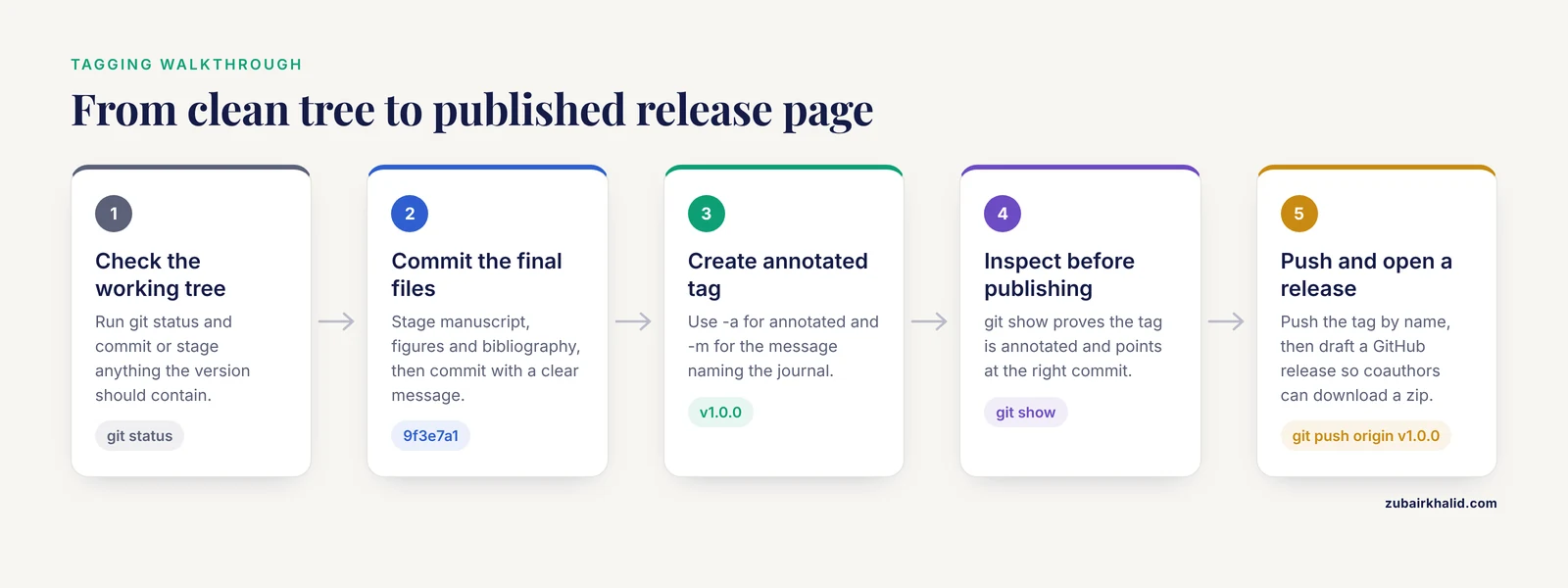
This walkthrough uses a small LaTeX manuscript repository called paper-fox-model with a remote named origin on GitHub. The commands are identical for a Markdown manuscript, a Quarto project, or a Word file. Substitute your own tag names and messages.
Step 1. Confirm a clean working tree
A tag freezes the committed state, not the messy state on your disk, so start by checking what Git sees.
git statusExpected output for a repository ready to tag:
On branch main
Your branch is up to date with 'origin/main'.

nothing to commit, working tree clean
If the output lists modified or untracked files instead, decide whether those changes belong in this version. Untracked files, which Git prints under Untracked files:, are invisible to commits and therefore invisible to tags. A missing figure source file is the classic version of this mistake. Stage and commit anything the version should contain before proceeding.
Step 2. Commit the exact files you want in the version
Stage and commit the final state:
git add manuscript.tex figures/ references.bib
git commit -m "Final text and figures for initial submission"
Expected output:
[main 9f3e7a1] Final text and figures for initial submission
 4 files changed, 132 insertions(+), 18 deletions(-)
Confirm the commit landed where you expect:
git log -1commit 9f3e7a1b2c4d5e6f708192a3b4c5d6e7f8091a2b (HEAD -> main)
Author: Zubair Khalid <[email protected]>
Date: Mon Aug 11 09:14:02 2025 -0500
Final text and figures for initial submissionThe long string after the word commit is the SHA. Write down the first seven or eight characters, 9f3e7a1 in this example, because Step 7 shows how to use a short SHA to tag an earlier commit if you forget this step.
Step 3. Create an annotated tag
Create the tag with the -a flag for annotated and the -m flag for the message:
git tag -a v1.0.0 -m "Initial submission to the Journal of Applied Modeling"If you omit -m, Git opens your configured text editor so you can write a longer tag message, which is useful when the message should include the journal name, the submission system confirmation number, or a note about which analysis pipeline produced the figures.
The tag now exists in your local repository. Nothing has been published yet.
Step 4. Inspect the tag before you publish it
Show the full tag object:
git show v1.0.0Expected output, abbreviated:
tag v1.0.0
Tagger: Zubair Khalid <[email protected]>
Date:   Mon Aug 11 09:22:47 2025 -0500

Initial submission to the Journal of Applied Modeling

commit 9f3e7a1b2c4d5e6f708192a3b4c5d6e7f8091a2b (HEAD -> main, tag: v1.0.0)
Author: Zubair Khalid <[email protected]>
Date:   Mon Aug 11 09:14:02 2025 -0500

    Final text and figures for initial submission
Two checks matter here. First, the Tagger and Date lines prove the tag is annotated, since a lightweight tag would show no tag header at all. Second, the line beginning with commit shows which commit the tag points to. Verify that the SHA matches the commit you meant to freeze, which is 9f3e7a1 in this example. If you tagged a moment too early and a later commit holds the real submission state, delete the tag with git tag -d v1.0.0 and retag at the correct commit before anyone else sees it.
List all tags with their first line of message:
git tag -n5v0.9.0 Draft for internal review, all figures in place
v1.0.0 Initial submission to the Journal of Applied ModelingFilter the list with a pattern when a repository accumulates many tags:
git tag -l "v1.*"v1.0.0Step 5. Push the tag to GitHub
Tags do not travel with ordinary pushes. This surprises nearly everyone running Git for the first time, and it is the single most common reason a tag never appears for coauthors. Push the tag explicitly by name:
git push origin v1.0.0Expected output:
Enumerating objects: 1, done.
Counting objects: 100% (1/1), done.
Writing objects: 100% (1/1), 163 bytes | 163.00 KiB/s, done.
Total 1 (delta 0), reused 0 (delta 0)
To github.com:zkhalid/paper-fox-model.git
 * [new tag]         v1.0.0 -> v1.0.0
Pushing commits and pushing tags are separate operations by design, because a tag is a statement that a particular commit is special. If you have several local tags and want to publish them all at once:
git push origin --tagsUse that form deliberately rather than habitually. Pushing every tag indiscriminately publishes private lightweight bookmarks alongside the version tags you intend to share.
Step 6. Turn the tag into a release page for coauthors
On GitHub, open the repository, go to the Releases area, and draft a new release pointing at the tag v1.0.0. Paste the submission details into the release notes. GitHub automatically attaches a downloadable archive of the repository at that exact snapshot, so a coauthor who has never used Git can download the tagged manuscript as a zip file with one click. This is the core value of GitHub for researchers who collaborate with colleagues who never touch a terminal.
Many laboratories connect their repositories to Zenodo, a repository service that assigns a persistent identifier to each tagged release, which makes a frozen manuscript version citable. The integration works off tags and releases, so a disciplined tagging scheme feeds directly into citable archives. Set the integration up once, then treat every meaningful version tag as a release candidate.
Step 7. Tag an earlier commit
Suppose you forgot to tag the submission commit and have since made three more commits while starting the revision. Tags can be placed on any commit, past or present. Find the submission commit with the log:
git log --oneline4d8c2f1 (HEAD -> main) Start response to reviewer comments
b71e905 Rearrange discussion section
0c4d8a2 Adjust figure 3 caption
9f3e7a1 Final text and figures for initial submissionTag the submission commit by appending its short SHA to the tag command:
git tag -a v1.0.0 -m "Initial submission to the Journal of Applied Modeling" 9f3e7a1Verify with git show v1.0.0 exactly as in Step 4. The commit line should name 9f3e7a1. Push as before. Tagging a past commit is safe and routine as long as the tag lands on the correct SHA, which is why Step 4's verification habit matters.
Step 8. Check out the tagged version for a reviewer
When a coauthor asks to see the submitted text, they can retrieve it with one command after cloning:
git checkout v1.0.0Git responds with a warning that alarms many newcomers:
Note: switching to 'v1.0.0'.

You are in 'detached HEAD' state. You can look around, make experimental
changes and commit them, and you can discard any commits you make in this
state without impacting any branches by switching back to a branch.
Detached HEAD means Git has moved your working directory to the tagged snapshot, but no branch is recording new commits. Looking at files, compiling the PDF, and copying figures are all safe. The only trap is committing changes while detached, because those commits belong to no branch and are easy to lose. If a reviewer wants to suggest edits, put them on a branch rooted at the tag:
git checkout -b review-v1.0.0 v1.0.0That command creates a branch named review-v1.0.0 pointing at the tag and checks it out, so every suggested edit is committed normally. When finished, return with git checkout main.
Step 9. Cut a prerelease tag during revisions
During a revision cycle you often want to circulate a candidate version without declaring it final. Create a release candidate tag:
git add manuscript.tex
git commit -m "Address reviewer 2 comments on [statistical methods](/blog/guides/statistical-methods)"
git tag -a v1.1.0-rc1 -m "Candidate for revision 1, pending final figure check"
git push origin v1.1.0-rc1
On GitHub, mark the corresponding release as a prerelease so it is visually distinguished from final versions. When the last checks pass and the final text is committed, tag v1.1.0 on that commit and push it. The sequence of rc tags then documents exactly which candidate states the coauthors saw and approved, which is a quiet but substantial benefit when a dispute arises later about who saw which text.
Step 10. Stamp the manuscript with the tag automatically
A version tag is most useful when the document itself states its own version. The git describe command prints the most recent annotated tag reachable from the current commit, and it appends the number of commits since that tag plus the current short SHA when you are past the tag:
git describev1.1.0-2-g7f3c9abThat string reads as version v1.1.0, two commits later, at commit g7f3c9ab. When you are exactly on a tagged commit, the output is simply v1.1.0. Generate a LaTeX macro from this value before each compile:
printf '\\newcommand{\\ManuscriptVersion}{%s}\n' "$(git describe)" > version.texIn the manuscript preamble and title block:
\input{version.tex}
...
Version \ManuscriptVersion. Compiled \today.
Every compiled PDF then carries the exact repository state it was built from. Add version.tex to your .gitignore file so the generated file is never committed, since the commit history already records the tag that produced it. The same trick works for Markdown-based systems that support variable substitution, and it pairs well with continuous integration so the stamp refreshes on every build.
Commands and Options Reference
The table collects the tag operations used in this guide plus the two you will eventually need in an emergency.
| Command | What it does |
|---|---|
git tag -a v1.0.0 -m "message" | Creates an annotated tag on the current commit |
git tag v1.0.0 | Creates a lightweight tag on the current commit |
git tag -a v1.0.0 -m "message" 9f3e7a1 | Creates an annotated tag on a past commit |
git tag -n5 | Lists tags with up to five lines of message |
git tag -l "v1.*" | Lists tags matching a pattern |
git show v1.0.0 | Shows the tag object and the commit it pins |
git push origin v1.0.0 | Publishes one tag to the remote |
git push origin, tags | Publishes every local tag, use deliberately |
git tag -d v1.0.0 | Deletes a tag locally |
git push origin :refs/tags/v1.0.0 | Deletes the tag on the remote |
git tag -f -a v1.0.0 -m "message" 9f3e7a1 | Moves a local tag to a different commit |
git checkout v1.0.0 | Checks out the tagged snapshot, detached HEAD |
git checkout -b review-v1.0.0 v1.0.0 | Creates a branch from the tag |
git archive -o manuscript-v1.0.0.zip v1.0.0 | Exports the tagged snapshot as a zip archive |
git describe | Prints the nearest tag relative to the current commit |
How to Check That the Tagged Version Is Right
Verification takes one minute and prevents the embarrassing discovery, months later, that a version tag misses a file or includes half-finished edits.
First, diff the tag against your current state when you tag mid-revision:
git diff v1.0.0 HEADThe output shows every line that differs between the tagged submission and your working state. During revision writing this diff is your change log, and it doubles as raw material for the response-to-reviewers letter.
Second, export the snapshot the way a reviewer will receive it:
git archive -o manuscript-v1.0.0.zip v1.0.0Unzip it into a temporary directory and compile the PDF from that copy. If the compile fails because a file was never committed, you have found the problem while it is still cheap to fix. This test catches untracked dependencies, missing style files, and figure sources that live outside the repository.
Third, when tags are cryptographically signed with GPG using git tag -s, anyone can verify authorship:
git tag -v v1.0.0A good signature line confirms the tag was created by the holder of the signing key and that its contents have not changed since. Signed tags are worthwhile for manuscripts with many contributors or for releases destined for a permanent archive, because they convert "Zubair says this is the submitted version" into a verifiable claim.
Finally, check the remote side, not just your local machine. After pushing, run git ls-remote, tags origin or visit the repository tags page on GitHub and confirm the tag is listed and points at the expected commit. A tag that exists only on your laptop has protected nobody.
Common Errors and Their Fixes
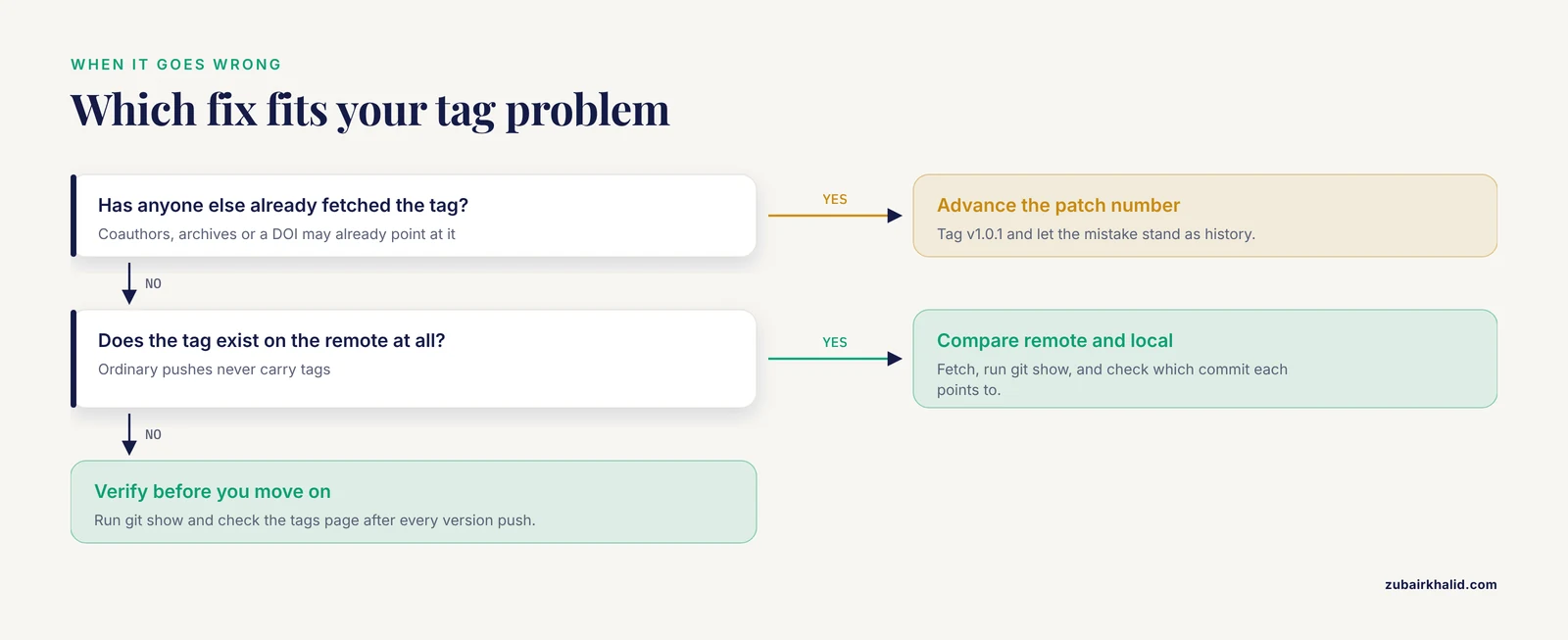
Tag name already exists. Creating a tag that already exists fails:
fatal: tag 'v1.0.0' already existsDecide whether the existing tag was correct. If it was a mistake, delete it locally with git tag -d v1.0.0 and recreate it, or move it with git tag -f. If other people may already have fetched the old tag, see the remote-rejection error below before moving anything.
Remote rejects the push because the tag already exists there. Pushing a tag whose name already exists on the remote, pointing at a different commit, produces:
 ! [rejected]        v1.0.0 -> v1.0.0 (already exists)
error: failed to push some refs to 'github.com:zkhalid/paper-fox-model.git'
Fetch the remote tag and compare:
git fetch origin
git show v1.0.0
If the remote tag is the wrong one and you are certain it should move, delete it on the remote and push your version:
git push origin :refs/tags/v1.0.0
git push origin v1.0.0
Never force-move a published version tag casually. Anyone who downloaded the old snapshot now holds content that the tag name no longer describes, which is the exact ambiguity versioning exists to prevent. The safer resolution in a collaborative repository is to advance to the next patch number, v1.0.1, and let the mistake stand as history.
The tag never appears on GitHub. You pushed commits with git push but forgot the tag. Ordinary pushes carry commits and branches, never tags. Run git push origin v1.0.0 and the tag appears. Checking the tags page on GitHub after every version push takes ten seconds and closes the loop.
Typo or missing tag in a command. Referencing a tag that does not exist produces:
fatal: Failed to resolve 'v1.0.0' as a valid ref.List your tags with git tag -l and correct the spelling. Watch for the missing v prefix if some tags carry it and others do not, which is one more argument for a single naming scheme.
A branch and a tag share a name. If you have both a branch and a tag named v1.0.0, Git prints:
warning: refname 'v1.0.0' is ambiguous.Commands may then resolve to the branch when you meant the tag. Disambiguate with the full reference form, refs/tags/v1.0.0 for the tag and refs/heads/v1.0.0 for the branch. The durable fix is to never name a branch after a version tag.
git describe finds nothing. On a repository with no annotated tags, or on a shallow clone that omitted tag history, describe fails:
fatal: No names found, cannot describe anything.Fetch the full history with git fetch, tags or clone without the shallow option. If the repository truly has no tags yet, create the first one rather than working around the error.
Common Mistakes and Limitations
Treating the tag as a backup. A tag points at commits that already exist in the repository. It protects nothing unless the repository itself is backed up and pushed to a remote. Push the commits, then push the tag, then confirm both on the remote.
Tagging before the final commit. Tags freeze what is committed, not what is on disk. The pattern that causes grief is tagging, then noticing a stray tracked file with leftover edits. Run git status immediately before every version tag, and confirm with git show v1.0.0 immediately after.
Reusing tag names. A moved tag invalidates every citation, download, and memory of the previous snapshot. In collaborative repositories, force-moving a published tag should require an explicit agreement, and GitHub supports protected tag rules that restrict who may create or edit tags matching a pattern. Configure protection on repositories shared across laboratories so that version tags cannot be silently rewritten.
Using lightweight tags for versions others will see. A lightweight tag records no creator, date, or message. Six months later nobody, including you, can establish who declared that snapshot a version. The cost of -a and -m is two seconds. Pay it.
Assuming tags make binary workflows reviewable. Git stores every version of a Word or Pages file faithfully, so tags work, but nobody can read a meaningful diff of binary formats. For manuscripts that go through heavy collaborative editing, keep the source in a text format such as LaTeX, Markdown, or Quarto, and treat the word processor file as an export. The tag then pins a state that humans can actually compare across versions.
Expecting a manuscript tag to reproduce the science. A tag on the manuscript repository freezes the text and the figures as files, but not necessarily the analysis code, the software environment, or the data that produced those figures. For results you may need to defend, tag the analysis repository and the data snapshot at the same point, or keep code, data provenance records, and manuscript in one repository so a single tag covers all of them. This is the central limitation of tagging in practice: the tag is only as reproducible as the repository state it points to.
Never deleting superseded local clutter. Lightweight bookmarks from months ago accumulate and bury the version tags that matter. Prune private bookmarks periodically with git tag -d, keeping the annotated version history clean.
Frequently Asked Questions
Should a manuscript version tag be annotated or lightweight?
Use annotated tags for every manuscript version another person will see. Annotated tags record the tagger, date, and message, which makes the version auditable later, while lightweight tags store none of that metadata.
Why does my tag not show up on GitHub after I push?
Ordinary git push sends commits and branches but never tags. Push the tag explicitly with git push origin v1.0.0, or publish all local tags with git push origin, tags.
Can I add a tag to a commit I made last week?
Yes. Find the commit's SHA with git log, oneline, then append it to the tag command, for example git tag -a v1.0.0 -m "Submitted version" 9f3e7a1. Verify with git show v1.0.0 before pushing.
What does the detached HEAD warning mean after I check out a tag?
Your working directory now shows the tagged snapshot while no branch is recording new commits. Browsing and compiling are safe, but commit any edits to a new branch created with git checkout -b branchname v1.0.0.
How do I fix a tag that points to the wrong commit?
Locally, delete it with git tag -d and retag the correct SHA, or move it with git tag -f. If the tag was already pushed and fetched by others, prefer advancing to the next patch number rather than rewriting a published version name.
What tag naming should I use for journal revisions?
Semantic versioning maps cleanly onto editorial events. Use v1.0.0 for the initial submission, patch the third number for typo-level fixes, bump the second number for each reviewer revision, and reserve a major bump for restructuring or resubmission to a different journal.
Do Git tags work for Word documents and other binary files?
Yes, tags pin any committed file exactly, including binaries. The limitation is comparison, since binary files cannot be diffed line by line, so keep the manuscript source in a text format where possible.
Can a Git tag become a citable DOI?
Yes, when the repository is connected to an archiving service such as Zenodo, each tagged release can receive its own persistent identifier. Publish the tag as a GitHub release, and the archive mints the identifier for that exact snapshot.