Using Git Tags for Bioinformatics Pipeline Releases
By Dr. Zubair Khalid, DVM, MS, PhD ·

By the end of this guide, you will be able to create an annotated git tag for a bioinformatics pipeline, sign it, publish it as a GitHub release, build a container image that carries the same version string, trigger a release job in continuous integration, and check out any past release to rerun an analysis exactly as it ran the first time.
You need Git 2.x installed, a pipeline repository hosted on GitHub or GitLab, and write access to that repository. GnuPG is optional and only needed for signed tags. The GitHub command line tool, gh, is optional and convenient for creating releases from a terminal. The worked examples use a small Nextflow pipeline, and every tagging command applies unchanged to Snakemake, CWL, WDL, or plain scripts.
A git tag is a named, permanent pointer to one specific commit. A branch moves forward as you add commits. A tag stays fixed on the commit it names. Most introductions to Git for scientists stop at commits and branches. Tags are the part that turns a repository into a citable record, because one short string such as v1.2.0 can name the exact code behind a figure, a table, or a clinical report.
Why Git Tags Matter for Bioinformatics Pipeline Releases
Bioinformatics pipelines are layers of your code on top of layers of external software. A workflow that behaves one way today can behave differently next month even if you change nothing, because an underlying tool was updated. The FairFlow project states the problem plainly: identical code can produce different results depending on which dependency versions are installed, and incomplete documentation of those versions undermines reproducibility [1].
The effect is measurable. In a community audit of twelve crosslinking mass spectrometry pipelines, verifiably false identifications exceeded the requested false discovery rate by up to 29-fold at the protein-protein interaction level for some pipelines, and the audit tracked how performance changed between software versions, which supports versioned benchmarks as regression tests [2].
Policy has converged on the same requirement. Consensus recommendations from thirteen clinical bioinformatics units in the Nordic Alliance for Clinical Genomics call for strict version control and reproducibility in clinical production, at standards similar to ISO 15189 [3].
Tags are the version control layer for your own code, and they complement rather than replace tool-level pinning. The MAYA pipeline, a Snakemake workflow for bacterial genome analysis, isolates every rule in its own Conda environment so that tool versions stay fixed across the workflow [4]. A release tag does the same job one level up. It freezes the workflow logic, the configuration defaults, and the documentation as a single unit.
In this guide, a release is a tagged snapshot of the repository plus release notes plus pinned dependencies. The tag is the anchor that names all three, and everything else in the article hangs off it.
How Git Tags Work
Git stores history as commits, and every commit has a unique hash such as 4f2c9e1. A ref is a named pointer to a commit. Branches live under refs/heads and move when you commit. Tags live under refs/tags and do not move. A remote is another copy of the repository, conventionally named origin, that you push to and pull from.
Git supports two kinds of tags.
A lightweight tag is a single file containing a commit hash. It has no author, no date, and no message. You create one with git tag v1.2.0.
An annotated tag is a full Git object. It stores the tagger name, the tagger email, the creation date, a message, and an optional cryptographic signature. You create one with git tag -a v1.2.0 -m "message". The -a flag requests an annotated tag and the -m flag supplies the message.
You can confirm the difference with git cat-file -t, which prints the type of the object a ref points to:
git cat-file -t v1.2.0Expected output:
tagA lightweight tag prints commit instead of tag.
For releases, always use annotated tags. They carry the metadata that release tooling and auditors expect, they can be signed, and git push, follow-tags transfers them while skipping lightweight tags.
Tags are cheap. A tag is a small file under .git/refs/tags, or a line in the packed-refs file, so creating hundreds costs nothing. Listing them is equally cheap, and git tag -l "v1.*" filters by pattern.
Tag names must be valid ref names. Git rejects names containing a space, a tilde, a caret, a colon, a question mark, an asterisk, an open square bracket, or a backslash. It also rejects names containing two consecutive dots, names ending in .lock, and the bare name @. The community convention for pipelines is a leading v followed by a semantic version, for example v1.2.0 or v2.0.0-rc.1.
One more term you will meet constantly is HEAD. HEAD is the pointer to the commit you have checked out right now. Checking out a tag moves HEAD to the tagged commit without attaching it to a branch, a state called detached HEAD. The section on consuming releases shows how to work there safely.
Choosing a Version Number for a Pipeline Release
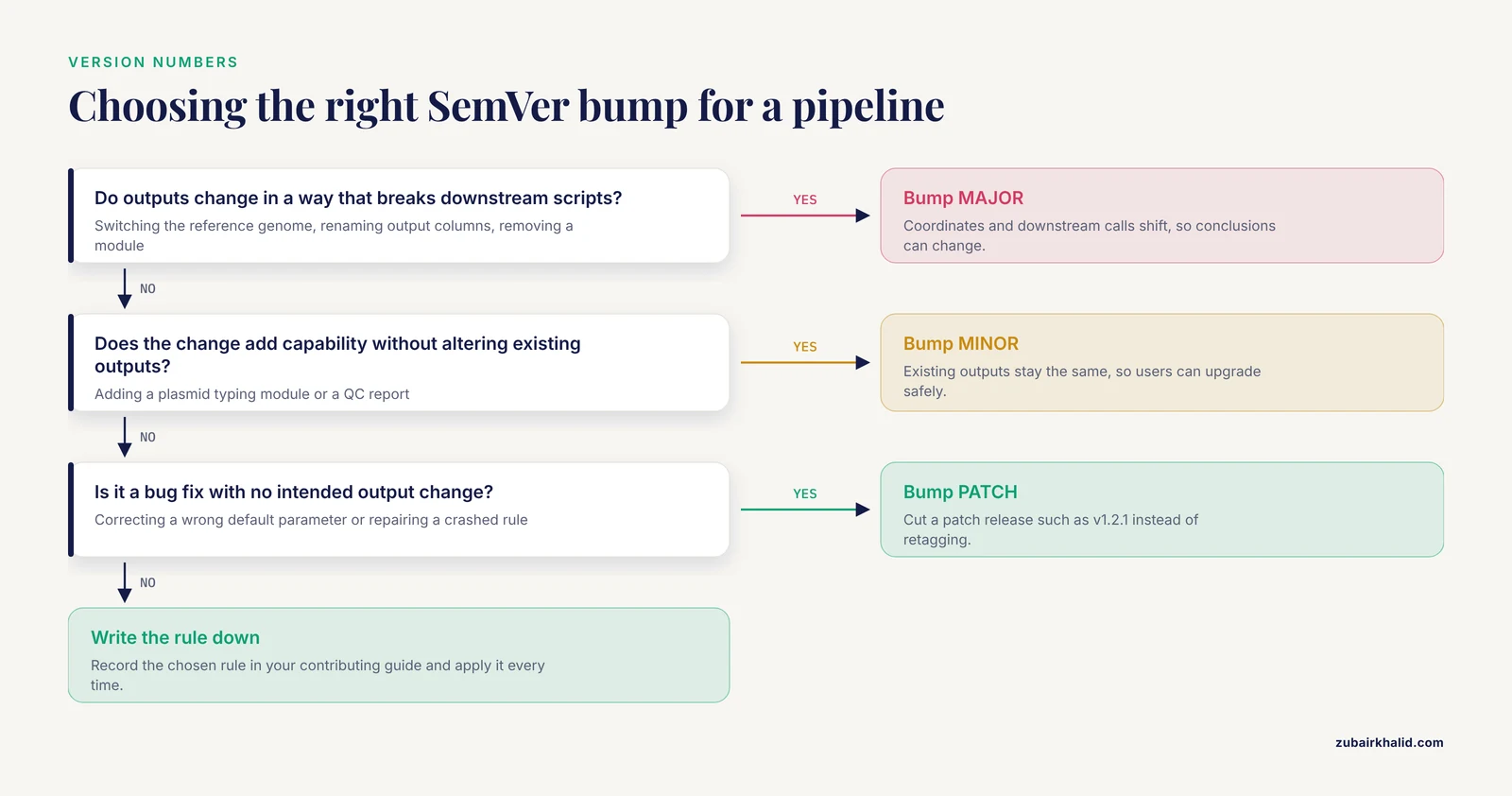
Most pipeline projects use Semantic Versioning, usually shortened to SemVer, which writes a version as MAJOR.MINOR.PATCH, for example 2.3.1. The number you bump tells anyone who depends on your outputs how much the release can change their results.
| Bump | Meaning for a pipeline | Example |
|---|---|---|
| , - | , - | , - |
| MAJOR | Outputs change in a way that can break downstream scripts or alter conclusions | Switching the reference genome, renaming output columns, removing a module |
| MINOR | New capability, existing outputs unchanged | Adding a plasmid typing module, adding a QC report |
| PATCH | Bug fix with no intended change to outputs | Correcting a wrong default parameter, repairing a crashed rule |
Reference changes are the clearest MAJOR case. When a clinical network standardizes on the hg38 genome build as the reference [3], a pipeline that switches its own reference makes a MAJOR change, because coordinates and downstream calls shift with it.
Two published pipelines show version numbers doing real communicative work. DiRT, a pipeline for detecting dicistronic tRNA-mRNA transcripts in plants, moved from v1 to v2 to expand detection to tRNA-like structures and to tRNA sequences embedded in untranslated regions [5]. MINI-EX, a tool for cell-type-specific gene regulatory network inference, shipped version 2 together with a guide covering the entire workflow from input preparation to output interpretation [6]. In both cases the bump announced a change in what the tool delivers, which is exactly the information users need.
One judgment call deserves a decision rather than a debate. A change that adds new detections also changes outputs, so an expansion like the DiRT update can reasonably be called MINOR (additive capability) or MAJOR (downstream counts change). Pick a rule, write it into your contributing guide, and apply it consistently. The number exists to predict the size of the change for your users.
Reserve pre-release suffixes for candidates that are not ready for production. Tag the first release candidate as v2.0.0-rc.1 and the next as v2.0.0-rc.2. SemVer defines a pre-release as lower precedence than the final version, so 2.0.0-rc.1 sorts as older than 2.0.0, which is what you want.
Step-by-Step: Tagging and Publishing a Pipeline Release
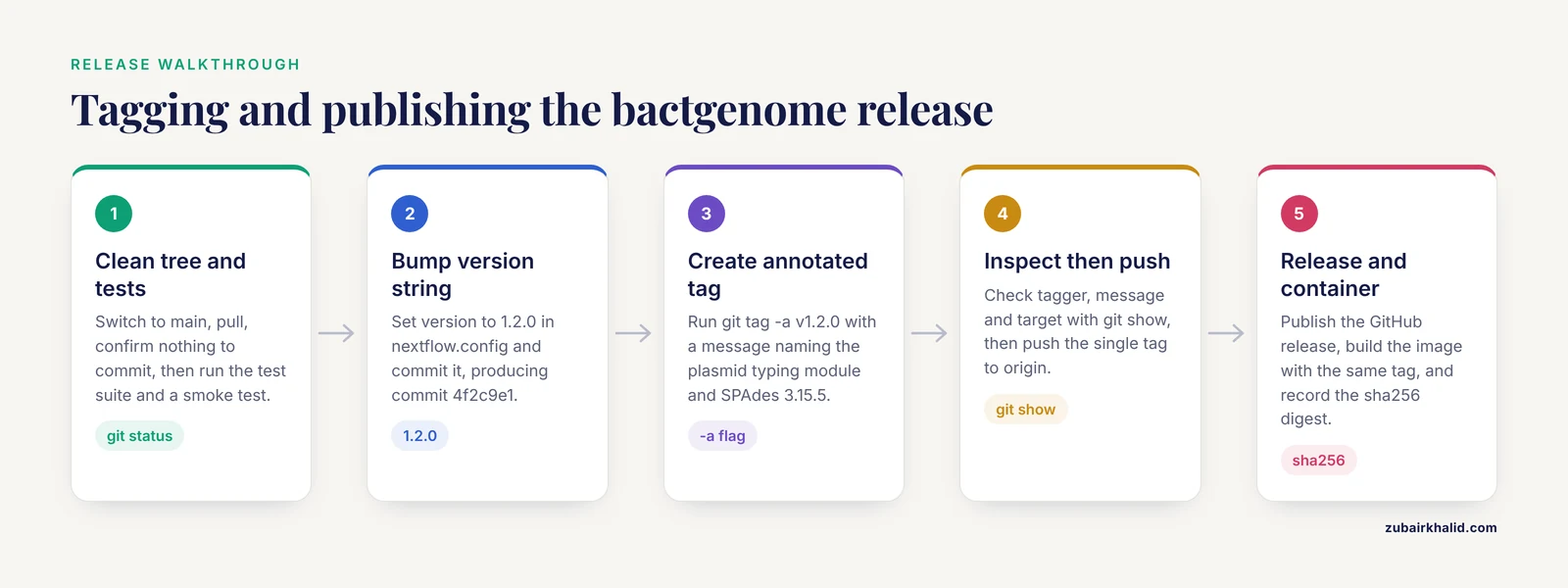
The walkthrough tags version 1.2.0 of a small bacterial genome pipeline called bactgenome. Substitute your own names and numbers throughout.
Step 1. Confirm a clean tree on the release commit
git switch main
git pull origin main
git status
Expected output:
On branch main
Your branch is up to date with 'origin/main'.

nothing to commit, working tree clean
A tag records what is committed at that instant. Uncommitted edits, untracked FASTA files, and stale configuration are not captured, so the tree must be clean before you tag.
Step 2. Run the tests and a smoke test
Run your test suite, then run the pipeline end to end on a small validation dataset. A tag is a promise about behavior, so verify the behavior before you make the promise.
Step 3. Bump the version string inside the code
Your pipeline should report its own version at startup, and that string must match the tag. In a Nextflow pipeline, edit the manifest block of nextflow.config:
manifest {
    name = 'yourlab/bactgenome'
    version = '1.2.0'
    description = 'Bacterial isolate assembly and annotation'
}
In a Snakemake pipeline, keep a VERSION file at the repository root and print it during startup. Pin the tools themselves in per-rule Conda environment files, for example:
name: assembly
channels:
  - conda-forge
  - bioconda
dependencies:
  - spades=3.15.5
  - fastp=0.23.4
Commit the bump:
git add nextflow.config
git commit -m "Bump version to 1.2.0"
Expected output:
[main 4f2c9e1] Bump version to 1.2.0
 1 file changed, 1 insertion(+), 1 deletion(-)
The commit hash 4f2c9e1 is what the tag will point to.
Step 4. Create the annotated tag
git tag -a v1.2.0 -m "Release v1.2.0: adds plasmid typing module, pins SPAdes to 3.15.5"Git prints nothing on success. Silence is success for tag creation. If the name is already taken, Git fails with fatal: tag 'v1.2.0' already exists. Delete the local tag with git tag -d v1.2.0 or choose a new number.
Step 5. Inspect the tag before you push
git show v1.2.0Expected output (the diff of the commit follows the message in the real output):
tag v1.2.0
Tagger: Zubair Khalid <[email protected]>
Date:   Wed Nov 11 10:02:31 2026 -0500

Release v1.2.0: adds plasmid typing module, pins SPAdes to 3.15.5

commit 4f2c9e1a7b6d8c0e2f1a3b5c7d9e1f2a3b4c5d6e
Author: Zubair Khalid <[email protected]>
Date:   Wed Nov 11 10:01:12 2026 -0500

    Bump version to 1.2.0
Check three things. The tagger and date are yours. The message describes the release. The commit is the version bump commit, not some older commit.
Step 6. Push the tag
git push origin v1.2.0Expected output:
Enumerating objects: 1, done.
Counting objects: 100% (1/1), done.
Writing objects: 100% (1/1), 187 bytes | 187.00 KiB/s, done.
Total 1 (delta 0), reused 0 (delta 0)
To github.com:yourlab/bactgenome.git
 * [new tag]         v1.2.0 -> v1.2.0
Pushing commits does not push tags. They travel separately. If you push commits and want their annotated tags to travel along, use git push, follow-tags.
Step 7. Verify the tag on the remote
git ls-remote --tags originExpected output:
From github.com:yourlab/bactgenome.git
9f8e7d6a5b4c3d2e1f0a9b8c7d6e5f4a3b2c1d0e        refs/tags/v1.0.0
1a2b3c4d5e6f7a8b9c0d1e2f3a4b5c6d7e8f9a0b        refs/tags/v1.0.0^{}
b7d9f1a3c5e7b9d1f3a5c7e9b1d3f5a7c9e1b3d5        refs/tags/v1.2.0
4f2c9e1a7b6d8c0e2f1a3b5c7d9e1f2a3b4c5d6e        refs/tags/v1.2.0^{}
An annotated tag appears twice. The plain line is the tag object itself. The line with the ^{} suffix is the commit the tag points to. If you see one line per tag and no ^{} line, the tag is lightweight.
Step 8. Publish the GitHub release
gh release create v1.2.0 --title "v1.2.0" --generate-notesExpected output:
https://github.com/yourlab/bactgenome/releases/tag/v1.2.0The -generate-notes flag drafts notes from merged pull requests and contributors. Edit the draft to describe biological consequences, not just merged code. If the repository is connected to Zenodo, publishing the release mints a citable DOI for this exact version.
Step 9. Build and push the container with the same tag
docker build -t ghcr.io/yourlab/bactgenome:v1.2.0 .
docker push ghcr.io/yourlab/bactgenome:v1.2.0
Then record the immutable digest, a content hash of the image written as sha256 followed by 64 hexadecimal characters, so users can pin the exact bytes:
docker inspect --format='{{index .RepoDigests 0}}' ghcr.io/yourlab/bactgenome:v1.2.0Expected output:
ghcr.io/yourlab/bactgenome@sha256:7d865e959b2466918c9863afca9b7a040a3ba2b6e3c9d5e6a7b8c9d0e1f2a3b4One string, v1.2.0, now names the code, the notes, and the software environment. That alignment is what turns a tag into a genuine release.
Step 10. Draft the changelog from the tag range
git log --oneline v1.1.0..v1.2.0Expected output:
4f2c9e1 Bump version to 1.2.0
9a8b7c6 Add plasmid typing module with per-rule conda env
3d2e1f0 Fix adapter trimming parameter in QC rule
Paste the range into the release notes, translate each line into user-facing language, and keep the result in a CHANGELOG.md file at the repository root.
Quick Reference: Essential Tag Commands
| Task | Command | Notes |
|---|---|---|
| , - | , - | , - |
| Create an annotated tag | git tag -a v1.2.0 -m "message" | Use for every release |
| List tags, newest first | git tag -l, sort=-v:refname | Version-aware sort |
| Show a tag and its commit | git show v1.2.0 | Check message and target before pushing |
| Push one tag | git push origin v1.2.0 | Triggers tag-based CI if configured |
| Push commits with their annotated tags | git push, follow-tags | Skips lightweight tags |
| Delete a local tag | git tag -d v1.2.0 | Remote copy survives |
| Delete a remote tag | git push origin :refs/tags/v1.2.0 | Treat as an emergency action |
| Check out a release | git checkout v1.2.0 | Leaves you in detached HEAD |
| Clone at a release | git clone -b v1.2.0 URL | Add -depth 1 for a shallow copy |
| Compare two releases | git diff v1.1.0 v1.2.0 | Review before upgrading |
| List commits between releases | git log, oneline v1.1.0..v1.2.0 | Raw material for release notes |
| Find tags containing a commit | git tag, contains 3d2e1f0 | Answers which release first shipped a fix |
| Describe the working copy | git describe, tags, dirty | Appends -dirty when files are modified |
Signing Release Tags with GPG
An unsigned tag carries a message that claims an author. A signed tag proves it. For pipelines used in clinical or multi-site settings, where traceability is an explicit expectation [3], signing is the cheapest provenance upgrade available.
GPG stands for GNU Privacy Guard, the open implementation of the OpenPGP encryption standard. Install it, generate a key with gpg, full-generate-key, and point Git at the key:
git config --global user.signingkey YOURKEYIDCreate the signed tag with -s, which implies an annotated tag:
git tag -s v1.2.0 -m "Release v1.2.0"Anyone holding your public key verifies the tag after fetching it:
git tag -v v1.2.0Expected output includes:
gpg: Signature made Wed 11 Nov 2026 10:03:02 AM EST
gpg:                using RSA key ABCD1234EF567890ABCD1234EF567890ABCD1234
gpg: Good signature from "Zubair Khalid <[email protected]>"
Recent Git versions can also sign tags with SSH keys, which many laboratories already manage, by setting gpg.format to ssh in the Git configuration. Whichever method you choose, publish the public key where users can find it, such as the repository README.
Tags in Nextflow, nf-core, and Snakemake Workflows
Workflow managers add release conventions on top of Git, and your tags should line up with them.
Nextflow reads a manifest block from nextflow.config, so the version users see in logs comes from the file you bumped in Step 3. Nextflow can also run a remote pipeline at a specific revision, and a tag is a valid revision:
nextflow run yourlab/bactgenome -r v1.2.0That single command fetches the tagged snapshot and runs it, which makes tags the natural interface between your repository and every analysis that depends on it.
Pipelines built on the nf-core framework, such as nf-core/scnanoseq for Oxford Nanopore single-cell RNA-seq, inherit a shared release convention from a framework designed for portability, scalability, and reproducibility across runs [7]. In practice, a tagged release pairs a manifest version bump with rebuilt containers and a changelog entry, so the tag, the software, and the documentation move together.
Snakemake projects reach the same goal through per-rule environment files. MAYA pins each tool in its own Conda environment to keep versions fixed across the workflow [4]. When you tag a Snakemake repository, the tag freezes the workflow logic and the environment files together, and that is what makes the tag meaningful.
Larger systems add a management layer above the workflow. clonevdjseq pairs a Nextflow workflow with a Django web interface for sequencing, archiving, and analysis of VDJ sequences from clonal libraries [8]. Even there, the Git tag remains the anchor that records which workflow version produced which archive.
Automating Releases with Continuous Integration
Continuous integration (CI) is the practice of running automated jobs in response to repository events. A tag push is one of those events, and it is the cleanest release trigger available. The following GitHub Actions workflow builds a container and pushes it whenever a tag matching v* lands:
name: release
on:
  push:
    tags:
      - "v*"
jobs:
  release:
    runs-on: ubuntu-latest
    permissions:
      packages: write
    steps:
      - uses: actions/checkout@v4
        with:
          fetch-depth: 0
      - name: Build and push container
        run: |
          docker build -t ghcr.io/${{ github.repository }}:${{ github.ref_name }} .
          docker push ghcr.io/${{ github.repository }}:${{ github.ref_name }}
Two details matter. The fetch-depth: 0 setting pulls full history so the job can see tags and compute changelogs. The github.ref_name context holds the tag name itself, so the image and the tag always share one string.
Add a consistency check so a mismatched version can never ship:
TAG=$(git describe --tags --abbrev=0)
DECLARED=$(cat VERSION)
if [ "$TAG" != "$DECLARED" ]
then
  echo "Tag $TAG does not match VERSION file value $DECLARED"
  exit 1
fi
Treat each release candidate as a regression test. Run a small benchmark dataset through the release candidate and compare key outputs against the previous release. The crosslinking mass spectrometry audit found version-to-version differences large enough that the community now treats such audits as regression tests [2]. A ten-minute benchmark run before tagging catches the changes nobody intended.
Checking Out and Running a Pinned Release
Collaborators consume releases through tags, so test the consuming path yourself at least once.
Clone directly at a tag:
git clone -b v1.2.0 https://github.com/yourlab/bactgenome.git
cd bactgenome
git status
Expected output:
HEAD detached at v1.2.0
nothing to commit, working tree clean
Detached HEAD means you are sitting on the tagged commit without being on any branch. Inspect and run whatever you like. To make changes, create a branch first with git switch -c my-changes, otherwise commits you make can become unreachable when you move away.
Confirm exactly where you stand:
git describe --tags --dirtyOutput v1.2.0 means you sit precisely on the release with no local modifications. Output v1.2.0-dirty means files changed after checkout. Output such as v1.2.0-3-g4f2c9e1 means you are three commits past the release, on commit 4f2c9e1.
Shallow or single-branch clones can miss tags. Fetch them explicitly:
git fetch --tagsFor signed releases, verify before you trust:
git tag -v v1.2.0On systems where Git history is unwelcome, export the tagged tree as a plain archive:
git archive v1.2.0 -o bactgenome-v1.2.0.tar.gzThe archive contains the files at the tag with no Git metadata, which suits cluster transfer policies that reject .git directories. When you run a pinned release, also confirm that the container your configuration points to was built from that same tag, because a code tag paired with a stale image silently undoes the pin.
Hotfixes and Patch Releases
When a bug surfaces in a released version, resist the urge to retag. Cut a patch release instead.
git switch -c hotfix-1.2.1 v1.2.0Fix the bug, commit, and tag:
git commit -am "Fix adapter trimming parameter in QC rule"
git tag -a v1.2.1 -m "Release v1.2.1: fixes adapter trimming parameter"
git push origin hotfix-1.2.1 v1.2.1
Bring the fix back into the main line:
git switch main
git merge hotfix-1.2.1
git push origin main
Users of v1.2.0 can move to v1.2.1 with a one-line diff and full knowledge of what changed.
The emergency path exists for the moment you tagged the wrong commit and nobody has consumed the tag yet. Delete both copies and recreate:
git tag -d v1.2.0
git push origin :refs/tags/v1.2.0
git tag -a v1.2.0 4f2c9e1 -m "Release v1.2.0"
git push origin v1.2.0
Understand the blast radius first. Anyone who already fetched the old tag keeps it until they run git fetch, tags, force. Any container built from the old tag still exists under the same name. Any CI run keyed to the old tag has already fired. Prefer a new patch tag whenever doubt exists.
Practical Tips for Research Groups
Protect the v* tag pattern in your repository settings so that only maintainers can create or delete release tags. GitHub and GitLab both support this, and it prevents an accidental v9.9.9 from reaching your users.
Connect the repository to Zenodo so that each release mints a citable DOI. The DOI then serves as a permanent citation for the exact code behind a paper.
Keep release notes human. Write what changed for the user, in biological terms where relevant, and link the comparison with git diff v1.1.0 v1.2.0 for reviewers who want detail.
Use git tag, contains 3d2e1f0 to answer the perennial question of which release first included a given fix.
For researchers using GitHub, the Releases page is the public landing point for a pipeline. Link it from the README, keep release titles plain, and announce new versions with the exact tag string so people can copy it.
Common Mistakes and Limitations
- Publishing with
git push origin, tagsout of habit. This pushes every local tag, including abandoned experiments and stale lightweight tags from years past. Push named tags, or use-follow-tagswith ordinary commit pushes.
- Using lightweight tags for releases. They carry no tagger, date, message, or signature, and
push, follow-tagssilently skips them. Reserve them for private bookmarks.
- Moving a tag after publication. Tags are the one immutable thing in Git. Moving one invalidates every container, DOI, and analysis that referenced it. Cut a new patch version instead.
- Tagging without bumping the in-code version. The tag says v1.2.0 while the pipeline logs say 1.1.0, and neither can be trusted. Automate the comparison in CI with the check shown earlier.
- Forgetting to push the tag. The release exists only on your laptop, CI never fires, and collaborators see nothing. Confirm with
git ls-remote, tags originbefore announcing anything.
- Treating a tag as a dependency pin. A tag freezes your workflow code. It does not freeze the tools inside it. Without per-rule Conda environments [4] or version-locked containers [1], a checkout of v1.2.0 can still run different tool versions on different days.
- Creating a branch and a tag with the same name. Git then prints
warning: refname 'v1.2.0' is ambiguous.when you check out, and you may not land where you intended. Prefix tags withvand never name a branch the same way.
- Using invalid tag names. Spaces, tildes, carets, colons, question marks, asterisks, open brackets, backslashes, consecutive dots, trailing
.lock, and the bare name@are all rejected by Git ref rules.
- Committing in detached HEAD by accident. Commits made while checked out at a tag belong to no branch and become hard to find. Run
git switch -c a-branchfirst if you intend to keep them.
Limitations to keep in view. A tag is necessary but not sufficient for reproducibility. It anchors code, while reference genomes, sequence databases, and raw data need their own versions and archives. A tagged release also does not certify correctness. Validate each release on your own data before production use, which is the same principle clinical recommendations apply to version control in production bioinformatics [3].
Frequently Asked Questions
What is the difference between a lightweight tag and an annotated tag?
An annotated tag is a full Git object that stores the tagger, date, message, and optional signature, while a lightweight tag is only a pointer to a commit. Use annotated tags for every pipeline release and leave lightweight tags for private bookmarks.
How do I push a single tag to GitHub?
Run git push origin v1.2.0 with your tag name in place of v1.2.0. Pushing commits does not push tags, because the two travel separately.
Can I move or rename a tag after publishing it?
Technically yes, by deleting and recreating it, but treat published tags as immutable. Moving a tag invalidates containers, DOIs, and analyses that referenced it, so cut a new patch version instead.
How do I run an older release of a pipeline?
Clone at the tag with git clone -b v1.2.0 REPO-URL, or check out the tag in an existing clone with git checkout v1.2.0. Nextflow users can run a remote pipeline at a tag with nextflow run pipeline -r v1.2.0.
What version number should my pipeline use?
Use Semantic Versioning, written as MAJOR.MINOR.PATCH. Bump MAJOR when outputs change incompatibly, MINOR for additive features, and PATCH for bug fixes, with release candidates suffixed as -rc.1.
Does a git tag pin the software versions inside my pipeline?
No. A tag pins your workflow code only. Pin tools with per-rule Conda environments or version-locked containers, and record container digests in the release notes.
How do I delete a tag?
Locally with git tag -d v1.2.0, and on the remote with git push origin :refs/tags/v1.2.0. Deleting a published tag is an emergency action, so prefer a new patch release.
How do I list tags in version order?
Run git tag -l, sort=-v:refname for newest first. Plain git tag -l sorts alphabetically, which places v1.10.0 before v1.2.0.
Sources
- FairFlow: A transparency-first framework for verifiable and reproducible bioinformatics.
- A community audit of error control in crosslinking mass spectrometry.
- Recommendations for bioinformatics in clinical practice.
- Deep Genomic Characterization of Bacillus subtilis SNUY1 & 168 Using MAYA (Multistage Analysis of Prokaryotic Annotations): An Integrated Snakemake-Based Bioinformatics Pipeline.
- DiRT v2.0: An Optimized Pipeline for Detecting Dicistronic tRNA-mRNA Transcripts in Plants.
- MINI-EX Version 2: Cell-Type-Specific Gene Regulatory Network Inference Using an Integrative Single-Cell Transcriptomics Approach.
- scnanoseq: an nf-core pipeline for Oxford Nanopore single-cell RNA-sequencing.
- clonevdjseq: A workflow and bioinformatics management system for sequencing, archiving, and analysis of VDJ sequences from clonal libraries.