How to Use Git Status to Understand Your Research Repository
By Dr. Zubair Khalid, DVM, MS, PhD ·

By the end of this guide you will be able to read every line of git status output, decode its short-format codes at a glance, audit the files Git is hiding from you, and add a clean-repository guard to your analysis pipelines. You will need Git 2.23 or newer installed (run git, version to check), a terminal, and about ten minutes. Older versions print slightly different hint lines, and I flag those spots as they come up.
This guide covers git status for scientists step by step, using the kind of repository a research project actually has: analysis scripts, configuration, small result tables, a .gitignore, and a data directory that stays out of Git. Every command and every output block below is real and reproducible in a scratch folder.
git status is the cheapest command in Git and the most underused. In one pass it answers four questions: which branch am I on, how far has my work drifted from the shared server, what will the next commit contain, and what exists on disk that Git does not track. For anyone practicing git for scientists conventions (small commits, clean trees, recorded provenance), status is the gauge you check between every step.
What git status tells you about a research repository
A research repository is not a backup folder. It is a structured record of code, configuration, documents, and small results, surrounded by data files that usually live somewhere else. Real projects make the mix concrete. The DrugUtilisation package, an open-source R package for drug utilisation studies on the OMOP Common Data Model, is maintained as versioned source code with comprehensive unit tests and standardized outputs so that the same analysis behaves consistently across databases [1]. A multimodal study of AI-generated ink paintings combined eye-tracking scan paths, EEG recordings, and semantic differential ratings from 120 participants split evenly between professional artists and non-artists [2]. A retinal proteomics study of paired postmortem tissue from 16 donors produced tables of 372 differentially abundant proteins [3]. A tracking method such as VL-METrack, which pairs a pre-trained localization network with optical-flow based correction, is delivered as code and configuration [4].
The pattern repeats across fields. Small text files (scripts, configuration, tables, manuscripts) belong under version control. Large binary files (imaging, raw sequences, model checkpoints) usually do not. git status is the command that shows, at any moment, which category every file on disk falls into.
In detail, status answers four questions.
- Which branch am I on, and how does it relate to the remote (the named copy of the repository on a server, conventionally called origin)?
- What is staged for the next commit?
- What has changed on disk since the last commit or staging step?
- What exists here that Git has never been told to track?
Three things status does not do are just as useful to know. It never contacts the network. It never shows commit history (that is git log). It never validates content, so a clean status means your files match your last commit, not that the analysis is correct.
The three snapshots git status compares
Every line of status output comes from comparing three snapshots of the project.
The working tree is the files on disk right now, including the edit you made five minutes ago. The index, also called the staging area, is the snapshot Git will turn into your next commit. Running git add copies the current content of a file into the index. HEAD is a pointer to the most recent commit on your current branch, in other words the last agreed state of the project.
git status performs two comparisons and reports both. Working tree versus index produces the "Changes not staged for commit" block. Index versus HEAD produces the "Changes to be committed" block. Anything on disk that appears in neither snapshot is untracked and lands in a third block. Files matching patterns in a .gitignore file are ignored, and Git keeps them out of the report unless you ask.
One consequence catches almost everyone at first: a single file can be in two states at once. Edit a file, run git add, then edit it again, and the index holds the older version while the working tree holds the newer one. Status lists that file under both blocks, and the short code MM compresses the situation into two characters.
Git status for scientists, step by step
Create a scratch repository so you can reproduce every output in this section. The commands are identical on macOS, Linux, and Windows terminals.
mkdir status-lab && cd status-lab
git init
git status
Expected output:
Initialized empty Git repository in /home/you/status-lab/.git/
On branch main

No commits yet

nothing to commit (create/copy files and use "git add" to track)
If your installation prints a hint about the default branch name, either name works fine. To make future repositories start with main, run git config, global init.defaultBranch main once.
Step 1: Confirm you are inside a repository
Status only works inside a repository (a directory containing a .git folder, where Git stores its history). From outside one you get the most common error in Git:
cd /tmp
git status
fatal: not a git repository (or any of the parent directories): .gitGit walks up the directory tree looking for .git. This message means it reached the top without finding one. Two causes cover most cases. You are in the wrong directory, which a quick cd fixes. Or the project lost its .git folder, which happens when a project is zipped without hidden files or moved by a tool that skips dotfolders. A project without .git has no history at all, so the fix is to re-clone from the remote rather than to run git init in place, which would start a fresh, empty history.
Step 2: Read the branch header
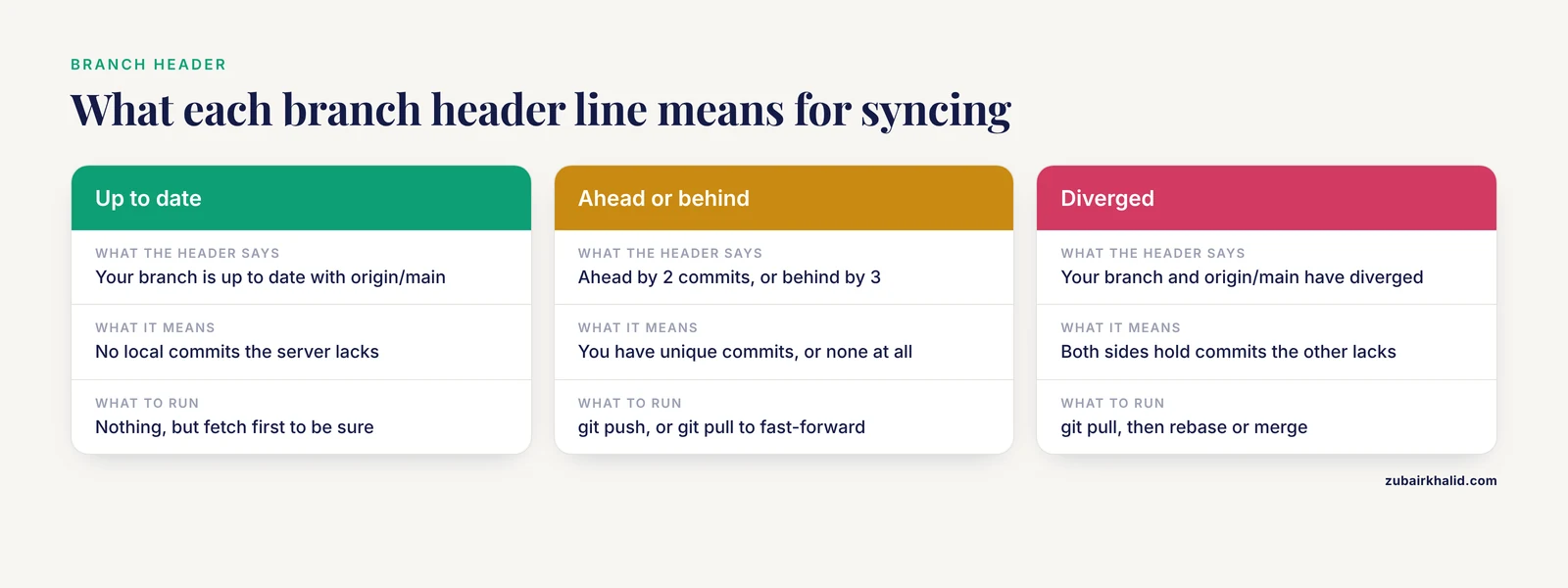
In a repository with commits and a configured remote, the first lines of status report branch state. The examples below assume a clean tree so the header is the whole story. You will meet one of these five variants:
$ git status
On branch main
Your branch is up to date with 'origin/main'.
$ git status
On branch main
Your branch is ahead of 'origin/main' by 2 commits.
(use "git push" to publish your local commits)$ git status
On branch main
Your branch is behind 'origin/main' by 3 commits, and can be fast-forwarded.
(use "git pull" to update your local branch)$ git status
On branch main
Your branch and 'origin/main' have diverged,
and have 1 and 2 different commits each, respectively.
(use "git pull" if you want to integrate the remote branch with yours)"Ahead" means you have local commits the server lacks, and the fix is git push. "Behind, and can be fast-forwarded" means you have no unique commits, so Git can slide your branch forward to match, and git pull does it. "Diverged" means both sides have unique commits, and you will need to integrate them, which git pull starts.
The caveat that matters in daily research life: every one of these lines is computed locally. Git compares your branch against the remote-tracking ref, your local record of the remote branch that was last updated by git fetch, git clone, or git pull. Status never contacts the server. If a collaborator pushed an hour ago and you have not fetched, status will tell you that you are up to date. The habit that prevents this: git fetch, then git status, before you decide anything about syncing.
A fifth header deserves instant recognition:
HEAD detached at a1b2c3dThis means HEAD points directly at a commit instead of at a branch, which typically happens after checking out a tag or an old commit to reproduce a result. Commits made in this state belong to no branch and can become hard to find once you switch away. If you plan to work from here, create a branch first with git switch -c my-branch.
Step 3: Stage a file and read the staged block
printf '# status-lab\n\nA scratch repository for learning git status.\n' > README.md
git add README.md
git status
On branch main
No commits yet
Changes to be committed:
(use "git restore --staged <file>..." to unstage)
new file: README.md"Changes to be committed" is the index-versus-HEAD comparison. The content of README.md is staged, meaning it is queued for the next commit, and nothing has been committed yet. Commit it:
git commit -m "Start README"[main (root-commit) 8f1a2b3] Start README
1 file changed, 2 insertions(+)
create mode 100644 README.mdNow status reports the state you want to see before starting any new work:
On branch main
nothing to commit, working tree clean
If you had changed your mind before committing, the hint line gives the command. git restore, staged README.md empties the index entry and leaves the file on disk untouched. On Git versions older than 2.23, the same hint reads git reset HEAD <file>, which does the same thing.
Step 4: Edit a tracked file and read the unstaged block
printf 'Last run: 2024-11-02\n' >> README.md
git status
On branch main
Changes not staged for commit:
(use "git add <file>..." to update what will be committed)
(use "git restore <file>..." to discard changes in working directory)
modified: README.md
no changes added to commit (use "git add" and/or "git commit -a")modified: README.md under "Changes not staged for commit" means the working tree and the index disagree. Look at the exact difference with git diff. Then either stage it with git add README.md or discard it with git restore README.md. The discard is destructive and unrecoverable for uncommitted work, so read the diff first. On older Git versions, the discard hint reads git checkout, <file>.
Step 5: Meet the untracked block
mkdir -p results
printf 'gene,log2fc,padj\nXist,2.1,0.003\n' > results/de_preview.csv
git status
On branch main
Changes not staged for commit:
(use "git add <file>..." to update what will be committed)
(use "git restore <file>..." to discard changes in working directory)
modified: README.md
Untracked files:
(use "git add <file>..." to include in what will be committed)
results/
no changes added to commit (use "git add" and/or "git commit -a")Untracked means Git sees the path but has never been told to track it. Untracked files are never included by a bare git commit, so they cannot sneak into history by accident. They also never reach a backup push, which is the real risk. Treat the untracked block as a to-do list. Every path in it needs a decision: track it, ignore it, or delete it.
By default Git collapses an untracked directory to its name, results/ here. To see every file individually, widen the view:
$ git status -s -uall
 M README.md
?? results/de_preview.csv
Step 6: The two-second check with -sb
In a cloned repository with a remote configured, git status -sb compresses everything into a few lines:
$ git status -sb
## main...origin/main [ahead 1, behind 2]
 M scripts/volcano_plot.R
MM results/de_table.csv
?? figures/volcano_draft.png
The line starting with ## is the branch header. It says your main branch has one commit the server lacks and two commits you lack, as of your last fetch. Each file line is two status columns, then a space, then the path. The next section decodes those columns. Make the check a reflex with an alias:
git config --global alias.st 'status -sb'
git st
Step 7: Audit what Git is hiding
Create a .gitignore (a list of filename patterns Git should leave alone) and some fake data:
printf 'data/raw/\n*.fastq.gz\n.Rhistory\n.RData\n.ipynb_checkpoints/\n__pycache__/\n' > .gitignore
mkdir -p data/raw/run01
head -c 1000 /dev/urandom > data/raw/run01/sample_R1.fastq.gz
git status -s
?? .gitignoreThe data directory has vanished from the report. Git is deliberately quiet about ignored files, which is exactly why you should audit the silence before your first push:
git status --ignored -s?? .gitignore
!! data/raw/Double exclamation marks mark ignored paths. To learn which rule hides a particular file, ask Git directly:
git check-ignore -v data/raw/run01/sample_R1.fastq.gz.gitignore:1:data/raw/ data/raw/run01/sample_R1.fastq.gzThe answer names the file, the line number, and the pattern that matched.
The audit doubles as your first data-protection control. Standardized clinical photographs of 30 patients, viewed by 50 observers, formed the stimulus set of one published eye-tracking study [5]. Participant-level records from a 12-week app-based walking trial that randomized 174 adults are another example of data with privacy constraints [6]. Files like these belong in controlled institutional storage, never in a Git history that gets pushed to a shared server. Running git status, ignored before the first push of any new repository costs five seconds.
Finish the step by committing the ignore rules:
git add .gitignore
git commit -m "Ignore raw data and editor byproducts"
Step 8: Machine-readable status for scripts
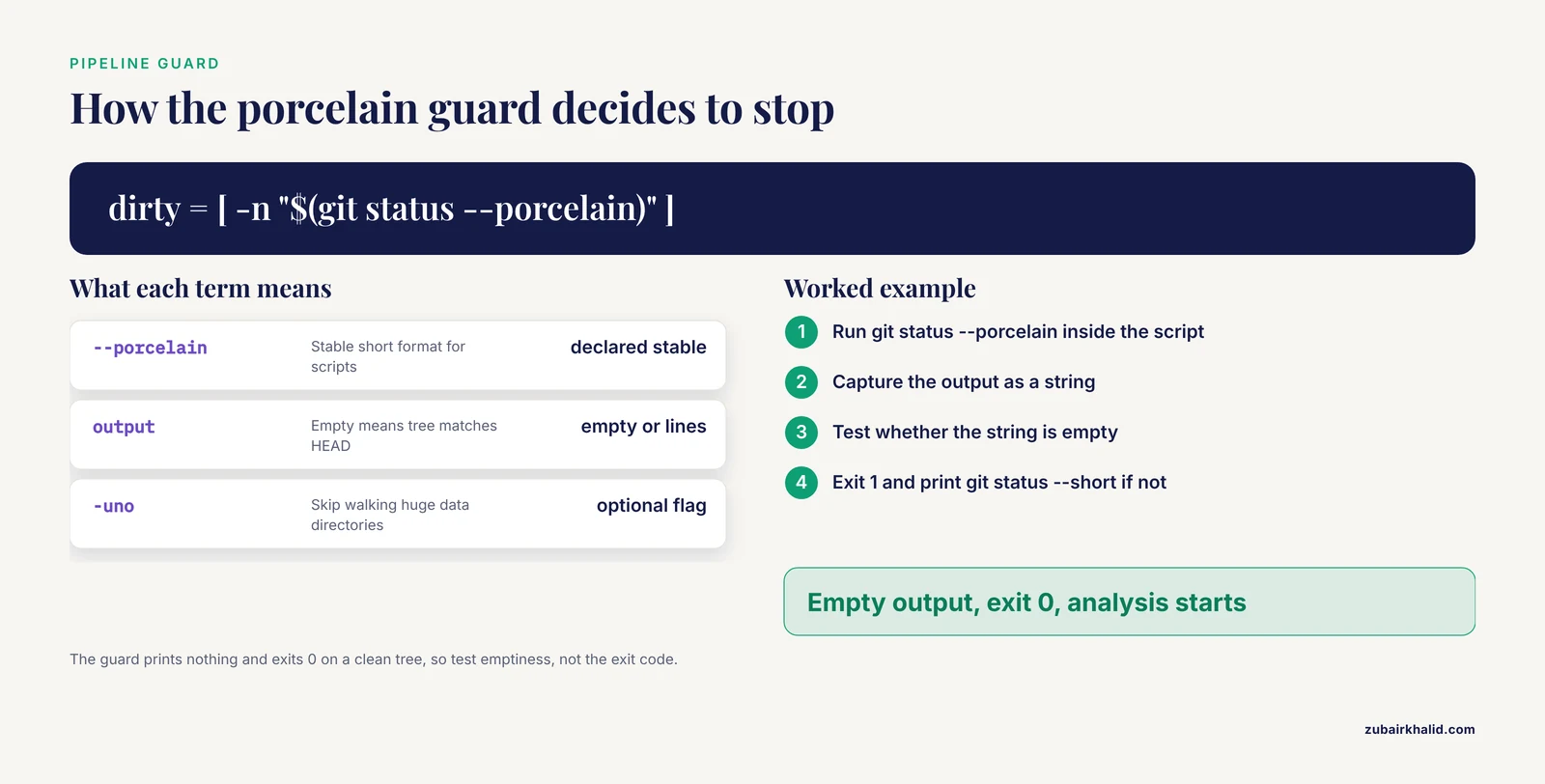
Human-readable status is for you. Scripts need a format guaranteed not to change between Git versions, which is what -porcelain provides. The lines match git status -s, but the format is declared stable:
$ git status --porcelain
 M README.md
?? results/
Empty output means the working tree and index exactly match HEAD. That fact powers the most useful guard in reproducible research, a script that refuses to run an analysis in a dirty repository:
#!/bin/bash
set -euo pipefail
if [ -n "$(git status --porcelain)" ]
then
  echo "Repository is dirty. Commit or stash before running." >&2
  git status --short
  exit 1
fi
echo "Working tree clean. Starting analysis."
Two details make the guard reliable. git status, porcelain prints nothing and exits 0 when the tree is clean, so the test is on string emptiness, not on the exit code. And if your data directories hold enormous numbers of files, add -uno so status does not walk them.
For tooling that wants more detail, git status, porcelain=v2, branch adds metadata lines that start with #:
# branch.oid a1b2c3d4... (full hash abbreviated here)
# branch.head main
# branch.upstream origin/main
# branch.ab +1 -0
The full grammar is documented in git help status. To list untracked files from a script, git ls-files, others, exclude-standard is the precise equivalent.
Step 9: Close the loop and verify
Review, stage, commit, and confirm:
git diff
git add README.md results/de_preview.csv
git diff --staged
git commit -m "Add run date and preview DE table"
git status
On branch main
nothing to commit, working tree cleanVerification, in order. git status prints a clean tree. git log, oneline -1 shows the commit you just made. git ls-files lists every tracked file, which should match your mental inventory. In a repository with a remote, git status -sb would now read ## main...origin/main [ahead 1], and git push turns it back into a plain tracking line. That round trip (dirty, staged, committed, pushed, clean) is the entire daily cycle, and status is the gauge at every stage.
Reading short-format status codes
In the short format, each file gets two columns. The first column (X) compares the index to HEAD, so it describes staged work. The second column (Y) compares the working tree to the index, so it describes unstaged work. A blank in a column means "nothing to report" for that comparison.
| Code | Meaning | Typical cause |
|---|---|---|
M | Modified, not staged | You edited a tracked file |
M | Modified and staged | git add after an edit |
MM | Staged edit, then edited again | Edit after git add |
A | New file staged | git add of an untracked file |
AM | New file staged, then edited | Edit after adding |
D | Deletion staged | git rm, or git add after rm |
D | Deletion not staged | Deleted the file without git rm |
R | Rename staged | git mv, or git add -A after a move |
?? | Untracked | New file Git has never tracked |
!! | Ignored | Matches .gitignore, shown with -ignored |
UU | Both modified, unmerged | Unresolved merge conflict |
A realistic reading:
$ git status -s
 M README.md
MM scripts/volcano_plot.R
A  config/samples.csv
AM results/de_table.csv
 D scripts/old_plot.R
?? figures/volcano_draft.png
Line by line: README.md has unstaged edits, volcano_plot.R was staged and then edited again (stage it again to include the newer edits), samples.csv is a staged new file, de_table.csv was staged and then modified, old_plot.R was deleted without staging the deletion, and the figure is untracked.
Moves deserve one note. Before you stage a move, status reports a deletion plus an untracked file. After git add -A (or git mv, which stages immediately), rename detection reports a single R line:
$ git mv scripts/plot.R scripts/volcano_plot.R
$ git status -s
R  scripts/plot.R -> scripts/volcano_plot.R
If a reported rename looks wrong, git status, no-renames shows the raw delete-plus-add pair underneath.
During a merge conflict, the long format tells you exactly where you stand:
On branch main
You have unmerged paths.
  (fix conflicts and run "git commit")
  (use "git merge --abort" to abort the merge)

Unmerged paths:
  (use "git add <file>..." to mark resolution)
	both modified:   config/samples.csv
Resolve the conflict markers in the file, git add it, and commit. git merge, abort returns you to the pre-merge state if you would rather start over.
Options worth memorizing
Three options cover most daily work: -sb for the reflex check, -uall when you are hunting a stray file, and -porcelain for scripts. The rest are audit and performance tools for the day your repository grows into a real project.
| Option | What it shows | When a scientist reaches for it |
|---|---|---|
| (none) | Long format with hint lines | Everyday reading |
-s | Short two-column codes, untracked directories collapsed | Quick scan before a commit |
-sb | Short codes plus the branch and ahead/behind line | Before every pull or push |
-porcelain | Short codes in a format stable across Git versions | Pipeline and CI guards |
-porcelain=v2, branch | Extended machine format with branch metadata | Tooling and audits |
-uall | Expands untracked directories into individual files | Finding one stray file |
-uno | Hides untracked files entirely | Huge data directories slow status down |
-ignored | Also lists ignored paths with !! | Auditing exclusions and sensitive files |
-no-renames | Reports a move as delete plus add | When rename detection misleads |
-no-ahead-behind | Skips ahead/behind computation | Very large repositories |
Practical git status tips for daily research work
Alias the reflex. git config, global alias.st 'status -sb' gives you git st. Typing cost is the main reason people skip the check.
Keep status fast on data-heavy checkouts. In a checkout with millions of untracked files, status spends its time walking the data directory. git status -uno skips that walk, and git config status.showUntrackedFiles no makes skipping the default for that repository. Git also offers an untracked cache and a file-system monitor (the core.untrackedCache and core.fsmonitor settings) that cut repeated status time in large checkouts.
Structure the repository so status stays readable. Map the layout onto the experimental design. A study that ran two experiments, manipulating object speed and distractor number across 70 participants in total, maps naturally onto two script-and-data pairs [7]. When each experiment owns a directory, status output reads like the design instead of like a shoebox.
Preview destructive cleanup. git clean -nd lists what Git would delete (the -n is a dry run). Only after reading that list should you consider git clean -fd, and never add -x without a second read, because -x includes ignored files.
$ git clean -nd
Would remove figures/volcano_draft.png
Watch for phantom modifications on shared filesystems. On network mounts, permission bits and line endings can flip, and status reports every file as modified even though git diff shows no content change. A diff that shows only old mode 100644 / new mode 100755 lines is a file-mode artifact, handled with git config core.fileMode false. A warning like warning: in the working copy of 'README.md', LF will be replaced by CRLF the next time Git touches it is a line-ending artifact, handled with git config core.autocrlf input on macOS and Linux (true on Windows) and, once, git add, renormalize ..
Run status from any subdirectory. Status always describes the whole repository, with paths shown relative to where you stand. From inside scripts/, untracked paths elsewhere appear with ../ prefixes. That makes status a valid check from inside a pipeline working directory.
Audit ignored files before the first push. Step 7 showed the commands. The five-second check catches credentials, patient files, and oversized intermediates before they become permanent history.
Use the porcelain guard in CI. The Step 8 script drops unchanged into continuous integration, so a pull request that leaves generated files behind fails loudly instead of silently.
From a clean tree to reproducible results
A clean status is the entry condition for provenance, not the finish line. Record the exact state that produced each result:
git rev-parse HEADThis prints the full commit hash. Write it into the results README, a log file, or a header comment so every table can be traced to an exact state of the code. Tag the states that matter, such as a submission:
git tag -a v1.0.0 -m "Results as submitted"
git push origin v1.0.0
Provenance problems scale with project size. A national evaluation of perinatal quality collaboratives found that inconsistent outcome measurement across states, driven by staggered certificate revisions and coding changes, confounds attempts to separate genuine improvement from data artifacts, and the authors recommend systematic tracking of initiatives alongside harmonized data [8]. The single-project version of that discipline is what you practiced above: know which state of the repository produced which number.
Package-based projects formalize the same idea. DrugUtilisation pairs its code with unit tests and standardized output formats so that results stay consistent across databases [1]. You do not need to build a package to borrow the pattern. Automated tests, a clean tree, and a recorded commit hash are the minimal version.
When the repository is ready to share, GitHub for researchers adds code review, issue tracking, tagged releases, and long-term archiving on top of plain Git. GitLab and institutional servers behave identically for status purposes, because everything in this article is plain Git. For binary assets that genuinely must live in version control, Git Large File Storage keeps pointers in history and content on a server, but treat it as a deliberate exception rather than a default.
Common Mistakes and Limitations
Reading "up to date" as proof of a backup. Status is computed locally. "nothing to commit, working tree clean" says nothing about whether your commits reached a server. Check the ahead count with git status -sb and push. A laptop with a clean tree and no remote has no backup at all.
Committing data files. GitHub rejects individual files larger than 100 MB, and even smaller binaries bloat history permanently, because every clone downloads every version of every file. Raw FASTQ, BAM, imaging data, and model checkpoints belong on lab storage with checksums, not in Git. If you stage one by accident, git restore, staged <path> fixes it. If you already committed it and have not pushed, git reset, soft HEAD~1 removes the commit while keeping the files on disk. Never rewrite history that collaborators have already pulled without agreeing on it first.
Staging with git add . and hoping. The blanket add sweeps in .RData, .ipynb_checkpoints, editor scratch files, and that 4 GB intermediate from last Tuesday. Read status before every commit, keep .gitignore current, and use git add -p (which offers each hunk, a contiguous block of changed lines, for a yes or no decision) when a file mixes finished and unfinished edits.
Letting the untracked block grow. Three hundred untracked files means nobody can meaningfully review a commit, including you. Decide per path: track, ignore, or delete.
Confusing staged with committed. "Changes to be committed" is a queue, not a record. Only a commit lands in history. Commit small and often, and treat the staged block as a short-term holding area. If you must switch context mid-experiment, git stash sets uncommitted work aside and git stash list brings it back.
Working in detached HEAD without noticing. The header HEAD detached at a1b2c3d is easy to scroll past. Commits made there are on no branch. Create a branch with git switch -c before working from a checked-out tag or commit.
Trusting phantom diffs on shared filesystems. File-mode and line-ending artifacts make a clean repository look fully modified and waste hours of confusion. Fix the configuration, renormalize once, and status becomes trustworthy again.
Expecting status to validate science. Status reports file state. It cannot tell you that the environment was pinned, that the code passed tests, or that the numbers are right. Pin environments with a conda environment.yml, renv, or a container, and record the commit hash with the results.
Assuming one policy fits all data. What may be committed, and where, is set by institutional policy and, for human-subjects research, by your IRB and data use agreements. Status and .gitignore are the enforcement tools, not the policy.
Frequently Asked Questions
Does git status contact the remote server?
No. It compares local files, the index, and locally stored remote-tracking refs, so "up to date" means up to date as of your last fetch, clone, or pull. Run git fetch first when you need the current remote state.
What is the difference between staged and unstaged changes?
Staged changes sit in the index and will form your next commit, while unstaged changes exist only in your working files. The "Changes to be committed" block shows staged work, and "Changes not staged for commit" shows edits Git will not include until you run git add again.
Should I commit raw data files like FASTQ or BAM files that status lists as untracked?
Usually no. Raw sequencing files belong on lab storage or specialized data systems, and committing them permanently bloats repository history. List them in .gitignore and keep code, small tables, and documents under version control.
Why does git status not show a file I told Git to ignore?
Because ignored files are hidden by default. Run git status, ignored -s to list them with the !! code, or git check-ignore -v <path> to see exactly which pattern hides a file.
What does the MM code mean in git status, short?
MM means you staged a modification and then edited the same file again, so part of your work is staged and part is not. Run git add on the file to stage the newer edits, or commit the staged part first.
Is it safe to run git status on a shared cluster login node?
Yes. It is read-only, makes no network connections, and never modifies files. It can be slow in checkouts with huge untracked directories, which -uno or the status.showUntrackedFiles setting addresses.
Why does git status say my branch has diverged?
Your branch and the remote-tracking branch each contain commits the other lacks, usually because a collaborator pushed while you committed locally. Fetch, then rebase or merge, and the header returns to a normal tracking line.
How do I make a pipeline refuse to run in a dirty repository?
Use git status, porcelain in a shell guard, because empty output means a clean working tree. The script in Step 8 exits with an error whenever the output is not empty.
Sources
- DrugUtilisation: An R Package to Support Drug Utilisation Research Using the OMOP Common Data Model.
- Dual-pathway processing of AI-generated Chinese ink painting: evidence from eye-tracking, EEG, and artistic expertise.
- Retinal proteome changes mirror brain pathology and reveal synaptic and cytoskeletal dysfunction in Alzheimer's disease.
- A unified decision-driven framework: Long-term tracking via visual-language models with motion estimation.
- Redistribution of Gaze Patterns in Facial Localized Scleroderma Following Autologous Fat Transfer: An Eye-Tracking Study.
- Personalized Mobile App-Based Messaging and Step Tracking for Improving Walking Behavior in Adults: Randomized Controlled Trial.
- Object speed and distractor number affect performance but not attentional allocation in multiple object tracking.
- Scaling evidence: national causal evaluation of perinatal quality collaboratives needs better data.