How to Revert Changes in Git Without Losing Your Scientific Work
By Dr. Zubair Khalid, DVM, MS, PhD ·

Most "git ate my data" emergencies in a research lab are not data loss at all. The most common situation is this: you have uncommitted changes sitting in your working directory, you run a destructive command such as git reset, hard or git restore, and Git discards work that was never saved into a commit. The second most common situation is that you reverted or reset a branch and now you cannot find the commit that held yesterday's analysis, even though that commit still exists inside the repository database.
The first thing to check, before running anything else, is git status followed by git stash list and git reflog. These three commands tell you whether you have uncommitted files, whether work was stashed away, and what your branch pointed to at every recent step. In the overwhelming majority of cases, the missing work is visible in one of those three outputs, and the fix is a single recover command rather than a rescue operation.
This guide walks through the causes of lost work in git for scientists, ordered from most common to rarest, with the mechanism behind each failure, a diagnostic sequence you can follow in order, and the prevention practices that make github for researchers safe instead of stressful.
The First Thing to Check When Git Seems to Have Eaten Your Data
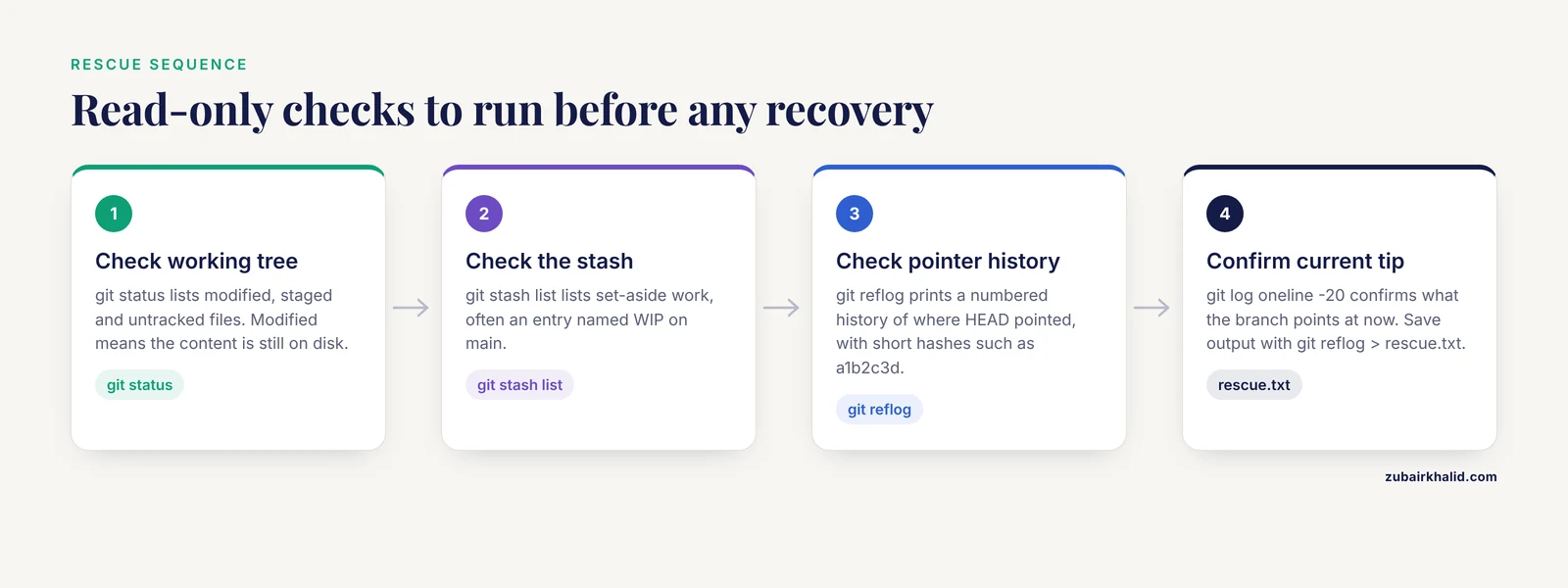
Run these commands in your repository, in this order, and save the output to a file before you do anything else.
git status. This shows modified files, staged files, and untracked files. If your analysis script shows up as modified rather than deleted, the content is still on disk and you have no emergency at all.git stash list. Anything you (or a GUI client) stashed is listed here. A surprising number of "lost" files are sitting in a stash entry namedWIP on main: <commit>.git reflog. This prints a numbered history of everywhere your current branch HEAD has pointed, including commits you reset away, rebased away, or amended over. Each line has a short hash such asa1b2c3d.git log, oneline -20. Confirms what your branch currently points at.
Capture this output with git reflog > rescue.txt and keep the file outside the repository. Every recovery step later in this article depends on a hash that appears in one of these lists. Do not run git gc, git prune, or any command containing the word clean until you have finished rescuing, because those commands are the only ones in normal use that permanently delete objects.
One habit matters more than any single command: commit early and commit often. A commit is a permanent, named snapshot. Uncertain whether a change is good? Commit it on a throwaway branch first. Deleting a bad commit later is easy and safe. Recovering an uncommitted change is not.
What Git Actually Stores (and Why Your Work Is Usually Still There)
Understanding the storage model explains every recovery technique below and removes most of the fear from reverting.
A Git repository is a content-addressable object database stored under .git/objects. Every time you commit, Git writes a snapshot of your tracked files as immutable objects (blobs for file contents, trees for directory structure, commits for the snapshot plus metadata). A branch is just a 41-byte text file containing the hash of one commit. When you "revert" or "reset", you are almost always moving that pointer, not deleting objects. The old commit objects stay on disk until garbage collection removes unreachable ones, which by default happens only after reflog entries expire (90 days for reachable commits, 30 days for unreachable ones) and after a grace period that git gc honors for loose objects.
This design has three practical consequences:
git revertnever rewrites history. It creates a new commit whose changes are the inverse of the target commit. Your original commit remains in the log. For shared research branches, revert is almost always the correct undo.git resetmoves a branch pointer. Evengit reset, hard, the most feared command in the tool, leaves the pre-reset commit in the reflog where you can retrieve it.- The only work that vanishes immediately is uncommitted work in the working directory or the index. That is why every prevention section below comes back to one rule: if it matters, commit it.
Troubleshooting Table: Symptoms, Causes, Confirmation, Fixes
| Symptom | Likely cause | How to confirm | Fix |
|---|---|---|---|
| "My analysis script reverted to an old version" | Change was never committed, then discarded by git restore, git checkout, <file>, or git reset, hard | git status, git stash list, git diff show nothing; the file on disk looks old | Recover from editor local history (VS Code Timeline, JetBrains Local History), notebook autosave, or OS file history. Git alone cannot restore never-committed bytes |
| "Yesterday's commits disappeared from git log" | git reset, hard <old> or a rebase moved the branch pointer | git reflog shows the pre-reset position near the top | git reset, hard <hash-from-reflog> or git branch rescue <hash> |
| "I reverted a commit and now the results are gone from the code" | That is what git revert does by design, it applies the inverse patch | git log, oneline shows a "Revert ..." commit | Revert the revert: git revert <revert-commit-hash> |
| "Revert failed halfway with conflict markers" | The reverted code was modified after the original commit | git status lists unmerged paths | Resolve conflicts, git add the files, then git revert, continue. Abort safely with git revert, abort |
| "I deleted a branch with results" | git branch -D removes the pointer, not the commits | git reflog contains commits from the deleted branch | git branch recovered <hash> |
| "Push rejected, then a force push overwrote shared history" | Someone ran git push, force on a shared branch | Compare hashes with a collaborator's clone or your own reflog from the machine that last pushed | Fetch the old tip hash from any clone that has it, then git branch restore <hash> on the server side or push it back under a new branch |
| "git stash pop lost my stash entry" | Pop deleted the entry after apply, and the working tree conflicted | git stash list is empty but the changes are half-applied | Recover with git fsck, unreachable and look for dangling commit blobs, or re-apply from git stash apply if the entry still exists (pop keeps the entry on conflict) |
| "Repo is huge and reverting is slow" | Large data files were committed at some point in history | git rev-list, objects, all piped through git cat-file, batch-check='%(objecttype) %(objectname) %(objectsize) %(rest)' sorted by size | Move data out of Git (see the scientific workflow section), rewrite history only after consulting collaborators |
| "Untracked intermediate files vanished" | git clean -fd or git clean -fdx deleted them | git clean prints nothing afterward because the files are gone | Check tool-specific scratch directories, cluster work directories, or OS-level backups. Git never tracked them, so Git cannot restore them |
Cause 1 (Most Common): Discarding Uncommitted Changes
The mechanism
git restore <file> (or its older spelling git checkout, <file>) tells Git to overwrite the working copy of a file with the version from the index or from HEAD. Because the discarded edits were never committed, they were never written into the object database as reachable objects. Git has nothing to offer you afterward. This is the single largest cause of genuinely unrecoverable work in "git revert changes scientific data" incidents, and it is entirely preventable.
How to fix it
Git itself cannot help, but three other layers usually can:
- Editor local history. VS Code keeps a Timeline of unsaved and saved file states per file (right-click a file, open Timeline). JetBrains IDEs (PyCharm, RStudio users on IntelliJ platform, CLion) keep Local History accessible from the right-click menu on a file or folder. Both survive Git operations because they are independent of Git.
- Notebook autosave. Jupyter Lab checkpoints and Colab revision history capture recent states of
.ipynbfiles. Check the checkpoint menu before giving up. - Operating system file history. macOS Time Machine, Windows File History, and most institutional network-drive snapshot systems keep hourly or daily versions of your home directory.
The correct habit that prevents this cause: git stash instead of git restore when you want to set work aside, and git commit instead of "I will commit once the analysis looks right." A stash entry is an object in the database. A discarded edit is not.
Destructive command warning: never run git restore, git checkout, <path>, or git reset, hard while output from git status shows changes you have not committed or stashed. Read git status first, every time. It exists precisely to tell you what a destructive command is about to remove.
Cause 2: git reset, hard Before a Commit
The mechanism
git reset, hard <target> does three things at once. It moves the current branch pointer to the target commit, resets the index to match, and force-overwrites files in the working directory to match. Any edits that were sitting uncommitted in your working directory are overwritten in place. Any commits your branch had that the target does not have become unreachable from the branch, but they remain in the reflog and in the object database.
How to fix committed work lost to a reset
Suppose you had three commits with yesterday's model fitting, then ran git reset, hard HEAD~3 believing it would only "unstage" things.
- Run
git reflog. You will see an entry likeHEAD@{1}: commit: fit random forest, tune mtryfollowed by the line for the reset. - Identify the hash of the last good commit, the one just before the reset line.
- Recover with either
git reset, hard <hash>(moves the branch back) orgit branch rescue <hash>(creates a branch at the old tip without touching your current state). The branch form is safer because it cannot overwrite anything.
If the reflog output looks confusing, git log, oneline, reflog shows all reflog-reachable commits in log form so you can find the work by its commit message.
Can uncommitted work survive a reset, hard?
Sometimes, partially. Files that were staged with git add before the reset exist as blob objects in the database even though no commit references them. Recover them with:
git fsck --unreachable
git show <unreachable-blob-hash>
git fsck, unreachable lists objects not reachable from any ref or reflog entry, including blobs created when you staged files. The output is noisy (each recovered blob is the content of one file version, without its filename), but for a 200-line R or Python script, you will recognize it instantly. A practical trick is to unstage nothing and instead run git stash push, include-untracked the moment you realize a reset was wrong, which wraps what remains into a stash entry you can inspect calmly with git stash show -p.
Cause 3: Undoing a Commit the Wrong Way on a Shared Branch
The mechanism
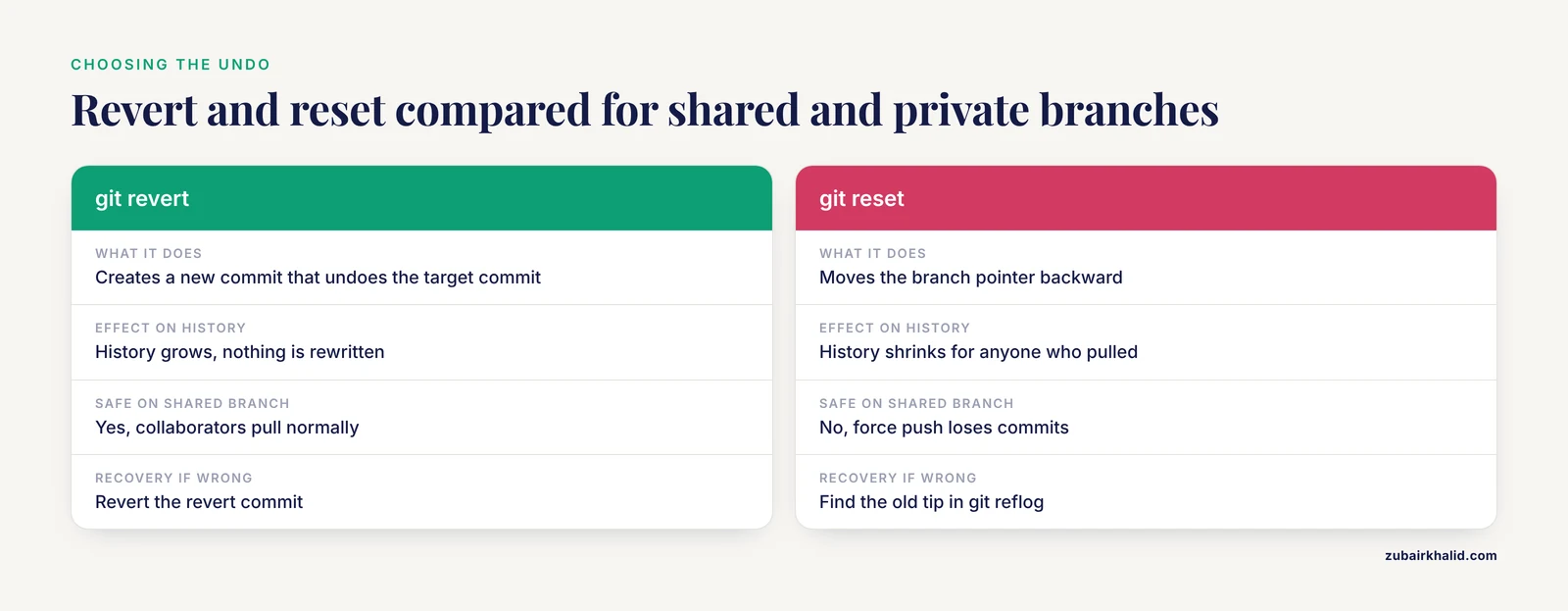
There are two fundamentally different undo operations, and choosing the wrong one is the root of many conflicts on shared research repositories.
git revert <commit>creates a new commit that undoes the target commit's changes. History grows. Nothing is rewritten. Safe on any branch that anyone else has pulled.git reset(soft, mixed, or hard) moves the branch pointer backward. History shrinks. Anyone who already pulled the old history will collide with you on the next pull, and "fixing" the collision withgit push, forceis how collaborators lose commits.
For a branch only you use, either approach works and reset is often cleaner. For a shared branch, including the main branch of a repository that backs a manuscript or a pipeline release, revert is the safe default.
How to fix it
To undo the most recent commit while keeping your edits in the working directory (safe, local):
git reset --soft HEAD~1    # keep changes staged
git reset HEAD~1           # keep changes in working directory, unstaged (default mixed)
To undo a commit publicly, on a branch others may have pulled:
git revert <commit-hash>If the commit you want to undo is a merge commit, revert needs the parent number, because a merge has more than one parent:
git revert -m 1 <merge-commit-hash>This keeps the changes introduced by the first parent (normally the branch you merged into), which is almost always what you want when you need to roll back a merge that broke a pipeline.
Cause 4: A Failed or Messy Revert
The mechanism
git revert computes the inverse patch of the target commit and applies it. If the lines being reverted were modified by later commits, the inverse patch does not apply cleanly and Git stops mid-operation, writing conflict markers (<<<<<<<, =======, >>>>>>>) into the affected files and leaving REVERT_HEAD in your repository. Scientists who have never resolved a merge conflict often panic here and run a second, different undo command on top of the first, which is how a contained conflict becomes a tangled one.
How to fix it
- Check where you are:
git statuslists unmerged paths and tells you a revert is in progress. - Decide whether to finish or abort.
- To abort and return your repository exactly to its pre-revert state:
git revert, abort. This is safe and complete. Nothing is lost. - To finish: open each conflicted file, edit the regions between the markers so the file contains what you actually want, then
git add <file>for each, thengit revert, continue. Git creates the revert commit with your resolved content. - If the revert itself turned out to be a mistake after it completed, undo it with a second revert:
git revert <revert-commit-hash>. This is a normal, clean operation because reverts are ordinary commits.
A useful diagnostic for a confusing revert is git log, oneline, graph, all, which shows branch topology and makes it obvious which "Revert" commits exist and what they target.
Cause 5: Deleted Branches, Amend, and Rebase
The mechanism
git branch -D <name>, git commit, amend, and git rebase all work by moving or discarding branch pointers and reflog entries for those branches. The commit objects themselves persist in the object database until reflog expiry and garbage collection remove them. Recovery is therefore a lookup problem, not a forensic one, as long as you act within the retention window.
How to fix a deleted branch
git reflogand scan for the commit message or the hash near the point the branch was deleted. Alternatively,git log, oneline, graph, allplusgit fsck, lost-foundwill surface dangling commits.- Recreate the branch at the recovered tip:
git branch recovered-results <hash>
git log --oneline recovered-results -5    # verify it holds the work
git checkout recovered-results
How to fix an accidental amend
If git commit, amend replaced a commit you needed, the original survives in the reflog as HEAD@{1} (or ORIG_HEAD, which Git writes before amend and reset operations). Recover with git branch pre-amend ORIG_HEAD or git reset, hard HEAD@{1}.
How to fix a bad rebase
After a rebase, the reflog keeps a record of the pre-rebase tip. git reset, hard HEAD@{n} where the entry reads rebase (start): ... restores the branch to its pre-rebase state. If you lost track of the number, git log, oneline, reflog lets you match the commit messages to the entries.
Destructive command warning: git gc and git prune permanently delete unreachable objects, subject to the default grace periods. Do not run them during a rescue. If a repository sits untouched for months, expired reflog entries mean some of these techniques stop working, which is why the diagnostic sequence below says to rescue first and clean later.
Cause 6: Stash Mishaps
The mechanism
The stash is a stack of commit objects. git stash push creates a commit (or more precisely a small set of commits) that is not on any branch but is referenced by refs/stash. git stash pop applies the entry and drops it on success. Two classic accidents follow. First, git stash pop hits a conflict, the apply half-succeeds, and the researcher, seeing the mess, runs git reset, hard believing that clears "the failed stash". The stash entry is actually still there in this situation, because pop only drops the entry when apply succeeds, so the reset destroys the working tree copy while the stash still holds the content. Second, git stash drop or git stash clear removes entries, and clearing the stack is unrecoverable through the stash itself.
How to fix it
- Run
git stash listbefore anything else. If the entry is still listed,git stash show -p stash@{0}inspects it andgit stash apply stash@{0}re-applies it. - If the entry was dropped, recover the underlying commit from the reflog. Stash commits appear there.
git stash apply <stash-commit-hash>restores the content from a reflog hash directly. - If the reflog has already expired or
git stash clearran,git fsck, unreachablemay still find the dangling stash commit. Its hash can be applied with the same command. This is the deepest recovery layer Git offers for stashes.
Cause 7 (Rarest): Garbage Collection After Long Delays
The mechanism
Git garbage collection removes unreachable objects, but only after safety windows pass. By default, reflog entries expire after 90 days for commits reachable from a ref and 30 days for unreachable ones, and git gc gives loose unreachable objects a two-week grace period configured by gc.pruneExpire. If you noticed the loss months later on a repository that has been actively committed to and collected since, the objects may genuinely be gone.
How to fix it
At that point, Git-level recovery has failed and you fall back on the layers a scientist should already have: the copy on the machine where the work was done (a laptop that has not synced in months, a lab workstation), a collaborator's clone that was last pulled before the loss, a fork on GitHub or another host, or institutional backups. Search your own GitHub event history and any CI logs, because a push that succeeded before the loss leaves the objects on the remote even after local GC, and cloning that repository at an old commit can restore them.
A Short Diagnostic Sequence
Work through this list in order on any "my work is gone" incident. Each step is cheap and read-only.
git status. Untracked and modified files are still on disk.git stash list. Set-aside work is still in the object database.git reflog(andgit log, oneline, reflogif you need commit messages). Almost every pointer move is recorded here.git fsck, unreachableandgit fsck, lost-found. Dangling blobs from staged-but-never-committed files and dangling commits show up here.- Editor local history, notebook checkpoints, and OS file history for anything Git never saw.
- Other clones: collaborators, a second machine, the origin host.
- Only after all of the above: accept the loss, and immediately adopt the prevention practices below so the next incident never reaches step 5.
Solutions for Scientific Workflows: Data, Notebooks, and Collaborators
Git was built for source code, and a research repository mixes code with things Git handles poorly, so the durable "git revert changes scientific data solutions" are workflow rules, not rescue commands.
Keep raw data out of Git. Raw sequencing runs, imaging stacks, and multi-gigabyte tables bloat history permanently, because every version of every file ever committed stays in the object database, which is why reverting and cloning slow down. Commit the code, the parameters, the metadata, and the small summary tables that results depend on. Track large data with a system built for it (Git LFS for large binary assets under normal Git workflow, or a data versioning tool such as DVC for dataset-and-pipeline versioning), or reference data by checksum in the repository and keep the data on versioned institutional storage. A checksum in a commit is itself a strong scientific record: it proves exactly which bytes the analysis consumed.
Commit the state that produced each result. The DrugUtilisation R package, developed within the DARWIN EU initiative for drug utilisation studies on the OMOP Common Data Model, illustrates the standard that research software should meet: comprehensive unit tests and a standardized output format that ensured consistent results across databases in the United Kingdom, Estonia, and the Netherlands [1]. That level of consistency is only auditable when every result can be traced to a specific commit of code and parameters. Tag the commits used for a manuscript submission (git tag manuscript-v1 <hash>) so reviewers' questions can be answered by checking out that exact state years later.
Treat notebooks as code, with outputs managed deliberately. Committing .ipynb files with embedded outputs preserves figures in history but creates noisy diffs. Pick a lab-wide policy (strip outputs on commit with a pre-commit hook, or commit with outputs and rely on the tag for the paper-facing version) and write it in the repository README so the policy survives student turnover.
Use GitHub as a researcher, not as a lone backup. Push to a remote daily. Enable branch protection on main so force pushes and deletions are rejected. Work through pull requests even solo, because a PR is a review point where a destructive revert gets a second pair of eyes before it lands. These settings cost minutes and eliminate the shared-history disaster class entirely.
Prevention Practices
- Commit at every working milestone. Before lunch, before running a long job, before going home. Small commits make reverts surgical and recovery trivial.
- Branch before experimenting.
git switch -c try-new-normalizationcosts nothing and keepsmainclean. - Read
git statusbefore every state-changing command. Most losses come from destructive commands issued while uncommitted work existed. - Prefer
git reverton shared branches,git resetonly on private ones. - Use
-dry-runequivalents.git clean -nlists what would be deleted without deleting.git revert, abortandgit rebase, abortback out of in-progress operations completely. - Tag releases and analysis freezes. Tags are cheap, permanent labels that outlive branches.
- Configure a real backup layer (institutional file versioning, automated snapshots of the machine, and a pushed remote) because Git covers versioned, committed content only.
- Write the lab policy down, one page, in the repository: branch naming, commit expectations, what belongs in Git versus data storage, and the rule that force pushes to shared branches require a second person.
Common Mistakes and Limitations
- Treating
git revertandgit resetas synonyms. Revert adds an undo commit and is safe for shared history. Reset moves the branch pointer and requires force-push coordination if the branch was shared. - Running recovery commands after
git gcout of habit. Garbage collection during a rescue can prune the very objects you need. - Assuming Git tracks file moves and directory renames it was never told about. Untracked files are invisible to Git and to every Git recovery tool.
git clean -fdxis the single most destructive command in normal lab use because it deletes untracked files, including ignored build products and local data copies. - Expecting reflog to work across clones. The reflog is local to each repository. Pushing before a disaster is what gives you a second copy elsewhere.
- Confusing the working directory with the repository.
git resetandgit checkoutchange what Git considers current. They never touch untracked files, but they also cannot bring back edits that were never added or committed. - Reverting data files by hand. If a data file was committed, revert it with Git (or check out the old blob) rather than replacing it from memory, so the history stays coherent.
- Individual cases vary. If your situation involves live patient data, regulated records, or a repository that supports a submission under deadline, escalate to your institution's research computing or data management staff rather than improvising history rewrites, and audit what was pushed where before rewriting anything.
Frequently Asked Questions
Will git revert delete my data files?
No. git revert creates a new commit that undoes the changes of a specific earlier commit, and the earlier commit remains in the history. To restore the data file's old version, check it out from the original commit or revert the revert later.
What is the difference between git revert and git reset?
Revert appends an inverse commit and never rewrites history, which makes it safe for branches other people have pulled. Reset moves the branch pointer backward, which rewrites history for anyone who already fetched the old commits.
I ran git reset, hard and lost uncommitted analysis code. Can I get it back?
Changes that were never staged are gone from Git's perspective, so recover them from editor local history, notebook checkpoints, or OS file versioning. Changes that were staged with git add before the reset exist as unreachable blobs and can be recovered with git fsck, unreachable.
How do I undo a git revert?
Revert the revert commit with git revert <revert-commit-hash>. Because a revert is an ordinary commit, this restores the original changes as a new commit without rewriting anything.
Can I recover a deleted branch?
Yes, in almost all cases. Find the branch tip in git reflog and recreate the branch with git branch recovered <hash>. Commits stay recoverable until reflog expiry and garbage collection remove them.
How do I undo a commit without changing history on a shared branch?
Use git revert <commit-hash>. It records the undo publicly, so collaborators pull normally and nobody's local history diverges from the server.
Should I commit raw sequencing data to GitHub?
No. Commit the code, parameters, metadata, checksums, and small result tables, and keep raw data on versioned institutional storage or a data versioning tool. Large files permanently bloat repository history once committed.
How do I stop Git from tracking a file I already committed?
Add the file's path to .gitignore for the future, then run git rm, cached <file> and commit. This untracks the file while leaving it on disk. Past versions remain in history unless history is rewritten, which should only be done with collaborator coordination.
Further Reading
- Dual-pathway processing of AI-generated Chinese ink painting: evidence from eye-tracking, EEG, and artistic expertise.
- A unified decision-driven framework: Long-term tracking via visual-language models with motion estimation.
- Redistribution of Gaze Patterns in Facial Localized Scleroderma Following Autologous Fat Transfer: An Eye-Tracking Study.
- Scaling evidence: national causal evaluation of perinatal quality collaboratives needs better data.
- Object speed and distractor number affect performance but not attentional allocation in multiple object tracking.