Git Log for Researchers: Step-by-Step Guide
By Dr. Zubair Khalid, DVM, MS, PhD ·

By the end of this guide you will be able to:
- Open any git repository and read its commit history with confidence
- Condense thousands of commits onto one screen and filter them by author, date, message, or code change
- Find the exact commit that introduced or removed a piece of code, even across renames and branches
- Export a clean commit table for a manuscript, supplementary file, or data audit
- Cite the precise code version behind a published result
You need three things on hand: a computer with git 2.x installed, a terminal (Terminal on macOS, Git Bash or PowerShell on Windows, any shell on Linux), and a repository that has commits in it. If you do not have a project handy, the setup section below shows how to clone a real research codebase in under a minute.
Git is a distributed version control system, a tool that records snapshots of a folder so that every change is attributable and reversible. Version control has become standard practice for scientists because reproducibility now extends past the data to the code that processed it. The git log command is the read-only window into that record. It changes nothing in your files, which makes it the safest git command to learn first.
Why git log matters for researchers
A commit is a snapshot of tracked files, stored together with the author name and email, a timestamp, a message, and a unique 40-character identifier called the commit hash. The hash is a SHA-1 checksum of the commit contents, which means any change to the snapshot produces a different hash. The chain of commits forms the provenance record of a project. When a reviewer asks which code produced a figure, or a collaborator asks why an analysis threshold changed, git log answers from the record instead of from memory.
Real research software shows how much weight this record carries. DEGAn, a Java application that automates Kaplan-Meier and log-rank survival analysis across large differentially expressed gene sets, distributes its source through a public Git repository so that other labs can inspect, reuse, and extend it [1]. The DrugUtilisation R package, built for drug utilisation studies on the OMOP Common Data Model, pairs standardized output formats with comprehensive unit tests, which kept results consistent across databases in the United Kingdom, Estonia, and the Netherlands and minimized coding errors [2]. Disciplined histories, tests, and standardized outputs are what make results comparable across teams and across years. git log is how you read that discipline back out of a repository.
A folder of backups is not the same thing. Copies named final, final2, and final_revised record nothing about who changed what, when, or why. A git history records all of it, and git log is the command that queries it.
Before you start
Check the installation and set your identity, because every commit you make later will carry it:
git --version
git config --global user.name "Jane Doe"
git config --global user.email "[email protected]"
The first command should print something like git version 2.47.1. Any recent 2.x release supports every command in this guide.
For practice material, use your own project if it has commits. Otherwise clone DEGAn, a real research codebase published in a public Git repository [1]:
git clone https://gitlab.com/giuseppeagapito/degan.git
cd degan
git log --oneline -n 5
The worked examples below use a small demonstration repository called rnaseq-pipeline, with seven commits on the main branch and one commit on a feature branch, so every output is predictable. Full option documentation lives in the official Git manual at git-scm.com/docs/git-log.
Git log step by step: the core workflow
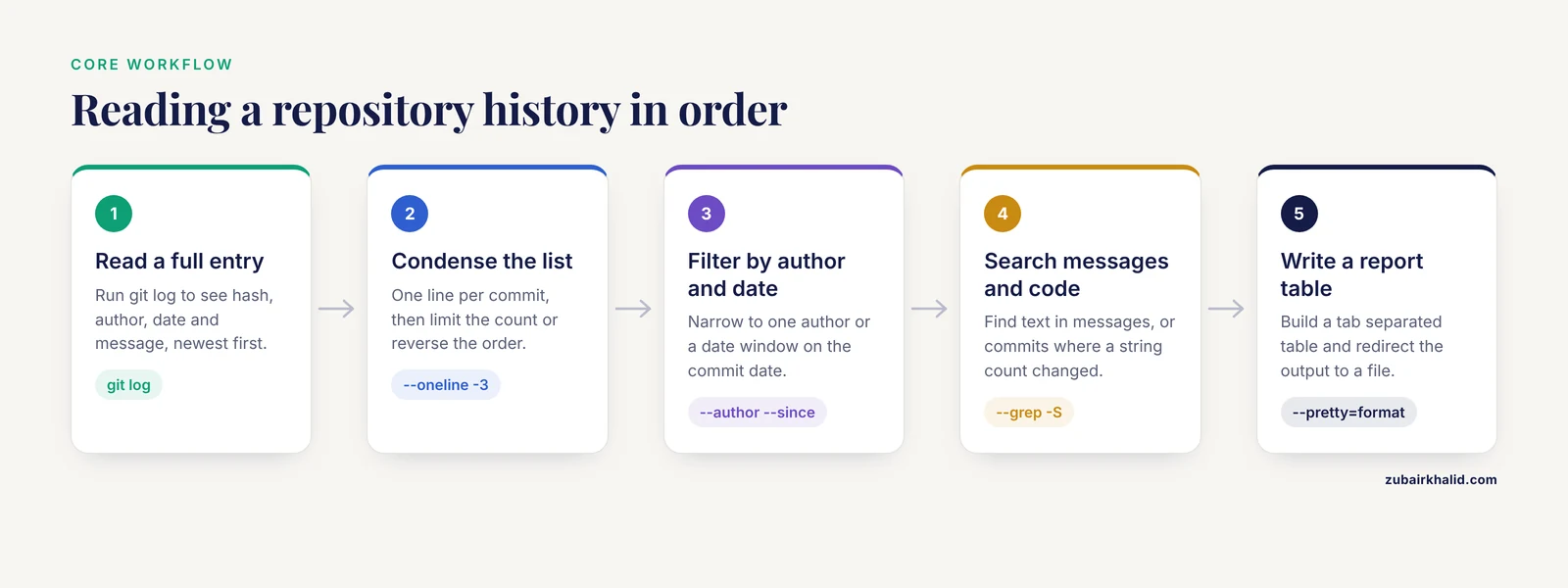
Step 1. Open the repository and read a full entry
cd rnaseq-pipeline
git log
Expected output, truncated after three entries:
commit 8e9f0a1b2c3d4e5f6a7b8c9d0e1f2a3b4c5d6e7
Author: Jane Doe <[email protected]>
Date:   Mon Nov 9 10:12:45 2026 -0500

    Update README with run instructions

commit 3f2a9c1b8e4d7a6f5c0b1d2e3f4a5b6c7d8e9f0a
Author: Jane Doe <[email protected]>
Date:   Tue Nov 3 14:22:31 2026 -0500

    Add batch correction step to RNA-seq pipeline

commit 9c8b7a6d5e4f3a2b1c0d9e8f7a6b5c4d3e2f1a0b
Author: Jane Doe <[email protected]>
Date:   Tue Oct 20 16:41:07 2026 -0400

    Fix duplicate sample IDs in metadata table
Four older entries follow in the real output. Each entry has four parts:
- The commit line with the full 40-character hash, the permanent identifier you can cite
- The author name and email, taken from the git configuration
- The date, with the UTC offset
- The message, indented four spaces
Entries appear newest first. When output fills more than one screen, git pipes it to a pager, a program that scrolls text one screen at a time. The default pager is less. Inside the pager, press the spacebar to page forward, press b to go back, type / followed by text to search, press n for the next match, and press q to quit. To print without a pager, which is useful in scripts, run git, no-pager log -n 3. You can also configure a quieter pager with git config, global core.pager "less -FRX".
Step 2. Get a compact overview
git log --onelineExpected output:
8e9f0a1 Update README with run instructions
3f2a9c1 Add batch correction step to RNA-seq pipeline
9c8b7a6 Fix duplicate sample IDs in metadata table
b7c8d9e Normalize counts with DESeq2 size factors
d4e5f6a Add read counting script
1a2b3c4 Add sample metadata table
5e6f7a8 Initial commit of RNA-seq pipeline
-oneline condenses each commit to the abbreviated hash plus the subject, which is the first line of the message. Abbreviated hashes are 7 characters by default and grow longer automatically in very large repositories. Limit the list with a number:
git log --oneline -3To recover the full hash behind an abbreviation at any time:
git rev-parse 9c8b7a6which prints 9c8b7a6d5e4f3a2b1c0d9e8f7a6b5c4d3e2f1a0b. To read the story of the project from its beginning, add -reverse:
git log --oneline --reverseStep 3. Filter by author and date
Find one person's commits by matching the name or email. The pattern is a regular expression, so partial matches work:
git log --oneline --author="[email protected]"Expected output:
8e9f0a1 Update README with run instructions
3f2a9c1 Add batch correction step to RNA-seq pipeline
9c8b7a6 Fix duplicate sample IDs in metadata table
d4e5f6a Add read counting script
5e6f7a8 Initial commit of RNA-seq pipeline
Restrict the log to a date window:
git log --oneline --since="2026-10-01" --until="2026-11-01"Expected output:
9c8b7a6 Fix duplicate sample IDs in metadata table
b7c8d9e Normalize counts with DESeq2 size factors
d4e5f6a Add read counting script
-since and -until accept calendar dates, ISO 8601 timestamps, and relative phrases such as "2 weeks ago". The filters run on the commit date, the moment the snapshot entered the history. The author date, when the change was originally written, can differ after an amend or a rebase. Two synonyms exist: -after equals -since, and -before equals -until. A related filter, -committer="pattern", selects commits by who committed them, which can differ from the author when patches are applied by someone else.
Step 4. Search messages and code changes
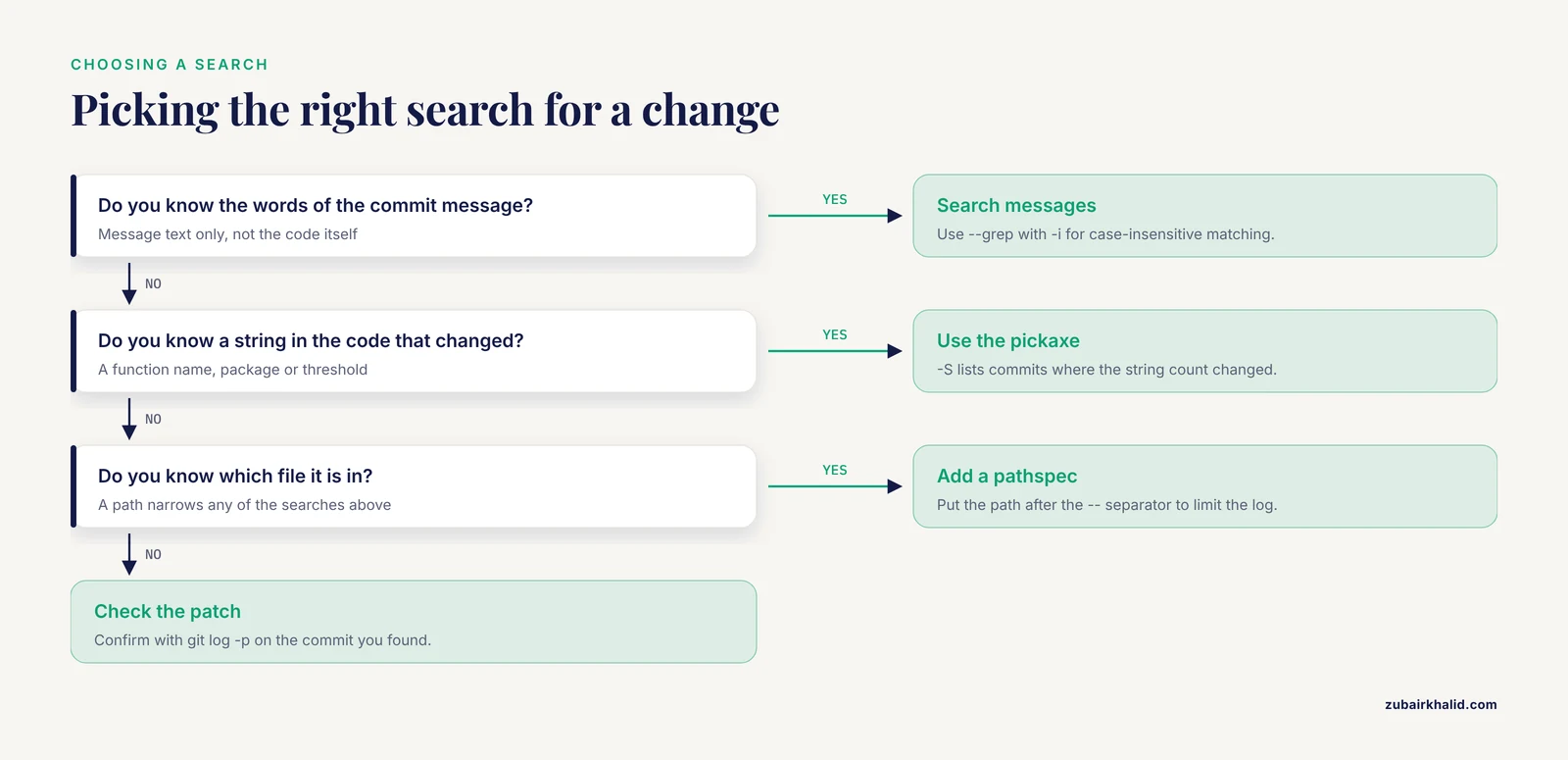
Search commit messages, case-insensitively with -i:
git log --oneline --grep="fix" -iExpected output:
9c8b7a6 Fix duplicate sample IDs in metadata table-grep reads the full commit message and nothing else. To find where a piece of code appeared or disappeared, use the pickaxe options, named for the way they dig through diffs. -S lists commits where the number of occurrences of a string changed:
git log --oneline -S"DESeq2"Expected output:
b7c8d9e Normalize counts with DESeq2 size factorsThat single result tells you the DESeq2 call entered the pipeline in exactly one commit. -G takes a regular expression and lists commits whose added or removed lines match it:
git log --oneline -G"batch"Expected output:
3f2a9c1 Add batch correction step to RNA-seq pipelineAdd -i to make -grep and -G case-insensitive. Multiple -grep patterns match commits that satisfy any pattern, and -all-match tightens that to all patterns. Combine a pickaxe search with a path to narrow it further:
git log --oneline -S"DESeq2" -- analysis/counts.RStep 5. See what each commit changed
Add -stat for a per-commit summary of files and line counts:
git log --stat -1 9c8b7a6Expected output:
commit 9c8b7a6d5e4f3a2b1c0d9e8f7a6b5c4d3e2f1a0b
Author: Jane Doe <[email protected]>
Date:   Tue Oct 20 16:41:07 2026 -0400

    Fix duplicate sample IDs in metadata table

 metadata/samples.csv | 12 ++++++------
 1 file changed, 6 insertions(+), 6 deletions(-)
Add -p to see the patch, the line-by-line diff, which is the record of what changed between two snapshots:
git log -p -1 9c8b7a6 -- metadata/samples.csvThe patch prints in unified diff format. A hunk header such as @@ -34,3 +34,3 @@ means the excerpt starts at line 34 in both the old and new versions and spans 3 lines. Lines starting with - were removed, lines starting with + were added, and unchanged context lines surround them:
@@ -34,3 +34,3 @@
 sample_id,condition,batch
-CTL_04,control,B2
+CTL_004,control,B2
 CTL_05,control,B2
Reading a handful of patches is the fastest way to understand why a result changed between two analysis runs.
Step 6. Trace one file across renames
A pathspec is a pattern that limits a command to specific files or directories. Limit the log to commits that touched a path, and use the - separator to tell git that everything after it is a path, not a revision:
git log --oneline -- analysis/counts.RExpected output:
3f2a9c1 Add batch correction step to RNA-seq pipeline
b7c8d9e Normalize counts with DESeq2 size factors
d4e5f6a Add read counting script
A directory pathspec covers everything under it, so , analysis/ includes every file in that folder. If a file was renamed at some point, a plain path log stops at the rename. -follow detects renames and keeps tracing backwards:
git log --follow --oneline -- analysis/counts.RIn this repository the path never changed, so the output matches the plain path log. In a repository where counts.R was once called counting.R, -follow adds the older commits that the plain log would hide.
Two failure modes to know. -follow accepts exactly one path:
$ git log --follow --oneline -- analysis/counts.R metadata/samples.csv
fatal: --follow requires exactly one pathspec
A path that does not exist behaves differently with and without -. With the separator, git prints nothing and exits cleanly. Without it, git reports:
fatal: ambiguous argument 'analysis/no_such_file.R': unknown revision or path not in working treeStep 7. Visualize branches and locate HEAD
git log --oneline --graph --all --decorateExpected output:
* 8e9f0a1 (HEAD -> main) Update README with run instructions
* 3f2a9c1 Add batch correction step to RNA-seq pipeline
| * a1b2c3d (feature-qc) Draft QC report template
|/
* 9c8b7a6 Fix duplicate sample IDs in metadata table
* b7c8d9e Normalize counts with DESeq2 size factors
* d4e5f6a Add read counting script
* 1a2b3c4 Add sample metadata table
* 5e6f7a8 Initial commit of RNA-seq pipeline
Each * is a commit. The vertical bar shows the feature-qc branch diverging after 9c8b7a6, and the slash marks the fork point. The parenthetical labels are decorations on refs, where a ref is any named pointer to a commit, such as a branch, a tag, or a remote-tracking name like origin/main. HEAD is the pointer to the commit you are currently on, here the tip of main. -all includes commits reachable from every ref, not just HEAD, which is why the feature branch commit appears.
On a repository with many merges, add -first-parent to follow only the mainline through merge points, or -no-merges to hide merge commits entirely. To list just the merges, run git log, merges, oneline.
Step 8. Format output for reports and spreadsheets
The -pretty=format option builds custom layouts with placeholders: %h abbreviated hash, %H full hash, %an author name, %ae author email, %ad author date, %cd commit date, %s subject. Pair it with -date=short for YYYY-MM-DD dates, or -date=iso for full ISO 8601 timestamps. The %x09 placeholder inserts a tab, which keeps the output safe for spreadsheet import even when messages contain commas:
git log --pretty=format:"%h%x09%an%x09%ad%x09%s" --date=shortExpected output, with tabs shown here as spacing:
8e9f0a1  Jane Doe    2026-11-09  Update README with run instructions
3f2a9c1  Jane Doe    2026-11-03  Add batch correction step to RNA-seq pipeline
9c8b7a6  Jane Doe    2026-10-20  Fix duplicate sample IDs in metadata table
b7c8d9e  Ravi Patel  2026-10-12  Normalize counts with DESeq2 size factors
d4e5f6a  Jane Doe    2026-10-01  Add read counting script
1a2b3c4  Ravi Patel  2026-09-15  Add sample metadata table
5e6f7a8  Jane Doe    2026-09-08  Initial commit of RNA-seq pipeline
Redirect the output to a file for a supplementary table or audit trail:
git log --pretty=format:"%h%x09%an%x09%ad%x09%s" --date=short > commit_history.tsv
echo >> commit_history.tsv
The echo appends the final newline that format output omits. For a per-author summary, use git shortlog:
git shortlog -sne HEADExpected output:
     5  Jane Doe <[email protected]>
     2  Ravi Patel <[email protected]>
The flags break down as -s for summary, -n for sort by count, and -e for email. Counts split when one person committed under two identities, a common side effect of unconfigured git on a shared cluster.
Key options at a glance
| Option | What it does | Example |
|---|---|---|
| , - | , - | , - |
| (none) | Full history, newest first | git log |
-oneline | One line per commit | git log, oneline |
-n <number> | Limit to the last n commits | git log -n 5 |
-reverse | Oldest first | git log, oneline, reverse |
-author="<pattern>" | Commits by matching author or email | git log, author="[email protected]" |
-since, -until | Date window on the commit date | git log, since="2026-10-01" |
-grep="<text>" | Search commit messages | git log, grep="fix" -i |
-S"<string>" | Commits where the string count changed | git log -S"DESeq2" |
-G"<regex>" | Commits with matching changed lines | git log -G"batch" |
-p | Show the full diff per commit | git log -p -1 9c8b7a6 |
-stat | Files and line counts per commit | git log, stat -3 |
-follow | Trace one path across renames | git log, follow, analysis/counts.R |
-graph | Draw branch structure next to commits | git log, graph, oneline, all |
-pretty=format:"..." | Custom output layout | git log, pretty=format:"%h %ad %s", date=short |
<A>..<B> | Commits in B but not in A | git log v1.0.0..v1.1.0 |
Tags, ranges, and changelogs for manuscripts
A tag is a named pointer to one commit. An annotated tag also stores a message, author, and date, which makes it the right choice for anything you plan to cite. Create one at the commit that produced a manuscript's results:
git tag -a v1.0.0 -m "Code used for the November 2026 manuscript submission"Rerun the step 7 command and the commit line for 3f2a9c1 now carries a (tag: v1.0.0) decoration. A plain git tag v1.0.1-rc1 without -a creates a lightweight tag with no metadata, fine for scratch use and weaker for citation.
Ranges answer the question "what changed between two versions". A range A..B lists commits reachable from B but not from A:
git log --oneline v1.0.0..v1.1.0The same syntax works with branches, which is how you review the commits a pull request would introduce:
git log --oneline main..feature-qcExpected output:
a1b2c3d Draft QC report templateAdd -no-merges to keep generated changelogs free of merge noise.
For researchers on GitHub, GitLab, or an institutional server, the history you see locally is the same history the web interface renders. Two practices make that history citable. First, record the full hash in your methods section or repository README, for example "analysis run at commit 3f2a9c1b8e4d7a6f5c0b1d2e3f4a5b6c7d8e9f0a". Second, pair the tag with an archived copy of the release through a long-term preservation service that issues a DOI, because tags live inside the repository and repositories can move or disappear. DEGAn illustrates the distribution side of this arrangement: its source and binaries sit in a public Git repository, and its updated release adds enhanced reporting aimed at reproducible exploratory screening, which only pays off when the code version is pinned [1].
How to verify the history is complete and correct
- Confirm where you are.
git statusprints the branch name on its first line, andgit branch, show-currentprints just the branch. Most reports of a "wrong" log come from the wrong clone or the wrong branch.
- Cross-check counts.
git rev-list, count HEADprints 7 for the demonstration repository, matching the seven lines from step 2.git rev-list, count, allprints 8 because the feature branch commit is included. If a collaborator's count differs from yours, one of you holds commits the other has not fetched.
- Expand and inspect.
git rev-parse <short-hash>prints the full hash.git show, stat 9c8b7a6prints the message and diffstat for one commit, which must match what step 5 showed.git showprints the full patch as well.
- Locate the nearest tag.
git describe, tagsprintsv1.0.0-1-g8e9f0a1, read as "one commit after v1.0.0, ending at abbreviated hash 8e9f0a1". This is a quick sanity check that HEAD sits where you think it does.
- Sync the remote view.
git fetch, alldownloads new commits from hosting remotes without touching your working files. Thengit log, oneline origin/main -n 5shows the server's version of main. A local log can never show commits that were never fetched.
Git log tips for research repositories
- Alias the view you use most, so a two-word command replaces a long one:
git config --global alias.lg "log --oneline --graph --decorate --all"
git lg- Use
-no-pagerin scripts and automated reports so output flows into files instead of stopping at an interactive pager. - Write messages for the version of you that reads the log in two years. "Fix bug" answers nothing. "Fix sample ID collision in metadata merge" answers a reviewer's question. One logical change per commit keeps
-Ssearches precise. - Standardize
user.nameanduser.emailin git configuration before the first commit on any shared cluster, because author filters and shortlog counts split identities that differ by capitalization or email. - Pair history with tests. The DrugUtilisation project combined versioned releases with comprehensive unit tests and standardized outputs so the same pipeline produced comparable results across databases in three countries [2]. The commit hash tells you which code ran, and the tests tell you it behaved as intended.
Common Mistakes and Limitations
- Reading the wrong repository or branch. The symptom is a history that looks unfamiliar. Run
git statusandgit branch, show-currentbefore interpreting anything.
- Treating an empty result as an error. Filters such as
-author,-since, and-greplegitimately return nothing when nothing matches. Relax one filter at a time until commits reappear, then tighten again.
- Recording short hashes in permanent documents. A 7-character abbreviation is unique only within one repository at one point in time. In manuscripts, READMEs, and audit records, store the full 40-character hash or a tag.
- Assuming history is immutable. Amending, rebasing, or force-pushing rewrites hashes and dates, so a cited hash can stop resolving. Never rewrite shared branches, and prefer tags plus archived releases for anything you cite.
- Expecting git log to search file contents.
-grepreads commit messages,-Sand-Gread the changes between snapshots, and none of them search the current files. To search the working tree, the files as they are checked out right now, usegit grep "pattern".
- Fighting the pager. Output that appears to hang after
git logis usuallylesswaiting for input. Pressq. In scripts, use-no-pager.
- Misusing
-follow. It takes exactly one pathspec, failing withfatal:, follow requires exactly one pathspec, and it works on files, not directories.
- Trusting a local log as the whole story.
git logshows only commits your clone knows about. Fetch before comparing with collaborators, and remember that unpushed local commits are invisible to everyone else.
- Reading merge commits wrong.
git log -pshows no diff for merge commits by default. Pass-mto diff against each parent, or-ccfor the combined view.
- Ignoring the privacy embedded in history. Author names and emails are permanent parts of every commit. Before pushing to a public repository, run
git log, format="%an <%ae>" | sort -uto see exactly what will be published.
Two limitations deserve plain language. git log records what was committed, not what was executed. A hash proves the state of the code at a moment, not that a particular analysis used it, unless you pair the hash with run logs, tags, or archived releases. And git cannot show history that was never committed. The commit is the unit of provenance, so the record is only as complete as the commits you make.
Frequently Asked Questions
What does the git log command do?
It prints the commit history of a repository, newest first, showing the commit hash, author, date, and message for each commit. Options filter by author or date, condense output to one line per commit, or reformat it for reports.
How do I exit the git log view?
Press q. Git sends long output through the less pager, where q quits, the spacebar pages forward, and a forward slash starts a text search.
How do I see the history of a single file?
Run git log, follow, path/to/file. The path limits the log to commits that touched the file, and -follow keeps tracing across renames.
How do I find who wrote a particular line of code?
Use git blame with a line range, for example git blame -L 10,20 analysis/counts.R. Each line is annotated with the commit and author that last changed it.
How do I search the history for a specific change?
Use git log, grep="text" for commit messages and git log -S"string" for code. The -S option lists commits where the number of occurrences of the string changed.
Why does git log return nothing?
Usually the command ran outside a repository or on a branch with no commits yet. Look for the message fatal: not a git repository, run git status, and confirm the project folder and branch.
How do I cite the exact code version used in a manuscript?
Record the full 40-character hash from git rev-parse HEAD, or create an annotated tag with git tag -a and archive the release. A tag plus a hash identifies the version unambiguously.
What is the difference between git log, git show, and git reflog?
git log walks committed history, git show prints one commit in full, and git reflog records where HEAD has moved, including commits that are no longer on any branch.
Further Reading
- Dual-pathway processing of AI-generated Chinese ink painting: evidence from eye-tracking, EEG, and artistic expertise.
- A unified decision-driven framework: Long-term tracking via visual-language models with motion estimation.
- Redistribution of Gaze Patterns in Facial Localized Scleroderma Following Autologous Fat Transfer: An Eye-Tracking Study.
- The effects of liquid versus spray-dried Laminaria digitata extract on selected bacterial groups in the piglet gastrointestinal tract (GIT) microbiota.