Versioning Large Genomic Datasets with Git LFS
By Dr. Zubair Khalid, DVM, MS, PhD ·
By the end of this guide you will be able to install Git LFS, track the file formats that dominate genomics projects (FASTQ, BAM, CRAM, indexed VCF, HDF5), commit and push multi-gigabyte files without bloating your repository history, migrate an existing repository that already contains large blobs, fetch only the files you need on a cluster, and recover from the quota and pointer errors that stop most labs the first time they try. The walkthrough is written as a step-by-step reference you can follow in a terminal, and the closing sections cover practical tips, common mistakes, and how Git LFS compares with git-annex and DVC.
What you need on hand:
- Git 2.x installed and working (
git, version). - Git LFS 3.x (installation commands below).
- A Git host that supports the LFS API, or your own LFS server. GitHub for researchers, GitLab, Bitbucket, and self-hosted Gitea all support Git LFS, and standalone LFS servers exist for air-gapped or institution-controlled setups.
- Write access to a test repository before you touch a production one.
Why Plain Git Fails on Genomic Data
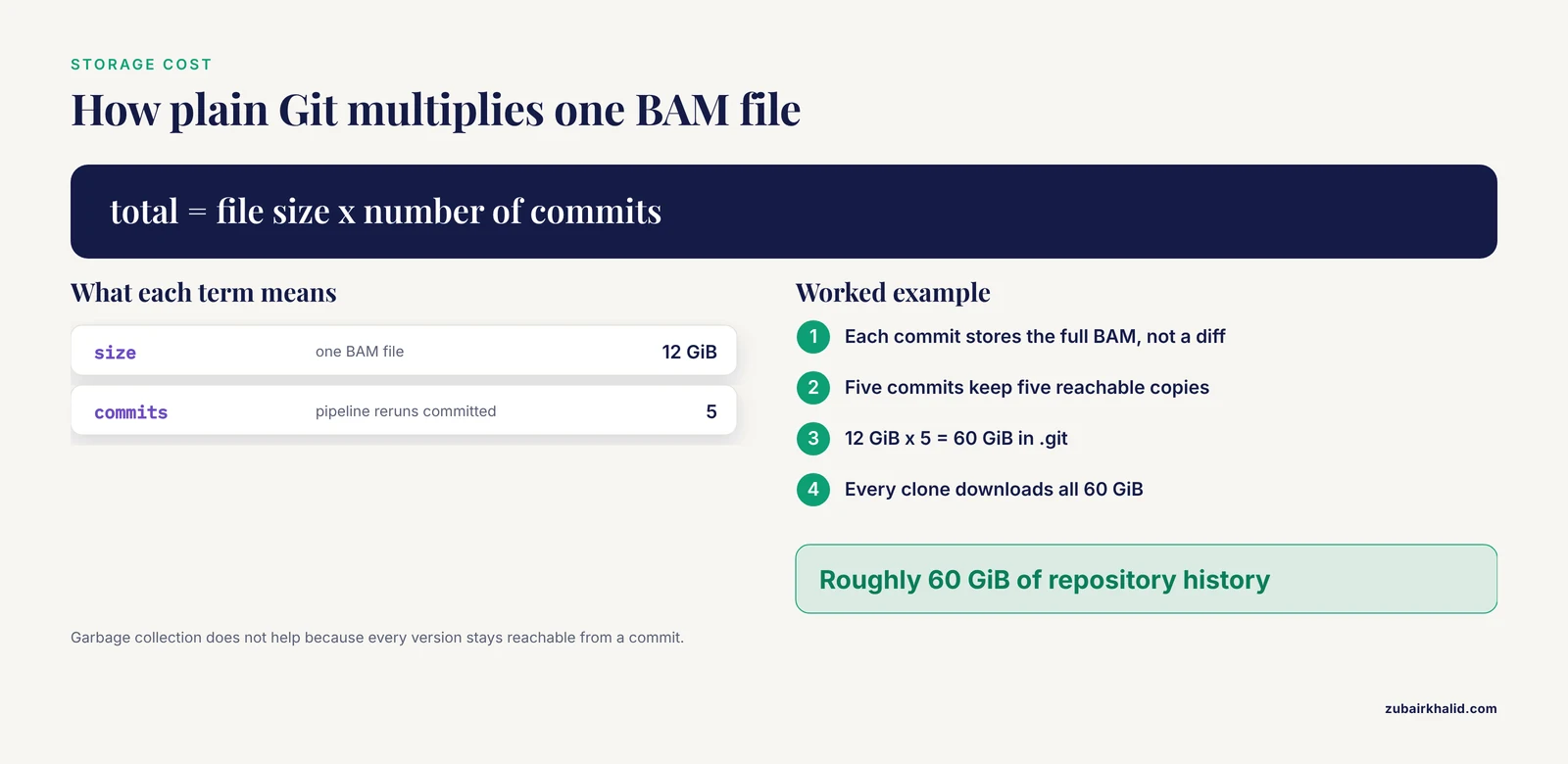
Git stores every version of every file as a full content blob in the repository history. That design is perfect for source code, where files are small and text diffs matter. It fails for genomics because the data is large, binary, and versioned by rerun rather than by edit.
A worked calculation makes the problem concrete. Suppose a whole-genome alignment produces a 12 GiB BAM file, and you rerun the pipeline five times over a month, committing the updated BAM each time. Plain Git stores all five versions in full, so the .git directory grows by roughly 60 GiB. Every collaborator who clones the repository downloads all 60 GiB, every time, because Git cannot skip history. Garbage collection does not help, since every version remains reachable from a commit.
This scale is normal in genomics. An uncompressed paired whole-genome FASTQ set runs to tens of gigabytes per sample, a BAM or CRAM alignment is commonly several to tens of gigabytes, and a single-cell experiment can produce HDF5 or AnnData files in the hundreds of megabytes to gigabytes. None of these are text files you can diff line by line, which removes the main benefit of storing them in Git history directly.
The problem is not only technical. Research groups need data and code to move together so that a figure in a paper can be regenerated from a tagged repository state. In clinical settings the stakes are higher. Work on hospital Clinical Data Warehouses argues that these systems must track patients longitudinally and manage the linking and versioning of large datasets from whole genome sequencing, RNA analyses, and complex imaging, and that current warehouses handle neither requirement well [1]. Versioning large genomic datasets with git lfs is the lab-scale answer to the same problem: keep the history, keep the reproducibility, and keep the bytes out of the object database.
How Git LFS Works: Pointers, Filters, and Storage
Git LFS (Large File Storage) is an open-source Git extension that replaces large file contents inside the repository with small pointer files and stores the actual bytes in a separate LFS object store. A pointer file is plain text and runs to roughly 130 bytes:
version https://git-lfs.github.com/spec/v1
oid sha256:4d7a2c9e8b1f0a3c5d6e7f8a9b0c1d2e3f4a5b6c7d8e9f0a1b2c3d4e5f6a7b8c
size 12884901888
Three pieces make this work:
- The
.gitattributesfile declares which path patterns are managed by LFS, for example*.bam filter=lfs diff=lfs merge=lfs -text. Because.gitattributesis itself committed, everyone who clones the repository gets the same tracking rules. - The clean filter runs when you
git adda tracked file. It replaces the content in the index with a pointer and uploads the bytes to the local LFS store, ready to push. - The smudge filter runs when Git checks a tracked path out of history. It reads the pointer, downloads the object from the LFS endpoint if needed, and places the real file in your working tree.
The LFS object store lives in two places. Locally, objects sit under .git/lfs/objects in your clone. Remotely, they sit behind an LFS API endpoint on your host. Objects are addressed by their SHA-256 hash, so identical content is stored once no matter how many commits reference it. Five commits of an unchanged 12 GiB file cost 12 GiB of storage and five tiny pointers, not 60 GiB.
History still works the way Git history works. Checking out an old commit updates the pointers, and the smudge filter fetches the matching old objects, so you can retrieve the BAM from last quarter exactly as you would retrieve an old version of a script.
Where Git LFS Fits and Where It Does Not
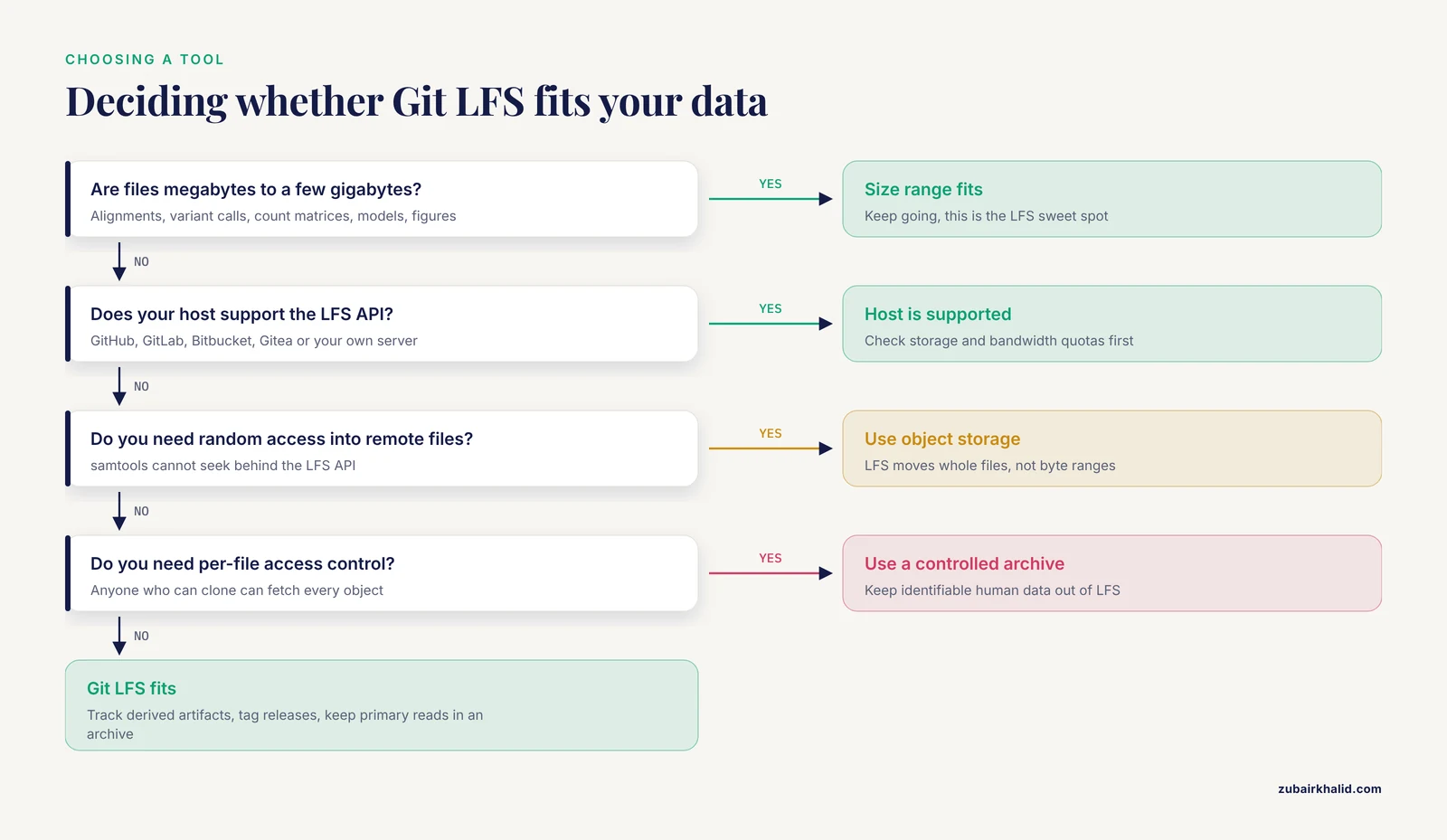
Git LFS is the right tool when all of the following hold:
- The files are versioned artifacts tied to code and parameters: alignments, variant calls, count matrices, reference and annotation snapshots, trained models, final figures.
- Individual files range from megabytes to a few gigabytes. That range keeps clones, pushes, and quota bills sane.
- Your host supports the LFS API. GitHub for researchers includes a monthly storage and bandwidth allowance for LFS and sells additional storage in data packs, so check the current billing documentation before you commit terabytes.
Git LFS is the wrong tool when:
- The files are primary data that belongs in a domain archive or institutional object store, such as hundreds of gigabytes of raw reads per sample.
- You need random access into remote files. Tools like
samtoolscan stream and index a BAM over HTTPS from object storage, but they cannot seek into an object sitting behind the LFS API. LFS moves whole files, it does not serve byte ranges. - You need per-file or per-user access control beyond repository access. Anyone who can clone the repository can fetch every LFS object in it.
- You expect meaningful diffs and merges. Binary formats do not diff, which changes how teams must coordinate (covered in the mistakes section).
Step-by-Step: Git LFS for Genomic Data
This walkthrough builds a small project called wgs-pipeline, tracks the common genomic formats, pushes to a remote, and then shows selective fetching on a second machine. Commands assume a Unix shell.
1. Install Git LFS
# macOS with Homebrew
brew install git-lfs

# Debian or Ubuntu
sudo apt-get install git-lfs

# Any system with conda (including HPC login nodes)
conda install -c conda-forge git-lfs
Verify the installation:
git lfs versionExpected output (version number will differ):
git-lfs/3.5.1 (GitHub; linux amd64; go 1.22.x)If you see git: 'lfs' is not a git command., the binary is not on your PATH. Fix the installation before continuing.
2. Enable Git LFS for your user
Run once per user account. This installs the clean, smudge, and pre-push hooks into your global Git configuration:
git lfs installExpected output:
Updated git hooks.
Git LFS initialized.
3. Create the repository
mkdir wgs-pipeline && cd wgs-pipeline
git init
git lfs install
Running git lfs install inside the repository ensures the hooks are present for this clone even if another user set the repository up.
4. Track the genomic file patterns
git lfs track "*.fastq.gz"
git lfs track "*.fq.gz"
git lfs track "*.bam"
git lfs track "*.bam.bai"
git lfs track "*.cram"
git lfs track "*.cram.crai"
git lfs track "*.vcf.gz"
git lfs track "*.vcf.gz.tbi"
git lfs track "*.h5"
git lfs track "*.h5ad"
Each command prints Tracking ".bam" (with the pattern you gave). The patterns are written to .gitattributes. A pattern without a slash, such as .bam, matches at every depth in the repository, so results/aligned/sample_A1.bam is covered. A pattern with a slash, such as results/*.bam, matches only under that directory.
Inspect the file that was created:
cat .gitattributesExpected output:
*.fastq.gz filter=lfs diff=lfs merge=lfs -text
*.fq.gz filter=lfs diff=lfs merge=lfs -text
*.bam filter=lfs diff=lfs merge=lfs -text
*.bam.bai filter=lfs diff=lfs merge=lfs -text
*.cram filter=lfs diff=lfs merge=lfs -text
*.cram.crai filter=lfs diff=lfs merge=lfs -text
*.vcf.gz filter=lfs diff=lfs merge=lfs -text
*.vcf.gz.tbi filter=lfs diff=lfs merge=lfs -text
*.h5 filter=lfs diff=lfs merge=lfs -text
*.h5ad filter=lfs diff=lfs merge=lfs -text
The filter=lfs attribute activates the clean and smudge filters, and -text stops Git from attempting line-ending conversion on binary content.
5. Commit .gitattributes first
git add .gitattributes
git commit -m "Track genomic data formats with Git LFS"
Committing .gitattributes before any data file is the single most important ordering rule in this workflow. Tracking rules only apply to files added after the rule exists in the index.
6. Add data and commit
mkdir -p results/aligned results/raw
cp /data/aligned/sample_A1.bam results/aligned/
cp /data/aligned/sample_A1.bam.bai results/aligned/
git add results/
git commit -m "Add alignment for sample A1"
During the commit, the clean filter converts each tracked file to a pointer and stores the bytes in .git/lfs/objects. The commit itself is fast because no large content enters the object database.
7. Verify that tracking worked
git lfs ls-filesExpected output:
0f4e5c9d12 * results/aligned/sample_A1.bam
6c3b8a71f4 * results/aligned/sample_A1.bam.bai
The marker before each path tells you the local state: * means the full content is present in the working tree, - means only the pointer is checked out. If a file you expected to see is missing from this list, it was not matched by a pattern at add time.
Confirm that Git history holds a pointer, not bytes:
git show HEAD:results/aligned/sample_A1.bamExpected output:
version https://git-lfs.github.com/spec/v1
oid sha256:4d7a2c9e8b1f0a3c5d6e7f8a9b0c1d2e3f4a5b6c7d8e9f0a1b2c3d4e5f6a7b8c
size 12884901888
Then verify integrity end to end. The oid is the SHA-256 of the file content, so a local checksum must match it:
sha256sum results/aligned/sample_A1.bam
git lfs ls-files -l
The hash from sha256sum should equal the full OID printed by ls-files -l. Making this comparison part of your release checklist turns every push into a checksummed data delivery.
8. Add a remote and push
git remote add origin https://github.com/your-lab/wgs-pipeline.git
git push -u origin main
Expected output:
Uploading LFS objects: 100% (2/2), 12.0 GB, done.
Enumerating objects: 12, done.
...
To https://github.com/your-lab/wgs-pipeline.git
 * [new branch]      main -> main
The Uploading LFS objects line is your confirmation that bytes went to the LFS endpoint and only pointers went into the Git history.
9. Clone elsewhere without downloading everything
On an analysis server or a collaborator's laptop, you often want the code and small files immediately and only some of the data:
GIT_LFS_SKIP_SMUDGE=1 git clone https://github.com/your-lab/wgs-pipeline.git
cd wgs-pipeline
git lfs ls-files
Expected output shows pointer-only state for every tracked file:
0f4e5c9d12 - results/aligned/sample_A1.bam
6c3b8a71f4 - results/aligned/sample_A1.bam.bai
Now pull only what you need:
git lfs pull --include="results/aligned/*"Expected output:
Fetching LFS objects: 100% (2/2), 12.0 GB, done.
Checking out LFS objects: 100% (2/2), done.
-include and -exclude accept the same path patterns as .gitattributes, so -include="results/aligned/sample_A1*" or -exclude="results/raw/*" both work.
10. Version a new release
Rerun the pipeline, commit the changed outputs, and tag the state:
git add results/
git commit -m "Rerun alignment with updated reference, sample A1"
git tag -a v1.1.0 -m "Alignment rerun, updated reference build"
git push --follow-tags
Because the new BAM has different content, LFS stores it as a new object keyed by its new SHA-256, and the old object stays retrievable through the v1.0.0 tag. This is the core of versioning large genomic datasets with git lfs: a paper figure can cite a tag, and anyone can reproduce the exact data state behind it.
11. Coordinate edits to shared binaries (optional)
For files that more than one person might edit, such as a curated AnnData object or a manually corrected annotation, LFS file locks prevent silent conflicts:
git lfs track --lockable "*.h5ad"
git lfs lock results/scrna/adata.h5ad
git lfs locks
git lfs unlock results/scrna/adata.h5ad
A lockable pattern makes tracked files read-only in the working tree until you hold the lock, which turns an invisible merge problem into an explicit request.
Command Reference
| Command | What it does | When to use it |
|---|---|---|
git lfs install | Installs clean, smudge, and pre-push hooks | Once per user, and once per clone |
git lfs track "PATTERN" | Adds a pattern to .gitattributes | Before the first commit of a file type |
git lfs ls-files | Lists tracked files and local state (* content, - pointer) | Verifying tracking after any add or clone |
git lfs status | Shows pending LFS uploads and checkout state | Pre-commit and pre-push sanity check |
git lfs migrate info | Reports which patterns dominate repository size | Before any migration |
git lfs migrate import, include=..., everything | Rewrites history so matching blobs become pointers | Fixing repositories that committed large files |
git lfs fetch, include=..., exclude=... | Downloads LFS objects without checking them out | HPC and partial-fetch workflows |
git lfs pull | Fetches objects and checks them out | Restoring content after a skip-smudge clone |
git lfs prune | Deletes local objects no longer needed by recent history | Reclaiming disk on long-lived caches |
git lfs lock / unlock | Exclusive write locks on tracked files | Shared binary files edited by several people |
git lfs env | Prints endpoint, storage path, and effective configuration | Debugging transfer or authentication problems |
git lfs logs last | Shows logs from the most recent LFS command failure | Diagnosing failed pushes or fetches |
Suggested Tracking Patterns for Genomic Data
| Data type | Patterns to track | Practical notes |
|---|---|---|
| Raw reads | .fastq.gz, .fq.gz | Commit compressed reads only, and only if they are versioned artifacts rather than archive copies |
| Alignments | .bam, .cram | CRAM saves substantial space when the reference is available, track the reference too |
| Alignment indexes | .bam.bai, .cram.crai | Indexes are small but must move with the alignment, track them so tags stay self-consistent |
| Variant calls | .vcf.gz, .vcf.gz.tbi | For small callsets, plain text VCF in normal git stays diffable, use LFS once files grow |
| Single-cell matrices | .h5, .h5ad | Good candidates for lockable patterns when curated by hand |
| Reference and annotation | .fa, .fa.gz, .gtf.gz, .2bit | Snapshot one release per tag, record checksums in the commit message |
Migrating an Existing Repository to Git LFS
Most labs discover LFS after a repository already contains BAM files. The fix is a history rewrite that converts matching blobs into pointers across every commit.
First, measure what a migration would touch:
git lfs migrate info --everything --include="*.bam,*.vcf.gz"Representative output:
*.bam      24 files  138.2 GB  96%
*.vcf.gz    9 files    4.1 GB   3%
If the numbers justify it, run the import:
git lfs migrate import --include="*.bam,*.vcf.gz" --everythingRepresentative output:
migrate: Sorting commits: ..., done
migrate: Rewriting commits: 100% (214/214), done
  main        3f2a9c1d8e -> 7e8b4a02f1
  tag v1.0.0  9a1b2c3d4e -> 5c6d7e8f90
migrate: Updating refs: ..., done
Then force-push the rewritten branches and tags:
git push --force origin main
git push --force --tags origin
Migration rewrites commit hashes, so plan it like any history rewrite:
- Freeze pushes, announce the migration window, and note who has unmerged work.
- Run the migration on a fresh clone.
- Force-push branches and tags.
- Have every collaborator re-clone, or run
git fetch origin,git reset, hard origin/main, andgit lfs pullif they have no local work. - Reopen or rebase any pull requests that targeted old commits.
Two gentler options exist. git lfs migrate import, no-rewrite converts tracked files to LFS in a new commit without rewriting history, which is safe for shared repositories but leaves the old blobs in history, so storage does not shrink. git lfs migrate export, include="*.bam" reverses a migration if you need files back in ordinary Git history.
Using Git LFS on an HPC Cluster or Shared Server
Clusters punish careless LFS use with slow home directories and full quotas. Three configuration choices fix most of it.
Point the object store at fast, roomy scratch space rather than a quota-limited home directory:
git config lfs.storage /scratch/$USER/lfs-cacheControl what a clone or fetch downloads. Excluding raw reads on machines that only need results keeps login-node clones small:
git config lfs.fetchexclude "*.fastq.gz"Tune parallel transfers if the storage endpoint allows it:
git config lfs.concurrenttransfers 8The standard cluster workflow then looks like this:
GIT_LFS_SKIP_SMUDGE=1 git clone https://github.com/your-lab/wgs-pipeline.git
cd wgs-pipeline
git lfs pull --include="results/aligned/*"
If objects were already fetched by another command, git lfs checkout materializes pointers into files from the local store without any network traffic. On long-lived clones, git lfs prune removes objects that no recent commit needs, which matters when a 12 GiB BAM has been superseded several times. Run prune yourself rather than on a schedule shared with colleagues, and never delete .git/lfs by hand to free space, since that destroys objects your history still references.
For continuous integration, remember that most runners do not enable LFS by default. Either run git lfs install in the job before checkout or use your platform's LFS option in the checkout step, for example the lfs option on the standard GitHub Actions checkout action.
Git LFS Compared with git-annex, DVC, and Plain Object Storage
Git LFS is one of three common answers to the same question, and choosing deliberately saves painful migrations later.
git-annex stores file content in a content-addressed annex beside the repository and records per-file location information across remotes. It supports many backend remotes, including rsync targets, S3 buckets, and tape systems, and it imposes no host quota because you own the storage. The tradeoff is that every collaborator needs git-annex installed and remotes configured, and the mental model is heavier. The gitOmmix project, which tackles large-file management for omics and imaging data inside a hospital Clinical Data Warehouse, chose git paired with git-annex as its file versioning layer [1]. If your datasets exceed what any Git host will store, or you need institutional storage backends, git-annex is the mature choice.
DVC (Data Version Control) writes small .dvc pointer files into Git and keeps content in a local cache synchronized to cloud object storage. Its strength is pipeline awareness, since stage definitions tie outputs to the commands and parameters that produced them. Teams already building Nextflow or Snakemake pipelines sometimes prefer DVC for its cache semantics and cloud-native remotes.
Plain object storage with checksums is the right home for primary data. Archive raw reads in a domain repository or institutional bucket, record the archive checksums in a committed manifest, and let Git track the manifest. This keeps heavy bytes out of every clone while preserving a verifiable link between code and data.
A practical division of labor for a genomics lab: primary reads live in an archive or object store, versioned derived artifacts up to a few gigabytes live in Git LFS, and anything larger or requiring custom remotes moves to git-annex or DVC.
Provenance Beyond Commit Messages
Commit hashes, tags, and messages are a minimal provenance record, but clinical and regulatory settings need more. The gitOmmix work addresses this by aligning Git versioning information with a PROV-O provenance knowledge graph, which makes it possible to query and browse provenance relationships and to retrace the history of a clinical interpretation back to the patient sample through supporting data and analyses [1]. The approach is open source and designed to work regardless of the warehouse data schema [1].
Lab-scale projects can capture the same idea cheaply. Have your workflow engine record software versions, parameters, container digests, and input checksums for each output, commit those records alongside the outputs, and tag release states. That gives you a queryable chain from figure to data without building a graph database, and it composes cleanly with LFS because the pointer files already carry SHA-256 identities.
Practical Tips for Versioning Large Genomic Datasets
- Track compressed formats and prefer CRAM over BAM where the toolchain allows it. CRAM with a shared reference routinely cuts alignment storage substantially, and every byte not stored is a byte not transferred.
- Commit
.gitattributesin the first commit of the repository. Every tracking mistake in the mistakes section below becomes more likely when patterns arrive late. - Split very large outputs along natural boundaries. Per-chromosome VCFs, per-lane FASTQs, and per-batch count matrices keep individual objects in the low-gigabyte range, which transfers more reliably and fails more gracefully.
- Use tags as release points and record checksums in the tag message. A tag that names the reference build, annotation release, and pipeline version turns a repository state into a citable artifact.
- Verify with
git lfs ls-filesbefore every push. The*and-markers tell you instantly whether files are content or pointers, which catches most problems before they reach the server. - Set
lfs.storageexplicitly on shared machines so objects never land in a quota-limited home directory by accident. - Keep a committed
manifest.tsvof SHA-256 checksums for archived primary data. It costs kilobytes and gives every clone a way to verify external data. - Run
git lfs envwhen anything behaves oddly. It prints the effective endpoint, storage path, and filters, which resolves most "why is this not uploading" questions in one screen.
Common Mistakes and Limitations
Committing large files before tracking them. This is the most common failure. You git add a 12 GiB BAM, Git stores the raw bytes, and the next commit or push prints:
Encountered 2 file(s) that should have been pointers, but weren't:
	results/aligned/sample_A1.bam
	results/aligned/sample_A2.bam
Due to the presence of impure pointers, pushing to your remote may be rejected by your server.
If the commit was never pushed, fix it locally: run git lfs track "*.bam", then git rm, cached results/aligned/sample_A1.bam, then git add results/aligned/sample_A1.bam, and commit again. If the blobs are already in shared history, use git lfs migrate import as described above.
Forgetting to commit .gitattributes. Without the patterns, a teammate's clone silently commits raw bytes for every large file. The repository looks fine until someone pushes and the server rejects it or the quota fills. Commit the patterns first and check git lfs ls-files in continuous integration for every pull request that adds data.
Assuming storage is unlimited. Hosts enforce storage and bandwidth quotas, and a typical GitHub quota error looks like:
batch response: This repository is over its data quota. Purchase more data packs to restore access.Deleting files in a new commit does not reclaim anything, because every historical object remains reachable and billable. Freeing space requires server-side cleanup of unreachable LFS objects where your host offers it, purchasing additional capacity, or moving the dataset to git-annex or DVC. Plan capacity before committing a hundred samples, not after.
Expecting diffs and merges from binary formats. Git cannot merge two edited BAMs. Use git lfs lock for shared binaries, and keep genuinely small text formats (plain VCF, BED, GFF3) in ordinary Git where diffs still work.
Rewriting shared history without coordination. After migrate import, all commit hashes change, signatures on signed commits are invalidated, and open pull requests lose their base. Announce a freeze, migrate, force-push, and require everyone to re-clone. Skipping the announcement is how teams lose a day to mysterious merge conflicts.
Treating the LFS endpoint as a backup. A hosted repository is a convenience copy, not an archival one. Maintain an independent copy with a mirror clone plus a full object fetch on a server you control:
git clone --mirror https://github.com/your-lab/wgs-pipeline.git
cd wgs-pipeline.git
git lfs fetch --all --recent
Then test a restore by cloning from the mirror and comparing sha256sum output against the OIDs in the pointer files.
Tracking regenerable intermediates. If Snakemake or Nextflow can rebuild a file from tracked inputs in minutes, committing it adds storage and bandwidth cost without adding reproducibility. Version the outputs you cite and publish, and let the pipeline regenerate the rest.
Putting identifiable human genomic data behind repository-level access only. LFS inherits repository permissions and nothing finer. Anyone who can clone can fetch every object, LFS adds no field-level access control, and hosting platforms are not controlled-access archives. Keep identifiable human data in an approved controlled-access archive and commit only checksums or derived, de-identified summaries.
Deleting .git/lfs or pruning shared caches carelessly. git lfs prune removes objects that recent history no longer needs, which is usually what you want on a personal cache and occasionally catastrophic on a machine that colleagues use as their fetch source. Coordinate before pruning anything shared.
Expecting random access into remote files. samtools cannot seek into an object behind the LFS API the way it can into an object store that supports byte-range requests. LFS transfers whole files. If your workflow streams remote alignments, keep those files in object storage and track only their checksums in Git.
One structural limitation deserves emphasis. Git LFS records what changed and when, but it does not by itself give you a queryable provenance graph linking samples, data versions, analyses, and interpretations. Work on clinical warehouses shows what the fully developed version of that capability looks like, combining Git versioning, a large-file layer, and a PROV-O knowledge graph aligned with the version history so provenance relationships can be queried directly [1]. For most labs, disciplined tagging plus workflow-engine provenance records gets you most of the way there.
Frequently Asked Questions
Can Git LFS handle files that are tens of gigabytes?
Git LFS itself has no fixed per-file size limit, but your host's quotas, any per-file caps in its documentation, and network reliability set the practical ceiling. Keep individual files in the hundreds of megabytes to low gigabytes range when you can, for example by splitting outputs per chromosome, lane, or batch.
Should I use Git LFS, git-annex, or DVC for genomic data?
Use Git LFS when you want data versioning inside ordinary Git on a host that supports the LFS API, and move to git-annex or DVC when datasets outgrow host quotas or need custom storage backends. Hospital-scale work has paired Git with git-annex and a PROV-O provenance graph for exactly that reason [1].
How do I fix "Encountered N file(s) that should have been pointers, but weren't"?
The files were committed before their pattern was tracked, so Git stored raw bytes. For unpushed commits, track the pattern, run git rm, cached on each file, add and commit again. For commits already in shared history, run git lfs migrate import, include="PATTERN", everything and force-push.
How do I clone a genomics repository without downloading every large file?
Clone with GIT_LFS_SKIP_SMUDGE=1 set in front of the command, then run git lfs pull, include="path/*" for only the directories you need. The working tree starts as small pointer files and fills in on demand.
Does deleting a large file free up LFS storage?
No. Deleting a file in a new commit leaves every historical object in place, so host storage and quota usage stay the same. Reclaiming space requires server-side cleanup of unreachable objects where the host supports it, or migrating the dataset to storage you control.
Can I run samtools, bcftools, or IGV on LFS-tracked files?
Yes. Once a file is checked out locally it is a normal file on disk, so every standard tool works unchanged. Git LFS only changes how the file travels and where it is stored, never how it is read.
How do I back up a Git LFS repository?
Keep a mirror clone plus a full object copy on a server you control, using git clone, mirror followed by git lfs fetch, all, recent. Verify restores by comparing local sha256sum output against the OIDs recorded in the pointer files.
Is GitHub suitable for researchers who need to version genomic data?
Yes, for code, versioned derived artifacts, and release-tagged results, since GitHub supports the LFS API with monthly storage and bandwidth allowances plus purchasable data packs. Treat it as a versioning layer for results, and keep primary data, especially controlled-access human data, in an appropriate archive.