Tracking Large Datasets with Git: When to Use Git LFS
By Dr. Zubair Khalid, DVM, MS, PhD ·

Plain Git stores the complete contents of every version of every file inside every clone, while Git LFS (Large File Storage) replaces large file contents with tiny pointer files and keeps the actual bytes on a separate server. The rule of thumb: keep code, configuration, and small text in plain Git, use Git LFS for binary files from roughly 1 MB to a few hundred megabytes that change rarely, and route anything larger or more volatile to DVC, git-annex, or a public data repository.
Git is now default infrastructure for computational research, and GitHub for researchers adds hosting, code review, and continuous integration on top of it. Major journals increasingly request code availability statements at submission, yet most researchers receive no formal training in version control, a gap documented directly in the surgical data science literature [1]. The predictable result is a repository that works well for scripts until someone commits a 1.8 GB BAM file, at which point the project stalls. This article explains what Git LFS does, how it compares with the other options for tracking large datasets with Git, and the policies that keep a lab out of trouble.
Why Plain Git Breaks on Large Scientific Datasets
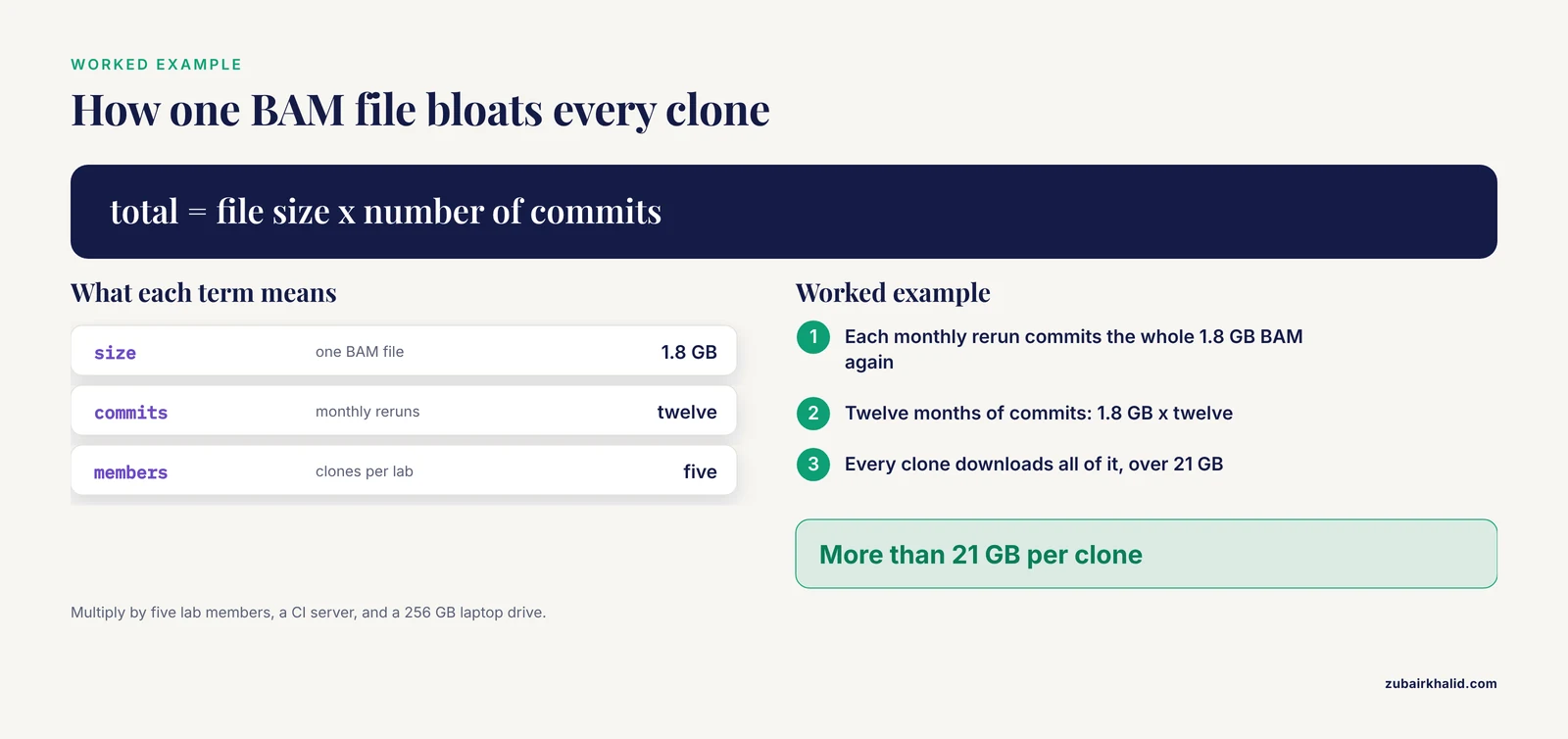
Git stores file content as blobs, its internal object type for file data, in a content-addressable database. A commit records a snapshot of pointers to blobs rather than a diff. Two consequences follow. Every clone downloads the full history of every tracked file, including every stale intermediate version. And Git's delta compression, which works well on source code, gains almost nothing on data that is already compressed, which describes most scientific formats, including compressed reads (.fastq.gz), BAM alignments, and HDF5 or Zarr array stores.
A worked example makes the arithmetic concrete. A 1.8 GB BAM file, the compressed binary format for sequence alignments, is regenerated after each monthly pipeline rerun and committed each time. After twelve months, every clone of that repository carries more than 21 GB of mostly obsolete alignments. Multiply by five lab members, a CI server, and a laptop with a 256 GB drive, and the repository becomes unusable long before the science is done.
Hosted platforms enforce the same physics with hard limits. GitHub's published rules warn at 50 MiB per file, reject files at 100 MiB, and recommend keeping repositories below 1 GB, with 5 GB treated as a firm ceiling. GitLab and Bitbucket differ in detail but not in kind. The failure arrives at the worst moment, usually as a push rejected after a long upload, a clone that takes an hour, or CI minutes burned on downloading data that never changes.
The training gap compounds the problem. Because most scientists meet version control on the job rather than in a curriculum, the first encounter with repository bloat tends to happen mid-project, when the fix requires rewriting shared history [1].
Git LFS for Large Scientific Datasets: How It Works
Git LFS is an open-source Git extension that swaps tracked large files for small pointer files inside the repository and transfers the actual content to separate storage over its own HTTP API. A pointer file is about 130 bytes regardless of whether the underlying content is 40 MB or 4 GB:
version https://git-lfs.github.com/spec/v1
oid sha256:4d7a214d5f6c8e0a1b2c3d4e5f60718293a4b5c6d7e8f90a1b2c3d4e5f6a7b8c
size 41943040
The oid line holds the SHA-256 checksum of the content, so integrity verification comes for free. Two Git filters make the swap invisible: the clean filter converts file content into a pointer at commit time, and the smudge filter converts a pointer back into real content at checkout. Branches, tags, and diffs of text files behave exactly as before, because LFS only intercepts the patterns you configure.
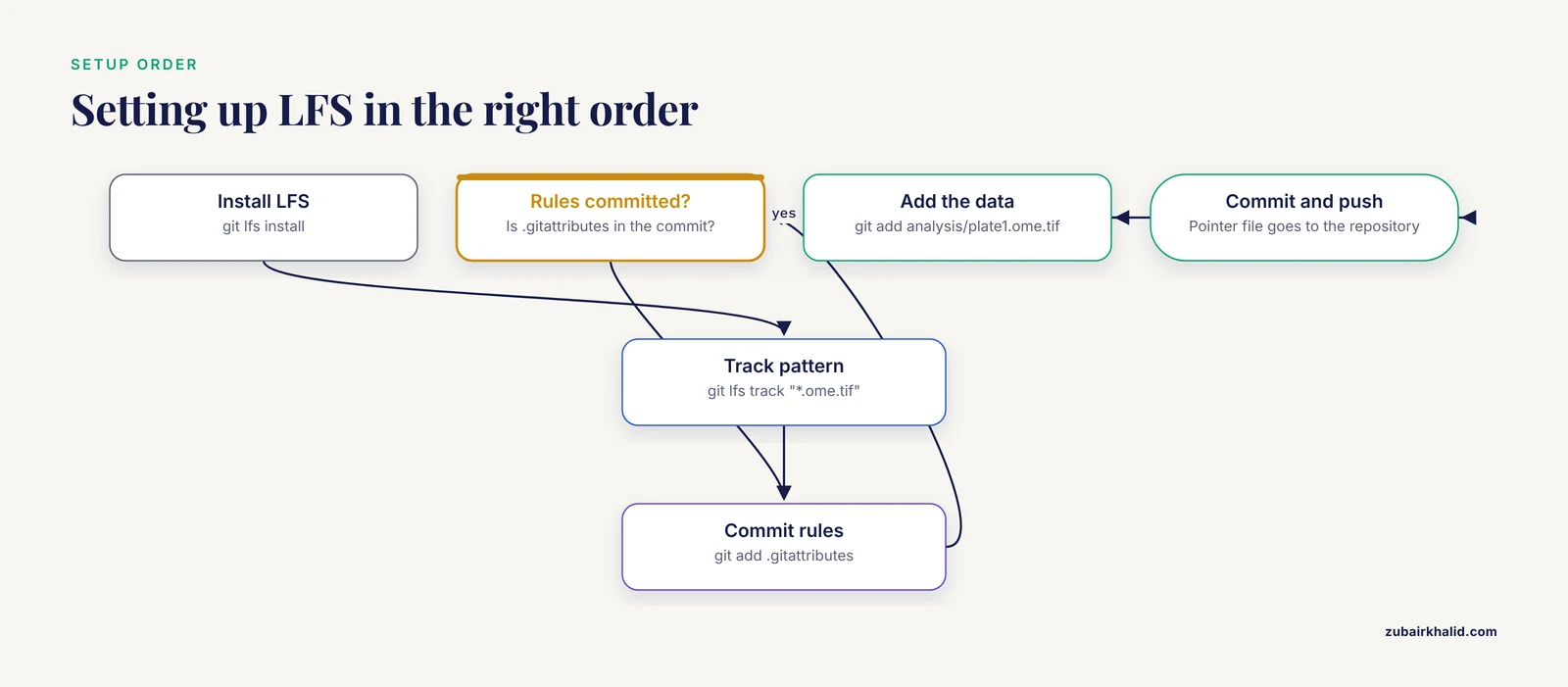
Setting up LFS for a microscopy derivative in OME-TIFF, a standard microscopy image format, takes six commands:
git lfs install
git lfs track "*.ome.tif"
git add .gitattributes
git add analysis/plate1.ome.tif
git commit -m "Track OME-TIFF derivatives with LFS"
git push
Note the order. git lfs track records the pattern in .gitattributes, which must be committed before or together with the data. Tracking rules live in .gitattributes, not .gitignore. The two files do opposite jobs: .gitignore keeps files out of the repository, while .gitattributes routes matched files into LFS.
Daily commands stay close to ordinary Git:
git lfs ls-files
git lfs pull
git lfs lock analysis/plate1.ome.tif
git lfs ls-files lists managed files, git lfs pull fetches the objects for the current checkout, and git lfs lock marks an unmergeable binary as yours so colleagues do not edit it in parallel.
Hosting is built into the major forges. GitHub for researchers includes LFS storage and bandwidth with a modest free allowance (10 GB of storage and 1 GB of monthly bandwidth at the time of writing) and sells additional data blocks beyond it. GitLab and self-hosted forges such as Gitea and Forgejo support LFS natively, and self-hosting removes quotas at the price of running the server.
If large files are already in history, adding a tracking rule changes only future commits. Repair requires rewriting history:
git lfs migrate import --include="*.bam,*.fastq.gz" --everythingThis rewrites every commit, converts matching blobs to pointers, and requires a force push followed by coordinated reclones across the team. Tag the pre-migration state first and announce the change. When the goal is removal rather than conversion, the BFG Repo-Cleaner is the standard alternative.
Three limits matter when deciding. LFS stores each revision of a file whole, with no delta compression and no deduplication, so a 500 MB checkpoint updated weekly consumes 500 MB of storage and bandwidth every week. A plain clone fetches only the LFS objects for the checked-out commit, and archiving every historical version requires fetching all LFS objects separately. And LFS is hosting rather than preservation, since it provides no DOI and no long-term curation commitment.
Tracking Large Datasets with Git: The Main Options
These are the realistic options when researchers ask which Git arrangement survives contact with large scientific datasets. Five cover nearly every case.
Plain Git for Code and Small Text
Scripts, notebooks, configuration files, Dockerfiles, environment specifications, small result tables, and checksum manifests all belong in plain Git because they are small and diffable. The DrugUtilisation R package illustrates the division of labor done right: version-controlled code with comprehensive unit tests and standardized outputs, while the clinical data itself stays in governed OMOP CDM (Observational Medical Outcomes Partnership Common Data Model) databases [2]. Git never touches the data, yet every result traces back to a specific code version.
Git LFS
LFS fits binary files from roughly 1 MB to a few hundred megabytes with few revisions: paper figures, trained model checkpoints shipped with a manuscript, modest imaging derivatives, test fixtures, and compressed reference metadata. It keeps the workflow familiar, since clone, commit, and push behave normally, and pointer files make binary changes visible in review. It fits poorly for raw reads, for anything above a few hundred megabytes per file at team scale, and for anything that changes often.
DVC
DVC (Data Version Control) is an open-source Python tool that stores large data in a local cache and mirrors it to a remote you own, including S3, Google Cloud Storage, Azure Blob Storage, SSH, and plain HTTP. Git sees only tiny .dvc metadata files:
pip install dvc
dvc init
dvc add data/counts
git add data/counts.dvc .gitignore
dvc remote add -d s3main s3://lab-bucket/dvcstore
dvc push
The cache is content-addressed, so identical files are stored once no matter how many dataset versions reference them. dvc.yaml files declare pipelines that tie stages to parameters and outputs, which turns an analysis into a reproducible, resumable sequence. The tradeoffs are a second tool for collaborators to install, cache hygiene on shared machines, and less familiarity for reviewers than LFS.
git-annex and DataLad
git-annex tracks large files by key and moves their content between configurable remotes, including USB drives, S3, Dataverse, and SSH servers. DataLad builds on git-annex with dataset nesting, recorded provenance, and simple sibling management, and it underpins several large neuroscience data sharing efforts:
datalad create study_042
datalad save -m "Add MRI derivatives" derivatives/
datalad get derivatives/sub01/anat/
datalad drop derivatives/sub01/anat/
Colleagues fetch only the subdirectories they need with datalad get and reclaim space with datalad drop while the history stays intact. The strengths are scale and flexibility across many remotes. The cost is a steeper learning curve, since the distinction between git-tracked and annexed files takes time to internalize and troubleshooting runs deeper than LFS.
Data Repositories and Object Storage with Checksums
The classic bioinformatics pattern keeps raw data out of Git entirely. Sequencing reads go to the SRA (Sequence Read Archive) at NCBI, expression matrices to GEO, and general datasets to Zenodo, OSF, or figshare under a DOI (digital object identifier). Zenodo accepts records up to 50 GB by default, which covers most single-study datasets. The repository then carries a manifest and a verification script:
sha256sum data/raw/*.fastq.gz > data/raw/SHA256SUMS
sha256sum -c data/raw/SHA256SUMS
A checksum is a fixed-length fingerprint of file content, so anyone can confirm that their download matches the bytes you analyzed. This pattern costs the repository nothing in size, gains citability and preservation, and requires only the discipline to regenerate the manifest whenever data changes.
Side-by-Side Comparison
| Option | What lives in the Git repo | Practical sweet spot | Where the bytes live | Clone experience | Best for | Main drawback |
|---|---|---|---|---|---|---|
| Plain Git | Full content of every version | Text files under about 100 KB | The repository itself | Fast for small repos | Code, configs, manifests, small tables | Bloats permanently with any big binary |
| Git LFS | Pointer files of about 130 bytes | Binaries from 1 MB to a few hundred MB, few revisions | LFS server on a forge or self-hosted | Repo clones fast, objects fetched per checkout | Checkpoints, figures, imaging derivatives, fixtures | Quotas, per-version storage, painful migration |
| DVC | Tiny .dvc metadata files | Hundreds of MB to multi-TB, many revisions | Any cloud or SSH remote you own | Repo clones tiny, data via dvc pull | Experiment datasets, ML pipelines | Second tool to learn, cache hygiene |
| git-annex / DataLad | Annex keys in Git | GB to TB across many remotes | Configurable remotes, including drives and archives | Selective get per path | Large imaging and neuroscience collections | Steepest learning curve of the four |
| Repository or object storage | Checksum manifest and fetch script | Any size, especially raw data | SRA, GEO, Zenodo, OSF, S3 | Repo unaffected, data fetched by script | Raw reads, publication data, archival | No file-level Git history, needs discipline |
Read the "where the bytes live" and "clone experience" rows first, because those decide day-to-day pain. The "practical sweet spot" column then narrows the choice. Most labs end up running two or three of these options at once, each for a different class of file.
Pros and Cons: The Criteria That Decide
File size and revision frequency
A reasonable default policy looks like this. Text under about 100 KB goes in plain Git. Binary files between about 100 KB and 500 MB with few expected revisions go in LFS. Anything larger, or anything revised often, goes in DVC or git-annex. Raw sequencing reads always go to the SRA. A 40 MB figure updated twice a year is a textbook LFS file. A 2 GB checkpoint regenerated nightly is a textbook DVC file. The same file can move between tiers as a project matures, and moving forward (Git to LFS, LFS to DVC) is far easier than moving backward.
Bandwidth, storage, and CI
LFS on a hosted forge means living inside a bandwidth allowance, and every revision of every tracked file that anyone checks out draws on it. CI is the usual culprit. Set GIT_LFS_SKIP_SMUDGE=1 in CI environments and pull only the objects a job actually needs, caching LFS objects between jobs where the runner supports it. DVC shifts storage to your own bucket, so the constraint becomes your cloud bill rather than a forge quota. Repository-based patterns cost the repository nothing at all.
Collaboration and review
Pointer files make binary changes visible but not diffable. A reviewer sees that a file changed and what its checksum is, never what the content looks like, so substantive review of binary assets needs notebooks, plots, or rendered previews alongside. LFS file locking prevents two people from editing an unmergeable binary simultaneously. Treat .gitattributes changes as code and review them in pull requests, because a careless wildcard can silently reroute whole file classes.
Privacy and patient data
Identifiable patient data must never enter a version-controlled repository, and the surgical data science primer details the .gitignore file as the guard against inadvertent commits [1]. The rule applies with equal force to LFS objects, DVC remotes, and annexes, which are all copies of your data on someone else's disk. De-identification precedes any sharing, and tutorials that ship de-identified datasets alongside their analysis pipelines illustrate the standard to meet [3]. A private repository is not a safe harbor for protected health information, it is simply a less public one.
Licensing and attribution
Before mirroring a third-party dataset into LFS or a bucket, confirm the license permits redistribution and follow its attribution requirements. Creative Commons and MIT licenses carry different obligations, and a lab mirror inherits all of them. The scale of the problem is measurable: an audit of 5,000 OpenML datasets found license violations in 5% and attribution violations in 6%, an overall compliance violation rate of 11% [4]. Record the license and provenance of every tracked dataset in the repository README.
Preservation and findability
LFS objects and DVC remotes disappear when payment stops or a lab migrates forges. Data backing a publication needs a DOI in a repository built to outlive the grant, with the versioned manifest in Git pointing at it. Public code-plus-data releases on GitHub set the transparency baseline for reusable research, and pairing a citable archive with the repository is the pattern reviewers increasingly expect [5].
Worked Scenarios
RNA-seq project
Raw FASTQ files go to the SRA at sequencing time, with accessions recorded in the README. The repository holds pipeline code, reference metadata, and a SHA-256 manifest for anything fetched externally. Per-sample count matrices, typically tens of megabytes, sit in plain Git or LFS depending on their size. BAM files live on HPC scratch and are regenerated by the pipeline, never committed. On publication, code is archived and count matrices go to Zenodo with a DOI.
Deep learning checkpoints
Nightly 2 GB checkpoints go through DVC with an S3 remote, keeping the last several versions and pruning the rest. The final 80 MB model that ships with the paper goes in LFS so reviewers and collaborators receive it with a normal clone. Release weights to a citable archive at publication time.
Multi-site clinical study
Each site's data stays in its own OMOP CDM database, and the shared repository holds versioned analysis code with unit tests and standardized outputs, the pattern the DrugUtilisation package demonstrates across databases in the United Kingdom, Estonia, and the Netherlands [2]. No patient data enters the repository, and .gitignore rules are reviewed in every pull request [1]. Reviewer reproducibility requests are met by shipping code with synthetic or aggregated data, a workflow the surgical data science primer demonstrates end to end [1].
Large imaging collections
Raw volumetric stacks exceed any repository pattern and belong on storage designed for them, accessed through viewers that stream chunks rather than shipping whole files. The DECODE-3DViz work shows what that access pattern achieves: progressive chunk streaming with level-of-detail rendering cut rendering time by up to 98% compared with competing tools while holding desktop GPU memory to 2.6 MB [6]. The repository carries code, small annotated crops tracked with LFS, and manifests for the raw data.
Public benchmark release
Pair a public GitHub repository with the benchmark data and tag the release. The LLM ethics benchmark released both its datasets and its evaluation codebase publicly to support transparency and reuse [5]. Small benchmark files can live in the repository or LFS, large raw data goes to an archive with a DOI, and the README states which version of each the published results depend on.
A Lab Policy You Can Adopt
- Plain Git for text files under about 100 KB.
- Git LFS for binary files from about 100 KB to 500 MB with few expected revisions, tracked by extension in
.gitattributesand committed together with the data. - DVC or git-annex for anything above 500 MB or anything revised frequently.
- Raw sequencing reads to the SRA, always, with the accession recorded in the README.
- No identifiable patient data in any repository, private or not, enforced through reviewed
.gitignorerules [1]. - External data referenced by a SHA-256 manifest plus a fetch script, never by a bare URL in a comment.
- CI sets
GIT_LFS_SKIP_SMUDGE=1by default and fetches selectively. - Any dataset backing a publication receives a DOI before submission.
- New machines run
git lfs installbefore the first clone, and DVC or DataLad setup before the firstdvc pullordatalad get.
Post the list in the repository that holds your lab templates, and treat violations as pull request comments rather than reprimands. Policy that lives in review is policy that gets followed.
Common Mistakes and Limitations
- Committing the file first and adding LFS tracking later. Tracking affects only future commits, so the blob stays in history. Fix it with
git lfs migrate importand a coordinated force push. - Confusing
.gitignorewith.gitattributes. One excludes files, the other routes them to LFS, and neither rescues a file already in history. - Tracking with broad wildcards such as a bare asterisk. Small text files then flow through LFS, wasting quota and breaking diffs.
- Assuming LFS deduplicates or delta-compresses. Every revision is stored whole, so heavily revised files are the worst possible LFS citizens.
- Skipping
git lfs installon a new machine or CI runner. The clone then contains pointer files that look like corrupted data, typically a 130-byte "image" that will not open. - Letting CI fetch every LFS object. Skip smudge by default and pull only what a job needs.
- Rewriting history without coordinating. Every collaborator must reclone, or their next push resurrects the blobs you removed.
- Treating a private repository as approval for patient data. The prohibition on identifiable data in version-controlled repositories applies regardless of repository visibility [1].
- Mirroring third-party data without checking the license. Redistribution and attribution obligations travel with the data.
- Treating LFS as long-term preservation. It provides no DOI and no curation, and objects vanish when the allowance or the account does.
- Backups that miss LFS objects. A bare clone of Git history does not include them, so fetch all LFS objects separately and back up the storage too.
Frequently Asked Questions
Can I commit a 2 GB FASTQ file to Git LFS?
You technically can on platforms whose per-file limits allow it, but you should not. Raw reads belong in the SRA, and a 2 GB file burns LFS storage and bandwidth with every revision. Reference it through a checksum manifest and a fetch script instead.
Does Git LFS deduplicate or delta-compress file versions?
No. Each revision of a file is stored whole, so ten versions of a 500 MB checkpoint cost 5 GB of storage and the same bandwidth when fetched. DVC's content-addressed cache deduplicates identical content, which is one reason it suits heavily versioned data.
What happens if a collaborator clones without Git LFS installed?
They receive pointer files instead of content. Installing LFS and running git lfs pull replaces the pointers with the real files. State this in the repository README so new collaborators are not surprised.
How do I fix a repository that already contains large files?
Rewrite history with git lfs migrate import to convert them to pointers, or remove them with the BFG Repo-Cleaner. Both approaches rewrite every commit and require a force push, so tag the old state and ask everyone to reclone.
Is Git LFS free?
The client is free and open source. Hosted forges include a modest free LFS allowance and charge for additional storage and bandwidth, while self-hosting removes quotas at the price of running the server yourself.
Should I version raw data at all, or just code?
Version code, manifests, and small derived results in Git, and keep raw data in a domain archive, database, or object store referenced by checksum. Journals increasingly ask for code availability, which Git handles well, while raw data is better served by DOIs and archives built for preservation.
Sources
- Version Control for Surgical Data Science: A Primer on Git and GitHub.
- DrugUtilisation: An R Package to Support Drug Utilisation Research Using the OMOP Common Data Model.
- Tutorial on using EEG microstates to study moment-to-moment large-scale functional brain network dynamics in neurodevelopment.
- Hybrid net powered large scale audit of dataset licensing and attribution practices for enhanced transparency and compliance.
- LLM ethics benchmark: a three-dimensional assessment system for evaluating moral reasoning in large language models.
- DECODE-3DViz: Efficient WebGL-Based High-Fidelity Visualization of Large-Scale Images using Level of Detail and Data Chunk Streaming.