Using Git Hooks for Bioinformatics Pipeline Validation
By Dr. Zubair Khalid, DVM, MS, PhD ·

Formal pipeline validation and day-to-day code review answer different questions. Validation asks whether a workflow performs to specification, demonstrated on a characterized sample panel with defined performance metrics. Code review asks whether today's change is safe to merge. Git hooks for bioinformatics pipeline validation connect the two: they turn the fast, cheap checks that protect a validated pipeline into scripts that Git runs automatically at every commit and push.
By the end of this guide you will be able to build a versioned hook chain that lints pipeline code, rejects floating tool and container versions, validates samplesheets against a schema, runs a smoke test on bundled test data with checksum comparison, blocks oversized files and accidental secrets, and enforces change-control-friendly commit messages. You will also know how to mirror the same checks in GitHub Actions so that bypassed local hooks still get caught, and how to avoid the failure modes that make teams quietly disable hooks.
Version control is baseline practice for computational biology, and git for scientists now extends past source code to pipeline definitions, container pins, environment files, and reference data manifests. Hooks are the part of git that enforces policy on all of it.
What you need on hand:
- Git 2.9 or newer (the
core.hooksPathsetting arrived in version 2.9) - A pipeline repository: Nextflow, Snakemake, CWL, WDL, or plain scripts
- Python 3.9 or newer if you want the pre-commit framework and the schema validator shown here
- ShellCheck installed (
apt install shellcheckorbrew install shellcheck) - A tiny test dataset with expected outputs, a few megabytes at most
Commands are shown for Linux and macOS. Windows users should run hooks under WSL or Git Bash, for reasons covered under Common Mistakes.
Why Git Hooks Belong in Bioinformatics Pipeline Validation
Validation, in the sense used by reference laboratories, means demonstrating that a workflow is fit for purpose with defined metrics. Bogaerts and colleagues validated a whole genome sequencing workflow for Shiga toxin-producing Escherichia coli against 131 isolates from food and human sources characterized with conventional methods, and reported repeatability, reproducibility, accuracy, precision, sensitivity, and specificity above 95 percent for the majority of assays [1]. The same group showed, earlier and for Neisseria meningitidis typing, that classical performance metrics can be adapted to bioinformatics assays such as resistance gene characterization, core genome multilocus sequence typing (cgMLST, a typing scheme based on allele calls across a set of core genes), and serogroup determination, and that laboratories working under a quality system need exactly this evidence to demonstrate fitness for purpose [2]. Clinical settings follow the same logic, from customized solid tumor NGS pipelines [3] to a whole genome pipeline for genetic disorders validated on 45 samples with known variants spanning single nucleotide variants (SNVs), insertions and deletions (indels), copy number variants (CNVs), and structural variants [4]. The tbtAMR pipeline for tuberculosis antimicrobial resistance prediction carried this approach all the way to accreditation under ISO standards [5].
The validated state covers more than code. The meningococcal resistance assay was defined against specific database versions, including ARG-ANNOT, ResFinder, CARD, and NDARO [2]. The STEC workflow supports three alternative gene detection approaches, BLAST+ alignment, KMA kmer-based read mapping, and SRST2 direct read mapping, so a method flip is a change to the validated assay [1]. tbtAMR accepts the WHO resistance catalogue or a user-defined database, so a database swap is a validation event [5]. Change any of these quietly and the published metrics no longer describe the pipeline you are running.
Professional bodies recognize the same fragility. A joint report of the Association for Molecular Pathology, the Association for Pathology Informatics, and the College of American Pathologists recommends in silico approaches for NGS pipeline validation, meaning pure simulated data or existing data files with variants inserted at defined properties. Their rationale maps directly onto hook-friendly test assets: in silico data lets a laboratory test caller behavior, for example analytical sensitivity at low variant allele fraction (the fraction of reads carrying a variant) or across a range of indel sizes, without sequencing additional cases [6].
Git hooks are the enforcement point between that evidence base and everyday development. Formal validation produces the metrics. Hooks guarantee that nothing enters the repository history without passing the cheap checks that protect those metrics: code lints, dependency versions are pinned, samplesheets parse, and the bundled smoke test still produces the expected outputs. Every commit that could affect results passes a gate, and the gate leaves a record in the history that pairs naturally with the change control expectations of a quality system [5].
How Git Hooks Work
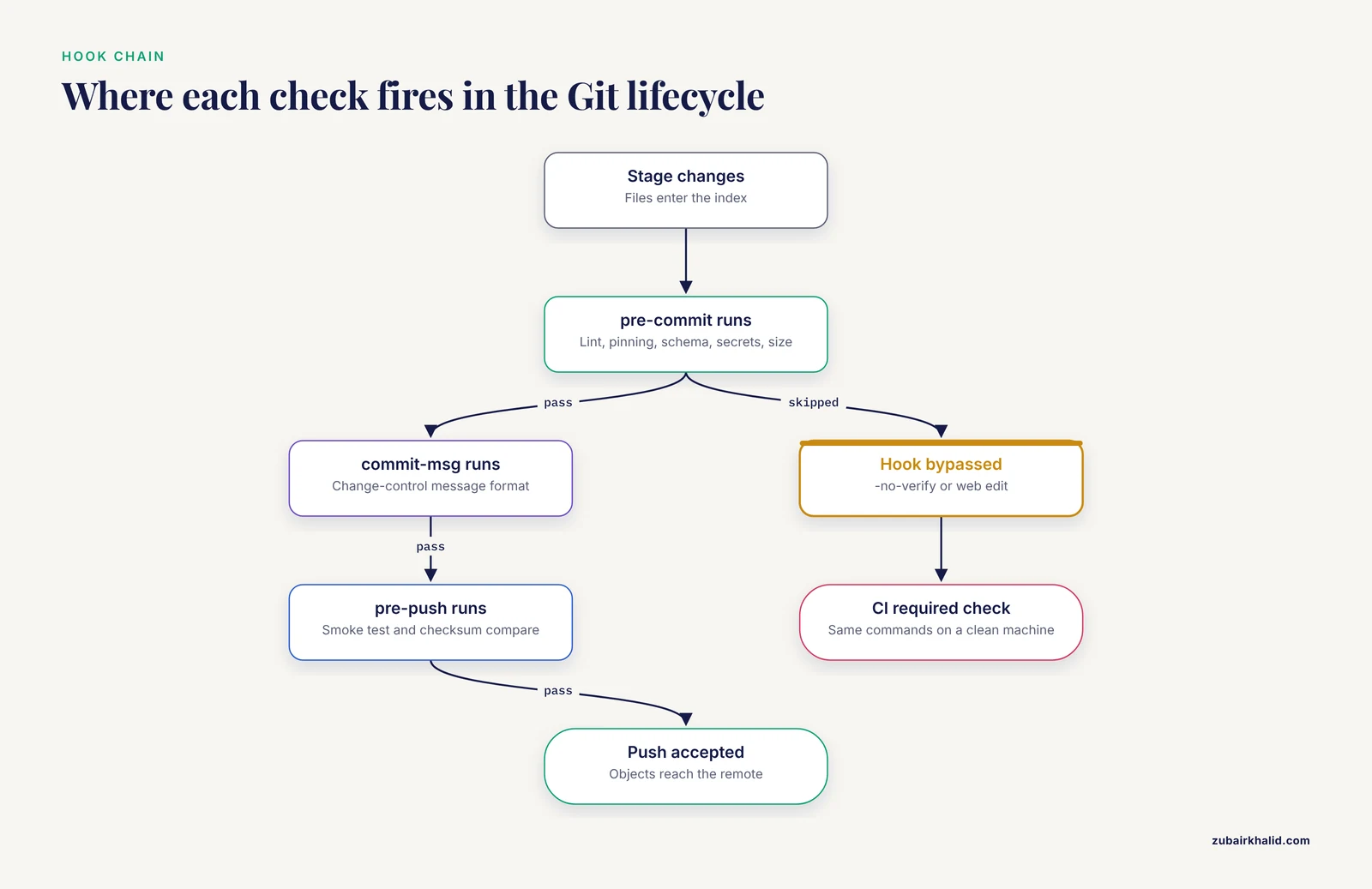
A Git hook is an executable script that Git runs automatically at a fixed point in its lifecycle. Client-side hooks run on your machine during commit, push, merge, or rebase operations. Server-side hooks run on the remote when it receives a push. Hooks live in the hooks directory, .git/hooks by default, where a fresh repository ships only examples ending in .sample. Git activates a hook purely by name and executable bit: a file named pre-commit with run permission fires before every commit.
Three mechanics matter most.
First, exit codes are the interface. If a pre-commit, commit-msg, or pre-push hook exits nonzero, Git aborts the action, and the hook's stderr output is what the user sees. Post hooks (post-commit, post-merge) cannot abort anything because Git ignores their exit codes, which makes them the right place for convenience actions such as rebuilding environments.
Second, hooks receive context. The commit-msg hook gets the path to a file holding the commit message as its first argument. The pre-push hook receives lines of the form local-ref, local-sha, remote-ref, remote-sha on standard input, one per ref being pushed. pre-commit receives no arguments, so it must ask Git what is staged, meaning which changes are recorded in the index, the snapshot Git will turn into the next commit.
Third, hooks are not versioned. Nothing in .git/hooks is copied by clone, fetch, or pull, so a fresh clone starts with no active hooks at all. Since Git 2.9, the configuration key core.hooksPath redirects Git to any directory you choose, which is the standard trick for keeping hooks under version control inside the repository itself:
git config core.hooksPath .githooksAfter that command, Git ignores .git/hooks entirely and runs scripts from .githooks instead. The setting lives in the local repository config, so every person who clones the repo must run it once. That single fact causes more silent hook failures than anything else in this article.
The table below summarizes the hooks worth knowing for pipeline work.
| Hook | When Git runs it | What belongs there | Can it block the action? |
|---|---|---|---|
pre-commit | Just before a commit is recorded | Linting, schema checks, dependency pinning, secret and file size checks on staged files | Yes, nonzero exit aborts the commit |
commit-msg | After you save the commit message | Message format, change request or ticket reference | Yes |
pre-push | Before objects are uploaded | Smoke test on bundled data, checksum regression | Yes |
post-merge | After a pull merges | Rebuild conda environments, pull containers | No, exit code ignored |
pre-rebase | Before a rebase starts | Warn when rebasing away from a validated tag | Yes |
pre-receive (server side) | When the remote accepts a push | Policy enforcement for every user | Yes, rejects the push |
What to Validate at Each Hook
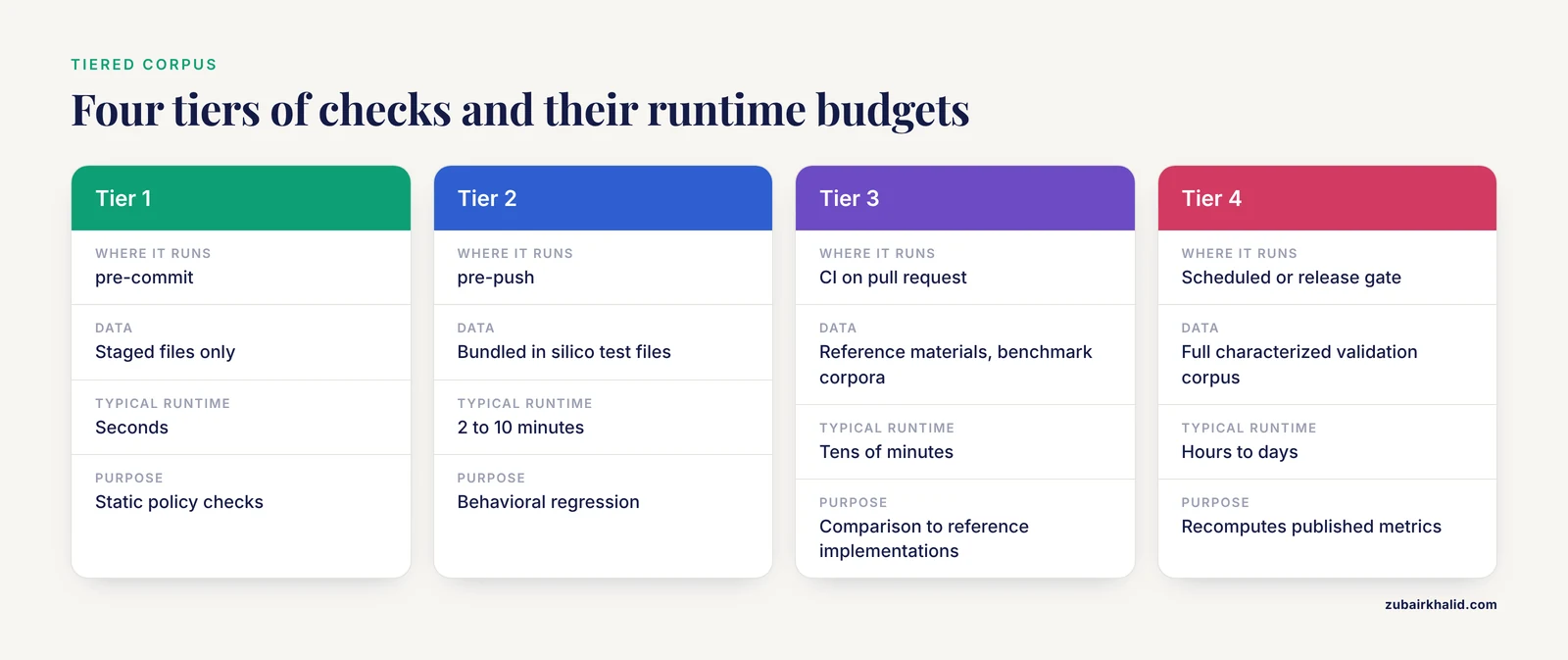
The design principle is a tiered corpus. Fast deterministic checks run constantly, expensive evidence runs rarely, and each tier uses data sized for its runtime budget.
Tier 1, pre-commit, inspects only the staged files. Static checks dominate: lint shell and Python, validate YAML and samplesheet schemas, confirm container images and conda packages are pinned to exact versions, block files over a size threshold, and scan for private keys. None of this executes the pipeline, so it belongs where it runs dozens of times a day.
Tier 2, pre-push, runs the pipeline itself on bundled test data and compares outputs against recorded checksums. A smoke test is a minimal end-to-end run whose only job is to prove the pipeline still executes and still produces recognizable results. The data should be small and known by construction. The AMP, Pathology Informatics, and CAP recommendations describe exactly this kind of in silico asset for clinical laboratories [6], and for metagenomics, MeStanG generates Nanopore datasets with a specified number of reads per organism from reference sequences and error profiles, so the expected sample composition is known in advance [7].
Tier 3, continuous integration on a pull request, runs reference materials and comparative benchmarks. ClinBioNGS, a fully containerized Nextflow pipeline for somatic NGS panels, was validated against SEQC2 reference datasets across six commercial panels and benchmarked on 2,024 clinical tumor samples [8]. IS-Seq validated its integration site abundance estimates against INSPIIRED, the most widely used published workflow in that field [9]. These runs take tens of minutes to hours and belong on CI infrastructure, not on a laptop.
Tier 4, scheduled or release-gated runs, re-executes the full validation corpus and recomputes the published metric set: the 131-isolate STEC panel [1], the 45 known-variant samples of the genetic disorder pipeline [4], or the three control datasets containing four laboratory strains at defined mixing ratios used to validate PHARE for Plasmodium falciparum compositional profiling [10]. A hook never runs tier 4. A hook's job is to make sure that when tier 4 runs, the pipeline it measures is the pipeline you think it is.
| Tier | Where it runs | Data | Typical runtime | Purpose |
|---|---|---|---|---|
| 1 | pre-commit | Staged files only | Seconds | Static policy: lint, pinning, schema, secrets, size |
| 2 | pre-push | Bundled in silico or synthetic test files | 2 to 10 minutes | Behavioral regression against known outputs |
| 3 | CI on pull request | Reference materials, benchmark corpora | Tens of minutes | Comparison against reference implementations |
| 4 | Scheduled or release gate | Full characterized validation corpus | Hours to days | Recomputes the published performance metrics |
Step-by-Step: Building a Validation Hook Chain
The walkthrough uses a small Nextflow-style repository, but every step works identically for Snakemake, CWL, WDL, or plain scripts. Run the commands at the repository root.
Step 1: Inspect the hooks directory
ls .git/hooks
head -20 .git/hooks/pre-commit.sample
Expected output:
applypatch-msg.sample     post-update.sample        pre-rebase.sample
commit-msg.sample         pre-applypatch.sample     pre-receive.sample
fsmonitor-watchman.sample pre-commit.sample         prepare-commit-msg.sample
post-checkout.sample      pre-merge-commit.sample   push-to-checkout.sample
post-merge.sample         pre-push.sample           update.sample
Every file ends in .sample, which means no hook is active. Git ships these as documentation, and pre-commit.sample is a runnable skeleton that shows the basic pattern of scanning staged content for leftover merge conflict markers.
Step 2: Create a versioned hooks directory and point Git at it
mkdir -p .githooks
git config core.hooksPath .githooks
git config core.hooksPath
Expected output:
.githooksThe core.hooksPath value can be absolute or relative to the top of the working tree. From now on, Git looks for hooks in .githooks and ignores .git/hooks. Add this command to your README or setup script, because a fresh clone does not inherit it.
Step 3: Write the pre-commit hook
Create .githooks/pre-commit:
#!/usr/bin/env bash
# Fast static checks on staged files. Budget: under 30 seconds.
set -euo pipefail

fail=0

# Everything staged that is Added, Copied, Modified, or Renamed.
# Excluding Deleted matters, otherwise linting a removed path crashes the loop.
staged=$(git diff --cached --name-only --diff-filter=ACMR)

# 1. Lint staged shell scripts
while IFS= read -r path
do
  if [[ "$path" == *.sh && -f "$path" ]]
  then
    if ! shellcheck "$path"
    then
      fail=1
    fi
  fi
done <<< "$staged"

# 2. Reject floating container or conda versions in staged workflow files
if grep -qE '(containers?\.ya?ml|nextflow\.config|envs/.*\.ya?ml)$' <<< "$staged"
then
  if git diff --cached | grep -E '^\+' | grep -E '(conda:|docker:|singularity:|container:)' | grep -E '(:latest|:\*|\$\{)'
  then
    echo "ERROR: staged change adds an unpinned container or conda dependency" >&2
    echo "       pin an exact version tag or digest, then restage and commit" >&2
    fail=1
  fi
fi

# 3. Block accidental large files, the classic FASTQ-in-git mistake
while IFS= read -r path
do
  if [[ -f "$path" ]]
  then
    size=$(stat -c%s "$path" 2>/dev/null || stat -f%z "$path")
    if [[ "$size" -gt 10000000 ]]
    then
      echo "ERROR: $path is larger than 10 MB, store it in object storage or LFS" >&2
      fail=1
    fi
  fi
done <<< "$staged"

if [[ "$fail" -ne 0 ]]
then
  echo "pre-commit: checks failed, commit aborted" >&2
fi

exit "$fail"
Parameters that matter here:
set -euo pipefailmakes the script exit on the first failing command (-e), treats unset variables as errors (-u), and treats a failure anywhere in a pipeline as a pipeline failure (-o pipefail). Withoutpipefail, agrepthat finds nothing mid-pipeline would be masked by a later command succeeding.-diff-filter=ACMRselects Added, Copied, Modified, and Renamed paths and drops Deleted ones, which prevents the lint loop from touching paths that no longer exist.- The 10,000,000 byte (10 MB) size threshold is a team policy choice, not a Git rule. Tune it to your repository.
- Pinning to an exact tag or a digest (a content-addressed
sha256:identifier of the image) is what keeps a containerized workflow identical between the validated run and today's run.
Make it executable and check the syntax:
chmod +x .githooks/pre-commit
bash -n .githooks/pre-commit
bash -n parses the script without running it and prints nothing when the syntax is clean. Silence here is success.
Step 4: Write the commit-msg hook
Change control starts with messages a human can audit months later. This hook enforces a conventional format and reserves a type for reference data changes:
#!/usr/bin/env bash
# .githooks/commit-msg: enforce a change-control message format
msg_file="$1"

if ! grep -qE '^(feat|fix|data|docs|refactor|test|chore)(\([a-z0-9._-]+\))?!?: .{10,}' "$msg_file"
then
  echo "commit-msg: message rejected" >&2
  echo "  expected format: type(scope): description of at least 10 characters" >&2
  echo "  allowed types: feat, fix, data, docs, refactor, test, chore" >&2
  echo "  use data(...) for reference or database updates, those require revalidation" >&2
  exit 1
fi
The hook's single argument, $1, is the path to a temporary file containing the message. The data(...) type is a lab convention worth adopting: when the change is a database or reference update, the commit itself announces that the validated state may have shifted.
chmod +x .githooks/commit-msgStep 5: Write the pre-push smoke test
This is the hook that actually runs the pipeline. Bundle a tiny test dataset and record output checksums (a checksum is a fixed-length fingerprint of a file, and sha256 is the standard choice):
mkdir -p test_data/expected
# generate checksums once, from a known-good run
cd test_data/expected
sha256sum variants.vcf.gz multiqc_report.html > checksums.sha256
cd ../..
cat test_data/expected/checksums.sha256
Expected output (your values will differ):
9f86d081884c7d659a2feaa0c55ad015a3bf4f1b2b0b822cd15d6c15b0f00a08  variants.vcf.gz
2c26b46b68ffc68ff99b453c1d30413413422d706483bfa0f98a5e886266e7ae  multiqc_report.html
Then create .githooks/pre-push:
#!/usr/bin/env bash
# .githooks/pre-push: run the pipeline on bundled test data before every push
set -euo pipefail

echo "pre-push: running smoke test on bundled test data"

nextflow run . -profile test -resume -ansi-log false

(cd test_data/expected && sha256sum -c checksums.sha256)

echo "pre-push: smoke test passed"
Parameters that matter:
-profile testselects the test configuration, the standard nf-core convention that points the pipeline at bundled minimal data instead of real runs.-resumecaches process outputs so repeated pushes take seconds instead of minutes.-ansi-log falsedisables the animated terminal output, which keeps the log readable when the hook output is captured to a file.sha256sum -creads the checksum file and verifies each entry, exiting nonzero on any mismatch.
A successful push now looks like this:
pre-push: running smoke test on bundled test data
N E X T F L O W  ~  version 24.04.0
Launching `./main.nf` [soggy_curie] DSL2 - revision: 1a2b3c4d5e
executor >  local (3)
[b3/8a1e2c] process > VALIDATE_SAMPLESHEET (1) [100%]
[d1/9f0a11] process > RUN_FASTQC           (1) [100%]
[e5/2b7d44] process > COLLECT_REPORTS      (1) [100%]
Pipeline executed successfully
test_data/expected/variants.vcf.gz: OK
test_data/expected/multiqc_report.html: OK
pre-push: smoke test passed
The launch name (soggy_curie) and the version line vary with your Nextflow install. The rest is the shape to expect. If a checksum fails, the hook prints the real sha256sum warning and the push dies:
test_data/expected/variants.vcf.gz: FAILED
sha256sum: WARNING: 1 computed checksum did NOT match
error: failed to push some refs to 'github.com/your-lab/pipeline.git'
That warning is the entire point of the hook. Something changed an output, and the change cannot reach the remote until someone explains it.
An optional post-merge hook keeps environments honest after pulls:
#!/usr/bin/env bash
# .githooks/post-merge: refresh the conda environment after pulling changes
conda env update --file environment.yml --prune
Step 6: Trigger a deliberate failure and confirm the gate holds
Verification matters as much as construction. Stage a violation on purpose:
echo "  - fastqc:latest" >> containers.yaml
git add containers.yaml
git commit -m "feat: add fastqc container"
Expected output:
ERROR: staged change adds an unpinned container or conda dependency
       pin an exact version tag or digest, then restage and commit
pre-commit: checks failed, commit aborted
Confirm the commit did not happen and the change is still staged:
git statusOn branch main
Changes to be committed:
modified: containers.yamlFix the pin to an exact version, restage, and the commit goes through. This five-minute exercise is also how you re-verify hooks after any Git upgrade or machine change.
Step 7: Adopt the pre-commit framework for the file-level checks
Hand-rolled hooks are transparent, but the pre-commit framework adds a curated hook library, per-file filtering, and automatic management of the hook entry point:
python -m pip install pre-commit
pre-commit install
Expected output:
pre-commit installed at .githooks/pre-commitThe framework respects core.hooksPath, so with the setting from Step 2 it installed its runner into .githooks, which would overwrite your hand-written pre-commit. The clean pattern is to let the framework own pre-commit and keep commit-msg and pre-push as raw scripts, which coexist without conflict. Configure the framework in .pre-commit-config.yaml:
repos:
  - repo: https://github.com/pre-commit/pre-commit-hooks
    rev: v4.6.0
    hooks:
      - id: check-yaml
      - id: end-of-file-fixer
      - id: trailing-whitespace
      - id: detect-private-key
      - id: check-added-large-files
  - repo: local
    hooks:
      - id: samplesheet-schema
        name: samplesheet passes schema validation
        entry: python scripts/validate_samplesheet.py
        language: system
        files: 'samplesheet.*\.(csv|tsv|yaml|yml)$'
Config keys that matter:
revpins the version of the remote hook repository, the same pinning discipline you apply to containers. Runpre-commit autoupdateperiodically to raise it deliberately.filesis a regular expression selecting which staged paths trigger the hook.language: systemrunsentrywith whatever is on PATH, which is fast but couples the check to the local environment. Use it for scripts you control.check-added-large-filesblocks new files over its default threshold of 500 kB, and accepts an argument to raise the threshold if your bundled test data is larger.
A samplesheet is the table mapping sample identifiers to input files, and it is the most common hand-edited file in any sequencing pipeline. A validator at scripts/validate_samplesheet.py can be as simple as required columns plus extension checks:
#!/usr/bin/env python3
"""Exit 0 if every samplesheet argument has the required columns and FASTQ paths."""
import csv
import sys
from pathlib import Path

REQUIRED = {"sample", "fastq_1", "fastq_2"}
FASTQ_SUFFIXES = (".fastq.gz", ".fq.gz", ".fastq", ".fq")

def main(paths):
    problems = []
    for raw in paths:
        sheet = Path(raw)
        delimiter = "\t" if sheet.suffix == ".tsv" else ","
        with sheet.open(newline="", encoding="utf-8") as handle:
            rows = list(csv.DictReader(handle, delimiter=delimiter))
        if not rows:
            problems.append(f"{sheet}: no data rows")
            continue
        missing = REQUIRED - rows.keys()
        if missing:
            problems.append(f"{sheet}: missing columns {sorted(missing)}")
        for number, row in enumerate(rows, start=2):
            for column in ("fastq_1", "fastq_2"):
                value = (row.get(column) or "").strip()
                if value and not value.lower().endswith(FASTQ_SUFFIXES):
                    problems.append(f"{sheet} line {number}: {column}={value} is not a FASTQ path")
    for problem in problems:
        print(f"samplesheet-schema: {problem}", file=sys.stderr)
    return 1 if problems else 0

if __name__ == "__main__":
    sys.exit(main(sys.argv[1:]))
Run everything across the whole repository to prove the configuration:
pre-commit run --all-filesExpected output:
check-yaml............................................................Passed
end-of-file-fixer.....................................................Passed
trailing-whitespace...................................................Passed
detect-private-key....................................................Passed
check-added-large-files...............................................Passed
samplesheet-schema....................................................Passed
Running the Same Checks on GitHub
Client hooks only ever run on machines where someone cloned the repository and ran the setup. GitHub for researchers adds the server-side layer that makes the policy real: protected branches, required status checks, and GitHub Actions.
The parity principle is simple: every check a hook can run, CI must also run, using the same commands and the same test data. A minimal workflow:
# .github/workflows/pipeline-tests.yml
name: pipeline-tests
on: [pull_request]
jobs:
  checks:
    runs-on: ubuntu-latest
    steps:
      - uses: actions/checkout@v4
      - uses: actions/setup-java@v4
        with:
          distribution: temurin
          java-version: "17"
      - uses: actions/setup-python@v5
        with:
          python-version: "3.12"
      - run: pip install pre-commit shellcheck-py
      - run: pre-commit run --all-files
      - run: curl -s https://get.nextflow.io | bash
      - run: ./nextflow run . -profile test
Mark this workflow a required status check for your main branch in the repository settings under branch rules. After that, a commit that arrived with -no-verify still cannot be merged until the same checks pass on a clean machine. That closes the biggest hole in client-side enforcement.
On self-managed infrastructure, the equivalent control is a pre-receive hook, which GitHub Enterprise Server supports and which GitLab exposes as server hooks. On github.com itself, custom server hooks are not available to regular repositories, so required status checks are the mechanism to use.
One more GitHub-side habit pairs well with hooks: tag the validated state. When a validation run completes against a commit, cut an annotated tag:
git tag -a v1.3.0-validated -m "Validation corpus passed, see VALIDATION.md"
git push origin v1.3.0-validated
The tag plus the commit history is the change-control record that quality-system audits trace, mapping each pipeline version to the evidence that supports it [5].
Common Mistakes and Limitations
The hook is not executable, so it never runs. Git skips a hook silently when it lacks the executable bit, though recent Git versions print a hint: hint: The '.githooks/pre-commit' hook was ignored because it's not set as executable. Fix with chmod +x and verify with ls -l .githooks that the rwx bits are present.
Windows line endings break the shebang. A hook edited on Windows and saved with CRLF endings fails with bash: .githooks/pre-commit: /bin/bash^M: bad interpreter: No such file or directory. The ^M is the carriage return. Fix the file with dos2unix and prevent recurrence with a .gitattributes line: *.sh text eol=lf.
A fresh clone has no hooks and no warning. core.hooksPath lives in local config, which clone does not copy, so teammates get a repository that looks fully set up and silently runs zero checks. Put git config core.hooksPath .githooks and pre-commit install in the setup documentation or a bootstrap script, and have CI fail when the hooks directory is missing or non-executable.
The hook checks the working tree, not the commit. A raw pre-commit hook that lints files on disk is checking content that can differ from what is staged: edit a file, stage only half of it, and the hook sees the whole file while the commit records half. For strict correctness, inspect staged content with git diff, cached, or use the pre-commit framework, which handles staged content for you.
Hooks get bypassed. git commit, no-verify and git push, no-verify skip client hooks entirely, and edits made through the GitHub web interface never trigger them. Client hooks are a convenience layer. The enforceable layer is server-side: protected branches with required status checks, or pre-receive hooks on platforms that support them.
Slow hooks get disabled. If pre-commit takes five minutes, someone on the team will bypass it or delete it. Keep pre-commit under roughly 30 seconds, put the pipeline smoke test in pre-push where it runs once per push, and keep multi-hour corpora in CI.
Deleted and renamed files crash naive loops. git diff, cached, name-only includes deleted paths, and running a linter on a path that no longer exists fails with No such file or directory. Filter with -diff-filter=ACMR or test for existence before invoking a tool.
Hooks pass locally and fail in CI. A hook that depends on whatever conda environment happens to be active is checking a different pipeline than CI is checking. Run both through the same pinned environment or container definition, which is also the reproducibility argument for fully containerized workflows such as ClinBioNGS [8].
And the honest limitation. Hooks verify the checks you thought to write, on the data you thought to bundle. They cannot detect a performance regression that only appears on real biological diversity, which is why the literature validates on characterized corpora of real isolates [1] and known-variant samples [4] rather than on bundled test files. Hook-based checks complement that evidence, they never substitute for it, and any clinical or diagnostic deployment needs formal validation by the laboratory that runs it.
Practical Tips That Keep Hooks Alive
- Budget by lifecycle point. Seconds for
pre-commit, minutes forpre-push, hours for CI, days for the validation corpus. If a check does not fit its budget, move it up a tier. - Make smoke test data synthetic or in silico. Test files built from simulated reads or inserted variants [6] and synthetic communities with known organism composition [7] are small, deterministic, and free of patient privacy constraints.
- Version the reference data, not just the code. Record database names, versions, and checksums in a tracked file, and use the
data(...)commit type so reference updates announce themselves and can trigger revalidation. - Tag validated releases and keep a
VALIDATION.mdthat maps each tag to its corpus and metric summary. Quality-system accreditation, such as the ISO accreditation achieved by the tuberculosis AMR pipeline [5], depends on tracing any reported result back to a pipeline version and its validation evidence. - Log hook failures. Append
pre-pushfailures to a file or CI artifact so recurring flakiness is visible instead of anecdotal. - Run
pre-commit run, all-filesbefore opening a pull request. It catches the trailing whitespace and end-of-file drift that makes review diffs noisy. - Keep hooks and CI in lockstep. One source of truth for the check commands, a script in the repository called by both the hook and the workflow, prevents the works-on-my-machine gap.
Sensible next steps, in order: add the post-merge environment refresh, extend the smoke test corpus with a few in silico files at harder parameter settings, wire the tier 3 CI job, and schedule the first tier 4 revalidation run against your tagged release.
Frequently Asked Questions
Do Git hooks replace formal bioinformatics pipeline validation?
No. Hooks run fast checks at commit and push time to keep a validated pipeline from drifting, while formal validation demonstrates performance on a characterized sample corpus with defined metrics. Treat hooks as a guardrail, not as the validation evidence itself.
What is the difference between a pre-commit hook and CI?
A pre-commit hook runs on the committer's machine in a few seconds and blocks the commit locally, while CI runs after the push on a clean server. Use hooks for instant feedback and CI as the authoritative, non-bypassable gate.
How do I share hooks with everyone in my lab?
Store them in a versioned directory such as .githooks and have every user run git config core.hooksPath .githooks once, or use the pre-commit framework and document pip install pre-commit plus pre-commit install in your setup instructions.
Can a developer bypass the hooks?
Yes, git commit, no-verify and git push, no-verify skip client hooks, which is why protected branches with required status checks should re-run the same checks on the server.
Do Git hooks work on Windows?
Yes, but hook scripts need executable permissions and Unix line endings, and the shebang must point to an interpreter that exists, so most Windows teams run hooks under WSL or Git Bash and add a .gitattributes rule forcing LF endings for scripts.
How big should the test data in a pre-push hook be?
Keep it small enough to finish in a few minutes, typically a handful of tiny synthetic or in silico modified files with known expected outputs, and save the full validation corpus for scheduled CI runs.
Do hooks run for edits made directly on GitHub.com?
No, client-side hooks only run on a machine with the repository checked out, so web edits skip them entirely, and protected branches with required status checks are the only reliable control for that path.
Which hook should run the pipeline smoke test?
The pre-push hook is the usual choice because it runs the few minutes before code leaves your machine, while teams that prefer faster commits move the smoke test to a pull-request CI job instead.
Sources
- Validation strategy of a bioinformatics whole genome sequencing workflow for Shiga toxin-producing Escherichia coli using a reference collection extensively characterized with conventional methods
- Validation of a Bioinformatics Workflow for Routine Analysis of Whole-Genome Sequencing Data and Related Challenges for Pathogen Typing in a European National Reference Center: Neisseria meningitidis as a Proof-of-Concept
- Validation of a Customized Bioinformatics Pipeline for a Clinical Next-Generation Sequencing Test Targeting Solid Tumor-Associated Variants.
- Test development, optimization and validation of a WGS pipeline for genetic disorders
- Bringing tuberculosis genomics to the clinic: development and validation of a comprehensive pipeline to predict antimicrobial susceptibility from genomic data, accredited to ISO standards.
- Recommendations for the Use of In silico Approaches for Next Generation Sequencing Bioinformatic Pipeline Validation: A Joint Report of the Association for Molecular Pathology, Association for Pathology Informatics, and College of American Pathologists.
- MeStanG-Resource for High-Throughput Sequencing Standard Data Sets Generation for Bioinformatic Methods Evaluation and Validation
- ClinBioNGS: A Clinical Bioinformatics Pipeline for Integrated Analysis of Somatic Next-Generation Sequencing Cancer Panels.
- IS-Seq: a bioinformatics pipeline for integration sites analysis with comprehensive abundance quantification methods
- PHARE: a bioinformatics pipeline for compositional profiling of multiclonal Plasmodium falciparum infections from long-read Nanopore sequencing data