Git for Manuscript Writing: A Comparison of Workflows
By Dr. Zubair Khalid, DVM, MS, PhD ·
The one decision that separates every Git workflow for manuscript writing is this: whether your manuscript lives as a plain-text file that Git can compare line by line, or as a binary word-processor file that Git can only snapshot as a whole. Plain-text manuscripts (Markdown, LaTeX, Quarto, R Markdown) unlock Git's full review and merge machinery. Word processor files still benefit from Git's history and backup, but they cannot be merged or diffed at the sentence level. The rule of thumb: if you or your coauthors are willing to write in plain text, adopt a hosted repository with branch-based review. If the team is committed to Microsoft Word, use Git as a versioned archive and let a separate tool handle comments and track changes.
This guide walks through the main git for manuscript writing options, compares them on the criteria that actually decide real projects, and gives worked scenarios for common team shapes. It assumes no prior Git experience and defines every term on first use.
Why Scientists Put Manuscripts Under Version Control at All
Version control is a system that records every saved state of your files so you can recall any earlier version later. Git is the most widely used version control system in research computing, and it is the same tool that underpins most modern software development. A repository (usually shortened to repo) is the folder Git watches, along with the hidden history of every change inside it.
Reproducibility, the ability of another person (or you, six months later) to rerun an analysis and obtain the same results, does not stop at the analysis code. A reproducible project also needs a reproducible manuscript, meaning the final PDF should be regenerable from the data, the analysis, and the text itself. Recent work on end-to-end reproducible research projects explicitly frames version control systems such as Git and document creation tools such as Quarto or R Markdown as the standard toolkit for covering the full path from analysis to finished manuscript [1]. Git for scientists is therefore not a niche habit. It is the mechanism that ties the paper to the code that produced it.
Version control solves four recurring manuscript problems:
- Lost history. Files named
draft_v3_FINAL_reviews_JB.docxstop being necessary. Every prior state is one command away. - Simultaneous editing. Two authors editing the same document produce conflicts in shared drives and silent overwrites in email attachments. Git makes both edits survive and forces a human decision where they genuinely collide.
- Review provenance. You can show exactly which change was requested by whom, when, and why it was accepted or rejected.
- A single home for text, code, and figures. The manuscript, the analysis scripts, and the generated figures live in one versioned place, which is the structural precondition for a reproducible paper [1].
The tradeoffs are real and appear throughout this article: Git has a learning curve, it works best with plain text, and it requires that at least one person on the team maintains the repository.
Git for Manuscript Writing: The Four Main Options
There are four workflows that cover nearly every real situation. They differ in who writes, how feedback arrives, and whether the manuscript regenerates from code.
Before defining them, a few terms. A commit is a saved snapshot of the repository with a message describing what changed. A remote is a second copy of the repository on another machine, typically a hosting service, used for backup and collaboration. A branch is a parallel line of development inside the repository. A pull request is a proposal, hosted on a platform like GitHub, to merge one branch into another, displayed with all its line-by-line changes open for comment.
Option 1: Local-Only Git With a Single Writer
The minimal workflow. You run Git inside your manuscript folder and never leave your laptop.
cd my-paper/
git init
git add methods.md
git commit -m "First draft of methods"
After that, the writing rhythm is the same two commands repeated for months:
git add .
git commit -m "Rewrote introduction after advisor feedback"
To see what changed between any two snapshots:
git diff HEAD~1 HEADHEAD means the most recent commit, so this command shows the difference between the current state and the one before it. To discard unsaved experimental edits to a file and return to the last commit:
git restore draft.mdThere is no remote, no branches beyond the default one, and no review machinery. You get infinite undo and a clean audit trail, nothing more. This is the correct first step for anyone learning Git, and a permanent solution only for solo projects with no external review.
Option 2: A Hosted Remote With One Writer
The next step up adds a remote on a hosting service so the repository is backed up off your laptop and visible to others. GitHub is the hosting service most researchers encounter first, and it is free for public and private repositories at the scale any manuscript requires. GitLab and institutional self-hosted servers (common at universities with data governance requirements) work identically for this purpose. When people discuss GitHub for researchers, this is usually the baseline they mean: a private repository per paper, one writer, everything pushed after each writing session.
git remote add origin https://github.com/yourname/my-paper.git
git push -u origin main
From then on, git push uploads your commits and git pull downloads anything new. On the platform's web interface, every commit shows a colored diff (a line-by-line comparison, deletions in red, additions in green), which turns out to be an excellent way for a PI to see what a student actually changed this week. Issues, the platform's built-in discussion threads, let coauthors file feedback as trackable to-do items without touching the document.
The manuscript here should already be plain text, because the value of the hosted diff depends on it. The writer merges feedback manually and commits the result.
Option 3: Branch and Pull Request Review
This is the workflow that makes Git behave like track changes with better provenance. Each reviewer works on a branch (a parallel copy of the document), edits freely, and opens a pull request to propose merging their edits back into the main version. Every suggested change appears as a line-level diff that other collaborators can comment on, approve, or request revisions on. When the discussion settles, one click merges the branch, and the full conversation is preserved alongside the change forever.
A coauthor would run:
git clone https://github.com/yourname/my-paper.git
git switch -c jb-revises-discussion
They edit discussion.md, commit, push, and open a pull request titled "JB: tightening discussion, addressing reviewer 2". You comment on individual lines, they push follow-up commits to the same branch, and the merged result enters main (the default branch, the one that represents the canonical current manuscript).
This workflow depends entirely on plain text. Two people editing the same paragraph of a Markdown or LaTeX file produce a small, readable conflict that Git flags and a human resolves in seconds. Two people editing the same paragraph of a .docx produce a binary conflict that Git cannot resolve at all, because Git cannot see inside the file. That single fact drives most of the workflow comparison below.
Option 4: A Reproducible Template Pipeline
The most complete option treats the manuscript not as a file you decorate but as an output you generate. The text is written in a plain-text format (Markdown-based Quarto or R Markdown, or LaTeX), the analysis is code in the same repository, and a build step renders the final document, inserting numbers, tables, and figures directly from the analysis output. Reproducibility work has emphasized exactly this combination, pairing Git with Quarto or R Markdown so that manuscript creation is itself reproducible, and wrapping the whole project in a containerized framework so the software environment is fixed as well [1]. A container is a portable, self-contained package of software and dependencies that runs identically on any machine, which removes the classic "it worked on my laptop" failure. Published project templates now provide this entire structure, from analysis to rendered manuscript, ready to use without customization [1].
A minimal loop, without a full template, looks like this in R Markdown:
analysis.Rcomputes results and writes them toresults.tsvandfigure1.pdf.manuscript.Rmdcontains the prose plus inline code that reads those numbers.- One render command rebuilds the PDF with every number current.
rmarkdown::render("manuscript.Rmd")When the underlying data change, you do not hunt for stale numbers in the text. You rerun the analysis, rerender the document, and the paper updates itself.
This option also accommodates Word-loving coauthors more gracefully than the others, because Quarto and R Markdown can render their output to a .docx file for review while the canonical source stays in plain text in the repository.
Side-by-Side Comparison
| Criterion | Option 1: Local only | Option 2: Hosted remote | Option 3: Branch and pull request | Option 4: Reproducible template |
|---|---|---|---|---|
| Typical team size | 1 writer | 1 writer, several readers | 2 to 10 writers and reviewers | 1 to 5, at least one comfortable with code |
| Document format | Any, plain text strongly preferred | Plain text required for useful diffs | Plain text effectively required | Plain text by design (Quarto, R Markdown, LaTeX) |
| Review mechanism | None | Comments on commits, platform issues | Line-level pull request comments and approval | Pull request review, plus regenerated document as the shared artifact |
| Line-level merging of edits | No | No (writer merges manually) | Yes, for plain text | Yes, for plain text |
| Reproducibility of the paper | Low | Low to moderate | Moderate | Highest, analysis and manuscript regenerate together [1] |
| Backup off the laptop | No | Yes | Yes | Yes |
| Learning curve for coauthors | Low | Low | Moderate (branching concepts) | Highest (plain text plus build tools, eased by ready-made templates [1]) |
| Works with Word-only coauthors | Partially | Partially | Poorly | Yes, via rendered .docx output |
| Typical failure mode | Laptop loss loses nothing but history stays local | Feedback scattered outside the repo | Confusion when branches pile up unmerged | Setup effort before any writing starts |
| Best fit | Solo writing, first exposure to Git | Solo writer with advising PI | Collaborative paper with engaged coauthors | Data-driven paper where numbers must never go stale |
One further variant deserves mention. Overleaf, the popular online LaTeX editor, exposes a Git remote for its projects, which lets you keep a LaTeX manuscript on Overleaf while treating it as a normal Git remote from your own machine. The same caution applies: the workflow is only as good as the plain-text source beneath it.
Pros and Cons of Each Workflow
Local-only Git
Pros. Near-zero setup, no account needed, nothing leaves your machine, which suits unpublished or restricted material. It teaches commit, diff, and restore without collaboration overhead.
Cons. No backup, no review, no concurrency. If the laptop dies, the history dies with it unless you copy the folder elsewhere.
Hosted remote with one writer
Pros. Automatic off-site backup on every push. A permanent, browsable record of who changed what and when. Issues give feedback a home that survives the writing process. Private repositories keep unpublished work unseen. This is the best git for manuscript writing starting point for a graduate student with a hands-on advisor.
Cons. Only one person edits, so all feedback arrives as issues or comments and someone must transcribe it into the document. Diffs are only meaningful for plain text.
Branch and pull request review
Pros. Genuine parallel writing with structured review. Comments attach to specific lines and persist. Merged pull requests give an auditable record of editorial decisions, which is invaluable when a coauthor later asks "who removed this sentence and why". This is the closest Git gets to replacing track changes, and for plain-text documents it is stronger, because changes are proposed, discussed, and accepted as discrete reviewable units.
Cons. Every coauthor needs working Git fluency or a patient integrator. Binary files cause unresolvable conflicts. Branches left open for weeks accumulate painful merge debt.
Reproducible template pipeline
Pros. The manuscript, analysis, figures, and software environment are one versioned unit, which is the defining requirement of end-to-end reproducible research [1]. Numbers in the text cannot drift from the analysis because they are injected at render time. Ready-made templates remove most setup work and can be adopted without customization [1]. Rendered .docx output keeps Word-based coauthors in the loop.
Cons. Writing prose in Markdown or LaTeX is a real adjustment for authors raised on word processors. Someone must maintain the build. The payoff is largest for computational papers and smallest for, say, a purely narrative ethics essay.
Which Workflow Is Best for Your Manuscript
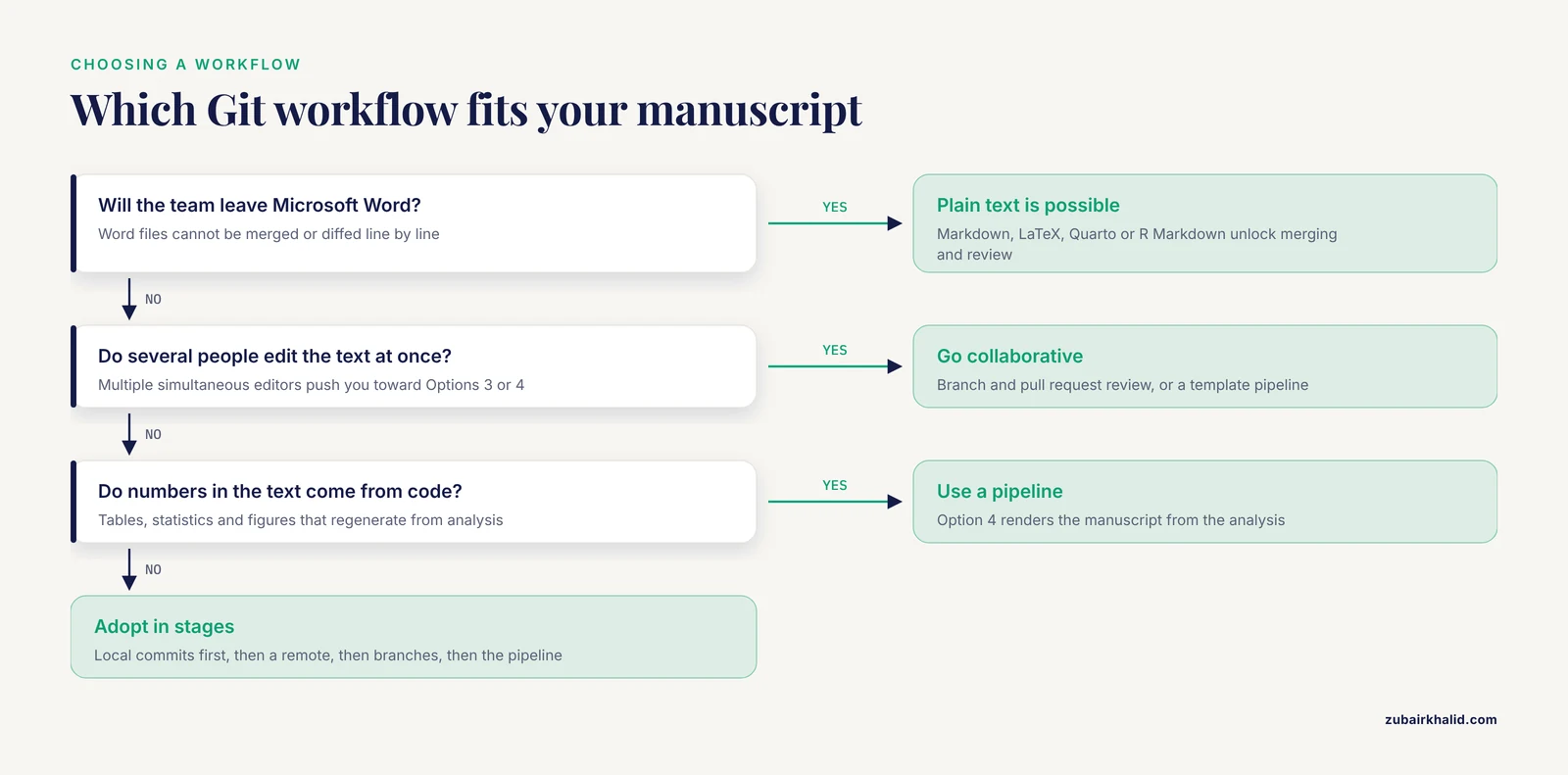
Choose on five criteria, in this order of importance.
1. Who edits the text. Multiple simultaneous editors push you toward Option 3 or 4. One writer keeps Options 1 and 2 viable.
2. What format the text is in. If the team will not leave Word, Git's merging and review superpowers are unavailable, and you should pick the lightest workflow that still gives you history, usually Option 2 with .docx snapshots. If plain text is acceptable, choose the heavier workflow. Do not run Option 3 on .docx files. It fails in the specific way everyone fears, with a conflict message and no way to merge.
3. How much the paper depends on computed numbers. The more tables, statistics, and figures come from code, the more an integrated pipeline pays off, because manuscript and analysis regenerate together [1].
4. Data sensitivity and hosting policy. Unpublished patient data, embargoed results, or collaborator-proprietary material belong only in private repositories, and some institutions require an institutionally controlled host rather than a commercial one. Check your local data governance rules before the first push, not after.
5. Coauthor skill and willingness. The best workflow on paper is the one your coauthors will actually use. A technically enthusiastic four-author team thrives on pull requests. A team with one Git user should standardize on Option 2 and route all feedback through issues.
Worked Scenarios
Scenario A: Solo analysis paper
A postdoc writes a methods-heavy paper alone. She puts analysis code, a Quarto manuscript, and figures in one repository, pushes it to a private GitHub remote, and commits after each session. Her advisor reads the rendered PDF and leaves comments in platform issues. The numbers in the text regenerate from the analysis every render, so a reviewer-requested change to the filtering criteria propagates through the tables automatically. This is Option 2 shading into Option 4, and it is the highest-value starting point for a computational scientist. The published end-to-end template literature makes exactly this combination of containerized analysis plus reproducible manuscript creation available off the shelf [1].
Scenario B: Four-author lab paper with mixed skills
Two coauthors write fluently in Markdown, one writes in Word, and the PI reads PDFs. The team adopts Option 3 with a rule: the two Markdown writers work on branches and open pull requests, the Word-oriented coauthor sends comments as numbered issues that a designated integrator transcribes into the text, and the PI reviews rendered PDFs attached to weekly merge commits. The integrator role (one person who merges, resolves conflicts, and pushes rendered drafts) is the practical glue for mixed-skill teams. It concentrates Git expertise in one person and keeps everyone else inside their comfort zone.
Scenario C: Multi-institution collaboration with Word documents
A clinical consortium writes in Word because templates, tracked changes, and institutional habits demand it. Full branch-based review is off the table. The workable compromise is Option 2 with discipline: one repository per manuscript, one integrator per site, a commit after every meaningful revision round, and descriptive commit messages such as "Methods revision per site B comments, paragraphs 2 to 4". Git then serves as the authoritative history and the tiebreaker when two versions of a .docx disagree, which for consortia is worth the modest setup on its own. Line-level merging is simply not part of the deal, and the team should rely on Word's own track changes for sentence-level review.
Common Mix-Ups
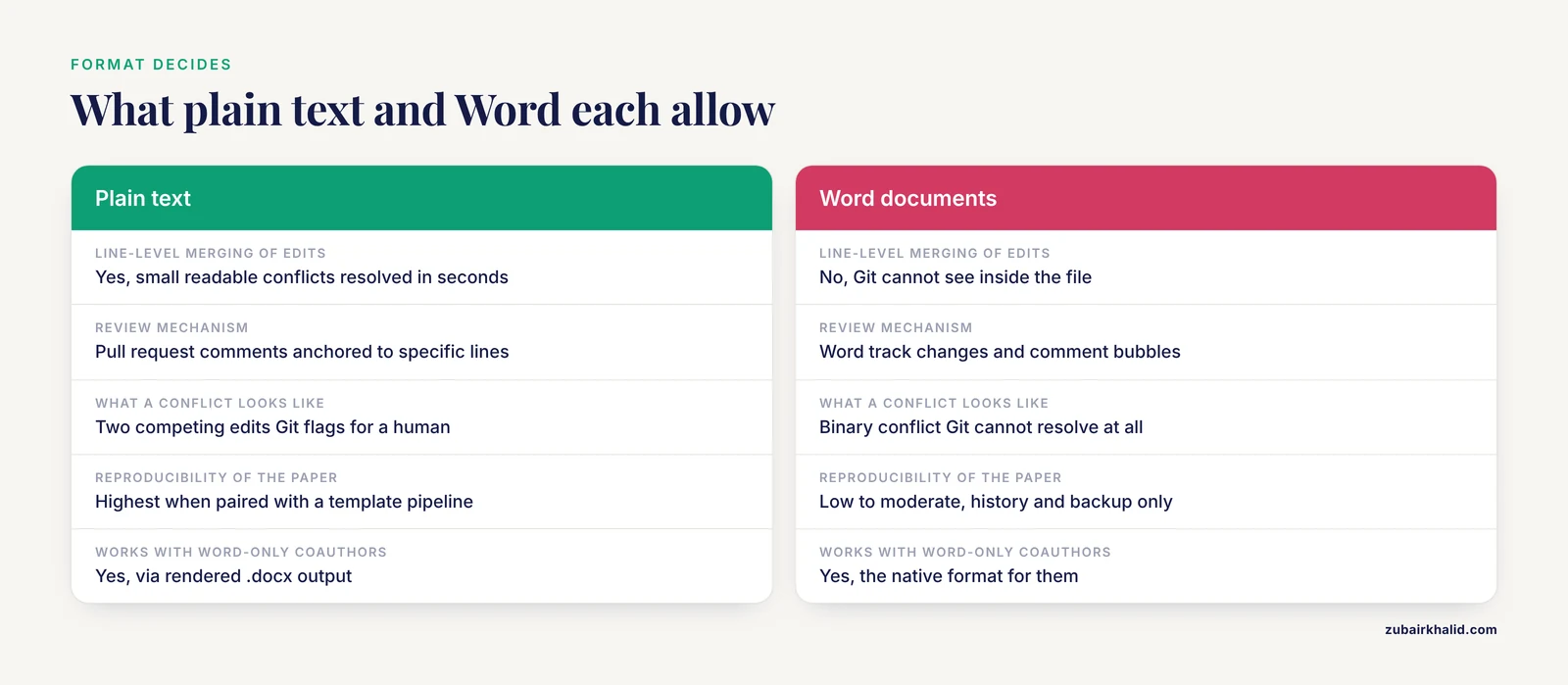
Assuming Git replaces track changes in Word. Git does not read .docx content. Track changes, comments, and suggestion mode in Word remain the sentence-level review tools for Word files. Git supplies the history around them.
Committing everything in sight. Intermediate analysis outputs, rendered PDFs, editor backup files, and especially raw data do not belong in the repository. A .gitignore file lists patterns Git should ignore:
*.log
*.aux
.Rhistory
*_files/
output/
Raw data frequently cannot be redistributed, so committing it into any hosted repository, even a private one, can violate data use agreements. Keep data outside the repo and reference it by a documented path or identifier.
Treating binary figures as text. A PDF or TIFF figure is a binary blob. Git stores each new version in full, so a repository that commits a regenerated figure every day grows quickly. Commit final or near-final figures, and let figures that regenerate from code be rebuilt by the pipeline rather than stored in every historical state.
Emailing files alongside the repository. The moment a draft travels by email attachment, the repository's history forks in practice. If the repo is the single source of truth, feedback must come back through issues, pull requests, or commits.
Rewriting shared history. Commands that modify existing commits can invalidate every collaborator's copy. On a shared manuscript repository, add new commits instead of rewriting old ones, and never force-push to a branch others are using.
Confusing a merge conflict with data loss. A conflict message means Git found two competing edits and is asking you to choose. Nothing has been deleted. Read the marked-up file, keep what should survive, and commit the resolution.
Skipping the commit message. "Update" tells you nothing in a year. "Restructure results to address reviewer 2 on power analysis" tells you everything. Commit messages are the manuscript's lab notebook.
Common Mistakes and Limitations
Underestimating the social cost. The technical part of Git is learnable in an afternoon. The part that fails projects is convention: agreeing what main means, who merges, and how feedback flows. Decide these rules in writing before the first shared commit.
Conflating version control with reproducibility. Git guarantees you can retrieve any past state of the files. It does not guarantee the analysis reruns. A reproducible manuscript additionally needs the analysis code, a documented environment, and a build step, which is why the template-based approaches pair Git with Quarto or R Markdown and containerization rather than relying on Git alone [1].
Starting too big. A team that adopts branching, pull requests, and a containerized pipeline in week one often stalls. Adopt in stages: local commits first, then a remote, then branches, then the pipeline.
Ignoring the word processor reality. Forcing Word-centric coauthors into Markdown against their will produces resistance and shadow copies in Dropbox. Meet the team where it is. A rendered .docx from a plain-text pipeline is usually a better bridge than a mandate.
Assuming hosting is neutral. A public repository discloses your work in progress, your review conversations, and possibly sensitive text. Default to private repositories for unpublished manuscripts and check institutional policy for regulated data.
One veterinary-relevant caveat, stated once. If the manuscript reports clinical cases, the same principle applies to those cases as to any individual patient, namely that clinical decisions about real animals belong with the treating veterinarian, and the repository should never contain identifiable case-level clinical records.
Finally, Git is not a reference manager, a grammar checker, or a submission system. It manages the text and its history. BibTeX keys, journal formatting, and submission portals remain separate concerns.
Frequently Asked Questions
Is Git worth learning if my coauthors only use Microsoft Word?
Yes, but aim low. Use Option 2: a private repository where Word files are committed after each revision round. You gain a permanent, dated history and a tiebreaker between conflicting versions. Do not attempt branch-based merging of .docx files, because Git cannot compare their contents. Let Word's track changes handle sentence-level review.
Which host is best for manuscript writing, GitHub, GitLab, or something else?
Any host that provides private repositories, commit diffs, and issue tracking supports the full workflow, and the choice rarely matters for a single paper. GitHub is the most common entry point for researchers because of its free private repositories and wide documentation. GitLab offers equivalent functionality, and institutionally hosted instances satisfy data governance policies that prohibit commercial services. Pick the host your institution or collaborators already trust.
Can Git fully replace track changes and comment bubbles?
For plain-text manuscripts, pull request review replaces most of what track changes does, with better history and line-anchored discussion. For Word documents, no. Git stores .docx files as opaque binary blobs and cannot show or merge sentence-level edits inside them, so track changes remains the review tool of choice in that setting.
How should I handle figures, data, and other large files in a Git repository?
Keep raw data out of the repository entirely, both for size and for legal reasons. Commit final or near-final figures, not every regenerated intermediate. Let figures produced by analysis code be rebuilt by the pipeline rather than stored in every historical version. For genuinely large binary assets that must be versioned, use a dedicated large-file extension for Git, but for a typical paper this is rarely necessary.
Do I need the command line to use Git for manuscript writing?
No. GitHub's desktop application and web editor, GitLab's interface, and the built-in Git panels in RStudio and VS Code cover commit, push, pull, branch, and pull request operations with buttons. The command line becomes valuable once you need history inspection or conflict resolution beyond the basics, but it is not a prerequisite for any of the four workflows described here.
How does a Git-based pipeline make a manuscript itself reproducible?
It places the prose in a plain-text source such as Quarto or R Markdown inside the same repository as the analysis code, so one render step rebuilds the document with numbers, tables, and figures injected directly from the analysis. Combined with a container that fixes the software environment, the finished PDF becomes regenerable from the repository rather than hand-assembled, which is the structure contemporary reproducible-project templates provide out of the box [1].
Further Reading
- Investigation into anthelmintic activity of Bambusa vulgaris: a phytochemical, in vitro and in silico evaluation against Haemonchus contortus.
- The effectiveness of generalist (GIT-PD) versus specialist treatment (MBT/ST) for severe personality disorders (Personality Disorders Access to Effective Treatment, P-DAET): study protocol of a pragmatic randomised controlled non-inferiority multicentre trial.
- Plastic, It's What's for Dinner: A Preliminary Comparison of Ingested Particles in Bottlenose Dolphins and Their Prey.
- Evaluation of Safety and Probiotic Traits from a Comprehensive Genome-Based In Silico Analysis of Ligilactobacillus salivarius P1CEA3, Isolated from Pigs and Producer of Nisin S.