How to Write Commit Messages for LaTeX Manuscripts
By Dr. Zubair Khalid, DVM, MS, PhD ·
By the end of this article you will be able to write git commit messages that make a LaTeX manuscript history readable, searchable, and auditable. You will know how to structure a subject line and body, how to credit a coauthor who edited text in the same commit, how to tie commits to reviewer comments, and how to verify that your history actually says what you think it says. You will also know the mistakes that turn a manuscript repository into a folder of commits labeled "update" and "fixes."
You need git installed (version 2.x is fine on macOS, Linux, or Windows via Git Bash or WSL), a LaTeX manuscript already under version control, and a terminal. A GitHub account is optional but useful, because coauthor attribution and issue references behave differently once a repository is on GitHub. If your manuscript is not yet in git, run git init in the project folder and make an initial commit before working through the walkthrough.
Why commit messages matter for manuscripts
A manuscript repository is a provenance record. When a reviewer questions a number, when a coauthor asks who changed a paragraph, or when you revisit a paper two years after publication, the commit history answers the question if the messages were written well. If they were not, you get a log full of entries like "changes" and "final final" that tell you nothing.
For solo projects this is an annoyance. For collaborative manuscripts it is a real coordination cost. Research on collaborative coding in large projects distinguishes macro-collaboration, where each commit is attributed to one person, from micro-collaboration, where several people contribute to the same change. That second pattern is common in science too, where a postdoc drafts a paragraph, a statistician corrects the numbers, and the principal investigator rewords the claim, often in one working session on one file. Platforms responded by supporting the Co-Authored-By: trailer in commit messages, which lets a single commit carry credit for everyone who shaped it, and large-scale analysis of commit histories now depends on those trailers to measure who actually contributed to what [1]. If you never write trailers, your repository permanently under-credits the colleagues who worked beside you.
There is a second, quieter benefit. Commit messages are the cheapest documentation you will ever write. Narrative methods researchers spend considerable effort recording stories and decisions in accessible written form precisely so that people who were not present can still use them later [2]. Your commit log serves the same function for a manuscript. The students who inherit the project after you submit did not sit in the meeting where the sample size changed. The log is what they have.
The anatomy of a manuscript commit message
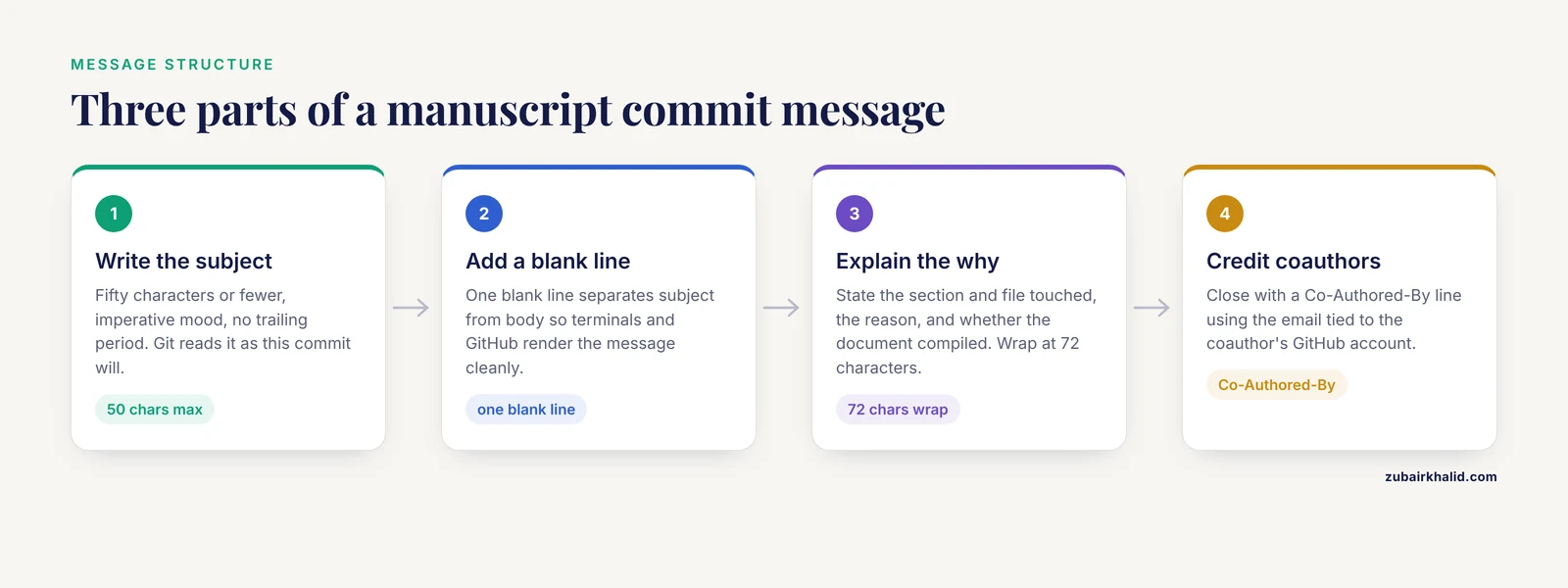
A commit message has three parts: a subject line, an optional body, and optional trailers.
Subject line. Fifty characters or fewer, in the imperative mood, with no trailing period. The imperative works because git completes the sentence "this commit will..." in its own default output. "Fix enrollment count in Methods" reads correctly as "this commit will fix enrollment count in Methods." Write it as if you are giving an order to the document.
Body. Separated from the subject by one blank line, wrapped at roughly 72 characters so it renders cleanly in terminals and on GitHub. The body answers why the change happened and what it affects. For a manuscript, the highest-value facts are the section and file touched, the reason (reviewer comment, coauthor request, data update), and whether the document compiled cleanly afterward.
Trailers. Machine-readable lines at the bottom of the message, the most useful being Co-Authored-By: Name <email>. The email must match the coauthor's git email for attribution to display correctly on GitHub.
A complete example for a typical manuscript edit:
Methods: correct enrolled cohort size to 247

The enrollment paragraph in sections/methods.tex reported 240
participants. The screening log totals 247 after the March query
resolution, so update the text and the Table 1 caption so both
match. The document compiles cleanly with pdflatex and the page
count is unchanged at 14.

Co-Authored-By: Maria Chen <[email protected]>
Every useful fact is there. A reader scanning the log learns which file changed, why, what else was touched, and that compilation was verified, without opening the diff.
Git commit messages for LaTeX manuscripts: a step-by-step walkthrough
This walkthrough covers how to write commit messages for LaTeX manuscripts from a clean working state to a pushed, verified commit.
Step 1. Confirm your identity
Git stamps every commit with a name and email. On a shared workstation or a new laptop these are often unset or wrong.
$ git config user.name
Zubair Khalid
$ git config user.email
[email protected]
If either command prints nothing, set the values for all your repositories:
$ git config --global user.name "Zubair Khalid"
$ git config --global user.email "[email protected]"
For journal submissions and GitHub for researchers generally, use an email your coauthors recognize. An institutional address keeps the authorship trail legible when someone later runs git log or git blame on a tex file.
Step 2. See exactly what changed
Before writing anything, look at the change.
$ git status
On branch main
Changes not staged for commit:
        modified:   sections/methods.tex
        modified:   sections/results.tex

Untracked files:
        figures/figure3_v2.pdf
$ git diff sections/methods.tex
diff --git a/sections/methods.tex b/sections/methods.tex
- We enrolled 240 patients between March 2021 and February 2022.
+ We enrolled 247 patients between March 2021 and February 2022.The diff is your source material. A commit message written from the diff is accurate. A commit message written from memory three days later is fiction with confidence.
Step 3. Stage deliberately, file by file
methods.tex and results.tex describe different changes, so commit them separately.
$ git add sections/methods.texResist git add -A for manuscripts. A single commit that touches the Methods, the Results, and two figures cannot be described in one honest subject line, and nobody can later revert just the number change without reverting everything.
Step 4. Write the message
The simplest reliable method passes each paragraph as a separate -m flag. Git inserts a blank line between them, which gives you the required subject-body separation for free.
$ git commit -m "Methods: correct enrolled cohort size to 247" \
  -m "The enrollment paragraph reported 240 participants. The \
  screening log totals 247 after query resolution. Update the \
  text and the Table 1 caption so both match." \
  -m "Co-Authored-By: Maria Chen <[email protected]>"
For longer bodies, omit -m entirely. git commit opens your configured editor, where you type the subject, a blank line, and the body. Save and close to finish the commit.
Step 5. Verify the result
$ git log -1 --stat
commit a1b2c3d4e5f6...
Author: Zubair Khalid <[email protected]>
Date:   Tue Nov 11 09:14:03 2026 -0500

    Methods: correct enrolled cohort size to 247

    The enrollment paragraph reported 240 participants. The
    screening log totals 247 after query resolution. Update the
    text and the Table 1 caption so both match.

    Co-Authored-By: Maria Chen <[email protected]>

 sections/methods.tex | 2 +-
 1 file changed, 1 insertion(+), 1 deletion(-)
Check three things. The subject line stands alone and reads as a complete thought. The stat line shows only the file you intended. The trailer sits on its own line at the bottom with the coauthor's actual email.
Step 6. Commit the second change, then push
$ git add sections/results.tex
$ git commit -m "Results: update n and percentages in Table 1"
$ git push origin main
Once pushed, treat the commits as public. Editing them requires rewriting history, which is covered in the mistakes section.
A prefix convention that keeps a manuscript log scannable
Software teams use short type prefixes so a log can be scanned at speed. Manuscripts benefit from the same trick with a vocabulary that matches how papers are actually built. Pick a small set, write it in the repository README, and use it consistently.
| Prefix | Use it for | Example subject line |
|---|---|---|
text | Prose changes in any section | text: tighten intro framing of the gap |
draft | First pass on a new section | draft: first pass on discussion limitations |
data | Number or table updates from analysis | data: refresh Table 2 odds ratios from model v4 |
figs | Figures and captions | figs: swap Figure 3 to log-scale x axis |
refs | Bibliography work | refs: add three citations for single-cell methods |
build | Preamble, class files, Makefile, CI | build: pin TeX Live version in CI config |
review | Revisions tied to peer review | review: address R2 comment on missingness handling |
response | Response-to-reviewers letter | response: draft point-by-point reply for R1 |
typo | Pure corrections with no meaning change | typo: fix complement spelling in abstract |
Three rules make this convention work. Keep the prefix lowercase. Put a colon and one space after it. After the prefix, still write a specific subject, because figs: update is exactly as useless as update. The prefix tells you where to look, the rest of the subject tells you what you will find.
A useful LaTeX-specific habit lives in the body, not the subject: state whether the document compiled and, when it matters, whether the page or word count moved. Journal word limits and typesetter constraints make "the manuscript is still within the 4,000-word limit" a fact worth recording, and page shifts after figure changes are the kind of detail you will want when filling out submission forms.
Crediting coauthors with trailers
The Co-Authored-By trailer deserves its own section because it is the part most scientists have never seen. When two people edit a manuscript together, whether side by side or over a shared session, the person who runs git commit gets sole authorship in the metadata unless the message says otherwise. The trailer fixes that:
Co-Authored-By: Maria Chen <[email protected]>Two formatting rules apply. The email must be wrapped in angle brackets, and it must match an email associated with the coauthor's GitHub account for the attribution to render under their profile. GitHub displays coauthors with their avatars on the commit page, which matters for labs that use repositories as an internal record of contribution.
The empirical motivation is straightforward. Analysis of roughly one million commits across 1,804 OpenStack repositories found that micro-collaborative practices are widespread yet hard to see in conventional attribution, and that trailer-based attribution in commit messages is what makes shared work visible at all [1]. A manuscript repository is smaller, but the principle transfers directly. If a student rewrote your Discussion paragraph while you supervised, one trailer preserves that fact in a form no one can lose.
Add the trailer at commit time, not after the fact. You can append one to the most recent unpushed commit with git commit, amend, but a trailer added to a months-old commit looks like bookkeeping rather than credit.
Writing messages that connect to review and provenance
The most valuable manuscript commits are the ones tied to an external event: a reviewer comment, a coauthor meeting, a supervisor email, a data correction. Put that connection in the body.
review: address R2 on missing-data handling

Reviewer 2 asked how missing covariates were handled. Replace the
one-sentence note in Methods with a full paragraph describing
multiple imputation by chained equations and add the sensitivity
analysis to Table 3. Compiled cleanly, page count 15, still within
the 4,000-word limit.
If you use GitHub for reviewers, internal drafts, or issue tracking, reference the issue number in the subject or body, for example review: address R2 on missing-data handling (issue 14). GitHub links the commit to the issue automatically when the number appears in a commit on the default branch.
This habit pays off twice. During revision, grepping the log for review: produces a de facto list of every change made in response to peer review, which halves the work of writing the response letter. After publication, it documents the provenance of every contested number. When a reader of the published paper emails you about the cohort size, the trail from the published text back to the screening log is three commits long instead of a memory exercise.
Checking that your history is actually good
Three commands audit a manuscript repository.
git log, oneline. Prints one line per commit. If the output reads like a table of contents for the paper's revision, the convention is working.
$ git log --oneline
a1b2c3d review: address R2 on missing-data handling
9f8e7d6 figs: swap Figure 3 to log-scale x axis
4c5b6a7 data: refresh Table 2 odds ratios from model v4
git shortlog -sn. Counts commits per author, useful before a contribution statement is written.
$ git shortlog -sn
    41  Zubair Khalid
    18  Maria Chen
git blame sections/methods.tex. Shows the last commit that touched each line, so you can answer "when did this sentence appear" in seconds. Combined with honest messages, blame turns any paragraph into a dated, explained decision.
The audit matters because messages are read months later under pressure, and evidence from communication research is consistent on one point that transfers here. In a randomized trial across 53 primary care practices, tailored reminders outperformed standard care at changing behavior [3], and an analysis of health messages on social media found personalized frames were the most shareable [4]. Generic broadcasts get ignored in every domain, including a commit log that your coauthors skim at 11 p.m. before a deadline. Write each message for the one person who will need that specific change explained, and the log stays useful to everyone else as a side effect.
Common Mistakes and Limitations
These are the failure modes that appear in nearly every manuscript repository, including mine.
Vague subjects. "Update", "fixes", "more edits", and "final" convey nothing and cannot be searched. If a subject would fit any commit in any repository, it is not a subject.
One giant commit at submission. Compressing six weeks of work into a single commit destroys the timeline that made version control worth using. Commit at the granularity of one explainable change, ideally daily or per writing session.
Committing build artifacts. main.pdf, .aux, .log, .bbl, and .synctex.gz files bloat history and create merge conflicts that no human can resolve. Ignore them from the first commit:
# .gitignore
*.aux
*.log
*.out
*.bbl
*.blg
*.synctex.gz
main.pdf
Commit the .tex sources, the figure source files, and the bibliography database, not the compiler output. The single exception is when a journal or coauthor specifically needs a snapshot PDF, in which case commit it deliberately with a message saying so.
Wrong author identity. Commits authored as a laptop's default name or a personal email on an institutional project create an attribution mess that is awkward to fix after pushing. Check git config user.email before your first commit on any new machine.
Missing trailers on shared work. The person who types the commit is not the only contributor, and omitting the trailer erases colleagues from the record permanently [1].
Amending pushed commits. git commit, amend rewrites the most recent commit. It is safe before you push and unsafe after, because rewriting pushed history forces every collaborator to reconcile their local copy, and someone usually loses work. After a push, correct mistakes with a new commit.
Messages that contradict the diff. The most damaging failure. If the message says the cohort is 247 and the diff shows 240 was changed to 248, the log now actively misleads. Read the diff before writing the subject. This is why step 2 exists.
Committing code that does not compile. A commit whose message claims a clean compile should reflect a document that actually compiled. Run pdflatex and bibtex (or your build tool) before committing anything labeled as a verified state.
Treating the log as the response letter. Commit messages support revision work but do not replace the response-to-reviewers document, the data availability statement, or the contribution statement. Journals never see your commit history. The audience is your future self and your coauthors, and that audience is reason enough.
One limitation applies to everything here: conventions only work when a team agrees on them. Put the prefix table in your repository README, and revisit it when the vocabulary stops matching how the project actually works.
A message-writing setup that makes good messages the easy path
The biggest predictor of message quality is not discipline, it is friction. If writing a good message requires remembering rules at the end of a tired writing session, the rules lose. A small amount of one-time configuration removes most of that friction, and every piece of it is standard git with no external dependencies.
Give yourself a template. Create a file named .gitmessage.txt in the repository root:
# <prefix>: <specific summary, 50 chars, imperative, no period>
#
# Explain why the change happened, which file or section it
# touched, and whether the document compiled. Wrap at 72 chars.
#
# Prefixes used in this repo:
#   text    prose changes          draft   first pass on new section
#   data    numbers and tables     figs    figures and captions
#   refs    bibliography work      build   preamble, class, CI
#   review  peer review response   response  reply letter
#   typo    meaning-preserving fix
#
# Co-Authored-By: Name <email>
Every line starting with # is stripped automatically when the commit is created, so the template is scaffolding, not clutter. Activate it for this repository only:
$ git config commit.template .gitmessage.txtNow git commit (without -m) opens your editor pre-filled with the checklist, and you cannot forget the blank line, the 72-character wrap, or the trailer slot. Because the template lives in the repository, you can commit it, and every collaborator who clones the repo inherits the reminder by running the same one-line config command.
Choose an editor you can exit. The classic failure mode for new git users is committing with an unfamiliar editor and not knowing how to save. Set one you know:
$ git config -global core.editor "nano"On Windows with Git Bash, notepad works. On macOS, nano is always present. The choice matters less than making a deliberate one, because a user who gets stuck inside an editor will start avoiding git commit without -m, and avoiding the editor is how one-line messages become the habit.
Build two aliases. Aliases reduce the cost of the two behaviors this article recommends most: looking before committing, and scanning the log afterward.
$ git config -global alias.wd "diff"
$ git config -global alias.lol "log -oneline -graph -decorate"
Typing git wd to review the diff and git lol to scan the history makes both activities cheap enough to happen on every writing session instead of rarely.
A note on graphical clients. Desktop clients and web interfaces let you commit without touching a terminal, and there is nothing wrong with them. The trap is that subject and body are handled differently across tools: some clients give you one text box, some give two fields, and some make multi-paragraph bodies with trailers awkward to enter. If you commit through a GUI, open the repository in a terminal afterward and run git log -1 to confirm the message arrived intact, with the blank line after the subject and the trailer on its own line. If it did not, fix the habit while the commit is still unpushed and amendable.
Tie the compile to the commit. The strongest setup change is procedural: never write "compiled cleanly" in a message unless you ran the compiler in the same minute. If you use latexmk, make the sequence automatic in your head, if not in a hook:
$ latexmk -pdf main.tex
$ git add sections/methods.tex
$ git commit
The template line about compilation only works if the claim behind it is verified at the moment of writing, not recalled from an earlier session.
Before and after: rewriting weak manuscript commit messages
Abstract rules land better when you see them applied to the messages that actually appear in manuscript repositories. Each example below is a message in the style that really shows up in the wild, a diagnosis of what it fails to do, and a rewrite using the conventions from this article.
Example 1: the universal subject.
updateDiagnosis: this message would fit any commit in any repository on earth, which means it fits none of them. It cannot be searched, it cannot be scanned, and it cannot support a provenance question later.
data: update Table 2 hazard ratios from analysis run 12

The prior numbers came from the model before the competing-risk
adjustment. Replace six HRs and their [confidence intervals](/blog/data-analysis/confidence-interval-formula-examples) in
table2.tex and regenerate the forest plot. Compiled cleanly.
The rewrite names the kind of change, the file, the reason, and the verification. A reader can now decide whether to open the diff at all.
Example 2: past tense with no content.
Fixed stuff and addressed commentsDiagnosis: two failures at once. Past tense fights git's own phrasing, and "addressed comments" says nothing about which comments or which response. This is the message that makes writing a response-to-reviewers letter painful months later, because the mapping from comment to change has to be reconstructed from diffs.
review: R1 comment on statistical software versions

Reviewer 1 asked which software and versions were used. Add a
sentence at the end of the [Statistical Analysis](/blog/guides/statistical-analysis) subsection naming
R and the packages with versions. Compiled cleanly.
Example 3: the number that disagrees with the diff.
Fix cohort sizeSuppose the diff changes 240 to 248 and the screening log supports 247. The message is now not merely vague but wrong in a specific, dangerous way: a future reader grepping for "cohort" finds a message asserting a fix was made, trusts it, and inherits the error. The correct message states both numbers and the source of truth:
Methods: correct enrolled cohort size to 247

Change 240 to 247 per the reconciled screening log. The earlier
248 in my working notes was a [transcription error](/knowledge/molecular-biology/transcription-error) from the June
query list. Update the abstract and Table 1 caption to match.
Example 4: the milestone that says nothing.
final finalDiagnosis: this is usually a submission milestone wearing the wrong clothes. Milestones are genuinely useful, which is exactly why they deserve a message that says what milestone it is. If the commit represents the version sent to a journal, say that, and consider also tagging it so it can be found without scrolling:
$ git commit -m "text: submission snapshot for J Clin Epidx first round"
$ git tag submitted-jce-r1
A tag gives the milestone a permanent, memorable name, and git diff submitted-jce-r1..main later shows everything that changed during revision. Tags do not need good messages to work, but pairing them with an honest commit message makes the pair genuinely navigable.
Example 5: the shared session with no trailer.
A postdoc and the principal investigator spend an afternoon rewriting the Introduction. The postdoc commits with:
Rewrote introDiagnosis: sole authorship is recorded for collaborative work, the precise pattern that conventional attribution misses and that trailer-based credit exists to capture [1]. The rewrite:
text: rewrite intro framing around measurement validity

Restructure the opening three paragraphs to lead with the
measurement problem rather than the epidemiology background.
Compressed the gap statement to two sentences. Compiled cleanly,
page count unchanged.

Co-Authored-By: Priya Raman <[email protected]>
Example 6: honest but misplaced detail.
Changed figure 3, also fixed a typo in the acknowledgments and
updated the funding note and removed an unused package
Diagnosis: the writing is fine; the granularity is not. Four unrelated changes in one commit mean none of them can be reverted, credited, or searched independently. The fix is not a better message but three or four commits, each with its own subject. When you notice the tangle before committing, unstage everything with git reset and stage piece by piece. When the commit is already made but unpushed, git reset -soft HEAD~1 returns the changes to the staging area so you can split them.
Searching a manuscript history: from log to answer
Well-written messages are only half the value. The other half is the arsenal of read-only queries that turn the log into answers. None of these commands modify anything, so they are safe to run freely, even on pushed history and even in front of a coauthor.
When did this number change? The pickaxe search finds every commit where a given string was added or removed:
$ git log -S "247" -oneline, sections/methods.texThis answers the reviewer question "the cohort size seems to have changed between versions" in seconds, with the exact commits and messages attached. Without a pickaxe search and a message that names the number, the same question requires opening diffs one by one.
Who wrote this paragraph, and when? Line-range blame narrows the answer to the lines you care about instead of flooding you with the whole file:
$ git blame -L 12,20 sections/methods.texEach line shows the commit hash, author, date, and, because your messages carry bodies, the reason is one git show away. This is the combination that makes blame usable for prose rather than just code.
List every review-driven change. Because review commits carry the review: prefix, the entire revision round is one query:
$ git log -grep="review:" -onelineAdd -i to match case-insensitively. Export the result as the skeleton of your response letter:
$ git log -grep="review:" -oneline > revision-log.txtWhat did we change during revision? If you tagged the submission snapshot, the diff range becomes the answer to "what changed since we submitted":
$ git log -oneline submitted-jce-r1..mainWhich commits touched a section that was later split? If methods.tex was later divided into methods-design.tex and methods-analysis.tex, plain path queries stop at the rename. The -follow option traces a file's history across renames:
$ git log -follow -oneline, sections/methods.texWho contributed to a section? Commit counts are a blunt instrument, since a thirty-word edit and a three-page rewrite count the same, and they are a starting point for contribution discussions, not a replacement for the CRediT statement. Path-limited shortlog tells you who worked where:
$ git shortlog -sn, sections/methods.texList the coauthored commits. Trailer lines are searchable like any other text, which is part of why trailer-based attribution scales to large projects where researchers need to reconstruct contribution from message content alone [1]:
$ git log -grep="Co-Authored-By: Maria" -onelineA habit that ties all of these together: after any collaborative writing session, run git log once before you close the laptop. The thirty-second scan catches vague messages while you still remember what you did, which is the only moment fixing them is cheap.
Branches, pull requests, and merge messages in collaborative manuscripts
Solo manuscripts can live on a single branch. Collaborative ones benefit from the standard branching pattern, adapted to prose, and the branch workflow changes what a "commit message" means: pull request titles and descriptions become part of the record too.
A simple branching pattern for papers. Keep main as the always-compiling, always-shareable version of the manuscript. Do revision rounds or risky restructurings on a branch:
$ git switch -c revisions-r2Branch names are searchable metadata, so name them for the event: revisions-r2, response-letter, figs-redesign. When the branch is done, merge it back:
$ git switch main
$ git merge -no-ff revisions-r2
The -no-ff flag forces a merge commit even when a fast-forward is possible, which preserves the shape of the revision round in the graph: you can see, forever, that these commits arrived together as one event. Git proposes a default merge message like "Merge branch 'revisions-r2'", and the editor opens so you can improve it:
Merge revisions-r2: round 2 revisions complete

Twelve review: commits addressing R1 and R2. Page count went
from 14 to 16; word limit still satisfied. Compiled cleanly.
Pull request descriptions are commit messages with room to breathe. On GitHub, a pull request title and description are attached to the change permanently and are displayed alongside every commit in the PR. Use the description the way you would use a long commit body: state the motivation, list the reviewer comments being addressed, and note the compile status. If coauthors review the pull request there, their approval comments become part of the provenance of that revision round, which is a record a shared folder cannot produce.
Understand squash merging before you use it. Squash merging compresses all of a branch's commits into one. For a manuscript that means the twelve individual review-driven changes collapse into a single commit, and the fine-grained history that made git log -grep="review:" useful is gone from the main branch. Some teams prefer that tidiness; for manuscript provenance I recommend against it. If your team does squash, preserve the detail by pasting the per-change summary into the squash commit's body, and verify afterward with git log -1 that coauthor trailers survived the consolidation.
Merge conflicts in prose. When two coauthors edit the same paragraph on different branches, git surfaces a conflict in the .tex file. Resolve it by choosing the better wording, not by mechanically accepting one side, and then write a body that records the editorial decision:
Merge branch 'intro-nadia' into main

Conflict resolved in the second intro paragraph: kept Nadia's
framing of the measurement gap but retained the original closing
sentence that links to the aims, per discussion on the call.
That message is doing the work of a lab notebook entry, dated and attached to the exact text it concerns.
Commit messages compared with other manuscript record-keeping
Commit messages do not exist in a vacuum. A manuscript project accumulates several kinds of written records, and knowing which questions each one answers prevents both duplication and gaps.
| Record | Answers | Weaknesses |
|---|---|---|
| - | - | - |
| Commit messages | What changed, when, why, and by whom, at the level of individual edits | Invisible to journals; only as good as the discipline behind them |
Comments in the .tex source | Local context for a specific passage | Not dated, not attributed, invisible in diffs of rendered text, easily orphaned when text is rewritten |
| A CHANGELOG-style file in the repo | Human-readable summary of versions for coauthors who will not run git | Manual, redundant, always slightly stale |
| Response-to-reviewers letter | The formal, journal-facing account of revision | Written once, at the end; loses intra-round detail |
| Hosted editor histories | Version snapshots with timestamps for every save | Snapshots are typically not accompanied by per-change messages explaining intent, so intent lives nowhere |
| Cloud folder version history | Point-in-time file recovery | No messages, no line-level diffs for prose, no attribution for simultaneous edits |
| Email threads | Decisions and rationale in real time | Detached from the text they concern; effectively unsearchable by content of the manuscript |
The pattern across the table is that commit messages are the only record that is simultaneously dated, attributed, attached to exact line-level changes, and searchable by content. That is the argument for investing in them even when other records exist. It is also why the commit log should not try to replace the others: the response letter needs polished prose, and the tex comments need to sit next to the sentence they explain. A good division of labor is that decisions and rationale land in commit messages at the moment they are made, and later documents are drafted by querying the log rather than reconstructed from memory. This is the same logic that drives narrative documentation methods in research practice, where capturing decisions in written form at the time they occur is what makes the record usable by people who were not present [2].
One practical bridge: the response: prefix commits let you draft the reply letter by extraction rather than recall. After the revision is done, read the log of review: and response: commits, and the letter nearly writes itself, because each commit body already states the comment and the action taken.
Conventions compared: Conventional Commits versus a manuscript vocabulary
Teams that contain software engineers often arrive carrying the Conventional Commits style, with prefixes like feat, fix, chore, and docs. It is worth deciding explicitly whether to adopt it or the manuscript vocabulary from this article, because the two conventions answer different questions.
| Aspect | Conventional Commits style | Manuscript prefix vocabulary |
|---|---|---|
| - | - | - |
| Designed around | Code changes and their effect on releases | The sections and artifacts of a paper |
| Type vocabulary | feat, fix, chore, docs, refactor | text, draft, data, figs, refs, build, review, response, typo |
| Maps a prose edit to | docs, which conflates manuscript text with documentation | text or draft, specific to the manuscript context |
| Maps a numbers update to | Nothing natural; fix overstates it, chore understates it | data, which is exactly what happened |
| Supports review-driven changes | fix at best | review, tied to a reviewer and a comment |
| Machine tooling | Broad, because parsers exist for it | None, which is fine for grep-based workflows |
For a manuscript repository, the manuscript vocabulary wins on expressiveness, and grep is sufficient tooling. If your lab shares a repository with analysis code and wants one convention across both, a hybrid is reasonable: use Conventional Commits types in code directories and manuscript prefixes in prose directories, and record the split in the README. The worst outcome is an undocumented mixture, where docs: sometimes means a manuscript paragraph and sometimes means code documentation, and nobody can filter reliably.
The deeper point is that the value of any convention is scannability, and scannability is a property of consistency rather than of the specific words chosen. This mirrors the finding from message-design research that generic broadcasts underperform tailored ones; a data: commit that names the table and the model version is a tailored message aimed at the one reader who needs it, while update is a broadcast aimed at no one [4].
Common misconceptions about commit messages for manuscripts
"Commit messages are for software, and my paper is not software." The commit history of a manuscript answers provenance questions that software never faces: which coauthor reworded this claim, when did the sample size change, and what did we send to the journal. The mechanism is identical; only the vocabulary differs.
"I will remember why I made that change." Writing sessions blur together, and revisions stretch over months. The entire premise of narrative documentation in research is that unrecorded context does not survive, which is why researchers invest in writing decisions down for people who were absent [2]. Your future self is one of those people.
"Diff history alone is enough; messages are optional." A diff shows what changed. Only a message records why, and only a message is searchable by intent. git log -S "247" finds the commit because someone bothered to write the number down in prose.
"More commits is always better." Fine granularity helps, but the unit of a good commit is one explainable change, not one keystroke. Forty commits named "typo," "typo 2," "typo 3" are worse than one commit named typo: correct complement spelling in abstract and caption. Granularity and message quality have to move together.
"Amending is normal maintenance." Amending an unpushed commit is routine. Amending pushed history on a shared manuscript repository forces every collaborator to reconcile, and the person who loses work in that reconciliation is rarely the person who amended.
"Trailers are a vanity feature." Trailer-based credit exists because shared work is systematically invisible when only the committing user is recorded, a pattern demonstrated at scale in large collaborative projects [1]. On a manuscript, a missing trailer can mean a student's rewrite of a key paragraph is permanently attributed to the supervisor who happened to run the commit.
"Reviewers and editors will read my commit log." They will not. The audience is internal, and internal audiences reward the same qualities external audiences do: specificity, honesty about verification, and framing aimed at the actual reader, which is what makes any message read rather than skimmed.
"A messy log can be fixed later." Fixing pushed history is costly, and messages are written once at commit time. Prevention, in the form of a template and a prefix convention, is the only cheap intervention.
Troubleshooting: fixing authorship, messages, and history without losing work
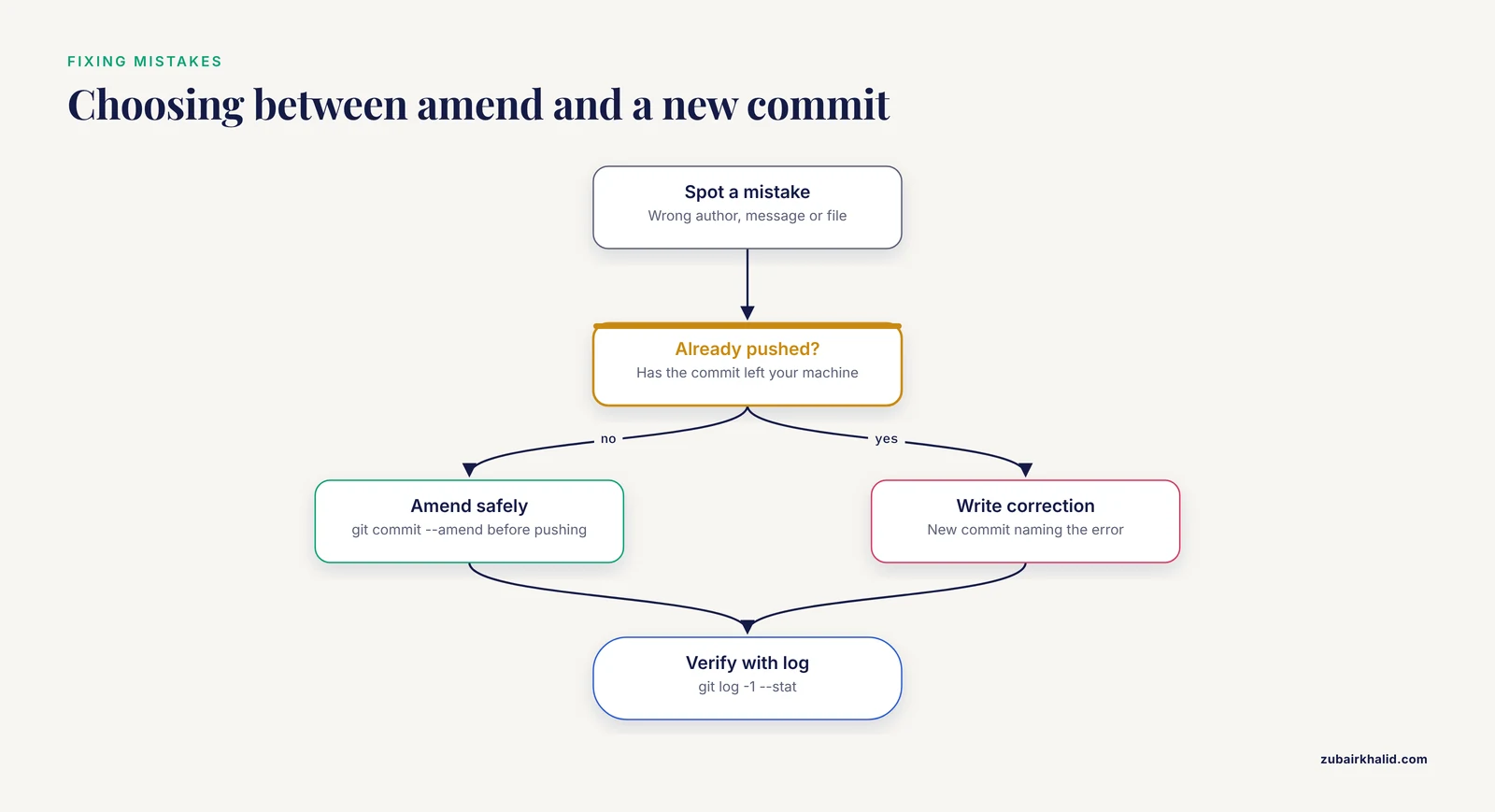
Mistakes happen at commit time, and most of them are repairable if you catch them before pushing. The commands below are ordered from safest to riskiest, and each is limited to the unpushed, most-recent-commit situation unless stated otherwise.
Wrong author on the last commit. Fix the configuration first, then correct the commit:
$ git config user.email "[email protected]"
$ git commit -amend -no-edit -reset-author
-reset-author replaces the author with the current config values and updates the commit timestamp. If only the author needs correcting and your config is already right, -amend -no-edit -reset-author is the whole fix.
Wrong message on the last commit.
$ git commit -amendThe editor opens with the current message; correct it, save, close. Add -no-edit instead if you are only changing staged content and want the message untouched.
Forgot a file in the last commit.
$ git add sections/methods.tex
$ git commit -amend -no-edit
The forgotten change joins the commit, and the message stays as it was. Check the result with git show -stat HEAD to confirm the file list now matches the message.
Committed a build artifact by accident. Untrack the file without deleting it from disk, ignore it, and commit the change:
$ git rm -cached main.pdf
$ echo "main.pdf" >> .gitignore
$ git commit -m "build: stop tracking compiled PDF"
The file remains in earlier history, so if the artifact was large and the repository must slim down, history rewriting is required. Treat that as a whole-repository decision involving every collaborator, not a solo cleanup; the safe everyday habit is simply the .gitignore plus the untracking commit.
Committed to main when you meant a branch, before pushing. Create the branch pointing at the current state, then move main back one commit:
$ git branch revisions-r2
$ git reset -hard HEAD~1
$ git switch revisions-r2
-hard discards working-tree changes, so run git status first and confirm everything is committed. This is local history rewriting on a branch nobody else has, which is the safe category.
The commit is already pushed and something is wrong. Do not rewrite. Make a new commit that corrects the content, with a message that references the error:
data: correct Table 2 HR for model v4, fixing prior commit

The previous commit used the unadjusted estimate by mistake.
Replace the 1.42 with the adjusted 1.19. Compiled cleanly.
An honest correction commit is more useful than a rewritten history, because it preserves the fact that the error existed and was caught.
An old commit's message is wrong and nothing is pushed. Interactive rebase can edit messages of older commits, but it rewrites every commit after the target one. On a manuscript repository where your coauthors may have pulled, I recommend against reaching for it casually. If the wrong message is misleading, a correction commit costs nothing and misleads no one.
A merge went badly and you have not pushed. git merge -abort returns the repository to the pre-merge state, and you can attempt the merge again after pulling the other side's latest work. Aborting a merge is always safe because a conflicted merge has not yet created the merge commit.
Making the convention stick in a lab
A convention that lives in one author's head is not a convention. The difference between a log that stays scannable for three years and one that decays by the second revision round is almost always whether the agreement was written down where new collaborators will encounter it.
Put the rules in the README, at the top. The prefix table, the 50-character rule, the imperative mood, and the trailer format belong in the repository README beside the build instructions. A new student who clones the repo reads the README anyway; the convention rides along.
Ship the template in the repository. Committing .gitmessage.txt and documenting the one-line git config commit.template command turns the convention from an instruction into a default. Defaults outperform instructions because they operate at the moment of writing rather than the moment of onboarding.
Make trailers a review expectation, not a courtesy. When you review a coauthor's pull request, treat a missing Co-Authored-By the way a code reviewer treats a missing test: a comment requesting it before merge. This is where the micro-collaboration evidence becomes actionable, since shared contributions are only recoverable from the record if the people doing the work record them at commit time [1].
Run a five-minute log audit at the end of each writing week. Three commands, in order:
$ git log -oneline -15
$ git status
$ latexmk -pdf main.tex
The first shows whether recent messages would survive being read by a stranger. The second catches uncommitted work that will otherwise become Friday's giant commit. The third verifies that main really is the always-compiling state you claim it is.
Set milestone tags at fixed events. Tag the initial submission, each revision submission, and the accepted version:
$ git tag -a submitted-r2 -m "Second revision submitted to JCE"Annotated tags carry their own message and author and date, and they give the log fixed landmarks that survive even messy stretches in between.
Onboard with the log, not with a lecture. When a new student joins the manuscript, have them read the last twenty commit messages before their first edit. The log demonstrates the vocabulary, the granularity, the compile-verification habit, and the trailer format in context, which teaches the convention faster than any document and signals that the log is a real record rather than ceremonial. Framing matters here too: the same principles that make health communication persuasive at scale, personalization and specificity, apply to the internal messages a lab actually reads and acts on [3].
Practical applications: what a well-written log buys you
Provenance for contested claims. When a reader of the published paper questions a figure, the chain from published text back to raw data runs through the log. Pickaxe queries and review: prefixes turn that chain from an afternoon of diff archaeology into a five-minute reconstruction, and the commit bodies record the verification steps as they happened.
Contribution statements with evidence behind them. Commit counts and trailer searches do not replace a CRediT taxonomy statement, but they ground it. Before writing "M.C. contributed to writing and data interpretation," check git shortlog -sn and the trailer grep; if the record does not support the planned statement, fix the record now, while the people involved can correct it, rather than after publication.
Faster, more accurate revision letters. The git log -grep="review:" extraction described earlier converts the worst part of revision, remembering what you changed in response to each comment, into a filtering task. Each commit body already pairs the comment with the action.
Reuse across papers. Methods sections get recycled, and the log tells you which paragraphs were already vetted, by whom, and in response to which earlier review. A draft: commit on the previous paper's statistical methods paragraph, with its trailer showing the statistician's involvement, tells the next project exactly which text to trust.
Teaching infrastructure by example. A lab that keeps an honest manuscript log has, for free, a training artifact for the next rotation student: real examples of provenance practice, dated and attributed, that no workshop slide can match. This is the compounding return on the hours spent writing messages nobody applauded at the time, and it is the reason the habit is worth defending even in the week before a deadline, when it is hardest to keep.
Frequently Asked Questions
How long should the subject line of a manuscript commit message be?
Fifty characters or fewer. If a change cannot be summarized that briefly, the subject should name the area and the most important fact, and the body should carry the rest.
Should commit messages use imperative or past tense?
Imperative. Git's own output completes the phrase "this commit will...", so "Fix enrollment count in Methods" reads correctly while "Fixed enrollment count" does not.
How do I credit a coauthor who edited text in the same commit?
Add a trailer line at the bottom of the message in the form Co-Authored-By: Name <email>, using an email associated with their GitHub account so attribution displays on the platform.
Should I commit the compiled PDF of my manuscript?
No. Ignore build artifacts including the PDF, .aux, and .log files in .gitignore, and commit only sources. Commit a PDF snapshot deliberately only when a coauthor or journal needs one.
What is the difference between git commit, amend and making a new commit?
-amend replaces the most recent commit with a corrected version and is safe only before pushing. After pushing, record the correction in a new commit so shared history stays intact.
How do I write a commit message that references a reviewer comment?
Use a review: prefix and describe the comment and your response in the body, for example "review: address R2 on missing-data handling," optionally with an issue number for automatic linking on GitHub.
Can I edit a commit message after pushing to GitHub?
Technically yes with history-rewriting commands, but on a shared manuscript repository you should not, because it forces every collaborator to reconcile a rewritten history and risks lost work. Add a new commit instead.
Do commit message conventions matter to journals or funders?
No journal or funder sees your commit log. The conventions matter because they make the repository searchable for coauthors, support accurate contribution records, and let you reconstruct the provenance of any published claim years later.
Sources
- A mixed-methods analysis of micro-collaborative coding practices in OpenStack.
- Telling our history: a narrative study with Indigenous elders, wisdom for the coming generation.
- Effect of Personalized Messages Sent by a Health System's Patient Portal on Influenza Vaccination Rates: a Randomized Clinical Trial.
- The Social Contagion Potential of Pro-Vaccine Messages on Black Twitter.