How to Write Commit Messages for Experimental and Control Group Data
By Dr. Zubair Khalid, DVM, MS, PhD ·
By the end of this article you will be able to write git commit messages that make an experimental and control group dataset auditable months or years later. You will know how to structure a commit message so a reader can tell, from the message alone, which group the data belongs to, how many samples arrived, when they were measured, and whether the study was still blinded. You will also be able to search your own history for every change that touched a group, recover from bad messages, and share a repository with collaborators on GitHub without losing provenance.
You need git 2.x installed, a terminal, and a text editor. A GitHub account is optional but recommended for team work. No prior git experience beyond opening a terminal is assumed.
Why Commit Messages Matter for Grouped Experimental Data
In most scientific repositories, the raw observations arrive in waves. Control samples arrive on one day, treated samples on another, a technician re-runs a plate, a statistician reassigns a block. Six months later, someone asks a simple question: which files contain the treated group's day 14 readings, and were they collected under the same conditions as the controls?
If your answer is a folder name like final_final_v3, you are relying on memory. If your answer is a commit message, the repository itself carries the answer, and it carries it permanently. A commit is a permanent snapshot of the repository at a moment in time. The commit message is the label on that snapshot. For grouped experimental data, the label has to answer four questions: which group, which samples, what changed, and why.
This discipline matters because treatment effects are always judged relative to controls. A randomised trial is designed so that an intervention arm can be compared against a control arm under defined conditions. Real studies often go further than two arms. A pragmatic six-arm randomised trial of patient portal influenza reminders, for example, randomised participants within strata to pre-commitment messages, loss-frame messages, gain-frame messages, combinations of these, or a standard-of-care control group, and compared vaccination rates across arms [1]. A repository holding data from a design like that needs a commit history where each arm's data arrivals are traceable as separate, labeled events. Vague messages such as "update data" destroy that traceability.
Commit messages also serve collaboration. A study of micro-collaboration in the OpenStack ecosystem examined roughly one million commits across 1,804 repositories over nine years and found that multiple contributors frequently work on the same commit, supported by mechanisms such as the Co-Authored-By: trailer that GitHub and GitLab both read [2]. Research teams behave the same way. A postdoc loads the plate, a student runs the pipeline, a statistician unblinds the analysis. Explicit, well-formed commit messages and trailers record who did what, which is exactly the record a data audit or authorship discussion later needs.
Anatomy of a Commit Message for Group Data
A commit message has three parts: a subject line, an optional body, and optional trailers.
Subject line. One line, 50 characters or fewer, written in the imperative mood. Imperative means it completes the sentence "this commit will". Write "add day 14 readings for treatment cohort", not "added" or "adding". Git tooling, including generated changelogs and patch email subjects, assumes this style.
Body. Wrapped at 72 characters, separated from the subject by one blank line. For group data, the body should state what changed numerically and why. Concrete numbers help: sample counts, dates of collection, instrument identifiers, batch numbers.
Trailers. Key-value pairs on the final lines, formatted as Key: value. Git parses these natively, and remote platforms such as GitHub and GitLab give special meaning to certain trailers like Co-Authored-By: [2]. For research repositories, custom trailers are a clean way to carry study metadata without inventing a new file format.
A practical convention, adapted from the widely used Conventional Commits style, is type(scope): subject, where the scope names the group:
data(control): add baseline fasting glucose for block 2
data(treatment): add day 14 weights for cohort A
metadata: revise sample sheet after cage mislabel
analysis: rerun mixed model with batch covariate
scripts: fix column name mismatch in demultiplex.sh
docs: update collection protocol with new fasting window
This gives you a mechanically searchable history. The command git log, oneline, grep="data(control)" returns every commit that touched control group data, which you cannot do with free-form messages.
A Commit Message Template for Experimental and Control Group Data
Use this template for every data-bearing commit. Copy it into a scratch file or configure your editor template.
<type>(<group>): <imperative summary, 50 chars or fewer>

<What changed, in concrete numbers.>
<Why now: what prompted this change.>
<Collection context: date, instrument, batch, operator.>
<Anything unusual: missing samples, re-runs, exclusions.>

Study-ID: <your internal study identifier>
Group: <control | treatment | block-N>
n: <number of samples added or changed>
Blinding-Status: <blinded | unblinded>
Co-Authored-By: Name <email>   (only if others contributed)
The table below summarizes each element and the failure it protects against.
| Element | Example | What it protects against |
|---|---|---|
| Type | data, metadata, analysis, scripts, docs | Mixing code changes and data arrivals in one unsearchable commit |
| Scope (group) | (control), (treatment), (metadata) | Not being able to list every change to one arm |
| Imperative subject | add day 14 weights | Vague labels such as "update" or "fix" |
| Sample count | n: 24 | Silent sample loss, duplicated rows, off-by-one errors |
| Collection date and instrument | measured 2026-03-04, reader R2 | Inability to reconstruct batch effects later |
| Blinding status | Blinding-Status: blinded | Accidental unblinding through the commit history itself |
| Study-ID trailer | Study-ID: GLUC-2026-01 | Merging commits from two studies in one repository |
| Co-Authored-By trailer | Co-Authored-By: Maria Lopez <[email protected]> | Lost attribution when several people produce one commit [2] |
One caution on the subject line: the scope names the group that the commit concerns, not the group you believe the samples belong to after analysis. If a few samples were later reassigned between groups, record that as a new metadata commit with its own explanation, never by rewriting the old messages.
Step-by-Step: Writing Git Commit Messages for Experimental and Control Group Data
This walkthrough builds a small example repository for a mouse fasting-glucose study with one control arm and one treatment arm. Every command is real. Where output is shown, it is what git prints on a typical Linux or macOS system.
Step 1. Configure git once
Before your first commit, git needs to know who you are, because your name and email are written into every commit you make.
git config --global user.name "Zubair Khalid"
git config --global user.email "[email protected]"
git config --global core.editor "nano"
git config --global init.defaultBranch main
core.editor sets the editor git opens when a commit message is needed. Nano is a friendly default. If you skip the user settings, your first commit fails with the message Please tell me who you are, followed by instructions to run the two user.name and user.email commands above.
Verify your settings:
git config --list --show-origin | grep userExpected output includes lines showing where each value was set, such as a file path under ~/.gitconfig, followed by user.name=Zubair Khalid.
Step 2. Create the repository and protect large files
mkdir glucose-study && cd glucose-study
git init
Expected output:
Initialized empty Git repository in /home/you/glucose-study/.git/Now create a .gitignore so bulky raw files never enter git. Git is designed for text files and small structured data, not for gigabytes of sequencing output or imaging data.
# .gitignore
data/raw/images/
*.fastq.gz
*.bam
*.h5
.Rhistory
.Rproj.user
__pycache__/
.DS_Store
Commit the ignore file with a clear message:
git add .gitignore
git commit -m "docs: ignore raw imaging and sequencing files"
If you later need version control over large files, Git Large File Storage (Git LFS) is the standard extension. Run git lfs install once, then git lfs track "*.fastq.gz", which records the pattern in a .gitattributes file. Track the pattern before adding the files, not after.
Step 3. Commit the group assignments first
The single most valuable commit in a grouped study is the one that registers which sample belongs to which group. Create metadata/sample_sheet.csv:
sample_id,group,block,sex,age_weeks
CTRL-001,control,1,F,10
CTRL-002,control,1,M,10
CTRL-003,control,2,F,11
TRT-001,treatment,1,F,10
TRT-002,treatment,1,M,10
TRT-003,treatment,2,F,11
Then commit it with a full message using a heredoc, which lets you write a multi-line message directly in the terminal:
git add metadata/sample_sheet.csv
git commit -m "$(cat <<'EOF'
metadata: register randomization assignments for 48 mice

Sample sheet assigns 24 animals to the control arm and 24 to the
treatment arm, blocked by litter within two randomization blocks.
Assignments were generated by the study statistician on 2026-02-20
and match the sealed-envelope log stored outside this repository.

Study-ID: GLUC-2026-01
Groups: control,treatment
n-per-group: 24
Blinding-Status: blinded
EOF
)"
Expected output:
[main (root-commit) d41c9ab] metadata: register randomization assignments for 48 mice
 1 file changed, 49 insertions(+)
 create mode 100644 metadata/sample_sheet.csv
Notice what this message records: group sizes, blocking structure, who generated the assignments, when, and where the authoritative record lives. A reader six months later can reconstruct the design from the message alone.
Step 4. Commit control group data with full context
When the control measurements arrive, stage them and write a message that captures collection conditions:
git add data/raw/control/glucose_baseline.csv
git commit -m "$(cat <<'EOF'
data(control): add baseline fasting glucose for 24 mice

Add 24 baseline fasting glucose values (mmol/L) for the control
cohort, measured 2026-03-04 between 08:00 and 10:00 to match the
fasting window used for the treatment cohort.

- Instrument: benchtop glucose reader, unit R2, log appended to
  metadata/instrument_log.csv
- Samples: CTRL-001 through CTRL-024
- One sample (CTRL-013) refused fasting and is recorded as NA
  with reason code FEED-01 in data/raw/control/README.md

Study-ID: GLUC-2026-01
Group: control
n: 24
Blinding-Status: blinded
EOF
)"
The body answers the questions an auditor asks. Why 08:00 to 10:00? Circadian matching. Why is one value NA? The animal fed through the fast, and the reason code says so. Two values became one sentence each, and both sentences prevent a future argument about whether the missingness was random.
Step 5. Commit treatment group data the same way
git add data/raw/treatment/glucose_baseline.csv
git commit -m "$(cat <<'EOF'
data(treatment): add baseline fasting glucose for 24 mice

Add 24 baseline fasting glucose values (mmol/L) for the treatment
cohort, measured 2026-03-05 between 08:00 and 10:00, one day after
the control cohort so both arms share the same fasting window.

- Instrument: benchtop glucose reader, unit R2
- Samples: TRT-001 through TRT-024
- No missing values

Study-ID: GLUC-2026-01
Group: treatment
n: 24
Blinding-Status: blinded
EOF
)"
Keeping the two arms in separate commits is deliberate. It lets you diff the arrival of one arm against the other, revert a bad batch from one arm without touching the other, and answer the question "when exactly did the treatment data land" with git log, grep="data(treatment)".
Step 6. Record preprocessing in the commit message
Derived files, such as normalized counts or summarized per-animal tables, should each carry a commit that names the exact input version. You can find that version by its hash:
git log --onelineExpected output:
a9f3d2c data(treatment): add day 14 weights for treatment cohort
7b21e88 data(control): add day 14 weights for control cohort
1c0f6a4 data(treatment): add baseline fasting glucose for 24 mice
8e1f0a3 data(control): add baseline fasting glucose for 24 mice
d41c9ab metadata: register randomization assignments for 48 mice
Then reference the hash in the derived-data commit:
git add data/derived/glucose_summary.csv
git commit -m "$(cat <<'EOF'
analysis: summarize baseline glucose by group and block

Build data/derived/glucose_summary.csv from the baseline files
introduced in commits 1c0f6a4 (control) and 1c0f6a4's treatment
counterpart, using scripts/summarize_glucose.py at this commit.

Group means are reported with standard deviation, per block, for
the statistician's review before unblinding.

Study-ID: GLUC-2026-01
Inputs: 1c0f6a4, 8e1f0a3
Blinding-Status: blinded
EOF
)"
If your research object is text rather than measurements, this habit matters even more. Computational communication studies, such as an analysis of health-message frames on social media, depend on pinning down exactly which messages were collected, under which query, and how they were coded into frames [3]. A commit message that names the corpus snapshot and the coding script version is the difference between a rerunnable analysis and a one-off result.
Step 7. Fix a message before pushing with amend
You will leave out a trailer or misspell a group name. Before the commit has been pushed or shared, amend it:
git commit --amendExpected behavior: git opens your configured editor with the last commit message loaded. Correct the text, save, and close. Git replaces the commit and prints a new hash, such as [main 4d2c1b7] .... The old hash becomes invalid, which is why amending is safe only for commits nobody else has. If a collaborator has already pulled the original commit, do not amend. Make a new commit that states the correction explicitly, for example metadata: correct n trailer, previous commit undercounted control arm by 2.
Step 8. Tag the moments that matter
Certain events in a grouped study, such as locking the dataset before unblinding, deserve a tag rather than just a message. Tags are named markers on specific commits.
git tag -a pre-unblinding-lock -m "Dataset locked before unblinding, 48 animals complete"Later, git show pre-unblinding-lock prints the tag message and the full commit it points to. If anyone questions what the analysis saw before unblinding, the tag answers.
Step 9. Push to GitHub and credit collaborators
When several people contribute to one data load, record them in the message body with the Co-Authored-By: trailer, which GitHub renders as shared attribution on the commit page [2]:
git add data/raw/treatment/glucose_day28.csv
git commit -m "$(cat <<'EOF'
data(treatment): add day 28 fasting glucose for 24 mice

Day 28 terminal measurements for the treatment cohort, collected
2026-04-01. Plate loaded by ML, readings exported and checked by ZK.

Study-ID: GLUC-2026-01
Group: treatment
n: 24
Blinding-Status: unblinded
Co-Authored-By: Maria Lopez <[email protected]>
EOF
)"

git remote add origin https://github.com/your-lab/glucose-study.git
git push -u origin main
Expected output ends with a line like Branch 'main' set up to track remote branch 'main' from 'origin'.
After pushing, open the commit on GitHub. The co-author's avatar appears beside yours, and the custom trailers display as plain text at the end of the message, searchable from the repository's commit view.
Practical Tips for Commit Messages in Research Repositories
- Commit per event, not per day. "Control day 14 arrival" and "fix header typo in control day 14 file" are different events and belong in different commits, because only the first is scientifically meaningful.
- Put numbers in the body, not the subject. The subject is a label. The body holds counts, dates, and instrument identifiers where they can be long.
- Reference commits by hash, never by "see above". Hashes survive reordering and searching. "Above" means nothing after a rebase.
- Never encode group labels in file names instead of the sample sheet. If the label exists only in a directory name, a commit message cannot explain a reassignment. The sample sheet is the authority, and commits about it explain changes.
- Write the message for the person replacing you. A useful test: could someone with no memory of this experiment, holding only the repository, reconstruct what happened? If not, the message is unfinished.
- Use
git commitwith an empty stage deliberately.git commit, allow-empty -m "notes: record instrument calibration event"creates a commit with no file changes, which is a legitimate way to timestamp a protocol event in the history.
Checking Your Commit History Is Correct
Three commands verify that your messages are doing their job.
First, confirm the searchable structure survives:
git log --oneline --grep="data(control)"Expected output is only the control-related commits, for example:
7b21e88 data(control): add day 14 weights for control cohort
8e1f0a3 data(control): add baseline fasting glucose for 24 mice
Second, confirm trailers are parseable. Git ships a trailer parser:
git log -1 --format=%B 8e1f0a3 | git interpret-trailers --parseExpected output:
Study-ID: GLUC-2026-01
Group: control
n: 24
Blinding-Status: blinded
If a trailer is missing here, it was formatted wrong, most often because a blank line does not separate the body from the trailers. Git treats the last block of contiguous lines starting with Key: value patterns as trailers.
Third, confirm provenance at the file level:
git blame -- data/derived/glucose_summary.csvThis prints each line of the file beside the commit hash that last touched it. When a reviewer questions one summary value, git blame plus the referenced commit message answers in seconds.
A healthy grouped-data history has three visible properties: every group arrival is its own commit with a group-scoped subject, every derived dataset names its input hashes, and blinding status changes are marked with commits or tags rather than buried in a README edit.
Common Mistakes and Limitations
Vague subjects. "Update", "fix", "final", and "data" carry no information. Six months later they are all identical. Write what changed and for which group.
One commit per week. Batching a control arrival, a script fix, and a metadata edit into one commit means you can never revert or audit one of them. Split them.
Rewriting shared history. Running git commit, amend, git rebase, or history filters on commits that collaborators have already pulled forces everyone to reconcile divergent histories and can silently drop someone's work. Amend only your own unpushed commits. Once a commit is public, correct it forward with a new commit.
Committing protected or sensitive identifiers. A commit message is copied into every clone and every fork and is effectively impossible to fully retract once shared. Do not put patient identifiers, addresses, or exact dates of birth in messages or in committed files. This extends beyond regulatory identifiers. Some research data carries community-level sensitivity that standard de-identification does not capture, as documented in elder-centered Indigenous research where stories and teachings were collected under explicit community protocols and validated with participants before recording [4]. When your data is governed by such agreements, keep identifying context out of the repository and record only the governance facts, such as the agreement name and custodian, in the commit message.
Putting raw large files in git. Git stores a full object for every version of every file. A few hundred megabytes of imaging data per commit makes clones slow for the whole team and can exceed hosting limits. Keep bulk data in managed storage or Git LFS, and let the commit message record the checksum and storage location.
Trusting the message over the data. A commit message is an assertion, not a verification. If the message says 24 samples and the file has 23 rows, the file wins. Checks such as row-count assertions in your loading scripts belong in the pipeline, not in prose.
Assuming blinding survives the history. If an unblinded analysis is committed before the lock tag, the repository itself reveals group differences to anyone who reads it. For blinded work, keep group-coded analysis in a separate private repository until unblinding, and record that boundary with a commit in each repository.
Relying on memory or a notebook alone. A lab notebook is a strong scientific record, and commit messages complement it rather than replace it. The notebook records intent and protocol. The commit history records what actually entered the analysis, in what order, and who contributed.
Frequently Asked Questions
Should control and treatment data go in the same commit?
No. Commit each group's data separately with a group-scoped subject such as data(control): or data(treatment):. Separate commits let you list, revert, and audit one arm without touching the other, and they make git log, grep a complete index of group-level events.
How long should a commit message be for experimental data?
Keep the subject line at 50 characters or fewer and the body wrapped at 72 characters. For data-bearing commits, write three to eight body sentences covering what changed, how many samples, when and how they were collected, and any anomalies. Length is not the goal, completeness is.
Can I edit a commit message after pushing to GitHub?
You can with git commit, amend followed by a force push, but you should not on a shared branch, because it rewrites history that collaborators already have. For a pushed commit, add a new commit whose message states the correction, and reference the old commit's hash.
How do I find every commit that touched control group data?
Use git log, oneline, grep="data(control)" if you adopted the type-and-scope convention, or git log, oneline, path/to/control/data/ to search by file path. Together, the two commands catch both label-based and file-based history.
Should raw data files live in the git repository?
Small text files such as sample sheets and summarized tables belong in git. Bulk raw files such as images, FASTQ files, and BAM files generally do not, because git stores every version of every file. Keep them in institutional storage or Git LFS and record their checksums and locations in commit messages.
What is the Co-Authored-By trailer and when should I use it?
It is a trailer line, Co-Authored-By: Name <email>, placed at the end of the commit message body. GitHub and GitLab both recognize it and display the named person as a contributor to the commit. Add it whenever more than one person produced the work in that commit, such as one person loading a plate and another validating the export.
Do commit messages matter if I keep a lab notebook?
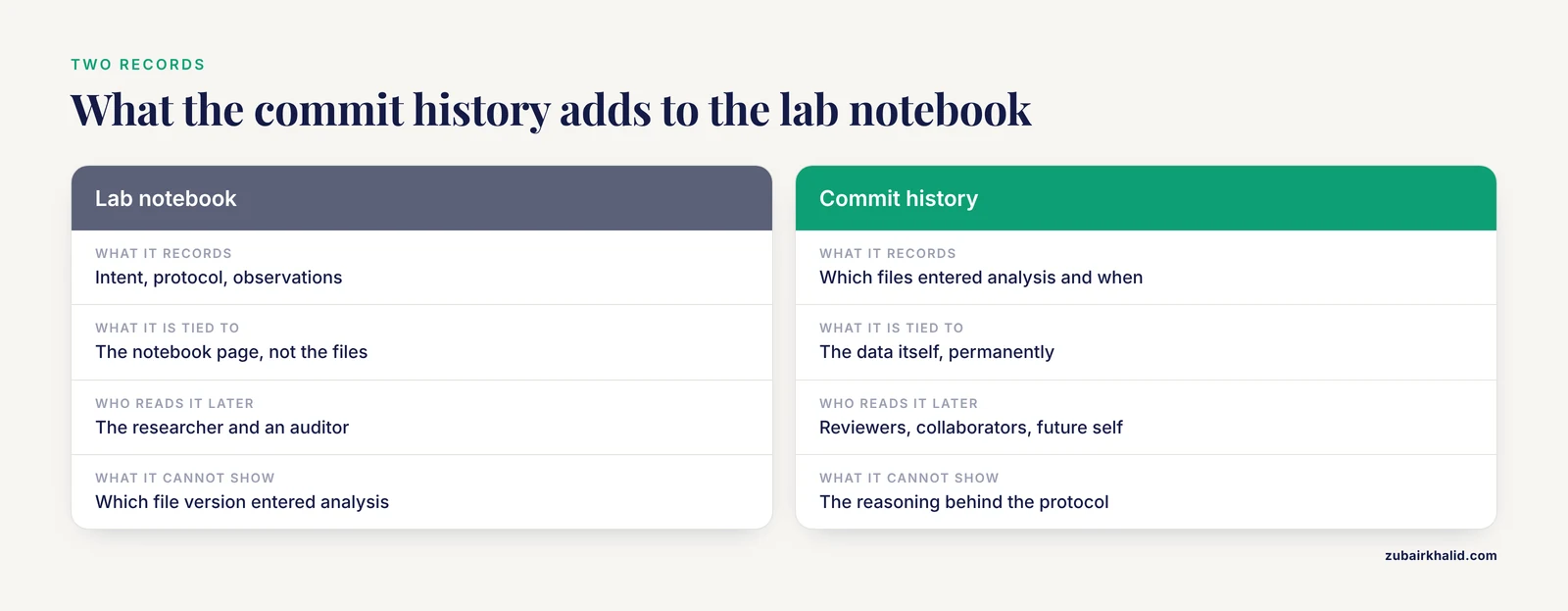
Yes, because they record a different fact. The notebook records what you planned and observed. The commit history records exactly which version of which files entered the analysis and when. A reviewer, a collaborator, or your future self needs both, and only the commit history is attached to the data itself.
How do I handle blinded studies in commit messages?
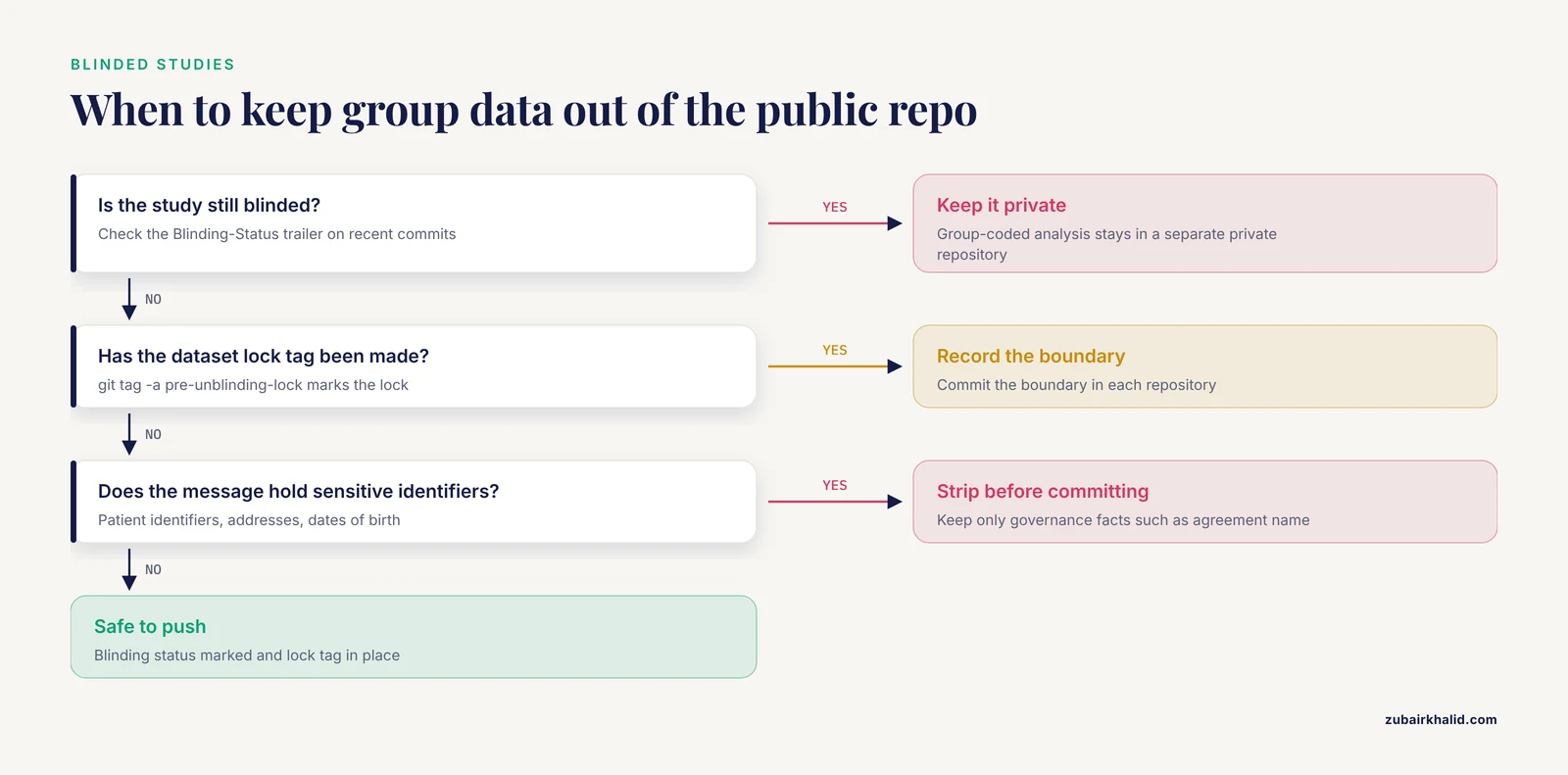
Mark every data and analysis commit with a Blinding-Status: trailer while the study is blinded, and create an annotated tag at the moment the dataset is locked. Keep group-coded analysis in a separate private repository until unblinding so the public history never exposes group differences early.
Sources
- Effect of Personalized Messages Sent by a Health System's Patient Portal on Influenza Vaccination Rates: a Randomized Clinical Trial.
- A mixed-methods analysis of micro-collaborative coding practices in OpenStack.
- The Social Contagion Potential of Pro-Vaccine Messages on Black Twitter.
- Telling our history: a narrative study with Indigenous elders, wisdom for the coming generation.