How to Write Commit Messages for Bioinformatics Pipelines
By Dr. Zubair Khalid, DVM, MS, PhD ·
By the end of this article you will be able to write commit messages that make a bioinformatics pipeline understandable six months later, record who contributed to a change, link a commit to the issue or pipeline run that motivated it, and enforce a consistent message style across a lab. You will need git installed on your workstation or HPC login node, a terminal, and a repository that holds pipeline code such as a Snakemake workflow, a Nextflow pipeline, a shell script collection, or a set of R or Python analysis scripts. A GitHub account helps if your lab collaborates through pull requests, which is where the github for researchers workflow becomes relevant.
A commit message is the text you attach to a snapshot of your repository when you run git commit. In bioinformatics that text often has to carry more weight than in ordinary software projects. A single commit may change an aligner parameter, swap a reference genome, and alter a quality filter, and the difference between a rerun that reproduces a figure and one that does not can be a single line in a config file. The commit message is often the only place where the reasoning behind that line survives.
Why Commit Messages Matter in Computational Biology
Most pipelines are written by more than one person. A graduate student writes the variant calling rules, a postdoc tunes the parameters, a staff scientist reviews the pull request, and someone else maintains the containers. Research on collaborative coding practices distinguishes macro-collaboration, where each commit belongs to one author, from micro-collaboration, where several people contribute to the same commit. Git hosting platforms support the second kind through commit message trailers such as Co-authored-by:, which GitHub and GitLab introduced as social coding mechanisms to record shared credit directly in the commit history [1].
That mechanism matters for labs because the default git history attributes every commit to a single person, which hides the graduate student who wrote the logic and the collaborator who caught the bug in the same change. When researchers studying the OpenStack ecosystem examined commit histories across 1,804 project repositories over a nine year period, they analyzed about one million commits and roughly 631,000 code review change sets specifically to understand how these shared-credit practices work in practice [1]. The takeaway for a research lab is direct: if two people shaped a commit, the commit message is the place to record both names, and the platform will honor it.
There is a second reason commit messages deserve care. Pipeline code is unusual because the code itself rarely explains the why. A Snakefile line that sets -gap-open to a new value looks arbitrary unless a commit message explains that the previous value dropped split reads in a specific library. The diff (the record of what changed) shows what. The message records why, which is what a reviewer, a collaborator, or your future self needs before trusting a result.
The Anatomy of a Pipeline Commit Message
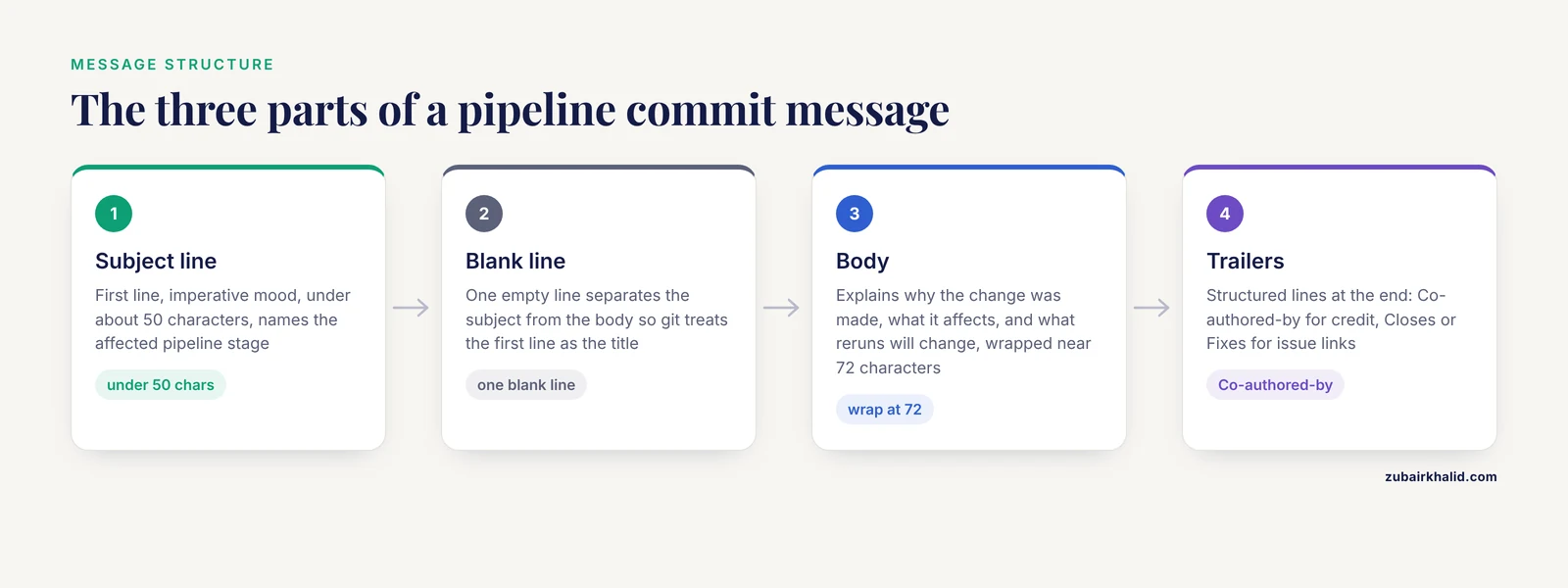
A good commit message has three parts: a subject line, an optional body, and optional trailers. Git enforces none of this, which is why conventions exist. The conventions below reflect long standing practice in the git community and apply cleanly to pipeline work.
The Subject Line
The subject line is the first line of the message. Keep it under about 50 characters, use the imperative mood, and do not end it with a period. Imperative mood means the line completes the sentence "If applied, this commit will..." For example, "Add RNA-seq quantification rule" completes that sentence correctly, while "Added RNA-seq quantification rule" does not.
For pipeline work, name the affected stage in the subject. A reader scanning git log should be able to tell which part of the workflow a commit touches without opening the diff.
Good subjects:
- Add duplicate marking step before variant calling
- Change BWA reference index to GRCh38 no-alt decoy
- Fix read group string so GATK accepts input
- Raise minimum mapping quality to 20 in filter rule
- Pin samtools container to version 1.19.2
Weak subjects:
- Update files
- Fix
- Changes to the pipeline
- Work from Tuesday
The Body
The body explains why the change was made, what alternatives were considered, and what observable effect it has. Leave one blank line between the subject and the body, because git treats the first line as the title and everything after it as the description. Wrap body lines at roughly 72 characters so the text stays readable in the plain terminal view of git log.
For pipeline changes, the most valuable body content answers questions such as:
- What problem did the change fix, in terms of output, not code?
- Which samples, genomes, or parameters were affected?
- What should a person who reruns the pipeline expect to change?
- What reference version, container tag, or database build was involved?
Trailers
Trailers are structured lines at the end of the body. The two most useful for research work are:
Co-authored-by: Full Name <email>to credit a second contributor. GitHub recognizes this trailer and displays the second author on the commit page [1].Closes: #123orFixes: #123to link the commit to an issue number in the same repository, so the platform closes the issue automatically when the commit lands on the default branch.
A Full Example
Increase minimum base quality to 20 in variant filter

Low quality tail calls from the old flowcell lot produced
clusters of false heterozygotes on chromosome 20 in the
March batch. Raising the threshold from 10 to 20 removes
those calls while keeping concordant sites.

Affects filter_variants.smk and config/filter.yaml.
Reruns will produce a different VCF for the 24 March samples.

Co-authored-by: Priya Raman <[email protected]>
Closes: #47
Step by Step: Writing a Commit Message for a Pipeline Change
This walkthrough uses a small Snakemake pipeline as the example, but the commands and the reasoning apply identically to Nextflow, CWL, WDL, or plain scripts. Every command shown runs in a terminal at the root of your repository.
Step 1. Look at what actually changed
Run:
git statusExpected output looks like this:
On branch main
Changes not staged for commit:
  modified:   Snakefile
  modified:   config/filter.yaml
  modified:   results/align/sampleA.bam.bai

Untracked files:
  results/filter/sampleA.filtered.vcf.gz
Then inspect the edits:
git diff SnakefileThe diff prints each changed hunk with a few lines of context. Read it before writing a word of the message. A surprising number of poor commit messages describe an intention that the diff does not match, because the author wrote the message from memory. Reading the diff first prevents that.
Step 2. Stage only the files that belong together
If a commit mixes a parameter change with an unrelated documentation edit, no single subject line can describe it honestly. Stage in groups:
git add Snakefile config/filter.yamlLeave generated results out of version control. Files such as BAM indexes, VCF outputs, and large reference directories belong in a .gitignore file, not in the history. Git will warn you when a staged file exceeds 50 MB and will refuse pushes containing files over 100 MB on GitHub, which is the standard enforcement documented by the platform.
Step 3. Write the subject line
Commit with a one line message using the -m flag:
git commit -m "Raise minimum base quality to 20 in variant filter"Expected output:
[main 3f8a2c1] Raise minimum base quality to 20 in variant filter
 2 files changed, 4 insertions(+), 2 deletions(-)
If you run git commit without -m, git opens an editor. If git aborts instead, you will see:
Aborting commit due to empty commit message.That error means the editor opened and closed without a saved message, usually because you did not know the editor at all. Set a familiar one once:
git config user.editor "nano"A second common error on fresh HPC accounts is:
fatal: unable to auto-detect email addressGit refuses to commit until it knows who you are. Set your identity with:
git config user.email "[email protected]"
git config user.name "Your Name"
Use the same email that your GitHub account uses, because GitHub matches commits to profiles by email address.
Step 4. Add the body when the why is not obvious
A subject alone cannot carry the reasoning for a parameter change, a reference swap, or a filter change. Pass a second -m flag and git inserts a blank line and a body paragraph:
git commit -m "Raise minimum base quality to 20 in variant filter" -m "Low quality tail calls from the old flowcell lot produced clusters of false heterozygotes on chromosome 20 in the March batch. Affects filter_variants.smk and config/filter.yaml. Reruns will produce a different VCF for the 24 March samples."Each additional -m becomes its own paragraph. If you prefer, run plain git commit, write the subject, skip a line, and write the body in the editor. Both produce the same structure.
Step 5. Add trailers for credit and issue links
Trailers go in the last paragraph of the body. Using the multi -m approach:
git commit -m "Raise minimum base quality to 20 in variant filter" -m "Reruns will produce a different VCF for the 24 March samples." -m "Co-authored-by: Priya Raman <[email protected]>" -m "Closes: #47"Step 6. Verify the result
Inspect the commit you just made:
git showExpected output begins with the full header and message:
commit 3f8a2c1d (HEAD -> main)
Author: Your Name <[email protected]>
Date:   Mon Nov 9 14:22:31 2026 -0500

    Raise minimum base quality to 20 in variant filter

    Reruns will produce a different VCF for the 24 March samples.

    Co-authored-by: Priya Raman <[email protected]>
    Closes: #47
Then scan the recent history the way a collaborator would:
git log -n 5If a subject line reads badly in that list, it reads badly to everyone else too.
Step 7. Correct a message before pushing, when needed
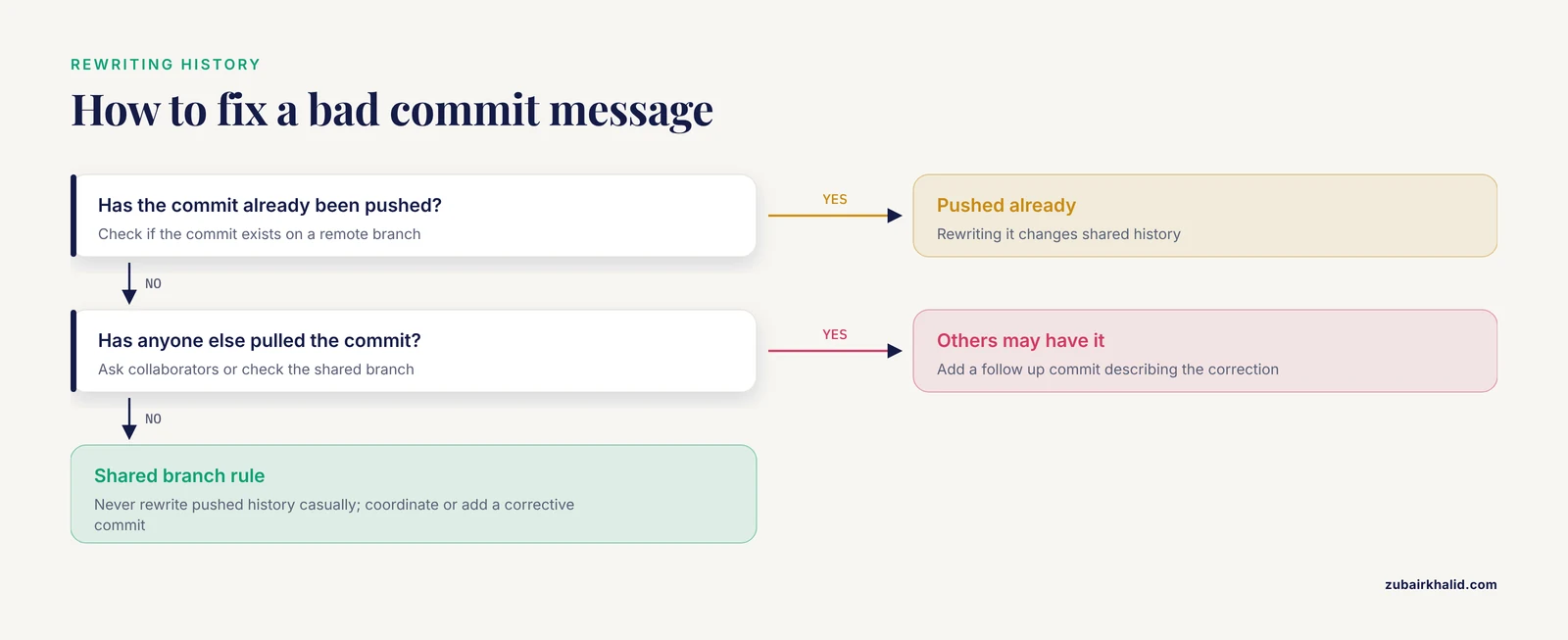
If you notice a typo or a missing detail immediately after committing and you have not pushed yet, reset the commit softly and redo it:
git reset HEAD^
git add Snakefile config/filter.yaml
git commit -m "Corrected message here"
Once a commit has been pushed and others may have pulled it, rewriting the message rewrites shared history and causes merge conflicts for everyone. At that point, add a follow up commit describing the correction instead.
Giving Credit with Co-authored-by Trailers
The git default is one author per commit: whoever ran the command. Research work rarely divides that neatly. A fellow student suggests the approach in a meeting, a statistician corrects the model specification, and the person at the keyboard runs the commit. Recording only the person at the keyboard erases contributions and distorts authorship discussions later.
The Co-authored-by: trailer fixes this at the level of the record itself. GitHub and GitLab support this trailer so that multiple contributors to a single commit can be represented in the platform interface, and researchers have used these trailers to study how such micro-collaboration actually operates in large projects [1]. When a co-author is listed, GitHub shows their avatar and profile next to the commit and counts the commit toward their contribution graph, provided the name and email match a GitHub account.
Practical rules for labs:
- List every person who contributed substantive ideas, code, or debugging to that commit, in addition to the person who ran
git commit. - Put each trailer on its own line. Multiple contributors mean multiple trailer lines.
- Match the name and email the collaborator uses on GitHub, or the platform will not attach the credit to their profile.
- Do not use the trailer to imply authorship of work the person did not contribute to. The trailer is a factual record, and it becomes part of a permanent public history on github for researchers.
Linking Commits to Issues, Pull Requests, and Pipeline Runs
The most useful pipeline commit messages connect three things: the code change, the reason for the change, and the evidence. The reason usually lives in an issue. The evidence usually lives in a log file, a multiqc report, or a result table that is too large to store in git.
Follow this pattern:
- Open an issue describing the problem, for example "Variant filter produces false heterozygote clusters on March batch".
- Create a branch for the fix:
git switch -c fix-baseq-filter- Commit the change with a subject and body, and reference the issue number in a trailer or in the body.
- Push the branch and open a pull request. GitHub links the pull request and the issue through the commit text automatically.
- Record the run evidence in the body. A line such as "Verified on the March batch, multiqc report archived at S3://lab-bucket/runs/2026-03-12/" points a future reader at the proof without committing megabytes of output.
When a change alters expected results, say so in the body. The sentence "Reruns will produce a different VCF for the 24 March samples" is worth more to a collaborator than any amount of code description, because it tells them their cached outputs are now stale. Workflow managers such as Snakemake and Nextflow handle rerun detection at the file level, but the human decision to trust and propagate new results belongs to the team, and the commit message is where that decision gets announced.
A Reference Table for Common Pipeline Changes
The table below gives subject line patterns for the changes that recur in every pipeline repository. Keep the pattern, replace the details.
| Change type | Subject pattern | Example subject |
|---|---|---|
| Bug fix | Fix (what breaks and why) | Fix read group string so GATK accepts input |
| New rule or step | Add (stage) to (workflow) | Add duplicate marking step before variant calling |
| Parameter change | Change (parameter) from (old) to (new) in (rule) | Change minimum base quality from 10 to 20 in filter rule |
| Reference or database update | Update (reference) to (version) | Update BWA reference index to GRCh38 no-alt decoy |
| Container or environment | Pin (tool) container to (tag) | Pin samtools container to version 1.19.2 |
| Config reorganization | Move (setting) from (place) to (place) | Move cluster settings from Snakefile to cluster.yaml |
| Performance change | Speed up (stage) by (method) | Speed up alignment by splitting BAM merging per chromosome |
| Documentation | Document (topic) | Document expected input layout in README |
| Data provenance note | Record (event) for (samples) | Record flowcell lot change for March batch |
| Revert | Revert (original subject) | Revert "Change minimum base quality from 10 to 20 in filter rule" |
Common Mistakes and Limitations
These are the mistakes that show up repeatedly in research repositories, with the practical fix for each.
Vague subjects that describe nothing. "Update files" and "fix bug" force every future reader to open the diff. The fix is to name the affected stage and the observable change: "Fix read group string so GATK accepts input" tells a reader everything they need from the log view alone.
Mega commits that mix unrelated changes. A commit that changes a filter parameter, updates the README, and bumps a container tag cannot be described in one subject line, cannot be reverted cleanly, and buries the one change a reviewer needed to scrutinize. Commit related files together and unrelated files separately, staging in groups as shown in the walkthrough.
Committing large data and results files. Binary outputs and reference genomes bloat the repository forever, because git history keeps every version. GitHub warns at 50 MB per file and blocks pushes with files over 100 MB. Store outputs in a data store or object storage, record checksums or storage locations in the commit body, and add results directories to .gitignore.
Putting sensitive information in commit messages. Patient identifiers, sample names tied to identifiable metadata, credentials, and API tokens must never appear in a commit message. Messages in pushed history are effectively permanent, and rewriting public history is painful. Reference a run ID or an internal sample sheet path instead, and keep the sensitive mapping in access controlled storage.
Messages that contradict the diff. Writing the message from memory produces claims the change does not support. Read git diff before writing, and verify with git show after committing.
Missing credit for collaborative work. When a colleague contributed the idea or the debugging, record it with a Co-authored-by: trailer. Research on collaborative coding shows that platforms introduced these trailers precisely to make shared contributions visible in histories that would otherwise credit one person [1].
Treating the commit message as the only documentation. A commit message explains one change in local context. It does not replace a README, a parameter reference, a changelog, or pinned software environments. Reproducibility requires the commit message to work together with pinned container tags, recorded reference versions, and stored logs.
Rewriting pushed history casually. Amending or rebasing commits that collaborators have already pulled breaks their clones. Only rewrite commits you have not pushed, or coordinate explicitly when you must.
A final limitation: commit messages improve human understanding of a pipeline, but they are not a provenance system by themselves. A repository with excellent messages and floating dependency versions still cannot be reproduced reliably. Pair message discipline with versioned environments and archived outputs.
Building a Lab Convention
A convention only works if it is written down and easy to follow. Three steps get a lab there.
First, write a short message template in the repository. Git can insert a template into the commit editor:
git config commit.template .gitmessage.txtThen create .gitmessage.txt at the repository root:
Subject: imperative, under 50 characters, name the pipeline stage

Body: why the change was made, what it affects, what reruns will change

Co-authored-by: Name <email>
Closes: #issue
Second, enforce the basics with a hook. Git runs the commit-msg hook before finalizing a commit, and the hook can reject weak messages. Save this as .git/hooks/commit-msg, make it executable with chmod +x .git/hooks/commit-msg, and it will block subjects longer than 72 characters:
#!/bin/sh
msg=$(head -n 1 "$1")
length=${#msg}
if [ "$length" -gt 72 ]
then
  echo "Subject line is $length characters. Keep it under 72."
  exit 1
fi
Hooks are local to each clone, so share the script in the repository and have new members install it. Third, review messages during pull request review the same way you review code. A reviewer who asks "what does this change do to existing outputs?" is doing the most valuable review a pipeline can receive, and the commit message is where the answer should already be written.
The habits above also apply when you use git for scientists outside pipelines, such as analysis notebooks, manuscript repositories, and figure scripts. The same subject line rules, the same credit trailers, and the same caution about sensitive data carry over directly.
Frequently Asked Questions
How long should a commit message be for a pipeline change?
Keep the subject under about 50 characters and add a body whenever the change affects outputs, parameters, or references. A typo fix needs one line. A parameter or reference change deserves a paragraph describing why and what reruns will change.
Should I put sample IDs or patient data in commit messages?
Never put patient identifiers or anything that links a commit to an individual in the message. Use deidentified sample codes, run IDs, or internal file paths, and keep any sensitive mapping in access controlled storage outside the repository.
What is the Co-authored-by trailer and how do I use it?
It is a commit message trailer that credits a second contributor to the same commit, in the format Co-authored-by: Name <email> on its own line at the end of the message. GitHub and GitLab display the credit on the commit page when the name and email match an account [1].
How do I write a commit message when I changed many files at once?
Split the change into several commits if the files serve different purposes. If the change is genuinely one logical unit, such as a refactor that renames a rule everywhere, write a subject that names the single purpose and use the body to list the notable affected areas.
Should commit messages mention tool versions and reference builds?
Yes, whenever a version or build change motivated the commit. A subject such as "Update BWA reference index to GRCh38 no-alt decoy" plus a body naming the exact build gives a future reader the provenance detail that the code diff cannot show.
How do I fix a bad commit message I already pushed?
If nobody else has pulled the commit, rewrite it locally with git reset HEAD^, restage, and commit again, then force push with git push -f on your own branch. For commits on a shared branch, add a corrective commit rather than rewriting shared history.
Do commit messages still matter if the pipeline is fully documented elsewhere?
Yes, because the history is the only record that sits next to the exact code state that produced a result. Documentation describes the pipeline in general, while the commit message explains the specific change that separated one result from another.
What should I look for when reviewing commit messages in a pull request?
Check that the subject names the pipeline stage and the change, the body states why and what reruns will affect, any co-authors are credited with trailers, and the message references the issue or run evidence that motivated it. A message that fails those checks usually signals a commit that mixes unrelated changes.
Further Reading
- Telling our history: a narrative study with Indigenous elders, wisdom for the coming generation.
- The Social Contagion Potential of Pro-Vaccine Messages on Black Twitter.
- Effect of Personalized Messages Sent by a Health System's Patient Portal on Influenza Vaccination Rates: a Randomized Clinical Trial.