How to Write Commit Messages for Scientific Research
By Dr. Zubair Khalid, DVM, MS, PhD ·

By the end of this guide you will be able to write a git commit message for scientific research that records why an analysis changed, find any past decision with a single command, and hand a collaborator or reviewer a project history that explains itself. You need Git installed (check with git, version), access to a terminal, and, for the collaboration section, a free GitHub account. Every command below runs on any Git release from the last several years on macOS, Linux, or Windows through Git Bash.
Most scientists learn the mechanics of Git, which are add, commit, push, and then stop. The message is left to habit, and the habit is usually "updated script". That habit is expensive. When a reviewer asks why the gene list changed between two versions of a figure, the answer lives in exactly one place: the messages between the two commits that touched the analysis.
A 2026 review of international biobanking guidelines makes the underlying point directly. A biobank's scientific value is determined less by how many specimens it stores than by the rigor of the rules under which those specimens are collected, processed, annotated, and shared [1]. A code repository behaves the same way. Two labs can have the same number of commits and completely different levels of trust in their history, and the difference is almost always the messages.
Why Commit Messages Carry Scientific Weight
The diff that Git stores with every commit shows what changed, line by line. It cannot show why. It cannot record that a threshold moved because a reviewer asked for a sensitivity analysis, that a filter was added because of an artifact found on a Friday afternoon, or that a model was switched because the design turned out to be longitudinal. That context is the provenance of a computational result, and the commit message is the only field in a commit built to hold it.
Research software teams already work this way. The DrugUtilisation project, an open-source R package for drug utilization studies on the OMOP Common Data Model (a standardized format for observational health data), credits comprehensive unit tests and a standardized output format with keeping results consistent across databases in the United Kingdom, Estonia, and the Netherlands while minimizing coding errors [2]. Tests catch what breaks. Messages explain what was intended. When a number moves between two runs, the first thing a reviewer reads is the messages between the two commits.
The same logic underlies formal reporting standards. A 2026 systematic review of EEG markers of auditory rise time followed PRISMA (the Preferred Reporting Items for Systematic Reviews and Meta-Analyses), searched PubMed, Web of Science, and APA PsycInfo, identified 37 studies, and still concluded that methodological heterogeneity and small sample sizes limited its conclusions [3]. That conclusion is defensible only because every search string, screen, and inclusion decision was documented well enough for others to audit. Your commit history serves the same function for a computational analysis. It is what lets someone reconstruct which decisions produced which numbers.
There is also a versioning obligation. The biobanking review documents how fast standards move: the Standard PREanalytical Code (SPREC) reached version 4.0, the MIABIS core standard for biobank data sharing reached version 3.0, and the ISO 20387 accreditation standard is under its first full revision [1]. Every specimen record has to show which version of which standard was in force. An analysis carries the same obligation, and the commit message is where the protocol version, the analysis plan section, or the data accession belongs.
Git for Scientists: What a Commit Actually Records
A repository (a project folder tracked by Git) stores a chain of commits. Each commit object contains a snapshot of every tracked file, the hash of its parent commit, the author and committer names, email addresses, and timestamps, and your message. The hash (a 40-character SHA-1 identifier, usually shortened to 7 characters such as 3f9c1ab) names the commit. HEAD is a pointer to the commit you currently have checked out.
Between your working folder and the history sits the staging area (also called the index). git add places files there, and git commit writes everything staged as one commit. This two-step design is what lets you group related changes into a single, honestly described commit.
The message is the only part of the commit you fully control at commit time that is not derived from the code itself. Everything else is mechanical. That is why the reasoning, the caveats, and the expected effect on results belong there.
The Anatomy of a Scientific Commit Message
The subject line
Keep the subject at 50 characters or fewer, capitalize the first letter, omit the trailing period, and write it in imperative mood. The imperative test is to complete the sentence "If applied, this commit will". "Filter low-count genes" completes it correctly. "Filtered low-count genes" does not. Git's own generated messages ("Revert ...", "Merge branch ...") use the imperative, which is why the convention exists.
The 50-character limit is a soft guideline with a hard stop around 72, because many interfaces, including the commit list on GitHub, truncate or wrap long subjects. A subject that survives truncation still communicates.
The body
Separate the subject from the body with one blank line. Git and every graphical client use that blank line to tell the subject from the body, so a missing blank line produces a git log, oneline view that drowns in paragraph text. Wrap body lines at 72 characters so the message reads cleanly in terminals and in git log side-by-side views.
Answer three questions in the body, in this order:
- Why was the change needed? Name the question, the problem, the reviewer comment, or the decision that triggered it.
- What exactly changed? Name the files, functions, parameters, and thresholds at a level a reviewer can check against the diff.
- What should change as a result? State the expected effect on outputs, tables, and figures, or write explicitly that results should not change.
The "why" matters more than the "what" because the diff already shows the what. A message that says "changed 0.05 to 0.1 on line 42" narrates the diff. A message that says the cutoff moved for a sensitivity analysis requested in reviewer comment 3 records a decision.
The footer
End with short reference lines. Refs: #12 links to an issue, Fixes #12 does the same and closes the issue automatically when the commit reaches the default branch on GitHub. Footers are also the right place for a protocol version, an analysis plan section, or a data accession number. Keep each on its own line.
A Git Commit Message Format for Scientific Research
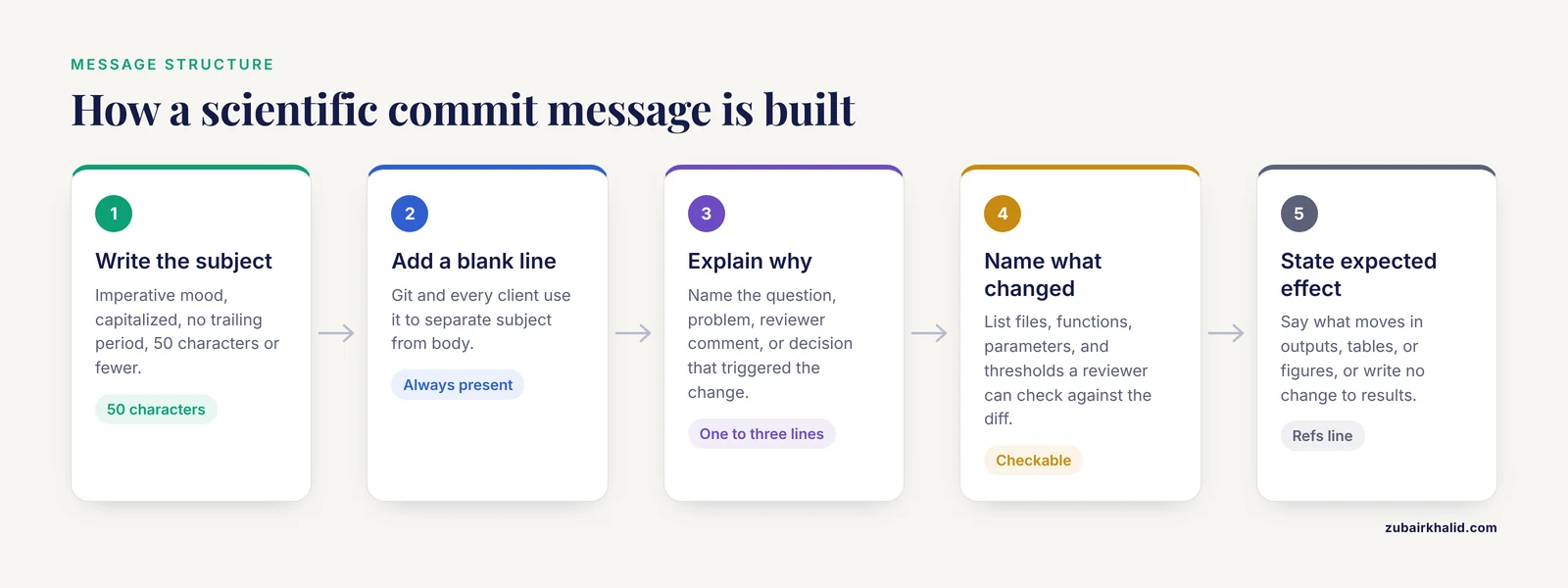
The shape below follows Conventional Commits, a widely used open specification for commit messages. The specification's standard types are feat, fix, docs, and a few others, and labs commonly extend the list with research-specific types. That extension is a lab choice, not part of the spec, and it works well.
<type>(<scope>): <imperative summary, 50 characters or fewer>

<Why: the question, problem, reviewer comment, or decision that
 triggered this change, wrapped at 72 characters.>

<What: the exact files, functions, parameters, or thresholds
 that changed, at a level a reviewer can check against the diff.>

<Expected effect: what should change in outputs, tables, or
 figures, or an explicit "no change to results".>

Refs: <issue number, protocol version, data accession, or plan section>| Field | Rule | Purpose |
|---|---|---|
| Subject | 50 characters or fewer, imperative, capitalized, no period | Scannable index of every decision in the project |
| Blank line | Always present | Lets Git and every client separate subject from body |
| Why | One to three lines | The reason a future reader cannot get from the diff |
| What | Named files, functions, parameters | Lets a reviewer verify the message against the code |
| Expected effect | Direction and scope of change, or "no change to results" | Turns history into a record of when numbers moved and why |
| Refs | Issues, protocol versions, accessions | Ties the change to external evidence |
You can make Git open every commit pre-filled with this skeleton. Save the skeleton to a file, then point the commit.template option at it:
nano ~/.gitmessage.txt
git config --global commit.template ~/.gitmessage.txt
After that, plain git commit opens your editor with the template already in place. Add git commit -v to your habits when you want the diff displayed below the message while you write, which makes the "what" section easy to fill accurately.
Worked Examples for Common Research Tasks
The examples below come from a realistic RNA-seq project and all subjects stay within 50 characters. A pipeline like the one behind a 2026 Alzheimer's study, which profiled the proteomes of retina and hippocampus from the same postmortem donors and reported 372 differentially abundant retinal proteins, involves dozens of small judgment calls across extraction, normalization, and thresholds [4]. Each of those judgment calls is one commit, and each commit is one message like these.
Adding or changing data:
data(metadata): add sequencing batch labels

The sequencing core delivered lane and batch assignments for all
24 libraries on March 3. Batch is a known source of variation in
this design and the model needs it as a covariate.

data/metadata.csv gains a batch column with three levels. No
count files changed.

Expected effect: no change to results until the model uses the
column in the next commit.

Refs: analysis plan section 2.4
Correcting a mistake:
fix(qc): correct cutadapt trimming offset

Trimming used a 3-base minimum overlap instead of the 1-base
offset in the kit documentation, which left adapter bases on
short reads. FastQC still flagged overrepresented sequences
after trimming, which is how the error was found.

scripts/run_qc.sh now passes -O 1 instead of -O 3. All 24
libraries need retrimming and recounting.

Expected effect: quality curves improve at the three-prime ends
and gene counts shift for short transcripts. Rerun the full
pipeline before trusting any table produced after commit 4d5e6f7.
Regenerating outputs:
figures(fig2): regenerate after FDR change

Regenerates Figure 2 at the padj 0.10 threshold set in the
previous commit so the figure matches the sensitivity table.

Expected effect: more points pass the threshold, axis limits
unchanged. No change to code.
Keeping documentation honest:
docs(methods): match filter text to code

The methods section said genes with "low expression" were
removed, which no reviewer can reproduce. It now states the
exact rule, 10 or more counts in at least 3 samples, matching
scripts/filter_counts.R.
Pinning the environment:
env: pin DESeq2 to 1.42.0 in renv.lock

A collaborator got slightly different gene counts after
reinstalling packages. renv.lock now pins the exact package
versions used for the submitted results, and the README explains
how to restore them.
Treat each message as a codebook entry. A 2026 systematic review of weight management interventions coded 84 delivery features and 89 intervention strategies using a project-specific codebook written before coding started [5]. The codebook is what made 58 trials codable by different people and comparable at the end. A commit message does the same job for code: it defines what a change means, in advance, so someone else can verify it against the artifact.
The same review literature shows what happens when definitions drift. A commentary on national evaluations of perinatal quality collaboratives describes how staggered state adoption of revised birth certificates and coding changes made it hard to distinguish genuine improvements from data artifacts [6]. The computational equivalent is a case definition or a threshold that changes mid-project. When it does, the subject should say so in plain words, for example analysis(cohort): extend window to 12 months, and the body should state which results are affected.
Step-by-Step: From Empty Folder to Auditable History
This walkthrough builds a small but fully auditable history for the RNA-seq project used above. Work along in your own scratch folder.
1. Identify yourself once. Every commit records author name and email, so set them before anything else:
git config --global user.name "Maya Lee"
git config --global user.email "[email protected]"
git config --global core.editor nano
There is no output on success. Verify with git config, global user.name, which prints Maya Lee. Setting core.editor to an editor you actually know prevents the classic failure where Git opens vim on a server, you cannot exit, and the commit aborts.
2. Create the repository:
cd ~/projects/brca-spatial
git init
Expected output:
Initialized empty Git repository in /home/mlee/projects/brca-spatial/.git/3. Look before you commit. git status is the safest command in Git. It changes nothing and tells you what Git sees:
git statusOn branch main
No commits yet
Untracked files:
(use "git add <file>..." to include in what will be committed)
data/metadata.csv
scripts/filter_counts.R
scripts/run_de.R
nothing added to commit but untracked files present (use "git add" to track)4. Stage exactly what belongs together. Stage the files that form one unit of intent, not the whole folder by reflex:
git add scripts/filter_counts.R data/metadata.csvIf a file contains both a change you want to commit and one you do not, git add -p walks you through the file hunk by hunk and lets you stage each separately.
5. Write the message with a heredoc. A heredoc is a shell construct that feeds a multi-line block to a command, and it is the cleanest way to write a full message in one command:
git commit -m "$(cat <<'EOF'
analysis(counts): filter genes below 10 counts

Low-count genes dominate the multiple-testing burden and inflate
the false discovery rate, and pre-filtering is recommended
before independent filtering. This applies the rule written in
the analysis plan.

scripts/filter_counts.R now keeps genes with 10 or more counts
in at least 3 of 12 samples. data/metadata.csv adds the batch
column supplied by the sequencing core on March 3.

Expected effect: tested genes drop substantially. The primary
results table and Figure 2 change on the next run.

Refs: analysis plan section 3.2, issue #4
EOF
)"
Expected output:
[main (root-commit) 3f9c1ab] analysis(counts): filter genes below 10 counts
 2 files changed, 36 insertions(+)
 create mode 100644 data/metadata.csv
 create mode 100644 scripts/filter_counts.R
For a quick one-paragraph message, two -m flags do the same job without an editor, because Git joins them as subject and body separated by a blank line: git commit -m "Subject line" -m "Body paragraph."
6. Read the history back. After a second commit a few days later, git log, oneline gives the project's decision index:
git log --oneline8d2e4f0 (HEAD -> main) analysis(de): use the likelihood ratio test
3f9c1ab analysis(counts): filter genes below 10 countsTo reread the complete message of the last commit, including the body and footer, use git log -1, format=%B. Checking your own message this way, once, is the difference between a history you trust and one you hope is fine.
7. Find a decision later. Search messages for any term:
git log --grep="batch" --oneline3f9c1ab analysis(counts): filter genes below 10 countsgit log, grep searches bodies and footers, not just subjects, which is exactly why the "why" section earns its space.
8. Mark milestones with an annotated tag. When a version of the analysis goes into a report or a submission, freeze it:
git tag -a v0.3-progress-report -m "Analysis state used for the March 20 progress report"
git show v0.3-progress-report
tag v0.3-progress-report
Tagger: Maya Lee <[email protected]>
Date: Fri Mar 20 16:40:11 2026 -0500
Analysis state used for the March 20 progress report
commit 8d2e4f0 ...An annotated tag stores the tagger, date, and message alongside the commit hash, so every figure in that report is traceable to one exact state of the code.
Using GitHub for Research Collaboration
A repository that lives only on your laptop is one disk failure away from losing its provenance. Push it to a shared remote:
git remote add origin [email protected]:lab/brca-spatial.git
git push -u origin main
From there, GitHub gives researchers three things a bare server does not.
First, pull requests turn history into review. A pull request shows the diff and every commit message side by side, so a labmate reviews the reasoning, not just the code. This mirrors how large reviews verify their own work: the intervention-coding review sent its coding to the original trial investigators for verification before trusting it [5]. A requested change to a pull request is that same verification step, applied to your analysis before it reaches a manuscript.
Second, messages link work to issues. Writing Fixes #12 in a commit body closes issue 12 automatically when the commit lands on the default branch, which keeps the issue tracker an honest record of what was actually done rather than what someone planned.
Third, protected branches and tagged releases make the record hard to lose. Protect main so commits reach it only through reviewed pull requests, and publish a GitHub release at each tagged milestone so the exact code state behind a figure set is archived and citable within the team. The DrugUtilisation package shows the payoff of this structure at scale: shared core tooling developed within the DARWIN EU initiative supports study-specific workflows on top of it [2]. A lab repository is the same shape, a shared pipeline with study-specific branches, and the commit messages are what keep the two layers from blurring.
Keep unpublished work in a private repository while it is in progress. The history gains its full value the day the work becomes citable.
Finding Any Decision Later
The template pays off the first time someone asks a question about a result that is six months old.
git log -p, scripts/run_de.Rshows every change to one file with its full patch and message. Add-followto keep following the file across renames.git blame -L 40,52 scripts/run_de.Rnames the commit and author that last touched each line in that range, which turns "who wrote this threshold" into a one-command answer.git log, since="2026-01-01", onelinenarrows history to a period, useful when reconstructing what was known at a given date.git bisectfinds the commit that introduced a wrong result by binary search. Mark the current state bad withgit bisect bad, mark a known-good older commit withgit bisect good v0.2, and Git checks out successive midpoints for you to test. It converges in a number of steps proportional to the logarithm of the commit count, so even a few hundred commits take under ten checks.git shortlog -snsummarizes commit counts per author. Treat it as a starting point for conversation about contributions, never as a measure of scientific contribution by itself.
A national commentary on perinatal quality collaboratives recommends a systematic registry to track quality improvement initiatives, because scattered records cannot support causal conclusions [6]. Your repository history is that registry at project scale, provided the messages are written so a search can find them.
Common Errors and Exact Fixes
| Message you see (key part) | Cause | Fix | |
|---|---|---|---|
fatal: not a git repository (or any of the parent directories): .git | You are outside the project folder | cd into the folder containing .git, or run git init if the project is not yet a repository | |
Aborting commit due to empty commit message. | The editor closed with nothing saved, often because no usable editor is set | Set one with git config, global core.editor nano, or use git commit -m "..." | |
nothing added to commit but untracked files present | Files were never staged | git add <file> then commit again | |
no changes added to commit | Tracked files changed but nothing is staged | git add the files, or use git commit -a for tracked files | |
error: pathspec 'x' did not match any file(s) known to git | Typo, or the file was never tracked | Check spelling against git status | |
fatal: Unable to create '.../.git/index.lock': File exists. | A crashed Git process left a stale lock | Confirm no Git process is running (`ps aux \ | grep git), then delete .git/index.lock` |
| Push rejected with a large-file error naming the file | GitHub warns at 50 MB per file and rejects above 100 MB | Keep raw data out of Git, or track it with Git LFS | |
! [rejected] main -> main (non-fast-forward) on push | The remote has commits you do not, often after amending a pushed commit | git pull first. On a shared branch, never overwrite others' work |
Two of these deserve detail. For large files, the honest pattern for terabyte-scale data is to keep the data on lab storage and commit a checksum plus a download script, for example the output of sha256sum in a data/manifest.txt. For files that genuinely need versioning, Git LFS (Large File Storage) replaces the file in history with a pointer:
git lfs install
git lfs track "*.bam"
git add .gitattributes
Hosting plans meter LFS storage and bandwidth, so reserve it for files that truly benefit.
For the amend trap: git commit, amend replaces the last commit, which is perfect for fixing a typo before pushing and disruptive after, because the rewritten commit no longer matches the remote. If you amend a pushed commit on a branch only you use, git push, force-with-lease (which refuses if the remote moved without your knowledge) is the safe recovery. On a shared branch, do not rewrite history at all. Add a new commit.
Common Mistakes and Limitations
- Vague subjects. "Updates", "changes", and "fix" carry no information, and
git log, grepfinds nothing six months later. A subject should survive the "If applied, this commit will" test. - One commit per week. A month of work in a single commit forces the message to describe forty decisions, so it describes none. Commit when one unit of intent is complete, and stage deliberately with
git add -pwhen a file mixes intents. - Narrating the diff. "Changed line 42 to 0.1" duplicates what the diff shows and omits why 0.1. The diff is free. The reasoning is not.
- Burying result changes. If a commit moves a threshold that changes the headline number, the subject should say so. Reviewers, collaborators, and your future self read subjects first.
- Committing credentials. Cloud API keys and database passwords in committed files or messages persist in history forever, even after a later commit deletes them. Use environment variables, and rotate any key that ever touched a commit.
- Committing participant-identifying information. Messages propagate to every clone and every hosting service. Identifiers never belong in a message, a filename, or a diff.
- Amending shared history. Rewriting pushed commits on a shared branch breaks every collaborator's next pull. Amend freely before pushing, never after on shared work.
- Expecting messages to carry binary context. Git cannot meaningfully diff
.RData,.xlsx, or.bamfiles, so for binary artifacts the message must state what the diff cannot show: which parameters produced the file and from which inputs.
A commit message records intent, not environment. Pin dependencies (renv for R projects, conda environment files or containers for Python), archive data with checksums, and tag the exact commit behind every figure set. Git history is also rewriteable by anyone with write access, so a hosted remote plus annotated tags is the practical record, and work under formal data governance should follow your institution's archival requirements. Messages are one layer of reproducibility, and they work because the other layers exist.
Frequently Asked Questions
How long should a commit message be?
Aim for a subject of 50 characters or fewer and a body wrapped at 72 characters, with as many body lines as the decision deserves. Trivial changes, such as a README typo fix, need only a subject line.
Should I commit raw data files to Git?
Usually no. Keep large or binary data out of the repository, commit a checksum and a download or generation script instead, and use Git LFS only for files that genuinely need versioning, because hosting plans meter LFS storage and bandwidth.
What tense should commit messages use?
Imperative mood, so the subject completes the sentence "If applied, this commit will". Write "Filter low-count genes", not "Filtered low-count genes". Git's own generated messages follow the same convention.
How do I fix a typo in my last commit message?
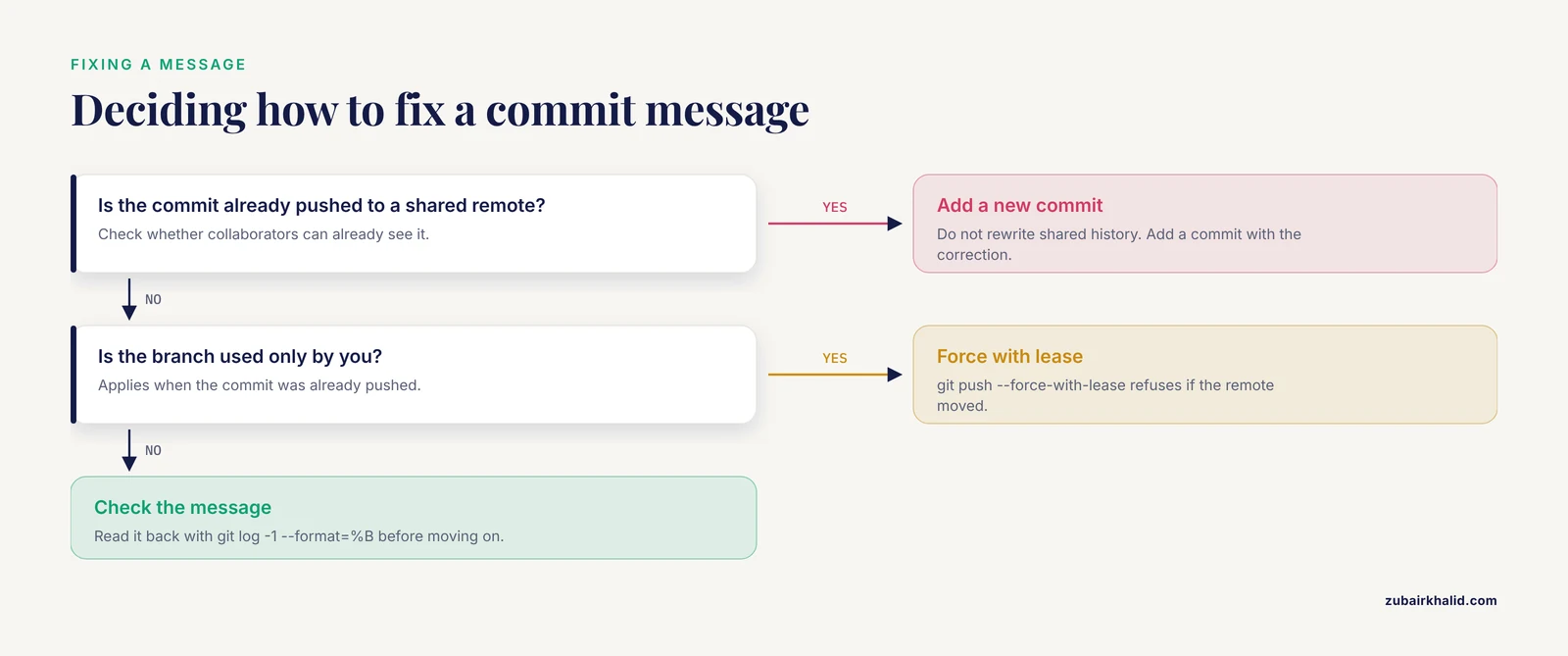
Run git commit, amend, edit the message, and save. Do this only before the commit has been pushed to a shared remote, because amending rewrites history and will be rejected on the next push otherwise.
What do I write when a commit changes the results?
Say it in the body, and ideally in the subject. State the parameter that changed, the expected direction of the effect, and which tables or figures need regeneration. If results should not change, write that explicitly so a later difference is a red flag.
How do I link a commit to a dataset or protocol?
Put identifiers in the footer, one per line: issue numbers, accession numbers, protocol versions, or analysis plan sections, for example Refs: #12, protocol v2.1. Writing Fixes #12 also closes the matching GitHub issue when the commit reaches the default branch.
Do commit messages work for Jupyter notebooks?
Yes, with one habit. Clear output cells before committing, or strip them automatically with a tool such as nbstripout, so diffs show code changes rather than megabytes of stored output, and let the message describe the code change.
How detailed should messages be in a shared lab repository?
Detailed enough that a reviewer can verify the message against the diff without asking you anything: what changed, why, and the expected effect on results. Write the convention down briefly in the repository README so every group member produces the same shape.
Sources
- From Donor to Discovery and Diagnosis: A Comprehensive 2026 Review of International Biobanking Guidelines Underpinning Molecular Pathology-Driven Cancer Diagnostics, with a Practical Roadmap for Establishing a New Biobank.
- DrugUtilisation: An R Package to Support Drug Utilisation Research Using the OMOP Common Data Model.
- EEG correlates of auditory rise time processing: A systematic review.
- Retinal proteome changes mirror brain pathology and reveal synaptic and cytoskeletal dysfunction in Alzheimer's disease.
- Unpacking weight management interventions measuring eating disorder risk in adults: coding of components of interventions in a systematic review.
- Scaling evidence: national causal evaluation of perinatal quality collaboratives needs better data.