Git Branching Strategies for Research Projects
By Dr. Zubair Khalid, DVM, MS, PhD ·

Every git branching strategy for research answers the same question differently: how many long-lived branches does a project maintain, and how strictly are changes gated before they reach the main line? The rule of thumb for labs is straightforward. If fewer than roughly five people commit to the repository and the product is analysis code rather than distributed software, run trunk-based development or GitHub Flow with short-lived branches and annotated version tags. Reach for GitLab Flow or Git Flow only when outside labs install and depend on your software.
The stakes are practical, not academic. Journals increasingly request code availability statements, and reviewers increasingly ask to rerun the analysis behind a figure, yet most scientists receive no formal training in version control [1]. A branching strategy is the small set of conventions that keeps a repository usable anyway. It decides where safe work lives, where experiments live, who reviews what, and which exact snapshot a paper points to.
This article covers the four strategies researchers actually use, a side-by-side comparison, the criteria that decide real choices, four worked scenarios, a concrete setup walkthrough, and the mistakes that cost the most time.
Git for Scientists: The Vocabulary Every Strategy Shares
Every strategy in this article is a convention layered on top of the same four mental models: the repository, the commit, the branch, and the remote [1]. Learn these once and every strategy becomes a variation on a theme.
Repository. A repository, usually shortened to repo, is a project folder plus the complete history of every saved change. Git stores that history in a hidden .git directory inside the folder. A repository lives on your machine and, in almost all research settings, also on a hosting service.
Commit. A commit is an immutable snapshot of the files you have staged, recorded with a message, an author, a timestamp, and a unique identifier called a SHA, a 40-character hexadecimal string that people shorten to its first few characters in everyday conversation. Commits are the units that branches move and tags freeze.
Branch. A branch is a movable label pointing at one commit. Creating one is essentially free because Git writes a small pointer file rather than copying anything. Work committed to a branch leaves the main line untouched until you merge it back.
Remote. A remote is a second copy of the repository on a service such as GitHub, GitLab, or Bitbucket. You push your commits to the remote and pull other people's commits from it. GitHub, a leading hosting platform for Git repositories [1], is the most common choice for researchers, and university GitLab instances are common where institutional control matters.
Pull request. A pull request (called a merge request on GitLab) proposes merging one branch into another. It bundles a diff, the line-by-line comparison of what changed, with a discussion thread and hooks for automated checks. Pull requests are where code review happens [1].
Merge. A merge combines the history of two branches. Git either fast-forwards, meaning the target branch simply advances to the newer commits, or creates a merge commit that records the joining explicitly.
Tag. A tag is a permanent, named pointer to one specific commit. Branches move as work lands. Tags never move. That asymmetry is the foundation of research reproducibility with Git.
On top of these models sits the daily rhythm that dominates Git usage: edit files, stage the changes with git add, record them with git commit [1]. A branching strategy does not change that rhythm. It decides when you work on the main line and when you work on a branch, and who is allowed to move the main line forward.
The Four Branching Strategies Researchers Actually Use
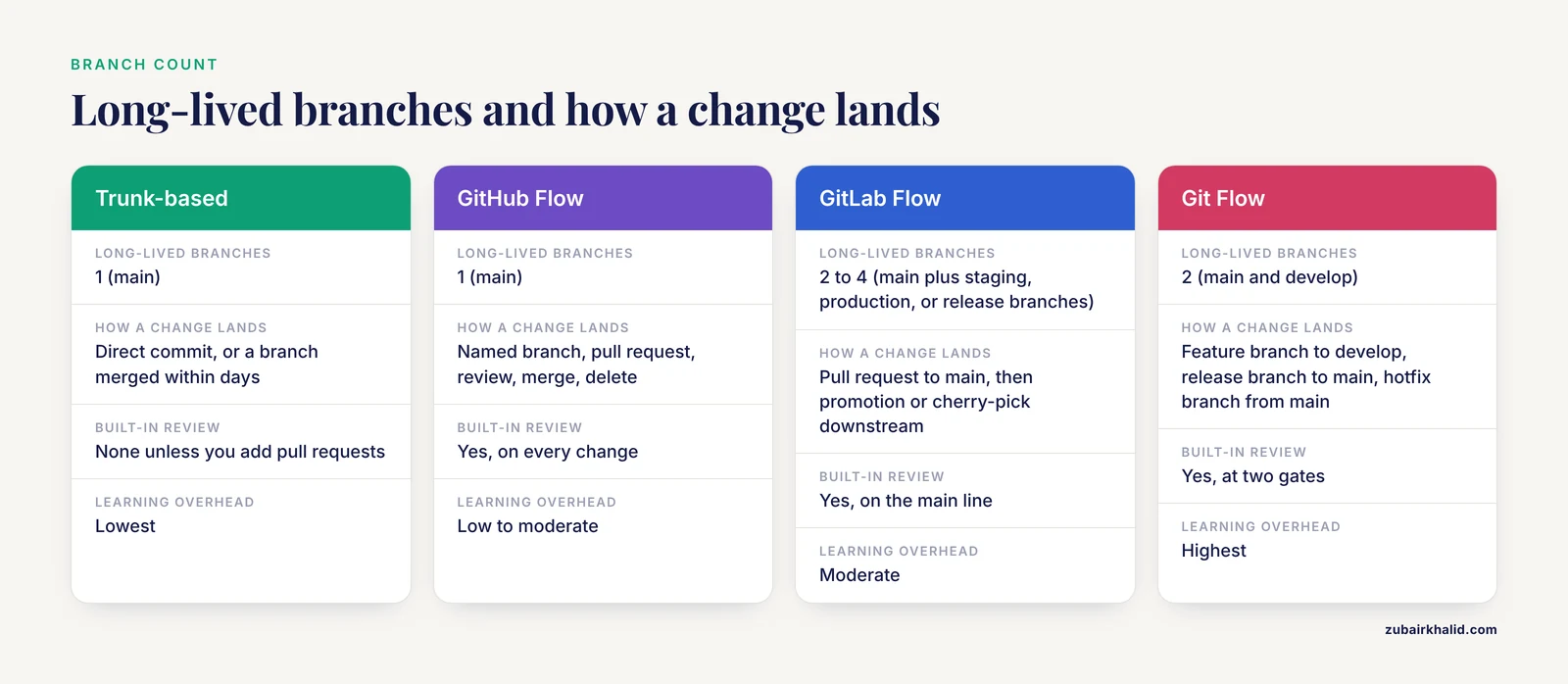
The realistic options are fewer than the internet suggests. Four strategies cover nearly every research project, and two of them cover most projects.
Trunk-Based Development: Small Batches on One Main Line
Trunk-based development keeps one long-lived branch, conventionally named main (older repositories use master). Everyone integrates small changes into it at least daily, either by committing directly or through branches that live for hours to a couple of days. Unfinished features stay out of main, hidden behind a feature flag, a setting in the code that keeps a half-built feature switched off until it is complete.
Small, safe changes go straight to main:
git switch main
git pull
# edit files
git add analysis/counts.R
git commit -m "Add library size filtering to count table"
git push
Risky or exploratory work gets a short-lived branch:
git switch -c try-harmony-integration
# experiment for a day or two
git switch main
git merge try-harmony-integration
To discard the experiment instead, delete the branch with git branch -d try-harmony-integration and main never knew it existed.
Pros. The history stays linear and readable. There is no merge debt, the accumulating pain of reconciling branches that have drifted apart for weeks. Small commits are easy to revert, which matters when an analysis change silently alters every downstream figure. The learning overhead is the lowest of the four options.
Cons. Main can break at any moment because nothing gates it. There is no built-in review step. Unfinished work can leak into main when discipline slips. Supporting multiple old versions is awkward.
Fit. Solo analysts, two or three person labs, and exploratory projects where the analysis changes daily and the only consumer of the repository is the person writing it.
GitHub Flow: Branch, Pull Request, Merge, Delete
GitHub Flow assumes main is always in a state you would be willing to hand to a collaborator or run on the cluster. Every change, however small, starts with a descriptively named branch, moves through a pull request, and lands on main only after review and any automated checks pass. After the merge, the branch is deleted, so main remains the only long-lived branch [1].
The loop looks like this:
git switch -c fix-normalization-bug
# edit, stage, commit, possibly several times
git push origin fix-normalization-bug
Then open the pull request in the browser, describe what changed and why, request review, respond to comments with new commits, merge once approved, and delete the branch.
Pros. Review becomes a habit rather than a favor, which matters when a biostatistician or a senior colleague must be able to vouch for the code. Main stays trustworthy because only reviewed work lands there. Branch names document intent, so the history reads like a lab notebook. On GitHub, pull requests connect naturally to issues and to Actions, the platform's built-in automation that can run syntax checks or smoke tests on every proposed change.
Cons. The ceremony is real overhead for a one-line fix. A solo researcher ends up reviewing their own work, which adds friction without adding safety. The strategy has no native concept of staged environments or releases, so teams add tags on top. Keep pull requests small, because a request touching 200 lines gets read and one touching 2,000 gets approved blindly.
Fit. Labs of roughly three to ten contributors, multi-institutional projects, and any repository where main must always run.
GitLab Flow: Main Plus Environment or Release Branches
GitLab Flow keeps main as the single source of truth and adds a small number of long-lived branches with jobs main cannot do. Two patterns dominate. Environment branches, such as staging and production, mirror where code actually runs: a change is merged to main first, validated, then promoted to production. Release branches, such as release-2.4, hold a supported version that can still receive fixes after the team has moved on.
The governing discipline is upstream first. A fix lands on main before anyone cherry-picks it, meaning copies that one specific commit, into a downstream branch. This ordering prevents the classic failure where production carries a fix that main lacks and the two lines diverge silently.
Pros. The promotion path from development to validated deployment is explicit, which suits pipelines that must be revalidated before they touch production data. Supported releases stay fixable, so a paper that used version 2.4 can be reproduced and patched years later. The mapping between branches and real environments is legible to system administrators as well as programmers.
Cons. Every extra long-lived branch is another thing to watch and another rule to teach the next student. Cherry-picking requires discipline and produces commits with different identifiers on different branches, which complicates bookkeeping. For an analysis repository with no deployment, the extra branches are pure overhead.
Fit. Core facilities, maintained tools with outside users, and projects with validated or staged computational environments.
Git Flow: The Full Ceremony
Git Flow, published by software developer Vincent Driessen in 2010, is the most elaborate of the four. It maintains two long-lived branches. main holds production-ready code, and every release on it carries a version tag. develop is the integration branch where finished features meet. Feature branches grow from develop and merge back into it. When a release is due, a release branch freezes the feature set for stabilization and then merges into both main and develop. When a bug surfaces in a released version, a hotfix branch grows from main, receives the fix, and merges back into both.
Pros. Release engineering is explicit, and old versions remain maintainable in parallel. The separation between development and production is unambiguous. Teams shipping software on a schedule get a process that matches that rhythm.
Cons. This is the heaviest strategy to run. Merge overhead multiplies because work flows through feature, release, and hotfix branches into two long-lived lines. In research settings the develop branch tends to rot into a second, stale main. Newcomers take the longest to become productive. The model assumes a release cadence that paper-driven research rarely has.
Fit. Mature software products with scheduled releases and multiple supported versions, such as a workflow distributed to many labs. It is rarely the right answer for analysis code, yet it is the strategy researchers most often adopt by mistake, precisely because it looks the most professional.
The Reproducibility Layer: Tags, Not Branches
Whatever strategy you choose, one layer matters more than the rest for research: freezing the exact code behind a paper with tags. A branch keeps moving as commits land. An annotated tag never moves. At every milestone a document depends on, create one:
git tag -a v1.0.0 -m "Analysis as submitted to Journal X"
git push origin v1.0.0
Many teams use three-part version numbers where the parts stand for major, minor, and patch changes, but any consistent naming works. Pair the tag with a record of the computational environment in the same commit, such as a conda environment file, an renv lockfile for R projects, or a container image reference. On GitHub, a release is a tag plus release notes and optional attached files, which gives collaborators and reviewers a stable page to download. The branching strategy organizes daily work. Tags and pinned environments are what answer a reviewer who asks to rerun a figure.
Side-by-Side Comparison of the Options
The table puts the pros and cons of each option on the dimensions that decide real choices.
| Dimension | Trunk-based | GitHub Flow | GitLab Flow | Git Flow |
|---|---|---|---|---|
| Long-lived branches | 1 (main) | 1 (main) | 2 to 4 (main plus staging, production, or release branches) | 2 (main and develop) |
| How a change lands | Direct commit, or a branch merged within days | Named branch, pull request, review, merge, delete | Pull request to main, then promotion or cherry-pick downstream | Feature branch to develop, release branch to main, hotfix branch from main |
| Built-in review | None unless you add pull requests | Yes, on every change | Yes, on the main line | Yes, at two gates |
| Release mechanism | Tags on demand | Tags and GitHub releases | Release branches plus tags | Release branches, hotfixes, version tags |
| Learning overhead | Lowest | Low to moderate | Moderate | Highest |
| Best fit | Solo analysts, 2 to 3 person labs | Labs of 3 to 10, collaborations, pipelines that must run | Core facilities, distributed tools, validated environments | Scheduled-release software with outside users |
| Main drawback | Main can break, no review gate | Overhead for trivial changes | Cherry-pick discipline, extra branches | Ceremony without a release schedule |
Two things the table does not say deserve emphasis. It does not rank reproducibility, because every column can be reproducible if the team tags releases and pins environments. It also does not include data handling, because no branching strategy makes committing sensitive data safe.
Choosing a Git Branching Strategy for Research: Six Criteria That Decide
Six questions separate the options faster than any general ranking.
- How many people commit, and how quickly do they rotate? Research groups turn over constantly as students graduate. Every long-lived branch is a concept each new member must learn and maintain. Trunk-based development and GitHub Flow keep that tax near zero. Git Flow multiplies it.
- Must main always run? If the repository holds a pipeline that colleagues, clinicians, or a core facility execute, main is a contract, and GitHub Flow or GitLab Flow with a protected main fits. If the repository holds exploratory notebooks and scripts, a temporarily broken main costs almost nothing, and trunk-based development is fine.
- Who reviews the code, and when? If a senior colleague, a biostatistician, or a journal process expects reviewed code, pull requests turn review into a scheduled step instead of an afterthought [1]. If nobody reviews until submission, tags at milestones do more good than a review gate nobody uses.
- What is the release cadence? Paper-driven projects freeze snapshots at submissions and revisions, which tags handle well. Software-driven projects with outside users need supported versions, which is where GitLab Flow release branches or, for scheduled releases, Git Flow earn their overhead.
- What is the skill mix? The best strategy is the lightest one every contributor can follow without a reference card. A lab of first-year students on Git Flow produces merge conflicts and orphaned branches. The same lab on GitHub Flow produces reviewed code.
- Where does the repository live? GitHub for researchers is the most common host, and its pull request, issue, and automation tooling assumes a GitHub Flow shape. University GitLab instances offer the same structure under the name merge request. The platform does not force a strategy, but its tooling rewards one, and institutional hosting is often required for clinical projects anyway.
If you want a single default for a new lab repository, choose GitHub Flow with a protected main and annotated tags at milestones. Drop to trunk-based development when you work alone. Add GitLab Flow release branches the day an outside lab installs your tool.
Worked Scenarios
Scenario 1: A Solo Dissertation Analysis
A PhD student in computational biology maintains a repository of R and Python scripts for a single-cell RNA-seq project. Nobody else commits. Her committee meets twice a year, and she has one paper target.
Recommendation: trunk-based development with short-lived experiment branches and tags at milestones. Routine work lands on main daily in small commits. When she wants to test a risky idea, such as a different batch correction method, she opens a branch, works there for a few days, and either merges it or deletes it. At her defense and at submission she creates annotated tags, v0.9-defense and v1.0-submission, and pins the R environment with a lockfile in the same commits.
Why not GitHub Flow: with no collaborators to review mid-week, a mandatory pull request for every change adds clicks without adding safety. Why not Git Flow: there is no release schedule and no outside users, so develop and release branches would be ceremony. When the committee or a reviewer asks which code produced a figure, the tag answers in seconds.
Scenario 2: A Multi-Institutional Clinical Study
Three hospitals pool a retrospective registry analysis. Analysts at each site commit to a shared repository. The registry itself never leaves institutional storage. The repository holds code, small synthetic fixtures for tests, and documentation.
Recommendation: GitHub Flow with a protected main. Each site's analyst works on a named branch, opens a pull request, and a designated reviewer at the coordinating center merges. Automated checks run a smoke test against the synthetic fixtures so a broken script cannot reach main silently. Multi-institutional collaboration is exactly the setting where branch and pull request structure pays for itself, because every change carries a named author, a discussion thread, and an approval [1].
At submission, the team tags the release, publishes it as a release on the hosting service, and cites it in the code availability statement. The .gitignore file excludes every path where data could land, and the team rereads it whenever the project layout changes.
Scenario 3: A Community Pipeline Other Labs Depend On
A lab maintains an amplicon analysis pipeline that outside researchers install on their own laptops and servers. EasyAmplicon illustrates this class of project: a cross-platform, open-source, reproducible, community-supported pipeline with more than 30 integrated modules and R packages, installation in under half an hour, and the ability to process dozens of samples on an ordinary laptop within about 3 hours. Its authors maintain it continuously, release updated tutorials in Chinese and English, and answer user questions through a WeChat account and GitHub [2].
Recommendation: GitLab Flow, or a lightweight Git Flow if release cadence is regular. main stays installable at all times. A develop branch absorbs integration work. Each supported version gets a release branch or, more simply, a tagged release that can receive cherry-picked fixes. User questions arrive as GitHub issues, and each fix follows the upstream-first rule: land on main, then propagate to supported versions.
The branching overhead is justified here because the repository is a product with users, not a one-off analysis. When a user reports a bug against an old version, the release branch is what makes a targeted fix possible.
Scenario 4: The Reviewer Reproducibility Request
A manuscript is conditionally accepted, and a reviewer asks to rerun the analysis behind the central figure. Because the team tagged v1.0-submission at submission and pinned the environment file in the same commit, the response is mechanical: point the editor to the tagged release, confirm the environment file, and let the reviewer clone the repository at that tag.
If the reviewer uncovers a genuine bug, the fix follows a hotfix pattern: branch from the tag, apply the minimal correction, merge to main, and tag v1.0.1. Git's recovery scenarios, such as restoring an earlier version of a file or undoing a bad commit, make this safe to attempt [1].
The lesson runs in both directions. The strategy chosen months earlier decides whether this request costs an afternoon or a crisis. A repository where everything lives on one moving line with no tags forces the team to reconstruct which commit produced which figure, which is the most common way research code fails a reproducibility check.
Setting Up a Research Repository: A Concrete Walkthrough
The following sequence sets up a small lab repository on GitHub with GitHub Flow and a tagging discipline. The same commands work on GitLab with merge requests in place of pull requests.
1. Create the repository and connect the remote.
git init -b main
git remote add origin https://github.com/your-lab/project-name.git
On older Git installations, run git init and then git branch -m main to name the default branch.
2. Write the .gitignore before the first commit. The ignore file lists paths Git must never track. For a clinical or wet-lab project, keep raw data and large outputs out from the first day:
# raw data and large outputs stay out of version control
data/
*.fastq.gz
*.RData
results/
# editor and notebook scratch files
.ipynb_checkpoints/
__pycache__/
3. Protect main. In the repository settings on the hosting service, enable branch protection so that direct pushes to main are blocked and at least one approving review is required. A protected branch converts GitHub Flow from a suggestion into a rule that survives staff turnover.
4. Run the daily loop.
git switch -c add-dea-module
# edit files
git add scripts/dea.R
git commit -m "Add differential expression module with volcano plot"
git push origin add-dea-module
Open the pull request in the browser, write what changed and why, request review, merge after approval, and delete the branch. If you must switch branches with uncommitted work in progress, git stash parks it safely until you return.
5. Freeze versions at milestones.
git tag -a v1.0.0 -m "Analysis as submitted"
git push origin v1.0.0
6. Inspect before you merge. Two read-only commands prevent most surprises: git status shows what is staged, and git log lists the commit history. Reading the diff in the pull request interface before merging is the cheapest quality control in research software.
Write commit messages in the imperative mood with one logical change per commit, starting with verbs such as Add, Fix, or Remove. Future you reads messages far more often than code.
Common Mistakes and Limitations
- Committing data, especially patient data. The most consequential mistake in research Git is not a merge conflict. Identifiable patient data must never enter a version-controlled repository, and a .gitignore file is the standard guard against inadvertent commits [1]. A private repository is not a data enclave. Once a file is committed, it persists in history even after deletion, and removing it requires rewriting history that collaborators may already have pulled. Prevention is cheap: ignore data paths from the first commit, keep datasets in institutional storage, and test with synthetic fixtures.
- Freezing papers with branches instead of tags. A branch named paper-1 will drift as new commits land, and six months later nobody knows which commit produced Figure 3. Tags exist precisely because they never move. Freeze documents to tags.
- Letting feature branches live for months. The longer a branch lives, the further it drifts from main and the more painful the merge. If a branch cannot merge within days, the work probably needs to be split into smaller pieces.
- Rewriting shared history. Rebasing, which replays commits onto a new base to rewrite history, is safe on private, unpushed branches and destructive on branches others have already pulled. Force pushes to shared branches are the classic way a lab loses an afternoon of work.
- Self-merging on collaborative repositories. If review is the point of the pull request, merging your own changes removes the point. Solo repositories are the exception.
- Branch sprawl. Stale branches accumulate until the branch list is unreadable. Delete branches after merging, since the commits remain reachable through main and the pull request record. A weekly git branch review takes a minute.
- Expecting the strategy alone to deliver reproducibility. A branch name is not a version. Reproducibility requires the tagged commit, the pinned environment, the data provenance, and, where the journal requires it, an archived copy. Teams that tag nothing but follow GitHub Flow faithfully still fail reviewer requests.
- Adopting Git Flow to look professional. Ceremony without a release schedule is pure overhead, and the develop branch becomes a second, stale main.
A few honest limitations close this out. No strategy fits every project, and the right choice changes as a project matures. An exploratory grant analysis that becomes a deployed clinical tool should change strategies, and the migration is mostly a matter of adding protection rules and release branches. Branching also governs code only. Git handles small text files well and struggles with large binary files. The standard extension Git LFS exists for large files that must be versioned, but raw sequencing data generally belongs in institutional storage with checksums recorded in the repository. Finally, a branching strategy is a social contract, not a technical control. It works when the team agrees to it, and it fails quietly when people push around it.
Frequently Asked Questions
What is the best git branching strategy for research?
For most research code, the best git branching strategy for research is GitHub Flow or trunk-based development with short-lived branches and annotated version tags. Add GitLab Flow style release branches when outside labs depend on your software. Git Flow rarely pays off in research settings.
Do I need branches if I work alone?
Yes, but lightly. Commit routine work directly to main, use a short-lived branch for risky or experimental changes, and tag the commits that correspond to milestones and manuscript submissions.
How do I freeze the exact code used for a published paper?
Create an annotated tag on the commit used for the manuscript, push the tag to the remote, and publish a release from it on the hosting service. If the journal requires an archival identifier, deposit the tagged release with a persistent identifier service.
Can patient data go into a private repository?
No. Identifiable patient data must never enter a version-controlled repository, regardless of privacy settings. Keep data in approved institutional storage and configure a .gitignore file so it can never be committed by accident.
What is the difference between a branch and a tag?
A branch is a movable label that advances as new commits land. A tag is a permanent label fixed to one specific commit. Use branches for work in progress and tags for versions you must be able to retrieve later.
How should a lab handle large sequencing files with git?
Keep raw data out of the repository. Store it in institutional or controlled storage and record file checksums in the repo. If individual large files must be versioned, the standard extension Git LFS can handle them, but git branches are not a data management plan.