Git Workflows for Collaborative Bioinformatics: Branching Strategies
By Dr. Zubair Khalid, DVM, MS, PhD ·

GitHub Flow keeps one long-lived branch and merges small, short-lived branches into it through reviewed pull requests, GitFlow maintains two long-lived branches (main and develop) plus dedicated release and hotfix branches, and trunk-based development keeps every branch alive for a day or less. A fourth design, the two-branch production flow, adds a branch that mirrors what actually runs on a live service. The rule of thumb: start with GitHub Flow if your team reviews pull requests and can rerun any analysis from main at any time, adopt GitFlow-style release branches when other institutions install your pipeline at pinned versions, and move to trunk-based development only once automated tests are strong enough that everyone can integrate daily without breaking main.
Git workflows for collaborative bioinformatics fail in a predictable way: the branching convention does not match how the team actually ships work. A three-person lab writing R and Python analysis scripts has different needs from a core facility shipping a Nextflow pipeline to five hospitals, and both differ from a platform team maintaining dozens of small workflows. The right git branching strategy for bioinformatics work is a written convention that states which branches exist, how long they live, who reviews them, and how versions get named. Git enforces none of it, so the convention has to be chosen deliberately and then enforced through repository settings and automated checks.
Four terms carry this article. A repository is the complete versioned history of a project. A commit is one snapshot of the files with a message describing the change. A branch is a lightweight, movable pointer to a commit (the official Git documentation describes it in exactly those words), which is why Git creates branches instantly and why having many of them costs almost nothing. A merge joins two lines of history into one. A pull request (called a merge request on GitLab) is a proposed merge packaged with a diff (the line-by-line view of what changed), a discussion thread, and automated status checks. A tag is a permanent, named pointer to a specific commit, and teams use it to mark a release.
Why Branching Decisions Hit Bioinformatics Teams Differently
Bioinformatics repositories usually mix executable code (pipeline definitions, R and Python scripts, Jupyter notebooks, which are documents mixing code, output, and notes), configuration (parameter files, sample sheets, environment specifications), and documentation. The heavy outputs, such as alignment files, variant call format (VCF) files, and figures, belong outside Git, on institutional file storage or cloud object storage, with checksums (short fixed-length fingerprints computed from a file's contents) recorded in the repository. A branching strategy governs the first group. A pinning strategy, built from containers (packaged environments that run software identically across systems), locked Conda environments (Conda is a cross-platform package manager for scientific software), and recorded checksums, governs the second. Teams that blur the two end up with slow clones and versions nobody can rerun.
Most production bioinformatics code runs through a bioinformatics workflow manager such as Nextflow or Snakemake. The manager reads a pipeline definition from a Git repository, resolves the dependency graph of tasks, and executes them on a high-performance computing (HPC) cluster managed by the Slurm scheduler, on a Kubernetes cluster (a system for orchestrating containerized workloads), or on a cloud service. Because the manager pulls code from Git, the branch, tag, or commit you point at becomes part of the analysis provenance (the record of what code and data produced a result). That coupling is stronger than most software teams face: pointing a run at the wrong ref is a reproducibility problem, not merely an inconvenience.
The audiences differ from typical software projects as well. Co-authors need a citable, frozen version at manuscript submission. External collaborators need a pipeline that behaves the same way every week. Reviewers may ask for the exact code behind a figure months after acceptance. A branching strategy that optimizes only developer convenience will disappoint all three.
A few more terms appear throughout. A long-lived branch is one that is never deleted, such as main or develop. A short-lived branch is created for one change and deleted after its merge. A rebase rewrites a branch's commits so they sit on top of a different starting point, which produces a clean history but changes commit identities. A fast-forward merge simply moves the branch pointer because the target branch has no commits of its own. A protected branch is a rule configured on the hosting platform (GitHub, GitLab, or Bitbucket) that blocks direct pushes and can require reviews and passing checks before a merge. A feature flag is a configuration switch that lets unfinished code merge into a shared branch while staying turned off for users.
The Four Options at a Glance
Four branching strategies cover nearly every bioinformatics team. The table compares them on the criteria that decide real choices: how many branches live forever, how work gets integrated, how a version ships, and where the main risk sits.
| Strategy | Long-lived branches | Short-lived branches | How a version ships | Where review happens | Best fit | Main risk |
|---|---|---|---|---|---|---|
| GitHub Flow | main | Feature and fix branches, days to a couple of weeks | Merge to main, tag when a citable version is needed | Pull request into main | Small to mid-sized teams doing analyses or active pipeline development | main breaks often when tests are weak |
| GitFlow | main and develop | Feature, release, and hotfix branches | Release branch stabilized, merged to main, tagged with a version | Pull request into develop, then a release review | Versioned pipelines installed by other institutions | Ceremony and merge overhead out of proportion for small teams |
| Trunk-based development | main | Branches living hours to a day, or direct commits | Continuous, with tagged snapshots, and unfinished work hidden behind feature flags | Small pull requests reviewed fast | Teams with strong automated tests and continuous integration | Broken main when test discipline slips |
| Two-branch production flow | main and production (or staging) | Feature branches as in GitHub Flow | An explicit merge from main to the production branch deploys the service | Pull request into main, then a release pull request | Core facilities and services with a running production system | The two branches drift apart when syncing is skipped |
Most real teams run a hybrid. A lab can work in GitHub Flow daily and cut a versioned tag at manuscript submission. A core facility can develop trunk-based between release cycles and cut a release branch every quarter. Treat the four rows as templates to combine, not laws to obey.
GitHub Flow: One Long-Lived Branch
GitHub Flow is the simplest strategy that still supports review. One branch, almost always named main, is long-lived and kept runnable at all times. Every change, from a one-line fix to a new processing step, happens on a short-lived branch with a descriptive name. When the work is ready, the author opens a pull request, colleagues review the diff, automated checks run, and the branch merges into main. The branch is then deleted.
The daily sequence looks like this:
git clone https://github.com/my-lab/rna-analysis.git
cd rna-analysis
git switch -c qc-thresholds
# edit files, then stage and commit
git add .
git commit -m "Raise the mapping quality filter to 30"
git push -u origin qc-thresholds
The -c flag creates the branch in one step, and -u records the upstream link so later pushes need no arguments. On the hosting platform, the author opens a pull request from qc-thresholds into main. Reviewers comment on the diff, the continuous integration (CI) system runs automated checks on every push (typically the pipeline's test profile, a named preset that points the run at tiny test data), and a maintainer merges. Cleanup follows:
git switch main
git pull origin main
git branch -d qc-thresholds
Pros:
- One rule to learn, so new students and rotating analysts follow it within a day.
- main stays current, so the version you demo, the version you cite, and the version you run are the same.
- Tags slot in cleanly: tag main whenever a citable version is needed, and Zenodo can issue a DOI (a permanent, citable identifier) for a GitHub release so a paper can point at an immutable snapshot.
- Works with any workflow manager, since the manager points at main or at a tag.
Cons:
- Without protected branches and required reviews, main accumulates half-finished work.
- Without CI on every pull request, main breaks in ways nobody notices until an analysis fails on the cluster.
- Supporting two versions in the field at once (a stable release installed elsewhere while development continues) has no dedicated mechanism, so teams add release branches when that need arrives.
GitHub Flow fits lab analysis repositories, method development, and the development side of community pipelines. The nf-core project, which maintains a large collection of community Nextflow pipelines, requires reviewed pull requests, automated runs on small test data, containerized software, and a version tag for every release, and its repositories keep a dev branch for integration alongside main for releases. That combination is GitHub Flow with a light two-branch overlay, and it is a proven template for pipeline development.
GitFlow: Versioned Releases as First-Class Citizens
GitFlow treats releases as first-class objects. The model comes from the original GitFlow essay on branching for scheduled-release software. Two branches live forever: main holds every released version, and develop holds the integrated work heading toward the next release. Feature branches grow from develop and merge back into it. When develop is ready to ship, a release branch is cut, receives only stabilization fixes (version bumps, small bug repairs), and is then merged into main and tagged. The release branch also merges back into develop so those fixes are not lost. When a bug appears in a released version, a hotfix branch (an urgent repair branch cut from main rather than develop) receives the fix and merges back to both main (tagged as a patch) and develop.
Version names follow semantic versioning, the MAJOR.MINOR.PATCH convention (2.1.0 means major version 2, minor 1, patch 0), where major versions break compatibility, minor versions add function, and patch versions fix bugs.
A release cycle looks like this:
git switch develop
git switch -c feature/star-alignment
# work, commit, push, open a pull request into develop
git switch develop
git pull origin develop
git merge feature/star-alignment

git switch -c release/2.1.0
# bump version strings, run the full test suite, fix small bugs
git switch main
git merge release/2.1.0
git tag -a v2.1.0 -m "Release 2.1.0"
git push origin main
git push origin v2.1.0
git switch develop
git merge release/2.1.0
A hotfix to a released version follows the same shape from the other side:
git switch -c hotfix/2.1.1 main
# fix the bug, commit
git switch main
git merge hotfix/2.1.1
git tag -a v2.1.1 -m "Patch release"
git push origin main
git push origin v2.1.1
git switch develop
git merge hotfix/2.1.1
Pros:
- Anyone can see exactly which code is in which released version, because main contains only tagged releases.
- Two versions can be supported at once: development continues on develop while a release branch receives stabilization fixes.
- Hotfixes reach production without carrying along unfinished develop work.
- The structure maps cleanly onto change-control expectations in clinical and regulated production settings, where each deployed version needs a documented diff from the last.
Cons:
- The ceremony is heavy for small teams, and develop often becomes a second main that is itself never quite stable.
- Merge overhead grows: every release merges back to develop, and every hotfix merges to two branches.
- For analysis code that never ships to anyone, the release machinery buys nothing.
A common lighter variant drops the develop branch: feature branches merge into main through pull requests, and a release branch is cut from main only when a version ships. Many core facilities run this GitFlow-without-develop style, and it captures most of the benefit at a fraction of the overhead.
Trunk-Based Development: Integrate Daily
Trunk-based development minimizes branch lifetime. Everyone integrates into main continuously, either through very small pull requests or, on teams that pair-review, through direct commits. Any branch lives hours to a day or two, never weeks. Work that is not ready for users does not wait on a branch. It merges behind a feature flag, which keeps the unfinished code path off until the flag is turned on. Continuous integration (CI), the practice of running the automated test suite on every push and pull request, is what makes this safe.
The rhythm is small and fast:
git switch main
git pull origin main
git switch -c fix-index-handling
# a change small enough to finish and review today
git add .
git commit -m "Handle missing index files with a clear error"
git push -u origin fix-index-handling
# open a pull request, merge the same day, delete the branch
Pros:
- Merge conflicts (overlapping edits that Git cannot reconcile automatically) stay small because no branch drifts from main for long.
- main is always close to shippable, so tagging a version at any moment is realistic.
- The history reads as a sequence of small, reviewable changes, which helps when reconstructing why an analysis changed.
Cons:
- The strategy depends entirely on test discipline. With weak tests, main breaks and the whole team stops.
- Feature flags add configuration surface that must be tracked and eventually removed.
- It suits code under active development by a cohesive team, and fits poorly when external users install specific versions.
Trunk-based development fits platform teams maintaining many small workflows in one repository (a monorepo), teams building internal tooling with solid test suites, and the development phase between releases of a larger pipeline.
Environment and Release Branches for Production Services
The two-branch production flow keeps main as the integration point and adds a second long-lived branch, often called production or staging (a pre-production environment that mirrors the live service), that reflects what actually runs. Work merges into main through pull requests exactly as in GitHub Flow. Deploying a new version is an explicit promotion: a pull request from main into production, reviewed and merged, is the act of deployment. Because the promotion is itself a reviewed change, the production branch always answers the question of what is running right now.
A variant used for versioned software cuts a release branch per deployment (release/2.1, release/2.2) so that patch fixes can land on an old line while the next version develops on main.
Pros:
- The running service has an unambiguous branch, which simplifies incident response: check out production and you hold the deployed code.
- Promotion is deliberate and reviewable, which suits core facilities, clinical production pipelines, and any service deployed under change control (formal procedures for reviewing and approving modifications).
- Release branches allow parallel maintenance of an installed version and forward development.
Cons:
- Two long-lived branches drift when syncing merges are skipped, and unwinding that drift is painful.
- Every change can require two merges over its life, which doubles some overhead.
- For teams without a running service, the second branch is dead weight.
This flow fits a core facility running a production pipeline for internal clients, a service with a staging environment, and pipelines deployed under change control where each deployment needs a documented, reviewable diff.
Choosing a Git Branching Strategy for Bioinformatics Teams
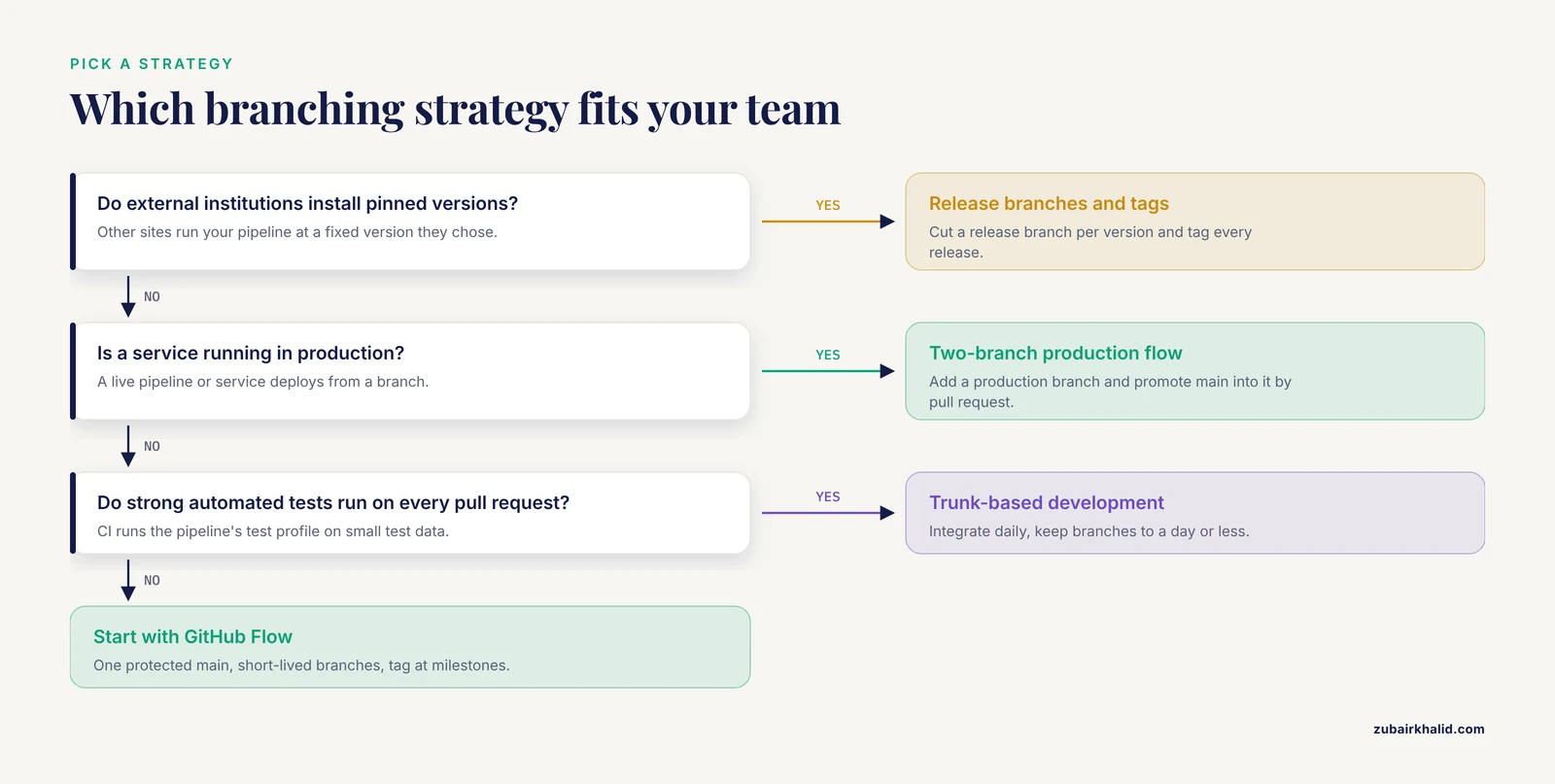
Seven questions separate the options in practice:
- Who consumes the code? If only the team reruns it, GitHub Flow or trunk-based development is enough. If external institutions install pinned versions, release branches and tags become necessary.
- What is the release cadence? Continuous or on-demand shipping favors GitHub Flow and trunk-based development. Scheduled, versioned releases favor GitFlow-style release branches.
- Is review required? A solo analyst can commit directly to main and tag milestones. The moment a second person pushes, branch protection and review pay for themselves.
- How mature is the CI? If every pull request runs the pipeline's test profile on small test data, short-lived branches and frequent merges are safe. Without CI, longer-lived branches and heavier review are the only protection.
- How does deployment work? If a branch or tag is itself the deployment unit (as when a Nextflow run points at a revision), tags carry more weight. If a service deploys from a branch, the two-branch flow fits.
- Are there change-control obligations? Clinical and regulated production settings need documented diffs between deployed versions, which release branches and tags provide naturally.
- What is the team's size and turnover? Large or rotating teams need simple rules (GitHub Flow) more than clever ones (full GitFlow).
| Situation | Sensible starting strategy |
|---|---|
| Two to five analysts sharing analysis code and notebooks | GitHub Flow with release tags at milestones |
| A pipeline installed by external sites with scheduled releases | GitFlow-style release branches, with develop optional |
| A platform team maintaining many small workflows with a strong test suite | Trunk-based development |
| A production service with a staging environment or change-control duties | Two-branch production flow |
Enforcement lives outside Git. Git will happily allow direct pushes to main, forced overwrites, and merges of anything. The convention becomes real when set in the hosting platform: GitHub, GitLab, and Bitbucket all document branch protection, required reviews, and required status checks (the CI results attached to a pull request) in their settings guides. Protect main, require one review, require the checks, block forced overwrites, and write the convention in a CONTRIBUTING file at the repository root so a new student reads it before the first commit.
Worked Scenarios
Scenario 1: A three-person lab analyzing sequencing data
The repository holds a small Snakemake workflow, R scripts for figures, and a notebook per experiment. The team adopts GitHub Flow. Each analysis question gets a branch named for the question, the workflow's dry run (snakemake -n, which prints the planned jobs without executing them) acts as a first check, and one colleague reviews every pull request. When the manuscript is submitted, the team tags v1.0.0 and lets Zenodo issue a DOI for the GitHub release so the paper cites an immutable version.
git switch -c feature/figure3-timecourse
# edit workflow and scripts
git add .
git commit -m "Add timecourse aggregation for figure 3"
git push -u origin feature/figure3-timecourse
# pull request, review, merge
git tag -a v1.0.0 -m "Analysis as submitted"
git push origin v1.0.0
Scenario 2: A core facility shipping a Nextflow pipeline to five institutions
Development merges into main through pull requests with CI. Each quarter, a release branch is cut, tested end to end on the target HPC environment, and merged to main with a tag. Institutions pin their runs to that tag with the revision flag described in the workflow manager section below. A broken container pin found after release becomes a hotfix branch cut from the release tag, merged back, and tagged as a patch.
git switch -c release/2.1
# freeze versions, run the full test profile on the cluster
git switch main
git merge release/2.1
git tag -a v2.1.0 -m "Quarterly release"
git push origin main
git push origin v2.1.0
Scenario 3: A platform team maintaining many small workflows
The team develops trunk-based in a monorepo. CI runs each workflow's tests on every pull request, changes stay small, and unfinished steps merge behind feature flags. Tags mark the versions downstream users run.
git switch -c add-trim-step
# small change to one workflow plus its tests
git push -u origin add-trim-step
# pull request, CI runs the affected workflow's tests, merge same day
Each scenario differs in ceremony, and all three keep two invariants: the integration branch always runs, and every version anyone could cite is a tag.
Branching With a Workflow Manager: Nextflow vs Snakemake
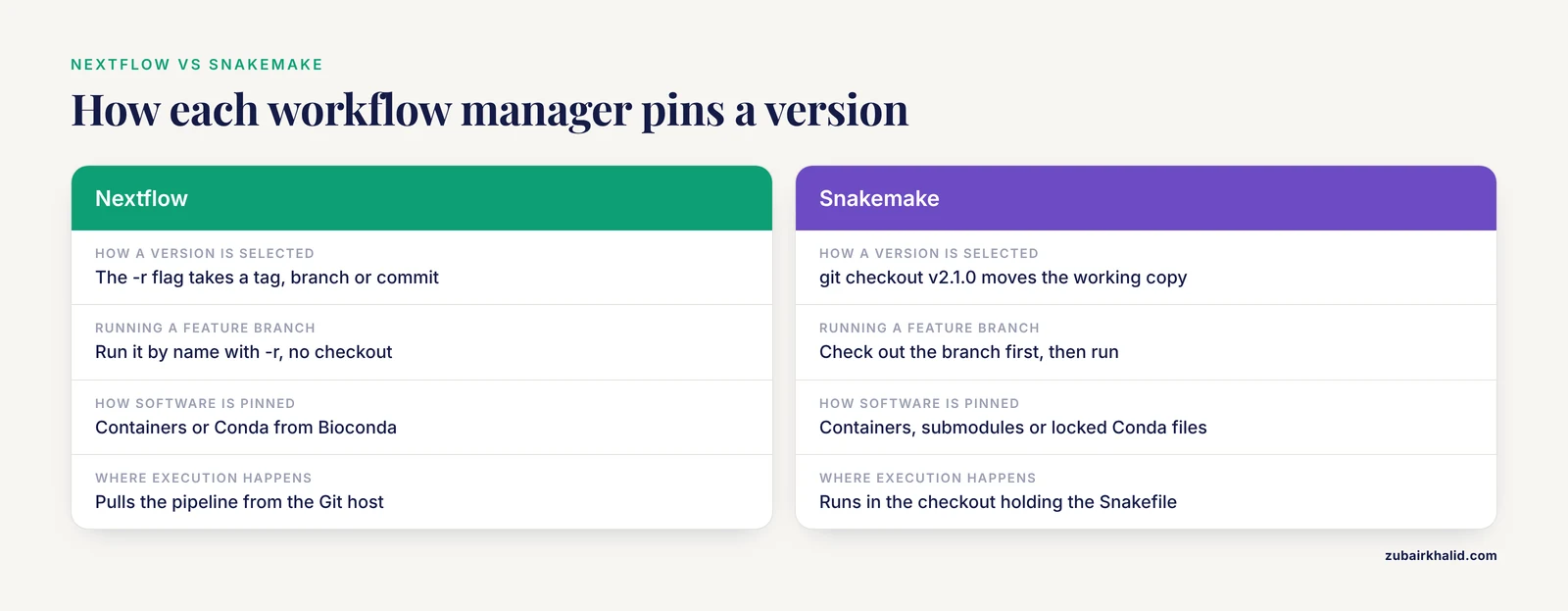
A bioinformatics workflow manager turns a pipeline into a set of tasks with declared inputs, outputs, software environments, and an execution target. Nextflow and Snakemake are the two most widely used open-source managers, and both read their pipeline definitions from Git repositories, so the branching strategy and the run command interact directly.
Nextflow has deep Git integration. The run command pulls a pipeline from a Git host, and the -r flag selects a revision, which Nextflow's documentation defines as a tag, a branch name, or a commit hash:
nextflow run my-lab/rna-pipeline -r v2.1.0
nextflow run my-lab/rna-pipeline -r feature-new-aligner
nextflow run . -profile test,docker
The second command runs the feature branch on the cluster without anyone checking it out, which makes branch-level testing on real data a one-command operation. The third runs the local directory with a profile (a named bundle of settings, here the test data preset under Docker, the most common container runtime), the pattern community pipelines use in CI on every pull request. The nf-core collection standardizes this pattern: reviewed pull requests, automated runs on small test data, containerized software, and a version tag for every release.
Snakemake executes from a working directory that contains a Snakefile, the Python-formatted file declaring the pipeline's rules. Because execution happens in the checkout, version selection happens when you check out:
git clone https://github.com/my-lab/rna-pipeline.git
cd rna-pipeline
git checkout v2.1.0
snakemake -n
snakemake -c 8
Here git checkout v2.1.0 moves the working copy to the tagged state (Git calls this a detached HEAD, meaning no branch is being followed, which is exactly right for rerunning a released analysis), snakemake -n is the dry run, and -c 8 requests eight cores. Teams that want a workflow available inside another repository pin it as a Git submodule (a reference to another repository locked to a specific commit) or pull a container image built from a tag.
For the branching decision, the nextflow vs snakemake comparison matters less than either community's enthusiasm might suggest. Both managers work with all four strategies. The practical differences are deployment-shaped. Nextflow's revision mechanism makes any Git ref (shorthand for any branch, tag, or commit pointer) runnable by name, which suits teams that test feature branches on a cluster before merge and pin production runs to tags. Snakemake's checkout-based execution makes tags, submodules, and containers the natural pinning tools. Both ecosystems encourage pinned software through containers (Docker locally, Apptainer on HPC, the container runtime formerly called Singularity) or Conda environments resolved from Bioconda (the community channel for bioinformatics software packages), so tool versions stay fixed no matter which branch is checked out. Choose the manager on language fit (Nextflow is Groovy-based, Snakemake is Python-based), on execution backends, and on the community pipelines available for your domain. Choose the branching strategy on the criteria in the previous section. The two decisions are largely independent.
Common Mistakes and Limitations
- Feature branches that live for months. Long-lived feature branches create merge debt (the growing cost of reconciling old work with main) and painful conflicts when the pipeline is refactored. If a branch needs more than a couple of weeks, merge working increments into main and start fresh branches.
- Rebasing branches that other people have pulled. A rebase rewrites commit identities. Anyone holding an old copy of the branch will fight duplicate commits after the next pull. Rebase only branches you alone have pushed, and prefer a merge for shared ones.
- Forced overwrites of shared or protected branches. A forced push overwrites remote history, which destroys the provenance a bioinformatics repository exists to preserve. If an overwrite is genuinely needed after a rebase, use the safer force-with-lease variant, which refuses to overwrite commits the local repository has not seen, and never disable branch protection to make a push succeed.
- Committing large results into Git. Alignment files (BAM format), variant calls (VCF), and multi-megabyte figures bloat the repository, and every clone on the cluster pays for it. Keep results on institutional or object storage, record checksums and the producing tag in the repository, and reserve Git LFS (Large File Storage, an extension that stores small pointers in Git and the file contents on a separate server) for the few files that must travel with the code. Tracking a file type looks like
git lfs track "*.vcf.gz". - Using branches to pin environments. A branch that exists to hold a different environment file is a version in disguise. Pin environments with tags, container images, or locked Conda environment files instead, so one code version has one environment.
- Never tagging releases. Tickets and papers that reference main as of some date reference a moving target. Tag at manuscript submission and at every production deployment, and cite the tag.
- Expecting the branching strategy to deliver reproducibility. Branching organizes change to code and configuration. Reproducibility comes from pinned software (containers or locked environments), pinned parameters, archived input data, and a tag that ties them together. A perfect branching strategy with unpinned software reruns nothing reliably.
- Keeping the convention in someone's head. When the only person who knows the rules is busy, the rules decay. Write them in a CONTRIBUTING file and let branch protection enforce the parts that can be automated.
Limitations. Git enforces none of this by itself. Protection rules, required reviews, and CI come from the hosting platform and the automation around the repository, and every strategy here is a convention that a sufficiently careless commit can violate. The strategies also trade off against each other in ways that depend on the project: GitFlow's overhead is real for a three-person lab, trunk-based development is unsafe without tests, and two-branch flows drift when syncing merges are skipped. Individual projects still need judgment about which conventions fit their data, deadlines, and consumers, and the written convention should be revisited when the team or the deployment model changes.
A Minimum Convention You Can Adopt This Week
- Protect main. Block direct pushes, require one approving review, and require the CI checks to pass.
- Name branches by intent: feature/ for new function, fix/ for repairs, release/ for stabilization lines.
- Route every change through a pull request, with CI running the pipeline's test profile on small test data.
- Merge with the hosting platform's merge or squash button, then delete the branch. Squashing folds a branch's commits into one, which keeps main readable.
- Tag every version anyone might rerun or cite, using semantic versioning, and push the tags.
- Keep results out of Git. Record checksums, parameters, and the producing tag in a results log inside the repository.
- Write the convention in a CONTRIBUTING file, and link it from the repository description.
A team that does only these seven things has, in practice, adopted GitHub Flow with release tags, and can add release branches later if external users begin installing pinned versions.
Frequently Asked Questions
Which git branching strategy should a bioinformatics team start with?
Start with GitHub Flow: one protected main branch, short-lived feature branches, a required pull request review, and a version tag whenever someone needs a citable version. Add release branches only when external users begin installing pinned versions of a pipeline.
Does the choice between Nextflow and Snakemake change my branching strategy?
No. Both managers work with any of the four strategies. The difference is deployment: Nextflow can run a branch or tag directly as a revision, while Snakemake usually runs from a checkout, so tags, submodules, or containers do the pinning.
How should we handle large result files in the repository?
Keep them out of Git. Store them on institutional or object storage, record their checksums and the tag that produced them inside the repository, and use Git LFS only for files that must travel with the code.
Should we rebase or merge feature branches?
Rebase a branch that only you have worked on, to refresh it before opening a pull request, and merge through the pull request. Never rebase a branch other people have pulled, because the rebase rewrites history and their copies will conflict.
How often should a production pipeline be tagged?
Tag a release every time someone outside the team could rerun or cite a specific version, which usually means every production deployment and every manuscript submission. The cadence follows your deployment schedule, not the calendar.
Can we give every experiment or collaborator a dedicated branch?
Yes, as long as those branches stay short-lived and get merged or closed on a schedule, such as before each group meeting. A branch per experiment that lives for a year is merge debt rather than organization.