Choosing the Right Storage Architecture for Your Genomics Lab
By Dr. Zubair Khalid, DVM, MS, PhD ·
The one-sentence difference: file-based systems (NAS, SAN, parallel filesystems) store data as named files that individual computers read and write, while object-based systems (S3-style stores, cloud buckets, tape-backed archives) store data as addressable objects optimized for durability and bulk access rather than fast, concurrent, random reads. The rule of thumb for choosing the right storage architecture for your genomics lab is this: if many jobs hammer the same large files at the same time, buy parallelism first and capacity second, and if data mostly sits untouched after analysis, buy durability and cheap capacity first and performance second. Almost every working lab ends up with a tiered combination of both.
This article is a genomics storage architecture comparison written for lab managers, principal investigators, and bioinformatics leads who need to make a purchasing or design decision and defend it. It explains each architecture on its own terms, compares the options on the criteria that actually decide purchases, works through realistic scenarios, and lists the mistakes that cause most storage failures in sequencing facilities.
Why Genomics Data Breaks Ordinary Storage
Sequencing output has grown faster than most IT budgets. NGS platforms now routinely produce data for cancer genomics, rare disease diagnostics, infectious disease surveillance, and precision medicine programs, and the field keeps adding single-cell sequencing, long-read platforms, and multi-omics integration on top of standard short-read workflows. Reviewers of the NGS analysis landscape make the consequence explicit: the sheer volume of sequencing data necessitates robust computational infrastructure for storage, processing, and interpretation, and that burden grows with every new modality the lab adopts [1].
Three properties of genomics workloads stress storage systems that office or web workloads never touch:
- Large sequential files. A single 30x human whole-genome run produces FASTQ files on the order of 100 GB, and the aligned BAM file is a similar size again. Copying, compressing, and indexing these files is pure sequential throughput.
- Explosive concurrency. A workflow manager such as Nextflow, Snakemake, or WDL/Cromwell may run hundreds of tasks at once, each opening files on the same storage backend. A single NFS server that serves one user browsing spreadsheets perfectly can collapse when forty BWA-MEM or STAR jobs start simultaneously.
- Small-file storms. Single-cell and fragmented-artifact workflows generate hundreds of thousands to millions of small files (per-cell matrices, per-chunk BAMs, intermediate shards). Filesystems that perform well on 100 GB BAMs can crawl on a directory of a million 4 KB files because of metadata overhead rather than data throughput.
The practical consequence is that "how many terabytes" is the wrong first question. The right first question is "what is the input/output pattern of my pipelines," because that pattern, more than raw capacity, determines which architecture works.
Genomics Storage Architecture Comparison: The Options Side by Side
The table below is the core of this genomics storage architecture comparison. It covers the options a sequencing lab realistically chooses among: network-attached storage (NAS), storage area network (SAN), parallel and distributed filesystems, object storage (on-premises or cloud), and archival tiers. Definitions for each appear in the sections that follow.
| Architecture | What it is | Best suited workloads | Pros | Cons |
|---|---|---|---|---|
| NAS (NFS/SMB) | A single head unit or small cluster exporting shared file folders over the network | Small labs, 1 to 10 concurrent users, desk-side analysis, shared reference data | Cheap, simple, familiar, easy to back up | Single metadata path becomes a bottleneck under parallel pipelines, limited scalability |
| SAN (block storage, often Fibre Channel or iSCSI) | Block-level disks presented to servers as raw volumes | Databases, virtualization, labs that already own SAN infrastructure | Very low latency, mature failover, vendor support | Expensive per TB, block model fits bioinformatics poorly without a filesystem layered on top, does not solve concurrency by itself |
| Parallel filesystem (Lustre, IBM Storage Scale/GPFS, BeeGFS, CephFS) | Data and metadata spread across many servers so reads and writes scale with the cluster | Core facilities, HPC clusters, large BAM/CRAM processing, many simultaneous workflow tasks | Scales throughput and concurrency, designed for exactly the NGS I/O pattern | Operational complexity, dedicated administrators, higher up-front cost |
| Object storage (S3-compatible, on-prem or cloud: MinIO, Ceph RGW, AWS S3, Google Cloud Storage, Azure Blob) | Data stored as flat objects addressed by keys, accessed over HTTP APIs | Raw data archives, finished results sharing, multi-site access, pipeline input staging | Effectively unlimited scale, high durability, cheap per TB, natural fit for cloud pipelines | Not mountable as a fast POSIX filesystem without gateways, poor random small-file access, egress fees on public clouds |
| Archive tier (tape libraries, deep cloud archive classes) | Sequential-access media or deep archive object tiers for data that is written once and rarely read | Long-term raw data retention, institutional compliance archives | Lowest cost per TB, very high durability | Retrieval takes hours to days, not suitable for active analysis |
| Hybrid and tiered designs | Combination of the above with automated or policy-based data movement | Nearly every lab beyond the small-team stage | Matches cost tier to data temperature, keeps hot data fast and cold data cheap | Requires policy discipline and tooling to move data between tiers correctly |
No single row wins outright. The best genomics storage architecture for a given lab is the one whose performance profile matches the lab's pipeline I/O pattern at a cost the lab can sustain for years, including the growth that comes after the first purchase.
Each Option Explained on Its Own Terms
NAS: The Shared File Server
A NAS (network-attached storage) is a self-contained appliance, or a small server running software such as TrueNAS, that exports folders over NFS or SMB so desktops and small servers can mount them like local disks. Everything funnels through one or a few head nodes, which handle both the data traffic and the metadata (the index of file names, directories, and permissions).
For a lab with one benchtop sequencer, a handful of analysts, and workloads like QC, variant calling on single samples, and report generation, a well-built NAS with redundant disks and regular snapshots is often the correct and complete answer. It is simple to understand, simple to back up, and an administrator can run it part-time.
The failure mode appears when the lab grows into pipeline parallelism. A workflow that scatters 200 tasks across a compute cluster sends every one of those tasks through the same NAS head. NFS handles this poorly because metadata operations (opening, stat-ing, and closing files) serialize through a single path. Jobs that would run in an hour on proper shared storage take most of a day, and the NAS, not the compute cluster, is the constraint.
SAN: Block Storage and Where It Fits
A SAN (storage area network) presents raw block devices to servers over a dedicated network. The server treats the volume as a local disk and puts its own filesystem on top. SANs dominate in hospital IT, enterprise databases, and virtualization farms because they deliver low latency, redundant controllers, and mature vendor support contracts.
Genomics labs that sit inside a hospital IT department often inherit SAN capacity, and using it is reasonable for databases (a ClinVar mirror, a LIMS, a warehouse of extracted variants) and for virtual machines. As the backbone of a sequencing pipeline, though, a SAN by itself solves the wrong problem. Block devices still need a filesystem, and a conventional filesystem on a SAN volume has the same single-filesystem metadata bottleneck as a NAS. If your site offers you SAN capacity, use it for structured databases and virtualization, and budget separately for parallel or object storage for sequencing files.
Parallel Filesystems: Built for the NGS I/O Pattern
A parallel filesystem strips data and metadata across many storage servers so that aggregate throughput grows as you add hardware, and hundreds of clients can read and write simultaneously without queueing behind one head node. Lustre, IBM Storage Scale (formerly GPFS), BeeGFS, and CephFS are the names you will encounter. HPC centers worldwide run sequencing pipelines on these systems, and they are the architecture that high-throughput aligners, per-sample scatter/gather workflows, and population-scale joint calling are implicitly designed around.
The tradeoff is operational, not conceptual. A parallel filesystem is a distributed system with daemons, failover behavior, capacity rebalancing, and version-upgrade planning. It needs at least one administrator who owns it, which is exactly the constraint that resource-limited institutions describe: building and sustaining HPC infrastructure depends on technical expertise, stable power and networking, and sustainable funding, not just on buying hardware [2]. If your institution cannot staff that role, a parallel filesystem is a liability regardless of its performance numbers.
Object Storage: Durability and Scale by Design
Object storage abandons the file-and-folder model. Data lives as opaque objects addressed by unique keys inside flat buckets, accessed over simple HTTP APIs (the S3 API is the de facto standard, implemented by Amazon S3, Google Cloud Storage, Azure Blob Storage, and open-source systems such as MinIO and Ceph's object gateway). Each object can be replicated or erasure-coded across many devices and sites, which is why object stores advertise very high durability, and why they are the natural home for the crown jewels of a genomics lab: raw BCL-to-FASTQ output, raw FASTQs, and final validated results.
Object storage fits pipelines that were born cloud-native: a Nextflow pipeline with S3 as its work directory stages input objects to compute nodes, writes outputs back as objects, and never needs a shared POSIX filesystem at all. It fits archives even better, because the cost per terabyte is low and durability is high.
Its weaknesses are the mirror image of its strengths. Random-access reads of small chunks inside large files are slow, there is no native concept of directories or POSIX permissions, and mounting an object bucket as a filesystem (with tools such as s3fs or cloud-native mount helpers) behaves nothing like a real filesystem under load. Public cloud object storage also carries egress charges when data leaves the provider, which matters for labs that collaborate with outside institutions.
Archive Tiers: Tape and Deep Archive
Labs are required, in practice, to keep raw data far longer than they actively use it. Sequencing vendors, funders, journals, and clinical accreditation frameworks all expect raw signal and raw reads to remain retrievable, and reanalysis with a new reference genome or a new variant caller is a legitimate scientific reason to go back to the raw FASTQs. For data at this temperature, spinning disks are the wrong economics.
Two archive options dominate: LTO tape in a library or on shelves, and deep-archive object tiers offered by cloud providers. Tape is the cheapest capacity per terabyte and physically offline, which protects against ransomware, but retrieval is manual and slow. Deep-archive cloud tiers are cheap and geographically redundant but impose retrieval delays and retrieval fees. Either way, the design rule is the same: archive raw and final data, keep intermediates disposable, and document exactly what is archived and how to restore it before anyone actually needs to restore it.
Hybrid and Tiered Architectures: What Most Labs Actually Build
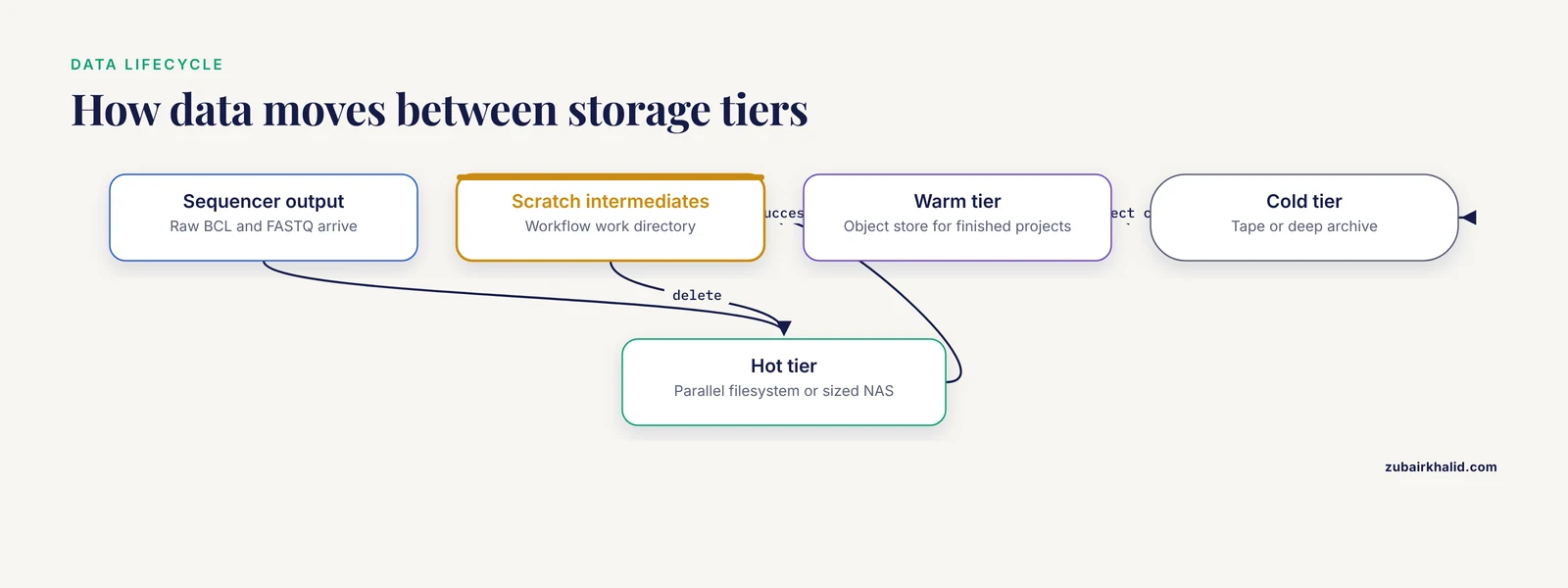
In practice, the answer to a genomics storage architecture comparison is rarely a single winner. Real facilities converge on a tiered pattern:
- Hot tier. A parallel filesystem or a well-sized NAS holds data actively under analysis. This is where workflow scratch directories, reference genomes, and current-project FASTQ/BAM files live.
- Warm tier. Object storage (on-premises or cloud) holds completed projects that users still query occasionally, plus shared resources such as reference indexes and annotation databases.
- Cold tier. Tape or deep archive holds raw data for long-term retention, written once at project close and read only for reanalysis or audit.
The difficulty of a tiered design is not the technology, it is the policy. Data has to move down the tiers on schedule and move back up on demand, and someone has to own those decisions. Labs that skip the policy end up with everything on the expensive tier (cost failure) or everything in the archive nobody can reach (usability failure).
The Criteria That Decide Real Choices
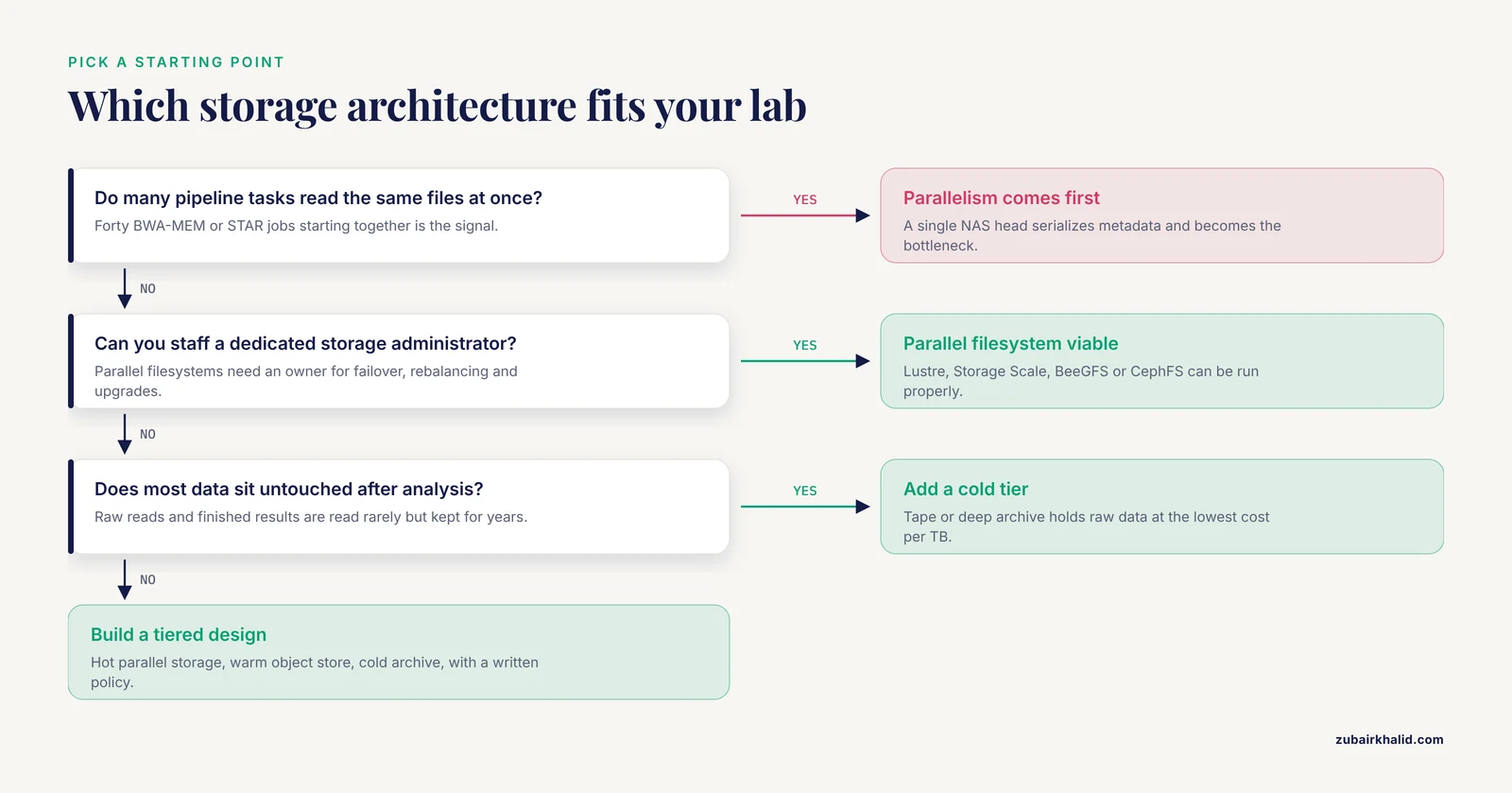
When you perform your own storage architecture comparison against vendor proposals, score the options on these criteria rather than on capacity and price alone.
Throughput and Concurrency Under Real Pipelines
Measure, or estimate from pilot runs, the aggregate read and write bandwidth your busiest workflow demands. An RNA-seq batch of 96 samples running STAR and featureCounts concurrently with 16 tasks in flight has a very different demand profile from a clinical lab running one tumor-normal pair at a time. Parallel filesystems exist precisely because aggregate throughput scales with the number of storage servers, while a NAS ceiling is fixed at purchase time.
Hardware and software parallelism interact with storage design at every level of the stack. The PLAST parallel local alignment search tool illustrates the point: it was designed to exploit SIMD instructions and multicore processors, and on an 8-processor server it achieved speedups of 3 to 6 over multithreaded BLAST with similar accuracy, explicitly targeting middle-range computers rather than exotic supercomputers [3]. Fast local compute does not remove the storage bottleneck, it concentrates it, because faster processors finish each task sooner and request the next chunk of data sooner.
Metadata Performance and Small-File Behavior
Ask every vendor and every internal candidate the same question: how does the system behave with a directory containing one million small files, and with a workflow performing hundreds of thousands of file opens per minute? Single-cell pipelines and chunked intermediate files make this a daily reality. Systems with distributed metadata (parallel filesystems, modern object stores) handle it far better than a single-head NAS.
Durability, Backup, and Recovery
These are three different properties and labs routinely conflate them. Durability is the probability that a stored bit survives hardware failure (replication and erasure coding address this). Backup is a second copy of data in a different failure domain. Recovery is the tested, timed process of getting data back. A tiered design should guarantee at least two independent copies of anything irreplaceable, with at least one copy in a different building, site, or provider. Object storage and tape both serve the second-copy role well, and neither excludes the other.
Cost Structure Over Five Years
Score total cost of ownership, not the sticker on the array: hardware refresh cycles, power and cooling, administrator salary share, support contracts, cloud storage class pricing, egress fees, and the staff time consumed by tiering policies. No generic per-terabyte figure applies across all labs, so build your own five-year model using your measured growth rate and your actual labor costs. The one universal rule is that cost per terabyte should fall as data temperature falls, and if your cold archive costs the same as your hot tier, the tiering is broken.
Reproducibility and Reanalysis
Storage architecture is a reproducibility instrument. If raw data is cheap to keep and easy to retrieve, your lab will reanalyze old datasets with new pipelines, which is how earlier investments keep paying off. If retrieval takes a week of paperwork, reanalysis does not happen. Modern comparative and large-scale analyses reward this: work on pairwise genome comparison showed that an out-of-core strategy, which deliberately uses secondary storage to avoid memory limits, could push all-versus-all comparison of sequences from small viral genomes up to large mammalian chromosomes with linear-time response and controlled memory consumption [4]. The storage layer was the enabling ingredient, not an afterthought.
Governance, Access Control, and Compliance
Clinical and controlled-access data demand auditable access control, encryption at rest and in transit, and retention you can demonstrate. File-based systems express this through POSIX permissions and ACLs, object stores through bucket policies and signed URLs, and both need institutional review before any human genomic data lands on them. Decide this before purchase, because retrofitting governance onto an architecture that cannot express it is far more expensive than choosing an architecture that can.
Compute Architecture Belongs in the Same Conversation
Storage choices and compute choices fail together, so evaluate them as a pair. Several published genomics systems make the coupling explicit.
The hybrid computational grid architecture for comparative genomics combined two kinds of parallelism deliberately: coarse-grained job distribution across a volunteer computing infrastructure for embarrassingly parallel comparisons, and fine-grained acceleration on commodity graphics hardware for sequence alignment, deployed and evaluated on an all-against-all comparison of microbial genomes feeding the PheGee phenotype-genotype explorer [5]. The storage implication is direct: volunteer and distributed compute tiers pull data from wherever it lives, so a grid design needs a data-serving layer that many loosely coupled nodes can reach efficiently.
The same coupling holds at smaller scale. PLAST was designed for middle-range servers, not supercomputers, and achieved its speedups by fitting the algorithm to the processor architecture available on commodity hardware [3]. A lab that buys fast multicore servers but serves them from a single NFS head will see the storage, not the CPUs, determine wall-clock time.
The most instructive recent example comes from a complete institution-scale design. The Uganda Virus Research Institute built a scalable, modular HPC framework for large-scale genomics in a resource-limited setting, integrating open-source HPC management tools, infrastructure automation, and reproducible configuration management, with optimized storage and networking configurations and a phased capacity-building strategy, and distilled the experience into ten practical design and operational rules [2]. Two of the transferable lessons apply to every lab regardless of budget. First, storage and networking are optimized jointly with compute, never purchased independently. Second, human capacity is a load-bearing component of the architecture, and a design that exceeds the local expertise available to operate it will decay no matter how good the hardware is.
The general lesson across these systems is that the "storage architecture comparison" question is really a "platform architecture comparison" question. Rank candidate designs by how the whole pipeline behaves end to end, from sequencer output to archived raw data, rather than by any single component's specification sheet.
Three Worked Scenarios
Scenario 1: The Three-Person Lab With One Benchtop Sequencer
An academic group runs 10 to 20 small sequencing projects per year on a benchtop instrument, mostly microbial genomes, plasmids, and amplicon panels. One analyst does the processing. The lab has one beefy workstation and no cluster.
A capable NAS in the 50 to 200 TB class, with RAID or erasure-coded redundancy, snapshots, and an automated off-site or cloud backup, is the correct architecture. The analyst runs single-sample workflows on the workstation reading directly from the NAS with no meaningful contention. For long-term raw data, a second copy on external disk media or a cheap cloud storage class covers reanalysis. If the group later runs an occasional all-against-all genome comparison, tools with out-of-core designs that use secondary storage to avoid memory limits [4] and parallel local alignment tools built for middle-range computers [3] let a single well-provisioned server handle workloads that would once have required a cluster.
What to avoid: buying a parallel filesystem for this lab is overkill and creates an administration burden nobody is staffed to carry. Also avoid putting the only copy of raw data on a single unreplicated device, which is the most common and most preventable catastrophe at this scale.
Scenario 2: The Academic Core Facility With a Cluster
A university genomics core runs 5 to 10 instruments, serves 40 research groups, and processes everything from ChIP-seq to population-scale whole genomes on a 500-core SLURM cluster. Dozens of workflow tasks run concurrently at all hours.
The hot tier should be a parallel filesystem, sized for measured peak aggregate bandwidth from the busiest pipelines, with a dedicated scratch area for workflow intermediates and a project area for results. The warm tier is an on-premises or cloud object store holding completed deliverables and shared reference data. The cold tier is tape or deep archive holding raw data per institutional retention policy. Metadata performance deserves as much attention as capacity, because scattered small-file workloads, which have grown with the adoption of single-cell methods alongside bulk sequencing [1], punish weak metadata layers hardest.
If the core supports computationally heavy comparative work, such as large all-versus-all genome comparisons, the architecture from the published hybrid grid model, distributing coarse-grained jobs widely while using specialized hardware for fine-grained alignment, is a proven pattern for keeping such analyses tractable on large datasets [5]. The core's storage tiering must then support both patterns: broad distribution of input data for scatter jobs, and fast shared scratch for tightly coupled stages.
Scenario 3: The Institute in a Resource-Limited Setting
A public health institute in a lower-income region wants in-house capacity for pathogen genomics and surveillance, with unstable power, constrained funding, and a small technical team.
The published UVRI framework is the closest template. Its architecture pairs open-source HPC management tools with infrastructure automation and reproducible configuration management, tuned storage and networking, and a phased build-out matched to a capacity-building plan, so that each phase of infrastructure arrives together with the people trained to run it [2]. For storage specifically, this argues for a deliberately modest design: a single robust NAS or a small parallel filesystem for the hot tier, an on-site disk or tape copy for durability against power and network instability, a cloud or geographically separate copy of raw data where connectivity permits, and configuration of all of it as code so the environment can be rebuilt from documentation rather than from one administrator's memory. The framework's own conclusion is that strategic investment in human capacity, structured planning, and open-source adoption are what sustain the system, and the same conclusion governs storage choices at any budget [2].
From Sample to Byte: Why Sample Type Shapes Storage Needs
Storage planning starts upstream of the filesystem, at the sample. Sample type determines data quality, and data quality determines how often labs must reprocess and reanalyze, which drives retention requirements.
Formalin-fixed paraffin-embedded (FFPE) tissue is a widely used diagnostic source precisely because of its long-term storage stability, which preserves tumor tissue architecture for years. The tradeoff is chemical: fixation degrades nucleic acids, and that degradation can degrade sequencing results. A paired comparison of fresh-frozen and FFPE samples using the Illumina TruSight Oncology 500 comprehensive genomic profiling assay, spanning 138 DNA and 138 RNA analyses on 69 paired samples across multiple cancer types, found that fresh-frozen tissue serves as a primary source of higher-quality genetic material for detecting small variants and biomarkers [6].
For storage architecture, the operational lesson is that labs working with degraded or difficult samples generate more reprocessing, more requencing, and more versioned reanalysis than labs working with pristine material. That pushes retention requirements upward and makes cheap, durable cold tiers more valuable. A lab that archives raw data affordably can reprocess an entire cohort when a new chemistry version ships. A lab that cannot, simply loses that option.
Common Mistakes and Limitations
These are the failure patterns that recur in sequencing facilities of every size.
- Buying capacity instead of measuring I/O pattern. Committees compare terabytes and prices while the actual failure will be metadata or aggregate bandwidth. Run a pilot of your heaviest pipeline against the candidate system before signing.
- Treating a NAS as a parallel filesystem. A single-head NAS serves ten interactive users beautifully and forty concurrent workflow tasks poorly. If you run a cluster, the hot tier must distribute metadata and data across multiple servers.
- Confusing backup with archive. A backup protects against failure. An archive satisfies retention and reanalysis over years. Labs need both, with different policies, and neither substitutes for the other.
- Deleting raw data to save space. Processed files are pipeline-version-specific. Raw reads are permanent. When a new reference genome or caller arrives, only raw data supports reanalysis, and labs that discarded it built a permanent gap into their record.
- Ignoring small-file behavior until it hurts. Single-cell workflows and chunked intermediates generate millions of tiny files. Test the candidate system against this pattern explicitly, because datasheets rarely volunteer the answer.
- Letting intermediates live on the expensive tier. Workflow scratch data should have an explicit lifecycle: deleted on pipeline success, never archived. Unmanaged intermediates are the silent budget killer on hot tiers.
- Skipping the restore test. An untested backup is a hypothesis. Schedule actual restore drills, from the cold tier, and time them.
- Ignoring operational staffing. Every distributed system needs an owner. A design that requires more expertise than the lab can employ or train will decay into a fragile single point of knowledge, which the resource-limited HPC experience documents in detail [2].
- Forgetting egress and retrieval economics. Cloud tiers that look cheap at upload can be expensive to analyze against or to move out. Model the full lifecycle, including the day you want the data back, before committing a class of data to a provider.
A final limitation on this whole exercise: architecture recommendations age. Catalogs, software versions, and pricing change continuously, and no article substitutes for a pilot on your own workloads. Score every candidate system with your own pipelines, your own sample mix, and your own staff before committing multi-year money.
Frequently Asked Questions
What is the difference between NAS and a parallel filesystem for genomics data?
A NAS serves files through one (or a few) head nodes, so all metadata and data traffic funnel through a single path, while a parallel filesystem spreads data and metadata across many servers so throughput scales with the cluster. Small labs fit comfortably on a NAS, and pipelines with many concurrent tasks need a parallel filesystem.
Should a genomics lab store sequencing data in the cloud or on premises?
Active, high-throughput analysis belongs on local parallel or file storage where latency is low and there are no egress fees, while durable, rarely-accessed raw data and deliverables fit cloud or on-premises object storage very well. Most mid-size and larger labs run a hybrid: local hot tier for pipelines, object storage for warm and cold copies.
How much storage does one whole-genome sequencing sample need?
A 30x human whole-genome sample produces on the order of 100 GB of FASTQ and a similar amount again as BAM or CRAM, with intermediates during processing adding a temporary multiple of that. Budget per-sample figures against your actual panel or genome size, then multiply by your annual sample volume and add growth.
What is the best storage architecture for single-cell RNA-seq data?
Single-cell workflows generate very large numbers of small files, so the architecture needs strong metadata performance rather than just raw bandwidth. A parallel filesystem or a modern object store handles the pattern far better than a single-head NAS, and keeping intermediates on a scratch tier with automatic cleanup prevents the small files from accumulating on expensive storage.
How long should raw sequencing data be kept?
There is no single number, because retention obligations come from funders, journals, clinical accreditation frameworks, and institutional policy, and they differ by data type and jurisdiction. The practical rule is to archive raw data indefinitely by default, since raw reads are what make future reanalysis possible, and to confirm the specific retention requirements that apply to your program before deciding otherwise.
Can a small lab get by without an HPC storage system?
Yes. A well-built NAS with redundancy, snapshots, and an off-site backup covers a small team running single-sample analyses on a workstation, and tools exist that bring large-comparison workloads onto middle-range hardware without a cluster. The architecture only becomes insufficient when many concurrent pipeline tasks contend for one storage head, which is the signal to move to a parallel or tiered design.
Sources
- Transformative Applications and Innovations in Next-Generation Sequencing Data Analysis.
- A scalable HPC framework for bioinformatics in resource-limited settings: design principles, implementation, and sustainability from the UVRI experience.
- PLAST: parallel local alignment search tool for database comparison.
- Breaking the computational barriers of pairwise genome comparison.
- A hybrid computational grid architecture for comparative genomics.
- Comparison of next-generation sequencing quality metrics and concordance in the detection of cancer-specific molecular alterations between formalin-fixed paraffin-embedded and fresh-frozen samples in comprehensive genomic profiling with the Illumina® TruSight Oncology 500 assay.