Comparing Sync Tools for Genomics Data
By Dr. Zubair Khalid, DVM, MS, PhD ·
A sync tool keeps two copies of data identical, one file at a time, while a transfer tool simply moves data once. That distinction drives every choice in genomics data management, because sequencing produces both one-time bulk moves (a finished run delivered to an analysis cluster) and ongoing synchronization (a growing set of results mirrored to a collaborator or to cloud storage). The rule of thumb: use rsync or a cloud-native sync command for recurring, scriptable, point-to-point synchronization, use Globus or a managed transfer service for people-facing sharing of large datasets, and use a versioning layer such as DVC when you need reproducible snapshots rather than a live mirror.
This article is a genomics data sync tools comparison written for bioinformaticians, core facility staff, and PIs who need to pick a tool and defend the choice. It explains each option on its own terms, then compares them on the criteria that decide real deployments, walks through worked scenarios, and lists the mistakes that cause silent data corruption or lost sample pairs.
Why Genomics Data Stresses Ordinary Sync Tools
Consumer file synchronization (Dropbox, Google Drive, OneDrive) is built around documents, photos, and spreadsheets. Genomics workloads violate almost every assumption those services make.
File sizes and file counts. A single Illumina flow cell can produce raw BCL output measured in hundreds of gigabytes, converted into FASTQ files that commonly run tens of gigabytes each. A project folder can hold tens of thousands of small VCF, BAM index, and per-sample report files alongside a handful of enormous alignment files. Sync tools have to handle both extremes, and many do not. Tools that walk the directory tree and hash every file before deciding to transfer become slow when the tree contains tens of thousands of files, a problem often called "many small files" overhead.
File formats carry structural constraints. A FASTQ pair (R1 and R2 reads for the same library) must arrive together and stay together. If a sync completes R1 but fails on R2, downstream tools such as FastQC or BWA will either fail or, worse, mislead you if the pair is silently mismatched. CRAM files depend on their reference genome, so a synced CRAM without the matching reference is not a complete copy. BAM files have indices (.bai or .csi) that must be regenerated or transferred in lockstep with the alignment file itself. Any sync workflow for genomics has to treat related files as a unit.
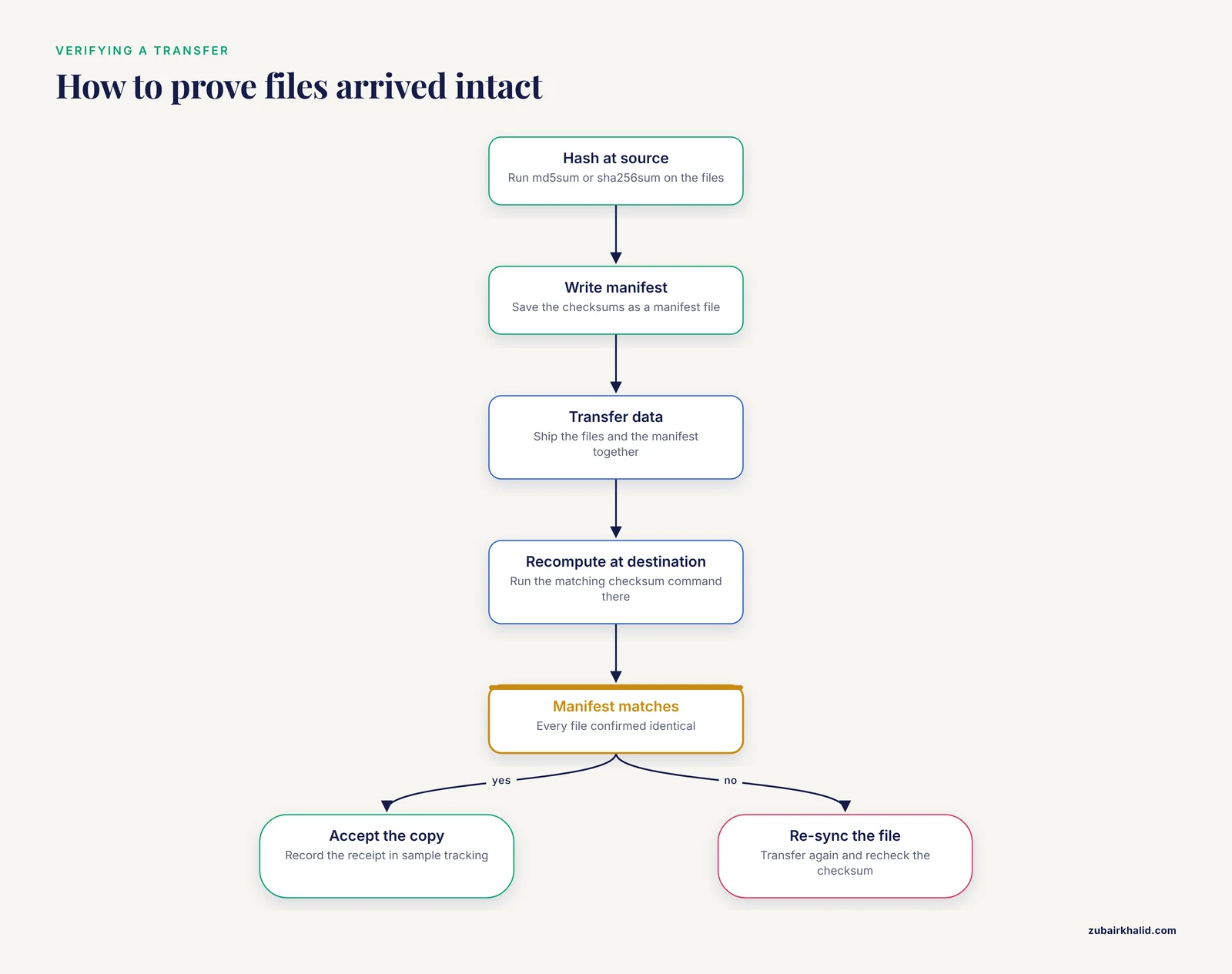
Integrity matters more than convenience. A corrupted spreadsheet shows obvious symptoms. A single corrupted block inside a BAM may sit quietly until a specific region is queried. This is why checksum verification is a first-class requirement in bioinformatics data management rather than an optional nicety. The standard practice, documented across the field and in the file format specifications maintained by the GA4GH hts-specs project and the SAMtools documentation, is to compute MD5 or SHA-256 checksums at the source, transfer them alongside the data in a manifest, and recompute them at the destination.
Network reality. Sequencing data moves between institutions, across transatlantic links, through campus firewalls, and into object storage buckets with different performance characteristics. A tool that cannot resume a partially completed 300 GB transfer after a network blip will waste days of wall-clock time.
These four pressures (size, pairing, integrity, and flaky networks) are the lens for the rest of this comparison.
The Main Options at a Glance
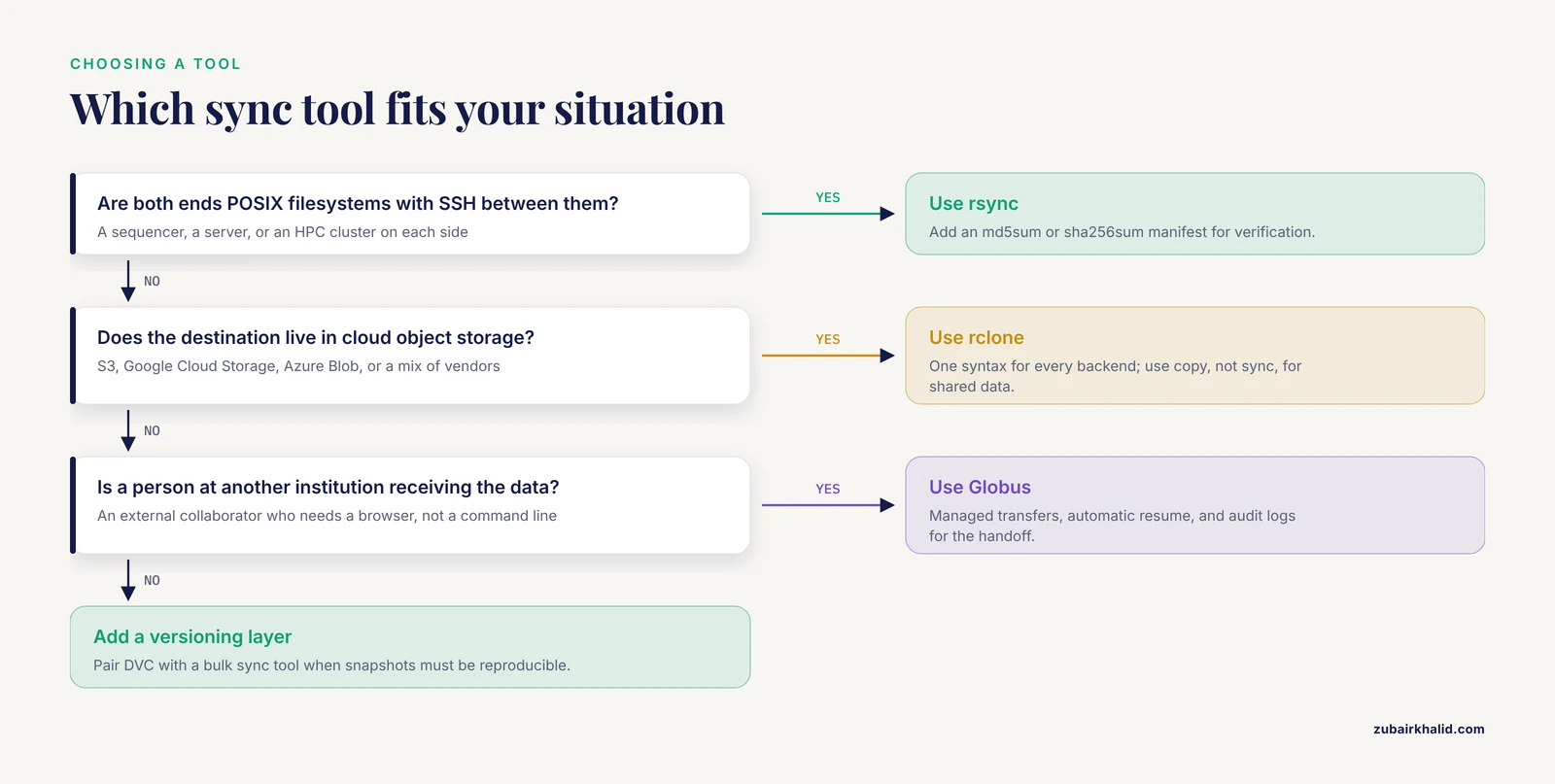
The table below is the core of this genomics data sync tools comparison. Each row gets its own section afterward.
| Tool | What it syncs | Paradigm | Integrity checking | Resume after failure | Best fit | Main caution |
|---|---|---|---|---|---|---|
| rsync | Files over SSH or a local daemon | Directory mirror | Modtime and size by default, full checksums with, checksum | , partial keeps incomplete files | Sequencer to HPC, recurring server-to-server mirrors | Default mode does not read file contents, so corruption can pass through |
| rclone | Local, S3, GCS, Azure, SFTP, and dozens more | Unified cloud sync | , checksum where backends support it, plus per-backend hashes | Chunked retries,, retries | HPC or laptop to any cloud bucket | Cloud hash limitations on multipart uploads, needs careful config |
| aws s3 sync / gcloud storage rsync / azcopy sync | Local to one cloud and back | Vendor-native mirror | Per-service checksum options (MD5, CRC32C) | Built into the tools | Staying inside one cloud vendor | Lock-in, differing flag semantics per vendor |
| Globus | Endpoint-to-endpoint transfers and scheduled sync | Managed, user-facing service | Checksum verification built into transfers | Automatic, resumable | Sharing with external collaborators, core facility to institution | Requires endpoint setup, service terms apply |
| Managed transfer services (IBM Aspera and similar UDP-based tools) | Bulk point-to-point | High-speed commercial transfer | Vendor-specific validation | Vendor-specific | Vendor-to-core data delivery, long-distance WAN | Licensing and client installation |
| Syncthing | Peer-to-peer folder sync between devices | Continuous bidirectional sync | TLS transport, per-file verification, versioning | Continuous, block-level | Lab laptops, small internal clusters | Not designed for one-way archival copies, peer discovery setup |
| DVC | Data and model files tracked like code | Version control over cloud storage | Content-addressable cache (hash-based) | Re-downloadable from remote cache | Reproducible pipelines, dataset snapshots | Adds workflow discipline, not a live mirror |
| Nextflow / Snakemake with storage plugins | Pipeline inputs and outputs | Workflow-managed fetch and publish | Pipeline-level checksum practices vary | Task-level retry | Automation where sync is part of analysis | Sync logic hidden inside pipeline code |
A note on terminology used in this table. "Checksum" means a fixed-length digest computed from file contents, most commonly MD5 or SHA-256, produced by tools such as md5sum and sha256sum. Two files with the same checksum are treated as identical for practical purposes. Modtime means the file modification timestamp, which is cheap to compare but says nothing about file contents.
rsync: The Workhorse for Point-to-Point Mirrors
rsync is a command-line utility, standard on Linux and macOS, that synchronizes files between directories on one machine or across an SSH connection. It has been the default answer in bioinformatics for two decades because it ships with every cluster, works over the SSH access you already have, and transfers only the differences between source and destination.
A typical run delivery looks like this:
rsync -avhP --partial /sequencer/runs/260101_A00123/ analysis@hpc:/data/seq/260101/The flags mean: archive mode (-a) preserves permissions, timestamps, and directory structure, verbose plus human-readable (-vh) shows progress, partial (-P, which implies, partial and, progress) keeps half-written files so a rerun resumes instead of starting over.
Strengths. rsync needs no accounts beyond SSH, no service, and no cloud configuration. Its delta-transfer algorithm compares unchanged portions of files and sends only differences, which is genuinely useful when you re-run an analysis and only some outputs changed. It handles very large single files well because it can resume from partial transfers.
Weaknesses. The default comparison uses file size and modification time. If a file was truncated or bit-flipped in place without a modtime change, plain rsync will consider it identical and skip it. For data whose integrity is non-negotiable, run with -checksum, which forces a full read of both copies. That read costs time on large BAM files, so the common pattern is size-and-modtime sync for speed, followed by an explicit md5sum or sha256sum pass against a manifest for verification. Also note that rsync speaks its own protocol and SSH, not object storage. You cannot rsync directly into an S3 bucket.
Verdict. rsync is the best genomics data sync tool comparison baseline. If your data lives on POSIX filesystems on both ends (a sequencer, a server, an HPC cluster), start here and add checksum verification on top.
rclone: One Tool for Every Cloud
rclone is an open-source command-line tool that presents a uniform interface to dozens of storage backends, including Amazon S3, Google Cloud Storage, Azure Blob Storage, SFTP servers, and WebDAV. Where rsync stops at SSH, rclone continues into object storage, which is where most modern genomics data storage now lives.
Setup is one-time per backend:
rclone configThen a sync is:
rclone sync /data/bams/ gcs:lab-bucket/bams/ --transfers 8 --checksumsync makes the destination match the source exactly, including deletions, so treat it with the same care you would give rm -rf. copy adds files without deleting anything at the destination, which is the safer default for irreplaceable data. -transfers controls how many files upload in parallel. -checksum forces content comparison where the backend stores usable hashes.
Strengths. One syntax for every backend means a lab can change cloud vendors without rewriting every script. rclone handles the many-small-files problem with parallel transfers and optional chunking, has built-in retry and bandwidth controls, and supports crypt remotes if your compliance posture requires client-side encryption. It also talks to SFTP, so it can replace rsync in mixed environments.
Weaknesses. Cloud backends store hashes inconsistently. S3 stores MD5 for simple uploads but multipart uploads may not have a usable MD5, in which case rclone falls back to comparing size and modtime unless the backend offers an alternative hash. You must know what your backend actually verifies rather than assuming -checksum is a guarantee. rclone also has a large flag surface, and teams that adopt it casually end up with scripts whose behavior nobody can explain six months later.
Verdict. For comparing sync tools for genomics data where any cloud vendor is in play, rclone is usually the right answer. It is the best single tool to learn for a mixed on-premise and cloud lab.
Cloud-Native Sync Commands
Each major cloud vendor ships its own sync-capable CLI. These are worth knowing because they are the tools your pipeline and your collaborators will already have installed.
AWS: aws s3 sync /data/fastq/ s3://lab-bucket/fastq/ mirrors a directory into a bucket, comparing size and modtime by default. The AWS CLI computes MD5 checksums on upload and supports additional integrity options such as full-object checksums (SHA-256 and CRC variants) on newer versions. The -storage-class flag lets you tier data directly on upload, for example to Infrequent Access or Glacier tiers for cold archives.
Google Cloud: the modern command is gcloud storage rsync, which replaced the older gsutil rsync. Google Cloud Storage maintains a CRC32C checksum per object by default and verifies integrity on transfer, which is a genuinely strong default.
Azure: azcopy sync compares with timestamps and optionally MD5, and azcopy is notable for high throughput on large blobs.
Strengths. Native tools are first to support each platform's newest features (checksum types, storage classes, requester-pays buckets, IAM integration), and they require no third-party dependency. For a lab committed to one vendor, they are the path of least friction.
Weaknesses. The three tools have different flags, different default behaviors, and different checksum semantics, so scripts are not portable. Using them tends to deepen vendor lock-in, and a lab that later migrates pays for that in rewritten pipelines.
Verdict. If your genomics data storage is entirely within one cloud, the native CLI is a fine and often optimal choice. If you touch more than one cloud or maintain an on-premise copy, standardize on rclone instead and keep one mental model.
Globus: Sharing Data With People, Not Just Machines
Globus is a managed research data transfer and sharing service, operated by the University of Chicago as part of its research computing portfolio, that moves data between registered "endpoints" (a server, a cluster, or a cloud bucket with the Globus Connect agent installed). It is heavily used by US university core facilities, sequencing centers, and consortia precisely because it solves the human side of the problem.
The typical pattern: a sequencing core creates a Globus endpoint on its storage server, runs a transfer to the customer institution's endpoint, and then shares the resulting folder with the collaborator's institutional identity through a web link. Transfers run on managed infrastructure, retry automatically after failures, verify integrity, and log every action for audit purposes. Scheduled and recurring transfers give you sync-like behavior without writing cron jobs.
Strengths. Globus handles resume and verification for you, gives collaborators a browser interface instead of a command line, integrates with institutional single sign-on, and produces transfer logs that satisfy data management plans. For NIH-supported projects, the data management and sharing policy expectations around traceable, documented data flows align naturally with what Globus logs provide.
Weaknesses. Someone must install and maintain the endpoint software on each side. The service model means terms of service and, for some features, subscription arrangements apply. Globus is aimed at dataset delivery and sharing, not at millisecond-level continuous mirroring inside a pipeline.
Verdict. When the "user" of the transfer is a person who needs a reliable, auditable, no-command-line handoff of a large genomics dataset, Globus is usually the best genomics data sync tools comparison winner among managed options.
High-Speed Managed Transfer (Aspera and Similar UDP Tools)
Commercial transfer systems such as IBM Aspera move data over UDP with their own congestion-control algorithms rather than TCP. On long-distance, high-latency links (a sequencer vendor in one country sending runs to a US core, or a multi-institution consortium), TCP-based tools like rsync and SCP can underperform because TCP interprets packet loss as congestion and slows down. UDP-based transfer tools maintain throughput under those conditions.
Most genomics organizations encounter these tools as the delivery mechanism offered by sequencing vendors, and the practical decision is usually not "which tool to buy" but "how to receive what the vendor sends" and "when to pay for the commercial option versus tuning free tools." Free tools can go a long way: parallelism (multiple simultaneous rsync or rclone streams), tuned TCP buffer sizes, and modern protocol options such as SSH multiplexing often recover most of the gap on real networks. Choose a commercial UDP transfer service when the link is genuinely long, fat, and lossy, when vendor integration demands it, or when transfer time has direct clinical or production value.
Syncthing: Continuous Peer-to-Peer Sync for Working Sets
Syncthing is an open-source, peer-to-peer synchronization tool that keeps a designated folder consistent across a set of devices, continuously and bidirectionally, encrypted in transit. It is not a bulk transfer tool. It is the tool for a shared working directory: a laptop, a lab server, and a small analysis node all holding the same current set of notebooks, small reference files, and active project folders.
Strengths. It needs no cloud account, works behind NAT with relay fallback, preserves deleted-file history with versioning, and simply runs in the background. For a small lab that wants "the same files everywhere" without an IT project, it is excellent.
Weaknesses. Bidirectional continuous sync and archival genomics data are a bad combination. A mistaken deletion propagates to every peer, and continuously watching a directory tree with tens of thousands of large files consumes resources. Syncthing also requires each peer to be reachable, which makes it wrong for institution-to-institution one-way deliveries.
Verdict. Use Syncthing for small, actively changing working sets inside your own lab. Never use it as the sole copy of raw sequencing data.
DVC and Git-Based Versioning: Snapshots, Not Mirrors
DVC (Data Version Control) is an open-source tool that tracks large files with content-addressable storage and stores the actual bytes in a configurable remote (S3, GCS, SSH, or local disk), while a small Git repository records which version of each dataset belongs to which code commit. Git LFS solves a related problem for smaller binary assets by keeping pointers in Git and blobs on a server.
For genomics, the distinction between syncing and versioning matters. rsync gives you "the destination now matches the source." DVC gives you "I can reconstruct exactly the reference FASTA, annotation, and feature counts that produced the figure in this paper, tagged as v1.2." If your bioinformatics data management requirement includes reproducibility (and for publications, grants, and regulated work it does), a mirror is not enough. You need immutable, addressable snapshots.
A minimal DVC workflow:
dvc add data/refs/grch38.fa
git add data/refs/grch38.fa.dvc .gitignore
git commit -m "Track GRCh38 reference"
dvc remote add s3remote s3://lab-dvc-cache/
dvc push
Later, on another machine, dvc pull fetches exactly the tracked versions.
Strengths. Content hashing is built in, so every dataset version has an identity. Storage deduplicates naturally because identical content is stored once. It integrates with Git workflows your team already uses for code.
Weaknesses. DVC is not a live mirror and not a sharing interface for collaborators who just want files. It imposes workflow discipline (commit, push, pull) that some lab members will resist. Large raw datasets can be tracked, but pushing terabytes through a DVC remote is slower than a straight rclone bulk upload.
Verdict. Pair DVC with a bulk sync tool. Use rclone or a cloud CLI to move the bytes, and DVC to record which bytes constitute which dataset version.
Workflow Managers as Implicit Sync Tools
Nextflow and Snakemake, the two dominant workflow engines in genomics, both fetch inputs from and publish outputs to remote storage. Nextflow's support for S3, Azure Blob, and Google Storage locations means a pipeline can read s3://bucket/input/*.fastq.gz and write results back to object storage without any explicit sync step, and its Fusion feature manages the staging details for containerized runs. Snakemake can consume and produce remote files through storage backends as well.
This is a real option in any genomics data sync tools comparison, with a specific caveat. When sync logic lives inside pipeline code, it is invisible to your storage policy. A pipeline that publishes to a bucket is doing data movement whether or not anyone documented it, chose checksums deliberately, or planned retention. Treat workflow-engine storage configuration as part of your sync architecture: review it, document it, and apply the same verification standards you would to a standalone sync job.
Comparing on the Criteria That Decide Real Choices
Feature lists do not choose tools. The following eight criteria do, and this is where most pros-and-cons summaries in genomics data storage actually get decided.
1. Integrity guarantee. What does the tool verify, and what do you verify separately? rsync with default flags verifies nothing about content. rclone with, checksum verifies where the backend supports hashes. Globus verifies as part of the transfer. Cloud-native tools vary by service and upload mode. Whatever the tool does, the gold standard for genomics is an external manifest: run md5sum *.fastq.gz > manifest.md5 at the source, ship the manifest, and run md5sum -c manifest.md5 at the destination. This catches corruption no sync tool will catch, because the checksum is computed independently of the transfer.
2. Resume behavior. Interrupt any transfer over a real network and it will be interrupted. rsync needs, partial to avoid discarding work. rclone retries automatically and can resume chunked uploads. Globus and azcopy resume by design. A tool without resumable transfers is disqualified for anything over a few gigabytes.
3. Throughput and parallelism. On a 10 Gbps campus link, a single-stream rsync may saturate the link or may not, depending on latency and TCP tuning. Parallel streams (rsync with multiple concurrent invocations over file subsets, or rclone with, transfers and, multi-thread-streams) usually close the gap. UDP-based commercial tools win mainly on long, lossy WAN paths. Benchmark with your own data on your own network before believing any throughput claim, including the qualitative ones in this article.
4. Many-small-files behavior. A directory of 50,000 per-sample VCFs will expose tools that stat and hash sequentially. Parallel directory traversal and concurrency flags matter here more than raw bandwidth. This is a common reason labs move from naive rsync loops to rclone or to tar-packing before transfer.
5. Metadata and format awareness. No mainstream sync tool understands that a BAM and its .bai index belong together, or that R1 and R2 FASTQ files form a pair. Your conventions must supply that structure: stable per-sample directories, a manifest listing related files, and a post-transfer validation step (for example, a quick SAMtools quickcheck over synced BAMs) that catches incomplete groups.
6. Security and compliance posture. Data subject to the NIH Genomic Data Sharing policy, dbGaP controlled-access terms, HIPAA, or institutional IRB agreements needs authentication, encryption in transit and at rest, least-privilege access, and an audit trail. Globus logs transfers and integrates institutional identity. Cloud buckets support fine-grained IAM. rsync over SSH is encrypted but its audit trail is whatever your SSH logs contain. A consumer sync service is generally not an acceptable home for controlled human genomic data, and many institutional policies prohibit it outright.
7. Cost model. Cloud egress fees, request charges, and retrieval fees on archive tiers are real line items, and their exact prices change frequently, so check the vendor's current pricing page rather than trusting any article, including this one. The structural point that does not change: sync tools that let you compare before transfer (avoiding redundant uploads) reduce cost, and tools that make tiering to cold storage automatic reduce it further. Free open-source tools cost nothing in license but real staff time in configuration and verification.
8. Operational fit. Who runs this? A cron job only a departing postdoc understands is a liability. A service with a web interface shifts work from people to the system. Weigh the skill set you have.
Worked Scenarios
Scenario 1: Nightly sequencer-to-cluster delivery. A core facility's Illumina instrument writes runs to a local NAS. An analysis cluster needs each run within hours. Both ends are Linux with SSH between them. The right tool is rsync in a cron or systemd timer job:
rsync -avhP --partial --exclude='*.tmp' /nas/runs/ hpc:/data/raw/
md5sum /nas/runs/*/Data/Intensities/BaseCalls/*.fastq.gz > /nas/manifests/$(date +%F).md5
scp /nas/manifests/$(date +%F).md5 hpc:/data/manifests/
with a checksum verification step on the cluster after each run completes. No cloud, no licenses, one script. This is the classic answer, and it remains correct.
Scenario 2: HPC results to a cloud bucket for external collaborators. A lab with 200 GB of BAMs and per-sample VCFs needs to publish results to an S3 bucket a collaborator can browse. rclone fits:
rclone copy /scratch/project/results/ s3:collab-bucket/results/ --transfers 8 --checksumUse copy rather than sync so a scripting error cannot delete anything in the shared bucket. Grant the collaborator an IAM policy scoped to a prefix, not the whole bucket. Keep the checksum manifest alongside the data so the collaborator can verify independently.
Scenario 3: Receiving runs from a distant sequencing vendor. The vendor offers Aspera or a web portal, and the data lands on a university server. The receiving side rarely gets to choose the protocol. What you control is what happens next: move the delivered files into your canonical layout with rsync, verify against the vendor's MD5 manifest, and record the receipt in your sample tracking sheet. The lesson from this scenario is that comparing sync tools for genomics data usually means choosing the internal legs of the journey, not every leg.
Scenario 4: A reproducible project snapshot for a paper. The lab has final BAMs, filtered VCFs, and count matrices that must remain retrievable for five years per the journal and funder expectations. Bulk-copy the data to a cloud archive tier with rclone or the native CLI, and record the dataset's identity with DVC or with a plain manifest plus checksums in the repository. The sync tool moved the bytes. The versioning layer (or a disciplined manifest) is what makes the snapshot reproducible.
Scenario 5: Mirroring to cold storage you will actually read again. A lab mirrors processed outputs into a Glacier-tier bucket "for safety," then discovers that restoring a tier costs money and takes hours to days depending on the tier. This is a storage-tier design problem more than a sync problem, but sync tooling interacts with it directly: choose tools and flags that let you place data into the correct tier on upload, and keep a clear policy for which data classes belong in which tier. Hot tier for anything a pipeline might touch this quarter, cold tier for completed projects, and test your restore path before you need it.
A Note on NCBI Submissions
Submitting raw reads to the Sequence Read Archive (SRA) is a special case of genomics data transfer that deserves its own mention. NCBI's submission documentation describes the supported upload routes through the Submission Portal and its File Transfer Protocol service, and the practical guidance is to follow their current instructions directly rather than improvising with general-purpose sync tools. The same principle applies to any controlled repository: the destination defines the method, and the destination's documentation is the authority.
Common Mistakes and Limitations
These are the errors that actually cost labs data, drawn from recurring patterns in real deployments.
- Trusting modtime-based sync for critical files. Default rsync and cloud sync modes compare timestamps and sizes. A file corrupted in place with a preserved timestamp syncs as "unchanged." Run checksum verification against a manifest for anything you cannot regenerate.
- Assuming the checksum flag is a guarantee. On some object-storage backends, hash verification degrades to size-plus-timestamp comparison for multipart uploads. Read your tool's documentation for the specific backend and confirm what is actually compared.
- Breaking FASTQ pairing. Syncing R1 and R2 as independent jobs means a failure can deliver half a pair. Sync at the sample-directory level and validate pairing (read-count and name agreement) before analysis.
- Separating files from their indices. A BAM without its .bai, a CRAM without its reference, a VCF without its .tbi: each is a silent time bomb. Make related-file groups explicit in your layout and your manifests.
- Using, delete or
syncsemantics on shared or irreplaceable data. One wrong path argument and the tool "helpfully" deletes the destination copy. Use copy semantics for anything that lacks a second independent copy. - Treating a cloud mirror as a backup. A mirror propagates deletions and corruption. A backup is versioned and independently verified. If you need backup semantics, add snapshots or object versioning on top of the sync, or use a dedicated backup tool with its own versioning.
- Skipping a restore test. An archive you have never restored is a hypothesis, not a backup. Restore a sample from your cold tier on a schedule and confirm the checksums.
- Consumer sync services for raw or controlled data. Terms of service, storage limits, weak audit trails, and sometimes explicit policy prohibitions make them unsuitable for sequencing data, and unsuitable outright for controlled human genomic data under NIH data sharing expectations.
- Ignoring egress economics. Copying terabytes between clouds, or out of a cloud to on-premise, carries charges that scale with volume. Plan the topology before you upload, not after the first invoice.
- No documentation of the sync itself. Six months later, nobody remembers which tool, which flags, which schedule, and which verification step ran. A short runbook (tool, command, schedule, verification procedure, recovery procedure) is part of the tooling.
One honest limitation applies across the board: no sync tool compensates for an unclear data model. If you cannot say which files belong to which sample, which copies are canonical, and who is allowed to delete what, no tool in this comparison will save you. Settle the layout and the policy first, then choose the tool.
Frequently Asked Questions
What is the best genomics data sync tools comparison starting point for a small lab?
Start with rsync for server-to-server transfers over SSH and rclone for anything involving cloud object storage. That pair covers the large majority of small-lab needs, both are free and scriptable, and both support checksum-based verification when you add an md5sum or sha256sum manifest to your workflow.
Can rsync transfer data directly into Amazon S3 or Google Cloud Storage?
No. rsync speaks its own protocol and SSH, not object storage APIs. Use rclone or the cloud vendor's native CLI (aws s3 sync, gcloud storage rsync, azcopy sync) for cloud destinations, and keep rsync for POSIX-to-POSIX paths such as sequencer to cluster.
How do I verify that my FASTQ or BAM files arrived intact?
Generate a checksum manifest at the source with md5sum or sha256sum, transfer the manifest with the data, and run the matching checksum command at the destination to confirm every file. Do this in addition to whatever integrity checking your sync tool performs, because an independent manifest catches corruption that a sync tool's own comparison can miss.
What should I use to share a large dataset with an external collaborator?
Use a managed transfer and sharing service such as Globus, which gives your collaborator a browser-based download, handles interrupted transfers automatically, verifies integrity, and produces audit logs. For cloud-native teams, a scoped cloud bucket with a checksum manifest works well. Avoid email attachments and consumer sync links for anything large or sensitive.
Do I need DVC or Git LFS for my genomics project?
You need a versioning layer when reproducibility matters, meaning anyone must later reconstruct exactly which reference, annotation, and intermediate files produced a given result. DVC suits large datasets and pipeline-integrated workflows, while Git LFS suits smaller binary assets tied to code repositories. If you only need a live mirror and not reproducible snapshots, skip both and use a plain sync tool with checksum manifests.
Can my Nextflow or Snakemake pipeline handle data sync by itself?
Partially. Both engines can read inputs from and write outputs to cloud object storage, which removes the need for separate sync steps around pipeline runs. However, that movement then lives inside pipeline code rather than in a documented storage policy, so review the storage configuration, apply the same checksum and retention standards you use elsewhere, and keep a runbook describing what the pipeline moves and where.