How to Package Genomics Data for Submission to Repositories
By Dr. Zubair Khalid, DVM, MS, PhD ·
By the end of this guide you will be able to take a finished sequencing project, quality check the reads, validate the sample metadata, organize the files, generate checksums, submit the package to a public archive such as the Sequence Read Archive (SRA), and verify that the submission landed correctly. You will also know the mistakes that cause the most submission delays and how to avoid them.
To follow the walkthrough you need a Linux or macOS workstation or server with at least 8 GB of RAM and several hundred gigabytes of free disk space, and the following tools installed:
- fastp and FastQC for read quality control
- MultiQC to aggregate quality reports
- md5sum (usually preinstalled) for checksums
- tar and pigz (parallel gzip) for packaging
- An NCBI account linked to your institution, which is required to use the NCBI Submission Portal
- Optionally, R with Bioconductor if you want to query your submission programmatically after release
Most journals and funders now require that raw sequencing data and the metadata describing each sample be deposited in a public archive before publication. The International Nucleotide Sequence Database Consortium (INSDC) archives, which include the SRA at the National Center for Biotechnology Information (NCBI) in the United States, ENA at EMBL-EBI in Europe, and DDBJ in Japan, are the standard destinations for raw reads, and they exchange data with each other so a submission to one is visible through all three [1].
Why Packaging Quality Determines Whether Anyone Can Use Your Data
A sequencing dataset is only useful to the wider community if two things travel together: the reads themselves and the contextual data that explains what each read belongs to. A pathogen genome with no collection date, source, or geographic location cannot inform surveillance. A cancer transcriptome with no tissue annotation cannot be pooled with similar samples. A 2025 protocol for genomic surveillance of enteric pathogens formalizes this as a standard data package built from quality controlled reads plus validated contextual metadata, submitted to an INSDC member archive, with a defined curation process to keep the record accurate after release [1].
Packaging poorly has real costs. Submissions with mismatched sample names or ambiguous metadata are held in review, which can add weeks to a publication timeline. Datasets assembled without consistent structure force every downstream user to spend days locating, cleaning, and integrating files before analysis can begin. The BioBricks.ai project documented this problem at community scale and responded by packaging public datasets as version controlled modules, treating data like software so that assembly of analytic cohorts drops from days to minutes [2]. You cannot control how others package their data, but you can make your own submission the one that downstream analysts thank you for.
Good packaging is also self protection. If your institutional server fails, a completed submission to a public archive with a permanent accession number is an offsite, versioned, independently checksummed copy of your raw data. Thoughtful bioinformatics data management treats the repository submission as the archival tier of your storage strategy, with local working copies and backups handling the active phase of analysis.
Understanding the Repository Data Model Before You Package Anything
Every INSDC archive organizes submissions as a hierarchy of linked objects. The SRA metadata model, which has remained stable since its early days and is well documented through tools that parse it programmatically, has five core objects: submission, study, sample, experiment, and run [3]. NCBI maps these onto names you will encounter in the Submission Portal.
| Repository object | NCBI name | What it describes | One per what |
|---|---|---|---|
| Study | BioProject | The overarching research effort, its goals, and funding | One per project |
| Sample | BioSample | The biological material the reads came from | One per biological specimen |
| Experiment | Experiment | Library construction, platform, and sequencing instrument | One per library preparation |
| Run | Run | One sequencer output file set from one experiment | One per sequencing lane or flow cell region |
| Analysis | Analysis or WGS master record | Assembled genomes, variant calls, or other derived results | One per analysis product |
Two rules follow from this structure and drive everything in the walkthrough below.
First, sample level metadata is the backbone. Each BioSample must describe one biological specimen with attributes drawn from standard checklists. For pathogens, attributes typically include organism, strain, isolation source, host, collection date, and geographic location. The enteric pathogen submission protocol explicitly treats validation of this contextual data as a distinct step, separate from read quality control, because metadata errors are the most common reason a submission is returned [1].
Second, runs link to experiments, experiments link to samples, and samples link to the project. If your file naming does not map unambiguously from file to run to sample, you cannot build those links, and neither can anyone reusing your data. Naming discipline before submission saves you from reconstructing the mapping from a notebook later.
Choosing Where to Submit
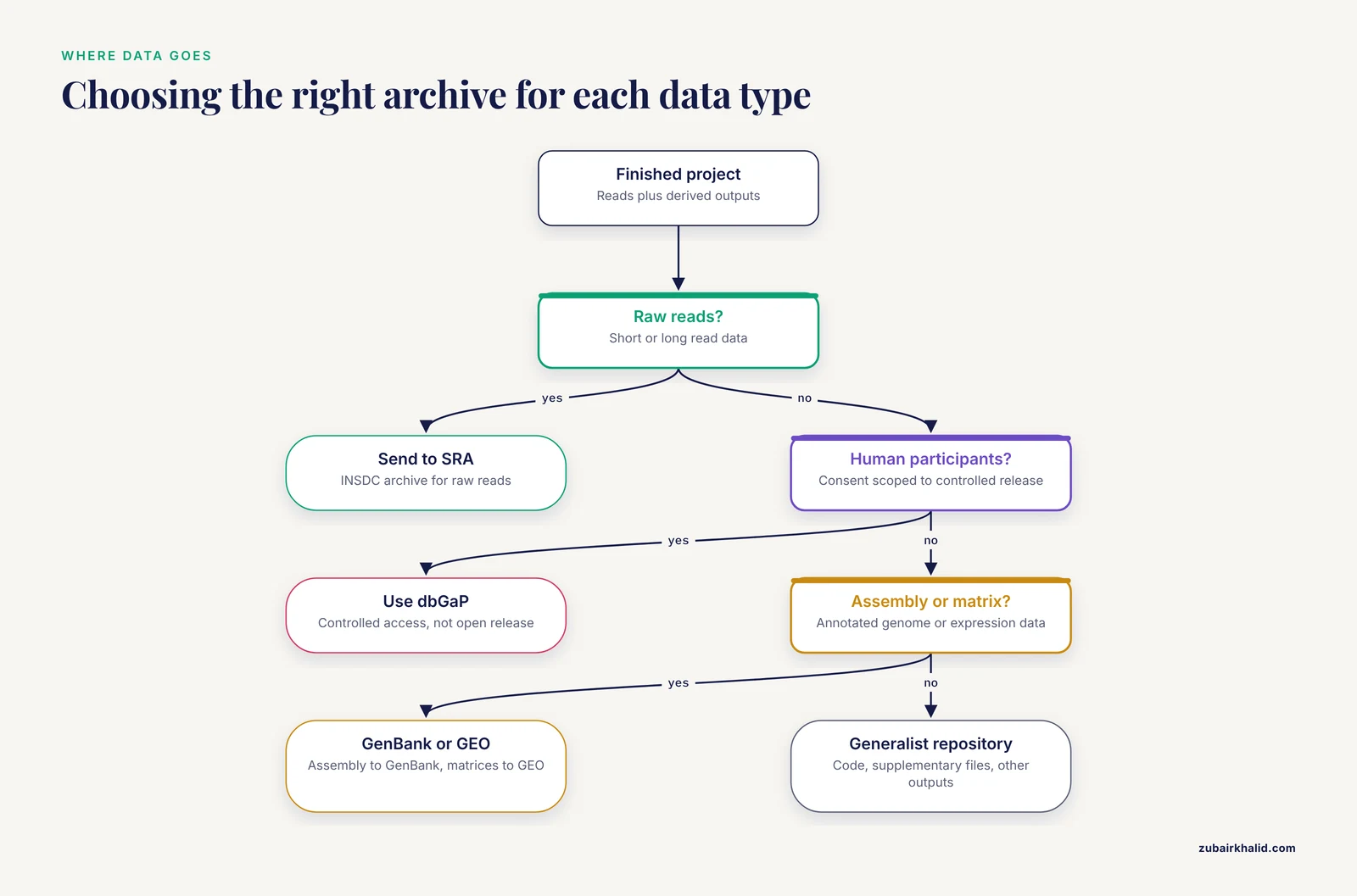
For raw short read and long read data, INSDC archives are the default. NCBI is the primary focus of most US laboratory workflows, and the SRA serves data from all major sequencing platforms including Illumina, PacBio, and Oxford Nanopore instruments [3]. Domain specific archives sit on top of INSDC archives or complement them:
- GenBank for assembled, annotated genomes, with raw reads going to the SRA
- dbGaP for controlled access human genomic data, where study participants consented to controlled rather than open release
- GEO for processed functional genomics data such as expression matrices
- Generalist repositories such as Zenodo or institutional repositories for supplementary files, code, and outputs that do not fit archive scopes
If your work contributes to public health surveillance, coordinate with the receiving program before submitting, because programs such as NCBI Pathogen Detection consume standard packages and run automated clustering and genotyping analyses on them, and a nonstandard package may not join those analyses [1].
Step by Step: Genomics Data Packaging for Repository Submission
This walkthrough uses a bacterial isolate sequenced on an Illumina instrument as the worked example, because the pattern generalizes to other data types. The project directory is /data/project_serotyping_2026 and the sample is SRR_demo_001.
Step 1: Organize the Project Directory
Create a structure that separates raw data, cleaned data, quality reports, and metadata. Never edit raw reads in place.
cd /data/project_serotyping_2026
mkdir -p raw qc cleaned metadata checksums submission
cp /mnt/sequencer/run_A/*_R1_001.fastq.gz raw/
cp /mnt/sequencer/run_A/*_R2_001.fastq.gz raw/
ls raw/
Expected output:
SRR_demo_001_R1_001.fastq.gz SRR_demo_001_R2_001.fastq.gzUnder a sound genomics data storage policy, the raw directory becomes read only at this point. Keep at least one copy on different physical media and one copy offsite. Storage is cheap compared with resequencing a sample that no longer exists.
Step 2: Run Read Quality Control
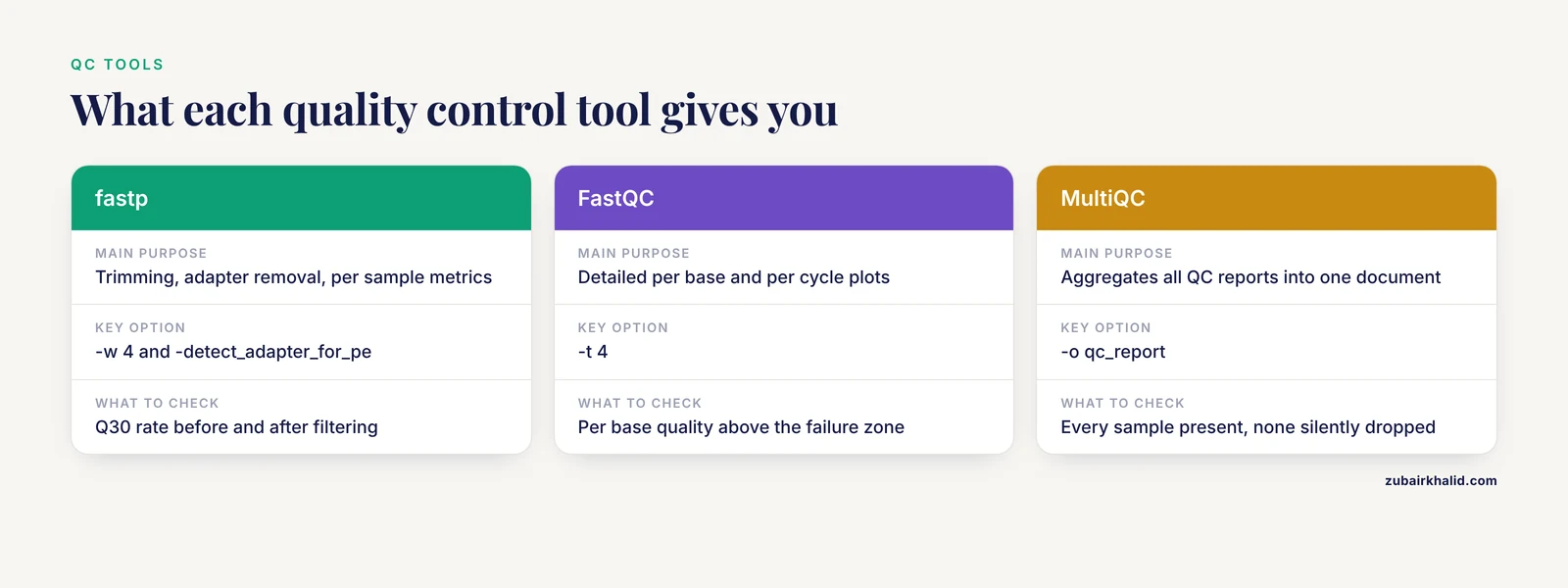
Quality control (QC) assessment is the first protocol in the standard pathogen data package, and it is the step that protects downstream users from silently bad data [1]. Run fastp for trimming and per sample metrics, then FastQC for detailed per base reports, then MultiQC to aggregate everything.
fastp \
  -i raw/SRR_demo_001_R1_001.fastq.gz \
  -I raw/SRR_demo_001_R2_001.fastq.gz \
  -o cleaned/SRR_demo_001_R1.clean.fastq.gz \
  -O cleaned/SRR_demo_001_R2.clean.fastq.gz \
  -h qc/SRR_demo_001_fastp.html \
  -j qc/SRR_demo_001_fastp.json \
  -w 4 \
  --detect_adapter_for_pe

fastqc cleaned/*.fastq.gz -o qc/ -t 4
multiqc qc/ -o qc_report
The -detect_adapter_for_pe flag enables adapter detection for paired end data. -w 4 uses four threads. The -h and -j flags write an HTML report and a machine readable JSON report, and the JSON report is what you will validate programmatically in the next step.
A typical fastp JSON summary contains the fields you need to confirm the run is sane:
{
  "summary": {
    "before_filtering": {
      "total_reads": 2413866,
      "total_bases": 366500932,
      "q30_rate": 0.9341
    },
    "after_filtering": {
      "total_reads": 2385011,
      "q30_rate": 0.9517
    }
  }
}
For an Illumina bacterial isolate you generally want the majority of bases at Q30 or above, read length distributions matching the expected insert size, and adapter content near zero after trimming. The exact thresholds depend on your platform and library type, so record the observed values in your metadata rather than assuming they will pass unseen review.
Step 3: Validate Contextual Metadata Separately
The second protocol in the standard package is validation of the contextual data, meaning everything you know about the sample other than the sequence itself [1]. Build a tabular metadata sheet in comma separated values format with one row per sample. A pathogen isolate sheet typically carries columns like these:
sample_name,organism,strain,isolate,collection_date,geo_loc_name,isolation_source,host,host_disease,sequencing_platform,library_strategy,library_source,library_selection,layout,instrument_model
SRR_demo_001,Salmonella enterica,SRR_demo,2026-03-14,USA: Nebraska,bovine feces,Bos taurus,diarrhea,Illumina,WGS,GENOMIC,NONE,paired,NextSeq 2000
Rules that prevent most metadata rejections:
- Use ISO 8601 dates (
2026-03-14), never ambiguous formats like03/14/26 - Use
geo_loc_namevalues in thecountry: regionformat that NCBI expects, such asUSA: Nebraska - Spell organism names with proper binomial capitalization, for example
Salmonella enterica, notsalmonella enterica - Never leave required cells empty, use controlled missing value terms where the checklist permits them
- Do not store the sheet in a format that silently rewrites text, because spreadsheet autocorrect has a documented history of mangling gene names and dates, and a corrupted sample attribute in a public record is permanent unless you curate it later [1]
Validate that every sample_name in the sheet matches exactly one pair of cleaned FASTQ files and nothing else:
cut -d, -f1 metadata/samples.csv | tail -n +2 | sort > /tmp/sheet_names.txt
ls cleaned/*.clean.fastq.gz | sed 's/cleaned\///; s/_R.clean.fastq.gz//' | sort -u > /tmp/file_names.txt
diff /tmp/sheet_names.txt /tmp/file_names.txt && echo "Metadata matches files"
Expected output:
Metadata matches filesIf diff prints anything, the sheet and the file names disagree, and you must resolve it before submission.
Step 4: Generate Checksums
Archives and journals increasingly expect integrity verification, and the verification step costs nothing. Compute an MD5 checksum for every file you will submit and store the manifest with the package.
cd cleaned
md5sum *.clean.fastq.gz > ../checksums/md5_manifest.txt
cd ..
md5sum -c checksums/md5_manifest.txt
Expected output:
SRR_demo_001_R1.clean.fastq.gz: OK
SRR_demo_001_R2.clean.fastq.gz: OK
Run the verification command again after any file move or upload. If a line reports FAILED, the file changed in transit and must be retransferred, not ignored.
Step 5: Assemble the Submission Package
For a reads only submission, the package is the cleaned FASTQ files plus the manifest. For a genome submission you also add the assembly and its annotation in the format the archive requires. GenBank prokaryotic submissions use tbl2asn or its successor table2asn, which reads a feature table and FASTA and produces the validated structure GenBank expects. Keep the raw reads, the assembly, and the assembly linked to the reads, because the enteric pathogen protocol packages sequence data and contextual data as one unit rather than as disconnected artifacts [1].
Archive the metadata and QC reports with the package so reviewers and reuse analysts can audit your decisions:
tar --use-compress-program=pigz -cf submission/SRR_demo_package.tar.gz \
  cleaned/ metadata/ checksums/ qc_report/
The -use-compress-program=pigz option compresses in parallel and is dramatically faster than plain gzip on multicore machines for large datasets.
Step 6: Register the BioProject and BioSamples
In the NCBI Submission Portal, create the BioProject first. It needs a title, a public description, and, when applicable, a grant number. Then register each BioSample from your validated metadata sheet, either through the interactive form or by uploading a completed template spreadsheet in batch. Each sample receives a temporary accession that the submission system tracks internally until release.
During registration you set the release trigger. An embargo hold is the standard mechanism for keeping data private until a paper is accepted, and the common patterns are release on a specified date or release on publication. Choose the option your journal expects, because journals differ on whether the accession must be live at submission or only at acceptance.
Step 7: Transfer the Files
The Submission Portal gives you a credentials protected upload target after you create the submission. Transfers typically run over FTP or the Aspera high speed transfer protocol. Aspera is much faster on long haul transfers, so use it when moving hundreds of gigabytes. A representative Aspera transfer follows the pattern below, with the exact endpoint and key file path provided on your submission account page, since archive endpoints are updated periodically.
ascp -P 33001 -O 33001 -QT -l 200m \
  -i ~/.aspera/connect/etc/asperaweb_id_dsa.openssh \
  cleaned/SRR_demo_001_R1.clean.fastq.gz \
  [email protected]:submissions/YOUR_SUBMISSION_DIR/
Here -l 200m caps the transfer at 200 megabits per second, -QT requests encryption and tries full speed, and -i points at the Aspera private key installed with the client. Verify the checksum after upload completes, exactly as you did locally, before you mark the files as submitted.
Step 8: Release, Then Verify the Public Record
After archive review completes, which takes days rather than weeks in typical cases, the submission receives accessions in the SRX, SRR, and SAMN families for experiments, runs, and samples respectively, with the study receiving a PRJNA BioProject accession. Verification matters because public records are how the community finds and interprets your data.
The SRAdb approach parses all SRA metadata into a SQLite database that is routinely updated and queryable from R, which makes programmatic verification straightforward [3]:
library(SRAdb)
sqlfile <- getSRAdbFile()
con <- dbConnect(SQLite(), sqlfile)
rs <- dbGetQuery(con, paste0(
  "SELECT run_accession, sample_accession, experiment_accession, ",
  "study_accession, spots, bases FROM sra WHERE study_accession = '",
  "SRP_PLACEHOLDER", "'"))
head(rs)
Expected output shape:
  run_accession sample_accession experiment_accession study_accession   spots    bases
1   SRR0000001      SAMN0000001           SRX0000001        SRP0000001 2385011 71550330
2   SRR0000002      SAMN0000001           SRX0000001        SRP0000001 2391400 71742000
Confirm that the run count matches your file count, that each run links to the expected sample, and that the read counts in the public record match your fastp summary. If anything is off, the correction path is curation, which the enteric pathogen protocol treats as a distinct maintenance step, because public records need to stay accurate long after submission [1].
Tools and Options at a Glance
| Tool or command | Purpose | Key option | What to check in the output |
|---|---|---|---|
| fastp | Trimming, adapter removal, per sample metrics | -w 4, -detect_adapter_for_pe | Q30 rate before and after filtering, reads removed |
| FastQC | Detailed per base, per cycle quality plots | -t 4 | Per base quality above the failure zone, no overrepresented adapters |
| MultiQC | Aggregates all QC reports into one document | -o qc_report | Every sample present, no failed samples silently dropped |
| md5sum | File integrity manifest | -c to verify | Every line reports OK |
| tar with pigz | Packaging with parallel compression | -use-compress-program=pigz | Archive size, member list with tar -tf |
| table2asn | Builds GenBank ready submission structure | Installed from NCBI | Validation report has no errors |
| Aspera (ascp) | Fast transfer to archive endpoints | -l bandwidth cap | Transfer completes without errors, checksum verifies |
| SRAdb in R | Programmatic verification of released metadata | SQLite backend, routinely updated [3] | Runs, samples, and studies link as intended |
Common Mistakes and Limitations
These are the errors that generate the most review feedback and downstream frustration.
Submitting reads before quality assessment. Review catches contaminated, truncated, or corrupt files, but only after you have waited in the queue. Run fastp and FastQC first, and read the reports rather than only collecting them.
Sample names that do not match file names. The single most common cause of returned submissions is a metadata sheet where sample 001, Sample_001, and sample-001 all appear. Pick one canonical identifier, put it in the filename, the sheet, and the BioSample, and validate with the diff command shown above.
Ambiguous dates and locations. 03/14/26 is meaningless in an international archive. Use ISO 8601 dates and structured location strings. The contextual validation protocol exists precisely because these fields determine whether surveillance systems can use your data [1].
Spreadsheet corruption of identifiers. Spreadsheet applications convert values like SEPT1 or MARCH1 into dates and strip leading zeros from accession like identifiers. Export metadata as CSV, open it in a plain text editor, and eyeball it before upload.
Swapped paired end files. If read 1 and read 2 files are switched, every downstream analysis produces garbage that looks like data. FastQC reports on read orientation and insert size estimation in tools such as fastp will flag implausible insert distributions. Check before submission.
No checksums, or checksums never verified. A manifest you compute and never verify against the uploaded copies is decoration. Run md5sum -c after transfer.
Editing raw files. Trimming writes to the cleaned directory. If you ever find yourself modifying the raw directory, stop, because the raw data is the thing reviewers and reuse analysts need, and the archive expects the unmanipulated reads.
Failing to link assemblies to reads. A genome assembly in GenBank with no linked SRA accession forces every user to guess which reads produced it. Submit both and create the link in the same submission.
Assuming the record is finished at release. Public records carry ongoing obligations. Hosts, collection dates, and taxonomy assignments get revised, and the curation protocol in the enteric pathogen workflow exists to keep records current rather than letting them decay [1].
Ignoring privacy obligations. Human genomic data generally requires controlled access mechanisms and documented consent. If participant consent was scoped to controlled release, open repositories are not the destination, and you should confirm the correct access pathway with your institution before transfer.
Treating the submission as the only copy. A public archive is an archival tier, not your working storage. Keep local and offsite copies of everything you submitted, including the metadata sheets and QC reports, under a deliberate genomics data storage plan.
One limitation of this guide is that archive interfaces and endpoints change periodically, so always confirm current requirements on the archive documentation pages before a large transfer. Specific datasets, especially those involving human participants or regulated materials, may carry institutional or legal requirements that go beyond what any general workflow can prescribe.
Tips for Reproducible Packaging and Long Term Data Management
A few practices separate submissions that age well from submissions that become orphaned.
Write the metadata sheet at sample receipt, not at submission. The MADGE system for cDNA microarray facilities was built on this principle, tracking clone storage, workflow state, sample submission, and project information in a relational database because effective data management requires capturing provenance as the experiment happens, not reconstructing it afterward [4]. You do not need a three tier database to benefit from the idea. A version controlled CSV updated the day each sample arrives achieves the same goal at small scale.
Version your data packages like code. The BioBricks.ai registry packages datasets as modular Data Version Control repositories with defined ETL pipelines, and its benchmarking shows that treating data as versioned assets reduces multi dataset assembly from days to minutes while supporting FAIR principles of findability, accessibility, interoperability, and reusability [2]. At minimum, keep a VERSION or changelog file in your submission package directory describing what changed between packaging attempts.
Archive your QC reports alongside the reads. The fastp JSON and MultiQC documents are small, and they tell a reuser exactly what filtering you applied. A future analyst who wants to reproduce your trimming can do so from those numbers alone.
Submit the standard package, not a personal format. When a program defines a standard data package, use it. Laboratories contributing to pathogen surveillance follow the defined package structure so that automated downstream analyses such as those at NCBI Pathogen Detection can process every contribution uniformly [1]. Custom structures force manual triage and delay the public benefit of your data.
Plan storage tiers deliberately. Working copies on fast local storage, a second copy on different media or a different system, and an offsite or archival copy form the backbone of sound genomics data storage. The repository submission conveniently doubles as the archival copy once it is released, but it does not replace local copies during the active analysis phase.
Record the submission in your methods section with accessions, not descriptions. A paragraph saying "raw reads are available under BioProject PRJNA000000" is worth more than any prose describing where data "will be made available upon reasonable request."
Frequently Asked Questions
Do I need to submit raw reads if I already deposited an assembly?
Yes in nearly all cases. Journals typically require the underlying reads, and raw reads let others reanalyze, reassemble, and verify your work in ways a fasta file alone cannot support. Submit the reads to the SRA and the assembly to GenBank, and link them.
How long does archive review take?
Simple read only submissions are usually processed within days, while genome and annotation submissions can take longer depending on validation findings. Fix any errors reported during review promptly, because the clock restarts on resubmission in practice.
Can I keep my data private until publication?
Yes. Archives support a hold or embargo period that you set during submission, with release triggered on a date or on publication. Data under hold still receives its accessions so you can include them in a manuscript.
What file format should I submit?
Submit gzipped FASTQ files for raw reads, using standard Sanger PHRED quality encoding, one file per read direction for paired end libraries. Submit assemblies in FASTA with annotation in the archive required table format.
Can I submit human genomic data the same way?
No. Human genomic data usually requires controlled access through the appropriate database and documented participant consent. Confirm the access model with your institutional review process before transferring anything.
Are the accession numbers permanent?
Yes. Accessions issued by INSDC archives are permanent identifiers and should be cited in publications, grant reports, and related submissions.
What do I do if I find an error after my data is public?
Update the record. Archives provide mechanisms to revise metadata after release, and keeping contextual fields accurate is an expected part of data curation rather than a one time event [1].
How can I check my submission programmatically once it is released?
Query the archive metadata directly. The SRAdb approach loads all SRA metadata into a routinely updated SQLite database that you can query from R to confirm runs, samples, and studies are linked as you intended [3].
Sources
- A Comprehensive Guide to Quality Assessment and Data Submission for Genomic Surveillance of Enteric Pathogens.
- BioBricks.ai: a versioned data registry for life sciences data assets.
- SRAdb: query and use public next-generation sequencing data from within R.
- MADGE: scalable distributed data management software for cDNA microarrays.