Using Spot Instances for Variant Calling: A Template
By Dr. Zubair Khalid, DVM, MS, PhD ·

By the end of this guide you will be able to launch spot-backed compute capacity on AWS, run a scatter-gather GATK best practices workflow across it, recover cleanly from an interruption with no lost work, and estimate what the run cost you. The article is written as a template you can copy, edit, and rerun.
To follow along you need:
- An AWS account with permissions for EC2, S3, and IAM
- The AWS CLI, version 2 or newer, configured with credentials
- A GATK reference bundle for your genome build (this template uses GRCh38 files from the public Broad reference bucket)
- A workflow engine. The walkthrough uses Nextflow. Cromwell works the same way and this article notes where the configuration differs
- Docker or Podman on your local machine for building or pulling the GATK container
- A terminal and roughly 30 minutes for the first dry run
Every command below is meant to be run as written, with the bucket names, subnet identifiers, and AMI identifiers replaced by your own values.
Why Spot Instances Fit Variant Calling
A spot instance is spare cloud compute capacity that a provider sells at a steep discount and can reclaim on short notice. On AWS, the reclaim process is called an interruption and you receive roughly two minutes of warning before the instance terminates. On Google Cloud the equivalent product is called a preemptible or spot VM, and on Azure it is a spot VM. The discount varies by instance family, region, and moment, but it is routinely large enough to change the economics of a pipeline.
Variant calling is a good match for this pricing model for one structural reason. The expensive steps of a GATK workflow, especially per-sample alignment and per-interval HaplotypeCaller, decompose naturally into many small, independent tasks through scatter-gather. When a task is small and independent, an interruption costs you one task, not the whole run. You rerun the lost shard and continue. A workflow engine with retries and call caching turns interruptions from disasters into rounding errors.
This is not a new idea. Aether, a framework from 2018, used linear programming to optimally bid on combinations of underutilized cloud resources, minimizing analysis cost while letting genomics teams keep their existing pipeline structure [1]. Whole genome cost and speed tradeoffs have been quantified on both AWS and Google Cloud, and the configuration choices you make matter as much as the discount you get on each hour [2]. One RNA-seq study processed thousands of samples on preemptible virtual machines for as little as 0.09 US dollars per sample, demonstrating that cheap, interruptible compute is viable for production genometrics at scale [3]. The keyword phrase "gatk spot instance" describes exactly this pattern. GATK provides the analysis, spot capacity provides the discount, and a workflow engine provides the resilience.
What You Need On Hand
Before launching anything, stage these four assets:
- A reference directory. The FASTA, its index (.fai), the sequence dictionary (.dict), dbSNP, and known indel sites for your genome build.
- A container.
broadinstitute/gatk:4.6.0.0from Docker Hub covers every command in this template. Nextflow and Cromwell will pull it automatically. - A sample sheet. One row per sample with the sample identifier and the S3 path to its aligned BAM or CRAM and its index.
- An interval list. A plain text file of chromosome names for scattering, for example chr1 through chr22 plus chrX and chrY for a human build. For finer balance, use the exon-free or interval-list files distributed with the reference bundle.
Keep raw inputs in S3. Spot instances have ephemeral local disks that vanish at termination, so S3 is your system of record for every artifact you care about.
Choosing Instance Types for Each GATK Step
Different steps of a variant calling pipeline stress different hardware, and matching the instance family to the step is where a large part of the savings lives. Whole genome studies on cloud clusters have shown that careful configuration of compute resources, including strategic batching of samples and correct cluster sizing, is a first-order cost lever rather than an afterthought [4]. The pileup stage in particular tends to become a bottleneck for naive implementations, and distributed approaches to it have cut both runtime and memory enough to substantially reduce cloud cost [5].
The general profile of the GATK best practices short-read workflow looks like this.
| Pipeline step | Example instance type | vCPU / RAM | Scatterable? | Spot suitability |
|---|---|---|---|---|
| QC, FastQC, MultiQC | m6i.large | 2 / 8 GiB | Per sample | Excellent, short tasks |
| Alignment, BWA-MEM2 | c5.9xlarge | 36 / 72 GiB | Per read group or region | Excellent |
| Sort, mark duplicates | r5.2xlarge | 8 / 64 GiB | Per sample | Good, memory bound |
| BaseRecalibrator, ApplyBQSR | c5.4xlarge | 16 / 32 GiB | Per interval | Excellent |
| HaplotypeCaller in GVCF mode | c5.9xlarge | 36 / 72 GiB | Per interval | Excellent, the main spot win |
| GenomicsDBImport, GenotypeGVCFs | r5.xlarge | 4 / 32 GiB | Per interval | Good, keep modest |
| VQSR or hard filtering | r5.xlarge | 4 / 32 GiB | Mostly monolithic | Run on demand or accept a retry |
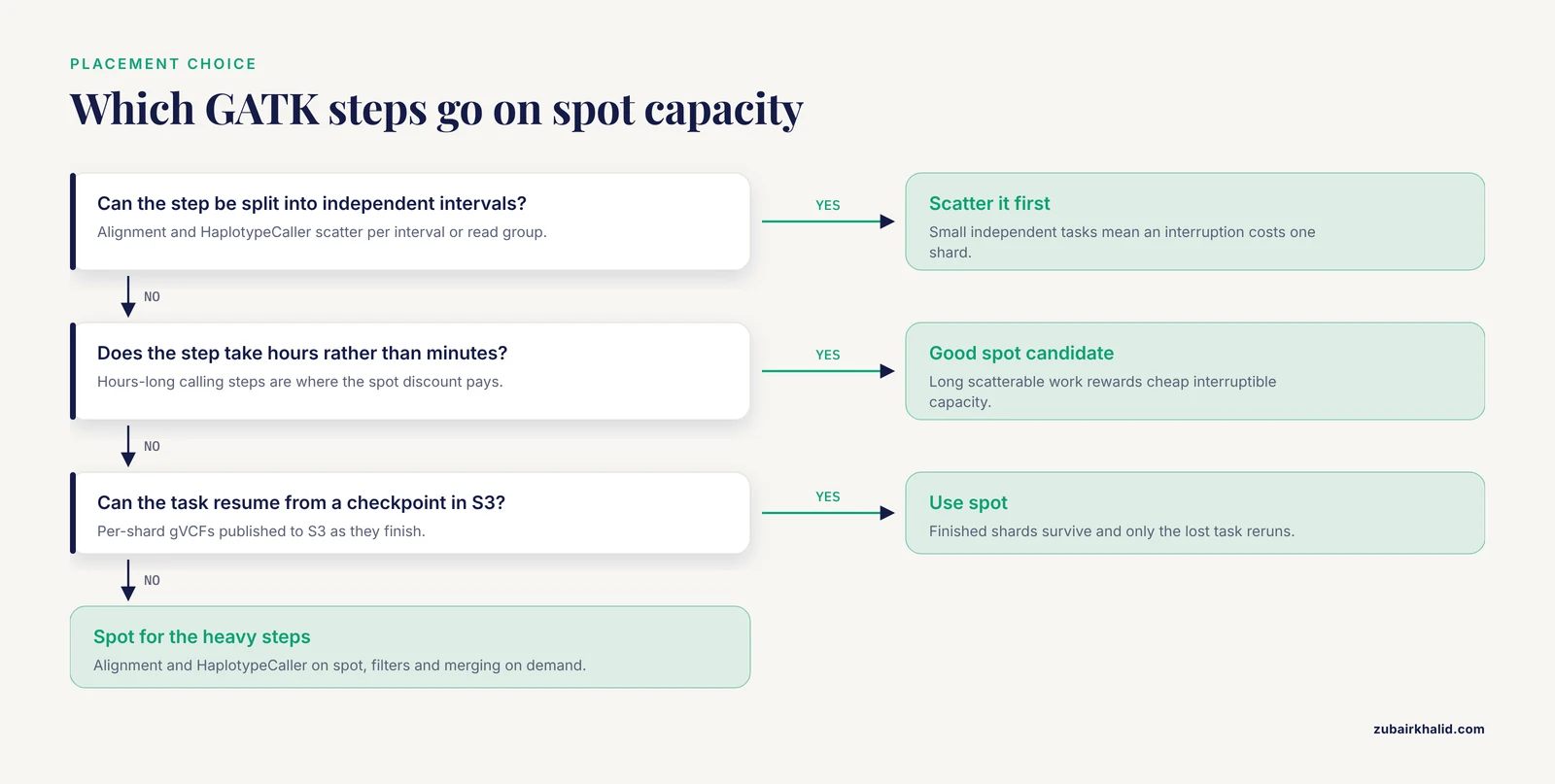
Two principles fall out of this table. First, spend your spot discount where the compute hours are, which means alignment and HaplotypeCaller. Second, do not scatter a step that cannot resume, and do not run a long monolithic step on capacity that can vanish. Filter steps that take minutes are cheap insurance on on-demand instances. Hours-long calling steps are the ones that reward spot pricing.
The Template: A GATK Spot Instance Example, Step by Step
This walkthrough takes one 30x whole genome sample from a CRAM in S3 to a joint-genotyped VCF, running the heavy work on spot instances. The same structure scales to a cohort by adding samples to the sample sheet.
Step 1: Stage the Reference and Inputs in S3
Create a bucket and copy the reference files you need. The Broad reference bucket is public and readable without credentials.
aws s3 mb s3://sc-variant-demo-us-east-1

aws s3 cp s3://broad-references/hg38/v0/Homo_sapiens_assembly38.fasta \
  s3://sc-variant-demo-us-east-1/ref/
aws s3 cp s3://broad-references/hg38/v0/Homo_sapiens_assembly38.fasta.fai \
  s3://sc-variant-demo-us-east-1/ref/
aws s3 cp s3://broad-references/hg38/v0/Homo_sapiens_assembly38.dict \
  s3://sc-variant-demo-us-east-1/ref/
aws s3 cp s3://broad-references/hg38/v0/Homo_sapiens_assembly38.dbsnp138.vcf.gz \
  s3://sc-variant-demo-us-east-1/ref/
aws s3 cp s3://broad-references/hg38/v0/Mills_and_1000G_gold_standard.indels.hg38.vcf.gz \
  s3://sc-variant-demo-us-east-1/ref/
Verify the FASTA transferred intact before building anything on top of it. A corrupt reference silently produces wrong calls.
aws s3 cp s3://sc-variant-demo-us-east-1/ref/Homo_sapiens_assembly38.fasta - | md5sumCompare the output hash against the md5 file shipped alongside the reference. Expected output looks like:
d4c8f1e2a9b0c3d4e5f6a7b8c9d0e1f2 -Step 2: Request the Spot Instance
There are two ways to buy spot capacity on AWS, and the one you pick shapes how you write the rest of the template.
The modern, simplest path is run-instances with an instance market option. This launches a single on-demand-style instance whose replacement capacity is spot.
aws ec2 run-instances \
  --image-id ami-0abcdef1234567890 \
  --instance-type c5.9xlarge \
  --key-name genomics-key \
  --security-group-ids sg-0123456789abcdef0 \
  --subnet-id subnet-0123456789abcdef0 \
  --instance-market-options \
    '{"MarketType":"spot","SpotOptions":{"SpotInstanceType":"one-time","InstanceInterruptionBehavior":"terminate"}}' \
  --user-data file://userdata.sh \
  --block-device-mappings \
    '[{"DeviceName":"/dev/xvda","Ebs":{"VolumeSize":128,"VolumeType":"gp3","DeleteOnTermination":true}}]'
The classic path is a standalone spot request, which is where the canonical gatk spot instance format lives. Save the following as spot-launch-spec.json:
{
  "ImageId": "ami-0abcdef1234567890",
  "InstanceType": "c5.9xlarge",
  "KeyName": "genomics-key",
  "SecurityGroupIds": ["sg-0123456789abcdef0"],
  "SubnetId": "subnet-0123456789abcdef0",
  "BlockDeviceMappings": [
    {
      "DeviceName": "/dev/xvda",
      "Ebs": {"VolumeSize": 128, "VolumeType": "gp3"}
    }
  ]
}
Then submit it:
aws ec2 request-spot-instances \
  --spot-price "1.50" \
  --instance-count 1 \
  --type one-time \
  --launch-specification file://spot-launch-spec.json
Check that the request was fulfilled:
aws ec2 describe-spot-instance-requests \
  --spot-instance-request-ids sir-0123456789abcdef0
Expected output, trimmed to the fields that matter:
{
  "SpotInstanceRequests": [
    {
      "State": "active",
      "Status": {"Code": "fulfilled"},
      "InstanceId": "i-0123456789abcdef0",
      "SpotPrice": "0.6120",
      "Type": "one-time"
    }
  ]
}
The parameters that matter in this format:
- InstanceType sets your CPU and memory ceiling. Match it to the pipeline step from the table above.
- SpotInstanceType of
one-timemeans AWS stops looking for capacity once the request is filled. Usepersistentonly if you want the request re-fulfilled automatically after an interruption, which pairs well with a checkpointed pipeline. - InstanceInterruptionBehavior of
terminateis the default and the right choice for stateless batch work.stopandholdcomplicate billing and rarely help a variant calling workflow. - SubnetId pins the request to one availability zone. Diversifying across several subnets materially improves your odds of getting capacity, a point the classic spot fleet design addresses with allocation strategies.
- SpotPrice in a standalone request acts as a ceiling. Since 2017, spot prices are set by spare capacity rather than by bidding, so most teams set a generous ceiling or omit price competition entirely and let availability decide.
For production scale you would replace both of these with an EC2 Fleet or, more commonly, with AWS Batch or a workflow engine's cloud executor managing the fleet for you. The single-node form above is the right thing to learn and test on.
Step 3: Bootstrap the Node With a User Data Script
The instance should configure itself on first boot. Save this as userdata.sh and reference it in either launch method.
#!/bin/bash
set -euo pipefail

# Install and start Docker
yum install -y docker
systemctl enable docker
systemctl start docker

# Pull the GATK container
docker pull broadinstitute/gatk:4.6.0.0

# Format and mount the local NVMe scratch disk if present
if [ -b /dev/nvme1n1 ] && ! blkid /dev/nvme1n1 > /dev/null 2>&1
then
  mkfs -t xfs /dev/nvme1n1
fi
mkdir -p /scratch
mount /dev/nvme1n1 /scratch || true

# Pull the reference from S3 onto local scratch
aws s3 sync s3://sc-variant-demo-us-east-1/ref/ /scratch/ref/

# Write a readiness marker
echo "READY $(date -u +%Y-%m-%dT%H:%M:%SZ)" > /scratch/status.txt
Three things in this script deserve attention. The scratch disk is local NVMe, which is fast and free with the instance but evaporates at termination, so anything you value must be copied to S3 by the workflow itself. The S3 sync at boot means every node re-derives its reference from the canonical copy, which avoids the classic failure of drift between nodes. The readiness marker gives your driver script a clean signal that bootstrapping finished.
Connect and confirm:
ssh -i genomics-key.pem ec2-user@<instance-public-ip>
cat /scratch/status.txt
docker images | grep gatk
Expected output:
READY 2026-11-11T14:03:22Z
broadinstitute/gatk   4.6.0.0   8c1f2e3d4b5a   15.2GB
Step 4: Run the Workflow With Scatter and Retry
This is the heart of any usable gatk spot instance template. The workflow splits the genome into intervals, calls variants on each interval independently, and treats every task as retryable. Save the process definition as variant.nf:
process HAPLOTYPECALLER {
    tag "${sampleId}-${chrom}"
    label 'caller'
    container 'broadinstitute/gatk:4.6.0.0'

    input:
    path ref
    tuple val(sampleId), path(bam), path(bai)
    val chrom

    output:
    path "${sampleId}.${chrom}.g.vcf.gz", emit: gvcf
    path "${sampleId}.${chrom}.g.vcf.gz.tbi", emit: tbi

    script:
    """
    gatk --java-options '-Xmx56g' HaplotypeCaller \\
      -R ${ref}/Homo_sapiens_assembly38.fasta \\
      -I ${bam} \\
      -L ${chrom} \\
      -ERC GVCF \\
      -O ${sampleId}.${chrom}.g.vcf.gz
    """
}
And the configuration in nextflow.config:
process {
    errorStrategy = 'retry'
    maxRetries = 3
    withLabel: 'caller' {
        cpus = 16
        memory = 60.GB
    }
}

docker {
    enabled = true
    runOptions = '-v /scratch:/scratch'
}
The two lines that make this spot-safe are errorStrategy = 'retry' and maxRetries = 3. When a spot interruption kills a task mid-flight, Nextflow sees a failed process, and instead of aborting the run it reschedules the task, ideally on different capacity. In Cromwell the equivalent protections are max-retries in the backend configuration and call caching, which lets a rerun reuse any task that already completed successfully.
Launch the run:
nextflow run variant.nf -c nextflow.config -resume -with-report report.htmlExpected console output:
N E X T F L O W  ~  version 24.04.0
Launching `variant.nf` [mad_curie] DSL2 - revision: 1a2b3c4d5e
executor >  local (24)
[2f/9a7b1c] HAPLOTYPECALLER (sampleA-chr1)   [100%]
[4b/3c8e2f] HAPLOTYPECALLER (sampleA-chr2)   [ 67%]
[6a/1d4f9e] HAPLOTYPECALLER (sampleA-chr3)   [  0%]
The -resume flag matters more here than in most tutorials. Every time you relaunch after an interruption, -resume combined with successful task outputs means completed shards are skipped and only unfinished work reruns.
Step 5: Checkpoint Every Task to S3
The workflow engine handles retries for tasks it knows about. You handle durability by copying each finished artifact to S3 the moment it is complete. Add a publish step in Nextflow:
HAPLOTYPECALLER.out.gvcf
    .subscribe { gvcf ->
        log.info "Publishing ${gvcf.name}"
    }
Or, in a script-driven setup, sync after each shard:
aws s3 cp /scratch/results/sampleA.chr1.g.vcf.gz \
  s3://sc-variant-demo-us-east-1/gvcf/sampleA/
aws s3 cp /scratch/results/sampleA.chr1.g.vcf.gz.tbi \
  s3://sc-variant-demo-us-east-1/gvcf/sampleA/
With per-shard gVCFs landing in S3 as they finish, an interruption at minute 58 of a 60-minute run loses only the one shard that was in flight. This is the property that makes spot pricing usable at all. Cloud studies of large-scale analysis have repeatedly found that the winning strategies are the ones that batch work into interruptible units and manage cluster resources deliberately, not the ones with the biggest machines [4].
Step 6: Detect the Interruption Warning
AWS writes an interruption notice to the instance metadata service about two minutes before termination. Read it with IMDSv2, which requires a session token:
TOKEN=$(curl -s -X PUT "http://169.254.169.254/latest/api/token" \
  -H "X-aws-ec2-metadata-token-ttl-seconds: 21600")

curl -s -H "X-aws-ec2-metadata-token: $TOKEN" \
  http://169.254.169.254/latest/meta-data/spot/instance-action
While the instance is safe, this endpoint returns an HTTP 404. Two minutes before termination it returns:
{"action": "terminate", "time": "2026-11-11T15:00:00Z"}Run a tiny poller in the background on the node so a human or a script can react:
#!/bin/bash
TOKEN=$(curl -s -X PUT "http://169.254.169.254/latest/api/token" \
  -H "X-aws-ec2-metadata-token-ttl-seconds: 21600")
while true
do
  ACTION=$(curl -s -o /dev/null -w "%{http_code}" \
    -H "X-aws-ec2-metadata-token: $TOKEN" \
    http://169.254.169.254/latest/meta-data/spot/instance-action)
  if [ "$ACTION" = "200" ]
  then
    echo "INTERRUPTION WARNING $(date -u)" >> /scratch/warning.log
    break
  fi
  sleep 5
done
For fleet-scale operations, subscribe to the same signal centrally. CloudWatch Events (EventBridge) emits a rule detail type of EC2 Spot Instance Interruption Warning for every affected instance, and workflow systems can listen for it and stop scheduling new tasks immediately. In a properly sharded pipeline the practical response is often simply to let the two minutes expire, since the engine will retry the dead task elsewhere.
Step 7: Merge, Genotype, and Validate
Once all per-sample, per-interval gVCFs are in S3, joint genotyping is fast and cheap enough to run without spot gymnastics:
gatk GenomicsDBImport \
  -R /scratch/ref/Homo_sapiens_assembly38.fasta \
  --genomicsdb-workspace-path /scratch/gdb_sampleA \
  -L chr1 \
  -V s3://sc-variant-demo-us-east-1/gvcf/sampleA/sampleA.chr1.g.vcf.gz

gatk GenotypeGVCFs \
  -R /scratch/ref/Homo_sapiens_assembly38.fasta \
  -V gendb:///scratch/gdb_sampleA \
  -L chr1 \
  -O sampleA.chr1.joint.vcf.gz
To confirm that spot interruptions did not corrupt anything, run the identical workflow once on on-demand instances as a control, then compare:
bcftools isec -p concord spot.joint.vcf.gz ondemand.joint.vcf.gzExpected result in concord/sites.txt is a count of zero discordant sites. In practice, tiny differences at low-quality sites can appear if a rerun used a slightly different software version, so pin your container digest and reference checksums before comparing. This control run costs a few dollars for one sample and buys you permanent confidence in the method.
Worked Cost Arithmetic
Use this arithmetic with your own current prices, which you should check in the AWS pricing pages for your region before planning a budget. The structure is what matters.
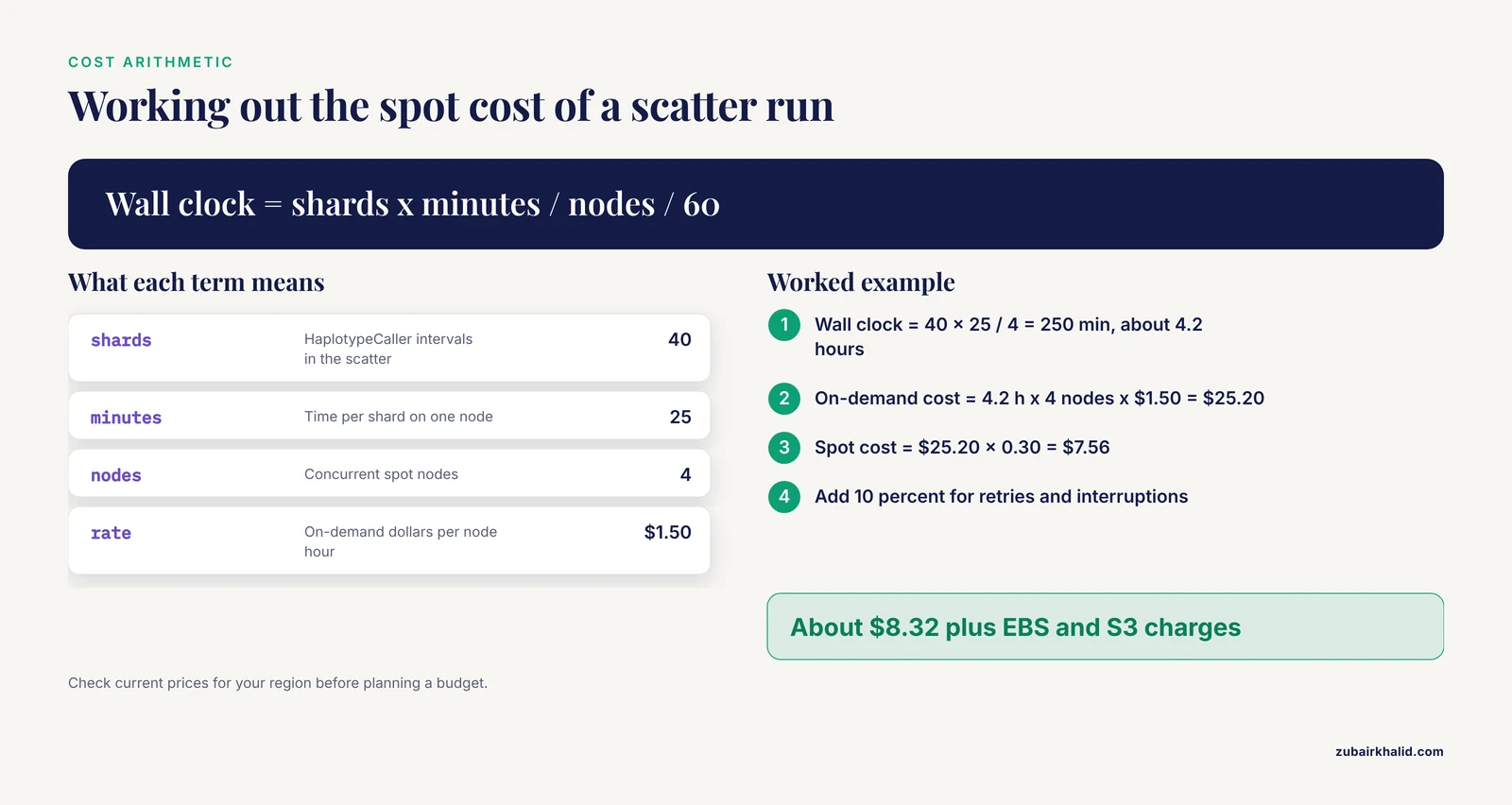
Suppose a c5.9xlarge on-demand rate of 1.50 dollars per hour and a 70 percent spot discount. A whole genome scatter of 40 HaplotypeCaller shards, each taking about 25 minutes on such a node, distributed across 4 concurrent spot nodes:
Wall clock      = 40 shards x 25 min / 4 nodes  = 250 min  ≈ 4.2 hours
On-demand cost  = 4.2 h x 4 nodes x $1.50       = $25.20
Spot cost       = $25.20 x 0.30                 = $7.56
+ 10% for retries and interruptions             = $8.32
+ EBS and S3 charges, tracked separately
The published literature gives you calibration points for how far this logic carries. One cloud RNA-seq pipeline drove per-sample cost down to 0.09 dollars using preemptible virtual machines [3]. A large-scale medical imaging curation job used more than 21,000 cloud virtual machines to finish in under 9 hours what would have taken an estimated 522 days on a single workstation, at a total compute cost of 1,011.05 dollars [6]. Those are different workloads from variant calling, but they establish the same principle. Cheap interruptible capacity plus aggressive parallelism plus disciplined checkpointing is a stable economic regime for genomics-scale batch compute.
A Reusable GATK Spot Instance Template
Condensing the walkthrough, the template consists of four files you keep in version control.
spot-launch-spec.json, the spot request format shown in Step 2, with the instance type parameterized per pipeline step.userdata.sh, the bootstrap script from Step 3, which installs Docker, mounts local scratch, and syncs the reference from S3.nextflow.configor its Cromwell equivalent, containingerrorStrategy = 'retry', a sensiblemaxRetries, and per-label resource limits matching the sizing table.intervals.txt, the chromosome or interval list that defines your scatter.
To adapt the template to a new project you edit the instance types, the bucket names, and the interval list. You do not need to touch the interruption logic, because it is generic. When you move beyond a single node, the same four files map onto AWS Batch or a spot-backed autoscaling group, and the workflow engine's executor setting changes while the retry and checkpoint logic carries over unchanged.
Cost and Scheduling Lessons From the Cloud Bioinformatics Literature
The research record on aws genomics and cloud bioinformatics cost optimization converges on a few findings that sharpen this template.
Comparative evaluations of whole genome association analyses on AWS and Google Cloud found that no single cluster configuration wins on both speed and cost, and that the speed-cost tradeoff is a genuine decision variable rather than a footnote [2]. That finding justifies the sizing table above. You are choosing a point on that tradeoff every time you pick an instance family, and the choice should be intentional per step.
Automated approaches formalize the intuition. Aether used linear programming to select combinations of underutilized resources to bid on, minimizing cost while keeping pipelines intact [1]. Workflow scheduling research has applied particle swarm optimization to task-to-resource mapping in epigenomics pipelines and reduced total cost by 6.83 percent relative to a standard optimization baseline, a reminder that even modest scheduling improvements compound across thousands of tasks [7].
Platform-level studies quantify the ceiling. Analysis of the UK Biobank whole genome sequencing data on its cloud research platform achieved a 44 percent cost reduction and a 94 percent speedup through compute architecture optimization alone, before any spot discount entered the picture [8]. Distributed reimplementations of hot kernel steps such as pileup delivered up to 6.5 times faster execution and up to 2 times lower memory use, which translates directly into fewer billable node-hours [5].
Finally, think about the full cost structure, not just compute. An early cloud genome analysis framework published detailed cost breakdowns across storage, compute, and I/O, and the I/O line item is the one teams most often forget [9]. Keeping intermediates in S3 costs pennies per shard but adds up across a cohort, and cross-region or cross-cloud transfer can dominate. Where variant calling is headed, deep-learning callers such as DeepVariant bring accuracy gains at higher computational cost, and cloud-deployed, Spark-backed versions of them show how that cost can be contained and even run on free trial credits for pilot-scale work [10].
Common Mistakes and Limitations
- Running the pipeline as one monolithic job. A single spot node executing the entire workflow end to end means an interruption restarts everything. Scatter the long steps first. Scatter-gather is the load-bearing design decision, not an optimization.
- Storing intermediates only on local scratch. Instance store and EBS volumes attached to a spot instance die at termination. If a shard finishes and its gVCF is not in S3, the discount bought you nothing.
- Skipping retry configuration. Spot interruptions surface to a workflow engine as ordinary process failures. Without
errorStrategy = 'retry'in Nextflow ormax-retriesin Cromwell, one interruption aborts the run instead of costing one shard. - Pinning all capacity to one availability zone. Spot availability varies sharply by zone and instance family at any given moment. Spread your subnets across at least three zones.
- Treating the spot price as a knob. The old bidding model is gone. Spot prices now follow spare capacity, and the price field in a standalone request functions as a ceiling, not a lever.
- Leaving orphaned EBS volumes. If
DeleteOnTerminationis false, terminated spot instances leave behind billed volumes. Audit withaws ec2 describe-volumesafter large runs. - Ignoring I/O and storage costs. Real cloud cost structures include storage and data transfer alongside compute, and these lines can be nontrivial at cohort scale [9].
- Assuming savings are constant. Spot discounts fluctuate with regional capacity demand, so budget with conservative estimates and recheck current pricing before each project. This mirrors the broader finding that cloud cost and speed must be evaluated together rather than assumed [2].
- Default JVM heaps on large nodes. GATK will not automatically use the memory you paid for. Set
-java-options '-Xmx56g'explicitly on a 72 GiB machine or you will trade an OOM for your discount. - A limitation on interpretation. The template above is a starting configuration for short-read germline variant calling on human data. Cohort-specific results, unusual sample types, and clinical interpretations require review by someone with domain expertise in the relevant pipeline and disease context, and this guide does not substitute for that review.
Frequently Asked Questions
What happens if a spot instance is interrupted during HaplotypeCaller?
The running shard dies, Nextflow or Cromwell records a failed task, and the retry policy resubmits that single interval on other capacity while all completed shards remain safe in S3. Nothing about the finished gVCFs changes.
How much money does using spot instances for variant calling actually save?
It depends on the discount at the time you run, which fluctuates by region and instance family. Published cloud genomics work gives useful anchors, including RNA-seq processing at 0.09 dollars per sample on preemptible VMs and a 44 percent cost reduction from architecture optimization alone on a large whole genome dataset, and spot discounts on top of such optimizations are typically the largest single lever left.
Which steps of the GATK pipeline should stay on on-demand capacity?
Short monolithic steps that are hard to checkpoint, such as small filter passes and final merging, are cheap enough to run on demand. Very long unscatterable steps are the ones to protect, because a single interruption costs the entire step.
What instance type works best for HaplotypeCaller on a spot instance?
A compute-optimized family with high vCPU count and moderate memory, such as the c5 series, fits HaplotypeCaller well because the step is CPU bound and scatterable. Shards around 25 to 40 minutes per chromosome interval are a practical target for balancing parallelism against retry cost.
How do I get advance warning that my spot instance will be terminated?
AWS writes an interruption notice to the instance metadata endpoint about two minutes ahead, readable with an IMDSv2 token at the spot/instance-action path. At fleet scale, subscribe to the CloudWatch EventBridge rule with detail type EC2 Spot Instance Interruption Warning instead of polling each node.
Will spot interruptions change my variant calls?
No. GATK's calls are deterministic given the same input BAM, reference, software version, and parameters. Interruptions either lose a shard, which is retried, or leave the finished output untouched. A one-time concordance check against an on-demand control run verifies this for your exact configuration.
Can I use the same template on Google Cloud or Azure?
Yes, with service-specific substitutions. Google Cloud's preemptible and spot VMs, used by cloud genomics platforms including Spark-based variant analysis deployments, and Azure spot VMs follow the same interrupt-and-retry pattern, so the workflow engine configuration carries over almost unchanged.
Do I need a workflow engine, or can I run GATK directly on a spot instance?
You can run GATK directly for a single sample and a single evening, but without scatter, retries, and checkpointing, spot interruptions will cost you whole runs. A workflow engine is what converts interruptions from fatal events into cheap retries, and it is effectively required for anything beyond a demonstration.
Sources
- Aether: leveraging linear programming for optimal cloud computing in genomics.
- Scalability and cost-effectiveness analysis of whole genome-wide association studies on Google Cloud Platform and Amazon Web Services.
- A cloud-based workflow to quantify transcript-expression levels in public cancer compendia.
- Scalable and cost-effective NGS genotyping in the cloud.
- Cloud-native distributed genomic pileup operations.
- Cloud-based large-scale curation of medical imaging data using AI segmentation.
- Cancer Diagnosis Epigenomics Scientific Workflow Scheduling in the Cloud Computing Environment Using an Improved PSO Algorithm.
- Optimizing UK biobank cloud-based research analysis platform to fine-map coronary artery disease loci in whole genome sequencing data.
- Atlas2 Cloud: a framework for personal genome analysis in the cloud.
- DeepVariant-on-Spark: Small-Scale Genome Analysis Using a Cloud-Based Computing Framework.