Galaxy vs Command-Line Workflow Managers
By Dr. Zubair Khalid, DVM, MS, PhD ·

Galaxy runs an analysis through a point-and-click web interface and records every step in a browser-based history, while Nextflow and Snakemake run an analysis as code that you write, version, and execute from the command line on a laptop, a cluster, or the cloud. That single difference drives almost every practical decision between them.
A bioinformatics workflow manager is software that chains analysis steps such as quality control, adapter trimming, alignment, quantification, and variant calling, tracks the inputs and outputs of each step, records every parameter, and reruns only the parts of an analysis that actually changed. Galaxy, Nextflow, and Snakemake all do this job. They differ in who can use them, where they run, and how reproducibility is enforced.
The rule of thumb is simple. Choose Galaxy when your priority is an accessible graphical interface for a mixed team of biologists and analysts. Choose Nextflow or Snakemake when your priority is a scalable, code-first pipeline under version control. The two approaches complement each other more than they compete. A 2025 review in Genome Biology describes Nextflow and Snakemake as popular command-line solutions that are increasingly adopted and that complement graphical platforms such as Galaxy [1].
The difference between Galaxy, Nextflow, and Snakemake therefore comes down to where the analysis lives: in a browser session that anyone can click through, or in code that a developer maintains. This guide frames the choice as Galaxy vs command-line workflow managers, then narrows to Nextflow vs Snakemake, explains each option on its own terms, compares them on the criteria that decide real projects, and works through concrete scenarios.
Galaxy vs Nextflow vs Snakemake at a Glance
The table below condenses the whole comparison. Each row is discussed in depth in the sections that follow.
| Question | Galaxy | Nextflow | Snakemake |
|---|---|---|---|
| Interface | Web browser, point and click | Command line, pipeline written in a Groovy-based language | Command line, pipeline written in Python-style syntax |
| Programming required | None | Comfort with basic scripting | Basic Python helps |
| Where it runs | Public servers, self-hosted servers, cloud | Laptop, HPC cluster, Kubernetes, AWS, Google Cloud, Azure | Laptop, HPC cluster, cloud |
| How steps are defined | Clicking tools in a browser, saved as workflows | Processes connected by channels | Rules with wildcards, resolved into a DAG |
| Software management | Versioned tool wrappers managed per server | Containers (Docker, Apptainer) or Conda | Conda environments or containers, per rule |
| Reproducibility record | Complete history of every step, parameter, and version | Git-tracked code plus pinned containers | Git-tracked code plus pinned environments |
| Shared pipeline ecosystem | Galaxy workflows, Tool Shed, training tutorials | nf-core framework and its module library | snakemake-wrappers and community collections |
| Partial reruns | Re-execute a workflow on new data | Cached, -resume skips completed steps | Rebuilds only outputs affected by a change |
| Interactive analysis | Native, Jupyter and RStudio inside Galaxy | Not native | Not native |
| Best fit | Mixed teams, teaching, one-off analyses | Core facilities, standardized production pipelines | Bespoke pipelines, Python-centric groups |
Both models are mainstream, and many organizations run both. The choice is about which one carries the core of your work.
What Galaxy Is and How It Works
Galaxy is an open-source, web-based platform for data-intensive research that a distributed community has developed since 2005. You use it entirely from a browser. Nothing is installed on your laptop, because a server hosts the tools, the data, and the compute. That architecture is why Galaxy is the default answer to the question of when to use Galaxy at all: whenever the people running the analysis should not have to think about servers, environments, or code.
Histories, tools, and workflows
The central object in Galaxy is the history. A history is a running record of everything you did: each uploaded file, each tool run, the exact parameters you chose, the tool version, and every output. You can rename and annotate steps, share a history with a collaborator through a link, or export it as a file. This record exists without any extra effort, which is why Galaxy is often where students first meet reproducible analysis.
Tools in Galaxy are wrappers around established command-line programs such as FastQC for read quality reports, Cutadapt for adapter removal, BWA for aligning reads to a reference genome, and DESeq2 for differential expression testing. Each wrapper pins a specific tool version and exposes its options as form fields with help text. Servers install additional tools from the Tool Shed, a catalog of community-contributed wrappers.
Once you have clicked through an analysis once, you can extract a workflow from the history or assemble one in a visual editor. A workflow reruns that chain of tools on new data. A dataset collection, which is a list of many files grouped for parallel processing, lets a single workflow run process dozens or hundreds of samples in one submission. Galaxy also runs interactive tools, so JupyterLab and RStudio sessions open inside the platform with direct access to your histories.
Where Galaxy runs
Three deployment options cover most needs. Public servers such as usegalaxy.org in the United States, usegalaxy.eu operated by the University of Freiburg, and usegalaxy.org.au are free to use and community-maintained, with fair-use limits on storage and compute. Self-hosted installations give laboratories and core facilities full control, which matters for sensitive human data and for heavy workloads. Cloud deployments occupy the middle ground. The Galaxy Project documentation covers each option in detail, and the Galaxy Training Network publishes free, hands-on tutorials for most common analyses.
What Galaxy does well, and where it strains
Galaxy excels at accessibility, teaching, and mixed teams. A bench scientist can run a published workflow, inspect intermediate files, and adjust parameters without writing code. The strain appears with complex branching logic, very large batch analyses, and software engineering practices such as code review. Galaxy workflows export as files, but version control of pipeline logic is less natural than in a Git repository, the standard tool for tracking code changes. Recent Galaxy versions support conditional steps and looping in workflows, yet deeply nested logic remains easier to express and maintain in code.
What Nextflow Is and How It Works
Nextflow is an open-source workflow manager built on the dataflow programming model, in which tasks run as soon as their inputs are ready rather than in a fixed sequence. Pipeline scripts are written in a Groovy-based domain-specific language (DSL), a small language designed for one purpose, and Nextflow runs on the Java virtual machine, the runtime that lets the same script target many kinds of compute infrastructure.
Processes, channels, and DSL2
Two constructs carry most of a Nextflow pipeline. A process is a task template with declared inputs, declared outputs, and a script block, usually a shell command. A channel is an asynchronous queue that passes data between processes. When a channel feeds three FASTQ file pairs (the standard raw sequencing read format with per-base quality scores) to a trimming process, Nextflow runs three instances of that process, in parallel whenever compute allows.
The current scripting style is DSL2, the second version of the language. DSL2 introduced modules, which are reusable process definitions in separate files, and subworkflows, which bundle module chains into named units. nf-core pipelines are built with DSL2, and a 2025 review reports recent nf-core framework developments built around this language version [1].
A minimal DSL2 example:
process FASTQC {
    input:
    path reads

    output:
    path "fastqc_out"

    script:
    """
    mkdir fastqc_out
    fastqc --outdir fastqc_out ${reads}
    """
}

workflow {
    reads = Channel.fromPath('data/*.fastq.gz')
    FASTQC(reads)
}
Executors, containers, and resume
An executor is the layer that submits tasks to a compute system. Nextflow ships executors for local runs, for common HPC schedulers such as SLURM, PBS, LSF, and SGE, and for cloud services including AWS Batch, Google Batch, Azure Batch, and Kubernetes. The pipeline code stays the same. You change a profile, a named block of configuration stored in a nextflow.config file, and the same analysis moves from a laptop to a cluster.
Software dependencies are handled with containers or Conda. A container is a packaged, isolated software environment, and Docker and Apptainer (formerly Singularity) are the common formats. Conda is a package and environment manager whose Bioconda channel distributes most bioinformatics software. Pinning these environments is what makes a pipeline behave identically on different machines.
Nextflow caches completed work. With the -resume flag, tasks whose code, inputs, and parameters are unchanged are skipped, and only affected tasks rerun. This turns a failed long run into a short retry of the last few steps. Built-in run reports, trace files, and timelines document what executed and where.
Typical commands:
# Quick start with a community pipeline and bundled test data
nextflow run nf-core/rnaseq -profile test,docker

# Rerun your own script on a cluster, skipping completed work
nextflow run pipeline.nf -profile slurm -resume
nf-core and the Nextflow ecosystem
nf-core is a community framework that develops and maintains best-practice Nextflow pipelines under shared guidelines, with automated checks that enforce those standards. Its catalogue includes widely used pipelines such as nf-core/rnaseq, which runs RNA-seq analysis from quality control through transcript quantification, and nf-core/sarek for germline and somatic variant calling. Beyond full pipelines, nf-core maintains an extensive library of modules and subworkflows, so a team can assemble a custom pipeline from tested, standardized parts and adopt common standards progressively as resources and needs allow [1]. Active research communities have formed around the framework, and the same 2025 review showcases its adoption by six EuroFAANG farmed animal research consortia as a model for cross-institution standardization [1].
What Snakemake Is and How It Works
Snakemake is an open-source workflow manager written in Python and inspired by GNU Make, the classic build tool that recompiles only what changed. You describe the files you want, and Snakemake works out the steps needed to produce them.
Rules, wildcards, and the DAG
The unit of work is a rule, which declares input files, output files, and a shell command or Python code. A wildcard is a placeholder such as {sample} that lets one rule handle many samples. Snakemake resolves requested outputs into a DAG, a directed acyclic graph, which is a map of jobs where each arrow points from a task to the task that needs its output and no path loops back on itself. You request final files, and Snakemake builds the graph backward from those targets to the raw data.
A minimal Snakefile:
SAMPLES = ["control_1", "control_2", "treated_1", "treated_2"]

rule all:
    input:
        expand("results/trimmed/{sample}_R1.trimmed.fastq.gz", sample=SAMPLES)

rule cutadapt:
    input:
        "data/{sample}_R1.fastq.gz"
    output:
        "results/trimmed/{sample}_R1.trimmed.fastq.gz"
    params:
        adapters="-a AGATCGGAAGAGC"
    shell:
        "cutadapt {params.adapters} -o {output} {input}"
Running snakemake -n performs a dry run that prints the planned jobs without executing them, which is a safe way to check logic before committing compute. Rules can also hand off to external scripts or notebooks with the script directive, so a pipeline can call your own Python or R code as a first-class step.
Environments, containers, and reruns
Each rule can declare its own Conda environment file, activated with the, use-conda flag, or its own container, activated with the, use-apptainer flag. This per-rule pinning is precise: the alignment step and the counting step can run different software versions without conflict. Snakemake also generates a self-contained HTML report of a run with the, report flag, and a linting mode (snakemake, lint) flags style and consistency problems in your rules.
Reruns follow the Make model. When inputs, code, or parameters change, Snakemake rebuilds only the outputs downstream of the change. Because a pipeline is plain Python plus shell, it lives naturally in a Git repository alongside the rest of a project. The snakemake-wrappers repository provides reusable, documented rules for common tools, so teams do not write every step from scratch.
Typical command:
snakemake --cores 8 --use-condaNextflow vs Snakemake: How the Two Command-Line Managers Differ
Both are mature, open source, and widely adopted in bioinformatics. Both run on laptops, HPC clusters, and cloud platforms, support containers and Conda, cache completed work, and keep pipelines in Git. The differences are in mental model, language, and ecosystem.
| Aspect | Nextflow | Snakemake |
|---|---|---|
| Language | Groovy-based DSL on the Java virtual machine | Python plus shell |
| Mental model | Data streams through channels between processes | Targets and rules resolved into a DAG |
| Pipeline ecosystem | nf-core, with shared modules and subworkflows | snakemake-wrappers and community collections |
| Dependency pinning | Containers or Conda per pipeline or process | Conda or containers per rule |
| Rerun control | -resume caching of completed tasks | Rebuilds outputs affected by a change |
| Best first pick | When a community pipeline covers your analysis | When the analysis is bespoke and Python-centric |
The mental model differs first. Nextflow is data-driven: channels stream data between processes, and tasks fire as inputs arrive, which suits paired files, scatter-gather patterns, and irregular sample sets. Snakemake is target-driven: you declare the files you want, and the tool derives the job graph from those targets, which suits projects organized around a directory of expected outputs.
The languages differ next. Nextflow scripts are Groovy, though DSL2 hides most of the language behind pipeline-specific constructs. Error messages can still expose Groovy internals, and newcomers feel that. Snakemake scripts are Python plus shell, and most bioinformatics analysts already read Python, so the barrier is lower for Python-trained groups.
The ecosystems differ most. nf-core gives Nextflow the largest standardized collection of community pipelines in bioinformatics, with a shared module library and automated checks that enforce conventions [1]. Snakemake answers with snakemake-wrappers and community-maintained pipeline collections, which are useful but less centralized. A practical shortcut: if a maintained nf-core pipeline already covers your analysis, Nextflow hands you a production-grade pipeline today. If your analysis is bespoke and your team thinks in Python, Snakemake fits how they already work.
Choosing Between Galaxy and a Command-Line Workflow Manager
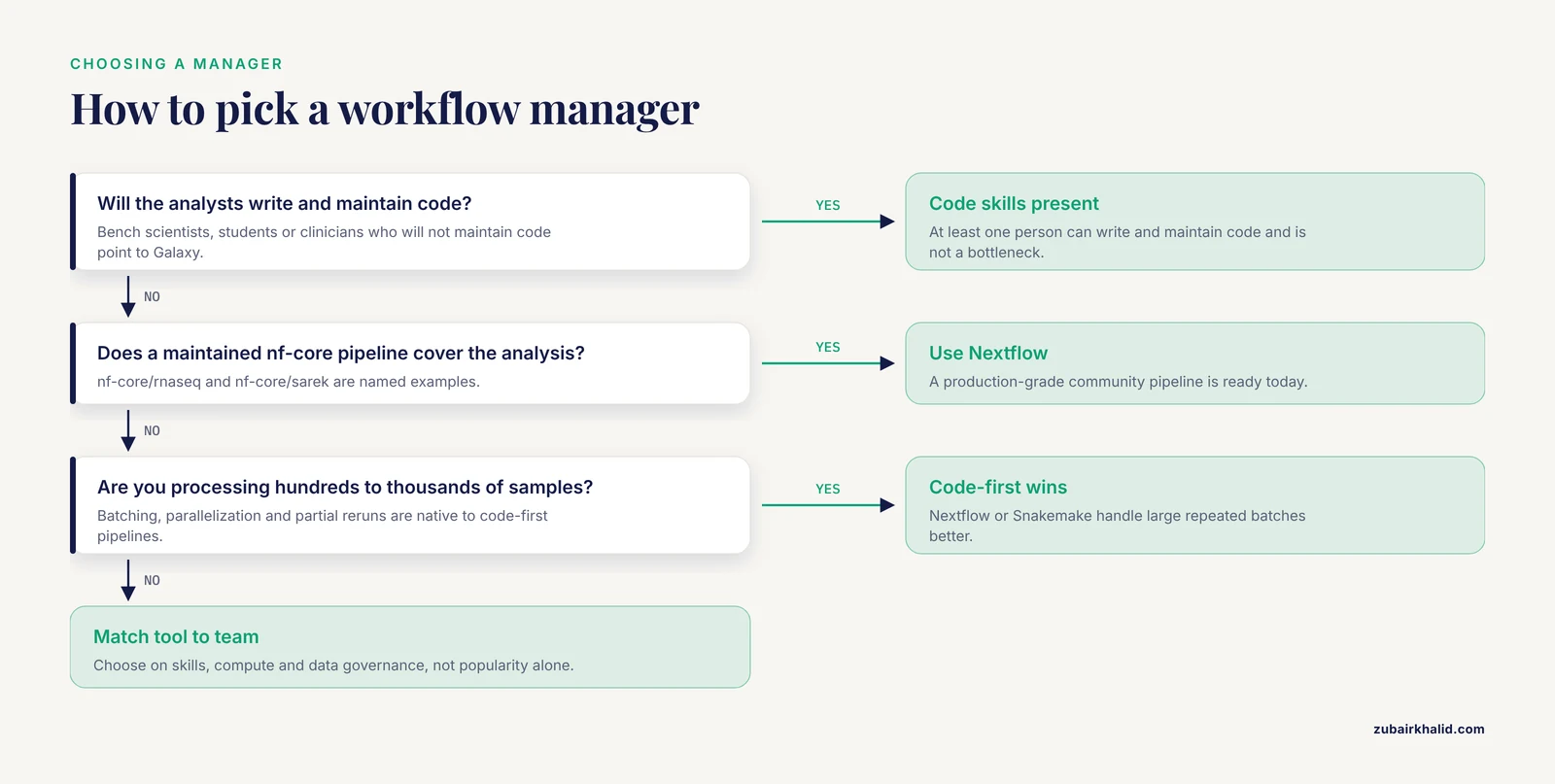
The question of Galaxy or Nextflow, or Galaxy or Snakemake, resolves into five practical criteria. Work through them in order, because the first one usually settles the rest.
Who will run the analysis
If the people running analyses are bench scientists, students, or clinicians who will not maintain code, Galaxy removes the programming barrier entirely. If at least one person can write and maintain code, and that person is not a bottleneck for everyone else, command-line managers become practical. A common failure mode is choosing a code-first tool for a team with no developer, then watching the pipeline rot after that person moves on.
Where the analysis runs
Galaxy needs a server, either a public one or one you host. Public servers are excellent for training and medium-sized analyses but impose fair-use limits and are shared with everyone. Command-line managers run wherever your data already sits, and their executor model moves the same pipeline from a laptop to a SLURM cluster or a cloud batch service with a configuration change. If your data is large and already on a cluster, the command-line route avoids moving it.
How many samples you process
For tens of samples, any option works. For hundreds to thousands of samples processed repeatedly, code-first pipelines win, because batching, parallelization, and partial reruns are their native territory. Galaxy dataset collections scale respectably, but the browser-centric model was not designed for thousands of batch jobs.
Reproducibility and FAIR compliance
Standardized analysis pipelines help research comply with the FAIR principles, which stand for Findable, Accessible, Interoperable, and Reusable, and they facilitate collaboration [1]. Galaxy enforces reproducibility through its histories, which capture every parameter and tool version automatically. Nextflow and Snakemake enforce it through Git-tracked code plus pinned containers or environments. Both routes are sound. The command-line route transfers reproducibility across institutions more easily, because a repository plus a container is a complete, portable specification of an analysis.
Collaboration and review
Code-first pipelines support pull requests, code review, and issue trackers, which is how distributed teams keep quality high. Galaxy supports shared histories, published workflows, and shared servers, which is how mixed teams keep access broad. Match the tool to the collaboration style your team can actually sustain.
If you are learning from scratch and want employable skills in both worlds, a sensible order is Galaxy first, to understand what a complete analysis record looks like, then Snakemake or Nextflow, to understand how the same record is built in code.
Worked Scenarios
Scenario 1: A university lab with rotating students and no programmer
A molecular ecology lab sends sequencing out and analyzes a handful of transcriptomes each year. Students rotate every semester. The right answer is a public Galaxy server, Galaxy Training Network tutorials, and shared histories the principal investigator can inspect in a browser. Nobody maintains code, the record is automatic, and staff turnover costs nothing.
Scenario 2: A genomics core facility on a SLURM cluster
A core facility processes hundreds of clinical and research samples a month on a university cluster. Results must be identical run to run, and a rerun after a failed node must not repeat hours of finished work. Nextflow with an nf-core pipeline such as nf-core/sarek for variant calling fits: containers pin every tool version, the SLURM executor submits jobs, -resume skips completed tasks, and Git tracks every change to the pipeline with a named review.
Scenario 3: A methods development group
A computational group develops a new peak-calling method and needs a pipeline that mixes standard tools with their own Python scripts, with different software versions at different steps. Snakemake fits: rules map cleanly onto steps, wildcards generalize across experimental conditions, per-rule Conda environments prevent version conflicts, and the whole project lives in one repository next to the method code.
Scenario 4: A multi-institution consortium
A consortium of laboratories in different countries wants the same variant-calling results from the same data at every site. The proven pattern is to standardize on a community framework rather than a homegrown pipeline. Shared modules and subworkflows let each site adopt common standards progressively, at the pace its resources and needs allow, and a shared test profile verifies that every site produces comparable output before any real data is processed.
Using Galaxy and Command-Line Managers Together
Many organizations run both, and the patterns below are common in practice.
- Prototype in Galaxy, productionize in code. A Galaxy history is a fast way to test parameters on a few samples before anyone writes a pipeline.
- Produce on the command line, review in Galaxy. Run a Nextflow or Snakemake pipeline at full scale, then load key outputs into Galaxy so collaborators can inspect and share them in a browser.
- Document browser-based work in the repository. Export Galaxy workflows as files and commit them next to the code, so the whole analysis story lives in one place.
- Pair a Galaxy front end with a cluster back end. Self-hosted Galaxy installations can hand heavy jobs to an HPC scheduler, so interactive access and serious compute coexist.
The hybrid is not a compromise. It matches each tool to the stage of the analysis where it is strongest.
Common Mistakes and Limitations
- Treating a messy history as a pipeline. A production analysis should be a clean, extracted workflow with sensible parameters, tested on new data, not a sprawling history clicked together once.
- Assuming public servers are private or unlimited. Public Galaxy servers are shared community resources with fair-use limits, and they are the wrong home for sensitive data. Host your own instance when data cannot leave your institution.
- Copying outdated Nextflow tutorials. Material written for the first DSL version will not match modern pipelines. Learn DSL2 from current documentation and current nf-core examples.
- Not pinning software versions. Floating Conda installs and unpinned containers break reproducibility silently. Pin containers or per-rule environments, and record Galaxy tool versions in your methods.
- Misreading resume semantics. Nextflow -resume skips only tasks whose code, inputs, and parameters are unchanged, so editing a process invalidates its cache. Snakemake rebuilds only downstream outputs, but changed code or timestamps can trigger surprise reruns. Understand the rules before trusting a cached result.
- Scaling before testing. Run a two-sample subset first. nf-core pipelines ship test profiles for exactly this purpose, and Snakemake dry runs with -n catch graph errors for free.
- Committing outputs instead of code to Git. Repositories should hold pipeline code, configuration, and sample sheets, the table that lists sample names and file paths, not gigabytes of generated files.
- Underestimating the Groovy learning curve. Nextflow hides most of the language, but error messages can still expose it. Budget extra learning time if your team has only Python experience.
- Choosing on popularity alone. The most adopted manager is the wrong one if it does not fit your team's skills, your compute, and your data governance rules.
- Neglecting data management. Most pipeline failures are input problems: inconsistent sample sheet formats, misnamed files, or missing metadata. Fix naming and metadata before debugging the pipeline.
The right choice depends on local infrastructure, data governance rules, funding, and team skills, and none of these tools removes the need for sound statistical and domain judgment in the analysis itself. Complex or regulated environments should involve experienced pipeline developers or informatics staff before the first production run.
Frequently Asked Questions
Is Galaxy easier to learn than Nextflow or Snakemake?
Yes. Galaxy requires no programming, and a new user can run a published workflow the same day through the browser. Nextflow and Snakemake require basic scripting comfort, and most newcomers need days to weeks to become productive, longer for complex pipelines.
When should I use Galaxy instead of a command-line workflow manager?
Use Galaxy when the analysts are not programmers, when teaching or training, when exploring a dataset interactively, or when a public server covers your compute needs. Host your own Galaxy instance when data cannot leave your institution.
Should I choose Nextflow or Snakemake?
Choose Nextflow if a maintained nf-core pipeline covers your analysis or you want the largest standardized pipeline ecosystem. Choose Snakemake if your analysis is bespoke and your team works in Python. Both scale from laptops to clusters and clouds.
Do I need to know how to program to use a bioinformatics workflow manager?
For Galaxy, no. For Nextflow and Snakemake, yes at a basic level, including reading and editing scripts, running shell commands, and using Git. Without those skills, Galaxy or a coding colleague is the better entry point.
Can Galaxy and a command-line workflow manager be used together?
Yes. Common patterns include prototyping parameters in Galaxy before coding a pipeline, running production pipelines on the command line and loading results into Galaxy for browser-based review, and exporting Galaxy workflows as files for documentation.
What is nf-core and why do so many teams use it?
nf-core is a community framework of best-practice Nextflow pipelines built on DSL2, with shared modules and subworkflows and automated checks that enforce standards. Teams adopt it because a maintained, tested pipeline is faster to start with than one written from scratch.