Forking vs. Branching for Scientific Collaboration
By Dr. Zubair Khalid, DVM, MS, PhD ·

A branch is a parallel line of work inside one shared repository, and a fork is a complete copy of the repository that lives under a different account on the hosting platform. The rule of thumb for choosing between them is short. Use branches when every contributor should have write access to one canonical project. Use forks when contributors sit outside your write-access circle, when you collect work from many outside parties, or when you intend to maintain an independent lineage of the code.
This choice arrives early in modern research. Analyses of large clinical and biological datasets are now routine, major journals request code availability statements at publication, and reviewers increasingly ask to rerun the analysis themselves, yet most surgical trainees and faculty receive no formal training in version control [1]. Tutorials on git for scientists usually teach commits and then stop, leaving a lab to improvise its collaboration model. The improvisation shows up in real repositories as direct pushes to main, orphaned branches, stale forks, and the occasional leaked data file. A deliberate fork-or-branch policy prevents most of that.
The rest of this article defines both mechanisms precisely, compares them on the criteria that decide real choices, walks through five scenarios drawn from research practice, and catalogs the mix-ups that new teams hit first.
Fork vs. Branch for Research Collaboration: The Short Answer
Four mental models cover nearly everything in Git: the repository, the commit, the branch, and the remote [1]. A repository (shortened to repo) is a project folder plus the complete history of every recorded snapshot. A commit is one snapshot, stamped with its author, the time, and a message describing what changed. A branch is a movable label pointing at one commit, and it advances automatically as new commits land on it. A remote is another copy of the repository that lives elsewhere, such as the copy on GitHub that your laptop pushes to and pulls from.
A fork is not part of core Git. It is a feature of hosting platforms such as GitHub, GitLab, and Bitbucket. When you fork a repository, the platform creates a new repository under your account containing a full copy of the history as it existed at that moment. The original is called the upstream repository. A clone is different again: it is a local copy of any repository on your own machine, created with the git clone command. Researchers clone constantly and fork only when the ownership boundary demands it.
A pull request (PR) is the review mechanism that sits on top of both models. It proposes merging one set of commits into a target branch, and it gives reviewers a place to read the changes line by line, run automated checks, and record approval before the merge happens.
The one-sentence difference: a branch shares write access to one project, while a fork separates ownership. Everything else in this article is a consequence of that sentence.
What a Branch Does in a Research Project
Branches are cheap, so use many
Creating a branch in Git is nearly free. The command git branch analysis-hba1c writes one small file inside the repository's hidden .git directory, containing the identifier of the commit you were on. Nothing is copied, and the operation finishes instantly regardless of project size. Because branches cost nothing, healthy research repositories carry many short-lived branches rather than a few ancient ones.
The default branch, usually named main, holds the state everyone agrees is correct. Work happens on topic branches (branches dedicated to one analysis, feature, or fix) with names that make their purpose obvious: analysis-mortality-stratified, feature-fastq-trimming, fix-normalization-bug. Changes reach main only through review. This separation is what lets two analysts rewrite the same script at the same time without destroying each other's work.
The daily edit-stage-commit cycle
Day to day, work follows the edit-stage-commit cycle that dominates Git practice [1]. You edit files, stage the changes that belong together (staging marks exactly which modifications the next commit will include), and record them with a message that says what changed and why:
git switch -c analysis-mortality-stratified
git add scripts/cox-models.R
git commit -m "Add Cox models stratified by age and sex"
git push origin analysis-mortality-stratified
git switch -c creates the branch and moves you onto it in one step (available in Git 2.23 and later). git push uploads the branch to origin, the remote name that points at the hosted copy your team shares. The platform then offers a one-click path to open a pull request into main.
Review and branch protection
On a well-run research repository, main is protected. Protection rules, configured by the repository owner on the hosting platform, can require that every change arrive through a pull request, that at least one reviewer approve it, and that automated checks pass before the merge button unlocks. Force pushes (pushes that overwrite a branch's history on the remote) and branch deletions can be blocked outright. With protection in place, main becomes a reference everyone can trust, and any branch can be compared against it at any time.
Review through pull requests also carries the coordination load that email attachments used to carry, badly. A reviewer sees exactly which lines changed, can request changes in place, and can rerun the analysis before approving. The combination of branches and pull requests is the standard collaboration pattern in the surgical data science primer on Git and GitHub, and it transfers directly to laboratory and consortium settings [1].
Conflicts and history hygiene
Merging folds one branch's commits into another. When two branches edit the same lines, Git stops and declares a merge conflict, and a human must choose the surviving text. Small branches merged often keep conflicts to a few lines. Branches that drift from main for months produce conflicts measured in screens.
One rule prevents most history disasters: never rewrite history that other people already have. Rebasing (replaying your commits on top of a newer base to keep the history linear) is safe on a branch only you use and destructive on a shared branch, because rewriting changes commit identifiers and leaves every collaborator's copy inconsistent with the remote. If a shared branch must be repaired, add a corrective commit instead of rewriting.
What a Fork Does in a Research Project
A fork is a permission boundary, not a Git command
Git itself has no fork command. Type git fork and Git returns an error. Forks exist because hosting platforms built them on top of Git remotes: the platform copies the entire repository, including its full history, into a new repository under your account, and records the relationship between the copy and its upstream. From that moment the fork is an ordinary repository that you own. You can branch inside it, push to it, change its settings, and, if you choose, never interact with the upstream again.
Forks solve a permission problem. A contributor without push access to your repository cannot create a branch in it, no matter how skilled or well-intentioned. The fork hands that contributor a write space of their own while leaving your repository's access control untouched.
Two visibility facts matter in research settings. First, a fork of a public repository is public, and on GitHub you cannot later make that fork private, so anything committed to the fork is world-readable. Second, forking works differently on private repositories: only people who already have access can fork a private repository, and organization owners can restrict forking altogether. Most platforms also let you fork a repository you own, which is occasionally useful for experiments you want fully separated from the original.
Guides to GitHub for researchers tend to introduce the fork button early and move on. The button is the easy part. The ongoing obligation is keeping the fork aligned with upstream.
Keeping a fork synced with upstream
A fork snapshots the history at the moment of forking and never updates itself. Later commits in the upstream stay invisible until you deliberately pull them in. The standard maintenance is to add the upstream as a second remote and sync periodically:
git remote add upstream https://github.com/upstream-owner/project-name.git
git fetch upstream
git merge upstream/main
Replace the URL with the real project address. git fetch upstream downloads the upstream's new commits without touching your working files, and git merge upstream/main folds them into your current branch. Teams that skip this step accumulate forks that drift so far from upstream that merging back becomes a rewrite.
The standard fork-and-branch contribution flow
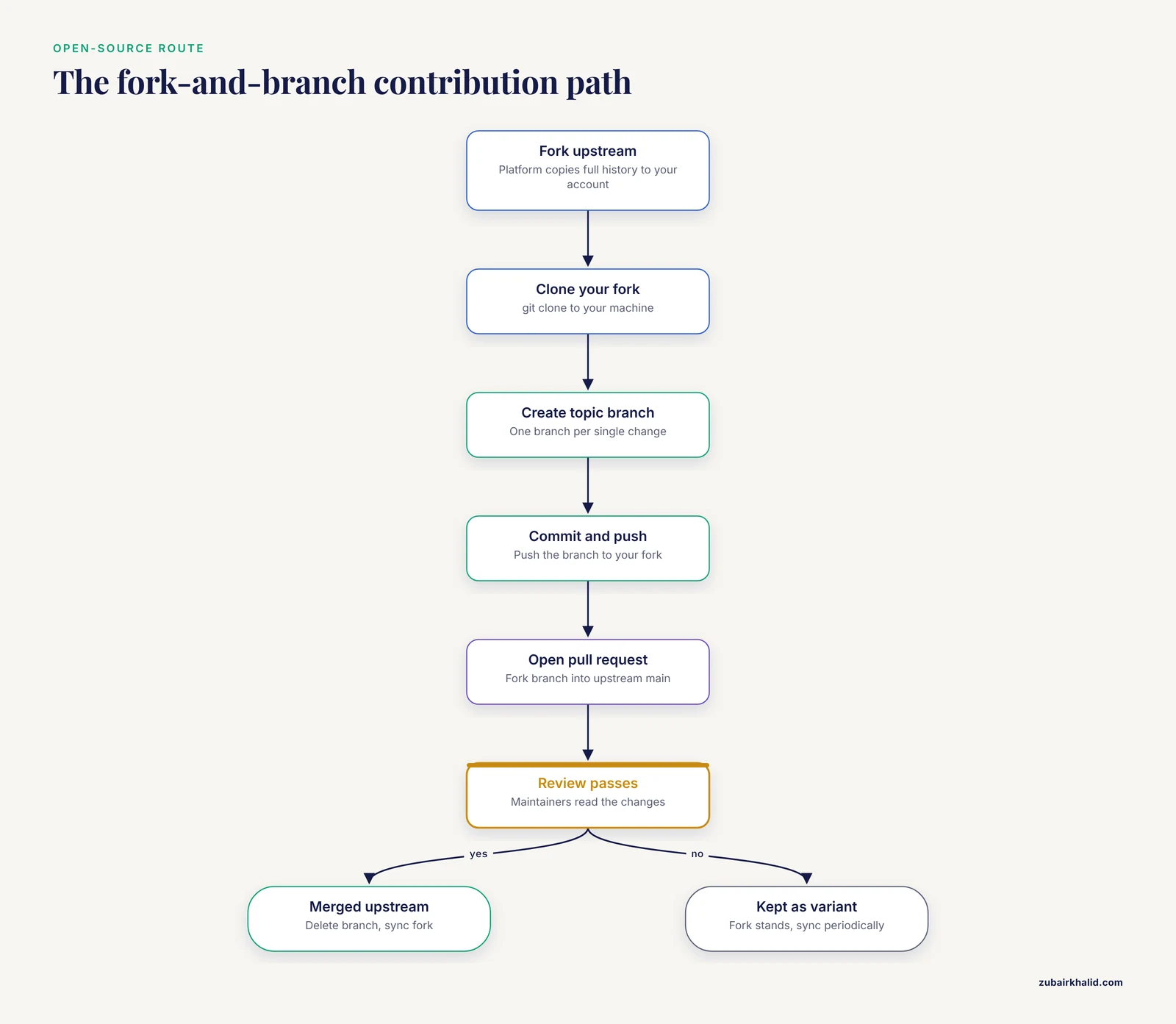
Open-source contribution follows a fixed sequence:
- Fork the upstream repository on the platform.
- Clone your fork to your machine with git clone.
- Create a topic branch inside your fork for the single change you intend to make.
- Commit your work on that branch and push it to your fork.
- Open a pull request that proposes your fork's branch as the source and the upstream's main branch as the target.
- Respond to review, and once the PR merges, delete the topic branch and sync your fork from upstream.
The topic branch matters more than beginners expect. A pull request opened from your fork's main branch absorbs every later sync commit, so reviewers see a stream of unrelated changes instead of your one contribution. A dedicated branch keeps the PR exactly as large as the change.
When to use a fork
When to use a fork reduces to four situations:
- You want to contribute to a repository where you cannot obtain write access, such as community software maintained by another group.
- You collect contributions from many outside people, and granting write access to all of them is unwise or impossible.
- You intend to maintain your own divergent version of a project permanently, with selective, periodic syncing from upstream.
- You run a course or consortium where each participant needs an isolated, owned copy of the exercise repository.
Forks also carry an open-science dimension. Designs released on GitHub under permissive licenses invite this workflow directly. The Open-tES project, an open-source current generator for transcranial electrical stimulation in rodent research, is shared on GitHub under a Creative Commons Attribution-ShareAlike 4.0 license precisely so that other laboratories can reuse and adapt it [2]. A lab that modified the design for its own protocol would fork the repository, build its variant on a branch, and could offer the improvement back upstream through a pull request. License terms travel with the code, so adaptations remain shareable on the same terms as the original.
Fork vs. Branch for Research Collaboration: Side-by-Side Comparison
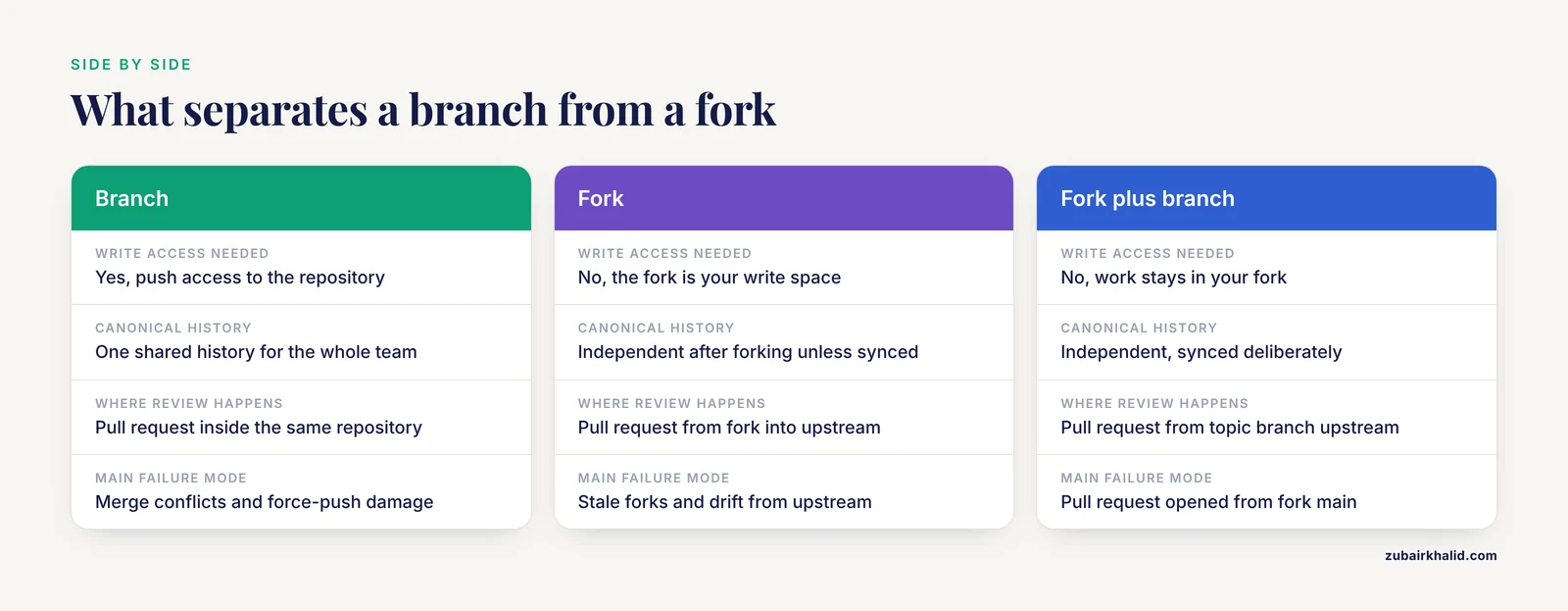
The table puts the two mechanisms side by side on the criteria that come up in real decisions.
| Criterion | Branch | Fork |
|---|---|---|
| What it is | A movable pointer to a commit inside one repository | A platform-created copy of an entire repository under another account |
| Where it lives | Inside the shared repository | On the hosting platform, as a separate repository |
| Who can create one | Anyone with push (write) access to the repository | Anyone who can view a public repository, or members with permission on a private one |
| Write access required | Yes, to push the branch | No, the fork provides its own write space |
| Canonical history | One shared history for the whole team | Independent histories after the fork, unless deliberately synced |
| Review mechanism | Pull request within the same repository | Pull request from the fork into the upstream repository |
| Cost and overhead | Near zero, instant to create | Full copy of the history plus ongoing sync maintenance |
| Visibility | Visible to everyone with read access to the repository | The fork has its own settings, and a fork of a public repository is public |
| Failure modes | Accidental pushes to shared branches, merge conflicts, force-push damage | Stale forks, drift from upstream, confusion about which copy is authoritative |
| Typical research use | Analysis branches, manuscript revisions, pipeline releases inside one team | Contributions to community tools, teaching, multi-group open collaboration, maintained variants |
The criteria that decide real choices
The question of fork or branch for research collaboration usually resolves on a handful of tests.
- The write-access test. List everyone who needs to push changes. If they all should have write access, use branches in one repository. If anyone should not, that person needs a fork, because the platform will not let them branch in yours.
- The canonical-history test. Decide whether the project can tolerate two versions of the truth. A manuscript analysis cannot. A community tool with site-specific deployments can.
- The trust test. Branch protection rules and required reviews make shared write access safe for accountable teams. Forks are the safer default when contributors are numerous, transient, or unknown.
- The turnover test. Rotating students and short-term collaborators fit the fork model for teaching and the branch model for supervised research work. The difference is whether someone senior reviews every push.
- The divergence test. If the work should flow back upstream and disappear into the main project, use a branch (or a fork plus a pull request). If the work is a permanent variant with its own identity, fork.
- The data-sensitivity test. Sensitive projects belong in private repositories with tightly controlled access, which pushes teams toward branches and away from public forks.
Most teams land on a hybrid without drama. Internal staff branch inside the canonical repository. Outsiders fork. Both routes converge on the same pull request queue, which is the point. Forking vs. branching for scientific collaboration is rarely an either-or decision across a whole portfolio. It is a per-project decision that the write-access test settles quickly.
Worked Scenarios from Research Practice
Scenario 1: A multi-institution registry study (branches)
Four sites collaborate on a retrospective registry analysis. The lead institution owns a private repository and grants write access to the named analysts at each site. Every analysis lives on its own branch, and the senior biostatistician reviews each pull request before it reaches main. This is the multi-institution collaboration pattern laid out in the surgical data science primer, which builds its workflows around repositories, branches, and pull requests [1].
Branches fit because the contributor list is small, known, and accountable, and because the project needs one canonical set of results that every site trusts. The team adds a tag such as v1.0-submission when the manuscript goes in, so the exact code state behind the submitted figures is never in doubt.
Scenario 2: Improving an open-source research tool (fork)
A neuroscience lab uses an open-source stimulator design shared on GitHub under a permissive Creative Commons license [2]. The lab needs a modified current limit for its rodent protocol. The lab has no write access to the upstream repository and should not have any, since the maintainers cannot vet every outside group. The lab forks the repository, clones its fork, and creates a branch:
gh repo fork upstream-owner/stimulator-project
git clone https://github.com/your-lab-account/stimulator-project.git
cd stimulator-project
git switch -c hardware-current-limit
After editing the design files and committing, the lab pushes the branch and opens a pull request into the upstream repository. If the maintainers merge it, every future user of the tool benefits. If they decline, the fork stands as the lab's maintained variant, synced periodically from upstream. Either outcome is acceptable, which is the hallmark of a situation that calls for a fork.
Scenario 3: A reviewer reproducibility request (branches and tags)
A journal requests the analysis code during revision, and the reviewer wants to regenerate the figures. Nothing here needs a fork. The team cleans the manuscript branch, tags the exact commit, and pushes the tag:
git tag -a v1.0-submission -m "Code state for first revision"
git push origin v1.0-submission
A tag is a permanent, named marker on one commit. The response letter cites the tag or the commit identifier so the reviewer can retrieve precisely that state. The surgical primer demonstrates these reviewer reproducibility workflows, along with worked recoveries from common Git accidents [1]. Tags and releases answer reproducibility requests because they freeze one state without freezing the project.
Scenario 4: A graduate course with sixty students (forks)
An instructor publishes an exercise repository and needs every student to work in an isolated copy. Granting write access to sixty accounts would let any student overwrite the exercises, intentionally or not. Each student forks the repository, pushes solutions to the fork, and opens a pull request against the upstream for grading. The instructor reviews PRs and never grants write access, so the exercise repository stays pristine. The same pattern scales to research consortia that collect small contributions from many institutions without wanting to manage sixty sets of credentials.
Scenario 5: A permanently divergent pipeline variant (fork)
A sequencing core maintains a variant of a community pipeline with site-specific calibration that will never merge upstream. The core forks the pipeline, develops its variant on its own main branch, and syncs selected upstream improvements every few months. A long-lived branch inside the upstream repository would be the wrong tool. It would burden the upstream maintainers with a branch they must host and ignore, and it would tie the core's variant to the upstream's access control. Ownership separation is the entire requirement, so the fork wins.
Common Mix-Ups Between Forks and Branches
- Confusing clone with fork. A clone is any local copy made with git clone, and a fork is a platform-side copy tied to your account. After forking you still clone. Many researchers clone repositories for years without ever forking, which is fine.
- Treating fork as a Git feature. Git knows nothing about forks. The fork button lives on the hosting platform, and the platform implements it with ordinary remotes behind the scenes.
- Expecting a fork to stay current. A fork never updates itself. Syncing is a manual act: fetch from the upstream remote, then merge or rebase.
- Assuming a pushed branch is private. Everyone with read access to the repository can see every pushed branch. Work that must stay local should stay unpushed, or live in a private repository.
- Opening pull requests from a fork's main branch. The PR then absorbs every future sync commit and becomes unreviewable. Topic branches inside the fork keep PRs clean.
- Keeping long-lived branches that never merge. A branch that drifts from main for six months accumulates conflicts and review debt. Merge small and often, or rebase a private feature branch onto the latest main.
- Rewriting shared history. Force-pushing rewritten history to a shared branch changes commit identifiers and breaks every collaborator's clone. Reserve history rewriting for branches only you use.
- Committing to a fork without checking visibility. A fork of a public repository is public, so anything pushed there, including data files that should never have been committed, becomes world-readable. Check what you commit before you push.
Common Mistakes and Limitations
- Letting sensitive data into history. Identifiable patient data must never enter a version-controlled repository, and the standard defense is a .gitignore file (a list of file patterns Git should ignore) configured from the very first commit, covering data files, credentials, and generated outputs [1]. Git preserves deleted files in earlier history, so a file removed in a later commit remains recoverable from the ones before it. Prevention is the only dependable control, and even a private repository is the wrong home for identifiable clinical data.
- Versioning data with Git. Git excels at text files and handles large binary files, such as imaging archives or sequencing outputs, poorly. Keep raw data in institutional storage or a dedicated data versioning system, and keep Git for code, documentation, and small configuration files. Git Large File Storage exists for large files, but it adds setup and storage quota considerations, and most research teams are better served by keeping bulk data out of the repository entirely.
- Choosing a model by habit. Teams default to whatever the most senior member already knows. Revisit the choice whenever the contributor pool changes, because a branch model that fit a two-person lab can fail a ten-site consortium, and a fork-heavy model can bury a small trusted team under sync overhead.
- Calibrating protection rules badly. Protection rules that demand multiple approvals and a battery of checks slow a two-person lab to a crawl. No protection at all invites accidental direct commits to main and force-push damage. Match the rules to the team size and to the cost of a mistake.
- Equating version control with reproducibility. A tagged release of code is necessary and insufficient. Reproducibility also requires the software environment (an environment file or container definition), documented software versions, and recorded random seeds where analyses use them. Reviewers who receive code without its environment frequently cannot run it, which is the failure mode that reviewer reproducibility requests are designed to expose [1].
- Expecting either model to fix governance. Branches and forks control code, not agreements. Multi-site projects still need written decisions about authorship, data use, and who may publish what, and no Git setting supplies those.
Finally, the right workflow depends on the specifics of each project, team, and institutional data governance policy. Projects handling clinical data should follow their institution's data security requirements together with the code availability expectations of their target journals [1].
Frequently Asked Questions
What is the difference between a fork and a branch for research collaboration?
A branch is a parallel line of work inside one shared repository, while a fork is a complete copy of the repository created under a different account on the hosting platform. Branches share one canonical history. Forks create a second, independent history that you own and must sync deliberately.
Should a small research lab use forks or branches?
Branches. A small trusted team should share one repository, work on short-lived feature branches, and review changes through pull requests into a protected main branch. Forks add sync overhead that a small internal team does not need.
When should a researcher use a fork?
Use a fork when you want to contribute to or maintain a repository where you do not have write access, when you collect work from many outside contributors, or when you intend to keep a permanently divergent version of a project.
Do I need to fork a repository if I already have write access?
No. With write access, create a branch, push it to the shared repository, and open a pull request inside the same repository. Forking would add a second copy to maintain for no benefit.
How do I keep a fork up to date with the original repository?
Add the original repository as a second remote named upstream, run git fetch upstream to download its new commits, and merge or rebase your fork's branches onto the upstream branch. Sync regularly to avoid large drift.
Can forks and branches be used together?
Yes. The standard open-source workflow forks the repository, creates a topic branch inside the fork for each change, and opens a pull request from that branch into the upstream repository.
Further Reading
- WSSM: A Weakly Supervised Oral Mucosal Disease Segmentation Model Based on Multi-Task Collaboration.