Fixing FileNotFoundError in Nextflow and Snakemake
By Dr. Zubair Khalid, DVM, MS, PhD ·

Most FileNotFoundError failures in Nextflow and Snakemake come down to one of two problems. Either the engine resolved the path from a directory you were not thinking about, or the name written in the workflow does not match the name on disk, character for character. The first check takes under a minute. Copy the exact path from the error message and run ls -l on it from the directory where the engine actually resolves paths. For Snakemake that is the directory you launched it from. For a failed Nextflow process that is the task work directory under work/.
Nextflow and Snakemake are the two dominant open-source bioinformatics workflow managers. A workflow manager takes a multi-step analysis, such as raw FASTQ files to a variant callset, and handles dependencies, execution, and restarts so you do not manage hundreds of commands by hand. Both engines are mature, but they fail differently, and the missing-file error is one of the most common failure signatures in both. Structured troubleshooting beats trial and error in every engineering discipline, and the pattern is always the same, reproduce the failure, isolate the cause, apply the smallest fix, then verify [1]. This article applies that pattern to missing-file errors in both engines, working from the most common cause to the rarest, with a symptom-to-fix table you can use as a fast reference.
What FileNotFoundError Means in Nextflow and Snakemake
FileNotFoundError is the name Python gives to operating system error number 2, written as errno 2, which means the requested path did not exist at the moment of the request. A typical message looks like this:
FileNotFoundError: [Errno 2] No such file or directory: 'data/raw/sample1_R1.fastq.gz'Snakemake is written in Python, so you see this exception when Snakemake itself opens a file, such as a config file named in a configfile directive, or when Python code inside a run block, a script file, or a helper module opens a path that is not there. Nextflow runs on the Java virtual machine and its scripts are written in Groovy, so engine-level failures surface as java.io.FileNotFoundException, while the same Python exception appears whenever a Python tool inside a task cannot find its input.
Two related errors get confused with FileNotFoundError, and separating them is the fastest way to narrow the search. Snakemake checks that every input of every scheduled rule either exists on disk or will be produced by another rule before it runs anything. When that check fails you get MissingInputException, which lists the missing paths and the rule that needed them. That is a workflow graph problem, not a runtime file problem. Nextflow catches missing files late by default, at the moment a task or a file operation touches them, unless you request earlier checks.
Workflow engines reason backwards from the files you request to the tasks that must produce them. Formal work on workflow fault detection describes exactly the two failure families you will meet here, the missing arc fault, where a resource was never initialized or produced, and the wrong expression fault, where the reference to the resource points at nothing that exists [2]. Every fix in this article belongs to one of those two families.
Nextflow vs Snakemake: Where Each Engine Looks for Files
Both engines coordinate many tasks across machines, the model that distributed workflow systems have used since their earliest designs, where a scheduler coordinates task execution across heterogeneous nodes [3]. Where they differ is path resolution, and that difference determines where a missing-file error appears.
| Aspect | Snakemake | Nextflow |
|---|---|---|
| Language | Python-based domain-specific language (DSL) | Groovy-based DSL on the JVM |
| Base for relative paths | The directory you launch from, overridable with the workdir directive | The launch directory for script-level code, the task work directory inside processes |
| When missing files are caught | At graph build time, before any task runs | At task runtime by default, earlier only where you request checks |
| File access model | Rules read files in place, no copying | Every declared input is staged, linked into an isolated task directory |
| Where the error shows up | In the console during graph build, or in a Python traceback from your code | In .command.err inside the task work directory |
Snakemake builds a directed acyclic graph, a DAG, which is the dependency graph of the analysis, by matching the files you request against rule output patterns. Because it resolves everything up front, a missing input usually fails the run before a single task executes. Nextflow instead gives every task its own directory under work/, links the declared inputs into it, and runs the script there. This staging isolates tasks from your filesystem, which prevents many path bugs and creates a few of its own, because a file that is not declared as input simply is not there when the script runs.
Pipeline failures also cluster around combinations of dataset, operator, and configuration rather than single obvious bugs, which is why the same workflow can process 200 samples and then fail on sample 201 with a missing file that has a slightly different name. Keep that in mind whenever a missing-file error appears for some samples and not others.
Quick Troubleshooting Table
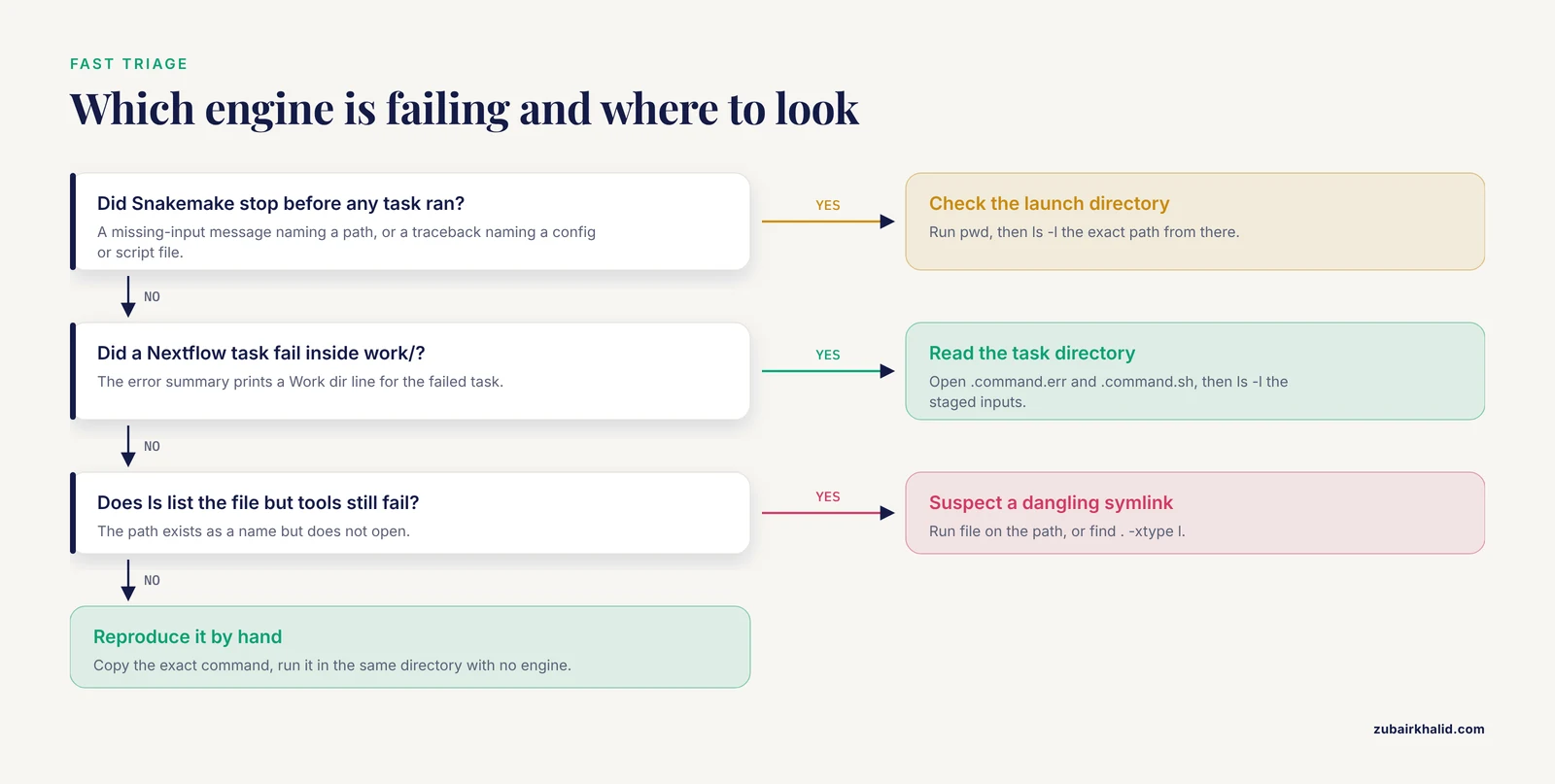
This table is the fast path. Find the symptom that matches your error, confirm the cause with the command given, then apply the fix. The sections after the table explain the mechanism behind each row.
| Symptom | Likely cause | How to confirm | Fix |
|---|---|---|---|
| Snakemake exits at startup with a missing-input message naming a path | No rule output matches that exact path, or the path resolves from the wrong directory | Run snakemake -n, then ls -l the path from the launch directory | Correct the path, or add a rule whose output pattern matches it exactly |
| Snakemake traceback showing FileNotFoundError from a run or script block | Python code opens a file that is not a declared rule input | Print os.path.abspath and os.path.exists for the path inside the block | Declare the file as an input, or fix the relative path |
| Snakemake fails before any task runs, naming a config, env, or script file | Auxiliary file path wrong from the launch directory | ls the exact path from the launch directory | Launch from the project root or correct the path |
Nextflow task fails and .command.err shows FileNotFoundError | The script reads a file never declared as input, so it was not staged | ls -l the task work directory and compare with .command.sh | Add the file to the input block as a path entry |
| Nextflow task fails on the cluster while the file exists on the login node | Relative path resolved inside the work directory, or node-local scratch | Check staged symlink targets with ls -l in the work directory | Use path inputs or absolute paths on shared storage |
ls lists the file but every tool says it is missing | Dangling symlink | file <path>, or find . -xtype l | Recreate the link or replace it with a real copy |
| Works by hand, fails inside the workflow | Case sensitivity, spaces, or quoting | find . -iname 'fragment' and ls -b | Rename files, quote variables, use the :q formatter in Snakemake |
| Fails after an interrupted run or a cleanup | Incomplete metadata or deleted work directories | Check .snakemake/incomplete, or run nextflow log for the run | Rerun with the rerun-incomplete option, or rerun the affected tasks |
s3:// inputs fail with missing-file errors | Missing credentials, or wrong bucket or prefix | aws s3 ls s3://bucket/prefix/ | Fix credentials and storage configuration before touching the workflow |
| Nextflow starts but no tasks run, or a downstream task receives nothing | A glob matched zero files | Print the channel with .view() in a minimal script | Fix the pattern and extensions |
The Root Causes, From Most Common to Rarest
Cause 1: The Engine Resolves Paths From a Different Directory Than You Expect
Snakemake resolves every relative input and output path against the directory you were in when you launched it, not against the directory that holds the Snakefile. If the Snakefile lives in workflow/ and you launch from the project root, data/raw/sample1.fastq.gz means the root copy of that path. If you launch from inside workflow/, the same string means a file under workflow/data/raw/, and the run dies with a missing-input error for a file that clearly exists. The workdir directive at the top of the Snakefile pins the working directory regardless of where you launch from:
# top of Snakefile
workdir: "/home/user/projects/rnaseq"
Nextflow behaves the same way for script-level code. Params and Channel.fromPath patterns resolve against the launch directory. Running nextflow run main.nf from your home directory, when the pipeline expects to be launched from its own root, produces empty channels and missing files:
cd ~/projects/rnaseq
nextflow run main.nf -profile test
cd ~
nextflow run ~/projects/rnaseq/main.nf -profile test   # params now resolve against ~
The habit that prevents this entire class of error is simple, always launch from the project root, and write that rule into the README. Verify with:
pwd
ls -l data/raw/sample1_R1.fastq.gz
If ls succeeds from that directory but the workflow still cannot find the file, the engine is resolving from somewhere else, and the fix is the workdir directive or absolute paths in your config.
Cause 2: The Name on Disk Does Not Match the Name in the Code
Linux filesystems are case sensitive, so Sample1.fastq.gz and sample1.fastq.gz are different files. Extensions drift, .fastq versus .fq, .txt versus .tsv, and compressed files must keep their .gz. Sample sheets drift from reality, the sheet says SRR12345678 and the file on disk is SRR12345678_1.fastq.gz. A glob, a pattern with wildcards such as *_R1.fastq.gz, fails silently when it matches nothing, and the empty match becomes a missing file one step later.
Confirm with a case-insensitive search and a raw listing:
find data -iname '*sample1*'
ls -b data/raw/
The -b flag shows spaces and control characters as escapes, which catches the sample with a space in its name. Fix the workflow or rename the file, whichever is the true source of truth. Renaming to a clean scheme, lowercase, underscores, no spaces, prevents recurrence:
mv 'Sample 1.fastq.gz' sample_1.fastq.gzCause 3: No Rule Produces the File (Snakemake DAG Gaps)
When Snakemake builds the graph, it walks backwards from your target files and asks one question for each, does a rule output pattern match this exact path, or does the file already exist. If neither holds, you get MissingInputException with the path and the rule that wanted it. The usual reasons are a typo in the output pattern, a mismatch between what one rule writes and what the next rule reads, results/sample1/counts.tsv written but results/sample1/counts.txt requested, or a rule that was never written at all.
Wildcards, the {sample} style placeholders in rule input and output patterns, must line up exactly. A rule declared with output results/{sample}/counts.tsv only satisfies requests for that exact pattern with a sample value, and it will not satisfy results/Sample1/counts.tsv. Run a dry run, snakemake -n, which builds the full graph and prints the plan without executing anything, and read which rule claims the missing file. If no rule claims it, either write the rule or correct the path.
Cause 4: Nextflow Did Not Stage the File Into the Task Work Directory
Nextflow stages nothing into a task except what you declare in the input block. A script that reaches back to params.genome or opens a path directly works on the head node, where the file is visible, then fails on a compute node or inside the isolated work directory, where it is not. The fix is to declare the file as a path input so Nextflow stages it:
process ALIGN {
    input:
    path reads
    path reference

    script:
    """
    minimap2 -ax map-ont ${reference} ${reads} > aln.sam
    """
}
Use val only for strings and numbers, never for files, because val values are not staged. Use stageAs when two inputs would collide on the same filename. For early failure with a clear message, wrap single-file params in a check:
ref = file(params.reference, checkIfExists: true)To inspect a failed task, find its work directory and read the artifacts Nextflow leaves there, .command.sh with the exact script, .command.err with the error, and the staged inputs:
nextflow log <run-name> -f name,status,workdir
ls -l work/ab/1a2b3c4d/
cat work/ab/1a2b3c4d/.command.err
Finding the right log in a distributed run is a recognized problem in its own right. Tools such as TLQ exist because users of open distributed systems cannot easily locate which log belongs to which task on which node [4]. Nextflow's per-task directories solve most of that discovery for you, provided you know to look in work/.
Cause 5: Config, Environment, and Script Files Named in the Workflow
Snakemake reads several files before any task runs, the YAML file named in a configfile directive, any files pulled in with includeConfig, the conda environment YAMLs attached to rules, and external scripts attached with the script directive. A wrong path in any of these produces a Python traceback that names the file, before a single task runs. The resolution base for these auxiliary paths has its own conventions that have changed across Snakemake releases, so the reliable habit is to launch from the project root, where every relative path in the project resolves the way you wrote it, and to keep config files, environment definitions, and scripts inside the project tree. Confirm any suspect path with ls from the launch directory before editing anything.
Cause 6: Broken Symlinks and Staged Links That Point Nowhere
A symbolic link, or symlink, is a pointer file rather than data. When its target moves or is deleted, the link dangles, and ls still lists it while every open fails. This is common after reorganizing raw data on shared storage, and it also happens inside Nextflow work directories, where staged inputs are symlinks to the original files. A task that resumes after the original moved now points at nothing.
Confirm and repair:
file data/raw/reads.fastq.gz
find . -xtype l -print
file prints a broken symbolic link message for dangling links, and find -xtype l lists every dangling link under the current directory. Recreate the link or replace it with a real copy, then rerun. For Nextflow, fixing the source location and resuming lets the affected tasks restage correctly.
Cause 7: Files That Do Not Exist Yet: Checkpoints and Dynamic Outputs
Some outputs cannot be known when the graph is built, such as the variable number of chunks produced by splitting a large FASTQ. Snakemake handles this with checkpoints, rules whose outputs are allowed to be unknown at build time and are queried after they run. The classic failure is a query pattern in the downstream input function that does not match what the checkpoint actually wrote, which surfaces as a missing file downstream. The pattern to use:
import os

checkpoint split:
    input: "raw/{sample}.fastq.gz"
    output: directory("split/{sample}")
    shell: "mkdir -p {output} && split -l 100000 {input} {output}/part_"

def collect_parts(wildcards):
    ckpt = checkpoints.split.get(**wildcards).output
    parts = glob_wildcards(os.path.join(ckpt, "part_{i}")).i
    return expand("split/{sample}/part_{i}", sample=wildcards.sample, i=parts)
The input function must call checkpoints.split.get, which forces Snakemake to let the checkpoint finish and then re-query its directory. If the pattern inside glob_wildcards does not match the names the shell command wrote, the collected list is empty and the downstream rule reports missing inputs. Nextflow has the same class of failure with operators that split files and emit paths consumed downstream, and the same cure, print what the upstream step actually emitted with .view() before wiring it downstream.
Cause 8: Remote Object Storage Paths
Both engines accept s3:// paths for inputs and outputs. Nextflow speaks S3 natively and picks up credentials from the standard AWS environment variables or the role attached to the machine. Snakemake routes remote paths through fsspec, a Python library that presents object stores as filesystems, using storage plugins configured for the run. When credentials are absent or the bucket name is wrong, the error often looks like a missing file rather than an authorization problem. Verify access outside the workflow first:
aws s3 ls s3://my-bucket/raw/If that fails, fix credentials or the bucket name before touching the workflow. If it succeeds, the path string in the workflow is the next suspect.
Cause 9: HPC Scratch, Shared Filesystems, and Deleted Work Directories
On a high-performance computing cluster, an HPC, tasks run on nodes that often have their own local disks, called scratch. A file written to node-local scratch exists only on that node, so the next task, scheduled on a different node, reports the file as missing. Keep Nextflow work directories and Snakemake outputs on storage shared by every node unless your execution profile explicitly handles scratch staging.
Interrupted runs leave partial state. Snakemake records unfinished work under .snakemake/incomplete, and the fix is to rerun with the rerun-incomplete option:
snakemake --rerun-incomplete -c 8Nextflow resume depends on the contents of work/. Deleting work directories out from under a run, or cleaning them while other analyses still resume from them, produces missing-file errors that are hard to attribute. nextflow log <run-name> -f name,status,workdir shows which run owns which directory before you delete anything.
Distributed troubleshooting is hard for a structural reason, each service and node writes its own unstructured logs with no built-in link between them, and research tools such as LogChain reconstruct the workflow from those scattered logs to diagnose failures [5]. On a practical level, keep .nextflow.log, task directories, and Snakemake logs inside the project and archive them per run, so a missing-file failure always has its evidence attached.
Safety note. Cleanup commands are irreversible. nextflow clean -f and recursive deletes of work directories permanently remove results, on storage that colleagues may share. Preview first with nextflow clean -n, list what will be deleted, confirm your current directory with pwd, and never run a recursive delete with a variable in the path. Snakemake's delete-all-output option removes every file the workflow can produce and should never be run on a production directory by accident:
# irreversible, preview and confirm before running
nextflow clean -n
nextflow clean -f
snakemake --delete-all-output
Cause 10: Quoting, Spaces, and Special Characters
A filename with a space splits into two arguments in an unquoted shell command, and the tool then reports the first fragment as a missing file. Snakemake provides a quoting formatter for exactly this, append :q to any variable in a shell block:
rule qc:
    input: reads="data/raw/Sample 1.fastq.gz"
    output: "qc/Sample_1.html"
    shell: "fastqc {input.reads:q} -o qc/"
In Nextflow, quote variables in the script block, "${reads}" instead of ${reads}, whenever names can contain spaces. The durable fix is upstream, ban spaces and special characters from filenames at the data-management step, because every downstream tool, not just your workflow, becomes safer.
How to Fix FileNotFoundError in Nextflow and Snakemake: A Five-Minute Diagnostic Sequence

This sequence resolves the majority of cases. Run it in order and stop when the cause is confirmed.
- Copy the exact path from the error message, character for character, including the directory.
- Establish where the engine resolves paths. For Snakemake, run
pwdin your launch shell. For a failed Nextflow task, the error summary Nextflow prints includes a Work dir line, andnextflow log <run-name> -f name,status,workdirlists task directories for a run. - Run
ls -lon the exact path from that directory. If it fails there, the file genuinely does not exist at that location, which is the whole error. - Check what the path really is with
file <path>. A broken symbolic link reports as such. - Search for near-misses with
find . -iname 'fragment'to catch case, extension, and spelling drift. - Ask the engine what it sees. For Snakemake, run
snakemake -n -pand read which rule claims the file. For Nextflow, read.command.shand.command.errin the task directory and runls -lto see what was actually staged. - Reproduce the failing command by hand in the same directory, copied from
.command.shor from the printed shell command, with no engine involved. Whatever the shell tells you is the real error. - Compare against a run that worked, same rule, same input type, and diff the paths. Debugging research formalizes this comparison, dual-version program slicing identifies the statements that differ and matter for the failure [6], and context-aware slicing keeps the surrounding information needed to actually understand it [7].
- Apply the smallest fix, then confirm with
snakemake -nornextflow run -resumebefore the full rerun. Nextflow resume re-executes only tasks whose code, inputs, or parameters changed, so a fixed input declaration reruns just the affected tasks.
Prevention Practices That Keep Paths Honest
Prevention is cheaper than debugging. These practices remove the causes above rather than their symptoms.
- Fix the launch point. Always launch from the project root and write that rule into the README and into any job submission script. One line of discipline removes Cause 1 entirely.
- Fail fast on purpose. In Nextflow, wrap critical params in
file(..., checkIfExists: true)so missing files abort with a message that names the path. In Snakemake, validate required files at parse time:
import os
for required in ["config/config.yaml", "data/samples.tsv"]:
    if not os.path.exists(required):
        raise FileNotFoundError(
            f"{required} not found from {os.getcwd()}, launch snakemake from the project root"
)- Make each check specific. A controlled experiment with 96 undergraduates found that ambiguous, multi-purpose test code, in particular the Assertion Roulette smell, measurably slowed the correction of errors in production code [8]. The workflow equivalent is a validation block that reports every missing file with its expected location, one clear message per failure, instead of a single vague complaint.
- Rehearse on tiny data. Run a dry run and a one-sample test dataset in continuous integration (CI), the automated testing pipeline that runs on every code change, so a renamed file breaks a two-minute test instead of a 4,000-sample run.
- Keep the evidence and watch the run. Real-time monitoring infrastructure built for scientific workflow engines exists because teams catch and classify execution anomalies far better when status and failures are tracked as they happen rather than reconstructed afterwards [9], [10]. Archive logs per run and keep them inside the project.
- Pin versions. Major engine releases change defaults, Snakemake 8 in particular reorganized conda integration and rerun behavior, so run
snakemake, versionandnextflow -version, and test after every upgrade. - Normalize filenames at ingest. Lowercase, underscores, no spaces, fixed extensions, and a manifest with checksums so drift is detectable.
Common Mistakes and Limitations
- Copying the missing file into the Nextflow work directory by hand. The task may pass, but the fix is invisible to the engine, resume will not reproduce it, and the next run fails again. Fix the input declaration instead.
- Forcing the graph instead of fixing it. Force-run flags and
ancient()make Snakemake treat files as existing, which silences the missing-input error and moves the failure downstream where it is harder to read. Use them to diagnose, not to ship. - Trusting the traceback line. The
open()call that raised the error is often downstream of the real cause, a path assembled incorrectly several lines earlier or one config entry away. Walk upstream from the failing line. - Deleting
work/or.snakemake/to reset a project. This destroys resume state and can convert one broken task into a full rerun, or into inconsistent partial outputs. Understand what you delete before you delete it. - Assuming the cluster behaves like the laptop. Case sensitivity, node-local scratch, module availability, and filesystem latency all differ. Test the smallest failing case on the login node, then on one compute node.
- Editing the workflow while a run is in progress. Both engines read code and metadata during execution, and mid-run edits produce errors that look like missing files.
- Version and scope limits. Flags and defaults differ across engine versions, so verify commands against
snakemake, versionandnextflow -versionbefore scripting them. This guide covers missing-path failures, errno 2, not permission failures (errno 13) or disk-space failures, which need different checks. Site-specific policies, such as where scratch lives, come from your own system administrators.
Frequently Asked Questions
What exactly does FileNotFoundError mean in Nextflow and Snakemake?
It means a process, or the engine itself, asked the operating system for a file at a specific path and nothing existed there at that moment. In Snakemake it usually comes from Python code in a run or script block or from a config file, and in Nextflow it usually comes from a tool inside a task or from Groovy file handling.
Why does Snakemake report my file as missing when it exists on disk?
Because Snakemake resolves relative paths from the directory you launched it from, which may not be the directory you are thinking of. The other usual reasons are a name that differs in case or extension, or a dangling symlink that lists but does not open.
Why does my pipeline work on my laptop but fail on the HPC cluster?
Usually because of staging and filesystem differences, node-local scratch that other nodes cannot see, relative paths that only resolve on the head node, or a missing module or environment on the compute node. Reproduce the failing command inside the task work directory to see exactly what the task could see.
How do I find the log for a failed Nextflow task?
Run nextflow log <run-name> -f name,status,workdir to list task work directories, then read .command.err for the error and .command.sh for the exact script in that directory. The staged inputs are visible with ls -l in the same place.
Should I switch from Snakemake to Nextflow to avoid these errors?
No, neither engine prevents missing-file errors, they surface at different points. Snakemake tends to fail early at graph build with missing-input messages, Nextflow tends to fail at task runtime inside the work directory, and the right choice depends on your team and infrastructure.
How do I fix FileNotFoundError inside a Snakemake run or script block?
Declare the file as a rule input so Snakemake tracks and provides it, or use an absolute path, and check os.path.exists before opening. A dry run with snakemake -n shows whether the graph expects the file to exist already.
What is the fastest way to reproduce the error outside the workflow engine?
Copy the exact command from the Nextflow .command.sh or from the printed Snakemake shell command, change into the directory where it failed, and run it by hand. Whatever the shell tells you then is the real error, without the engine in the way.
Can I make the workflow check every input before starting?
Yes. Run a dry run, use checkIfExists on critical Nextflow file params, and add a parse-time validation block in Snakemake that raises a clear error naming each missing file and the directory it was expected in.
Sources
- The Common Troubleshooting in BX06PCM Debugging
- Fault Detection by Backwards Analysis in Coloured Workflow Nets
- Design and implementation of a distributed workflow enactment service
- Log Discovery for Troubleshooting Open Distributed Systems with TLQ
- Logchain: Cloud workflow reconstruction & troubleshooting with unstructured logs
- CoReX: Context-Aware Refinement-Based Slicing for Debugging Regression Failures
- CaSS: Context-Aware Slice Summarization for Debugging Regression Failures
- Do the Test Smells Assertion Roulette and Eager Test Impact Students’ Troubleshooting and Debugging Capabilities?
- A Case Study into Using Common Real-Time Workflow Monitoring Infrastructure for Scientific Workflows
- A General Approach to Real-Time Workflow Monitoring