How to Find Orthologs and Paralogs in Ensembl: A Practical Guide
By Dr. Zubair Khalid, DVM, MS, PhD ·

By the end of this guide you will be able to find orthologs and paralogs in Ensembl for any gene of interest, download the complete homology table for a genome, script the same lookups against the REST API, query the Compara database directly, and check that the calls hold up under a gene tree and a synteny view. You need a web browser, curl or Python 3 for the scripted routes, and optionally a MySQL client for direct database access. Every route runs against public Ensembl servers, so there are no credentials to manage and no local databases to build.
Ensembl computes these relationships in Ensembl Compara. The Compara GeneTrees pipeline builds phylogenetic trees from coding sequences across species and reconciles them with the species tree, and those reconciled trees are what generate the orthologue and paralogue calls you see on the website [1]. The same general design, all-against-all similarity searches followed by clustering, multiple alignment, and tree construction, underlies most homology family databases [2].
If you are still learning how to use Ensembl, treat Steps 1 through 3 as a compact Ensembl genome browser tutorial for comparative data. The same menus work for any gene in any species.
How Ensembl Compara Defines Orthologs and Paralogs
Three terms anchor everything else. Homologs are genes that share a common ancestor. Orthologs are homologs that were separated by a speciation event. Paralogs are homologs that were separated by a duplication event. Two refinements matter in practice. When a duplication follows a speciation on one lineage, the duplicated genes on that lineage are co-orthologs of the single gene on the other lineage, which is why Ensembl reports one-to-many and many-to-many relationships. When a duplication predates the speciation that separates two species, the genes are out-paralogs, and Ensembl labels those pairs between_species_paralog.
Compara collects peptide sequences for every gene in every species of a division, clusters them, aligns each cluster, and builds a gene tree. It then reconciles the gene tree with the species tree. A node that matches a speciation event yields orthologs. A node that requires a duplication yields paralogs. This tree-first design matters because sequence similarity alone cannot separate orthologs from paralogs once a family has expanded, and the gene trees also carry structural detail such as exon boundary conservation across the family [1].
Ensembl uses the British spellings Orthologues and Paralogues in its interface. This guide uses the American spellings in prose and the exact interface labels and database values in commands.
| homology_type value | Meaning | Practical reading |
|---|---|---|
| ortholog_one2one | One gene on each side of the speciation event | The clean case, safest for mapping and phylogenetics |
| ortholog_one2many | One gene in the query species, several co-orthologs in the other | The target lineage duplicated after the split |
| ortholog_many2many | Duplications after the split on both lineages | Resolve with the gene tree before pairing |
| between_species_paralog | The duplication predates the speciation event | Out-paralogs, homologous but not orthologous |
| within_species_paralog | Duplicates inside one species | Tandem duplicates, whole-genome duplication remnants, homeologs in polyploids |
| gene_split | One gene split into two models by an assembly or annotation error | An artifact, inspect manually before use |
Finding Orthologs and Paralogs in Ensembl, Step by Step
Step 1: Pick the right portal and gene
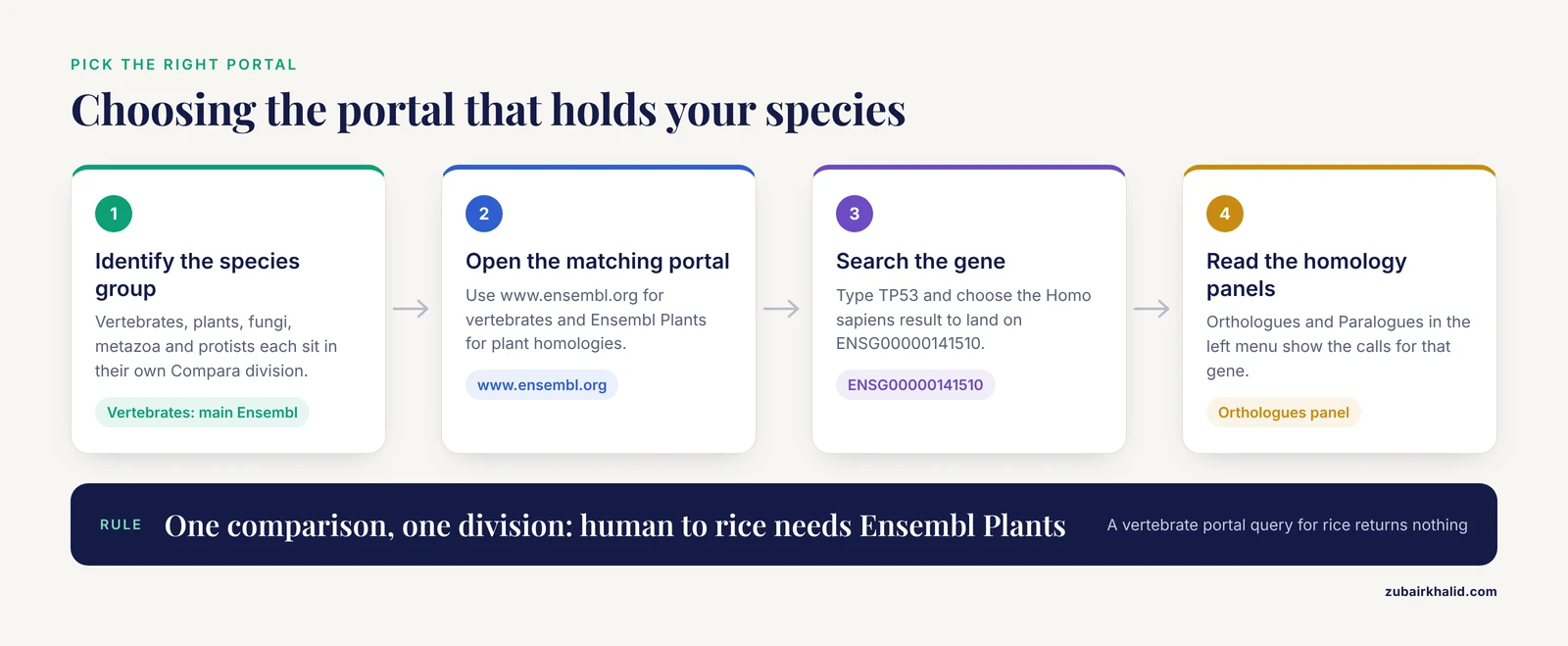
Open www.ensembl.org and type TP53 into the search box. Choose the Homo sapiens TP53 result. You land on the Gene tab for ENSG00000141510.
Portal choice matters. Vertebrate homologies live in the main Ensembl Compara database. Plant homologies live in Ensembl Plants Compara, and fungi, metazoa, and protists each sit in their own Ensembl Genomes divisions. The programmatic access routes described below are consistent across these divisions, which is what makes the same scripts reusable for plant genomes [3]. A human-to-rice comparison will not return results from the vertebrate portal, so run each comparison where the species live.
Step 2: Read the Orthologues and Paralogues panels
On the gene page, look at the left menu. Two entries matter here.
- Click Orthologues. The panel expands into a species list. Each row shows the species, the homology type such as ortholog_one2one, and a confidence indicator. For human TP53 the mouse entry reads ortholog_one2one.
- Click a species name, for example Mouse. The orthologue view shows the gene pair, the peptide alignment, the CDS alignment, the dN and dS values, and a link into the gene tree.
- Go back and click Paralogues. For human TP53 the panel lists TP63 (ENSG00000073282) and TP73 (ENSG00000078902), both labeled within_species_paralog. This is the p53 gene family, expanded by duplications deep in vertebrate ancestry.
Use the species filter at the top of the panel when the full list is long. The panels are projections of the same Compara data you will query programmatically in later steps, which makes them a fast way to sanity-check script output.
Step 3: Inspect the gene tree
Click Gene tree in the left menu. The image shows your gene highlighted in the context of its full family across all included species. Duplication nodes are marked, and node confidence is displayed. Clicking a duplication node shows which species sit on each side of the duplication. The menu also offers Gene tree (text), a tabular version of the same tree.
Every gene tree has its own stable identifier beginning with ENSGT. To take the tree into downstream software, download it as Newick through the REST API:
curl -s -H "Content-Type:text/x-newick" \
  "https://rest.ensembl.org/genetree/member/id/human/ENSG00000141510?sequence=none" \
  > tp53_tree.nwk

head -c 300 tp53_tree.nwk
The output is a single Newick line that starts and ends with parentheses and carries Ensembl protein identifiers such as ENSP00000269305 at the leaves. Load this file into any tree viewer to see exactly why Compara called a given pair orthologous or paralogous.
Step 4: Query the REST API
The REST endpoint for homologies is GET /homology/id/:species/:id on rest.ensembl.org. Two calls cover most needs:
# All orthologues of human TP53, restricted to mouse
curl -s -H "Content-Type:application/json" \
  "https://rest.ensembl.org/homology/id/human/ENSG00000141510?type=orthologues&target_species=mouse" \
  | python3 -m json.tool

# All paralogues of human TP53 within human
curl -s -H "Content-Type:application/json" \
  "https://rest.ensembl.org/homology/id/human/ENSG00000141510?type=paralogues" \
  | python3 -m json.tool
The first call returns one ortholog_one2one record whose members are ENSG00000141510 (homo_sapiens) and ENSMUSG00000059552 (mus_musculus). The second returns within_species_paralog records for TP63 and TP73. A trimmed version of the orthologue response looks like this, with numeric values varying by release:
{
  "data": [
    {
      "homology_type": "ortholog_one2one",
      "id": "ENSG00000141510",
      "species": "homo_sapiens",
      "homology": {
        "type": "ortholog_one2one",
        "method_link_type": "ENSEMBL_ORTHOLOGUES",
        "is_high_confidence": 1,
        "dn": "0.0310",
        "ds": "0.2950",
        "dn_ds": "0.1051",
        "members": [
          { "id": "ENSG00000141510", "species": "homo_sapiens" },
          { "id": "ENSMUSG00000059552", "species": "mus_musculus" }
        ]
      }
    }
  ]
}
The same endpoint works in Python for batch work:
import requests, sys

server = "https://rest.ensembl.org"
ext = "/homology/id/human/ENSG00000141510?type=orthologues"
r = requests.get(server + ext, headers={"Content-Type": "application/json"})
if not r.ok:
    r.raise_for_status()
    sys.exit()

for entry in r.json()["data"]:
    hom = entry["homology"]
    print(entry["homology_type"], "high_confidence=" + str(hom["is_high_confidence"]))
    for m in hom["members"]:
        print("  ", m["species"], m["id"])
Key parameters for this endpoint:
| Parameter | Common values | What it controls |
|---|---|---|
| type | orthologues, paralogues | Restricts the response to one class of homology |
| target_species | a species name, or all | Limits the partners returned, or returns every species |
| target_taxon | an NCBI taxon ID or clade name | Limits partners to a clade |
| sequence | none, cds, peptide | Adds sequence strings to each member |
| aligned | 0 or 1 | Returns aligned sequences with cigar strings when set to 1 |
| format | full, condensed, link | full returns one record per pair, condensed groups pairs, link returns a compact mapping |
| is_tree | 0 or 1 | Keeps only homologies derived from gene trees |
| is_tree_confident | 0 or 1 | Keeps only gene-tree supported calls |
Errors you will hit and their fixes:
- HTTP 404 with a body like {"error":"ID ENSG00000141510X not found"} means the stable ID is misspelled, retired, or from a different release. Check the ID on the website and re-run.
- HTTP 406 means the Accept or Content-Type header requests a format the endpoint does not serve. Use application/json for homology calls.
- HTTP 429 means you exceeded the rate limit. The public service allows up to 15 requests per second per IP, so add a short sleep between batch calls.
How to verify: run the same query with target_species=mouse and then from the mouse side, and confirm the pair comes back reciprocally. Spot-check one known pair such as TP53 and Trp53 against the browser panels from Step 2.
Step 5: Download genome-wide homology tables
For whole-genome work, skip per-gene calls and take the bulk tables. Ensembl publishes one homology file per species on its FTP site:
wget https://ftp.ensembl.org/pub/release-112/tsv/ensembl-compara/homologies/homo_sapiens.tsv.gzReplace 112 with the current release number shown on the Ensembl homepage, since release numbers advance several times a year. The human file is a few tens of megabytes compressed. Recent releases use this column order:
gene_stable_id  gene_name  homology_id  homology_type  related_gene_stable_id
related_gene_name  related_species  related_homology_type  is_high_confidence
dn  ds  dn_ds
Column order can change between releases, so always parse the header line rather than hardcoding offsets. One row with placeholders for the release-specific values looks like this:
ENSG00000141510 TP53 ... ortholog_one2one ENSMUSG00000059552 Trp53 mus_musculus ortholog_one2one 1 ... ... ...Filter with awk:
# Keep only high-confidence one-to-one orthologues
zcat homo_sapiens.tsv.gz | awk -F'\t' 'NR==1 || ($4=="ortholog_one2one" && $9==1)' > hc_one2one.tsv

# Count one-to-one orthologues per species
zcat homo_sapiens.tsv.gz | awk -F'\t' 'NR>1 && $4=="ortholog_one2one" {count[$7]++} END {for (s in count) print s, count[s]}' | sort
The count command prints one line per species with the species name and its one-to-one total. Use it as a sanity check, since close relatives of human should dominate the list. Or load the table into pandas:
import pandas as pd

df = pd.read_csv("homo_sapiens.tsv.gz", sep="\t")
hc = df[(df.homology_type == "ortholog_one2one") & (df.is_high_confidence == 1)]
print(len(hc), "high-confidence one-to-one orthologue rows")
hc.to_csv("hc_one2one.tsv", sep="\t", index=False)
The printout gives the row count for the current release. A wget that fails with ERROR 404: Not Found almost always means the release number in the URL is stale. Check the current release and retry.
Step 6: Query Compara directly in MySQL
Ensembl exposes read-only MySQL servers with an anonymous account. List the available Compara databases first:
mysql -h ensembldb.ensembl.org -u anonymous \
  -e "SHOW DATABASES LIKE '%compara%'"
You will see one database per release, named like ensembl_compara_112. Connect to the release you want and pull all orthologs of a gene:
mysql -h ensembldb.ensembl.org -u anonymous ensembl_compara_112 -e "
SELECT h.homology_type,
       gm1.stable_id AS query_gene,
       gm2.stable_id AS related_gene,
       gdb2.name     AS related_species
FROM homology h
JOIN homology_member hm1 ON hm1.homology_id = h.homology_id
JOIN homology_member hm2 ON hm2.homology_id = h.homology_id
JOIN gene_member gm1 ON gm1.member_id = hm1.member_id
JOIN gene_member gm2 ON gm2.member_id = hm2.member_id
JOIN genome_db gdb1 ON gm1.genome_db_id = gdb1.genome_db_id
JOIN genome_db gdb2 ON gm2.genome_db_id = gdb2.genome_db_id
WHERE gdb1.name = 'homo_sapiens'
  AND gm1.stable_id = 'ENSG00000141510'
  AND gdb2.name != 'homo_sapiens'"
Expected output for the mouse pair:
homology_type     query_gene       related_gene        related_species
ortholog_one2one  ENSG00000141510  ENSMUSG00000059552  mus_musculus
The homology table also carries dn and ds, and homology_member carries pairwise alignment summaries such as perc_id and perc_cov. Run DESCRIBE on homology, homology_member, and gene_member before writing production queries, because column names shift occasionally between releases. Two errors you will see:
- ERROR 1045 (28000): Access denied for user, which means the host or user is wrong. Use ensembldb.ensembl.org with user anonymous.
- ERROR 1049 (42000): Unknown database, which means you omitted the release number. The bare name ensembl_compara does not exist.
For Ensembl Genomes species, the equivalent server is mysql-eg-public.sql.ebi.ac.uk on port 4157, again with user anonymous, and the same table structure applies across divisions [3].
Step 7: Export a filtered set with BioMart
BioMart is the no-code route to a custom table.
- Open www.ensembl.org/biomart and choose Ensembl Genes, then your dataset, for example Homo sapiens.
- Under Filters, either leave the whole genome selected or paste a list of Ensembl gene IDs into the ID list limit box.
- Under Attributes, open the homologue section, tick the species you want, and select the orthologue ID, homology type, and confidence columns.
- Click Results and export as TSV.
The caveat is layout. BioMart gives one column per partner species, so a many-species export becomes a very wide table with many empty cells. For all-species matrices, the FTP tables from Step 5 are the better shape.
Step 8: Validate calls with trees and synteny
Automated calls deserve a check before they carry a conclusion.
- Reciprocal check. Run the REST call from the partner species and confirm the pair returns.
- Gene tree check. Open the tree and confirm the two genes are sister leaves with no intervening duplication node.
- Synteny check. Use the comparative views from the Location tab to look for a conserved gene neighborhood around the pair. Conserved synteny is a strong independent signal that improves homology inference when combined with sequence similarity, an idea formalized by tools such as GenFamClust, which scores synteny quantitatively and merges genes into families more accurately than similarity-only clustering [4]. The value of synteny is well documented in plant genomics, where networks of duplicated blocks from ancient whole-genome duplication and selective gene loss were mapped between tomato and Arabidopsis [5], and where cucurbit phenylalanine ammonia-lyase genes were organized into cucumber-melon-watermelon triples on the strength of syntenic relationships.
- Coverage and identity check. Inspect perc_id and perc_cov from the API or database. A call resting on a tiny aligned fraction of one gene deserves suspicion.
Tips for Better Ortholog and Paralog Calls
- Filter on the confidence flag first. The is_high_confidence column in the FTP tables and the is_high_confidence field in the API mark pairs where the gene tree supports the call. Dropping low-confidence rows removes most marginal cases at zero cost.
- Respect the co-ortholog structure. When a species-specific duplication produced one-to-many or many-to-many relationships, do not force a one-to-one pairing. Read the gene tree and decide which co-ortholog matches your question.
- Use dN/dS as a screen, not a verdict. Compara reports dN, dS, and their ratio for pairwise orthologs. As an arithmetic example, if dn is 0.03 and ds is 0.30, then dn_ds equals 0.10, well below 1, consistent with purifying selection. Ratios near or above 1 flag candidates for positive selection, but a very small dS makes the ratio unstable, so check the component rates before interpreting.
- Take the Newick with you. The gene tree download from Step 3 lets you verify any specific call and supports downstream analyses on the whole family.
- Scope with target_taxon. When you only care about primates or grasses, restricting the taxon keeps responses small and comparisons relevant.
- Batch politely. Keep scripted access under the documented rate limit and cache responses locally so you never refetch the same gene.
- Cross-check methods. The browser panels, the REST API, the FTP tables, and MySQL all read the same Compara data. If two routes disagree, suspect a release mismatch or a stale identifier before suspecting the data.
- Match the portal to the question. Ensembl Plants and the other Ensembl Genomes divisions run the same comparative machinery for their kingdoms, and the scripting routes are consistent across divisions, so a script written for vertebrates usually needs only a host and dataset change for plants [3].
Putting the Workflow to Work: Published Examples
Published gene family studies show what these tables support once you have them.
Cucurbit phenylalanine ammonia-lyase. Genome-wide searches identified 13 PAL genes in cucumber, 13 in melon, and 12 in watermelon, 38 in total. Phylogenetic and syntenic analysis organized them into 11 cucumber-melon-watermelon triples, ten in the dicot group and one grouping with gymnosperm PALs, and attributed family expansion to segmental and tandem duplications plus intron insertion.
Brassica cell wall genes. Fifty-three xyloglucan endotransglucosylase/hydrolase genes in Brassica rapa and 38 in Brassica oleracea fell into three phylogenetic groups, with whole-genome triplication and tandem duplication as the main expansion mechanisms and tandem duplicates confined to Group I/II [6].
Tsetse chemosensory repertoires. Counts across five Glossina species ranged from 115 to 127 chemosensory genes, fewer than Drosophila melanogaster at 246 or Anopheles gambiae at over 247, with expanded CO2 receptor genes, no sugar receptors, and genes dispersed across distant scaffolds [7]. Family-level counts like these are a direct tabulation of homology calls per family.
Spruce genomes. Comparison of four North American spruce genomes showed structurally similar assemblies with different gene family expansion patterns tied to ecological adaptation, plus rapidly evolving genes carrying elevated nonsynonymous relative to synonymous polymorphism [8].
Moss pectin gene families. Phylogenetic trees for 16 pectin-related families across ten plant genomes showed that five families already had multiple members in the early land plants, against the single-ancestor expectation [9].
Phylogenomic data strategy. In a 26-primate dataset, single-copy families are the traditional gold standard, but tree-based decomposition of larger families and species-tree methods that tolerate paralogs greatly expand the usable gene set while returning consistent species trees [10]. This is the strongest argument for exporting the full homology table rather than only the one-to-one rows.
Common Mistakes and Limitations
- Treating the top BLAST hit as the ortholog. Best hits break down when families have co-orthologs or lineage-specific losses. Compara's tree-based calls exist precisely because similarity ranking cannot resolve these cases.
- Reading homology_type loosely. A between_species_paralog pair is homologous but not orthologous. The duplication predates the speciation, so the two genes are out-paralogs. Mapping a function from an out-paralog to a one-to-one counterpart is a category error.
- Discarding one-to-many and many-to-many rows. Filtering to ortholog_one2one is convenient and biased. For phylogenomics, tree-based decomposition of larger families recovers orthologs from within them, and methods that accept paralogs use far more data [10].
- Confusing homeologs with paralogs in polyploids. In hexaploid wheat, the A, B, and D subgenomes sit in one species entry, so homeologous copies appear as within_species_paralog. Studies of wheat prolamin and resistance loci show how rapidly these homeologous regions erode collinearity through differential duplication and deletion [11]. Label such copies homeologs, not ordinary paralogs, when reporting.
- Misreading dN/dS. A ratio above 1 is suggestive, not conclusive, and a very low dS inflates the ratio. Always inspect dn and ds separately.
- Accepting gene_split as a duplication. The gene_split type marks one gene broken into two models by an assembly or annotation fault. Merge or exclude these manually.
- Mixing releases. Stable IDs retire and coordinates shift between releases. Pin the release number in every URL and database name, and archive the tables you download.
- Interpreting absence as noise. A missing ortholog can be a real gene loss, and gene losses have shaped extant genomes in documented cases, including ancient animal families lost in mammals and vertebrates [12]. Absence can also reflect draft assembly quality. The kiwifruit Red5 assembly work, where most computationally predicted models required manual re-annotation, illustrates how gene prediction quality in draft genomes propagates into every downstream homology call [13].
- Crossing portals by accident. Vertebrate and plant homologies live in separate Compara databases. A query that returns nothing may simply be pointed at the wrong division.
- Skipping validation. Automated calls are the starting point. A reciprocal check, a look at the gene tree, and a synteny screen catch most problems, and quantitative synteny scoring demonstrably improves homology inference over similarity-only clustering [4].
Frequently Asked Questions
What is the difference between an ortholog and a paralog in Ensembl?
An ortholog is a pair of genes separated by a speciation event, and a paralog is a pair separated by a duplication. In Ensembl, orthologs appear in the Orthologues panel with types such as ortholog_one2one, while paralogs appear in the Paralogues panel as within_species_paralog entries.
How do I download all orthologs for a whole genome from Ensembl?
Take the per-species homology table from the Ensembl FTP site and filter it. The file homo_sapiens.tsv.gz under tsv/ensembl-compara/homologies on ftp.ensembl.org lists every homologous pair for human, and a one-line awk filter keeps the rows you want.
Why does my gene show no orthologs in Ensembl?
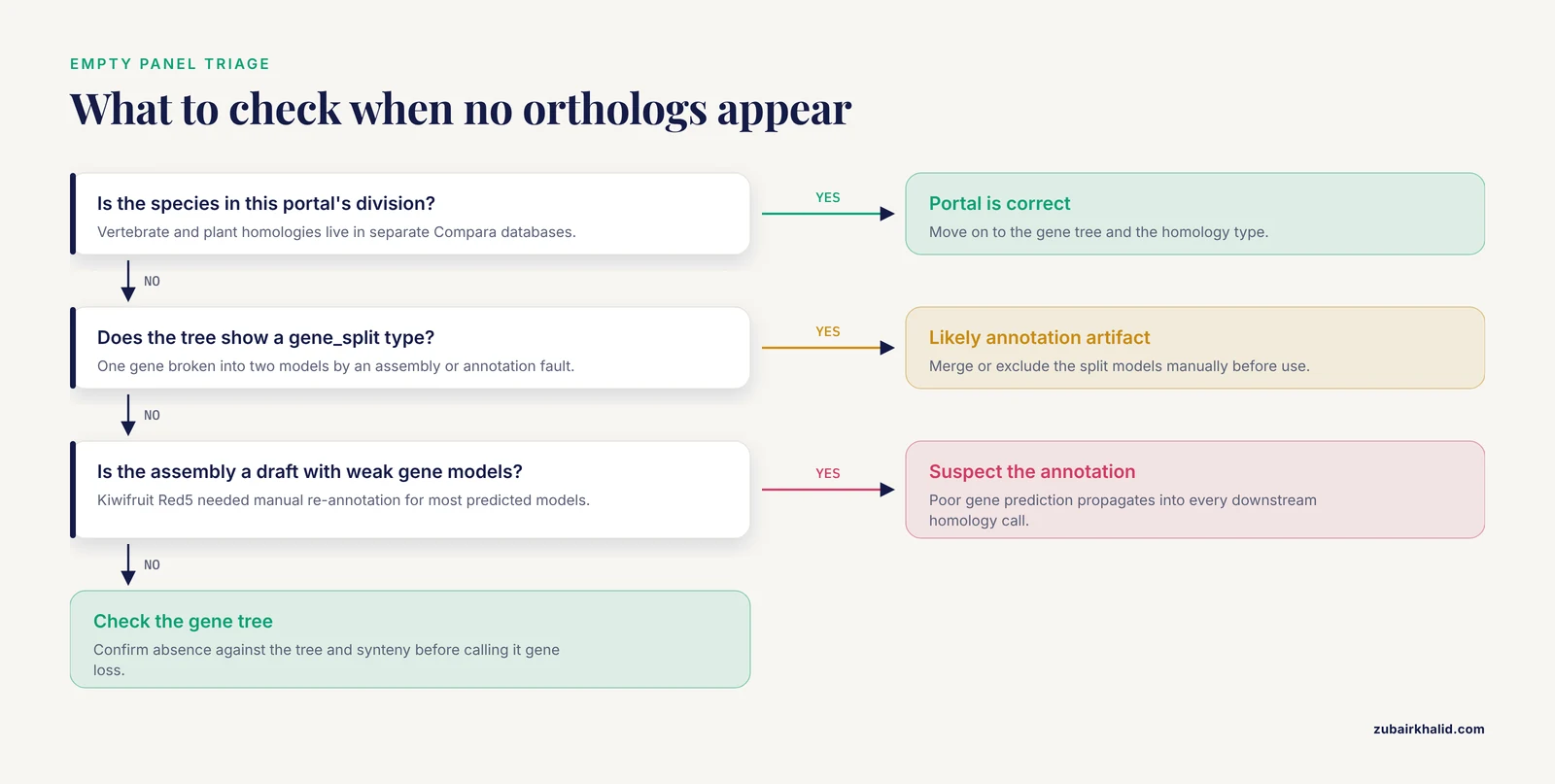
The gene may be species-specific, genuinely lost in the compared species, missing from a draft assembly, or annotated as fragments. Check the gene tree and the gene_split type before concluding the gene is absent.
What does between_species_paralog mean in Ensembl?
It marks two genes in different species whose duplication happened before the speciation that separates them, in other words out-paralogs. They are homologs but not orthologs, so do not treat them as one-to-one counterparts.
How reliable are Ensembl Compara calls and what is the high confidence flag?
Calls come from gene trees and are strongest when the tree supports them. The is_high_confidence flag marks pairs that pass Compara's tree-support and coverage criteria, and filtering on it removes most marginal calls.
Can I compare human genes to plant genes in Ensembl?
Not in one database. Vertebrate homologies live in the main Ensembl Compara database and plant homologies in Ensembl Plants Compara, so run each comparison in its own portal.
How should I handle one-to-many and many-to-many orthologs in a phylogeny?
Do not force them into one-to-one pairs. Either extract orthologs from the gene tree or use a species-tree method that tolerates paralogs, which keeps far more data.
Which REST endpoint returns homologies and which parameters matter most?
Use GET /homology/id/:species/:id on rest.ensembl.org. The type, target_species, and format parameters matter most for controlling what comes back.
Sources
- GeneSeqToFamily: a Galaxy workflow to find gene families based on the Ensembl Compara GeneTrees pipeline
- Databases of homologous gene families for comparative genomics
- Scripting Analyses of Genomes in Ensembl Plants
- Quantitative synteny scoring improves homology inference and partitioning of gene families
- Comparing sequenced segments of the tomato and Arabidopsis genomes: large-scale duplication followed by selective gene loss creates a network of synteny.
- Genome-wide identification, and phylogenetic and expression profiling analyses, of XTH gene families in Brassica rapa L. and Brassica oleracea L.
- Genome-Wide Comparative Analysis of Chemosensory Gene Families in Five Tsetse Fly Species
- Spruce giga-genomes: structurally similar yet distinctive with differentially expanding gene families and rapidly evolving genes.
- Phylogenetic analysis of pectin-related gene families in Physcomitrella patens and nine other plant species yields evolutionary insights into cell walls
- Using all Gene Families Vastly Expands Data Available for Phylogenomic Inference
- Gene Duplication and Evolution Dynamics in the Homeologous Regions Harboring Multiple Prolamin and Resistance Gene Families in Hexaploid Wheat
- Eleven ancestral gene families lost in mammals and vertebrates while otherwise universally conserved in animals
- A manually annotated Actinidia chinensis var. chinensis (kiwifruit) genome highlights the challenges associated with draft genomes and gene prediction in plants