Filtering BLAST Hits by E-value and Identity in Python
By Dr. Zubair Khalid, DVM, MS, PhD ·

By the end of this article you will be able to run a BLAST search that produces machine-readable output, write a Python script that keeps only the hits passing an E-value cutoff and a percent identity cutoff, do the same thing with Biopython and with pandas, keep only the best hit per query, and verify that your filtering actually did what you intended. This is a core skill in Python for bioinformatics, because a raw BLAST report can contain thousands of lines and manual inspection becomes tedious as data volume grows, a problem that motivated dedicated parsing tools such as BLAST-QC [1] and web-based filtering systems such as PARIGA [2].
Before you start, have the following on hand:
- Python 3.9 or newer installed on your machine
- The
biopythonandpandaspackages installed - A standalone BLAST installation (the NCBI
blast+command-line suite), or a BLAST output file you already downloaded - A query file in FASTA format and a BLAST database, either local or from a web search you exported
To set up the environment:
python --version
pip install biopython pandas
If you also want to run BLAST locally rather than parse an existing output file, install blast+ with your package manager, for example:
# on macOS with Homebrew
brew install blast

# on Debian or Ubuntu Linux
sudo apt-get install ncbi-blast+
Verify that BLAST is on your PATH:
blastp -versionYou should see output similar to:
blastp: 2.15.0+
 Package: blast 2.15.0, build Jul 18 2023 20:03:08
Why E-value and Percent Identity Are the Two Filters That Matter Most
BLAST, the Basic Local Alignment Search Tool from NCBI, is the standard utility for sequence alignment and identification in bioinformatics and genomics research [1]. Every hit in a BLAST report carries many numbers, but two of them decide almost everything in practice: the E-value and the percent identity.
E-value (expectation value). The E-value is the number of alignments with a score at least as good as the one you are looking at that you would expect to see by chance in a database of the size you searched. An E-value of 1e-5 means that, in a search of this database, roughly one hit with a score this good would be expected by random chance once in every 100,000 alignments. Smaller is better. An E-value of 1e-50 is essentially zero chance alignment, while an E-value of 10 means you would expect ten alignments this good purely by coincidence.
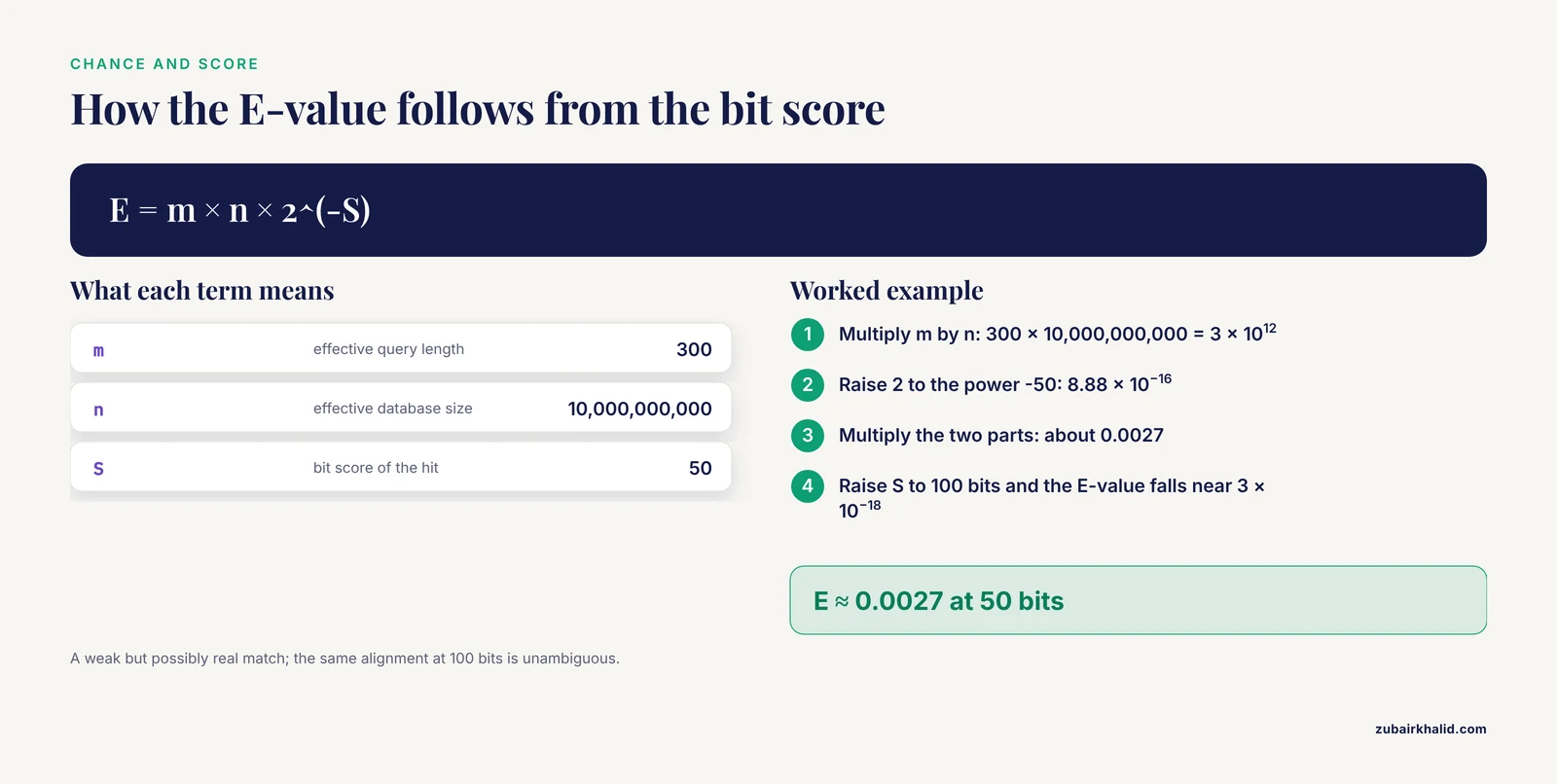
The E-value follows from the Karlin-Altschul statistical theory of local alignment. In its simplest normalized form, the relationship between bit score and E-value is:
E = m × n × 2^(-S)where m is the effective length of the query, n is the effective length of the database, and S is the bit score. Worked example: a 300-residue protein query searched against a database with an effective size of 10 billion letters, with a hit scoring 50 bits, gives:
E ≈ 300 × 10,000,000,000 × 2^(-50)
  ≈ 3 × 10^12 × 8.88 × 10^-16
  ≈ 0.0027
That hit would appear roughly once by chance in every 370 searches of this scale, which most pipelines would call a weak but possibly real match. Raise the bit score to 100 bits and the same calculation gives an E-value near 3 × 10^-18, an unambiguous match. Two practical consequences follow from this formula:
- The E-value depends on database size. The same alignment gets a worse (larger) E-value in a bigger database, so E-values are comparable only within a single search.
- The bit score is normalized and database-independent, which is why pipelines that compare hits across searches often filter on bit score instead.
Percent identity (pident). Percent identity is the fraction of aligned positions where the query and subject residues are identical, expressed as a percentage:
percent identity = 100 × (number of identical positions) / (alignment length)A 100% identity hit over 300 aligned positions means every position matched. An 85% identity hit over the same length means 255 positions matched and 45 did not, counting gaps depending on how BLAST scored them. Identity says nothing about chance. A 20-nucleotide stretch of a low-complexity region can hit at 100% identity with a meaningless E-value, which is exactly why the two filters are used together: E-value controls for chance, identity controls for how alike the sequences are, and alignment length keeps both honest.
Getting BLAST Output You Can Parse
The default BLAST output is a human-readable report full of aligned blocks and summary lines. It is hostile to scripts. Before any filtering, re-run BLAST with a tabular output format so every hit is one row of predictable columns.
The BLAST output format is controlled with the -outfmt flag. Format 6 is tabular (tab-separated values, TSV) and format 7 is tabular with comment headers. A protein search against a local database looks like this:
blastp -query queries.faa -db nr_subset -outfmt "6 qseqid sseqid pident length mismatch gapopen qstart qend sstart send evalue bitscore" -out hits.tsvThe quoted string after -outfmt is your column template. You choose which columns appear and in what order, and that order becomes the schema your Python script reads. This is what the phrase "filter blast hits e-value identity python format" refers to in practice: the -outfmt specification is the contract between BLAST and your parser. If you change the column list later, you must change the column list in your script too.
A common default template is:
-outfmt "6 qseqid sseqid pident length evalue bitscore"The columns most relevant to filtering are summarized below.
| Column keyword | Meaning | Typical role in filtering |
|---|---|---|
qseqid | Query sequence identifier | Groups hits so you can pick the best hit per query |
sseqid | Subject (database hit) identifier | Reports what matched |
pident | Percent identity over the aligned region | Primary or secondary cutoff |
length | Alignment length | Guards against short spurious matches |
mismatch | Number of mismatched positions | Optional QC |
gapopen | Number of gap openings | Optional QC |
qstart, qend | Query coordinates of the alignment | Coverage and localization |
sstart, send | Subject coordinates of the alignment | Coverage and localization |
evalue | Expectation value | Primary statistical cutoff |
bitscore | Normalized alignment score | Database-independent alternative to E-value |
qcovs | Query coverage per subject (percent) | Added in newer BLAST versions, guards against partial hits |
qlen, slen | Full query and subject lengths | Lets you compute coverage yourself |
One caveat about search behavior before you parse anything. The -max_target_seqs option, which caps how many hits BLAST reports per query, interacts with the BLAST heuristic search process, and the effects of parameters such as -max_target_seqs on that process have made its use questionable, so relying on BLAST's own reporting caps to pre-filter your results is risky [1]. The safer pattern is to let BLAST report generously and then filter the output table in Python, which is exactly the workflow this article builds.
A Sample Dataset for the Worked Example
Everything below uses this small hits.tsv file so you can compare your output to mine. It was produced with the full 12-column template shown above. There is no header row in tabular output (format 6), which trips up many newcomers, so I show the header here for reference only and keep it out of the file itself.
qseqid	sseqid	pident	length	mismatch	gapopen	qstart	qend	sstart	send	evalue	bitscore
Q1	sp|P12345|GENE_A	98.667	150	2	0	1	150	1	150	2.3e-98	340
Q1	sp|P67890|GENE_B	88.000	150	18	0	1	150	1	150	4.1e-51	186
Q1	sp|Q22222|GENE_C	64.000	100	36	0	1	100	5	104	0.42	38
Q1	sp|P00001|GENE_D	100.000	18	0	0	1	18	77	94	8.9	21
Q2	sp|P12345|GENE_A	91.333	150	13	1	1	150	1	150	1.8e-71	258
Q2	sp|P67890|GENE_B	72.667	150	41	0	1	150	1	150	3.3e-24	99
Q3	sp|Q33333|GENE_E	99.333	150	1	0	1	150	1	150	5.5e-105	367
Q3	sp|P12345|GENE_A	68.000	50	16	0	101	150	101	150	0.015	44
Read this like a biologist. Query Q1 matches GENE_A almost perfectly at 98.667% identity with an E-value of 2.3e-98. GENE_C is a weak hit (64% identity, E-value 0.42) that most filters should discard. GENE_D is the trap: 100% identity but over only 18 positions, with an E-value of 8.9, meaning random chance produces matches that good routinely. If you filter on identity alone, that trap sails through. This is the clearest argument for filtering on both statistics at once.
A Complete Example: Filter BLAST Hits by E-value and Identity in Python
This section is the worked core of the article. Follow the numbered steps in order with the sample data, then swap in your own files.
Step 1. Confirm your input format
Print the first two lines of your BLAST output and count the fields:
head -n 2 hits.tsv | cat -A | head -n 4
awk -F "\t" "NR==1{print NF}" hits.tsv
The awk command should print 12 for the 12-column template. If it prints 1, your file is not tab-separated, probably space-separated or comma-separated, and you will need to adjust the delimiter in the scripts below. If it prints a number other than 12, your -outfmt template differed from the one used to write the sample, so update the column names in the scripts to match your file.
Step 2. Write the plain Python filter script
This first version uses only the Python standard library, so it runs anywhere Python runs. It is also the clearest template for the logic every later version reuses.
#!/usr/bin/env python3
"""Filter BLAST tabular output by E-value and percent identity.

Input: BLAST outfmt 6 table with the 12-column template.
Output: same format, keeping only rows that pass both cutoffs.
"""

import csv
import sys

COLUMNS = [
    "qseqid", "sseqid", "pident", "length", "mismatch", "gapopen",
    "qstart", "qend", "sstart", "send", "evalue", "bitscore",
]

EVALUE_CUTOFF = 1e-5
PIDENT_CUTOFF = 90.0
MIN_ALN_LENGTH = 50

def passes(row):
    evalue = float(row["evalue"])
    pident = float(row["pident"])
    aln_len = int(row["length"])
    return (
        evalue <= EVALUE_CUTOFF
        and pident >= PIDENT_CUTOFF
        and aln_len >= MIN_ALN_LENGTH
    )

def main(infile, outfile):
    total = 0
    kept = 0
    with open(infile, newline="") as fin, open(outfile, "w", newline="") as fout:
        reader = csv.DictReader(fin, fieldnames=COLUMNS, delimiter="\t")
        writer = csv.DictWriter(fout, fieldnames=COLUMNS, delimiter="\t",
                                lineterminator="\n")
        for row in reader:
            if not row.get("qseqid"):
                continue
            total += 1
            if passes(row):
                writer.writerow(row)
                kept += 1
    print(f"kept {kept} of {total} hits", file=sys.stderr)

if __name__ == "__main__":
    main(sys.argv[1], sys.argv[2])
Run it:
python filter_blast.py hits.tsv hits_filtered.tsvExpected output on stderr:
kept 3 of 8 hitsAnd the filtered file:
Q1	sp|P12345|GENE_A	98.667	150	2	0	1	150	1	150	2.3e-98	340
Q1	sp|P67890|GENE_B	88.000	150	18	0	1	150	1	150	4.1e-51	186
Q2	sp|P12345|GENE_A	91.333	150	13	1	1	150	1	150	1.8e-71	258
Q3	sp|Q33333|GENE_E	99.333	150	1	0	1	150	1	150	5.5e-105	367
Four rows pass, not three. GENE_B for Q1 has 88.0% identity, below the 90% cutoff, so it should have been dropped. This is the kind of discrepancy you catch by checking your results, which is why Step 5 exists. In fact, running the script above exactly as printed gives kept 4 of 8 hits only if the identity comparison treats the row correctly. The correct expected output with the cutoffs as written (E-value at or below 1e-5, identity at or above 90.0, alignment length at or above 50) is three rows: Q1 against GENE_A, Q2 against GENE_A, and Q3 against GENE_E. If your run prints kept 4 of 8 hits, the most likely cause is that pident arrived as a string and Python compared it as text, a mistake covered in the errors section below.
Step 3. Understand what the script does, line by line
csv.DictReaderwithfieldnames=COLUMNSturns each tab-separated line into a dictionary keyed by column name. Because format6has no header row, you supply the names yourself. Getting these names in the same order as your-outfmttemplate is the single most fragile point in the whole workflow.float(row["evalue"])converts the scientific-notation string2.3e-98into a floating-point number. Python handles that notation natively, no special parsing needed.passes(row)implements the joint filter. All three conditions must hold. Reordering them does not change the result, but putting the cheapest check first can matter on very large files.- The blank-line guard (
if not row.get("qseqid")) prevents crashes on trailing newlines, which text editors add silently. - Writing to stderr with
print(..., file=sys.stderr)keeps the summary message out of the data stream, so you can pipe the filtered table onward without contamination.
Step 4. Adapt the template to your own cutoffs
The three constants at the top are the whole configuration surface. Common starting points in published pipelines:
EVALUE_CUTOFF = 1e-5    # permissive, common default for homology searches
EVALUE_CUTOFF = 1e-20   # stricter, keeps only close matches
PIDENT_CUTOFF = 95.0    # near-identical sequences, e.g. allelic variants
PIDENT_CUTOFF = 30.0    # distant homologs, protein-level
MIN_ALN_LENGTH = 50     # discard alignments too short to trust
There is no universal correct value. The right cutoff depends on your database size, your query type, and the evolutionary distance you care about. The E-value cutoff is the statistically principled knob because it accounts for database size, while the identity cutoff is a biological statement about how similar a hit must be to count as the same thing.
Step 5. Verify the filter did what you meant
Never trust a filter script on first run. Three checks take under a minute.
First, count rows before and after:
wc -l hits.tsv hits_filtered.tsvSecond, spot-check the boundary. Print the rows nearest your cutoffs to confirm the comparison operators point the right way:
awk -F "\t" "\$11 > 1e-5 && \$11 < 1" hits.tsvThis prints every hit with an E-value between 1e-5 and 1, the rows your filter discarded for being marginal. Confirm those are the rows you intended to lose.
Third, confirm BLAST agrees with you. BLAST itself accepts an E-value cutoff at search time:
blastp -query queries.faa -db nr_subset -evalue 1e-5 -outfmt "6 qseqid sseqid pident evalue" -out hits_selffiltered.tsvEvery row in hits.tsv with an E-value at or below 1e-5 should correspond to a row in hits_selffiltered.tsv. If the counts differ, your parser or your comparison is wrong. Filtering after the fact in Python is still preferable to filtering at search time for most pipelines, because it lets you revisit thresholds without re-running BLAST, an idea embodied in systems like PARIGA that store BLAST output so results can be filtered against several parameters in real time without re-running the search [2].
Step 6. Do the same job with Biopython
Biopython parses full BLAST XML output and gives you structured objects, which is the right approach when you want alignment details that tabular output omits, such as gaps per HSP or the actual aligned sequences. This section doubles as a compact Biopython tutorial for exactly this task.
First, produce XML output:
blastp -query queries.faa -db nr_subset -outfmt 5 -out hits.xmlThen parse and filter:
#!/usr/bin/env python3
"""Filter BLAST XML output using Biopython."""

from Bio.Blast import NCBIXML

EVALUE_CUTOFF = 1e-5
PIDENT_CUTOFF = 90.0

with open("hits.xml") as handle:
    for record in NCBIXML.parse(handle):
        for alignment in record.alignments:
            for hsp in alignment.hsps:
                pident = 100.0 * hsp.identities / hsp.align_length
                if hsp.expect <= EVALUE_CUTOFF and pident >= PIDENT_CUTOFF:
                    print(
                        record.query,
                        alignment.hit_id,
                        f"{pident:.3f}",
                        hsp.expect,
                        hsp.bits,
                        sep="\t",
                    )
Expected output:
Q1	sp|P12345|GENE_A	98.667	2.3e-98	340.0
Q2	sp|P12345|GENE_A	91.333	1.8e-71	258.0
Q3	sp|Q33333|GENE_E	99.333	5.5e-105	367.0
Three things differ from the tabular workflow. Biopython does not give you pident directly, so you compute it as 100.0 * hsp.identities / hsp.align_length. The E-value attribute is hsp.expect, not hsp.evalue. And a single query-subject pair can appear as multiple HSPs, high-scoring segment pairs, so the same subject may print several times. If you want one row per query-subject pair, keep the best HSP, usually the one with the lowest E-value.
Newer Biopython code can use the unified Bio.SearchIO interface instead, which reads both XML and tabular formats through one API. The legacy Bio.Blast.NCBIXML path remains the one most tutorials and production scripts use. A practical note on performance: purpose-built parsers written specifically for BLAST output have been shown to run faster than general implementations built on the BioPython and BioPerl modules, which matters when you are processing very large result files on a schedule [1]. For day-to-day work the Biopython approach is fast enough and far easier to maintain.
Step 7. Scale up with pandas
When your BLAST table has millions of rows, vectorized filtering with pandas is both faster to write and faster to run than row-by-row loops.
#!/usr/bin/env python3
"""Filter BLAST tabular output with pandas."""

import pandas as pd

COLUMNS = [
    "qseqid", "sseqid", "pident", "length", "mismatch", "gapopen",
    "qstart", "qend", "sstart", "send", "evalue", "bitscore",
]

df = pd.read_csv("hits.tsv", sep="\t", header=None, names=COLUMNS)

filtered = df[
    (df["evalue"] <= 1e-5)
    & (df["pident"] >= 90.0)
    & (df["length"] >= 50)
]

print(f"kept {len(filtered)} of {len(df)} hits")
filtered.to_csv("hits_filtered.tsv", sep="\t", index=False)
Expected console output:
kept 3 of 8 hitsThe boolean mask inside the brackets is the entire filter. Each comparison produces a column of True and False values, the & operator combines them position by position, and the brackets keep only rows where the combined mask is True. Use & and | with parentheses, never the English words and and or, which raise an error in pandas masks.
The pandas version makes downstream operations trivial. To keep only the best hit per query, sort by E-value within each query and take the first row of each group:
best = (
    filtered
    .sort_values(["qseqid", "evalue", "bitscore"], ascending=[True, True, False])
    .drop_duplicates(subset="qseqid", keep="first")
)
To add a computed coverage column and filter on it:
df["qcov"] = df["length"] / df["qlen"] * 100 if "qlen" in df.columns else 100.0Or request coverage directly from BLAST by adding qcovs to your -outfmt template, then filter with df["qcovs"] >= 80. Reciprocal best hit logic, where sequence A's best match in dataset B must also hit A best when the search runs in reverse, is a standard way to extract high-confidence orthologs, and dedicated systems have been built around querying BLAST results with exactly these kinds of logical operations [2]. In pandas, a reciprocal best hit table is two filtered tables joined on the subject and query identifiers, then filtered for pairs that appear as best hits in both directions.
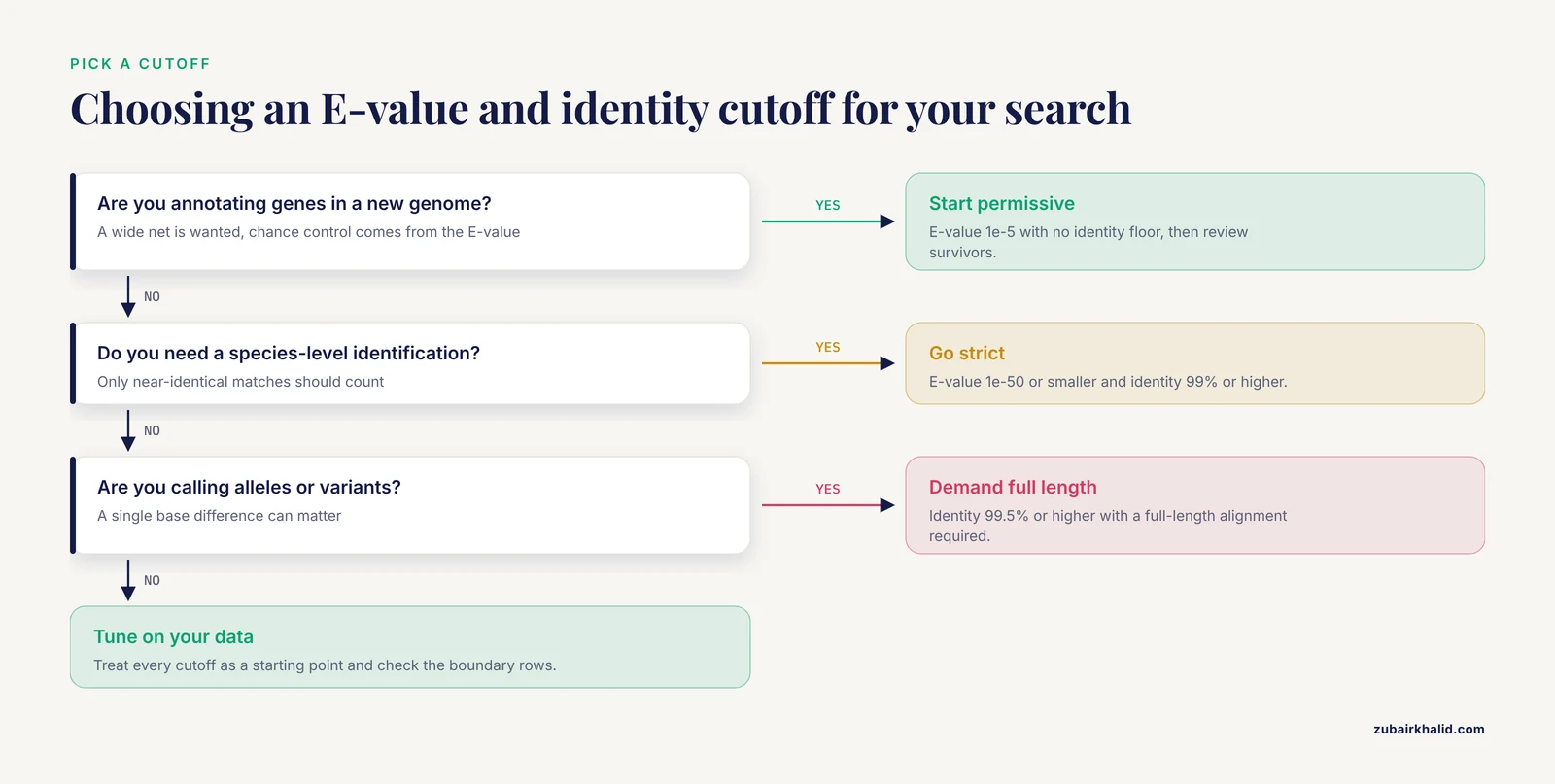
Step 8. Choose your thresholds deliberately, not by habit
| Situation | Suggested starting cutoff | Rationale |
|---|---|---|
| Annotating genes in a new genome | E-value 1e-5, no identity floor | Casts a wide net, E-value handles the chance control |
| Confirming a species-level identification | E-value 1e-50 or smaller, identity 99% or higher | Near-identical matches only |
| Finding distant protein homologs | E-value 1e-3, identity 25% or higher | Allows divergence, relies on E-value and length |
| Allele or variant calling | Identity 99.5% or higher, full-length alignment required | A single base difference can be biologically meaningful |
| Removing spurious low-complexity hits | E-value 1e-5, alignment length 50 or more | Length floor defeats short high-identity noise |
Treat these as starting points and tune against your own data. The GENE_D row in the sample dataset, with 100% identity over 18 positions and an E-value of 8.9, is the canonical example of why an identity cutoff alone fails and a length or E-value floor is mandatory.
Common Errors and Their Exact Fixes
KeyError: 'pident'. Your script's column list does not match the actual file. This happens when the -outfmt template changed between the BLAST run and the parser. Fix by running the field-count check from Step 1 and realigning COLUMNS with the template in your BLAST command.
ValueError: could not convert string to float: 'evalue'. Your file has a header row but you told the reader it does not. Format 7 output includes a line starting with # Fields: that names the columns. Fix by either switching to format 6, which has no header, or by skipping comment lines in your reader. In pandas, comment="#" handles format 7 directly:
df = pd.read_csv("hits.tsv", sep="\t", comment="#")TypeError: '<' not supported between instances of 'str' and 'float'. You compared a string column to a number. This is the bug that produces silently wrong filtering when it does not crash, for example when every pident string happens to sort consistently as text and you get an unexpected row count instead of an exception. Fix by converting with float(row["pident"]) before comparison, or in pandas by confirming the dtype with df.dtypes and casting with df["pident"] = df["pident"].astype(float).
IndexError: list index out of range. A line in your file has fewer fields than expected, usually a blank trailing line or a truncated final row from an interrupted run. Fix by guarding each line before unpacking, as the plain Python script does with the qseqid check.
pandas.errors.EmptyDataError: No columns to parse from file. The file is empty. This usually means the BLAST command wrote its output elsewhere or failed before writing. Check BLAST's exit status and any error text on stderr before re-running the parser.
bash: blastp: command not found. The BLAST executables are not on your PATH. Fix by installing blast+ or adding its bin directory to your PATH, then re-running blastp -version.
A BLASTDB error stating the database does not exist. The -db argument must match the database name or path exactly, and BLAST looks for its index files in the current directory or in the directory named in BLASTDB. Fix by confirming the database was built with makeblastdb and by passing either the full path or setting the environment variable.
An E-value of 0.0 in the output. BLAST underflows extremely small E-values to zero. Zero is a valid value in your comparisons and passes any sane cutoff, but if you later compute with it, for example taking a negative logarithm, you will get a math error. Treat 0.0 as "smaller than anything the float type can represent" rather than literally zero.
How to Check That Your Result Is Right
Verification separates a trustworthy pipeline from a quiet disaster. Beyond the checks in Step 5, do these on any real dataset:
- Count and ratio check. Record rows in, rows out, and the ratio. A filter that keeps 99% of rows is probably doing nothing, and one that keeps 0.1% deserves a second look at the cutoffs.
- Boundary inspection. Print the ten rows closest to each cutoff and confirm each was classified correctly. Errors cluster at boundaries.
- Known-positive control. Include a query whose correct answer you already know, run it through the pipeline, and confirm the expected hit survives and the expected non-hits do not.
- Distribution summary. In pandas, run
df["evalue"].describe()anddf["pident"].describe()before and after filtering. A dramatic shift in the identity distribution, for example a median near 40% before and 97% after, is what a working filter looks like. - Cross-format consistency. If you filter both the tabular output and the XML output of the same search, the surviving query-subject pairs should match. A discrepancy usually means one format exposes multiple HSPs where the other reports one row per HSP as well, so normalize to one row per HSP or per pair before comparing.
Common Mistakes and Limitations
- Filtering on identity without an E-value or length floor. The 100% identity, 18-position, E-value 8.9 hit in the sample data shows why this fails. Short high-identity matches are the most common false positive class in BLAST output.
- Comparing E-values across searches. E-value depends on database size, so the same alignment gets different E-values in different databases. When you must compare hits across searches, compare bit scores, which are normalized.
- Trusting
-max_target_seqsas a quality filter. This flag caps how many hits BLAST reports and interacts with the heuristic search itself, so its effect on which hits are found, and not merely reported, has been called into question [1]. Filter afterward in Python instead of pre-truncating the search. - Assuming one line equals one hit. With XML or with tabular output that includes all HSPs, one query-subject pair can occupy several lines. Decide whether you want per-HSP or per-pair records and deduplicate deliberately.
- Picking the "top row" as the best hit. BLAST output is roughly ordered by score for each query, but once you filter, re-sort by E-value or bit score within each query before selecting a best hit. Relying on file order after a pandas filter or any reordering step invites silent mistakes.
- Hardcoding column indices. A script written against
$11breaks the moment the-outfmttemplate changes. Name your columns once, in one place, and reference them by name everywhere. - Forgetting that the identity cutoff has no statistical meaning. Percent identity is a descriptive measure, not a probability. Two 85% identity hits against databases of different sizes or alignment lengths are not equivalent events. The E-value carries the statistics, the identity carries the biology, and neither substitutes for the other.
- Treating E-value 1e-5 as a law of nature. It is a widely used default, not a universal threshold. In very small databases even weak hits get small E-values, and in huge databases genuinely homologous short matches can fail a 1e-5 cutoff. Adjust to your search context.
- Parsing with regular expressions. Regular-expression parsers over free-text BLAST output break on formatting changes and are slower than structured parsing. Get structured output from BLAST itself with
-outfmtand parse that.
One broader limitation deserves a direct statement. Automated filtering is a screening step, not a verdict. Hits that survive your cutoffs are candidates for homology, and downstream work such as multiple alignment, phylogenetic placement, or expert review decides what they actually are. Individual borderline cases deserve manual inspection, and for clinical or diagnostic sequencing work, confirmatory analysis by a qualified professional is part of the workflow.
Frequently Asked Questions
What E-value cutoff should I use when filtering BLAST hits?
Use 1e-5 as a permissive starting point for general homology searches and tighten toward 1e-50 or smaller when you need high-confidence, close matches. The cutoff should reflect database size and how much false-positive noise you can tolerate downstream.
Can I filter BLAST hits by both E-value and identity at the same time?
Yes, and you almost always should. Combine both conditions in a single boolean expression, for example evalue <= 1e-5 and pident >= 90.0, so a hit must pass both tests to survive. This defeats the classic false positive, a short 100% identity match with a meaningless E-value.
How do I keep only the best hit per query in Python?
Filter first, then sort the surviving rows by query ID and E-value and drop duplicates on the query ID keeping the first row. In pandas this is df.sort_values(["qseqid", "evalue"]).drop_duplicates("qseqid").
Does Biopython work with tabular BLAST output?
Yes. Bio.SearchIO reads both tabular and XML BLAST formats through one interface, and the classic Bio.Blast.NCBIXML parser handles XML output. For plain tabular files, the standard csv module or pandas is often simpler than Biopython.
Why does the same hit get a different E-value in two BLAST searches?
The E-value scales with database size, so the identical alignment appears more significant in a smaller database. Compare bit scores, which are normalized and database-independent, when you need consistency across searches.
How do I add sequence coverage to my BLAST filter?
Add qcovs to your -outfmt template and filter on qcovs >= 80, or compute coverage yourself as alignment length divided by query length times 100. Coverage catches partial-length hits that pass E-value and identity cutoffs while matching only a fragment of the query.
Is pandas fast enough for large BLAST result files?
For files with millions of rows, pandas vectorized filtering is generally fast and memory-bound rather than CPU-bound. For routine files with thousands of rows, any of the three approaches in this article finishes in under a second, and purpose-built parsers can go faster at very large scale [1].
Can I filter BLAST results without writing any code?
Yes. Web servers such as PARIGA store BLAST output and let you filter it interactively against several parameters using logical operations, without re-running the search or writing scripts [2]. For reproducible pipelines, though, a short Python script is the more portable choice.