How to Create a Bash Function to Automate QC with FastQC
By Dr. Zubair Khalid, DVM, MS, PhD ·

By the end of this article you will have a working Bash function called run_fastqc that takes a folder of FASTQ files (or a single file), runs FastQC across them in parallel, writes every report into one clean output directory, keeps a timestamped log, counts the reports it produced, and warns you if anything failed. You will also know how to install FastQC, how to load the function in every new terminal, how to verify the results, and which mistakes cause the most wasted hours in real sequencing projects.
To follow along you need a Linux or macOS machine (or a Windows machine with WSL2), Bash as your shell, FastQC installed, and a working Java runtime, because FastQC is a Java program. Everything else, including the function itself, is built in the article with copy-paste commands.
FastQC is a quality control (QC) tool developed by Babraham Bioinformatics. It reads sequencing data files and produces an HTML report plus a machine-readable text file for each one, scoring about a dozen QC modules such as per-base sequence quality, per-sequence GC content, sequence duplication, and adapter contamination. Typing the full FastQC command for every file in a 24-sample run gets old fast, and one mistyped output directory can scatter reports across your filesystem. A function fixes that.
What FastQC Actually Produces
Before automating anything, know what you are automating. When you run FastQC on a file such as sample_R1.fastq.gz, it writes two files by default:
sample_R1_fastqc.html, the interactive report you open in a browsersample_R1_fastqc.zip, a compressed archive containing the report and the raw text outputs
If you add the -extract option, FastQC unzips the archive into a folder named sample_R1_fastqc/ containing fastqc_data.txt, fastqc_report.html, summary.txt, and icon images. The summary.txt file is the most useful one for automation because every line starts with a status word, either PASS, WARN, or FAIL, followed by the module name. Your function can grep that file later.
Each module is a specific check. The per-base quality module shows Phred quality scores (a log-scaled error probability) by cycle. The overrepresented sequences module lists reads that appear far more often than expected, which usually means adapters, rRNA, or other contaminants. The duplication module estimates how many reads are exact duplicates. Two of these modules, overrepresented sequences and duplication, are estimated from a subset of reads so that the tool stays fast on large files, which the FastQC documentation states explicitly in the module descriptions. That detail matters when you interpret a WARN on a 3 GB file.
FASTQ itself is the plain-text format that stores reads, four lines per read: a header starting with @, the nucleotide sequence, a separator line with +, and a per-base quality string. Most sequencing facilities deliver FASTQ files compressed with gzip, which FastQC reads directly without you decompressing anything.
Prerequisites: Linux for Bioinformatics Setup
Every workflow in linux for bioinformatics starts with the same five minutes of setup. Work through this section once and the rest of the article assumes nothing more.
Confirm Java
FastQC needs a Java runtime at least as recent as the one your FastQC release supports. Check what you have:
java -versionExpected output on a healthy system looks like this:
openjdk version "17.0.9" 2023-10-17
OpenJDK Runtime Environment (build 17.0.9+9)
OpenJDK 64-Bit Server VM (build 17.0.9+9, mixed mode, sharing)
If you see command not found instead, install Java through your package manager. On Debian or Ubuntu:
sudo apt-get update
sudo apt-get install default-jre
On a Red Hat based system use sudo dnf install java-openjdk. On macOS, brew install openjdk if you use Homebrew.
Install FastQC
Three installation routes, in order of preference for reproducibility.
Route one, Conda. If you use Miniconda or Anaconda, which most analysts in linux for bioinformatics do, Bioconda maintains a current FastQC build:
conda install -c bioconda fastqcRoute two, manual download. Grab the current release zip from the FastQC page, unzip it, and make the launcher executable:
cd ~/bin
unzip fastqc_v*.zip
chmod +x fastqc/fastqc
Then add the folder to your PATH, the list of directories your shell searches when you type a command name:
echo 'export PATH="$HOME/bin/fastqc:$PATH"' >> ~/.bashrc
source ~/.bashrc
Route three, system package. Debian and Ubuntu carry a fastqc package, installed with sudo apt-get install fastqc. This version can lag behind the current release, so check which one you got.
Verify the installation
fastqc -hThe first line of the help text reports the version, for example FastQC v0.12.1. If instead you see fastqc: command not found, the directory holding the launcher is not on your PATH, or the launcher is not executable. Revisit the chmod +x step.
A handful of linux commands bioinformatics work worth knowing before you write the function: command -v fastqc prints the full path of a program if it is on your PATH and prints nothing if it is not, pwd prints your current directory, find searches directories for files matching a pattern, and wc -l counts lines of text. The function you build in the next sections leans on exactly these.
Bash Function Anatomy for Bioinformatics Work
A Bash function is a named block of shell code that you can run like a command. The Bash reference manual documents two equivalent spellings, name() { ... } and function name { ... }, with the first being the common convention. Functions solve a specific problem in daily bioinformatics work: pipelines you type repeatedly but which are too short to justify a standalone script file.
Three concepts carry you through the rest of this article.
First, arguments. Inside a function, $1 is the first argument, $2 the second, and so on. The expansion ${2:-fastqc_out} means "use the second argument, but if it is empty, use the text fastqc_out". This one pattern gives your function sensible defaults.
Second, local. Variables created inside a function leak into your shell unless you declare them with local. A function that overwrites your global $files variable is a bug waiting to happen in a long analysis session, so the reference manual's guidance on local scope is worth internalizing early.
Third, exit codes. Every command returns a number when it finishes, 0 for success and nonzero for failure. The if statement tests that number. In Bash, zero is true. This feels backwards to new programmers and it causes real bugs, so keep it in mind: if fastqc ... runs the then branch when FastQC succeeds.
A minimal example to test the mechanics:
greet() {
  local name="${1:-world}"
  echo "hello $name"
  return 0
}
Run it and check the exit code:
$ greet
hello world
$ greet zubair
hello zubair
$ echo $?
0
That is the entire vocabulary you need. The rest is composition.
Writing the FastQC Bash Function Step by Step
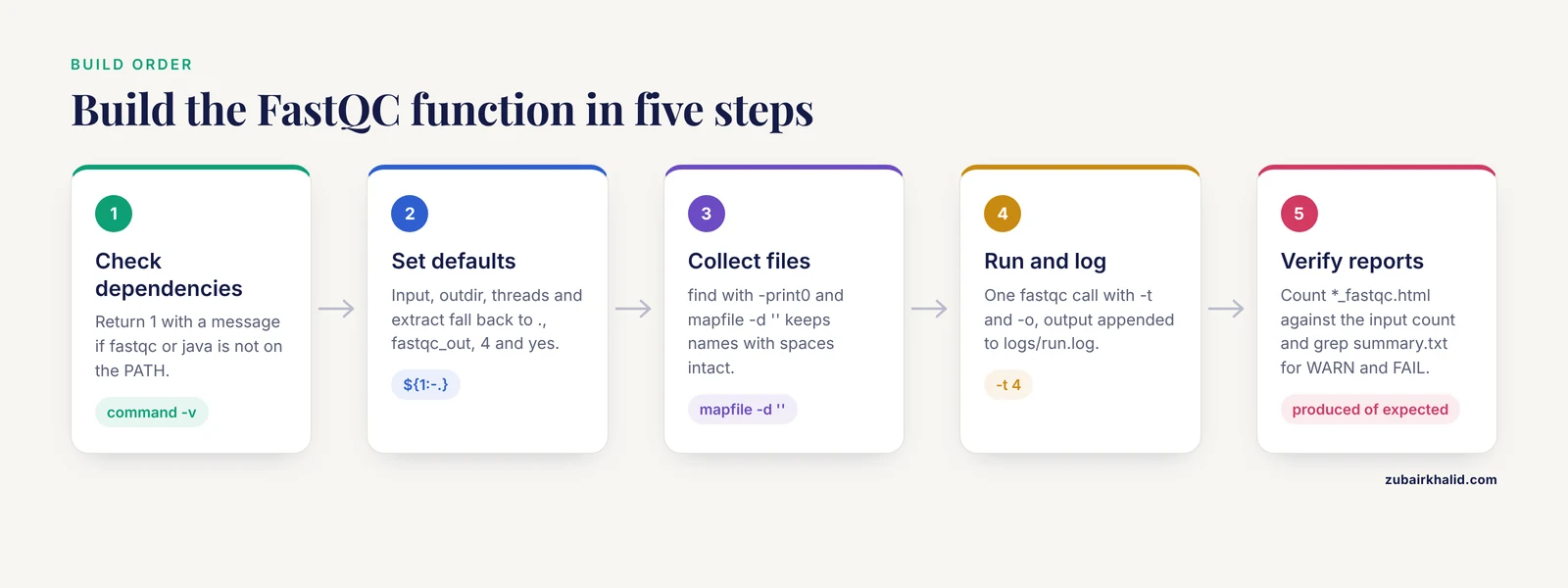
This is the core walkthrough. Build the function in five small steps, testing each one, so you understand every line before it runs against real data.
Step 1: Create the skeleton with dependency checks
Open ~/.bashrc in an editor, or better, keep the function in a dedicated file such as ~/.bash_functions that you source from .bashrc. Add this:
run_fastqc() {
  if ! command -v fastqc > /dev/null 2>&1
  then
    echo "run_fastqc: fastqc is not on your PATH" >&2
    return 1
  fi
  if ! command -v java > /dev/null 2>&1
  then
    echo "run_fastqc: java is not installed or not on your PATH" >&2
    return 1
  fi
  echo "run_fastqc: dependencies OK"
}
Save, then load and test it:
source ~/.bash_functions
run_fastqc
Expected output when everything is installed:
run_fastqc: dependencies OKIf you see run_fastqc: fastqc is not on your PATH instead, the function is already doing its job. The redirect > /dev/null 2>&1 discards the normal output of command -v because you only care about its exit code. Sending the error message to >&2 puts it on standard error, which is the correct stream for failures and matters later when other tools consume this function's output.
Step 2: Accept arguments with sensible defaults
Now give the function its interface. Four arguments: the input file or directory, the output directory, the thread count, and whether to extract the zip archives. Replace the last echo line with this:
  local input="${1:-.}"
  local outdir="${2:-fastqc_out}"
  local threads="${3:-4}"
  local extract="${4:-yes}"

  if ! [[ "$threads" =~ ^[0-9]+$ ]] || (( threads < 1 ))
  then
    echo "run_fastqc: threads must be a positive integer, got '$threads'" >&2
    return 1
  fi

  echo "run_fastqc: input=$input outdir=$outdir threads=$threads extract=$extract"
Test the guard:
$ run_fastqc mydata myout zero
run_fastqc: threads must be a positive integer, got 'zero'
$ echo $?
1
$ run_fastqc mydata myout 4
run_fastqc: input=mydata outdir=myout threads=4 extract=yes
Failing fast with a clear message beats discovering the problem twenty minutes into a run. The regex ^+$ rejects anything that is not a string of digits, and the arithmetic test (( threads < 1 )) rejects zero. Without these checks, a typo like -t 0 would send FastQC into a confusing failure deep inside Java.
Step 3: Build the file list safely
Given a directory, you want every FASTQ file in it, including gzipped ones, without accidentally grabbing anything else. The naive approach, ls *.fastq.gz, breaks in two ways: it fails when no files match, and it splits filenames containing spaces. Use find instead, with a null character as the delimiter so that no filename can ever be split incorrectly:
  local -a files=()
  mapfile -d '' files < <(
    find "$input" -maxdepth 1 -type f \
      \( -name '*.fastq' -o -name '*.fastq.gz' -o -name '*.fq' -o -name '*.fq.gz' \) \
      -print0 | sort -z
  )

  if (( ${#files[@]} == 0 ))
  then
    echo "run_fastqc: no FASTQ files found in '$input'" >&2
    return 1
  fi
  echo "run_fastqc: found ${#files[@]} FASTQ file(s)"
mapfile -d '' reads null-delimited records into the array files and requires Bash 4.2 or newer, which every modern Linux ships. macOS is the exception, where the system Bash is 3.2 from 2007 because of licensing, so macOS readers should install a newer Bash through Homebrew. The sort -z sorts null-delimited records, giving you a predictable file order in the log, which makes runs reproducible by eye. If the input argument is a single file rather than a directory, find still works because it prints the file itself when it matches the pattern test. Note the escaped parentheses around the -name group, which Bash needs backslashes for to prevent shell interpretation.
Step 4: Run FastQC and log everything

FastQC has a genuinely useful parallel design: it processes one file per core, so the -threads option controls how many files run simultaneously, not how many cores attack a single file. That means the right thread count is the number of files you have, capped by your core count. Create the output and log directories, then run FastQC once over the whole list:
  local logdir="$outdir/logs"
  mkdir -p "$outdir" "$logdir"
  local logfile="$logdir/run.log"

  local start
  start=$(date +%s)

  echo "run_fastqc: starting fastqc, log at $logfile"

  if [[ "$extract" == "yes" ]]
  then
    fastqc -t "$threads" -o "$outdir" -extract "${files[@]}" >> "$logfile" 2>&1
  else
    fastqc -t "$threads" -o "$outdir" "${files[@]}" >> "$logfile" 2>&1
  fi

  local rc=$?
  local elapsed=$(( $(date +%s) - start ))
  echo "run_fastqc: fastqc exited with status $rc after $elapsed seconds"
  return "$rc"
A few deliberate choices here. mkdir -p creates both directories at once and does not complain if they already exist. The redirect >> "$logfile" 2>&1 appends both FastQC's standard output and its error output to one log, and appending means repeated runs accumulate history instead of destroying it. Capturing $? immediately after the if is necessary because any later command overwrites that variable. The elapsed-time calculation with date +%s, which prints seconds since a fixed epoch, gives you a runtime number you can put in a lab notebook.
Step 5: Verify the output before declaring success
FastQC can exit with status zero even when individual files produced warnings, so never trust the exit code alone. Count the reports that actually landed in the output directory and scan the summaries for problems:
  local expected=${#files[@]}
  local produced
  produced=$(find "$outdir" -maxdepth 1 -name '*_fastqc.html' | wc -l)
  echo "run_fastqc: reports produced: $produced of $expected"

  if (( produced != expected ))
  then
    echo "run_fastqc: MISMATCH, inspect $logfile" >&2
    return 1
  fi

  local flagged
  flagged=$(grep -c -e WARN -e FAIL "$outdir"/*/summary.txt 2> /dev/null | grep -v ':0$' || true)
  if [[ -n "$flagged" ]]
  then
    echo "run_fastqc: flagged modules:"
    echo "$flagged"
  fi
The function is complete. Save the file, reload with source ~/.bash_functions, and you are ready for the full listing and a real run.
The Complete FastQC Bash Function
Here is the whole function assembled, ready to paste into ~/.bash_functions:
run_fastqc() {
  # Usage: run_fastqc [input file or dir] [outdir] [threads] [extract yes/no]
  if ! command -v fastqc > /dev/null 2>&1
  then
    echo "run_fastqc: fastqc is not on your PATH" >&2
    return 1
  fi
  if ! command -v java > /dev/null 2>&1
  then
    echo "run_fastqc: java is not installed or not on your PATH" >&2
    return 1
  fi

  local input="${1:-.}"
  local outdir="${2:-fastqc_out}"
  local threads="${3:-4}"
  local extract="${4:-yes}"

  if ! [[ "$threads" =~ ^[0-9]+$ ]] || (( threads < 1 ))
  then
    echo "run_fastqc: threads must be a positive integer, got '$threads'" >&2
    return 1
  fi

  local -a files=()
  mapfile -d '' files < <(
    find "$input" -maxdepth 1 -type f \
      \( -name '*.fastq' -o -name '*.fastq.gz' -o -name '*.fq' -o -name '*.fq.gz' \) \
      -print0 | sort -z
  )

  if (( ${#files[@]} == 0 ))
  then
    echo "run_fastqc: no FASTQ files found in '$input'" >&2
    return 1
  fi

  local logdir="$outdir/logs"
  mkdir -p "$outdir" "$logdir"
  local logfile="$logdir/run.log"

  echo "run_fastqc: input=$input outdir=$outdir threads=$threads"
  echo "run_fastqc: found ${#files[@]} FASTQ file(s)"
  echo "run_fastqc: starting fastqc, log at $logfile"

  local start
  start=$(date +%s)

  if [[ "$extract" == "yes" ]]
  then
    fastqc -t "$threads" -o "$outdir" -extract "${files[@]}" >> "$logfile" 2>&1
  else
    fastqc -t "$threads" -o "$outdir" "${files[@]}" >> "$logfile" 2>&1
  fi

  local rc=$?
  local elapsed=$(( $(date +%s) - start ))
  echo "run_fastqc: fastqc exited with status $rc after $elapsed seconds"

  local expected=${#files[@]}
  local produced
  produced=$(find "$outdir" -maxdepth 1 -name '*_fastqc.html' | wc -l)
  echo "run_fastqc: reports produced: $produced of $expected"

  if (( produced != expected ))
  then
    echo "run_fastqc: MISMATCH, inspect $logfile" >&2
    return 1
  fi

  local flagged
  flagged=$(grep -c -e WARN -e FAIL "$outdir"/*/summary.txt 2> /dev/null | grep -v ':0$' || true)
  if [[ -n "$flagged" ]]
  then
    echo "run_fastqc: flagged modules:"
    echo "$flagged"
  fi

  return "$rc"
}
Make it permanent by adding one line to ~/.bashrc:
echo 'source ~/.bash_functions' >> ~/.bashrcConfirm the shell sees it with type run_fastqc, which should print the function definition, and start over fresh in a new terminal to prove the .bashrc wiring works.
Running It and Reading the Output
A real run against a small test directory of six gzipped FASTQ files, with 6 threads and extraction on:
run_fastqc ~/data/fastq ~/qc/demo 6 yesExpected terminal output:
run_fastqc: input=/home/you/data/fastq outdir=/home/you/qc/demo threads=6
run_fastqc: found 6 FASTQ file(s)
run_fastqc: starting fastqc, log at /home/you/qc/demo/logs/run.log
run_fastqc: fastqc exited with status 0 after 94 seconds
run_fastqc: reports produced: 6 of 6
run_fastqc: flagged modules:
/home/you/qc/demo/sample_A_R1_fastqc/summary.txt:2
The other invocations worth knowing:
# Single file, default output dir and threads
run_fastqc sample_R1.fastq.gz

# Directory of files, 12 threads, no zip extraction
run_fastqc ~/data/fastq ~/qc/run01 12 no
After the run, open any *_fastqc.html file in a browser to see the full report. The fastqc_data.txt file inside each extracted folder holds the underlying numbers in blocks that end with >>END_MODULE, which is the format most downstream scripts parse.
Key FastQC Options at a Glance
The function uses a small subset of FastQC's options. This table covers the ones that matter in daily work, with the single-dash spellings used throughout this article.
| Option | What it does | Example |
|---|---|---|
-o DIR | Writes all reports into DIR instead of the current directory | -o qc_out |
-t N | Processes N files simultaneously, one core per file | -t 8 |
-extract | Unzips each report archive into its own folder | -extract |
-nogroup | Plots every base separately instead of grouping bases for long reads | -nogroup |
-c FILE | Uses a custom contaminants list for the overrepresented sequences module | -c my_contaminants.txt |
-a FILE | Supplies a custom adapter list | -a my_adapters.txt |
-f FORMAT | Forces the input format, one of fastq, bam, or sam | -f bam |
-q | Quiet mode, suppresses progress output | -q |
FastQC parses long option names with a single leading dash, so -threads and -extract are valid spellings alongside the conventional double-dash forms you will see in other documentation. The -nogroup option deserves a note: for reads longer than 50 bases, FastQC groups bases into blocks by default to keep the per-base plots readable, and disabling that grouping gives you per-cycle resolution at the cost of larger plots. Memory for very large files is controlled through standard Java heap settings exported in the _JAVA_OPTIONS environment variable, such as -Xmx4g for a 4 GB heap.
Verifying That the Results Are Right
Automation is worthless if you cannot trust the output. Three checks, all of which the function already does for you, plus one manual check.
First, the report count. The number of *_fastqc.html files in the output directory must equal the number of input files. A mismatch means FastQC rejected or failed on something, and the answer is in logs/run.log.
Second, the summary flags. Every extracted folder contains summary.txt, and grepping it tells you exactly which modules raised concerns in which files:
grep -H -e WARN -e FAIL qc_out/*/summary.txtExpected output format:
qc_out/sample_A_R1_fastqc/summary.txt:WARN	Per base sequence quality
qc_out/sample_A_R1_fastqc/summary.txt:FAIL	Overrepresented sequences
qc_out/sample_C_R2_fastqc/summary.txt:WARN	Sequence Duplication Levels
Third, spot-check one fastqc_data.txt by opening it and scrolling to the >>Overrepresented sequences block. If a contaminant dominates, the sequences there usually identify it directly.
Fourth, the manual check that no tool performs for you: interpret the flags in context. The module thresholds inside FastQC are generic heuristics, and the documentation is explicit that a WARN or FAIL does not automatically mean your library is bad, only that the module flagged something worth looking at. A FAIL on per-base quality in the final 20 cycles of a read is routine for many platforms and handled by trimming, while the same FAIL across all cycles means the run itself has a problem.
Extending the Function
Once the core works, three extensions pay for themselves quickly.
Aggregate with MultiQC. Individual FastQC reports are great for one sample and hopeless for twenty. MultiQC is a reporting tool that walks through a directory, finds the fastqc_data.txt files, and renders every module for every sample in a single interactive page. Add an optional hook at the end of the function:
  if command -v multiqc > /dev/null 2>&1 && [[ "$extract" == "yes" ]]
  then
    echo "run_fastqc: running multiqc"
    multiqc -o "$outdir" "$outdir" >> "$logfile" 2>&1
  fi
Handle paired-end data by name. Most paired runs name files sample_R1 and sample_R2. A thin wrapper that runs run_fastqc once and then greps for R1 and R2 mismatch warnings saves real debugging time later.
Move to a cluster. On an HPC system using the SLURM scheduler, the same function body works inside a batch script submitted with sbatch, and the scheduler documentation describes how job scripts receive their arguments and resource allocations. The one change to make is the thread count: read it from the SLURM allocation rather than hardcoding it, so the function never asks for more cores than the job was granted.
Common Mistakes and Limitations
These are the failures seen repeatedly when people first write a fastqc bash function, each with its exact symptom and fix.
- Calling the function
fastqc. If you name your function the same as the binary, every call inside the function resolves to the function itself and recurses until the shell dies. Never shadow a command name you intend to run. Userun_fastqcorqc_fastq.
- Forgetting to source the file. The error
run_fastqc: command not foundalmost always means you added the function to a file but never ransource ~/.bash_functions, or you added thesourceline to~/.bashrcbut opened the terminal before doing so. Runtype run_fastqcto check what the shell currently knows.
- Unquoted variables. Writing
fastqc -o "$outdir" $filesinstead of"${files[@]}"shatters every filename with a space into separate arguments, and FastQC then reports a missing input file. Quote every expansion containing a filename.
- Trusting the exit code. FastQC generally exits zero on a run where some files processed fine and others did not. That is why the function counts produced reports against expected reports and inspects
summary.txtfor WARN and FAIL entries. Exiting zero is not the same as all files passing.
- Overwriting previous QC runs. Pointing
-oat the same directory for every project mixes reports from different samples. The function's second argument exists precisely so each run gets its own directory, and the log subdirectory keeps the history appendable rather than destructive.
- Oversubscribing threads. Because FastQC spends one core per file, asking for 32 threads on 8 files gains nothing and on a shared cluster node it invites the administrator's attention. Match the thread count to the file count or the allocated cores, whichever is smaller.
- Expecting the flags to be gospel. The module thresholds are generic. High duplication is expected in some library types, adapter content is expected if you did not trim, and the sampling behind the overrepresented sequences and duplication modules means borderline calls can shift with file size. Read the plots, not just the verdicts.
- Ignoring Bash version differences.
mapfile -dneeds Bash 4.2 or newer. On macOS with the ancient system Bash, the function will error with an option not supported message. Install a current Bash or rewrite the file list with awhile read -d ''loop.
- Running under
set -ewithout understanding it. If your interactive shell or script hasset -eactive, the benign patterngrep -v ':0$'that finds nothing returns exit status 1 and kills the script mid-flight. That is why the function appends|| truethere.
- Feeding it the wrong file types. The function's
findpattern matches FASTQ and gzipped FASTQ only. A directory of BAM files produces the messageno FASTQ files found, which is correct behavior. Convert BAM to FASTQ withsamtools fastqfirst, or pass-f bamin a manual FastQC call, since FastQC reads BAM and SAM natively when told the format.
One limitation worth stating plainly: this function automates running FastQC, not interpreting it. Module verdicts vary by platform, library prep, and organism, so a flagged module in a 16S amplicon run means something different than the same flag in a whole-genome run. Treat the automated summaries as a triage layer that tells you which reports to open.
Frequently Asked Questions
Where do I put the Bash function so it loads in every terminal?
Put the function in a file such as ~/.bash_functions and add the line source ~/.bash_functions to ~/.bashrc. Every new interactive shell then reads .bashrc, which loads your function definitions automatically. Test with type run_fastqc in a brand-new terminal.
How do I run FastQC on many files at once?
Pass all filenames to one FastQC invocation and set -t to the number of files you want processed simultaneously, because FastQC allocates one core per file rather than parallelizing inside a file. The run_fastqc function does exactly this, collecting files with find and expanding them as "${files[@]}".
Why do some FastQC modules report based on only part of my file?
FastQC computes the overrepresented sequences and duplication modules from a sample of reads rather than the whole file so that reports finish quickly on large datasets. Treat those two modules as estimates, and recheck them manually if a sample sits right at a threshold.
Do I still need MultiQC if I have FastQC?
Yes, if you run more than a handful of samples. FastQC writes one report per file with no cross-sample view, while MultiQC collects every fastqc_data.txt in a directory into a single combined report where you can compare all samples at once. They solve different halves of the same job.
How many threads should I give FastQC?
Use the number of input files, capped by your available cores, because each file is handled by one core and a single file never uses multiple cores. Twelve files on a 16-core machine wants -t 12, not -t 16.
Why does my function work in one terminal but not another?
The function exists only in shells that sourced its file. If you defined it in one terminal and opened a second, the second shell knows nothing about it until the source line lives in ~/.bashrc or you run source ~/.bash_functions manually in the new terminal.
Can I use this function on macOS?
Yes, with two adjustments. Install a current Bash through Homebrew because the default system Bash is 3.2 and lacks mapfile -d, and install FastQC with brew install fastqc rather than the Linux package manager commands.
How do I quality check BAM files instead of FASTQ?
FastQC reads BAM and SAM directly when you tell it the format with -f bam. For alignment QC you want different tooling entirely, typically samtools flagstat and a dedicated alignment QC tool, because a BAM already represents an alignment step past the point where FastQC's read-level checks apply.