Building a Reproducible FASTQ Folder Structure: A Template
By Dr. Zubair Khalid, DVM, MS, PhD ·

By the end of this article you will be able to build a FASTQ folder structure template that survives personnel changes, disk migrations, and pipeline reruns. You will create a project skeleton with a single script, apply a file naming convention that pipelines can parse, write a README and samplesheet that explain the data to a stranger, generate and verify SHA-256 checksum manifests, lock raw data against accidental modification, and confirm that paired-end R1 and R2 files stay matched.
To follow along you need a Unix-like shell (Linux or macOS, or WSL on Windows), GNU coreutils version 8 or newer (sha256sum, find, chmod), rsync version 3 or newer, and either gzip or pigz. FastQC version 0.11.9 or newer is useful for the verification step but not required. Everything in the walkthrough runs on a laptop or a lab server with no special privileges beyond write access to your home directory or group storage.
Why folder structure is a reproducibility problem, not a tidiness problem
Raw FASTQ files are the irreversible record of a sequencing run. Once a library is sequenced, no amount of computation recreates the bits that came off the instrument. That single fact drives most of the policy in this article: raw reads get copied once, verified with checksums, made read-only, and never edited. Everything downstream lives in a processed/ tree that can be deleted and regenerated.
The FAIR data principles, published by the GO FAIR initiative, state that data should be findable, accessible, interoperable, and reusable, and that metadata should travel with the data it describes. A folder layout is the cheapest metadata you will ever produce. When a collaborator opens raw/RUN20240315/ and sees files named S01_ctrl_L001_R1_001.fastq.gz, they learn the sample, condition, lane, and read direction without opening a spreadsheet. When they see Sample 1 final.fastq.gz, they learn nothing, and the space in the filename will break half the tools they try to run.
Bioinformatics data management also has a compliance dimension. If you plan to deposit reads in the NCBI Sequence Read Archive (SRA) or an EMBL-EBI archive, submission requires per-file checksums and consistent sample metadata. Building both into your folder structure on day one makes submission a file-copy operation instead of a forensic project.
Design principles behind the template
Four principles define the format used throughout this guide. Each one exists because its absence causes a specific, recurring failure.
- Raw data is immutable. Files under
raw/are copied from the sequencer or the sequencing provider once, checksum-verified, and set read-only. No trimming, no renaming, no "quick fixes." - One project, one directory, one level of nesting per concept. Raw reads live under
raw/RUNID/, where the run ID matches the sequencing record. Processed outputs mirror the analysis stages. Depth beyond three levels hides files. - Names are parseable. Fields are separated by underscores, values inside a field use hyphens, spaces and parentheses never appear, and read direction is always
_R1or_R2immediately before the extension. - Documentation and checksums sit inside the project. A
README.mdand asamplesheet.csvship with the data, and a checksum manifest lets anyone confirm integrity years later without asking you.
The template follows the pattern recommended in practice for FAIR-aligned project organization: a self-contained project directory that can be zipped, moved, or archived and still makes sense to someone who has never seen it.
The template format at a glance
Here is the skeleton you will build, shown as the output of the tree -L 2 command run inside a project directory:
$ tree -L 2 project_2026_mouse_rnaseq
project_2026_mouse_rnaseq
├── README.md
├── metadata
│   ├── samplesheet.csv
│   └── manifest.sha256
├── raw
│   └── RUN20260310_HV7
├── processed
│   ├── fastqc
│   ├── trimmed
│   └── aligned
├── scripts
├── logs
└── results

9 directories, 2 files
Each directory has one job:
| Directory | What belongs there | What never belongs there |
|---|---|---|
metadata/ | Samplesheet, checksum manifest, run reports from the sequencing provider | Any .fastq file |
raw/RUNID/ | Untouched FASTQ files exactly as received, one subdirectory per sequencing run | Trimmed, renamed, or regenerated files |
processed/ | Pipeline outputs, one subdirectory per stage | Raw reads |
scripts/ | Every script or config needed to regenerate processed/ and results/ | Ad hoc one-off fragments with no comment header |
logs/ | One log file per script run, named with a timestamp | Manual notes (those go in the README) |
results/ | Figures, tables, and reports destined for a manuscript | Intermediate files that a script can regenerate |
The split between raw/ and processed/ is the load-bearing decision. Storage is cheap relative to a resequenced library, so the raw tier is treated as permanent and the processed tier as disposable.
File naming convention
The template format for FASTQ filenames uses ordered, underscore-separated fields, zero-padded where sorting matters:
<SAMPLE>_<CONDITION>_<LANE>_<READ>_<SET>.fastq.gzA concrete example from a mouse RNA-seq project:
S01_ctrl_L001_R1_001.fastq.gz
S01_ctrl_L001_R2_001.fastq.gz
S02_treated_L001_R1_001.fastq.gz
S02_treated_L001_R2_001.fastq.gz| Field | Example | Rule |
|---|---|---|
| Sample | S01 | Unique within the project, zero-padded so lexical sort equals numeric sort |
| Condition | treated | Lowercase, hyphens allowed inside the field, no spaces |
| Lane | L001 | Zero-padded three digits, or L0001 if your instrument exceeds 999 lanes |
| Read direction | R1 or R2 | Required for paired data, always the fourth field |
| Set | 001 | Keeps the instrument's file splitting if present, otherwise omit |
| Extension | .fastq.gz | Always gzip-compressed, never plain .fastq at rest |
Two conventions matter for downstream tools. The _R1/_R2 suffix immediately before the extension is the pattern that nf-core pipelines, FastQ Screen, Trimmomatic, and most aligners use to auto-detect read pairs. And gzip compression is universal: every major tool reads .fastq.gz directly, compression roughly halves storage, and uncompressed FASTQ files at rest waste genomics data storage capacity for no benefit.
Never use spaces, parentheses, commas, or non-ASCII characters in filenames. Spaces force quoting in every script, and tools that shell out to other programs routinely mishandle them.
Walkthrough: building the project step by step
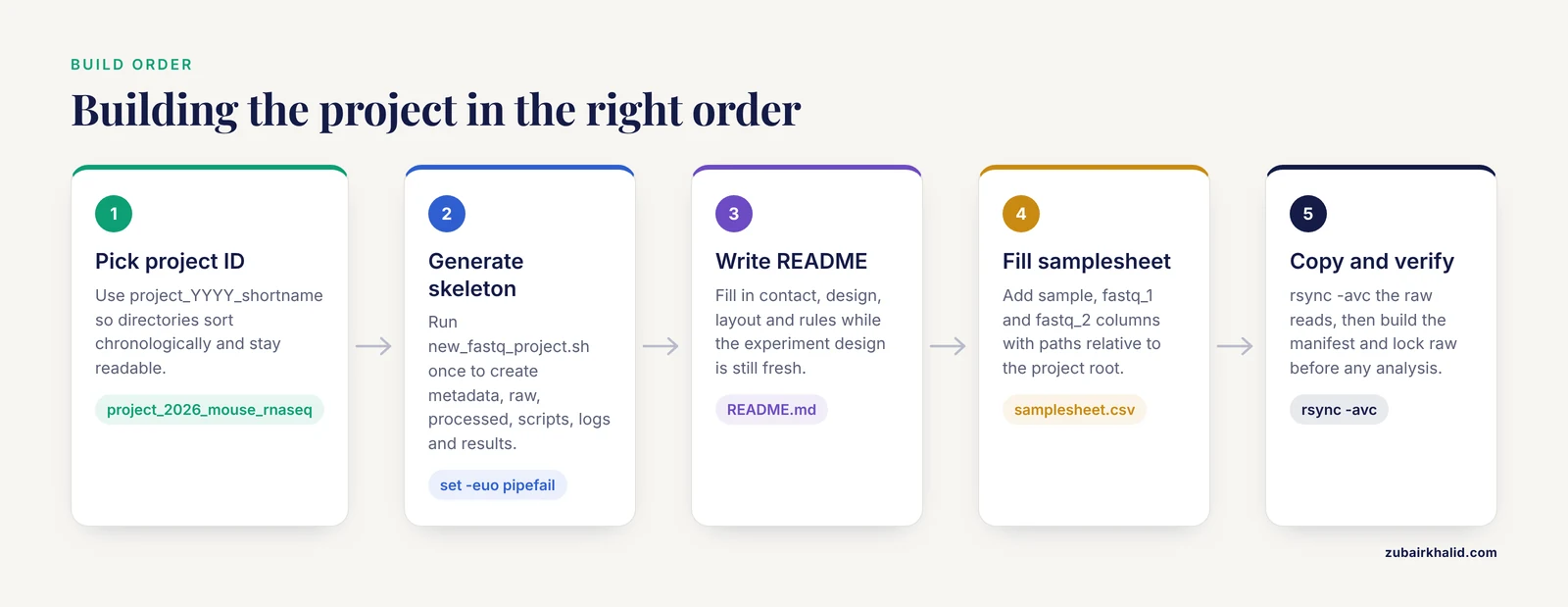
This walkthrough builds a real project called project_2026_mouse_rnaseq from an empty directory. Run each block in order and compare your output with what is shown.
Step 1: Choose a project ID and create the skeleton
Decide on a project ID before typing anything. The template uses project_YYYY_shortname, which sorts chronologically and stays readable:
$ cd /data
$ mkdir -p project_2026_mouse_rnaseq
Step 2: Generate the directory tree
Save this as ~/bin/new_fastq_project.sh and make it executable with chmod +x:
#!/usr/bin/env bash
set -euo pipefail

project="$1"
if [ -z "$project" ] || [ -d "$project" ] || [ -e "$project" ]; then
  echo "Usage: new_fastq_project.sh <new_project_dir>" >&2
  exit 1
fi

mkdir -p "$project"/metadata \
         "$project"/raw \
         "$project"/processed/fastqc \
         "$project"/processed/trimmed \
         "$project"/processed/aligned \
         "$project"/scripts \
         "$project"/logs \
         "$project"/results

touch "$project/metadata/samplesheet.csv"

echo "Created $project"
Run it:
$ new_fastq_project.sh project_2026_mouse_rnaseq
Created project_2026_mouse_rnaseq
The set -euo pipefail line stops the script the moment any command fails, so a half-created skeleton never silently continues. The guard clause refuses to touch an existing path, which prevents accidentally nesting a new project inside an old one.
Step 3: Write the README before the data arrives
Create README.md with a heredoc and fill in the bracketed values. Write this while you still remember the experiment design. The test for adequacy is simple: a colleague with no context should be able to trace any file back to its library, lane, and sample.
$ cat > project_2026_mouse_rnaseq/README.md << 'EOF'
# project_2026_mouse_rnaseq

## Contact
Name, email, ORCID

## Design
Question, organism, tissue, library type (stranded/unstranded),
paired-end 2 x 150 bp on <instrument>, <sequencing provider>

## Layout
- raw/RUNID/     immutable FASTQ as received from the provider
- processed/     pipeline outputs, safe to delete and regenerate
- metadata/      samplesheet.csv, checksum manifest.sha256
- scripts/       code needed to regenerate processed/ and results/
- logs/          one file per script run
- results/       manuscript-bound outputs only

## Rules
- Never edit or rename anything under raw/
- New work goes in a new project directory, not a raw/ subfolder
- Regenerate processed outputs from scripts/, never by hand
EOF
Step 4: Fill in the samplesheet
Edit metadata/samplesheet.csv. The three-column layout below matches what nf-core RNA-seq expects, which makes pipeline setup a file copy later:
sample,fastq_1,fastq_2
S01,raw/RUN20260310_HV7/S01_ctrl_L001_R1_001.fastq.gz,raw/RUN20260310_HV7/S01_ctrl_L001_R2_001.fastq.gz
S02,raw/RUN20260310_HV7/S02_ctrl_L001_R1_001.fastq.gz,raw/RUN20260310_HV7/S02_ctrl_L001_R2_001.fastq.gz
Paths are relative to the project root. Relative paths let you move the whole project to another disk or server without editing anything, which is the single highest-value habit in building a reproducible FASTQ folder structure.
Step 5: Copy the raw data with verification
Copy from the sequencer or provider drive with rsync in checksum mode. The -c flag forces a whole-file checksum comparison on top of the usual size and timestamp checks:
$ rsync -avc /mnt/seq_provider_drive/RUN20260310_HV7/ \
    project_2026_mouse_rnaseq/raw/RUN20260310_HV7/
Expected tail of output:
S01_ctrl_L001_R1_001.fastq.gz
S01_ctrl_L001_R2_001.fastq.gz
S02_ctrl_L001_R1_001.fastq.gz
S02_ctrl_L001_R2_001.fastq.gz

sent 48,712,904,113 bytes  received 198 bytes  214,340,018.31 bytes/sec
total size is 48,705,221,876  speedup is 1.00
Do not mv raw data from the sequencer unless the instrument output is explicitly disposable. Copy, verify, then delete the source only after the manifest in the next step passes.
Step 6: Generate the checksum manifest
From the project root:
$ cd project_2026_mouse_rnaseq
$ find raw -type f -name '*.fastq.gz' | sort \
    | xargs sha256sum > metadata/manifest.sha256
$ head -n 2 metadata/manifest.sha256
e3b0c44298fc1c149afbf4c8996fb92427ae41e4649b934ca495991b7852b855 raw/RUN20260310_HV7/S01_ctrl_L001_R1_001.fastq.gz
15c9f2d4a71e88b0a2b8a9e1f0d3c4b5a6987fed4321098abcdef0123456789ab raw/RUN20260310_HV7/S01_ctrl_L001_R2_001.fastq.gz(Your hashes will differ. The format is what matters: one hash, two spaces, then the relative path.)
SHA-256 is the default here because it is collision-resistant and available everywhere coreutils is installed. MD5 remains acceptable for detecting accidental corruption and is what SRA asks you to report at submission time, but SHA-256 costs little extra time and removes the collision question entirely.
Step 7: Lock the raw directory
$ chmod -R a-w raw/
$ find raw -type d -exec chmod a-x,o-rwx {} +
$ chmod 750 raw raw/RUN20260310_HV7
Removing the write bit (a-w) prevents the two most common accidents: an editor saving a "corrected" file and a pipeline writing into the wrong directory. Keep directories executable for the owner and group so they remain traversable. If your server uses groups, set umask 027 in your shell startup so new files are group-readable but world-blind by default.
Step 8: Verify the archive
Verification has three layers. Run all three after the copy and again after any migration.
First, checksums:
$ sha256sum -c metadata/manifest.sha256
raw/RUN20260310_HV7/S01_ctrl_L001_R1_001.fastq.gz: OK
raw/RUN20260310_HV7/S01_ctrl_L001_R2_001.fastq.gz: OK
raw/RUN20260310_HV7/S02_ctrl_L001_R1_001.fastq.gz: OK
raw/RUN20260310_HV7/S02_ctrl_L001_R2_001.fastq.gz: OK
Second, gzip integrity, which catches truncation inside files whose sizes happen to match:
$ gzip -t raw/RUN20260310_HV7/*.fastq.gz && echo "all gzip streams OK"
all gzip streams OK
Third, spot-check that the content is a well-formed FASTQ record. Every record is four lines: header beginning with @, sequence, a + separator line, and base qualities:
$ zcat raw/RUN20260310_HV7/S01_ctrl_L001_R1_001.fastq.gz | head -n 4@A00551:84:HVKTWDSX5:1:1101:1027:1521 1:N:0:AGTTCAGG
GATCGGAAGAGCACACGTCTGAACTCCAGTCA
+
FFFFFFFFFFFFFFFFFFFFFFFFFFFFFFF:Step 9: Confirm R1 and R2 pairing
Paired-end analysis assumes that read N in the R1 file pairs with read N in the R2 file. After renaming or re-sorting, that assumption is the first thing to break. Check line counts and read identifiers:
$ for r1 in raw/RUN20260310_HV7/*_R1_*.fastq.gz
  do
    r2="${r1/_R1_/_R2_}"
    n1=$(zcat "$r1" | wc -l)
    n2=$(zcat "$r2" | wc -l)
    if [ "$n1" -eq "$n2" ]; then
      echo "count OK   $r1"
    else
      echo "count BAD  $r1 ($n1 vs $n2)"
    fi
  done
count OK raw/RUN20260310_HV7/S01_ctrl_L001_R1_001.fastq.gz
count OK raw/RUN20260310_HV7/S01_ctrl_L001_R2_001.fastq.gzFor identifier-level checks, extract the first token of each header and diff sorted lists. Any mismatch here will surface later as dropped pairs or, worse, silently mismatched pairs, so catching it now costs minutes instead of days.
Step 10: Run a first sanity pass
Run FastQC into the template's processed/fastqc/ directory as a smoke test. Reports with abnormal per-base quality, heavy adapter content, or wildly variable read lengths tell you to contact the sequencing provider before investing compute in alignment:
$ fastqc -o processed/fastqc -t 4 raw/RUN20260310_HV7/*.fastq.gzStarted analysis of S01_ctrl_L001_R1_001.fastq.gz
Approx 5% complete for S01_ctrl_L001_R1_001.fastq.gz
Analysis complete for S01_ctrl_L001_R1_001.fastq.gzStep 11: Back up with the 3-2-1 rule
The 3-2-1 backup pattern, long the standard recommendation in data stewardship practice, means three copies of the data, on two different types of media or systems, with one copy offsite. Applied to the template:
$ rsync -avc project_2026_mouse_rnaseq/ \
    /backup/project_2026_mouse_rnaseq/
Then replicate to an offsite or cloud object storage target according to your institution's policy. Schedule this, write the schedule into the README, and record the backup location in the README as well. A backup nobody can find during your absence does not exist.
The free FASTQ folder structure template script, assembled
Everything above collapses into one free template script you can keep in your dotfiles. It creates the skeleton, seeds the README, and sets permissions in a single call:
#!/usr/bin/env bash
set -euo pipefail

usage() { echo "Usage: new_fastq_project.sh <project_dir>"; exit 1; }
[ $# -eq 1 ] || usage
[ -e "$1" ] && { echo "Refusing: $1 already exists" >&2; exit 1; }

P="$1"
mkdir -p "$P"/metadata "$P"/raw "$P"/processed/fastqc \
         "$P"/processed/trimmed "$P"/processed/aligned \
         "$P"/scripts "$P"/logs "$P"/results

cat > "$P/README.md" << 'EOF'
# PROJECT
Contact:
Design:
Run IDs:
Backup location:
## Layout: raw/ immutable, processed/ regenerable, metadata/ samplesheet + checksums
## Rules: never edit raw/, work from scripts/, log every run
EOF

printf 'sample,fastq_1,fastq_2\n' > "$P/metadata/samplesheet.csv"

find "$P" -type d -exec chmod 750 {} +
find "$P" -type f -exec chmod 640 {} +
echo "Created $P"
Keep this script in version control alongside your other infrastructure code. If the template changes, for example when your group adds a references/ directory for genome indices, the script's git history documents exactly when the format changed for every project on disk.
Where the template meets pipelines
A well-formed folder structure makes pipeline handoff trivial. Most workflow engines consume a tabular sample sheet, and the template's metadata/samplesheet.csv is already in that shape. When you adopt Nextflow or Snakemake, point the config at the project root and reference paths relative to it:
params:
  samplesheet: metadata/samplesheet.csv
  outdir: results
Processed outputs land in processed/, final deliverables in results/, and pipeline logs in logs/. When a reviewer or collaborator asks how a figure was produced, the chain is results/ file, then scripts/, then logs/ timestamp, then the immutable raw/ reads. That chain is reproducibility in practice, and the folder structure is what makes it walkable.
One caution: pipelines sometimes want to write intermediates next to inputs. Configure temporary directories outside raw/ (usually /tmp or a scratch volume) so a misconfigured tool can never touch the immutable tier. This is also why raw/ carries the write-protection bit from Step 7.
Genomics data storage tiers for FASTQ projects
Plan storage in three tiers rather than one.
- Scratch (fast, temporary). Local NVMe or a high-performance scratch filesystem where alignment and assembly actually run. Anything here is disposable and should be deleted on a schedule.
- Project storage (durable, moderate speed). Group or institutional storage holding the full template, including
raw/. This is whereprocessed/outputs return after compute finishes. - Archive (cold, offsite). An archived copy of the complete project directory, ideally as a tar archive so the directory structure itself is preserved, plus the checksum manifest. Cloud object storage archive tiers fit this role. Confirm retention expectations with your institution or funder, and note that NIH data management policies and most journals expect raw sequencing data to be preserved and, where appropriate, deposited in a public archive such as SRA or an EMBL-EBI archive.
Decompressing FASTQ files during pipeline runs, then deleting the uncompressed copies when the stage completes, keeps the durable tier compressed while compute stays fast.
Common Mistakes and Limitations
- Renaming raw files in place. Someone renames
Sample1_ACGT_L001_R1_001.fastq.gztoS01_ctrl_R1.fastq.gzdirectly in the sequencer export. Now the filename no longer matches the instrument's sample sheet, the lane information is destroyed, and checksum-based provenance to the provider is severed. Rename through symlinks or in aprocessed/staging directory, or better, use the samplesheet to map ugly input names to clean sample IDs without renaming anything. - Editing raw FASTQ files "just this once." Trimming half a file to unblock a run is the most expensive edit in bioinformatics. The corrected copy overwrites the only record of the library. Trim into
processed/trimmed/and keepraw/untouched. - No checksum manifest. Silent bit rot and interrupted transfers are common on long-lived storage. Without a manifest you cannot prove the copy is faithful, and SRA submission will require MD5 values you no longer have a trustworthy way to compute.
- One giant folder with hundreds of loose files. A flat directory of 200 FASTQ files from 12 different projects defeats every downstream tool's glob patterns and makes per-project cleanup dangerous. One project, one directory, always.
- Spaces and special characters in filenames. Scripts that pass filenames unquoted break with
command not foundor truncated arguments. Fix it at creation with the naming convention, not with ever-more-elaborate quoting in every script. - Duplicates without a decision. The same run copied into three projects triples storage and creates three potential "authoritative" copies. Keep raw reads in exactly one project directory and reference them from elsewhere via the samplesheet.
- Metadata that exists only in someone's head. If the link between sample ID and biological condition lives in an email thread or a notebook, the project is not reproducible. Put it in
samplesheet.csvbefore the reads arrive. - Limitations of the template itself. This layout fits the common case of small-to-medium studies with a handful of runs per project. Very large consortia, multi-site sequencing contracts, and regulated clinical workflows need institution-level LIMS systems and formal data governance beyond what any folder template provides. Scaling decisions, retention schedules, and access policy belong with your institution's data stewardship office.
Frequently Asked Questions
What is a FASTQ folder structure template?
It is a predefined directory layout, naming convention, and set of metadata files that every sequencing project follows. The template in this article places immutable raw reads under raw/RUNID/, pipeline outputs under processed/, the samplesheet and checksum manifest under metadata/, and scripts, logs, and results in their own directories, all described by a README inside the project.
Should FASTQ files be compressed, and with what?
Yes, compress every FASTQ file with gzip and keep them as .fastq.gz at rest. Gzip is universally supported by quality-control tools, aligners, and workflow engines, roughly halves storage compared with plain text, and decompresses fast enough that most pipelines read compressed files directly.
How do I keep raw FASTQ files immutable?
Copy the files once with rsync -avc, generate a SHA-256 manifest, then remove the write permission with chmod -R a-w raw/. Combine that with a written rule in the README that all new analysis writes to processed/, and accidental edits become nearly impossible.
What naming convention should I use for FASTQ files?
Use ordered, underscore-separated fields with no spaces, such as S01_ctrl_L001_R1_001.fastq.gz. Zero-pad sample and lane numbers so alphabetical order matches numeric order, always place R1 or R2 immediately before the extension for paired data, and restrict field values to lowercase letters, digits, and hyphens.
How do I make sure R1 and R2 files stay correctly paired?
Check that every R1 file has an R2 partner with matching line counts, and spot-check that read identifiers align between the pair. The loop in Step 9 of the walkthrough automates the count check. Pairing errors caught here are minutes of work, while the same errors discovered at the alignment stage can silently corrupt downstream quantification.
Do I need checksum files, and which checksum should I use?
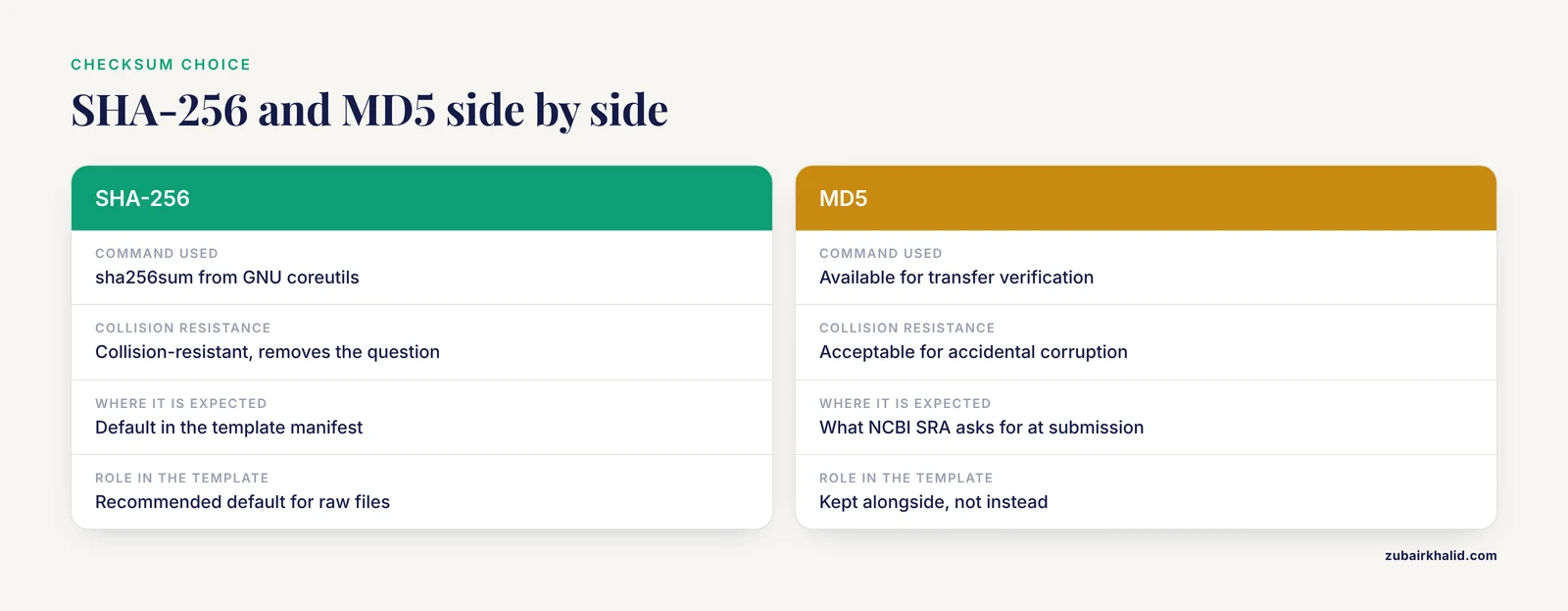
Yes, keep a checksum manifest for every set of raw files. SHA-256 from sha256sum is the recommended default because it is collision-resistant and available on every Unix system, while MD5 remains acceptable for transfer verification and is what NCBI SRA expects at submission. Verify with sha256sum -c metadata/manifest.sha256 after every copy or migration.
How much storage do I need for a FASTQ project?
It depends on read number and read length, so estimate per project rather than adopting a universal rule. As a planning heuristic, gzip-compressed whole-genome-scale mammalian datasets commonly reach tens of gigabytes per sample, transcriptome libraries are typically far smaller, and you should budget for the raw tier plus processed intermediates plus at least one backup copy. Measure one finished project and use that number for future planning.
How should I back up my FASTQ project folders?
Follow the 3-2-1 pattern: three copies of the data, on two different systems or media, with one copy offsite. Copy the entire project directory, not just the FASTQ files, so the README, samplesheet, and checksum manifest travel with the reads, and record the backup locations and schedule in the README itself.