FASTQ Checksum Verification: Step-by-Step Guide
By Dr. Zubair Khalid, DVM, MS, PhD ·

A FASTQ file passes through many hands before an analyst opens it. The sequencer writes it, software compresses it, a scheduler copies it to storage, a portal serves it to a collaborator, and a pipeline decompresses it again. A checksum is how you prove the file that arrived is the file that left. This guide walks through that proof step by step, with commands you can run today.
By the end you will be able to:
- Compute and record MD5 and SHA-256 digests for FASTQ files.
- Verify a single file and an entire run directory against a manifest.
- Verify the decompressed reads independently of how the file was compressed.
- Confirm that paired-end files still match after a transfer.
- Diagnose the exact error messages that appear when verification fails.
On hand you need a Linux or macOS shell with GNU coreutils (sha256sum, md5sum) and gzip. pigz speeds up decompression on multicore machines and seqkit reports record counts, both optional but recommended. A one-record demo file appears early, so every command has a worked output.
Why FASTQ Files Need Checksum Verification
A checksum, also called a digest, is a fixed-length fingerprint computed from a file's bytes. Change one byte anywhere in a 30 GB FASTQ file and the fingerprint changes completely. Comparing fingerprints recorded at two points in time answers the core question of bioinformatics data management: is this the data I think it is?
FASTQ is a positional format, which makes it unusually fragile. Every record is exactly four lines:
@read1 1 length=40
GATTTGGGGTCAAAGCAGTATCGATCAAATAAGTAAATCC
+
IIIIIIIIIIIIIIIIIIIIIIIIIIIIIIIIIIIIIIII
Line 1 is the header and starts with @. Line 2 holds the nucleotide sequence. Line 3 is a separator that starts with +. Line 4 holds the base quality scores in Phred+33 encoding, where the ASCII code of each character minus 33 gives the Phred quality score, so I (ASCII 73) encodes Q40. The sequence line and the quality line must have equal length. A lost newline, a Windows line ending, or a truncated tail breaks the file without any error from the filesystem, the transfer tool, or the storage layer. That is silent data corruption: damage that returns no error anywhere in the stack.
Damage is not hypothetical. Fault injection experiments on flash-based storage show that corruption can occur inside the storage device itself, below the layers that ordinary end-to-end checks watch [1]. Storage media also decay slowly over years, a phenomenon known as bit rot. The habit of verifying is old and cross-disciplinary. Digital radio standards define checksum computation for the most critical header fragments of packets crossing noisy channels [2], and observatory archives have verified image files with embedded header checksums since the mid-1990s [3]. Sequencing data deserves the same discipline, because a corrupted FASTQ does not fail loudly. It quietly shifts read counts, alignment statistics, and variant calls.
One boundary matters before the first command. A checksum proves a file is unchanged since the digest was computed. It does not prove the file was ever correct. If a manifest was built on damaged data, verification passes forever. That is why the walkthrough pairs digests with structural checks at every stage.
The cost case also runs in your favor. Hashing a file costs a single read pass, and the transfer-time studies in Step 3 show the cost can be engineered close to zero. The expensive failure is the opposite one: discovering, mid-analysis, that two collaborators aligned different bytes.
Choosing a Checksum Algorithm for FASTQ Data
Three algorithms cover every FASTQ workflow, and the choice is a policy decision as much as a technical one.
MD5 produces a 128-bit digest written as 32 hexadecimal characters. It is fast, universally available, and the common currency of published datasets, since many public archives ship an MD5 value alongside each FASTQ file. Its weakness is well documented: researchers constructed practical MD5 collisions years ago, so MD5 detects accidental damage but cannot serve as tamper evidence.
SHA-256 produces a 256-bit digest written as 64 hexadecimal characters. It is the default for provenance, meaning the recorded history of where data came from and what touched it, and for custody transfers that a reviewer might audit. It costs more CPU than MD5, which matters mainly when hashing during a transfer rather than after it.
CRC32 is a cyclic redundancy check, a 32-bit code designed to detect burst errors from noise and hardware faults rather than deliberate alteration. Every gzip file stores a CRC32 of its uncompressed data in its trailer, which gives you a free structural check on every compressed FASTQ you own.
The research literature keeps confirming a layered approach. Combining a CRC with a separate checksum improved error detection in simulation compared with either technique alone, in one design using 72 bits of memory and finishing a check in about a millisecond [4]. At the lightweight end of the spectrum, a single-digit checksum has been used as an integrity proof for cloud-executed encrypted computation [5]. At the strong end sit cryptographic digests such as SHA-256. Simple XOR checksums over serial links reliably detect inconsistencies while remaining unable to correct them [6], a property they share with every checksum in this guide.
Skip SHA-1 for new manifests. It offers no practical advantage over MD5 for corruption detection and carries the same collision baggage.
The table maps each option to its role:
| Algorithm | Digest size | Detects | Command | Best use |
|---|---|---|---|---|
| MD5 | 128 bits | Accidental corruption | md5sum file.fastq.gz | Verifying published downloads |
| SHA-256 | 256 bits | Accidental damage and deliberate tampering | sha256sum file.fastq.gz | Provenance and custody manifests |
| CRC32 | 32 bits | Accidental damage only | gzip -t file.fastq.gz | Free structural check inside gzip |
| Content digest | Same as chosen hash | Everything, independent of compression | gzip -dc piped to sha256sum | Verifying reads after recompression |
Step 1: Verify a Single FASTQ File
Create a demo file so every output below is reproducible:
printf '@read1 1 length=40\nGATTTGGGGTCAAAGCAGTATCGATCAAATAAGTAAATCC\n+\nIIIIIIIIIIIIIIIIIIIIIIIIIIIIIIIIIIIIIIII\n' > demo.fastq
gzip demo.fastq
gzip replaces demo.fastq with demo.fastq.gz, and -k keeps the original if you want both.
- Inspect the object before hashing.
ls -l demo.fastq.gz
file demo.fastq.gz
Expected:
-rw-r--r-- 1 alex lab 99 Nov 11 09:14 demo.fastq.gz
demo.fastq.gz: gzip compressed data, was "demo.fastq", from Unix
The size and timestamp matter later, because gzip records both in its header.
- Test the gzip stream.
gzip -t demo.fastq.gz && echo "gzip stream OK"Expected:
gzip stream OKThe -t flag decompresses the entire file to /dev/null and compares the result against the CRC32 in the trailer. It catches damage introduced after compression, including truncation, and it catches nothing that happened before compression. For a quick look at the trailer values, list them:
gzip -lv demo.fastq.gzExpected:
method  crc     date  time           compressed         uncompressed  ratio uncompressed_name
defla 3a9c1e7d Nov 11 09:14                  99               103   3.9% demo.fastq
For concatenated or blocked gzip files, such as bgzip output, the listed values may not describe the whole file. Treat gzip -lv as a sanity check and gzip -t as the real test.
- Record the archive digest.
sha256sum demo.fastq.gz > demo.fastq.gz.sha256
cat demo.fastq.gz.sha256
Expected (your digest will differ):
7f4a1c9e0b2d3f6a8c5e1d4b7a9f0c2e5d8b1a4f7c0e3d6b9a2f5c8e1d4b7a0f demo.fastq.gzThe line format is digest, two spaces, filename. The two-space separator is the GNU convention for text mode, and sha256sum -c depends on it. A manifest generated on Windows or edited by hand with a single space will fail to parse. When a provider publishes MD5 values instead, the same steps apply:
md5sum demo.fastq.gzExpected:
9e107d9f8b6a4c2e1d3f5a7b9c0e2d4f demo.fastq.gz- Record the content digest. gzip -dc (or zcat) writes the decompressed stream to standard output:
gzip -dc demo.fastq.gz | sha256sum > demo.content.sha256
cat demo.content.sha256
Expected:
c9a5e7d2b8f4a6c0d3e5f7a9b1c3d5e7f9a0b2c4d6e8f0a2b4c6d8e0f2a4c6d8 -The trailing - means standard input. This digest describes the decompressed FASTQ bytes, so it survives recompression, renaming, and movement between filesystems. The archive digest describes the stored object. Record both, and treat the content digest as the identity of the data itself.
- Verify on demand.
sha256sum -c demo.fastq.gz.sha256
gzip -dc demo.fastq.gz | sha256sum -c demo.content.sha256
echo $?
Expected:
demo.fastq.gz: OK
-: OK
0
The -c flag reads digest lines and recomputes each one. When a line names - as the file, sha256sum hashes whatever arrives on standard input, which is how the second command verifies the decompressed stream without writing it to disk. Exit codes carry the verdict: 0 means every line passed, 1 means a mismatch or an unreadable file, and 2 means the digest file itself is malformed.
- Verify a provider-supplied MD5 list. If a download arrived with a checksum file in the standard format, verify everything at once:
md5sum -c checksums.md5Expected:
runA_sample1_R1.fastq.gz: OK
runA_sample1_R2.fastq.gz: OK
Then compute your own SHA-256 digests at ingest, so your records do not depend on the provider's format or algorithm choice.
- On macOS, shasum -a 256 and shasum -a 256 -c behave the same way, and GNU coreutils installs through Homebrew if you want identical md5sum behavior.
Step 2: Build and Verify a Manifest for a Sequencing Run
A manifest is one checksum file covering every file in a run directory. It turns verification from a per-file chore into a single command, and it is the unit of record for genomics data storage.
- Generate it deterministically, from the run root:
find . -type f -name '*.fastq.gz' | LC_ALL=C sort | xargs sha256sum > manifest.sha256
cat manifest.sha256
Expected:
2f6a8c5e1d4b7a9f0c2e5d8b1a4f7c0e3d6b9a2f5c8e1d4b7a0f3c6e9a2d5b8c1  ./runA_sample1_R1.fastq.gz
8c5e1d4b7a9f0c2e5d8b1a4f7c0e3d6b9a2f5c8e1d4b7a0f3c6e9a2d5b8c1f6a  ./runA_sample1_R2.fastq.gz
find walks the tree, LC_ALL=C sort fixes byte order so the manifest is reproducible across machines, and xargs batches filenames into sha256sum. Paths are stored relative to the directory where you ran find, so always verify from the same root. If you must verify from a different root, generate the manifest with absolute paths and document that choice, because sha256sum -c resolves the recorded paths as written. For filenames containing spaces or newlines, switch to the null-delimited form with find -print0, sort -z, and xargs -0.
- Head the manifest with provenance. GNU sha256sum ignores lines that begin with # when checking, so record context where the digests live:
# run: runA  created: 2026-11-11  operator: alex
# tool: coreutils sha256sum paths relative to run root- Hash the manifest itself and store that digest separately, in a laboratory information management system (LIMS) entry or a backup location. A manifest that can be edited silently is a single point of failure.
- Verify everything in one command:
sha256sum -c manifest.sha256Expected:
./runA_sample1_R1.fastq.gz: OK
./runA_sample1_R2.fastq.gz: OK- Check structure, not just bytes. A digest can match a manifest and still be a malformed FASTQ if the damage predates the manifest. Count records and validate the four-line shape:
gzip -dc runA_sample1_R1.fastq.gz | awk '
  NR%4==1 { if (substr($0,1,1) != "@") bad++ }
  NR%4==2 { seqlen = length($0) }
  NR%4==3 { if (substr($0,1,1) != "+") bad++ }
  NR%4==0 { if (length($0) != seqlen) bad++ }
  END { printf "lines=%d remainder=%d bad=%d\n", NR, NR%4, bad+0 }'
Expected on a healthy 25 million read file:
lines=100000000 remainder=0 bad=0remainder=0 confirms a whole number of four-line records. bad=0 confirms headers start with @, separators start with +, and every quality line matches its sequence line in length. For friendlier output and alphabet checks, seqkit stats reports read counts and length ranges:
seqkit stats runA_sample1_R1.fastq.gz runA_sample1_R2.fastq.gzExpected:
file                      format  type  num_seqs  sum_len     min_len  avg_len  max_len
runA_sample1_R1.fastq.gz  FASTQ   DNA   25000000  7500000000  300      300      300
runA_sample1_R2.fastq.gz FASTQ DNA 25000000 7500000000 300 300 300- Confirm pairing. Two files are a true pair when they hold the same read names in the same order. A digest of the identifier lines gives you that in one comparison:
for r in R1 R2
do
  gzip -dc "runA_sample1_${r}.fastq.gz" | awk 'NR%4==1 {print $1}' | sha256sum
done
Expected:
b1c3d5e7f9a0b2c4d6e8f0a2b4c6d8e0f2a4c6d8e0f2a4c6d8e0f2a4c6d8b1c3  -
b1c3d5e7f9a0b2c4d6e8f0a2b4c6d8e0f2a4c6d8e0f2a4c6d8e0f2a4c6d8b1c3  -
Matching digests mean identical identifier lines in identical order. The awk print of $1 takes the first whitespace-delimited field, so trailing comments on header lines do not cause false mismatches. If the digests differ, stop and investigate before aligning the files as a pair.
- Record num_seqs and sum_len next to the digests in your sample sheet or LIMS. A future reviewer can then confirm in seconds that a file holds 25 million reads of 300 bp and has not moved a byte since ingest.
Step 3: Verify Transfers, Copies, and Migrations
Verify at every hop: sequencer to storage server, storage to high-performance computing (HPC) scratch, site to site, and any migration to new hardware. The checksum principle treats each move as a migration whose outcome must be verified before the source is released [7].
- For plain copies, checksum both ends and compare, or let rsync do the work:
rsync -rc runA/ backup:/data/runA/The -r flag recurses and -c makes rsync compare files by full checksum instead of the default size-and-timestamp shortcut, re-reading both copies and transferring only blocks that differ. It is slower than the default mode, and that is the point.
- Flush before you verify. After a large copy, modified data can still sit in memory rather than on disk. Measurements of end-to-end verification found that implementations which verify while data is still in memory can report success and then lose the file in a power cut, because verification finished before the data reached storage [8]. Close that window at the end of every copy script:
sync
sha256sum -c manifest.sha256- Prefer transfer tools that verify in flight. Hashing after a transfer reads every byte twice, once for the transfer and once for the digest. Transfer frameworks built for scientific data avoid the double read. Block-level pipelining that overlaps checksum computation with a GridFTP transfer improved end-to-end time by up to 70 percent compared with transferring first and hashing afterwards [9]. An overlapping design called FIVER cut the overhead of end-to-end verification from as much as 120 percent of transfer time to below 15 percent [8]. For routine movement of genomics data storage between sites, choose a transfer tool with built-in verification and keep your manifest as the independent record.
- For cloud object storage, verify after download against your own manifest. Provider-side ETags, the checksum-like identifiers object stores return, are not always plain MD5 digests, particularly for multipart uploads, so the comparison that always works is digest at source against digest at destination. Checksum-based integrity signatures for cloud storage remain an active research area [10], which is a reason to keep verification in your hands rather than the platform's.
Step 4: Verify Through Compression and Decompression
Compression is where most checksum confusion happens, because the same reads can live in many different byte streams.
- See the problem once and never forget it:
gzip -dc demo.fastq.gz | gzip > demo.recompressed.fastq.gz
sha256sum demo.fastq.gz demo.recompressed.fastq.gz
gzip -dc demo.fastq.gz | sha256sum
gzip -dc demo.recompressed.fastq.gz | sha256sum
Expected (your digests will differ):
7f4a1c9e0b2d3f6a8c5e1d4b7a9f0c2e5d8b1a4f7c0e3d6b9a2f5c8e1d4b7a0f  demo.fastq.gz
4a7c0e3d6b9a2f5c8e1d4b7a0f3c6e9a2d5b8c1f6a4a7c0e3d6b9a2f5c8e1d4b  demo.recompressed.fastq.gz
c9a5e7d2b8f4a6c0d3e5f7a9b1c3d5e7f9a0b2c4d6e8f0a2b4c6d8e0f2a4c6d8  -
c9a5e7d2b8f4a6c0d3e5f7a9b1c3d5e7f9a0b2c4d6e8f0a2b4c6d8e0f2a4c6d8  -
The two archive digests differ while the two content digests match. The gzip header records the source file's name and modification time, and the compressed bytes also depend on the tool and its settings, so identical content can produce different archive digests. Never compare archive digests across recompression. Compare content digests.
- Verify the decompressed stream inside the pipeline. Decompression is a transform, and a decompressor bug or a damaged archive can corrupt the stream your aligner consumes even when the archive passed its own checks. FASTQ-specific compressors are becoming part of the storage stack, including a pipelined lossless FPGA design that sustains about 440 MB/s on FASTQ streams [11], so treat whatever decompresses your data as part of the verified chain. This pattern verifies while the pipeline runs:
set -o pipefail
gzip -dc runA_sample1_R1.fastq.gz | tee >(sha256sum -c runA_sample1_R1.content.sha256) | awk 'END {print NR/4, "reads"}'
Expected:
-: OK
25000000 reads
tee copies the stream to the verification process while the read count proceeds. set -o pipefail makes the whole pipeline fail if verification fails, which is the behavior you want inside a workflow engine. Without it, the pipeline exit code would hide the failed check. On multicore machines, pigz -dc is a drop-in replacement for gzip -dc and produces the same content digest, because decompression is deterministic.
- bgzip files, the blocked gzip format produced by htslib tools, are multi-member gzip and behave identically here. gzip -dc decompresses them, gzip -t tests them, and the content digest is computed the same way.
A FASTQ Checksum Verification Policy for Genomics Data Storage
Tools are the easy part. A written policy makes verification survive staff turnover and storage migrations. Adopt these five rules as written or adapt them to your lab.
- At ingest, compute the archive digest, the content digest, and the record count for every FASTQ file. Store all three in a manifest beside the data and in a system that survives the storage, such as a LIMS entry or a separate backup. Hash the manifest itself and record that digest too.
- On every copy or transfer, verify before releasing the source. A migration is not complete when the copy command exits. It is complete when the destination digest matches the source digest.
- Re-verify cold archives on a fixed schedule. Choose a cadence you can sustain, such as twice a year, and log the date next to the manifest. Silent corruption accumulates over years, and scheduled re-verification catches it while a second copy still exists.
- On failure, stop. Quarantine the file, re-transfer from the source, and compare against any second copy. Never regenerate a file in place to make a check pass, because that destroys the evidence you need to trace the fault.
- Keep humans in the loop through naming. A short digest prefix in archive filenames, for example sample1_R1_2f6a8c5e.fastq.gz, lets anyone compare a file against the manifest at a glance.
Assign ownership by role. Name who runs ingest verification, who runs scheduled re-verification, and who responds to a failure, because unowned checks quietly stop happening. Log every verification with the date, the tool and version, the manifest used, and the result. A verification log converts checksums from a one-time ritual into a continuous property of your storage, which is the actual goal of bioinformatics data management.
Common Mistakes and Limitations
These failures happen in real pipelines, with the exact messages and fixes.
- Comparing archive digests across recompression. The digest changes because the gzip header changed, not because the data changed. Fix: compare content digests, as in Step 4.
- Line-ending damage. A file touched by a Windows editor or transferred in text mode gains carriage returns, every quality line becomes longer than its sequence line, and both the digest and the structure break at once. Fix: move FASTQ files in binary mode only and never open them in editors or spreadsheets. The awk validator in Step 2 exposes this as bad values above zero.
- Trusting size alone. A truncated download can have a plausible size, and size says nothing about content. Fix: always digest, and run gzip -t, which reports truncation as:
gzip: demo.fastq.gz: unexpected end of file- Verifying against a manifest built after the damage. The check passes forever and the corruption ships with the data. Fix: build manifests at ingest, before the file leaves the machine that produced it, and pair digests with the structural checks in Step 2.
- Recording a content digest from a broken pipe. In
gzip -dc file | sha256sum, a decompression failure can leave sha256sum hashing a partial stream, and you would record a digest of truncated data as if it were the file. Fix: runset -o pipefailin scripts that hash a stream, and confirm the decompressor exited cleanly before trusting the digest.
- Malformed manifests. The most
Common Mistakes and Limitations, Continued
The mistake list above ends mid-item. Here are the remaining failures that show up repeatedly in real labs, with the exact symptoms and the fixes.
- Malformed manifests. The most common causes are a single space instead of two between the digest and the filename, a line edited in a tool that rewrapped or reflowed the text, or a manifest saved with Windows line endings so every filename carries a hidden carriage return.
sha256sum -cthen either refuses to parse the file or reports that it cannot open files that plainly exist. The failure looks like a data problem and is actually a formatting problem, which is why it sends people digging through storage when the data is fine. Fix: generate manifests with the pipeline from Step 2, never type digest lines by hand, and if you must rescue a manifest that an editor mangled, strip carriage returns withtr -d '\r', re-verify immediately, and record in the log that the manifest was rebuilt. A rescued manifest matches the current files but no longer carries the provenance of the original.
- Case mismatches in hand comparisons. Some providers publish digests in uppercase hexadecimal, and eyeballing two digests on screen fails because of case alone. GNU tools accept either case when checking a manifest, so if
md5sum -creports a failure, the case of the published digest is not the cause. The failure is real. Case only trips up humans diffing two lines side by side or scripts comparing raw strings. Fix: when comparing by eye, compare case-insensitively; when comparing in scripts, normalize both sides to lowercase before the comparison.
- Exit codes swallowed by scripts. The most damaging variant of this mistake is a copy script that runs verification, prints a scary line into a log nobody reads, and exits with status 0 because the last command in the script succeeded. The scheduler sees success, the source is released, and the corrupt copy becomes the only copy. Fix: make the verdict a branch, not a printout:
if sha256sum -c manifest.sha256 > verify.out
then
  echo "verify OK" >> ingest.log
else
  echo "verify FAILED" >> ingest.log
  cat verify.out >> ingest.log
  exit 1
fi
The exit codes documented in Step 1 are the contract. Anything that consumes the script, including a workflow engine or a cron mailer, should see the failure.
- Hashing a file that is still being written. A digest computed while the sequencer, the transfer, or a decompressor is still writing captures a partial file, and that digest is stable garbage. You will record a value that verifies perfectly against nothing. Fix: hash only after the writer has finished. If you cannot prove the writer finished, check for stability by comparing the file size across a pause, and treat the digest as provisional until the next full verification. GNU tools also warn when a file changes while being read, which is your signal to stop and wait.
- Treating
gzip -tas an identity check. The gzip test answers one question: does the decompressed stream match the CRC32 that was stored when the file was compressed? It answers nothing about whether this file is the file you meant to keep. A pristine, perfectly intact FASTQ containing the wrong sample passesgzip -tforever. Fix: usegzip -tas the cheap structural pre-check it is, and pair it with digests against an ingest manifest every time identity matters.
- Verifying while another process reads or writes the same file. Digests assume a stable byte stream. A file being re-read by a backup agent, or rewritten by a tool that updates in place, can produce a digest that matches nothing. This overlaps with the previous mistake but deserves its own rule: one writer at a time, verification after writes complete, and no in-place rewrites of archived data, ever.
- Derived files with no new records. Every trimmed, filtered, split, or merged FASTQ is a new object with a new byte stream. Labs that carefully manifest their raw runs often let derived files float unrecorded, so when a downstream question arises months later, nobody can prove which trimming output was used. Fix: give every derived FASTQ the same three records as a raw file: archive digest, content digest, and record count, with a pointer back to the parent it came from. Section on derived files below shows the pattern.
One limitation frames all of this. A checksum detects, it does not correct, and it does not localize; when a digest fails, you learn that the bytes changed and nothing about which bytes or why, which is the same detect-only property shared by the simplest XOR schemes over serial links [6]. Layering matters because different checks catch different failure classes; combining a CRC with an independent checksum improved detection in simulation compared with either alone [4]. And the deepest limitation is temporal: verification is only as trustworthy as the moment the first digest was computed. Everything after that is a comparison against a recorded past, which is why ingest timing dominates this entire discipline.
A Field Guide to Verification Errors and Their Fixes
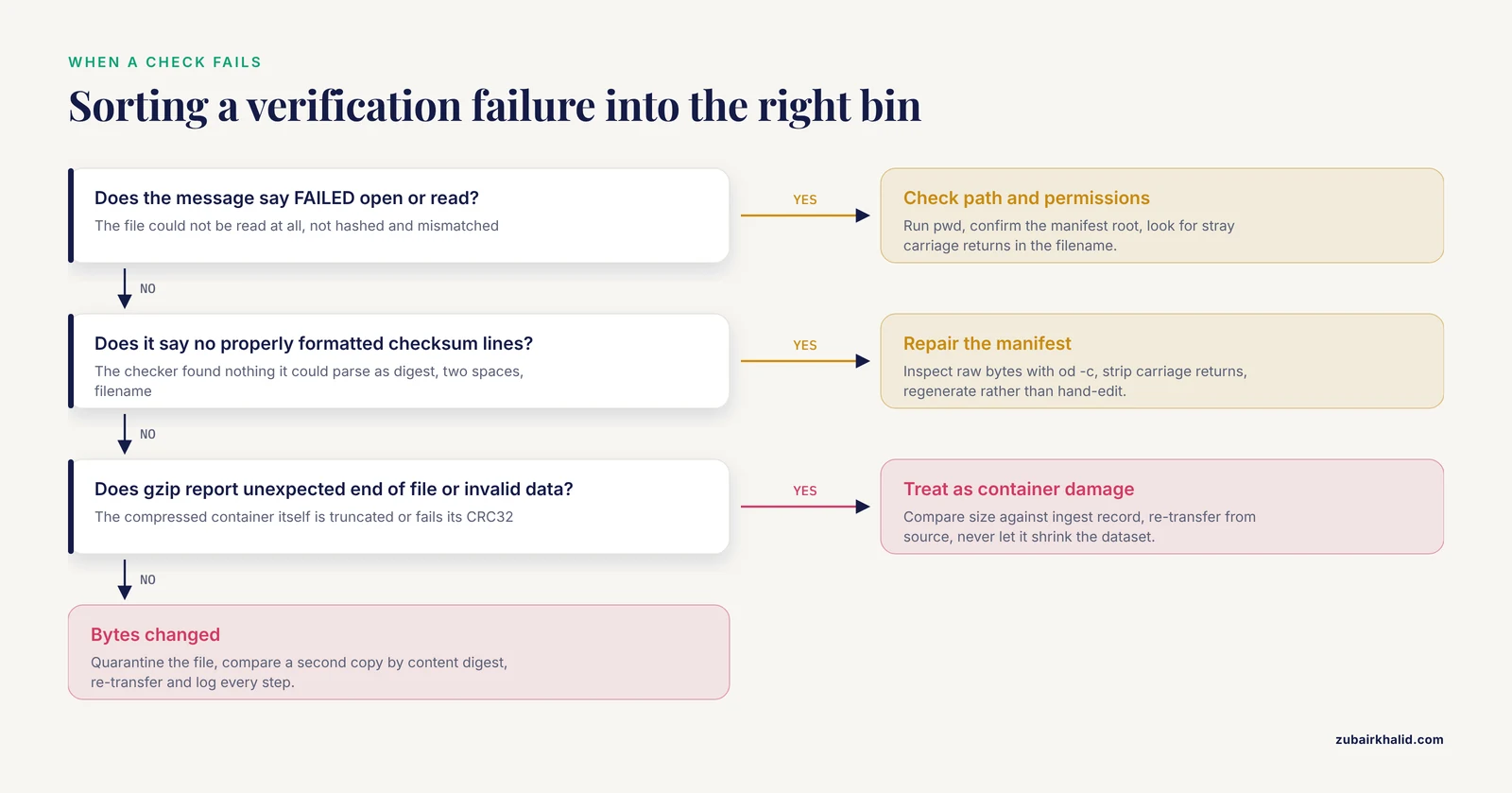
When a check fails, the message tells you which of four things happened: the bytes changed, the record is missing, the manifest is malformed, or the container is damaged. Learn to sort failures into those four bins and troubleshooting becomes mechanical.
1. Bytes changed: the FAILED line.
sha256sum -c demo.fastq.gz.sha256
demo.fastq.gz: FAILED
sha256sum: WARNING: 1 computed checksum did NOT match
This is the only message that means the file on disk differs from the recorded digest. Work through it in order. First, re-run the check once; a single transient read error on a busy filesystem can produce a one-off mismatch, and a clean re-run suggests the storage layer is flaky rather than the data lost. Second, if the failure reproduces, quarantine the file: rename it with a .quarantine suffix and bar it from pipelines. Third, compare against any second copy, using the content digest so that differing compression does not confuse the comparison. Fourth, re-transfer from the source and verify again. Log every digest you compute along the way. The damaged file is evidence; keep it until the fault is traced, because a file that fails once and passes on re-read is telling you something about your storage hardware that you want to know before it affects other files.
2. Missing or unreadable: FAILED open or read.
runA_sample1_R1.fastq.gz: FAILED open or read
sha256sum: WARNING: 1 listed file could not be read
Rank the causes by frequency. Wrong working directory first, because manifests store relative paths and sha256sum -c resolves them from where you stand; run pwd and compare it to the manifest's own comment header. Moved or renamed file second; list the exact recorded path to see if it exists. Permissions third; a file readable by the owner but not by the service account running your verification is unreadable in practice. Manifest line endings fourth; a carriage return at the end of a line glues onto the filename and makes the path unfindable. That last case has a signature: the reported filename ends with a stray character before the colon.
3. Malformed manifest: no properly formatted checksum lines.
sha256sum: manifest.sha256: no properly formatted checksum lines foundThis means the checker found no line it could parse as digest, two spaces, filename. Look at the raw bytes rather than trusting your terminal:
od -c manifest.sha256 | head -4You are looking for two visible spaces before the filename and \n rather than \r \n at line ends. Wrapping damage from a pasted digest shows up here too: a digest split across two lines parses as nothing. Exit status for this condition is the malformed-manifest code from Step 1, which is how scripts distinguish a broken manifest from a broken file.
4. Container damage: the gzip family of messages.
gzip: runA_sample1_R1.fastq.gz: unexpected end of fileTruncation. The compressed stream simply stops before the trailer. Compare the current size against the size recorded at ingest; a mismatch confirms truncation, and the fix is a re-transfer from the source. Never let a truncated file silently shrink your dataset: the structural checker from Step 2 would report a nonzero remainder and a low record count even if the gzip stream were coaxed into decompressing.
gzip: runA_sample1_R1.fastq.gz: invalid compressed dataWhen gzip's message names the CRC check, the decompressed bytes do not match the CRC32 stored in the trailer. This is damage after compression with the file length intact, the nastiest storage-level failure because sizes look normal. The archive digest will also fail if you have one; if the archive digest passed but gzip -t fails, suspect a filesystem returning bad blocks or a decompressor binary problem, and try a second machine before blaming the data.
gzip: demo.fastq.gz: not in gzip formatThe file is not a gzip stream at all. On download portals this usually means you received an HTML error or login page instead of the data. file on the object and head -c 200 on it will show the truth in seconds. This is also the message you get if a transfer tool ran in text mode and mangled the header.
5. Archive digest matches but content digest does not. Rare but diagnostic. The stored object is byte-identical to the record, yet the decompressed stream differs from the record. Either a different decompressor path transformed the bytes, or you hashed one file and verified another, for example two copies in different directories with the same name. Re-run both commands with absolute paths and confirm which decompressor binary is in the path.
6. Pairing digest mismatch. When the identifier digests from Step 2 disagree, find the first divergence:
diff <(gzip -dc runA_sample1_R1.fastq.gz | awk 'NR%4==1 {print $1}') \
     <(gzip -dc runA_sample1_R2.fastq.gz | awk 'NR%4==1 {print $1}') | head
diff prints the record number where the two identifier streams part ways. A difference at record 1 usually means swapped or mismatched files from the provider. A difference deep in the file usually means one mate was trimmed or filtered and the other was not. Matching prefixes with divergence at a specific point is also the signature of a truncated read burst in one mate. Each diagnosis leads to a different conversation with the provider, which is why pinpointing the record number before calling matters.
7. Verification passes but pipeline results differ. The verified file is not the file the pipeline consumed. This happens with duplicate copies in different directories and with pipelines that re-compress or filter on input. The fix is positional verification: digest the stream at the point where the consumer reads it, using the tee pattern from Step 4, so the bytes consumed are the bytes checked.
8. Intermittent FAILED open or read on a shared filesystem. A file that verifies fine on retry, with no other change, points at the network filesystem or its client cache rather than the data. Note the pattern, the time, and the host, and raise it with whoever owns the storage. Intermittent read failures during verification are an early warning of infrastructure trouble that will eventually cost you a file you cannot replace.
A Complete Ingest Script You Can Adapt
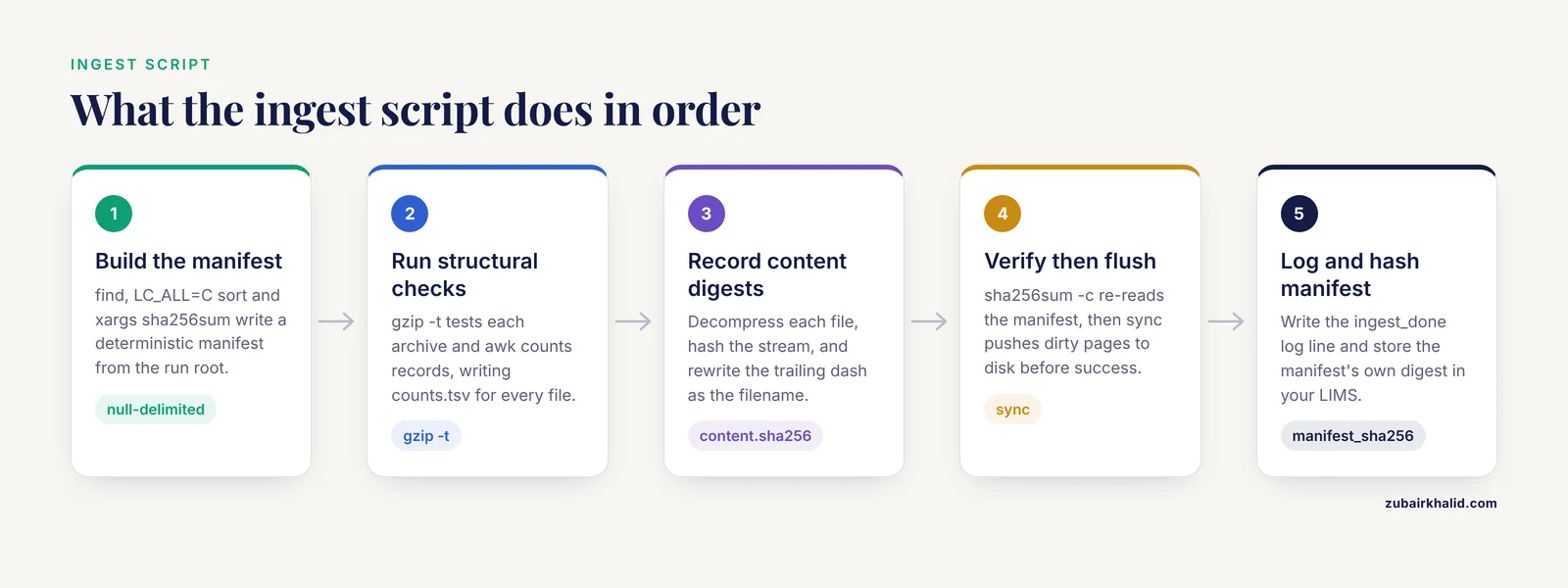
The individual steps above become powerful when they run as one script the moment a run lands. Here is a complete, self-contained ingest script that produces the manifest, the content digests, the record counts, the gzip structural checks, and a log line, and refuses to declare success on any failure:
#!/usr/bin/env bash
set -euo pipefail

run_dir="$1"
cd "$run_dir"

log="verification.log"
stamp="$(date -u '+%Y-%m-%dT%H:%M:%SZ')"

echo "$stamp run=$(pwd) event=ingest_start" >> "$log"

# 1. Archive manifest, deterministically ordered
find . -type f -name '*.fastq.gz' -print0 \
  | LC_ALL=C sort -z \
  | xargs -0 sha256sum > manifest.sha256

# 2. Per-file structural checks, counts, and content digests
: > counts.tsv
: > content.sha256

find . -type f -name '*.fastq.gz' -print0 \
  | LC_ALL=C sort -z \
  | while IFS= read -r -d '' f
    do
      gzip -t "$f"
      n="$(gzip -dc "$f" | awk 'END {printf "%.0f", NR/4}')"
      printf '%s\t%s\n' "$n" "$f" >> counts.tsv
      gzip -dc "$f" | sha256sum | sed "s| -$| $f|" >> content.sha256
    done

# 3. Full verification pass, then flush, then log
if sha256sum -c manifest.sha256 > verify.out
then
  sync
  md="$(sha256sum manifest.sha256 | awk '{print $1}')"
  echo "$stamp run=$(pwd) event=ingest_done files=$(wc -l < manifest.sha256) manifest_sha256=$md" >> "$log"
else
  echo "$stamp run=$(pwd) event=ingest_failed" >> "$log"
  cat verify.out >> "$log"
  exit 1
fi
Run it as ./ingest_run.sh /data/seq/runA from anywhere; it changes into the run directory so all recorded paths stay relative to the run root.
Walk through the design decisions, because each one closes a specific hole. set -euo pipefail makes any failed command, including gzip -t inside the loop, stop the script immediately, and pipefail ensures a decompressor failure inside any pipeline is not hidden by a downstream command's success. The manifest is generated with null-delimited handling end to end, so filenames with spaces or newlines survive. The while read loop runs the three per-file checks serially, which keeps the log deterministic and keeps disk seeks sequential on spinning storage. The sed rewrite turns the digest - output of hashing a stream into digest filename, so the content digest file is itself checkable later with sha256sum -c. The final verification pass re-reads the manifest and confirms every line, sync pushes any dirty pages to storage before success is declared, which closes the in-memory window that end-to-end verification studies showed can report success and then lose the file in a power cut [8], and only then does the script log completion and hash the manifest itself so the digest of the manifest can be recorded in your LIMS.
A successful run leaves this log trail:
2026-11-11T09:14:02Z run=/data/seq/runA event=ingest_start
2026-11-11T09:41:37Z run=/data/seq/runA event=ingest_done files=2 manifest_sha256=1a3b5d7e9f0b2d4f6a8c0e2a4b6d8f0a2c4e6a8b0d2f4a6c8e0a2c4e6b8d0f2
and a counts file like this:
25000000	./runA_sample1_R1.fastq.gz
25000000	./runA_sample1_R2.fastq.gz
From this point, the migration rule applies without exception: the run is not moved anywhere until the destination verifies against this manifest, and the source is not released until then [7]. Wire the script into whatever receives data from the sequencer, run it under an account that cannot write to the archive tier, and the ingest habit survives staff turnover.
One scheduling note: never run ingest while the instrument or its transfer agent is still writing into the run directory. Gate the script on the run being complete, whether that is a done-marker file from the instrument, a closed transfer session, or a human sign-off, because a digest of a partially written run is worse than no digest at all.
Comparing Verification Strategies Side by Side
Labs often mix several verification methods without being able to say which one guarantees what. The table puts the main strategies in one frame:
| Strategy | What it proves | Cost | Weak spot | Best use |
|---|---|---|---|---|
| - | - | - | - | - |
One-off digest (sha256sum file) | Bytes unchanged since that digest was recorded | One read pass | Depends on someone remembering to run it | Downloads, ad hoc checks |
Run manifest (sha256sum -c) | Every file in a run unchanged since ingest | One read pass over the run | Manifest itself must be protected and stored off-storage | The unit of record for a run |
rsync -c | Both ends of a copy hold identical bytes | Full read on both sides, slower transfer | Only covers that single hop | Hop-by-hop copies to backup |
| In-flight verification | End-to-end identity at near-zero extra wall time | Overlapped with the transfer | Requires a transfer tool that supports it | Site-to-site and wide-area moves [9] |
gzip -t | Decompressed stream matches the stored CRC32 | One decompression pass | Says nothing about the pre-compression history | Cheap pre-check inside pipelines |
| Content digest | Reads are identical regardless of compression | One decompression plus hash | Requires the original pipeline context to interpret | Durable identity of the data itself |
Three comparisons deserve expansion.
Hashing after transfer versus verifying in flight. Hashing after a transfer reads every byte twice, once to move it and once to digest it. For large runs on shared storage, that second read is real contention. Transfer frameworks built for scientific data overlap the digest computation with the transfer itself, and the measured gains are large: block-level pipelining with GridFTP improved end-to-end time by up to 70 percent compared with transferring first and hashing afterwards [9], and the FIVER design cut end-to-end verification overhead from as much as 120 percent of transfer time to below 15 percent [8]. The practical takeaway is not that post-transfer hashing is wrong, but that it is the fallback. When your organization moves terabytes of genomics data storage between sites regularly, choose a tool that verifies in flight and keep your manifest as the independent record that does not depend on the transfer tool's own bookkeeping.
gzip -t versus a full digest. These answer different questions and cost similar amounts, so the choice is about what you need to know. gzip -t proves the container is internally consistent, which is exactly the right check before feeding a pipeline, because a pipeline cares whether decompression will succeed and produce coherent records. A digest proves the object is the object you recorded, which is the right check for custody, provenance, and collaboration. Running both costs two read passes; running only one leaves a known blind spot. On compressed archives the pairing is natural: gzip -t guards the container, the archive digest guards the object, and the content digest guards the reads inside it.
Spot checking versus full re-verification. Spot checking a random subset of files on a schedule is tempting on very large archives, and it is better than nothing, but it has a specific failure mode: corruption is rarely uniform, so a clean sample does not bound the damage. For cold archives the defensible compromise is risk-ordered full verification: verify the oldest, least-touched data first on each cycle, because it has had the longest exposure to slow decay, and treat the newest data as lower risk because it was verified at ingest and at its last move. Keep the cadence honest, twice a year or whatever your capacity sustains, and log every cycle so an auditor can see coverage over time rather than a single heroic pass.
Common Misconceptions About FASTQ Checksums
1. A matching checksum proves the data is good. It proves the data is unchanged since the digest was recorded. If the manifest was built on already-damaged data, every future verification passes forever while the corruption ships with every analysis. This is the boundary stated at the top of the guide, and it is worth restating because it is the misconception with the largest consequences. Pair digests with structural checks at ingest, when the evidence is still traceable.
2. gzip -t passing means the file is verified. It means the compressed stream is internally consistent. A file that is the wrong sample, the wrong run, or the wrong library entirely passes with flying colors. The gzip trailer CRC guards against damage after compression, nothing more.
3. Hashing will slow the pipeline unacceptably. Hashing is a single sequential read pass, and modern transfer designs overlap it almost completely with the data movement it accompanies. The expensive event is not the hash; it is the mid-analysis discovery that two collaborators aligned different bytes, or that a cold archive copy rotted past the point where the second copy could be compared.
4. MD5 collisions put my data at risk. MD5 collisions were constructed deliberately by researchers with control over both inputs. Random hardware damage will not land in a collision, so MD5 remains fully effective against the accidental corruption that actually threatens FASTQ files. The correct restriction is narrower than most people assume: do not use MD5 as evidence against a malicious actor, do use it for interoperation with published datasets, and prefer SHA-256 for anything an auditor might review.
5. The cloud object store's checksum-like identifier equals an MD5. Multipart uploads change what the identifier represents, so treating it as a plain MD5 can produce false mismatches or false confidence. The comparison that always works is your digest at source against your digest at destination [10]. Keep verification in your hands rather than delegating it to a platform whose identifier semantics can change underneath you.
6. If a check fails, re-run the copy until it passes. Repeated blind re-copying hides failing hardware and can destroy the evidence. A file that fails verification, passes after a re-copy, and fails again a month later is a storage fault announcing itself. Quarantine, compare copies, trace the fault, then re-transfer deliberately.
7. Checksums protect the whole chain automatically. They protect exactly the objects you digested, at the moments you digested them. A pipeline that writes intermediate files, sorts records, or extracts a subset creates byte streams nobody has recorded. If intermediates matter, they need their own digests; if they do not, be explicit about that in your policy so nobody later assumes coverage that never existed.
8. Compression is invisible to checksums. The bytes on disk change with every recompression, tool version, and compression setting, so archive digests change with them. Only the content digest is stable across the compression layer, which is why the walkthrough records both and treats the content digest as the identity of the data.
Checksum Verification Tips for Daily Practice
These are the small habits that separate a verification program that survives from one that quietly decays.
- Generate manifests, never edit them. The two-space separator and the line format are machine contracts. Any manual edit risks the malformed-manifest failure, and a manifest you edited is a manifest you cannot vouch for.
- Pin the locale when sorting.
LC_ALL=C sortis what makes two manifests generated on different machines byte-comparable. Without it, sort order varies with the environment and manifest diffs fill with noise. - Store digests twice, in different failure domains. The manifest lives beside the data, and its own digest lives in a LIMS entry, a sample sheet, or a separate backup. A manifest stored only next to the data it describes dies with the data.
- Put a digest prefix in filenames.
sample1_R1_2f6a8c5e.fastq.gzlets anyone, including future you, confirm at a glance that a file corresponds to a manifest line, without running anything. - Verify silently in scripts and verbosely for humans. For cron and workflow contexts, redirect the
OKlines to a log and act on the exit code; for interactive use, let every line print so you can see the whole run checked. - Record the tool and version in the manifest header. Comment lines starting with
#are ignored by the checker and are the cheapest possible provenance. A manifest generated by a different tool version years from now should never be a surprise. - Treat every derived FASTQ as a new object. Trimmers, filters, and splitters all produce byte streams that deserve their own digest, count, and manifest entry, with a pointer back to the parent.
- Use binary transfers only, and say so in your shared procedures. Text-mode transfers and editor round-trips are the classic way line endings corrupt a FASTQ while every size check looks normal.
- Verify at the point of consumption, not just at rest. The
teepattern from Step 4 costs almost nothing and ties the verification verdict to the exact bytes an aligner reads, which is the only place a mismatch actually hurts. - Adopt layered checks rather than one perfect check. The CRC-in-gzip comes free on every archive; a cryptographic digest adds identity; a structural checker adds format sense; together they cover more failure classes than any single check [4].
- Re-verify cold data on a schedule you will actually keep. A modest cadence, logged every time, beats an ambitious one that stops after a year. Silent corruption accumulates over years, and the whole point of scheduled re-verification is to catch it while a second copy still exists.
- On macOS, mind the tool format differences. The native
md5prints a different line format than GNUmd5sumand is not directly checkable withmd5sum -c. Useshasum -a 256for SHA-256 work, or install GNU coreutils so behaviors match across your machines.
Practical Applications Across a Real Project
Reproducing a published dataset. Download the FASTQ files and the provider's MD5 list. Verify with md5sum -c exactly as shown in Step 1, then immediately compute your own SHA-256 archive digests, content digests, and record counts, and file them in your sample sheet. From that moment, any future discrepancy is traceable: if a pipeline result changes, you can prove whether the input bytes changed, because you hold an independent record that does not depend on the provider's format or choices.
Multi-site collaborations. Exchange manifests, not just files. When you send a collaborator a run, send manifest.sha256, content.sha256, and counts.tsv alongside it, over a channel separate from the data if possible. Each site verifies on arrival and appends to its own log. When results differ between sites weeks later, the two logs answer the first question in minutes: same bytes or different bytes. That single question, resolved cheaply, prevents the most expensive class of collaboration argument.
Pipeline gating. Put verification at the entry of the analysis, before alignment, using the tee pattern so the verdict covers the stream actually consumed. Combined with pipefail, a damaged input aborts the run with a clear cause instead of producing shifted read counts that someone discovers in a QC plot a week later. Workflow engines that track files by content or by recorded digests extend this naturally; the manifest you built at ingest is the anchor those checks resolve against.
Cold archive cycles. Twice a year, or on whatever cadence your capacity sustains, run the full verification pass over archived runs, generate a fresh manifest, and diff it against the ingest-time baseline:
diff baseline.sha256 verify-2026-05.sha256An empty diff is a clean bill of health for every file. Changed or missing lines name exactly which objects changed, giving you a per-cycle corruption report rather than a vague anxiety. The observatory archives that have verified image files with embedded header checksums since the mid-1990s demonstrate how long a disciplined cycle can run [3]; sequencing archives deserve the same longevity.
Instrument and storage health monitoring. Ingest verification is also a sensor. A file that fails gzip -t at ingest points at the path between the sequencer and storage, often a cable, a disk, or a misbehaving transfer agent, and catches it while the run is still on the instrument or the second copy is still fresh. Tracking the rate of verification failures over time turns individual accidents into an infrastructure trend you can act on.
Publication and review readiness. A verification log with dates, tool versions, manifest digests, and results is concrete evidence of custody for data underlying a paper. When a reviewer or repository asks how integrity was maintained, you answer with a file rather than a reassurance.
Onboarding and teaching. A new analyst given the demo file from Step 1 can learn the entire verification discipline, including every failure mode, in an afternoon on a 103-byte file, before anyone trusts them near a 30 GB run.
Scaling Verification to Large Archives
At the scale of many terabytes, the constraint is read bandwidth, not CPU. Hashing is a full read pass over every byte, so plan it like any other storage-heavy job.
Parallelize without losing comparability. On multicore machines and parallel-capable filesystems, hash several files at once:
find . -type f -name '*.fastq.gz' -print0 \
  | LC_ALL=C sort -z \
  | xargs -0 -P 8 sha256sum \
  | LC_ALL=C sort > manifest.sha256
With -P 8, eight files hash concurrently, but completion order is nondeterministic, so the output is sorted again afterwards. Sorting the finished lines keeps the manifest deterministic and diffable across runs, which matters more than the order files were hashed in. Note the tradeoff: full-speed parallel hashing competes with everything else reading the same storage, so schedule it off-peak or cap the parallelism.
Diff manifests to produce corruption reports. The periodic re-verification cycle doubles as a drift detector. Each cycle produces a new manifest; the diff against the previous cycle's manifest is the list of changed, missing, or added files. Keep every cycle's manifest, named by date, and the sequence of diffs is a longitudinal integrity record for the archive that costs nothing extra to maintain.
Budget the reads. A full verification pass over an archive is roughly one read of every archived byte. When capacity forces choices, order by risk: oldest and least-verified first, since those bytes have had the longest exposure to slow decay, and recently transferred data last, since it passed end-to-end checks on arrival. Record the coverage of each cycle so partial passes are visible as partial, not mistaken for complete.
Treat new compression layers as part of the verified chain. FASTQ-specific compressors are entering the storage stack, including hardware designs that sustain roughly 440 MB/s on FASTQ streams [11], and block-compressed formats are already standard for indexed access. Whatever compresses or decompresses your data is a transform on the verified path. The content digest is your insurance policy across all of them: computed at ingest, checked at the point of consumption, it is indifferent to which compressor, which version, or which hardware touched the bytes in between.
Keep the format frozen. Resist the temptation to add fields or change path conventions in manifest files as tooling evolves. A manifest format that has been stable for years is readable by every future tool and every future colleague; each format migration is an opportunity to lose the archive's integrity record at exactly the moment it matters most.
Verifying Derived Files Without Breaking Provenance
Raw reads are not the end of the story. Trimmed reads, filtered reads, split per-lane files, and merged lanes are all new byte streams, and the integrity record must extend to them or the chain of custody stops at the trimmer.
The pattern is simple: when a transformation produces a new FASTQ, record the same three values for the child as you did for the parent, archive digest, content digest, and record count, plus a pointer to the parent. A child manifest can carry the lineage in its comment header:
# parent: runA_sample1_R1.fastq.gz
# parent archive digest: 2f6a8c5e1d4b7a9f0c2e5d8b1a4f7c0e3d6b9a2f5c8e1d4b7a0f3c6e9a2d5b8c1
# operation: adapter and quality trimming, tool v1.2.3, default parameters
(Digests here are illustrative; yours will differ.) After the trimmer finishes, run the structural checker and record the count, because trimming changes record counts and length distributions, and those numbers are the fastest future check that the right transformation was applied to the right parent.
Two rules keep the chain intact. First, never overwrite a raw file with a derived one; transformations write to new paths, always, so the parent manifest remains valid forever. Second, record the transformation itself, tool name and version and parameters, because a child digest proves the child is unchanged, and only the recorded parameters prove the child is the output of the intended operation. Together with the parent digest, that is a complete, auditable chain from instrument to analysis, which is the end state this whole discipline is aiming at: every FASTQ in the project, raw or derived, provably the bytes it claims to be, with the evidence to show for it years later.
Sources
- Concurrent and Robust End-to-End Data Integrity Verification Scheme for Flash-Based Storage Devices
- EFFICIENCY OF METHODS OF FRAME VERIFICATION IN PROFESSIONAL MOBILE RADIO COMMUNICATION SYSTEMS OF THE DMR STANDARD
- FITS Checksum Verification in the NOAO Archive
- Enhancing Data Security through Hybrid Error Detection: Combining Cyclic Redundancy Check (CRC) and Checksum Techniques
- One Digit Checksum for Data Integrity Verification of Cloud-executed Homomorphic Encryption Operations
- Pengaruh Panjang Kabel terhadap Performa UART, I2C, dan SPI pada ESP32-S3 dengan Checksum XOR
- Verifying data migration correctness: The checksum principle
- Avoiding data loss and corruption for file transfers with Fast Integrity Verification
- High-Performance End-to-End Integrity Verification on Big Data Transfer
- Concurrent Trie Hashing Based Checksum Signature Integrity Verification For Secured Cloud Data Storage
- PLORC: A Pipelined Lossless Reference-Free Compression Architecture for FASTQ Files