How to Extract a Specific File from a tar.gz Archive
By Dr. Zubair Khalid, DVM, MS, PhD ·

Tarballs are the default currency of bioinformatics data. Reference genomes, software releases, course datasets and collaborator folders almost always arrive as a single .tar.gz file. By the end of this guide you will be able to extract a specific file from a tar.gz archive without unpacking the rest, pull several files or a pattern match in one pass, preview a file straight from the archive, and confirm that what landed on disk is intact.
You need three things: a Unix-like shell (any Linux machine, the macOS Terminal, or Windows through WSL, Git Bash, or the tar.exe included with Windows 10 and later), the tar utility that ships with all of them, and a .tar.gz file to practice on. Every command below uses the same sample archive, rnaseq_project.tar.gz, so you can follow along line by line.
These are core linux commands for bioinformatics. On an HPC cluster (a shared Linux server built for compute-heavy work), where reference builds, pipeline inputs and toolchains arrive as compressed archives, the difference between unpacking 200 GB and pulling out one 300 MB FASTQ is the difference between a two-minute task and a full quota. The same habit of careful, verified extraction scales from a laptop to a login node, and it is one of the quiet foundations of linux for bioinformatics.
What a tar.gz Archive Is
tar, short for tape archive, is a format and a command that packs many files into one sequential file while preserving directory structure, permissions, ownership and timestamps. Each file or directory stored inside an archive is called a member. gzip is a compressor built on the DEFLATE algorithm, which shrinks a stream of bytes by replacing repeated sequences with short back-references to earlier data. A .tar.gz file (also written .tgz) is a tar archive that has been passed through gzip, so the bytes on disk form one gzip stream that decompresses into one tar stream.
That layering has one consequence that explains most of this guide. gzip knows nothing about the files inside. It sees a single stream, and because DEFLATE blocks can reference earlier bytes, decompression is strictly sequential. There is no table of contents a tool can seek into, the way a ZIP file keeps a central directory of its entries. To read a member stored in the middle of a tar.gz, tar must decompress the stream from the beginning until it reaches that member. Listing the contents costs the same full read, because tar has to walk every header to enumerate members.
The payoff for that cost is why the format dominates data distribution. One file to download, one checksum that covers an entire directory tree, permissions and timestamps preserved, and a format that streams cleanly over ssh and pipes. Generic gzip is universal, but it is not always the most efficient compressor for a specific data type. Structural biology shows how far format-aware compression can go: BinaryCIF, a binary serialization of Crystallographic Information Files that stays compatible with PDBx/mmCIF, reduces file sizes by more than a factor of two compared with gzip-compressed CIF files, and reaches roughly a factor of ten against plain CIF for the largest structures [1]. The practical lesson is simple. The .tar.gz wrapper is for transport and storage, and the formats inside it decide how efficiently you can work once the file is out.
List the Contents Before You Extract
Every successful single-file extraction starts with a listing. Guessing member names is the most common cause of the errors shown later, and a listing takes seconds.
$ tar -tzf rnaseq_project.tar.gz
rnaseq_project/
rnaseq_project/README.md
rnaseq_project/data/
rnaseq_project/data/SRR1039508_R1.fastq.gz
rnaseq_project/data/SRR1039508_R2.fastq.gz
rnaseq_project/reference/
rnaseq_project/reference/GRCh38.fa.gz
rnaseq_project/results/
rnaseq_project/results/counts.tsv
Three letters do the work. -t lists members instead of extracting them. -z runs the archive through gzip decompression on the way in. -f names the archive file to read, and it must be the last letter in an option cluster because it consumes the next argument as the archive name.
To search a long listing, pipe it through grep:
$ tar -tzf rnaseq_project.tar.gz | grep -i 'srr1039508'
rnaseq_project/data/SRR1039508_R1.fastq.gz
rnaseq_project/data/SRR1039508_R2.fastq.gz
To count members, use wc -l:
$ tar -tzf rnaseq_project.tar.gz | wc -l
9
For a detailed view with sizes and timestamps, add -v, and pass an exact name to check that one member exists:
$ tar -tvzf rnaseq_project.tar.gz rnaseq_project/data/SRR1039508_R1.fastq.gz
-rw-r--r-- alex/lab 302847744 2024-03-02 14:11 rnaseq_project/data/SRR1039508_R1.fastq.gz
Two details in any listing deserve attention. First, copy the member name exactly, including a leading ./ if one is present. Archives created with a command like tar -czf a.tar.gz . store every member with a ./ prefix, and you must include that prefix when you extract. Second, note the depth. The member above is rnaseq_project/data/SRR1039508_R1.fastq.gz, not data/SRR1039508_R1.fastq.gz. Member names are relative to the archive root, not to your filesystem.
Listing is not free. tar decompresses the entire stream to enumerate members, so listing a 50 GB archive reads all 50 GB while writing nothing to disk. On a fast local disk that is a minute-scale operation. Over a network filesystem it can be slow, which is one reason to save a manifest once and reuse it:
$ tar -tzf rnaseq_project.tar.gz > manifest.txtLater greps hit the small text file instead of re-reading the archive.
How to Extract a Specific File from a tar.gz Archive, Step by Step
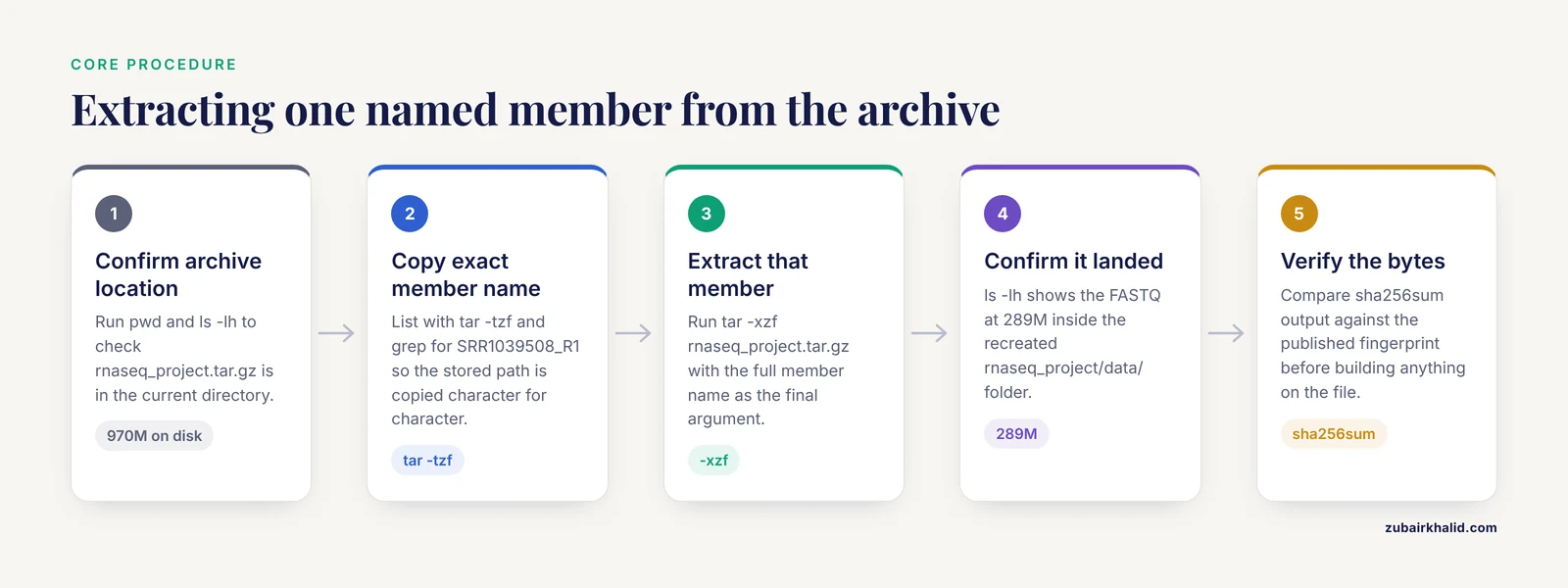
This is the core procedure, using the sample archive from the listing above.
- Confirm the archive is where you think it is.
    $ pwd
    /home/alex/scratch/downloads
    $ ls -lh rnaseq_project.tar.gz
-rw-r--r-- 1 alex lab 970M Nov 11 09:14 rnaseq_project.tar.gz- Get the exact member name from a listing, as shown in the previous section. For this walkthrough the target is rnaseq_project/data/SRR1039508_R1.fastq.gz.
    $ tar -tzf rnaseq_project.tar.gz | grep 'SRR1039508_R1'
rnaseq_project/data/SRR1039508_R1.fastq.gz- Extract that one member by name.
$ tar -xzf rnaseq_project.tar.gz rnaseq_project/data/SRR1039508_R1.fastq.gz- Confirm the file landed.
    $ ls -lh rnaseq_project/data/SRR1039508_R1.fastq.gz
-rw-r--r-- 1 alex lab 289M Nov 11 09:20 rnaseq_project/data/SRR1039508_R1.fastq.gz- Verify integrity before building anything on top of the file.
    $ sha256sum rnaseq_project/data/SRR1039508_R1.fastq.gz
    9f86d081884c7d659a2feaa0c55ad015a3bf4f1b2b0b822cd15d6c15b0f00a08  rnaseq_project/data/SRR1039508_R1.fastq.gz
A few parameter details prevent most failures. -x switches tar from listing to extraction. -z decompresses the gzip layer. -f points at the archive and must come last in the cluster: tar -xzf works because f is the final letter and consumes rnaseq_project.tar.gz as its argument, while tar -xfz makes tar look for an archive literally named z and fail. The member name after the options tells tar to write only that member, matched character for character against the stored name. tar recreates any parent directories it needs, so step 3 produces rnaseq_project/data/ and the FASTQ inside it, and nothing else from the archive is touched. tar is silent on success, so no output means the file was written. Add -v if you want the name echoed as it is extracted.
Extract Several Named Files in One Pass
Pass multiple member names after the options:
$ tar -xzf rnaseq_project.tar.gz \
  rnaseq_project/data/SRR1039508_R1.fastq.gz \
  rnaseq_project/data/SRR1039508_R2.fastq.gz \
  rnaseq_project/README.md
One invocation reads the compressed stream once. Three separate single-file extractions decompress the stream three times, which on a multi-gigabyte archive wastes real time. Batch the names whenever you need more than one member.
Extract an Entire Directory
Name the directory member:
$ tar -xzf rnaseq_project.tar.gz rnaseq_project/referencetar extracts the directory and every member under it, in this case GRCh38.fa.gz. A trailing slash is optional. Like batching, this reads the stream only once, which matters when the subtree sits deep in a large archive.
Extract Files That Match a Pattern
When you want every member that matches a shape rather than exact names, use a wildcard, a pattern character such as * that stands in for any string. GNU tar, the default on most Linux distributions, treats extraction names as literal text unless you add its wildcards long option:
$ tar -xvzf rnaseq_project.tar.gz --wildcards 'rnaseq_project/data/*.fastq.gz'
rnaseq_project/data/SRR1039508_R1.fastq.gz
rnaseq_project/data/SRR1039508_R2.fastq.gz
Quote the pattern in single quotes so the shell passes it to tar untouched. Without quotes, the shell expands *.fastq.gz against your current directory before tar ever runs, which produces a confusing failure covered in the mistakes section.
macOS and Windows ship bsdtar, a different implementation from the libarchive project, and it matches wildcard patterns by default, so the same command without the wildcards option works there. If you move between systems, the grep-the-listing habit stays the same on both.
Preview a File Without Writing It to Disk
The -O option sends the member to standard output (the stream a program writes results to) instead of to disk:
$ tar -xOzf rnaseq_project.tar.gz rnaseq_project/results/counts.tsv | head
gene_id          sample       count
ENSG00000223972  SRR1039508   4
ENSG00000269831  SRR1039508   12
...
Pipe it into less to page through a file, into wc -l to count lines, or straight into the tool that will consume it. The same trick reads a compressed member nested inside the archive without a second extraction step:
$ tar -xOzf run_archive.tar.gz logs/pipeline.log.gz | gunzip | lesstar writes the raw bytes of the member, gunzip decompresses them, and nothing temporary ever touches the disk.
Drop Parent Folders with strip-components
Release tarballs from GitHub and many toolchains wrap everything in one top-level folder such as tool-1.2/. To take a single file out without recreating that folder, use the strip-components long option with a number:
$ tar -xzf tool-1.2.tar.gz --strip-components=1 tool-1.2/bin/toolThe value 1 removes one leading component from every extracted name, so tool-1.2/bin/tool lands as bin/tool relative to your current directory. Set the number to match how many folders you want to shed, and combine it with -C to control both ends of the path.
Work with .tgz, .tar.bz2 and .tar.xz
A .tgz file is a .tar.gz under another name, and every command in this guide works on it unchanged. Modern versions of GNU tar and bsdtar detect the compression layer automatically when reading, so tar -xf archive.tar.gz works as well as tar -xzf, and the same command handles .tar.bz2 and .tar.xz files. The explicit letters still exist (-j selects bzip2, -J selects xz), and many bioinformaticians keep -z in scripts because it documents the expected format for the next person who reads the command.
One trend worth tracking as data volumes grow: compression is increasingly built into the data formats themselves rather than wrapped around them. Structural biology moved in this direction with BinaryCIF and the CIFTools libraries for Java and TypeScript, which pair a purpose-built serialization with efficient handling of compressed structural data [1]. When a format offers native tooling like that, prefer it, and reserve tar.gz for bundling and transport.
Key tar Options at a Glance
| Option | Meaning | Example |
|---|---|---|
| , - | , - | , - |
| -t | List members, extract nothing | tar -tzf a.tar.gz |
| -x | Extract members | tar -xzf a.tar.gz member |
| -z | Filter the archive through gzip | tar -xzf a.tar.gz |
| -f FILE | Read or write archive FILE, keep last in a cluster | tar -xzf a.tar.gz |
| -v | Print each member as it is processed | tar -xvzf a.tar.gz |
| -O | Write members to standard output | tar -xOzf a.tar.gz member |
| -C DIR | Extract into DIR | tar -xzf a.tar.gz -C /scratch/alex member |
| -k | Keep existing files, refuse to overwrite | tar -xzkf a.tar.gz member |
| wildcards | Treat names as patterns (GNU tar long option) | tar -xzf a.tar.gz, wildcards '*.bed' |
| strip-components=N | Remove N leading path components from names | tar -xzf a.tar.gz, strip-components=1 t/bin/x |
Exact Error Messages and How to Fix Them
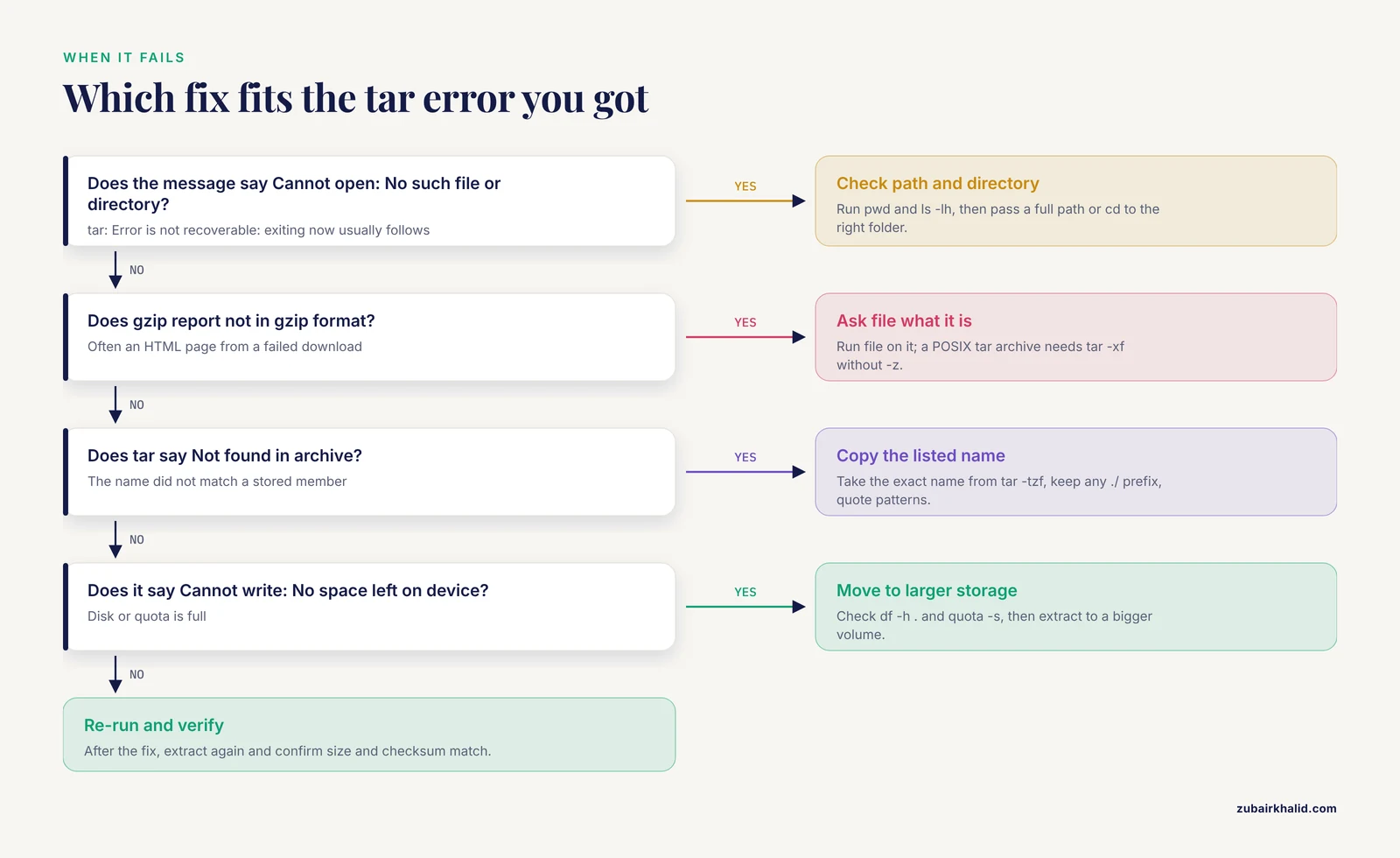
GNU tar and bsdtar word their messages differently, but the causes are identical. These are the failures you will meet most, shown with GNU tar wording. In these messages, stdin means standard input, the stream a program reads from.
tar: rnaseq_project.tar.gz: Cannot open: No such file or directory
Followed by tar: Error is not recoverable: exiting now. The archive path is wrong or you are in the wrong directory. Run pwd and ls -lh to confirm the file exists where you think it does, then pass a full path or cd into the right directory.
gzip: stdin: not in gzip format
The full pattern usually looks like this:
gzip: stdin: not in gzip format
tar: Child returned status 1
tar: Error is not recoverable: exiting now
The file is not gzip-compressed. It might be a plain .tar, a .zip, or an HTML error page saved by a failed download link. Ask the file command what it sees:
$ file mystery.tar.gz
mystery.tar.gz: POSIX tar archive
If it reports a POSIX tar archive, drop the -z and use tar -xf. If it reports Zip archive data, use unzip. If it reports HTML, the download failed and you need the real file from the source.
gzip: stdin: unexpected end of file
Often paired with tar: Unexpected EOF in archive. The archive is truncated, usually by an interrupted download or copy. Compare the byte count from ls -l against the size published at the source, re-download (wget -c resumes a partial transfer), and verify a checksum if one is provided. Never trust data extracted from a truncated archive.
tar: rnaseq_project/data/SRR1039508_R1.fastq.gz: Not found in archive
Followed by tar: Exiting with failure status due to previous errors. The name you passed does not match any stored member. The usual causes are a missing ./ prefix, a wrong directory depth, a case mismatch, or a wildcard pattern passed to GNU tar without its wildcards option. Copy the name straight from tar -tzf output, quote every pattern, and add the wildcards option when you mean a pattern rather than a literal name.
tar: rnaseq_project/data/SRR1039508_R1.fastq.gz: Cannot open: Permission denied
The target location is not writable. This is common on clusters where home directories carry quotas and shared reference areas are read-only. Extract into scratch with -C, and check the target with ls -ld:
$ mkdir -p /scratch/alex/rnaseq
$ tar -xzf rnaseq_project.tar.gz -C /scratch/alex/rnaseq rnaseq_project/data/SRR1039508_R1.fastq.gz
tar: rnaseq_project/data/SRR1039508_R1.fastq.gz: Cannot write: No space left on device
The disk or your quota is full. Check df -h . for the filesystem and quota -s on cluster home directories, extract to a larger volume, and remove the archive only after the extracted files verify.
Verify the Extracted File
Three checks take under a minute and catch nearly everything that goes wrong.
Size and type. Compare the size against the tar -tvzf listing, and ask file what it sees:
$ ls -lh rnaseq_project/data/SRR1039508_R1.fastq.gz
$ file rnaseq_project/data/SRR1039508_R1.fastq.gz
rnaseq_project/data/SRR1039508_R1.fastq.gz: gzip compressed data
Checksum. A checksum is a fixed-length fingerprint computed from the bytes of a file. If two files share a SHA-256 fingerprint, their contents match for practical purposes. Distributors of reference genomes and tool releases commonly publish checksum files, and clusters often publish them for reference builds. Compare your fingerprint against the published value:
$ sha256sum rnaseq_project/data/SRR1039508_R1.fastq.gz
9f86d081884c7d659a2feaa0c55ad015a3bf4f1b2b0b822cd15d6c15b0f00a08  rnaseq_project/data/SRR1039508_R1.fastq.gz
md5sum works the same way with the older MD5 fingerprint, which is still what many older reference bundles ship.
Content sanity. For sequence files, look at the head and confirm the records parse:
$ tar -xOzf rnaseq_project.tar.gz rnaseq_project/reference/GRCh38.fa.gz | gunzip | head
>chr1
NTT...
A FASTA file should show headers beginning with > and clean sequence lines. A FASTQ should show four-line records beginning with @. If you still have the original file outside the archive, diff -q original extracted prints nothing when they are identical.
Practical Tips for Large Bioinformatics Archives
- Extract into scratch, not home. Scratch is temporary, high-throughput storage on clusters, and it is where extracted data belongs. Prepare the target with mkdir -p and use -C so the command works from any directory.
- Batch members in one invocation. Every tar run re-reads the stream from the start. Ten separate single-member extractions from a 50 GB archive decompress up to 500 GB of stream. One run with ten names decompresses the stream once, up to the deepest member.
- Save a manifest once. tar -tzf archive.tar.gz > manifest.txt gives you a permanent index you can grep without touching the archive again, and it doubles as the file list for verification scripts.
- Pull files from a remote machine without copying the archive:
$ ssh alex@cluster 'cat /data/rnaseq_project.tar.gz' | tar -xzf - rnaseq_project/README.mdThe trailing - tells tar to read the archive from standard input. Only the members you name cross the network as extracted bytes, not the whole archive.
- Know the equivalent long form. gzip -dc rnaseq_project.tar.gz | tar -xf - does the same job and helps on the rare systems where a tar build lacks gzip support built in.
- For data you query repeatedly, move it into an indexed format instead of re-extracting. Coordinate-sorted intervals and variants fit bgzip plus tabix, which index compressed files for direct lookup by region. Purpose-built serialization follows the same logic in structural data, where the BinaryCIF approach to macromolecular archiving was designed for exactly this kind of efficient access [1].
- Write the command into the pipeline that uses the file, whether that is a shell script, a Snakemake rule or a Nextflow process, so the extraction is reproducible instead of living in shell history.
- Protect the source. chmod a-w on the archive prevents accidental modification, keep its checksum beside it, and delete it only after the extracted files verify.
Common Mistakes and Limitations
Guessing names instead of listing. Almost every Not found in archive error starts here. List first, copy the exact name, then extract.
Putting -f anywhere but last. tar -xfz a.tar.gz makes tar look for an archive named z and fail with tar: z: Cannot open: No such file or directory. Keep -f as the final letter: -xzf, -xvzf and -xOzf all end in f for this reason.
Leaving patterns unquoted. With an unquoted *.fastq.gz, the shell expands the pattern against your current directory before tar runs. If a file there matches, tar receives that filesystem path, does not find it as a member, and reports Not found in archive. Single-quote every pattern.
Extracting into the wrong directory. Running the command in $HOME scatters rnaseq_project/ across your home folder. Use mkdir -p plus -C so the destination is explicit and repeatable.
Expecting random access. A tar.gz has no index. Extracting one member decompresses the stream from the beginning, and listing costs a full read too, because DEFLATE back-references tie every block to the bytes before it. Budget for that when the archive is large and lives on slow storage.
Overwriting files by accident. GNU tar overwrites existing files silently by default. Add -k (the keep-old-files behavior) to make tar refuse to clobber, or the skip-old-files behavior to skip existing members without an error. bsdtar accepts -k as well.
Extracting untrusted archives carelessly. Modern GNU tar and bsdtar strip leading slashes and refuse parent-directory escapes by default, but the safe habit is to list an unknown archive before extracting it and never extract anything as root that you have not reviewed. tar also restores stored permissions and timestamps, which is a feature for pipelines and a hazard when you did not create the archive.
Trying to append to a compressed archive. tar cannot add members to a .tar.gz in place and exits with tar: Cannot update compressed archives. Keep an uncompressed .tar while a project is active and compress it when you finish, or rebuild the archive.
Limitations of the format itself
The constraints are structural, not mistakes. No index means no seeking, no verification of a single member without reading the stream, and little room for parallel decompression of one gzip stream. None of this makes tar.gz a poor choice. It remains the right tool for moving a directory tree as one file with one checksum, and the extraction skills above cover daily needs. When a workload outgrows it, the durable answer is a container or format with built-in compression and dedicated tooling, the direction structural biology data standards took with BinaryCIF [1], rather than a harder fight with tar.
Next Steps
- Put the extraction command, with its checksum check, into the script or workflow that consumes the file.
- Learn the creation side, tar -czf, because knowing how archives are built makes their member names predictable.
- Practice the -O pattern until piping a member into samtools, bedtools or your parser of choice is reflexive.
- Ship a checksum file beside every archive you distribute, so the people downstream of you can verify with one command.
Frequently Asked Questions
How do I extract a single file from a tar.gz without extracting everything?
List the archive with tar -tzf to get the exact member name, then run tar -xzf archive.tar.gz with that name as the final argument. tar writes only that member and recreates its parent folders.
Why does tar say Not found in archive when the file is in the listing?
The name you passed does not match the stored member exactly. The usual causes are a missing ./ prefix, a wrong directory depth, or a wildcard pattern given to GNU tar without its wildcards option. Copy the name straight from the tar -tzf output.
How do I extract a file into a different directory?
Add -C /path/to/target before the member name, and create the target first with mkdir -p. tar creates the member's own subfolders but not the -C directory itself.
Can I look at a file inside a tar.gz without extracting it to disk?
Yes. Use -O to send the member to standard output and pipe it, for example tar -xOzf archive.tar.gz data/file.tsv | less. Nothing is written to disk.
Does extracting one file still decompress the whole archive?
Everything up to that file, yes. Both the tar structure and the gzip layer are strictly sequential, so tar decompresses from the start of the stream until it reaches the member you named.
How do I extract all files that match a pattern such as *.fastq.gz?
On GNU tar, add the wildcards long option and quote the pattern (tar -xzf archive.tar.gz, wildcards 'data/*.fastq.gz'). On macOS and Windows, bsdtar matches patterns by default, so the same command works without the option.
What is the difference between tar -xzf and tar -xf?
The -z letter forces the gzip filter, while recent GNU tar and bsdtar versions detect the compression automatically when reading. tar -xf therefore works on .tar.gz, .tgz, .tar.bz2 and .tar.xz alike. Keeping -z in scripts documents the expected format.
How do I confirm the extracted file is intact?
Compare its sha256sum or md5sum fingerprint against the checksum published with the archive, and check that the file size matches the tar -tvzf listing. For sequence files, a quick head also shows whether the records parse.