How to Extract Sequence Regions from FASTA Files Using awk and sed
By Dr. Zubair Khalid, DVM, MS, PhD ·
By the end of this article you will be able to pull a single sequence out of a multi-sequence FASTA file by name, cut a region out of a sequence by start and end coordinates, extract many regions at once from a table of coordinates, and verify that each extraction returned exactly the bases you asked for. You will do all of this with awk and sed, the two text-processing tools that ship with every Linux distribution and macOS install.
You need a terminal, awk, sed, grep, and cut. These are preinstalled on Linux for bioinformatics work and on macOS. If you work on Windows, install Windows Subsystem for Linux (WSL) or use Git Bash so you get the same shell environment. No other software is required for the core walkthrough, and every command runs in seconds on files of ordinary size.
Why awk and sed belong in every bioinformatics toolkit
A FASTA file is plain text. That single fact explains most of this workflow. The FASTA format stores each sequence under a header line that begins with the greater-than character, followed by the sequence itself split across one or more lines. Because the file is plain text with a predictable structure, the classic Unix stream editors can read it, filter it, and slice it without loading it into a spreadsheet or writing a Python script.
awk is a pattern-scanning language built for column-based text. It reads a file line by line, applies rules you write, and can count, accumulate, and print. sed, the stream editor, is built for line addressing: it can print specific line numbers, delete lines matching a pattern, and perform substitutions. Linux commands like these were designed to be piped together, and bioinformatics adopted them early for exactly that reason. When you know awk and sed, you can inspect a 40 GB genome file before downloading a single specialized tool.
The two tools divide the work cleanly. awk understands fields, arrays, and arithmetic, so it handles sequence coordinates and multi-record logic. sed handles simple line ranges and pattern matches. Most extraction problems in practice are awk problems, and sed fills in the narrow cases where line numbers are what you actually care about.
The FASTA format rules that affect extraction
Three properties of FASTA files control every command in this article.
- Header lines start with >. The first word after the > is the sequence identifier. NCBI documents the identifier as the first word on the header line, and almost every downstream tool treats it that way. A header like
>chr1 synthetic chromosomehas the identifierchr1and a description after it. - Sequences can wrap across many lines. Standard FASTA wraps sequences at a fixed width, often 60 or 80 characters. Any coordinate-based extraction must therefore be aware that one biological sequence spans many text lines.
- Coordinates are 1-based. The first base of a sequence is base 1. awk's substr function is also 1-based, which makes the two agree naturally. This differs from BED files, which use 0-based starts, a mismatch that causes more extraction bugs than anything else.
Quick reference for extracting regions from FASTA files
The table below collects the command patterns used throughout the walkthrough. The region length formula is always the same: region length equals end minus start plus 1.
| Task | Tool | Command pattern | Notes | |
|---|---|---|---|---|
| Count records | grep | grep -c "^>" file.fa | One header per record | |
| List identifiers | awk | awk '/^>/{print $1}' file.fa | First word of each header | |
| Extract one whole record | awk | flag variable set on the target header | Streaming, low memory | |
| Extract bases by coordinates | awk | substr(seq, start, end - start + 1) | 1-based, inclusive | |
| Slice a flat single-line file | sed plus cut | `sed -n '/^>id$/{n;p}' flat.fa \ | cut -c101-200` | Works when sequence is one line |
| Extract many records by ID | awk | two-file pattern with NR==FNR | IDs read from a list file | |
| Extract many regions by coordinates | awk | coordinates read from a tab-separated file | Handles wrapped sequences | |
| Fix Windows line endings | sed | sed 's/\r$//' in.fa > out.fa | Run before any coordinate math |
Set up a test file
Run every command in the walkthrough against this file so you can compare your output character by character. Create it by pasting the following block into your terminal.
cat > test.fa <<'EOF'
>chr1 synthetic chromosome one
ACGTTGCAAGGCTTACCGAT
TTGCAAGGCTTACCGATACG
>chr2 synthetic chromosome two
GGCATTACGCGTATCGAATTC
EOF
chr1 has two sequence lines of 20 bases each, for a total length of 40. chr2 has one line of 20 bases. Using a file this small is deliberate: you can verify every extraction by eye, which is the habit that keeps large-scale extractions honest later.
First, confirm the record count and list the identifiers.
grep -c "^>" test.fa
awk '/^>/{print $1}' test.fa
Expected output:
2
>chr1
>chr2
Step-by-step: extract sequence regions from FASTA files with awk and sed
Step 1. Extract one whole sequence record by name
The safest awk pattern for pulling one record uses a flag that turns on at the target header and off at the next header. The flag check at the end of the program prints every line while the flag is on, including the header itself.
awk '
/^>/ {
  if (f) exit
  f = ($1 == ">chr1")
}
f
' test.fa
Expected output:
>chr1 synthetic chromosome one
ACGTTGCAAGGCTTACCGAT
TTGCAAGGCTTACCGATACG
How it works, line by line. The first rule fires on every header. If the flag is already on, the record you wanted is complete and exit stops reading the file, which saves time on large files. Otherwise the comparison $1 == ">chr1" sets the flag to 1 only when the first field of the header matches. Matching $1 rather than the whole line means the command works whether or not the header carries a description. The bare f on its own line is awk shorthand for "print the current line when f is nonzero."
If you want the sequence without the header, move the flag assignment so it takes effect after the current line is printed, or filter the output through grep -v "^>".
Step 2. Extract a coordinate region from a single-line sequence
When a sequence sits on one text line, substr does all the coordinate work. substr takes three arguments: the string, the 1-based start position, and the number of characters to return. To get bases 5 through 12 of chr1, the start is 5 and the length is 12 minus 5 plus 1, which is 8.
awk '/^>chr1/{getline s; print substr(s, 5, 8)}' test.faExpected output:
TTGCAAGGCheck it by hand against the first line of chr1, ACGTTGCAAGGCTTACCGAT. Position 1 is A, position 2 is C, position 3 is G, position 4 is T, position 5 is T. Counting eight bases from there gives T, T, G, C, A, A, G, G. The output matches.
Make the coordinates parameters instead of constants so you can reuse the command in a loop or a shell script.
awk -v s=5 -v e=12 '/^>chr1/{getline x; print substr(x, s, e - s + 1)}' test.faThis form works only when the whole sequence is on the line immediately after its header. Wrapped sequences need the next step.
Step 3. Extract a coordinate region from a wrapped, multi-line sequence
Real FASTA files wrap their sequences, so a region such as chr1 bases 15 to 30 spans two text lines. The general solution concatenates the sequence lines for the record you care about and then applies substr to the joined string.
awk '
/^>chr1/ {
  getline id_header
  s = ""
  while ((getline line) > 0 && line !~ /^>/) {
    s = s line
  }
  print substr(s, 15, 16)
}
' test.fa
Expected output:
ACCGATTTGCAAGGCTThe while loop appends lines to the string s until it hits the next header or the end of the file. The region length is 30 minus 15 plus 1, which is 16, so the third substr argument is 16. Verify by hand: chr1 line 1 is ACGTTGCAAGGCTTACCGAT, and bases 15 through 20 of that line are A, C, C, G, A, T. Line 2 is TTGCAAGGCTTACCGATACG, and bases 21 through 30 are its first 10 characters, T, T, G, C, A, A, G, G, C, T. Joined together that is ACCGATTTGCAAGGCT, which is exactly what awk printed.
One caution on getline: it reads the next line outside awk's normal loop, and if it hits an end-of-file condition it returns a failure value that some scripts forget to test. The (getline line) > 0 test handles that correctly. For a single quick extraction it is fine. For anything you plan to keep, the two-pass and region-table patterns in step 5 are more robust because they never call getline at all.
Step 4. Extract many sequences by identifier list
Suppose you have a list of identifiers in ids.txt, one per line, and you want every matching record from a FASTA file. The two-file awk pattern reads the small file first and the FASTA second, using the condition NR==FNR to tell the two apart. NR counts all lines read so far and FNR counts lines within the current file, so the two are equal only while awk reads the first file.
cat > ids.txt <<'EOF'
chr2
EOF

awk '
NR==FNR {
  want[$1] = 1
  next
}
/^>/ {
  keep = ($1 in want)
}
keep
' ids.txt test.fa
Expected output:
>chr2 synthetic chromosome two
GGCATTACGCGTATCGAATTC
Inside the program, want[$1] = 1 stores each requested identifier as an array key. The header rule sets keep to 1 or 0 for every record as each header passes, and keep prints sequence lines only while the current record is wanted. Add more identifiers to ids.txt and rerun, and every matching record comes out in file order.
Step 5. Extract many coordinate regions from a table
The most useful version of this workflow reads a tab-separated table of coordinates, extracts every region, and writes each one as its own FASTA record. Create the table. Columns are identifier, start, end.
cat > regions.tsv <<'EOF'
chr1	15	30
chr2	1	10
EOF

awk '
NR==FNR {
  start[$1] = $2
  end[$1] = $3
  next
}
/^>/ {
  if (id != "" && (id in start)) {
    print ">" id
    print substr(seq, start[id], end[id] - start[id] + 1)
  }
  id = $1
  sub(/^>/, "", id)
  seq = ""
  next
}
{
  seq = seq $0
}
END {
  if (id != "" && (id in start)) {
    print ">" id
    print substr(seq, start[id], end[id] - start[id] + 1)
  }
  seq = ""
}
' regions.tsv test.fa
Expected output:
>chr1
ACCGATTTGCAAGGCT
>chr2
GGCATTACGC
The program builds the full concatenated sequence for each record as it streams past. When the next header arrives, or the file ends, it checks whether the finished record has an entry in the coordinate table and prints the requested slice. Sequence lines are joined without separators, so coordinates refer to the biological sequence rather than to text line positions, which is what you want.
If your regions file is huge and your genome is large, this script keeps every requested region's coordinates in memory but only one sequence at a time, so its memory use stays modest. The genuinely memory-heavy pattern, storing all sequences in an array and printing at the end, is avoidable with the structure above and worth avoiding at genome scale.
Step 6. Use sed for line-based extraction
sed addresses lines, so it shines in two situations: pulling header lines, and slicing records whose sequences have been flattened to one line. First flatten the test file so each record is a header plus exactly one sequence line.
awk '
/^>/ {
  if (NR > 1)
    print ""
  print
  next
}
{
  printf "%s", $0
}
END {
  print ""
}
' test.fa > flat.fa

cat flat.fa
Expected output:
>chr1 synthetic chromosome one
ACGTTGCAAGGCTTACCGATTTGCAAGGCTTACCGATACG
>chr2 synthetic chromosome two
GGCATTACGCGTATCGAATTC
Now sed can address the sequence line by a pattern on the header. The command n reads the next line into the pattern space, and p prints it, so together they print the line after each matching header.
sed -n '/^>chr1$/{n;p}' flat.faExpected output:
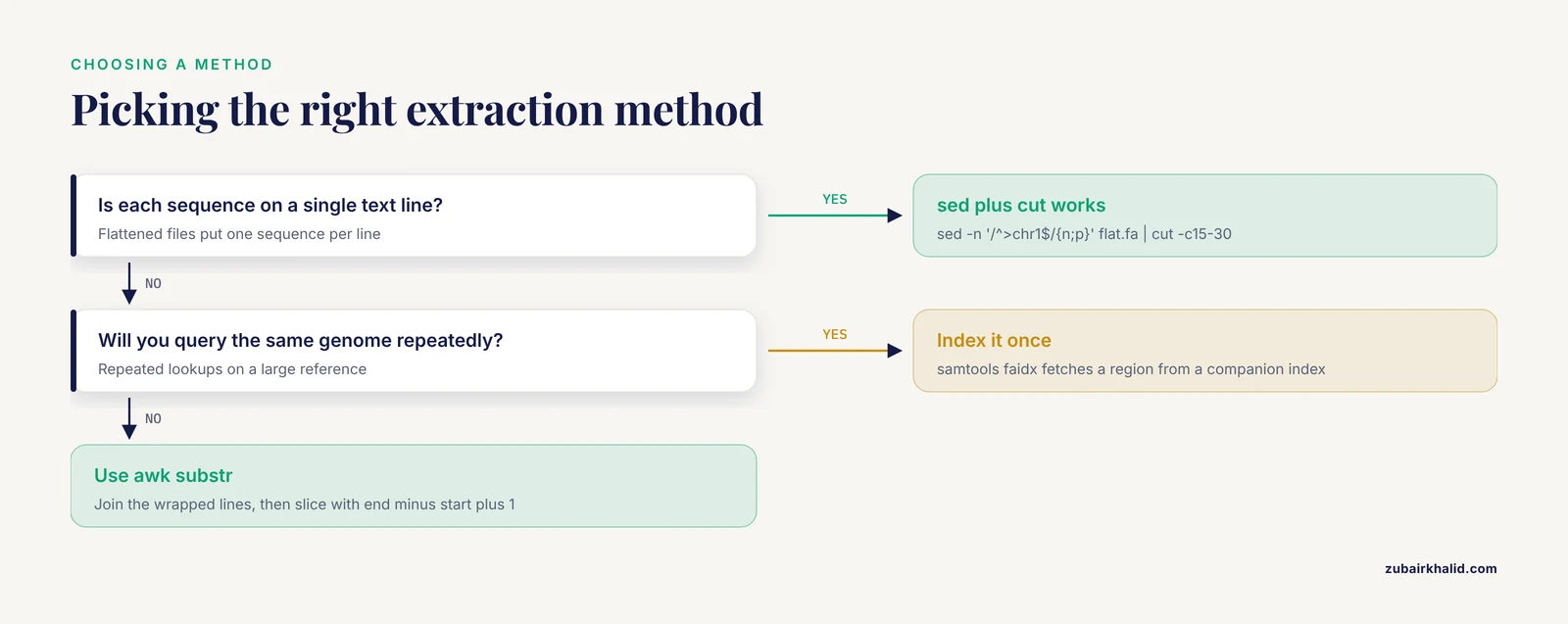
ACGTTGCAAGGCTTACCGATTTGCAAGGCTTACCGATACGPipe that into cut to take a column range. cut -c is 1-based and inclusive, matching FASTA coordinates exactly, so chr1 bases 15 through 30 are columns 15 to 30.
sed -n '/^>chr1$/{n;p}' flat.fa | cut -c15-30Expected output:
ACCGATTTGCAAGGCTThis matches the awk result from step 3, which is a good habit to build: two independent methods that agree is evidence your extraction is right. sed can also print a range between two headers, but the closing pattern's line comes with the output, so a second sed pass removes it.
sed -n '/^>chr1$/,/^>chr2$/p' test.fa | sed '$d'Expected output:
>chr1 synthetic chromosome one
ACGTTGCAAGGCTTACCGAT
TTGCAAGGCTTACCGATACG
The sed '$d' deletes the final line, which here is the chr2 header that the range rule pulled in. This trick only works when the end pattern is the header of the very next record. With wrapped sequences, unknown downstream neighbors, or repeated identifiers, sed range matching becomes fragile. awk's flag pattern handles all of those cases, which is why the general recommendation is awk for record logic and sed for line numbers and simple substitution.
Step 7. Add a reverse-complement option
Region extraction frequently pairs with reverse-complementing a negative-strand region. This awk script complements each base and reverses the order, using a translation table built in a BEGIN block.
cat > revcomp.awk <<'EOF'
BEGIN {
  comp["A"] = "T"
  comp["T"] = "A"
  comp["G"] = "C"
  comp["C"] = "G"
  comp["N"] = "N"
}
/^>/ {
  print
  next
}
{
  n = split(toupper($0), base, "")
  out = ""
  i = n
  while (i >= 1) {
    out = out comp[base[i]]
    i--
  }
  print out
}
EOF

awk -f revcomp.awk test.fa
Expected output:
>chr1 synthetic chromosome one
CGTAAGGTAACCTGCAACGT
GCTACGGCAATTCGATGCGC
>chr2 synthetic chromosome two
GAATTCGATACGCGTAATGCC
Any character without an entry in the comp table, such as the IUPAC ambiguity codes R or Y, becomes an empty string and is dropped. Extend the table if your sequences contain those codes and you want to preserve them under a defined convention.
Step 8. Work with gzipped input
Most public FASTA files arrive gzipped. Stream the decompressed bytes straight into awk so nothing touches the disk as a plain file.
gzip -cd genome.fa.gz | awk '
/^>/ {
  if (f) exit
  f = ($1 == ">chr1")
}
f
'
The same works for sed and for the region-table script in step 5. If you expect to query the same compressed file many times, decompress it once to disk rather than paying the decompression cost on every run.
Practical tips for extracting sequence regions from FASTA files with awk and sed
- Always compute the length as end minus start plus 1. Writing
substr(s, 15, 30)when you meant bases 15 to 30 is the single most common bug in this workflow, because substr's third argument is a length, not an end coordinate. - Match identifiers on
$1, not on the full header line. Descriptions after the first space differ between database releases even when the identifier does not change. - Convert BED coordinates before using them here. A BED interval of start 14, end 30 describes bases 15 through 30 in 1-based FASTA terms, because BED is 0-based and treats the end as exclusive.
- Check for Windows line endings before doing coordinate math. Carriage returns inflate sequence lengths and shift every coordinate. The
filecommand reports "with CRLF line terminators" when they are present, andsed 's/\r$//'removes them. - Prefer streaming designs. Every script in the walkthrough processes one line at a time and holds at most one sequence in memory, which keeps behavior predictable on files far larger than your RAM.
- Test on a small file with hand-checkable answers, as this walkthrough does, before pointing a script at a genome. Two methods agreeing on the same region is the cheapest verification available.
Common Mistakes and Limitations
Treating substr's third argument as an end position. substr(s, 101, 200) returns 200 characters starting at base 101, ending at base 300. If your region is bases 101 to 200, the call must be substr(s, 101, 100). The correct length is always end minus start plus 1. A quick length check on the output catches this immediately: the printed sequence should contain exactly 100 characters.
Matching the full header line when the header has a description. The rule /^>chr1$/ requires the header to end right after chr1. In a file whose header reads >chr1 synthetic chromosome one, that rule never fires and awk prints nothing. Either match $1 == ">chr1" as in step 1, or use a prefix match such as /^>chr1 / when you genuinely need to constrain the description.
Letting the next record's header leak into output. Range-based extractions, especially sed's /start/,/end/ form, print the closing line, which is often the next record's header. In awk the fix is to reset the flag at every header before printing, or to exit once the wanted record is complete. If you see a stray > line at the bottom of your output, this is why.
Assuming one sequence per text line. Coordinates that look right on a flat file return the wrong bases on a wrapped file, because substr operates on text lines. Run the flattening step first, or use the concatenation approach in steps 3 and 5. The reverse is also true: flattening a file and then re-wrapping with fold -w 60 changes line numbers, which breaks any sed line-address logic you had built.
Confusing 1-based and 0-based coordinates. awk's substr and FASTA coordinates are 1-based. BED files are 0-based with exclusive ends. GFF files are 1-based with inclusive ends. Mixing these silently shifts every extraction by one base or drops one base at each end. Decide once, in your pipeline documentation, which convention each file uses.
Carriage returns and other invisible characters. Files edited on Windows carry \r at line ends. The sequence lengths your awk script reports will exceed the true lengths by the number of lines, and extracted regions will contain embedded carriage returns. Run file test.fa to check, and clean with sed 's/\r$//' or the dos2unix utility.
Blank lines and whitespace. Trailing blank lines inside records become part of a concatenated sequence in some scripts unless you guard against them. The pattern { seq = seq $0 } adds blank lines literally. Add a length check on $0 before appending, or strip trailing whitespace with a sed pass first.
Limits of these tools. awk and sed do not validate that your coordinates fall inside the sequence. A start beyond the sequence length returns an empty string from substr without any error, and an end beyond the sequence length silently truncates. Ambiguity codes beyond N are not complemented by the simple translation table. For repeated queries against a large reference genome, an indexed fetcher such as samtools faidx returns a region in a fraction of the time a full-file scan takes, because it reads only the bytes it needs from a companion index file. The awk approach remains the right tool for one-off extractions, for files without indexes, and for pipelines where awk is already running.
How to verify your extraction is correct
Verification takes three commands and removes nearly all doubt.
First, check the length. For chr1 bases 15 to 30, the expected length is 16.
awk '/^>chr1/ {
  getline x
  s = ""
  while ((getline line) > 0 && line !~ /^>/) {
    s = s line
  }
  r = substr(s, 15, 16)
  print length(r)
  print r
}' test.fa
Expected output:
16
ACCGATTTGCAAGGCT
Second, check the boundaries. Print one extra base on each side of the region and confirm the flanking bases match the source sequence. Bases 14 and 31 of chr1 are T and T, so the extended region should begin and end with T. If either flank disagrees with the source, your coordinates are shifted.
Third, cross-check with a second method. The step 3 awk result and the step 6 sed-plus-cut result produced the identical string ACCGATTTGCAAGGCT from two independent code paths. When a third tool such as samtools faidx is available, fetch the same region by name and coordinates and compare all three outputs. Agreement across independent implementations is stronger evidence than any single command run twice.
Scaling up: large files and pipelines
Everything in the walkthrough streams, so the whole-record and region-table patterns handle files many times larger than available memory. Two adjustments matter at scale. First, use mawk where it is installed, because its interpreter is substantially faster than gawk for this kind of line processing, and every construct used in this article is standard awk that mawk supports. Second, when the same genome will be queried repeatedly, index it once and fetch by coordinates, reserving the awk pipeline for batch jobs that touch many records in a single pass.
For reproducibility, save your awk programs as script files, as step 7 did with revcomp.awk, rather than embedding them in shell history. A directory of named awk scripts plus a small README describing each file's expected input is the simplest form of a durable bioinformatics pipeline, and it ports to any Linux machine without installation.
Frequently Asked Questions
Can sed extract bases 101 to 200 of a sequence directly?
No. sed addresses text lines, not sequence coordinates. If each sequence occupies a single line, pipe the sed output into cut -c101-200, which is 1-based and inclusive. For wrapped sequences, use awk's substr instead.
Are FASTA coordinates 0-based or 1-based?
FASTA coordinate extraction with substr is 1-based, so the first base is position 1 and a region of bases 15 to 30 is 16 bases long. BED files are 0-based with exclusive ends, so convert before mixing formats.
Why does my awk output include the next sequence's header?
The flag controlling your print rule was not reset when the next header arrived. Reset it at every line matching /^>/, or exit once the record you wanted is complete, as the walkthrough scripts do.
How do I extract a region from a gzipped FASTA file?
Stream it with gzip -cd file.fa.gz | awk '...' so the decompressed bytes flow straight into awk without writing an uncompressed copy to disk. The same pipe works for sed and grep.
What is the fastest way to extract many regions from a large genome?
Index the genome once with samtools faidx and fetch regions by name and coordinates. The awk scripts in this article are efficient for one-pass batch extraction of thousands of regions, but an indexed genome is faster when you query the same file repeatedly.
Does awk load the whole FASTA file into memory?
No. awk reads and processes one line at a time, so memory use is small and constant for the streaming scripts here. Memory grows only when you deliberately store sequences in arrays, as the multi-region script avoids doing.
How do I handle lowercase soft-masked bases in my extractions?
Soft-masked repeats appear as lowercase a, c, g, and t. Call toupper() on each line before matching or counting bases, and decide in advance whether masking information matters for your downstream analysis.
Can I run this workflow on macOS or Windows?
Yes on macOS, where awk, sed, grep, and cut are preinstalled, though BSD sed differs from GNU sed in a few flags. On Windows, install Windows Subsystem for Linux or use Git Bash to get the same command-line environment.