How to Export Ensembl Variants to UCSC
By Dr. Zubair Khalid, DVM, MS, PhD ·

By the end of this guide you will be able to take variant records out of Ensembl and display them as a working custom track on the UCSC Genome Browser. You will pull variants through four different Ensembl routes, convert them to BED format with correct coordinates, package large sets as a bigBed file, load everything into UCSC, and verify that the track lands on the right bases.
This is a surprisingly common task that trips up experienced analysts. Ensembl and UCSC use different coordinate conventions, different chromosome naming, and slightly different assembly labels. A variant that is one base off, or mapped to the wrong assembly patch, looks perfectly plausible on screen and is simply wrong. The steps below are built to avoid that class of error from the start.
One note on context. In production annotation work, tools such as the Ensembl Variant Effect Predictor (VEP, the command line tool that assigns functional consequences to variants) are usually run inside managed pipelines rather than as loose scripts. The MuSA pipeline, for example, wraps VEP with dozens of annotation plugins in a containerized Nextflow workflow precisely because manual configuration and ad hoc format conversion are the main reproducibility bottlenecks in variant work [1]. The export steps in this article borrow that same philosophy: scripted, deterministic, and verifiable at every stage.
What You Need Installed or On Hand
Before you start, have the following ready.
- A Unix-like command line (Linux, macOS, or Windows Subsystem for Linux).
curlfor HTTP requests, which ships with most systems.jqfor parsing JSON from the Ensembl REST API.bcftoolsandtabix(part of htslib) if you plan to work with VCF files.- The UCSC Kent utilities (
fetchChromSizesandbedToBigBed) if you expect large variant sets. These are available from the UCSC Genome Browser utilities download page or through package managers such as conda. - An Ensembl release number. Ensembl publishes a new release roughly every two to three months, so check the release banner at ensembl.org and substitute the current number wherever you see
113in the commands below. - A target UCSC assembly in mind, usually
hg38(which corresponds to GRCh38) orhg19(GRCh37).
No database access credentials are needed. Everything in this guide uses Ensembl's public, anonymous-access services.
Background: How Ensembl and UCSC Represent the Genome
Understanding two representational differences is what separates a correct export from a silently shifted one.
Coordinate systems
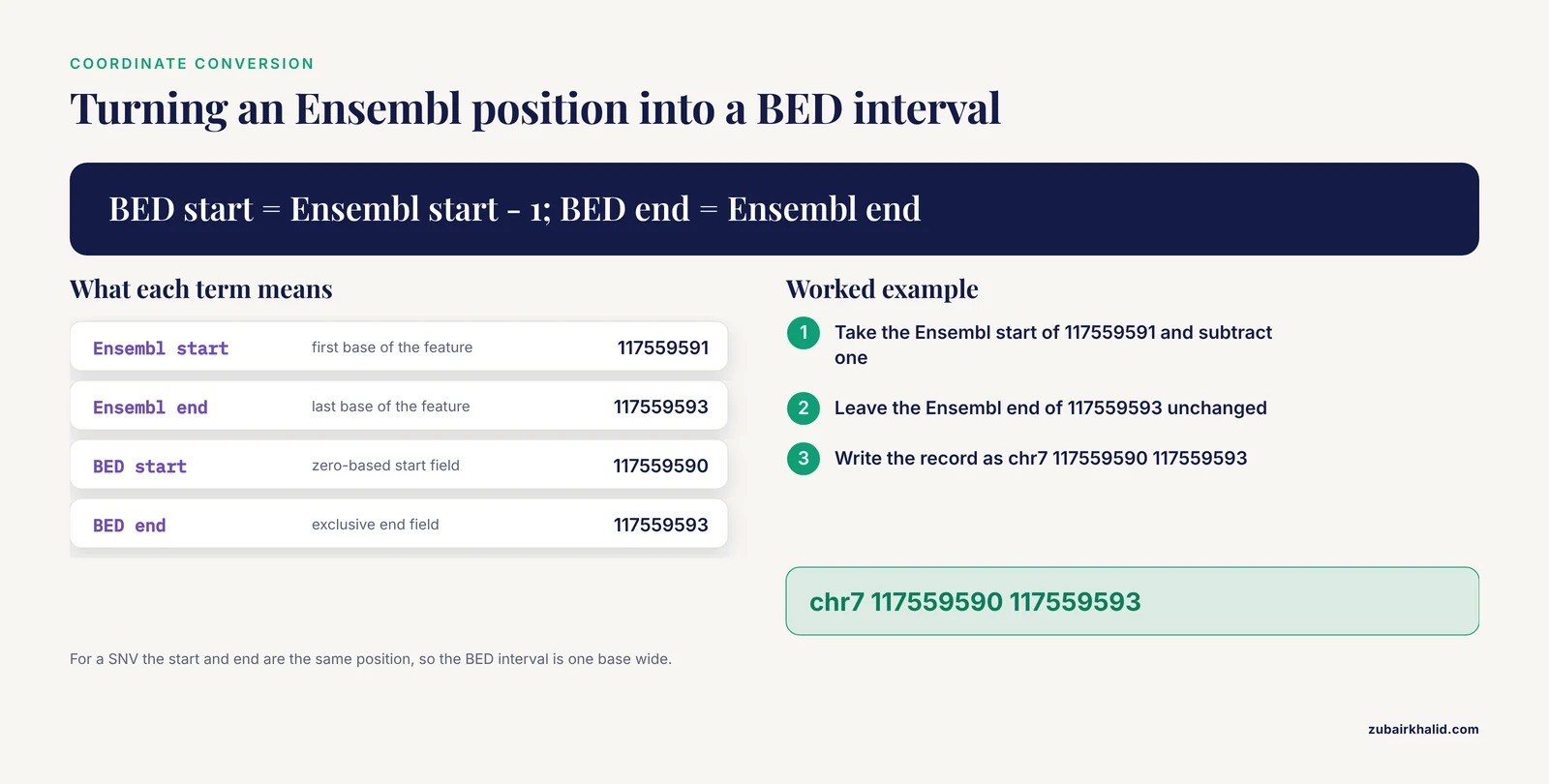
Ensembl reports genomic coordinates in 1-based, fully closed notation. Position 1 is the first base of a chromosome, and a feature listed as 7:100-105 includes bases 100 through 105.
The UCSC Genome Browser stores and displays intervals in BED-style 0-based, half-open notation. In a BED record, the start field counts from zero and the end field is exclusive. The same six bases that Ensembl writes as 7:100-105 become start=99, end=105 in BED.
The conversion rule is simple and worth memorizing:
- BED start = Ensembl start - 1
- BED end = Ensembl end (unchanged)
For a single-nucleotide variant (SNV, a variant affecting one base), Ensembl reports a start and end that are the same position. If Ensembl lists a SNV at 17:43044295 (example numbers), the BED record is chr17 43044294 43044295. For a 3-base deletion starting at 117559591, Ensembl writes 7:117559591-117559593 and the BED record becomes chr7 117559590 117559593.
Assembly and chromosome naming
Ensembl names assemblies with GRCh prefixes for human: GRCh38 is the current major assembly and GRCh37 is the previous one. UCSC names the corresponding human assemblies hg38 and hg19. These pairs are the same underlying assemblies with different patches and contigs included, so GRCh38 corresponds to hg38 and GRCh37 to hg19.
Chromosome naming also differs. Ensembl writes human chromosomes as 1, 2, X, MT. UCSC BED tracks expect chr1, chr2, chrX, chrM. Your conversion script must add the chr prefix and translate MT to chrM.
If you export from GRCh37 but load the track onto hg38 in UCSC, coordinates will be wrong by large distances, not by one base. Check the assembly twice, once at export and once when you select the genome in UCSC.
Choosing an Export Route
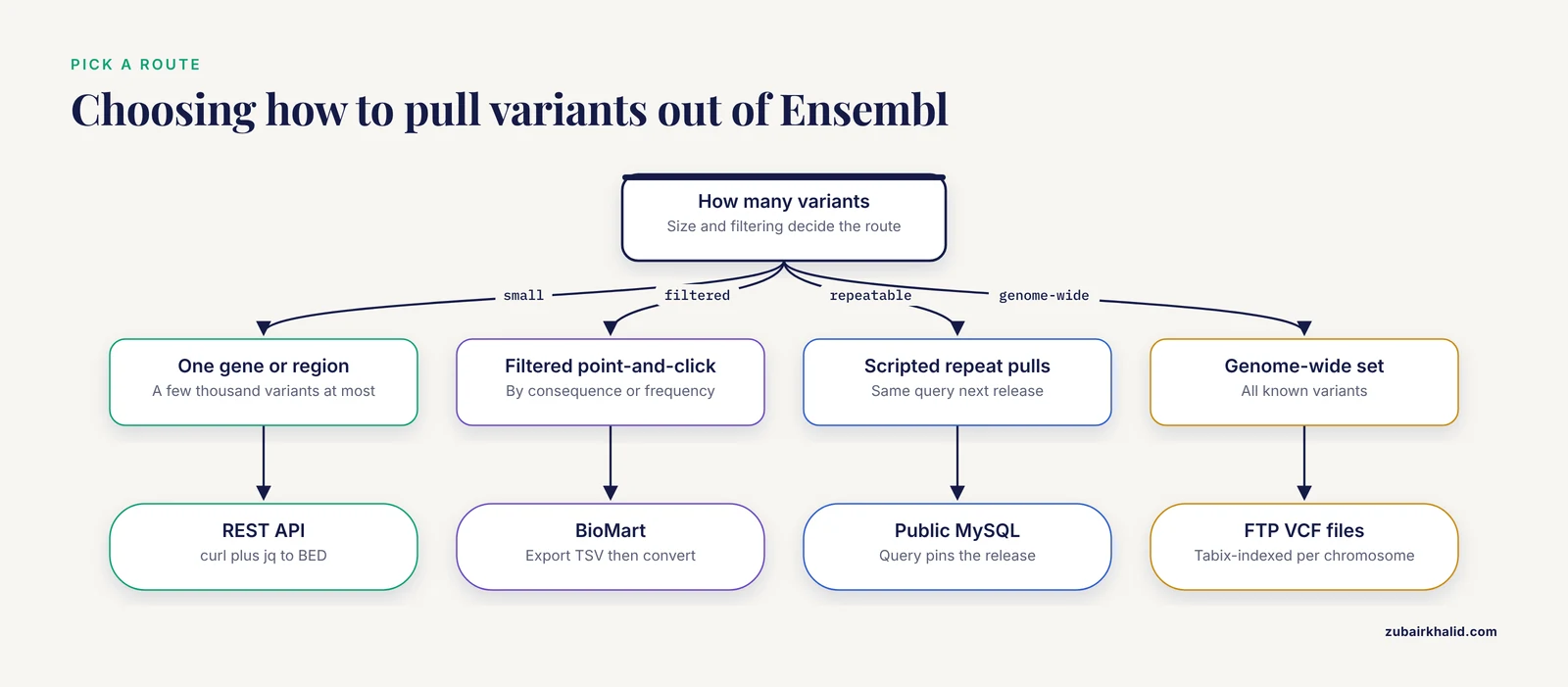
There are four practical ways to get variant data out of Ensembl, plus a fifth if your variants already went through VEP. Pick based on scale and how much annotation you need.
| Route | Best for | Typical scale | What you get |
|---|---|---|---|
| Ensembl REST API | A gene, region, or a few thousand variants | Up to a few Mb per request | JSON records with coordinates, IDs, consequences |
| BioMart (web interface) | Point-and-click exports, filtering by consequence or population frequency | Tens of thousands of rows | TSV or CSV table |
| Public MySQL server | Whole regions, many regions, scripted reproducible pulls | Millions of rows | Query result as TSV |
| Ensembl FTP VCF files | Genome-wide variant sets | All known variants | Compressed, tabix-indexed VCF |
| VEP output | Variants you just annotated | Whatever your VCF holds | VCF (or TSV) with consequence annotations |
The REST API and FTP VCF routes are the most scriptable. BioMart is the friendliest for one-off exports. The public MySQL server is the workhorse when you need the same query run again next release, which matters because reproducibility is a recognized weakness of hand-built variant workflows [1].
How to Export Ensembl Variants to UCSC, Step by Step
The walkthrough below uses a running example: export all known variants in the human CFTR region from GRCh38 and display them on UCSC hg38. Substitute your own coordinates and release number as needed.
Step 1. Install and sanity-check your tools
Confirm the essentials:
curl --version | head -1
jq --version
bcftools --version | head -1
tabix --version
Each command should print a version number. If jq or bcftools are missing, install them with your system package manager (apt-get install jq bcftools tabix on Debian or Ubuntu, brew install jq bcftools on macOS, or conda install -c bioconda bcftools tabix).
For the bigBed route, also install the Kent tools and check them:
fetchChromSizes hg38 > hg38.chrom.sizes
head -3 hg38.chrom.sizes
Expected output, with sizes that differ per assembly:
chr1	248956422
chr10	133797422
chr11	135086822
Note that the sizes file already uses chr-prefixed names, which is a useful reminder of what your BED records will need.
Step 2. Pull variants from Ensembl
Option A, the REST API (recommended for regions)
The Ensembl REST API serves the same data as the browser. The overlap endpoint returns variants in a genomic region. Request the CFTR region in GRCh38:
curl -H "Content-Type: application/json" \
     -H "Accept: application/json" \
     "https://rest.ensembl.org/overlap/region/human/7:117480025-117668665?feature=variation" \
     > cftr_variants.json
The parameters that matter here are:
7:117480025-117668665is the region inchromosome:start-endform, 1-based inclusive, in the assembly that the endpoint defaults to (currently GRCh38 for human). To pin the assembly explicitly, addcoord_system_version=GRCh38to the query string.feature=variationasks for variant features. Without it you get genes, transcripts, and regulatory features instead.- The
Accept: application/jsonheader requests JSON. The API also returns XML or GFF3 if you ask for those types, but JSON is easiest to script against.
The response is a JSON array in which each record carries the fields you will convert. Its shape looks like this, with real values filled in for whatever region you requested:
[
  {
    "seq_region_name": "7",
    "start": 117559591,
    "end": 117559593,
    "allele_string": "CTT/-",
    "strand": 1,
    "id": "rs0000000",
    "most_severe_consequence": "inframe_deletion",
    "assembly_name": "GRCh38"
  }
]
The record above uses placeholder values to show the structure. Notice that assembly_name is included in every record, which gives you a built-in assembly check. Convert straight to BED with jq:
jq -r '.[] | ["chr" + .seq_region_name, (.start - 1), .end, .id] | @tsv' \
   cftr_variants.json > variants.bed
Watch two details in that jq expression. The chr prefix is added here so you never have to patch it later. The (.start - 1) performs the 1-based to 0-based conversion at the source, which is the safest place to do it.
For large regions, the API is rate-limited, so batch your requests with pauses rather than hammering it in a tight loop.
Option B, BioMart (recommended for filtered, point-and-click exports)
BioMart is Ensembl's web-based query builder and is the quickest route when you want variants filtered by consequence type, minor allele frequency, or clinical significance.
- Go to ensembl.org and open BioMart from the tools menu.
- Choose Database "Ensembl Variation" (or the "Ensembl Genes" database if you want variant-anchored gene attributes).
- Select the human dataset and confirm the release and assembly shown in the header match your target.
- Under Filters, restrict by region (for example chromosome 7, start 117480025, end 117668665) and optionally by consequence type such as missense variant.
- Under Attributes, select Variation name, Chromosome name, Chromosome start, Chromosome end, and Allele.
- Click Results, choose TSV, and export the file.
The exported TSV has Ensembl 1-based coordinates and unprefixed chromosome names. Convert it the same way as any other table:
awk 'BEGIN{OFS="\t"} NR>1 {print "chr"$2, $3-1, $4, $1}' biomart_export.tsv > variants.bedThe NR>1 skips the header row. BioMart column order depends on the attributes you selected, so check the header before hard-coding field positions.
Option C, the public MySQL server (recommended for reproducible pulls)
Ensembl mirrors its databases on a public read-only MySQL server at ensembldb.ensembl.org, reachable with the username anonymous and no password. The variation tables (notably variation_feature, which holds mapped coordinates and allele strings) live inside each species' core database.
Test the connection and list available human databases:
mysql -u anonymous -h ensembldb.ensembl.org -P 3306 \
  -e "SHOW DATABASES LIKE 'homo_sapiens_core%';"
You will see one database per release and assembly, named like homo_sapiens_core_113_38, where 113 is the release and 38 is GRCh38. Query the CFTR region in that database:
mysql -u anonymous -h ensembldb.ensembl.org -P 3306 \
  -e "SELECT sr.name, vf.start, vf.end, vf.variation_name, vf.allele_string
      FROM homo_sapiens_core_113_38.variation_feature vf
      JOIN homo_sapiens_core_113_38.seq_region sr
        ON sr.seq_region_id = vf.seq_region_id
      WHERE sr.name = '7'
        AND vf.start BETWEEN 117480025 AND 117668666
        AND vf.variation_name NOT LIKE ''" \
  --batch > mysql_out.tsv
Two notes on this query. The seq_region join resolves internal numeric region IDs into chromosome names. The upper bound in BETWEEN is end + 1 so that variants overlapping the region boundary are caught, matching how Ensembl itself defines overlap. Convert to BED the same way as the BioMart TSV. If you hit ERROR 1045 (28000): Access denied for user, the username or host is wrong, and the fix is to use exactly anonymous at ensembldb.ensembl.org.
This route is the most release-stable. Because the query text pins the release number, rerunning it against a new release database is a one-character change, which is the kind of determinism that containerized variant pipelines are designed to enforce [1].
Option D, the Ensembl FTP VCF files (recommended for genome-wide sets)
Ensembl publishes all known variants as compressed, tabix-indexed VCF files under the variation/vcf/homo_sapiens/ directory of each release on ftp.ensembl.org. File names include the assembly, release, and chromosome, and the exact naming convention varies by release, so list the directory first.
Because the files are tabix-indexed, you can stream just one region without downloading the whole chromosome:
tabix ftp://ftp.ensembl.org/pub/release-113/variation/vcf/homo_sapiens/Homo_sapiens.GRCh38.113.chr7.vcf.gz \
  7:117480025-117668665 > cftr.vcf
If the URL form of tabix is blocked on your network, download the file with wget or curl first, then query the local copy. This VCF is Ensembl's own variant set, so its ##assembly=GRCh38 header line doubles as documentation of what you exported.
Step 3. Convert VCF output to BED
If you came from the FTP route, or from VEP with -vcf output, convert to BED with bcftools and awk:
bcftools query -f '%CHROM\t%POS\t%ID\n' cftr.vcf \
  | awk 'BEGIN{OFS="\t"} {print "chr"$1, $2-1, $2, $3}' > variants.bed
bcftools query -f extracts chosen VCF fields per record. %POS is the 1-based reference position, so $2-1 in the awk step performs the coordinate shift. For indels, a more precise interval uses the reference allele length:
bcftools query -f '%CHROM\t%POS\t%REF\t%ID\n' cftr.vcf \
  | awk 'BEGIN{OFS="\t"} {print "chr"$1, $2-1, $2-1+length($3), $4}' > variants.bed
Here the BED end equals the VCF position minus one, plus the length of the REF allele. For a SNV with a one-base REF this collapses to the same single-base interval as before.
Step 4. Fix coordinates, names, and sort order
Even after careful scripting, run a dedicated sanity pass. Three checks catch nearly every real-world problem.
First, confirm no record survived with a missing or odd chromosome name:
cut -f1 variants.bed | sort -uYou should see only clean names such as chr7. A chrLRG or chrPATCH entry means a variant mapped to a LRG or patch scaffold that UCSC's main chromosome sequences will not place, and you should decide whether to drop or separately handle those records.
Second, confirm start positions are less than end positions and both are non-negative:
awk 'BEGIN{bad=0} $2<0 || $3<=$2 {bad++} END{print bad " bad records"}' variants.bedExpected output is 0 bad records. Any nonzero count means a coordinate conversion bug upstream.
Third, sort the file so each chromosome's records are contiguous and position-sorted, which the bigBed tools require:
sort -k1,1 -k2,2n variants.bed > variants.sorted.bedStep 5. Load the track into UCSC
Small sets, the custom track page
For up to tens of thousands of records, paste or upload a plain BED file at the UCSC "Add Custom Tracks" page (genome.ucsc.edu, then Manage Custom Tracks). Choose the correct genome (Human, assembly hg38 for GRCh38 exports) and paste a track line followed by your BED records:
track name="ensCFTR" description="Ensembl variants CFTR GRCh38" visibility=pack color=0,0,180
chr7	117483000	117483001	rs9999999
chr7	117490500	117490503	rs8888888
The track line parameters that matter:
nameis the internal identifier, no spaces.visibility=packrenders each feature as a labeled item.visibility=2gives a dense view.color=R,G,Bsets the default item color in decimal RGB.- Adding
itemRgb=Onplustype=bed9lets each record carry its own RGB color in the ninth field.
Click Submit, then "go to genome browser" to view the track. The variants appear as bars at their positions, clickable to show the BED name field.
Large sets, the bigBed route
UCSC converts plain custom tracks into an internal on-the-fly format, which is fine until the file grows past roughly 50 MB, at which point the browser recommends a bigBed track instead. The conversion is one command:
bedToBigBed variants.sorted.bed hg38.chrom.sizes variants.bbThen host variants.bb at any URL the browser can reach over https (an institutional web server, GitHub Pages, or an object store), and add a track with:
track name="ensVars" type=bigBed9 bigDataUrl="https://your-server.org/variants.bb" description="Ensembl variants GRCh38" visibility=packbigBed is indexed, so UCSC streams only the region on screen, which keeps pan-and-zoom fast even with millions of variants.
Step 6. Verify the result
Verification takes two minutes and catches the errors that matter.
- Position spot check. Pick one variant from your BED file, then search UCSC for its chromosome and position directly (for example
chr7:117,559,590-117,559,593). The variant bar should sit exactly at that interval. If it appears shifted one base left, your conversion subtracted one from the end as well as the start. - Cross-reference an ID. For any variant with an rsID, type the rsID into the UCSC position search. UCSC resolves common SNPs against its own annotation, so the landing position should match your track item.
- Count reconciliation. Compare the number of BED records with the number of records your source returned.
wc -l variants.bedagainst, say, the record count in the JSON array or the VCF body. A silent filter in your pipeline should be intentional, not accidental. - Assembly double-check. On the UCSC browser page, the assembly name in the top bar must read
GRCh38/hg38if your Ensembl records saidassembly_name: GRCh38. A mismatch here produces errors on the scale of megabases, which paradoxically can look fine if you never compare against an independent landmark.
Tips for Getting More Out of the Export
Once the basic track works, three refinements pay off quickly.
Color variants by consequence. If your export route includes consequence annotations, encode them as BED9 item colors so the track is readable at a glance. For example, red for missense, gray for synonymous:
awk 'BEGIN{OFS="\t"}
     {if ($5 ~ /missense/) rgb="255,0,0"
      else rgb="128,128,128"
      print $1,$2,$3,$4,0,$6,$2,$3,rgb}' variants.bed > variants_bed9.bed
This assumes your intermediate file carries the consequence string in field 5. If you ran VEP, its -vcf output embeds consequence annotations in the INFO field that you can parse out with bcftools query [1].
Use thickStart and thickEnd for indels. UCSC draws the interval between thickStart and thickEnd as a filled bar and the rest as a thinner base. Setting thick boundaries to the deleted bases makes a 3-base deletion visibly different from a 1-base SNV at the same zoom level.
Save a UCSC session. After configuring track order, colors, and visibility, save the session to a UCSC account and share the URL with collaborators. The session preserves the custom track configuration, so the bigBed URL and all display settings travel together.
On the Ensembl side, remember that the browser itself is a useful verification tool. Any Ensembl Location page has an "Export data" menu for the region on screen, and each variant's page links the same coordinates you are exporting, which gives you an independent readout to compare against UCSC. For anyone still learning how to use Ensembl, walking one variant from the Ensembl variant page to the same position in UCSC is the fastest possible orientation, and it doubles as the sanity check in Step 6. A full Ensembl genome browser tutorial is beyond this article's scope, but the principle is simple: use each browser to check the other.
Common Mistakes and Limitations
These are the errors seen most often when moving variant data between Ensembl and UCSC, in rough order of frequency.
Off-by-one coordinates. Subtracting one from both start and end is the classic error. The rule is subtract one from the start only. SNVs are especially forgiving to look at, because a one-base shift is invisible unless you compare sequences directly, so always verify with the position search rather than eyeballing the browser.
Assembly mismatch. Exporting GRCh37 coordinates onto hg38, or onto hg19 after a GRCh38 export, silently misplaces every variant. The trap is that both assemblies contain the same chromosome names and the same-looking coordinates for many loci. Pin the assembly explicitly in REST calls, keep GRCh in your file names, and match it against the UCSC genome selector before submitting the track.
Missing chr prefix or unconverted MT. UCSC BED parsing fails or warns on chromosome names it does not recognize. Add the prefix in one scripted place, and translate MT to chrM for human mitochondrial variants.
LRG and patch scaffold coordinates. Ensembl maps some variants to LRG sequences or GRCh patch scaffolds. These do not exist as UCSC chromosomes in the main assembly tracks. Decide explicitly whether to drop them, lift them to the primary assembly, or keep them in a separate non-displayed file. Dropping records without recording the decision is how counts drift between releases.
Unsorted input to bedToBigBed. The conversion tool requires each chromosome's records to be contiguous and position-sorted. If you see an error about unsorted records or a chromosome not found in the sizes file, rerun the sort step and regenerate the sizes file for the exact assembly you target, because hg19.chrom.sizes will reject chr1_KI270706v1_random-style names cleanly only if you handle alt contigs consistently.
Over-trusting a single export route. The REST API, BioMart, and the MySQL schema can disagree on edge cases such as multi-mapped variants (variants with a map_weight greater than one) because they present different views of the same database. For clinical or publication-grade annotation work, the modern practice is to run variant annotation through a standardized, containerized pipeline rather than piecemeal scripts, since that approach directly addresses the configuration and format-conversion fragility that makes variant interpretation a bottleneck [1]. A one-off browser track does not need that machinery, but it does need the verification in Step 6.
Version drift. Ensembl releases arrive every few months, and the contents of the variation database change with each one. Record the release number, the assembly, and the query date alongside your exported file. A BED file with no provenance is unusable six months later.
One limitation worth naming plainly: this workflow displays variants, it does not interpret them. Individual variant interpretation, particularly for clinical decisions, requires appropriate professional oversight and evidence review beyond what any browser track provides.
Frequently Asked Questions
Can UCSC display a VCF file directly?
Yes for small files, but converting to BED is more reliable for custom tracks. UCSC accepts VCF-based custom tracks when they are compressed and indexed, yet the plain BED route works everywhere, is easier to debug, and converts to bigBed cleanly for large sets.
Why are my variants shifted by one base?
Because BED coordinates are 0-based half-open while Ensembl coordinates are 1-based. Subtract one from the Ensembl start position and leave the end position unchanged.
Should I use hg38 or hg19 on UCSC?
Use hg38 if your Ensembl export came from GRCh38, and hg19 only for GRCh37 data. Match the assembly that appears in your export records rather than defaulting to either one.
How do I export variants for the whole genome without slowing the browser?
Download the per-chromosome VCF files from the Ensembl FTP, convert to BED, and convert to bigBed with bedToBigBed. UCSC streams bigBed tracks by region, so even genome-wide sets stay responsive.
Can the track show allele frequencies or clinical significance?
Yes, if you encode them in your export. Put the value in the BED name field as a label, or split variants into separate colored tracks by category using BED9 itemRgb colors.
What is the fastest programmatic way to get variants for one gene?
Use the Ensembl REST API overlap endpoint with feature=variation on the gene's coordinates. One curl call plus one jq conversion produces a BED file in seconds.
How do I make this export reproducible?
Pin the Ensembl release number in every query, script the conversion steps in one file, and record the assembly and query date with the output. Containers or workflow managers formalize this if the export becomes part of a larger pipeline.
Why does my variant appear in Ensembl but not in UCSC?
The most common causes are an assembly mismatch, a variant mapped to a patch or LRG scaffold that UCSC does not display, or a chromosome name that failed the chr-prefix conversion. Check the assembly first, then the chromosome names in your BED file.