How to Export Ensembl Gene Data
By Dr. Zubair Khalid, DVM, MS, PhD ·

By the end of this guide you will be able to export Ensembl gene data six different ways: a single gene sequence from the genome browser, a filtered gene table from BioMart, whole-genome annotation and sequence files from the FTP site, individual records from the REST API, reproducible tables from R with biomaRt, and custom queries over direct MySQL access. You will also know how to verify each export, how to pin a specific Ensembl release so your results are reproducible, and how to fix the errors that come up most often.
Ensembl is a genome database and browser maintained jointly by EMBL-EBI and the Wellcome Sanger Institute. It holds reference gene annotation (the agreed gene models for each species), variation data, comparative genomics, and regulatory features. Exporting gene data means pulling any of that out in a format your downstream tools can read, such as FASTA, GTF, GFF3, or a tab-delimited table.
What You Need on Hand
- A web browser for the Ensembl site and BioMart.
- A terminal with
curlandwget. macOS and Linux ship both. Recent versions of Windows includecurlin PowerShell. - Python 3 with the
requestslibrary, or R (version 4 or newer) with BiocManager, for programmatic work. - An optional MySQL client if you want direct database queries.
- A few gigabytes of free disk space if you plan to download human genome files.
No special hardware is required. Everything in this guide runs on a laptop.
How to Use Ensembl: A Short Orientation
This section doubles as a short Ensembl genome browser tutorial, because every export route is easier once you know how the site is organized. Ensembl's own practical guide walks through the browser's pages and features across more than 50 mostly chordate organisms and shows how to go beyond exporting one gene sequence to build a fuller picture from gene, comparative, and functional genomics data [1].
Ensembl itself focuses on chordates (mammals, birds, fish, and related groups). Plants, fungi, protists, bacteria, and invertebrate animals live on the sister site Ensembl Genomes at ensemblgenomes.org, which shares the same interface and export tools [1].
Three concepts control every export:
- Stable IDs. Ensembl assigns permanent identifiers: ENSG for genes, ENST for transcripts, ENSP for proteins, followed by a number. The human gene BRCA2 is ENSG00000139618. IDs can carry a version suffix (for example ENST00000380152.10), where the number after the dot is the transcript version.
- Genome assembly. A genome assembly is the coordinated set of chromosome sequences for a species. Human data currently sits on GRCh38. Mouse sits on GRCm39. Coordinates mean nothing without the assembly name.
- Release. Ensembl republishes everything on a numbered release every few months (for example release 113). Gene models and coordinates can change between releases, so every serious export should record the release number.
When you search for a gene on the site, you land on a gene page with tabs such as Location, Sequence, Variation, and Comparative Genomics. The left menu on each page holds the export controls.
Choosing the Right Export Route
Match the route to the job before you start. The table below summarizes the options covered in the rest of this guide.
| Route | Best for | Output formats | Typical scale |
|---|---|---|---|
| Browser export | One gene or one region | FASTA, GFF3, EMBL | Small |
| BioMart | Filtered gene tables with chosen columns | TSV, CSV, HTML, FASTA | Hundreds to thousands of rows |
| FTP download | Whole-genome annotation and sequence | GTF, GFF3, FASTA | Genome-wide |
| REST API | Scripts, apps, and single lookups | JSON, XML, FASTA | One to thousands of records |
| biomaRt (R) | Reproducible pipelines inside R | R data frames, CSV | Hundreds to thousands of rows |
| MySQL | Custom queries the other tools cannot express | SQL result tables | Any |
A good rule of thumb: use the browser for one gene, BioMart for a table, FTP for a whole genome, and the REST API or R for anything you will repeat next month.
Step-by-Step: Export Ensembl Gene Data for One Gene
This walkthrough exports the BRCA2 gene sequence and its gene model from the browser.
- Open https://www.ensembl.org and type
BRCA2orENSG00000139618into the search box at the top of the page. - Click the gene hit under "Human gene". You land on the gene summary page. The page header names the species and assembly, for example Homo sapiens, GRCh38.
- To export sequence, open the Sequence tab and click Export sequence. The dialog offers several sequence types, and picking the right one matters:
- Unmasked genomic sequence gives the raw chromosome span including introns. Use this for alignment or promoter work.
- cDNA sequence gives the spliced mature transcript, introns removed, untranslated regions included. Use this for transcript queries and probe design.
- CDS sequence gives only the coding bases between the stop codons' boundaries. Use this for codon and translation work.
- Peptide sequence gives the translated protein.
- Upstream and downstream bases let you add flanking genomic sequence. Entering 5000 adds 5 kb on each side, which is the usual starting point for promoter extraction.
- Masking options control repeats. Soft-masked sequence shows repeats in lowercase, which most aligners prefer.
- To export the gene model instead of sequence, open the Location tab, then choose Export data in the left menu. Select FASTA for the sequence slice or GFF3 for the feature coordinates. GFF3 is a tab-delimited annotation format that lists genes, transcripts, and exons with their coordinates.
- Click Export to download a file, or Text to view the result in the page and copy it.
- Rename the download to include the assembly and release, for example
BRCA2_GRCh38_release113_cdna.fa. Future you will thank present you.
The result is a FASTA file, a plain-text sequence format where each record starts with a > header line. For a BRCA2 genomic export, the header encodes chromosome 13, positions 32,315,184 through 32,402,531, and the reverse strand (BRCA2 is transcribed from the minus strand). The exact header wording varies slightly between export types, but it always names the coordinates and the assembly.
Bulk Export with BioMart
BioMart is Ensembl's web query tool for exporting filtered gene tables. It is the right choice when you need hundreds to thousands of rows with exactly the columns you want.
- Open https://www.ensembl.org/biomart, or find BioMart under the Tools menu on any Ensembl page.
- In CHOOSE DATABASE, pick the current genes database, for example "Ensembl Genes 113". The number changes each release, which is convenient, because the database name then documents your export.
- In CHOOSE DATASET, pick "Human genes (GRCh38)" or the species and assembly you need.
- Set Filters in the left panel. Filters define which rows you get. Useful ones include:
- Region, to restrict to a chromosome or a coordinate range.
- Gene stable ID(s) or HGNC symbol(s), to paste a list of identifiers. Paste one ID per line.
- Gene type, to keep only protein_coding, or only lncRNA, and so on. Biotype is Ensembl's classification of each gene.
- Set Attributes in the right panel. Attributes define your columns. A common set is Gene stable ID, Gene name, Chromosome/scaffold name, Gene start (bp), Gene end (bp), and Gene type. You can also add GO term attributes or homologue attributes for orthologs (genes in other species descended from the same ancestral gene).
- Click Count before exporting. This shows how many rows your filters produce and catches over-broad queries in seconds.
- Click Results, choose TSV as the output format, tick Export all results, and click Go.
Expected output for a small ID-list query looks like this (tab-separated):
Gene stable ID	Gene name	Chromosome/scaffold name	Gene start (bp)	Gene end (bp)
ENSG00000139618	BRCA2	13	32315184	32402531
ENSG00000141510	TP53	17	7668421	7687550
Row order can differ between runs. Two practical tips: keep result sets under a few hundred thousand rows, because very large BioMart queries can time out in the browser, and if a query does stall, split it by chromosome and merge the files afterward.
Download Whole Genomes from the Ensembl FTP
For genome-wide work, skip the website and download the published files directly. Ensembl publishes GTF (Gene Transfer Format, the tab-delimited gene model format most counting tools expect), GFF3, and FASTA files for every species and release.
- Browse https://ftp.ensembl.org/pub/ to find the latest release directory. Directories are named
release-NNN, for examplerelease-113. Always check for a newer number than the one shown here. - Create a working directory and download the human GTF plus its checksum file:
mkdir -p ensembl_export && cd ensembl_export
wget https://ftp.ensembl.org/pub/release-113/gtf/homo_sapiens/Homo_sapiens.GRCh38.113.gtf.gz
wget https://ftp.ensembl.org/pub/release-113/gtf/homo_sapiens/CHECKSUMS- Verify the download against the published MD5 checksum (a 32-character hash that must match exactly):
grep 'Homo_sapiens.GRCh38.113.gtf.gz' CHECKSUMS
md5sum Homo_sapiens.GRCh38.113.gtf.gz
You should see the same 32-character hexadecimal string twice, once from CHECKSUMS and once from md5sum. If the strings differ, delete the file and download again.
- Test the archive integrity, then look at the first records:
gunzip -t Homo_sapiens.GRCh38.113.gtf.gz
zcat Homo_sapiens.GRCh38.113.gtf.gz | head -n 4
The file opens with a few comment lines beginning with ## that record the GTF version, the Ensembl release, and the genome assembly. The first data line is the long noncoding RNA DDX11L1 on chromosome 1. With attributes truncated for readability, it looks like:
1 ensembl_havana gene 11869 14409 . + . gene_id "ENSG00000223972" ...The nine GTF columns are chromosome, annotation source, feature type, start, end, score, strand, frame, and attributes.
- Confirm your gene of interest is present, with coordinates you can cross-check against the browser:
zgrep -m 1 'gene_name "BRCA2"' Homo_sapiens.GRCh38.113.gtf.gzExpected output (attributes truncated):
13 ensembl_havana gene 32315184 32402531 . - . gene_id "ENSG00000139618" ...- Count the gene records to sanity-check the file:
zcat Homo_sapiens.GRCh38.113.gtf.gz | awk -F'\t' '$3=="gene"' | wc -lExpect a number in the tens of thousands for human, because the file includes every biotype, not only protein-coding genes. The count grows slightly with each release as annotation improves.
- Download sequence files from the same release. The main choices:
| File type | Contents | Typical use |
|---|---|---|
| dna (primary assembly) | Full chromosome sequences | Read alignment, region extraction |
| cdna | Spliced transcripts with UTRs | Transcript quantification |
| cds | Coding sequence only | Codon analyses, translation checks |
| pep | Translated proteins | Homology searches, domain scans |
| gtf | Gene models | Read counting, visualization |
| gff3 | Gene models in GFF3 format | Tools that require GFF3 |
For example, to fetch the human transcriptome and primary genome assembly:
wget https://ftp.ensembl.org/pub/release-113/fasta/homo_sapiens/cdna/Homo_sapiens.GRCh38.cdna.all.fa.gz
wget https://ftp.ensembl.org/pub/release-113/fasta/homo_sapiens/dna/Homo_sapiens.GRCh38.dna.primary_assembly.fa.gz
The compressed genome FASTA runs to hundreds of megabytes, so give it disk space and time.
Programmatic Export with the Ensembl REST API
The REST API is an HTTP interface that returns structured data, usually JSON, for a URL you construct. It is the right tool for scripts that need one record, one region, or a few thousand records at a time. The base address is https://rest.ensembl.org.
Fetch a gene record:
curl -H 'Content-Type: application/json' 'https://rest.ensembl.org/lookup/id/ENSG00000139618?expand=0'Expected output (trimmed):
{
   "assembly_name": "GRCh38",
   "biotype": "protein_coding",
   "end": 32402531,
   "id": "ENSG00000139618",
   "seq_region_name": "13",
   "species": "homo_sapiens",
   "start": 32315184,
   "strand": -1
}
Parameters that matter here:
expandcontrols nesting.expand=0returns the gene alone. A number likeexpand=1nests transcripts, andexpand=2nests exons as well.content-typesets the response format.application/jsonis the default for lookups. XML is available if your pipeline needs it.
Fetch a sequence instead of coordinates:
curl 'https://rest.ensembl.org/sequence/id/ENSG00000139618?type=cdna'The type parameter accepts genomic, cdna, cds, and peptide. Expected output begins with a FASTA header naming the gene and transcript, for example:
>ENSG00000139618|ENST00000380152
ATGG...
A version suffix such as .10 may follow the transcript ID depending on the release.
List every gene in a region:
curl -H 'Content-Type: application/json' 'https://rest.ensembl.org/overlap/region/human/13:32315184-32402531?feature=gene'The feature parameter accepts values such as gene, transcript, exon, and variation. The response is a JSON array, here containing the single BRCA2 gene record.
For many IDs at once, use one batch request instead of hundreds of separate calls:
curl -H 'Content-Type: application/json' -d '{"ids": ["ENSG00000139618", "ENSG00000141510", "ENSG00000012048"]}' 'https://rest.ensembl.org/lookup/id'The response is a JSON object keyed by each ID, with coordinates for BRCA2, TP53, and BRCA1. Batch endpoints are the single biggest speedup available in this API.
The same calls work in Python:
import requests

server = "https://rest.ensembl.org"
ext = "/lookup/id/ENSG00000139618"
r = requests.get(server + ext,
                 headers={"Content-Type": "application/json",
                          "User-Agent": "my-pipeline/1.0 ([email protected])"})
gene = r.json()
print(gene["seq_region_name"], gene["start"], gene["end"], gene["strand"])
Expected output:
13 32315184 32402531 -1Ensembl's documentation asks that you keep request rates at or below about 15 requests per second and that you set a descriptive User-Agent with a contact email, exactly as the example above does. Add a short sleep between calls in loops, cache responses to disk, and never re-fetch data you already have.
Two errors you will meet:
- A wrong ID or species returns HTTP status 404. Check the species name in the URL path (lowercase with underscores, such as
homo_sapiens) and confirm the ID belongs to that species. - Exceeding the rate limit returns HTTP status 429 with a message asking you to slow down. Back off, batch your IDs, or move the job to an FTP download.
Export Ensembl Gene Data in R with biomaRt
biomaRt is the Bioconductor interface to BioMart, and it turns exports into reproducible R code. Bioconductor packages in this space query Ensembl directly, and the same pattern supports any Ensembl species, which is why tools like locuszoomr use Bioconductor or AnnotationHub resources to draw Ensembl gene tracks [2].
# install.packages("BiocManager")   # run once if needed
# BiocManager::install("biomaRt")   # run once if needed
library(biomaRt)

ensembl <- useEnsembl(biomart = "genes",
                      dataset = "hsapiens_gene_ensembl")

results <- getBM(
  attributes = c("ensembl_gene_id", "hgnc_symbol",
                 "chromosome_name", "start_position", "end_position"),
  filters    = "hgnc_symbol",
  values     = c("BRCA1", "BRCA2", "TP53"),
  mart       = ensembl
)
results
Expected output (row order can differ):
  ensembl_gene_id hgnc_symbol chromosome_name start_position end_position
1 ENSG00000012048       BRCA1              17       43044295     43129954
2 ENSG00000139618       BRCA2              13       32315184     32402531
3 ENSG00000141510        TP53              17        7668421      7687550
The arguments mirror the web tool: attributes are your columns, filters and values define your rows, and mart points at the dataset. If an attribute or filter name is rejected, run listAttributes(ensembl) or listFilters(ensembl) to see the exact names available in your release, because names occasionally change between releases.
To work against the older human assembly GRCh37, use the dedicated argument:
ensembl37 <- useEnsembl(biomart = "genes", GRCh = 37,
                        dataset = "hsapiens_gene_ensembl")
For annotation stored as local SQLite databases, AnnotationHub and the ensembldb family let you query Ensembl gene models offline after a one-time download, which suits reproducible pipelines that must not depend on a live web service.
Direct MySQL Access and Version-Pinned Exports
Every Ensembl database is also readable over MySQL, which suits custom joins the other routes cannot express. Ensembl publishes a public read-only server at ensembldb.ensembl.org on port 5306 with the username anonymous and no password:
mysql -u anonymous -h ensembldb.ensembl.org -P 5306Then, inside the client:
SHOW DATABASES LIKE 'homo_sapiens_core%';
USE homo_sapiens_core_113_38;

SELECT stable_id, seq_region_start, seq_region_end, seq_region_strand
FROM gene
WHERE stable_id = 'ENSG00000139618';
Expected output:
ENSG00000139618 32315184 32402531 -1The database name encodes species, core schema, release, and assembly version, so a query like this is pinned to release 113 on GRCh38 by construction. If you mistype the name, MySQL answers with ERROR 1049 (42000): Unknown database, and SHOW DATABASES shows the valid names for the current release.
Pinning matters because coordinates and gene models move between releases. Three ways to hold a version still:
- Use release-numbered FTP paths and record the release in your filenames.
- Use archive sites for past releases: archive.ensembl.org hosts older releases, and grch37.ensembl.org serves the older human assembly.
- Use a release-aware API. The JEnsembl API lets applications connect to any release version of any species in Ensembl and Ensembl Genomes, which is how the desktop tool ArkMAP draws maps from thousands of species across specific releases and aligns them through the homology relationships stored in Ensembl Compara [3]. Compara is Ensembl's comparative genomics database, and it is also where BioMart's ortholog attributes come from.
Bringing Your Own Data Back into Ensembl Context
Export flows in both directions, and the published literature shows the round trip. ISACGH, a web environment for array-CGH and gene expression analysis, includes a DAS server (DAS, the Distributed Annotation System, is an older HTTP protocol for serving annotation tracks) so that users can export their copy-number results into the Ensembl viewer and read them against genes and other contextual genomic information [4]. DAS itself has since been superseded, and current integrations follow the same pattern through the REST API.
In R, locuszoomr draws publication-ready regional locus plots with Ensembl gene tracks queried from Bioconductor or AnnotationHub, works for any Ensembl species, and layers GWAS and eQTL signals on the same page. The authors report that identifying 50 peaks in a GWAS of around 8 million SNPs takes around 0.6 seconds, and exporting 50 locus plots with a 1 Mb window plus recombination rate takes around 30 seconds [2].
For downstream annotation, GVViZ is a FAIR (findable, accessible, interactive, reusable) platform for gene-disease annotation and RNA-seq expression analysis with dynamic heat map visualization, built so that users without a computational background can run customized analyses on exported gene data [5]. A sensible pipeline therefore looks like this: export a GTF and FASTA from FTP, quantify or align your own data against them, then feed gene-level results into a tool such as GVViZ for disease annotation and expression visualization [5].
Tips for Cleaner, Reproducible Exports
- Name every file with species, assembly, and release, for example
hsapiens_GRCh38_rel113.gtf.gz. This one habit prevents most reproducibility failures. - Prefer FTP for anything genome-wide, REST for single records and small batches, and BioMart or biomaRt for tables.
- Use BioMart's Count button before every export. A surprising row count means a filter is wrong.
- Choose soft-masked sequence when you plan to align reads, and unmasked sequence when you plan to extract exact coordinates.
- Remember strand when extracting promoters. For a gene on the plus strand, upstream means lower coordinates. For a minus-strand gene such as BRCA2, upstream means higher coordinates.
- Keep a plain-text manifest listing each file, its URL, its MD5 hash, and the date downloaded.
- Strip transcript version suffixes only when you are sure your downstream tool wants unversioned IDs. When in doubt, match versions exactly.
How to Check Your Export Is Correct
Run these checks after any substantial export:
- Checksum. Compare
md5sumoutput against the FTPCHECKSUMSfile. A mismatch means a corrupted download. - Archive integrity.
gunzip -t file.gzexits silently on success and reports corruption otherwise. - Known-gene spot check.
zgrepone well-annotated gene and compare its chromosome, start, end, and strand against the Ensembl web page for the same release. The two must agree exactly. - Feature counts. Count gene, transcript, and exon rows with
awkand confirm the counts are plausible for the species and stable across repeated downloads. - Sequence length sanity. For a cDNA export, sum the sequence lines and compare against the transcript length shown on the Ensembl transcript page:
lengths = {}
name = None
with open("BRCA2_cdna.fa") as fh:
    for line in fh:
        if line.startswith(">"):
            name = line[1:].strip()
            lengths[name] = 0
        else:
            lengths[name] += len(line.strip())

for header, total in lengths.items():
    print(header, total)
The printed length should be in the thousands of bases for a protein-coding transcript like BRCA2 and should match the transcript page.
- Round trip. Take one exported ID and query it through the REST lookup endpoint. If the coordinates in the JSON match your file, your export and the live release agree.
Common Mistakes and Limitations
These are the errors that cost the most time in practice, with fixes.
- Mixing genome assemblies. GRCh37 and GRCh38 coordinates for the same gene differ by large offsets on many chromosomes. Check the assembly in every file header, and never merge files from different assemblies without a liftover step.
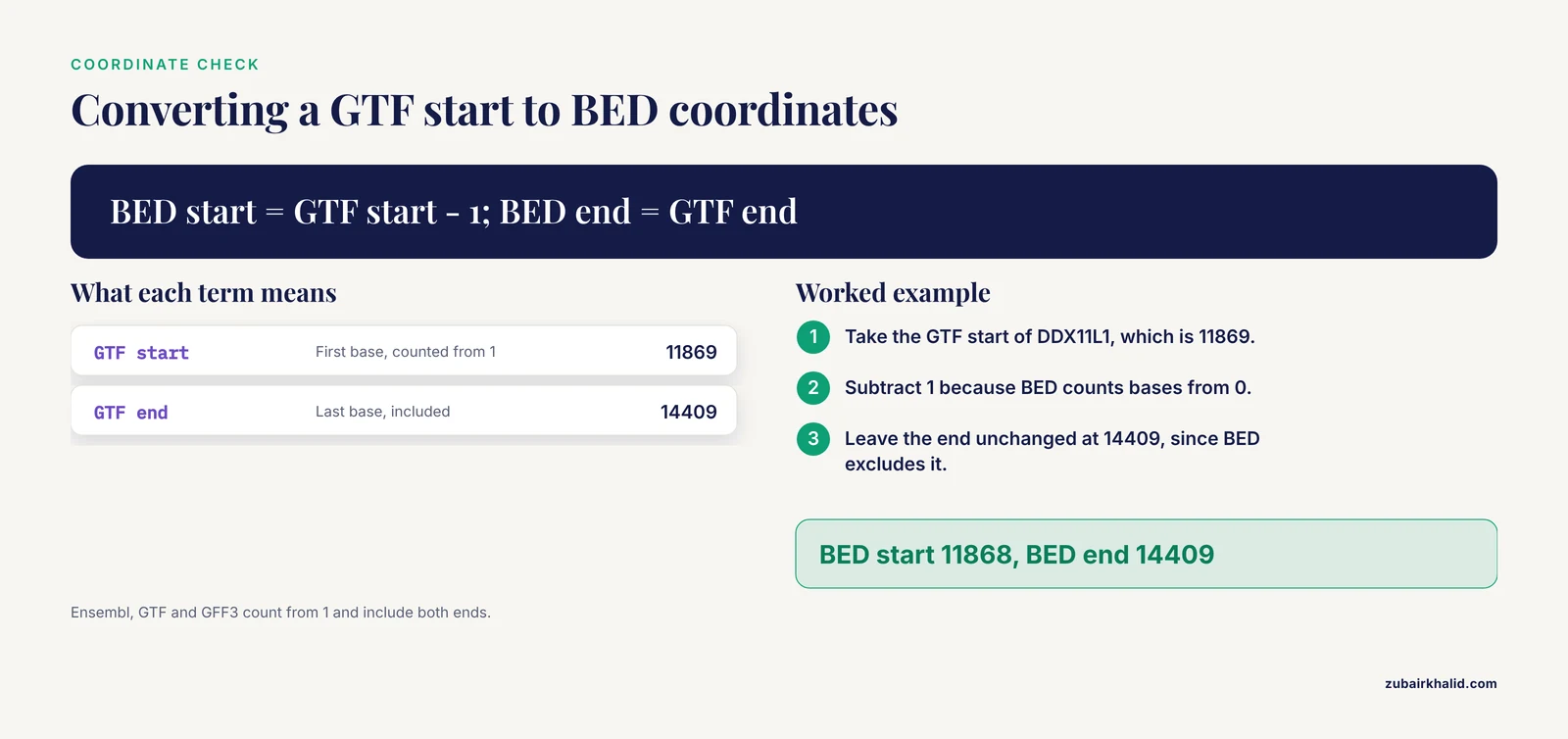
- Coordinate system confusion. Ensembl, GTF, and GFF3 count bases from 1 and include both ends. BED counts from 0 and excludes the end. DDX11L1 at GTF position 11869 becomes BED position 11868, while its end 14409 stays 14409 in BED. Off-by-one errors here silently shift every feature.
- Exporting the wrong sequence type. A cDNA export has no introns, so aligning it to a genome or calling it "genomic" breaks downstream tools. Re-read the export dialog before saving.
- Ignoring transcript versions. ENST00000380152.9 and ENST00000380152.10 are different records. Either match versions exactly or strip suffixes consistently across all files.
- Forgetting pseudoautosomal genes. In human, genes in the pseudoautosomal regions at the tips of the X and Y chromosomes appear with coordinates on both chromosomes, so whole-genome exports contain entries you may not expect. Filter deliberately rather than by surprise.
- Overrunning the REST API. Requests beyond roughly 15 per second draw HTTP 429 responses. Batch IDs in a single POST, cache results, and move genome-scale jobs to FTP.
- Assuming IDs transfer between databases. An Entrez Gene ID is not an Ensembl ID. Use xrefs (cross-references between databases), available as BioMart attributes and REST endpoints, to convert.
- Letting BioMart time out. Very large exports stall in the browser. Split by chromosome, or switch to the FTP files and filter locally with
awkorzgrep. - Not pinning the release. Coordinates and gene models change between releases, and an unpinned export cannot be reproduced. Record the release number in filenames, use release-numbered FTP paths, and use release-aware APIs such as JEnsembl for version-specific work [3].
- Trusting a single source of truth. Ensembl gene models, RefSeq models, and GENCODE models can differ for the same locus. Know which annotation your project standardized on, and export from that one consistently.
One limitation deserves a plain statement. An Ensembl export is reference annotation, a curated model that changes with each release, not a validated measurement of any particular sample. For clinical interpretation or diagnostic decisions, confirm findings against current professional resources and appropriate expertise rather than a raw file download.
Frequently Asked Questions
What is the fastest way to export one gene sequence from Ensembl?
Open the gene page, go to the Sequence tab, click Export sequence, and choose cDNA, CDS, peptide, or genomic sequence. For scripts, the REST endpoint /sequence/id/ with the Ensembl gene ID returns the same sequences as FASTA in one line of curl.
How do I export every gene in a genomic region?
Open the Location view for that region and use Export data in the left menu, or call the REST overlap endpoint with feature=gene, or download the species GTF and filter rows by start and end coordinates with awk.
What is the difference between GTF and GFF3 files?
Both are tab-delimited, nine-column annotation formats describing genes, transcripts, and exons. GFF3 is the more general standard with extra directives, while GTF is the format that most read-counting and quantification tools expect, so choose GTF for RNA-seq workflows unless a tool says otherwise.
How do I export gene data for plants, fungi, or microbes?
Use Ensembl Genomes at ensemblgenomes.org, the sister site to the chordate-focused main site. It provides the same browser, BioMart marts, FTP layout, and REST access, so every method in this guide transfers with a different starting URL.
Can I export from an older Ensembl release?
Yes. Use archive.ensembl.org for past releases, grch37.ensembl.org for the older human assembly, the release-numbered FTP directories, or a release-aware API such as JEnsembl, which can target any release version of any Ensembl species.
Why do my exported coordinates disagree with my other files?
The two usual causes are different genome assemblies (GRCh37 versus GRCh38) and different coordinate conventions, since Ensembl and GTF count bases from 1 while BED counts from 0 and excludes the end position. Check both before blaming the data.
How do I export orthologs for a gene across species?
In BioMart, add the homologue attributes for the species you need to your attribute list, or query Ensembl Compara, the database that stores Ensembl's homology and orthology relationships and backs tools like ArkMAP.
How do I keep the REST API from rejecting my requests?
Stay at or below about 15 requests per second, cache responses, send many IDs in one batch POST to the lookup endpoint, and switch to FTP downloads for anything genome-wide.
Sources
- Touring Ensembl: a practical guide to genome browsing.
- locuszoomr: an R package for visualizing publication-ready regional gene locus plots.
- ArkMAP: integrating genomic maps across species and data sources.
- ISACGH: a web-based environment for the analysis of Array CGH and gene expression which includes functional profiling.
- Advancing clinical genomics and precision medicine with GVViZ: FAIR bioinformatics platform for variable gene-disease annotation, visualization, and expression analysis.