Ensembl vs. UCSC Genome Browser: Which One Should You Use
By Dr. Zubair Khalid, DVM, MS, PhD ·

Ensembl and the UCSC Genome Browser are two windows onto the same reference genomes. Ensembl, a joint project of EMBL-EBI and the Wellcome Sanger Institute, is an annotation and identifier resource wrapped in a browser, while UCSC, run from the University of California, Santa Cruz, is a visualization platform that layers thousands of annotation tracks over reference assemblies [1]. Both are free, web based, multi-species browsers, and this Ensembl vs. UCSC genome browser comparison ends with a clear rule of thumb for choosing between them.
Start in Ensembl when your question begins with a gene, transcript, variant, or identifier and ends with authoritative annotation or a bulk data export. Start in UCSC when your question begins with a genomic region and ends with a view you can interpret, annotate, or share. When a project spans both kinds of questions, use both browsers, because working groups routinely do.
This guide explains what each browser is built for, walks through the core tasks in each, compares them on the criteria that decide real projects, and works through four concrete scenarios, from primer specificity checks to non-model species.
What a Genome Browser Does
A genome browser is a graphical interface for browsing, searching, retrieving, and analyzing genomic sequence and annotation data [1]. The sequence is a reference assembly, a curated chromosome-scale reconstruction such as GRCh38, the Genome Reference Consortium human build 38. The GRC, which maintains these assemblies, states its mission as improving the reference assembly, correcting errors, and adding sequence to meet basic and clinical research needs [3]. Annotation means the curated and computed features layered on that sequence, gene models, repeats, regulatory elements, and variants, displayed as tracks, horizontal layers aligned to the sequence [4].
Both Ensembl and UCSC are general, multi-species web browsers in exactly this sense [1]. Both let you jump from a gene symbol to a locus, zoom in and out, inspect individual features, and download the underlying tables for analysis [4]. The difference is emphasis. Ensembl treats the gene and its stable identifiers as the primary object, with the browser as one view of it. UCSC treats the region as the primary object, with genes as tracks among many. Every practical difference described below follows from that split.
A concrete example shows how similar the two experiences are at heart. A review of web-based browsers walked through both Ensembl and UCSC using the human alpha-globin gene cluster on chromosome 16, demonstrating the same core moves in each interface, searching for the locus, adjusting the view, and reading the gene models [1]. If you can drive one browser, you can drive the other. The choice is about which tool makes your specific task faster, not about learning two unrelated systems.
Ensembl at a Glance
What Ensembl Is Built For
Ensembl has produced genome annotation and a browser for more than two decades. Its gene set comes from an automated annotation pipeline, and for human and mouse that output is merged with manual curation from the HAVANA team to create GENCODE, the reference annotation for the ENCODE project [5], [6]. GENCODE 7, a landmark release, documented 20,687 protein-coding loci and 9,640 long noncoding RNA (lncRNA) loci, and the set is distributed from gencodegenes.org as well as through the Ensembl and UCSC browsers [5].
Three design choices define the resource.
Stable identifiers. Every gene, transcript, protein, and exon carries a versioned ID with a predictable prefix, ENSG for genes, ENST for transcripts, ENSP for proteins. The tumor protein p53 gene TP53 is ENSG00000141510. These IDs persist across releases and are citable in papers and pipelines, which makes them the connective tissue between databases.
Structured export. BioMart, the batch query interface, returns filtered tables of genes, variants, or sequences without any programming [7]. For the most demanding genome-scale queries, Ensembl provides a documented application programming interface (API) [7].
Broad species coverage. Beyond the main site, Ensembl Genomes extends the same interface to plants, fungi, protists, and bacteria, and the Rapid Release site serves newly assembled genomes with lighter annotation on a faster schedule.
The same philosophy extends to variation and evolution. Ensembl annotates variants against transcripts and computes their consequences, and its Compara resource delivers gene trees and orthology relationships as structured data. Both feed the browser and the API alike.
How to Use Ensembl: A Quick Tutorial
This Ensembl genome browser tutorial covers the six moves that handle most day-to-day work.
- Search. Go to www.ensembl.org, type TP53 or ENSG00000141510 in the search box, and choose Human. The gene page opens with tabs for Location, Gene, Transcript, and Variation.
- Inspect the gene. The Gene tab lists the biotype, the gene's classification such as protein-coding or lncRNA, along with synonyms and external references such as RefSeq and UniProt. Click any transcript to see its exon structure, splice pattern, and protein product.
- Zoom to the region. Open the Location tab and choose Region in detail for a zoomable view of the locus. Use Configure this page to add variation, regulation, or comparative genomics tracks.
- Export the view. The Export data menu returns the current region as GTF, a tab-delimited annotation format, or as FASTA, a plain-text sequence format.
- Export in bulk with BioMart. Choose the Ensembl Genes dataset and the human build, apply a Filter such as chromosome or biotype, select Attributes such as gene ID, coordinates, and gene name, then click Results and download a TSV or CSV [7]. A filter for protein-coding genes on chromosome 17 with ID and coordinate attributes returns a clean gene table in under a minute.
- Go programmatic when the question outgrows the web forms. The REST API returns structured data over plain HTTP. One line pulls the genomic sequence of TP53:
curl "https://rest.ensembl.org/sequence/id/ENSG00000141510?content-type=text/plain"BioMart covers flexible no-code queries, the API covers the most challenging genome-scale questions, and workflow engines such as Galaxy can chain either resource into larger pipelines [7].
When to Use Ensembl
Reach for Ensembl in these situations.
- You need a stable, citable identifier for a gene, transcript, or variant.
- You need filtered bulk exports, for example every protein-coding gene on a chromosome with coordinates and IDs.
- You need variant consequence annotation, which the Ensembl Variant Effect Predictor (VEP) computes for single nucleotide variants, indels, which are small insertions and deletions, and structural variants.
- Your species lives in the Ensembl Genomes divisions, such as rice, wheat, Arabidopsis, or a bacterial genome.
- You are building a pipeline and want a documented API instead of manual retrieval [7].
UCSC Genome Browser at a Glance
What UCSC Is Built For
The UCSC Genome Browser has served the research community for more than two decades from genome.ucsc.edu [8]. It organizes data and annotations as tracks around reference assemblies and presents them through a dense, fast, web-based graphical interface [4]. Where Ensembl leads with the gene, UCSC leads with the view.
Four strengths define the site.
Multiple gene sets side by side. UCSC carries GENCODE, NCBI RefSeq, Ensembl genes, and the legacy UCSC Genes set as separate tracks, together with MANE, the Matched Annotation from NCBI and EMBL-EBI program that names an agreed representative transcript for each gene, and RefSeq Select, NCBI's per-gene representative transcript set [8]. Overlaying the models is the fastest way to see where annotation sets disagree.
Regulation and function. The site hosts the ENCODE registry of candidate cis-regulatory elements (cCREs), regions with experimentally supported regulatory potential, and promoters from the Eukaryotic Promoter Database [8]. Stacked with conservation and expression tracks, a locus page reads like a review figure.
Comparative genomics. Multiple sequence alignments and their conservation scores can be visualized and downloaded for any region [4].
Customization and sharing. You can upload custom tracks, attach remote track hubs, which are collections of tracks hosted elsewhere and connected by URL, and save sessions that reproduce your exact configuration, [9]. The track hub system also powers GenArk, a growing collection of UCSC browsers built from NCBI assemblies, each equipped with gene models, repeat masks, BLAT, and in silico PCR [9].
Under the visualization sits a full database. Every feature links to a details page with its sequence, its evidence, and its external references, and the underlying tables are downloadable in full [4]. That pairing of picture and data is why UCSC pages so often end up in papers as the definitive view of a locus.
UCSC also moves quickly when it matters. Within weeks of the coronavirus outbreak it released a browser for the SARS-CoV-2 reference assembly with detailed annotation tracks [8]. Recent display work includes Hi-C contact maps, which chart physical interactions between genomic regions as heatmaps, and a phased family trio display for VCF, the Variant Call Format, files [8].
How to Use UCSC: A Practical Walkthrough
- Pick the assembly. From genome.ucsc.edu, choose the clade, the organism group, the genome, and the assembly. Human GRCh38 appears as hg38. This click matters more than any other, because every coordinate you read or export inherits it.
- Search. Type a symbol such as TP53 or a position such as chr17:7,668,421-7,687,550, the TP53 locus in GRCh38. The browser opens with default tracks.
- Read the view. Each horizontal row is a track. Drag to zoom, click a track label on the left for a full-width view, and click any feature for its details page.
- Compare gene models. Under Genes and Gene Predictions, switch on GENCODE, NCBI RefSeq, and Ensembl. Differences in splice models become obvious immediately.
- Add your data. Use Add custom tracks to upload a BED, a tab-delimited interval format, a BEDGraph, or a GTF file, or paste a URL to one. For large or reusable collections, host a track hub and attach it by URL [9].
- Share the view. Save a session and send the link. Collaborators land on your tracks, your coordinates, and your settings, not on a screenshot.
- Export with the Table Browser. Choose the clade, genome, assembly, group, and track, set the region to a position or a gene, pick an output format such as BED or all table fields, and click get output [4]. The Table Browser is how genome-scale datasets leave UCSC without programming [10], [7].
- Check sequence and primers. BLAT, the BLAST-Like Alignment Tool, maps a sequence to the assembly when the match is near exact, and in silico PCR predicts the product of a primer pair against the assembled genome [9], [11].
When to Use UCSC
Reach for UCSC in these situations.
- You need to see a locus in full context, with conservation, repeats, regulation, and expression stacked in one view [4].
- You need to compare gene models from different pipelines at the same locus.
- You need to hand collaborators an interactive annotated view rather than a static figure [9].
- You need conservation scores or multiple alignments for a region [4].
- Your species is outside Ensembl's main set, and a GenArk browser built from its NCBI assembly will do the job [9].
Ensembl vs. UCSC Genome Browser: Side-by-Side Comparison
| Criterion | Ensembl | UCSC Genome Browser |
|---|---|---|
| Operator | EMBL-EBI and the Wellcome Sanger Institute | University of California, Santa Cruz |
| Web address | www.ensembl.org | genome.ucsc.edu |
| Core design | Gene and variant pages built around its own annotation pipeline | Track-based visualization over reference assemblies |
| Human gene sets | Ensembl gene set, merged with HAVANA curation as GENCODE | GENCODE, RefSeq, Ensembl, UCSC Genes, MANE, and RefSeq Select as separate tracks |
| Bulk export | BioMart | Table Browser and downloads server |
| Programmatic access | REST API and Perl API | Public MySQL server, downloads server, track hubs |
| Custom data | Uploaded data files attached to views | Custom tracks, remote track hubs, shareable sessions |
| Comparative genomics | Compara gene trees and alignments | Conservation tracks and multiple alignments with scores |
| Regulation data | Ensembl regulatory build | ENCODE cCRE registry and promoter sets |
| Variant tools | VEP and variation pages | Variant tracks and a phased trio VCF display |
| Sequence search | BLAST | BLAT and in silico PCR |
| Species coverage | Main site, Ensembl Genomes, Rapid Release | Main site plus GenArk browsers from NCBI assemblies |
| Best first question | "What is this gene, and give me its data" | "What is happening at this position" |
Both browsers are free and need no account for browsing. The table compresses the choice, and the next section unpacks the differences that actually decide projects.
The Difference Between Ensembl and UCSC Genome Browser in Practice
Gene Models and Identifiers
Both sites serve GENCODE for human and mouse, so the headline annotation is the same [5]. The differences live in defaults and extras. Ensembl's gene set is the pipeline output, and GENCODE is that output merged with HAVANA manual curation [6]. UCSC displays several sets at once, including RefSeq and the older UCSC Genes track [8]. When a paper says Ensembl gene, GENCODE gene, or RefSeq gene, it is naming a specific model, not a universal truth.
The sets genuinely differ, which surprises newcomers. GENCODE 7 contained 33,977 coding transcripts that were not represented in the UCSC Genes and RefSeq sets of that release [5], and an early comparison reported that only about 40 percent of GENCODE exons were contained in the RefSeq and Ensembl sets of the time [6]. The practical rule is to pick one gene set per project, record its release number, and never mix models mid-analysis.
Coordinates and Assembly Names
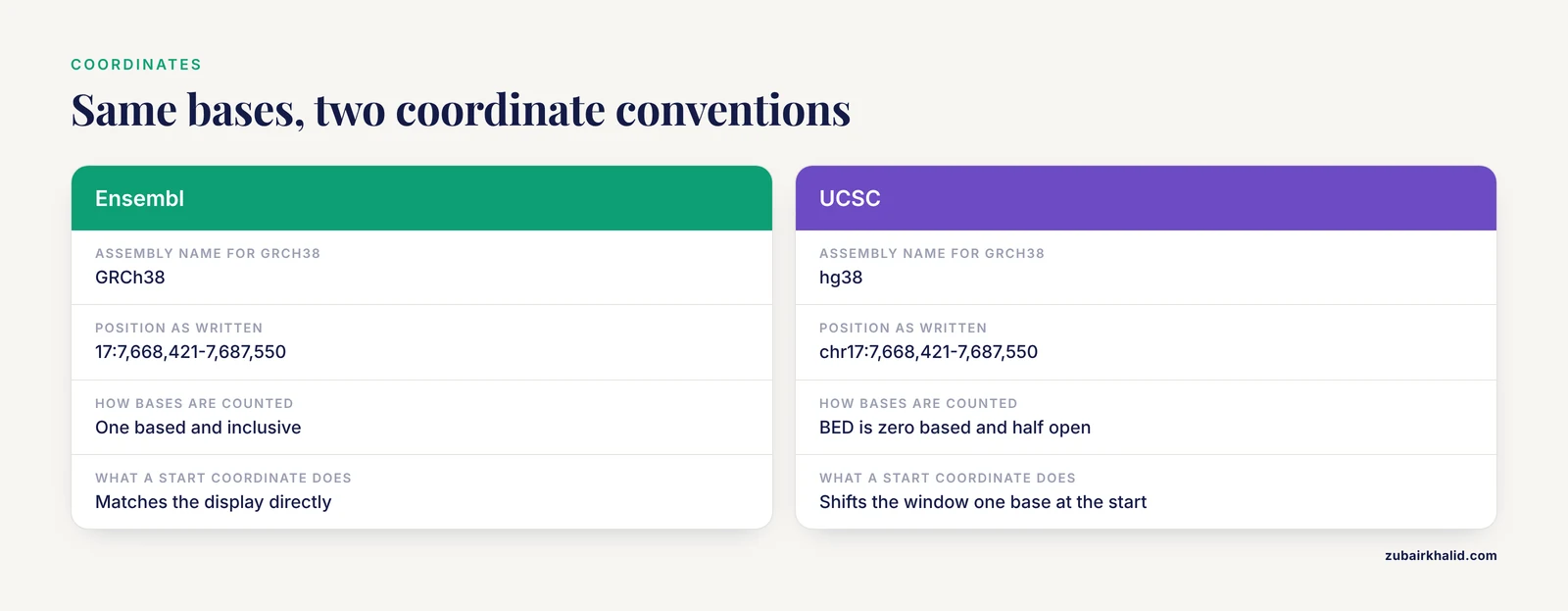
Both browsers display the same GRC assemblies under different names. GRCh38 is hg38, GRCh37 is hg19, GRCm39 is mm39, and GRCm38 is mm10. Ensembl writes the same span as 17:7,668,421-7,687,550, while UCSC writes chr17:7,668,421-7,687,550.
The deeper trap is coordinate convention. UCSC's BED format is zero based and half open, so a BED interval of chr1 999 2000 covers bases 1,000 through 2,000. Ensembl's displays and GTF files are one based and inclusive, so the same bases appear as 1:1000-2000. Pasting a BED start coordinate into a search box shifts your window one base at the start, enough to miss an exon boundary. Convert deliberately when moving intervals between ecosystems, and use a conversion tool such as UCSC LiftOver when changing assemblies rather than eyeballing offsets. A common failure is mixing a variant call set from GRCh37 with an annotation track from GRCh38 in one view, which silently misaligns everything.
Getting Data Out: BioMart vs. Table Browser
Both browsers answer complex questions without programming, Ensembl through BioMart and UCSC through the Table Browser [7]. BioMart is attribute driven, you pick a dataset, apply filters, choose columns, and download. The Table Browser is track driven, you pick a track, optionally intersect it with another track or a custom upload, and download rows or summary statistics [4].
For programmatic access, Ensembl offers documented REST and Perl APIs [7]. UCSC exposes its underlying database through a public MySQL server and serves its tables from a downloads server [9]. Above both sits Galaxy, which chains browser resources into multi-step workflows [7]. The hierarchy matters, simple lookups belong in the browser, flexible queries in BioMart or the Table Browser, multi-step analyses in Galaxy, and genome-scale pipelines in an API [7]. Choosing the right layer for the job is the single highest-leverage decision in a browser workflow.
Custom Data and Sharing
UCSC built the ecosystem standard here. Custom tracks display your own BED or GTF files next to reference annotations, and track hubs let a lab host large track collections remotely and attach them to any browser [9]. Saved sessions freeze your track configuration and coordinates behind a shareable link. Ensembl supports uploaded data attached to views as well, but the hub model is UCSC's home turf [9]. Small uploads fit custom tracks, larger or reusable collections belong in a hub.
If your deliverable is a view, a figure companion or a lab resource others will browse, UCSC is usually the faster path. If your deliverable is a table or an ID list, either works and BioMart is often quicker [7].
Regulation, Conservation, and Comparative Genomics
UCSC hosts the ENCODE cCRE registry and Eukaryotic Promoter Database promoters as tracks [8], and its multiple alignments and conservation scores are both visualized and downloadable [4]. Ensembl counters with its regulatory build and Compara gene trees and alignments. In practice, UCSC wins for overlaying many functional datasets on one locus, because that is the design goal of a track-based viewer [4]. Ensembl wins when you want a gene's evolutionary relationships, such as orthologs, genes in other species descended from a common ancestor, delivered as structured data rather than as a picture.
Species Coverage and New Assemblies
Neither site covers everything, and they fill different gaps. UCSC's GenArk builds browsers from NCBI assemblies, with 3,269 assemblies listed and standard tools such as BLAT, in silico PCR, gene models, and repeat masks attached [9]. It can bulk-import third-party resources, including Ensembl gene models for hundreds of assemblies [9]. Ensembl's main site covers its curated species set, Ensembl Genomes adds plants, fungi, protists, and bacteria, and Rapid Release adds fresh assemblies with lighter annotation.
Model organism databases bridge the two worlds. Xenbase, the Xenopus database, hosts its own browsers and links out to NCBI, UniProtKB, and Ensembl [12]. Working scientists routinely use both sites on one project, for example examining candidate loci across up to 100 vertebrate species in both the UCSC and Ensembl browsers [2], or cross-checking de novo repeat annotations against Ensembl alongside NCBI and the repeat databases Dfam and Repbase [13].
Releases and Reproducibility
Ensembl ships numbered releases on a rolling schedule, and GENCODE versioning follows those releases for human and mouse, for example GENCODE v17 corresponded to Ensembl 72 [10]. UCSC updates its annotation tracks continuously to keep data current and names assemblies explicitly, hg38 rather than a release number [8]. Either way, the browser you saw last month is not the browser you see today. Record the site, the assembly, the gene set, and the release or database date with every figure and table. Unversioned browser results cannot be reproduced, and reviewers increasingly ask.
Where Ensembl and UCSC Converge
The differences are real, but so is the overlap, and knowing it prevents overthinking the choice.
Both browsers serve the same GENCODE reference annotation for human and mouse [5]. UCSC even maintains an Ensembl genes track and has imported Ensembl gene models into hundreds of GenArk assemblies [8], [9]. Both expose the same GRC reference assemblies, both support programmatic retrieval, and both keep annotations current [8]. Both are free, require no account for browsing, and run in any modern browser.
The practical consequence is that switching costs are low. Coordinates, IDs, and exported files move cleanly between the two once you respect the naming and coordinate conventions described above. Many published workflows treat the two sites as one toolkit rather than as competitors,.
Ensembl or UCSC Genome Browser: A Decision Rule
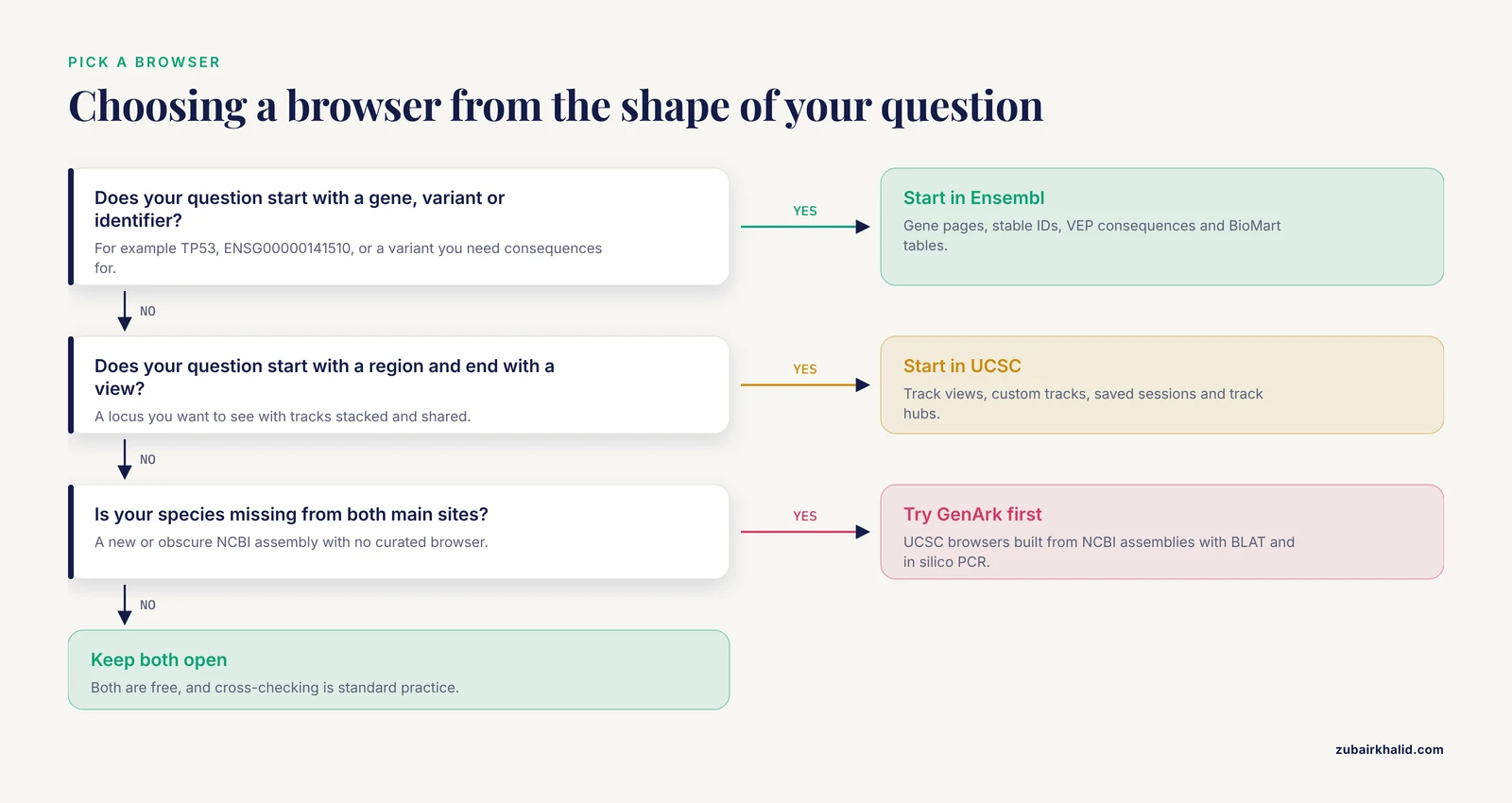
When someone asks, Ensembl or UCSC genome browser, answer with the shape of the question.
- Question starts with a gene symbol, variant, or identifier and ends with annotation or a table. Use Ensembl.
- Question starts with a region and ends with a view or a shared figure. Use UCSC.
- Bulk filtered tables with stable IDs. Ensembl BioMart [7].
- Track intersections or a custom upload next to reference data. UCSC Table Browser [4], [10].
- An interactive annotated view for collaborators. UCSC sessions and track hubs [9].
- Variant consequences across transcripts. Ensembl VEP, with the MANE tracks at UCSC as the reporting reference [8].
- Plants, fungi, protists, or bacteria. Ensembl Genomes.
- An obscure NCBI assembly, fast. UCSC GenArk [9].
- A pipeline. Ensembl REST API for annotation queries [7], UCSC downloads for bulk files.
- Unsure. Open both, they are free, and cross-checking is standard practice.
Worked Scenarios
Scenario 1: Checking RT-qPCR Primer Specificity
A toxicology team inherits published primer sets for reverse transcription quantitative PCR (RT-qPCR), which measures gene expression, and wants to know which sets are trustworthy. The reference workflow chains three resources, NCBI Primer BLAST, in silico PCR at the UCSC Genome Browser, and the Ensembl DNA database [11].
Run each primer pair through UCSC in silico PCR against the correct assembly to get every predicted amplicon, the DNA fragment a primer pair amplifies, with coordinates. Record the assembly in the form, because a primer pair can behave differently across builds. Then open the hit loci in Ensembl to check whether a second amplicon lands on a paralog, a duplicated copy of the gene, or on a different splice variant of the same gene [11]. The two tools cover each other's blind spots, which is why the workflow chains them.
The need is real. Applied retrospectively to 504 primer sets from 70 rat toxicological studies, the workflow found potential mismatches in 9 percent, cross-matches in 13.5 percent, risk of co-amplifying multiple splice variants in 9 percent, and sub-optimal amplicon sizes in 25 percent [11]. A single-tool check would have missed part of that.
Scenario 2: Pulling a Genome-Scale Gene List
A researcher wants every human long noncoding RNA exon that overlaps a pseudogene, a gene copy that has lost its protein-coding ability, in either orientation. The published approach imported three pseudogene catalogs and two lncRNA catalogs, retrieved from the UCSC Genome Database with the UCSC Table Browser, and intersected them [10]. That analysis identified 2,277 loci with exon-to-exon overlaps between pseudogenes and long noncoding RNAs [10].
The Table Browser fits this job because the question is about tracks and intersections. The sibling question, every gene of a given biotype on a chromosome with coordinates and IDs, is a short BioMart job in Ensembl [7]. The rule is simple. Track intersections and custom uploads go to the UCSC Table Browser. Attribute-rich gene and variant tables go to BioMart [7]. Whichever tool you use, export both the coordinates and the identifiers so the list can feed a downstream annotator or pipeline without a second manual pass.
Scenario 3: Interpreting a Variant and Picking a Transcript
A paper reports an amplified locus and you must decide which transcript to analyze. In high-grade serous ovarian carcinoma, the MECOM locus is a worked example. Researchers used the UCSC Genome Browser, Ensembl, and NextProt, a protein knowledge base, to identify two MECOM transcripts corresponding to classical protein isoforms, alternative versions of the protein, then linked their expression to patient survival in 352 tumors and 88 normal ovarian tissues from the GTEx and TCGA public datasets [14].
The browser steps repeat anywhere. Locate the variant or amplicon in UCSC and switch on the MANE and RefSeq Select tracks, which name the agreed representative transcript per gene [8]. Cross-check the transcript models and variant consequences in Ensembl, where VEP annotates what a variant does to each transcript. Report gene-level consequences against the MANE Select transcript unless you have a specific reason not to. Save the UCSC session with the tracks on so the transcript choice stays auditable later.
Scenario 4: Working With a Non-Model Organism
A new assembly lands for your species and no curated browser exists yet. Check three places in order. GenArk, which builds UCSC browsers from NCBI assemblies and attaches gene models, repeat masks, BLAT, and in silico PCR [9]. Ensembl Rapid Release and the relevant Ensembl Genomes division. The model organism database for your clade, if one exists, such as Xenbase for Xenopus, which hosts its own browsers and links to NCBI, UniProtKB, and Ensembl [12].
Then expect to cross-validate. A goat genomics study checked its de novo long terminal repeat (LTR) retrotransposon calls against NCBI, Ensembl, Dfam, and Repbase before trusting them [13]. A repeat-colonization study examined candidate loci in up to 100 vertebrate species using both the UCSC and Ensembl browsers [2]. In non-model work, two browsers beat one, because annotation depth varies and each site fills the other's gaps. Whichever browser you land on, attach your own calls as a track hub so collaborators can see them against the reference [9].
Common Mistakes and Limitations
- Mixing coordinate conventions. BED is zero based and half open, Ensembl displays and GTF are one based and inclusive. A one-base shift at the start of an interval is enough to miss an exon boundary in a report.
- Ignoring assembly names. GRCh38 and hg38 are the same assembly, GRCh37 and hg19 are the same assembly, and coordinates do not transfer between them. Record the assembly with every dataset and use a conversion tool such as LiftOver when you must move between builds.
- Assuming all gene sets are the same. GENCODE, RefSeq, Ensembl, and UCSC Genes disagree on transcripts and exons, with 33,977 GENCODE 7 coding transcripts missing from UCSC Genes and RefSeq at that release [5]. Pick one set, record the release.
- Treating the browser as the whole genome. The GRC assemblies that both browsers display omit sequence and structure that cytogeneticists rely on, including subbands defined under the International System for Human Cytogenetic Nomenclature (ISCN) and satellite-rich heterochromatic and pericentromeric sequence [3]. Browser coordinates are not a substitute for cytogenetic nomenclature.
- Reading the browser instead of exporting from it. Screenshots are for orientation. For analysis, export tables through the Table Browser [4] or BioMart [7] and work on the data directly.
- Using one tool for sequence checks. Primer and probe validation that relies on a single resource misses cross-matches and splice-variant co-amplification, which is why the reference workflow chains NCBI Primer BLAST, UCSC in silico PCR, and Ensembl [11].
- Sharing screenshots instead of sessions. A UCSC session link or a track hub reproduces your exact view, a screenshot does not, [9].
- Trusting default tracks. The default view hides most tracks, including regulation and conservation, and a locus that looks empty may be full of unshown data. Start from hide all, then add what the question needs.
- Ignoring strand. Gene models and custom features carry strand, and a primer or motif reported on the wrong strand fails silently in some downstream reports.
- Not recording versions. Note the Ensembl release, the GENCODE release, or the UCSC database date with every figure and table. Browsers change under your feet, and unversioned results cannot be reproduced.
- Asking the browser to do a pipeline's job. Browsers orient you and export data. Multi-step analyses belong in Galaxy or in code against an API [7].
Frequently Asked Questions
What is the main difference between the Ensembl and UCSC genome browsers?
Ensembl is an annotation and identifier resource from EMBL-EBI and the Wellcome Sanger Institute, while UCSC is a visualization and data integration platform from the University of California, Santa Cruz [1]. Ensembl leads with stable gene IDs, BioMart exports, and an API. UCSC leads with track-based views, regulation and conservation data, custom tracks, and track hubs [4],.
Do Ensembl and UCSC use the same genome coordinates?
Yes, both display the same Genome Reference Consortium assemblies, so GRCh38 in Ensembl is hg38 at UCSC and GRCh37 is hg19. The names and conventions differ, since BED files are zero based while Ensembl displays are one based, so convert deliberately when moving intervals between the two.
Which browser has better gene annotation?
For human and mouse, both serve GENCODE, the reference annotation produced by merging the Ensembl pipeline with HAVANA manual curation [5], [6]. UCSC additionally shows RefSeq, MANE, and legacy sets side by side [8]. Neither is better, they emphasize different views of the same core data.
Which browser should I use for non-human species?
Check UCSC's GenArk first for a browser built from your NCBI assembly, since it lists thousands of assemblies with standard tools attached [9]. Check Ensembl Genomes for plants, fungi, protists, and bacteria, and Ensembl Rapid Release for fresh assemblies. Model organism databases such as Xenbase also host their own browsers and link to both ecosystems [12].
How do I download large datasets from each browser?
Use BioMart in Ensembl and the Table Browser in UCSC, the two standard no-programming export tools [7]. BioMart filters a dataset and returns chosen columns as a table. The Table Browser exports a selected track for a region, optionally intersected with other tracks [4]. For pipelines, use the Ensembl REST API [7] or UCSC's downloads server.
Can I use both browsers together?
Yes, and most working groups do. A common pattern is to orient and visualize in UCSC, then pull identifiers and annotations from Ensembl [2]. The decision rule is to start where your question starts, a region points to UCSC, a gene or variant points to Ensembl, and keep both open when a project spans both kinds of questions.
Sources
- A brief introduction to web-based genome browsers.
- Minimal repeats are ubiquitous sites of crossover and recombination across the human genome.
- About classical molecular genetics, cytogenetic and molecular cytogenetic data not considered by Genome Reference Consortium and thus not included in genome browsers like UCSC, Ensembl or NCBI.
- Visualizing Genomic Annotations with the UCSC Genome Browser.
- GENCODE: the reference human genome annotation for The ENCODE Project.
- GENCODE: producing a reference annotation for ENCODE.
- Asking complex questions of the genome without programming.
- The UCSC Genome Browser database: 2021 update.
- GenArk: towards a million UCSC genome browsers.
- Global Intersection of Long Non-Coding RNAs with Processed and Unprocessed Pseudogenes in the Human Genome.
- A bioinformatics workflow for the evaluation of RT-qPCR primer specificity: Application for the assessment of gene expression data reliability in toxicological studies.
- Navigating Xenbase: An Integrated Xenopus Genomics and Gene Expression Database.
- Genome-wide in-silico identification and characterization of LTR retrotransposons in domestic goat (Capra hircus).
- MECOM Locus classical transcript isoforms affect tumor immune microenvironment and different targets in ovarian cancer.