Ensembl Variant Page Anatomy: A Visual Tour of Every Section
By Dr. Zubair Khalid, DVM, MS, PhD ·

The Ensembl variant page is a single, structured web page that gathers everything Ensembl knows about one genetic variant: its genomic coordinates, its alleles, its effect on every overlapping transcript, its allele frequencies across human populations, and its links to phenotype and clinical databases. Each section of the page answers one specific question about that variant, and the layout is identical for every variant in the database.
Learning the anatomy of this page is one of the highest-yield skills in applied genomics. Once you can read a variant page fluently, you can interpret a GWAS hit, check what a SNP does to a protein, confirm whether an allele is common or rare, and trace a variant's clinical classification, all without running a single command. This guide walks through every section of the page in the order you encounter it, with worked examples you can reproduce in your own browser in under a minute.
What Is the Ensembl Variant Page and What Is It For?
Ensembl is a genome browser and comparative genomics database maintained by EMBL-EBI in collaboration with the Wellcome Sanger Institute. Its core product is the genome browser, which lets you navigate any annotated genome assembly gene by gene, base by base. Nested inside that browser is a family of "focus pages," each dedicated to one type of object: gene pages, transcript pages, protein pages, regulation pages, and variant pages.
The variant page is the destination for a single piece of sequence variation, most often a single nucleotide polymorphism (SNP) identified by an rsID, the accession number issued by dbSNP. When you look up "what is ensembl variant page sections," the practical answer is a set of labeled views, each with a defined job:
| Section of the page | The question it answers | Typical contents |
|---|---|---|
| Summary tab (header block) | What and where is this variant? | rsID, genomic location, allele pair, variant class, most severe consequence |
| Genes and regulation tab | What does it do to transcripts? | Per-transcript consequence table, amino acid changes, SIFT and PolyPhen predictions |
| Population genetics tab | How common is each allele? | Allele frequencies from 1000 Genomes, gnomAD, and related projects, genotype counts |
| Phenotype data tab | Has this variant been linked to traits? | Associations from the GWAS catalog and other curated phenotype sources |
| Clinical data tab | What do clinical databases say? | ClinVar records, clinical significance terms, disease names |
| Sidebar tools | How do I see it in context or take data away? | Region in detail view, export options, links to NCBI and dbSNP |
This structure matters because variant interpretation is a multi-question task. A researcher who finds rs738409 in a lipid GWAS needs one answer (which gene, which protein change). A genetic counselor needs a different answer (what does ClinVar say). A population geneticist needs a third (what is the allele frequency in each ancestry group). The Ensembl variant page anatomy places each of those answers in a predictable location, so the same navigation habit works for every variant you will ever look up.
The page is also the human-readable front end for annotation produced by the Variant Effect Predictor (VEP), Ensembl's command-line and web tool for classifying variant consequences. Systematic reviews routinely rely on VEP to annotate large variant lists before meta-analysis. A recent meta-analysis of variants associated with fasting triglycerides, published in the Journal of Clinical Lipidology, used the Ensembl Variant Effect Predictor to annotate the 23 variants included in its quantitative synthesis [1]. The variant page shows you the same annotation VEP produces, rendered for one variant at a time.
How to Use Ensembl to Reach a Variant Page
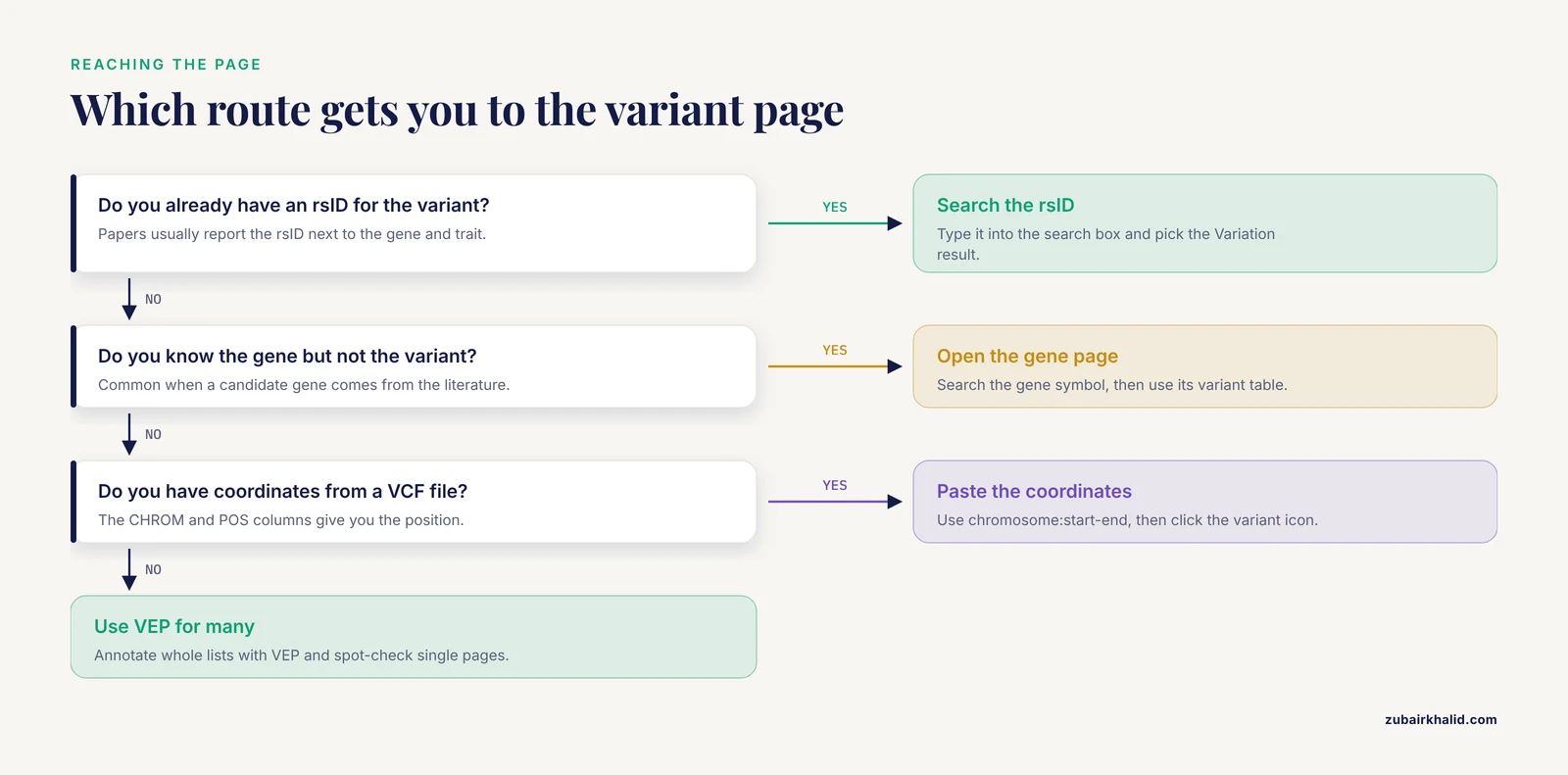
Before touring the sections, you need a reliable way to arrive at one. There are three standard routes, and the "how to use ensembl" question is really a question about picking the right route for the data you already have.
Route 1, Search by rsID (the fastest route)
- Go to ensembl.org in any browser.
- Confirm the species and assembly in the page header. For human work, the current assembly is GRCh38, and new Ensembl releases default to it.
- Type the rsID, for example rs738409, directly into the search box at the top of the page and press Enter.
- If the search returns several matches, choose the entry listed under "Variation" rather than a gene or region match. Ensembl then opens the variant page for that rsID on the current assembly.
This works because Ensembl imports identifiers from dbSNP, the public archive of short genetic variation run at NCBI. Any rsID that exists in dbSNP and overlaps the human assembly resolves to a variant page.
Route 2, From a gene page
If you know the gene but not the variant, open the gene page first (search the gene symbol, for example PNPLA3), then use the left-hand menu to open the variant table for that gene. Each row links to that variant's own page. This route is common when you inherit a candidate gene from the literature and want to see which variants in it have been studied.
Route 3, From a data file or publication
When a paper reports a variant, it almost always reports the rsID alongside the gene and the trait. Type that rsID into the search box as in Route 1. When a pipeline outputs a VCF file instead, the CHROM and POS columns give you coordinates, and you can paste a coordinate string in the form chromosome:start-end into the search box to open the region view, then click the variant icon in the resulting image to reach the variant page.
A fourth route exists for bulk work. If you need to annotate hundreds of variants, you do not visit each page by hand. You run VEP locally or through its web form, and you use the variant page only for spot-checking individual results. The distinction between browsing one variant and annotating thousands is the single most useful thing to internalize in an Ensembl genome browser tutorial, because it prevents hours of unnecessary clicking.
The Summary Tab: Header Block and Identifiers
The Summary tab is what loads first when you open any variant page. It is divided into a header block and one or more allele panels.
The header block
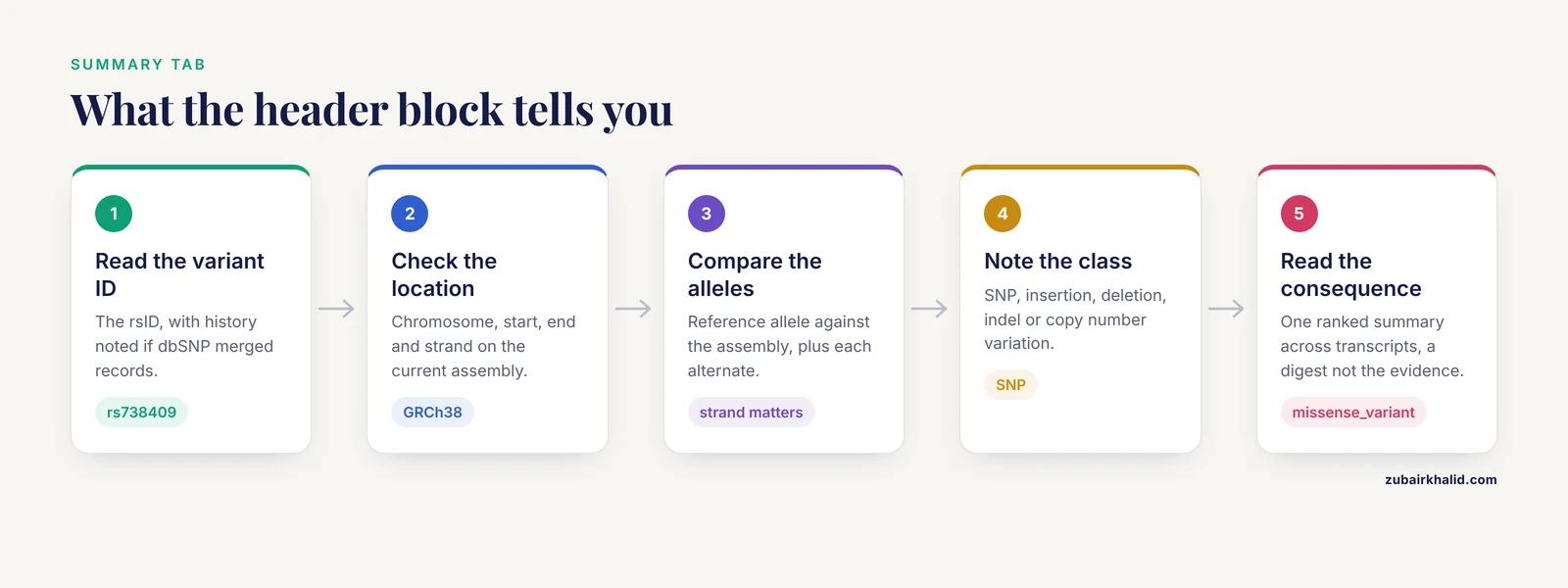
The header block sits at the top of the page and contains the fields you will use most often:
- Variant ID. The rsID (for example, rs738409). If dbSNP has merged multiple IDs onto one record, Ensembl shows the current ID and notes the history, which explains why an older paper may cite an rsID that no longer resolves on its own.
- Location. The chromosomal coordinates on the current assembly, given as chromosome, start position, end position, and strand. For an SNV the start and end differ by one base.
- Alleles. The reference allele and the alternate allele(s), with the reference allele shown against the assembly. Multi-allelic sites list more than one alternate.
- Class. The variant type: SNP, insertion, deletion, insertion or deletion (indel), copy number variation, and so on.
- Most severe consequence. A single summary term chosen from all overlapping transcripts, such as missense_variant or intron_variant. This is the one line most readers quote, and it deserves a careful read, which the next section covers.
- Source. The archive the variant record came from, almost always dbSNP for human variants.
A frequent reader error is to stop at the "most severe consequence" line. That term is computed across every transcript in the region, including poorly characterized ones. A variant labeled intron_variant might be a missense_variant with respect to a transcript that the annotation pipeline considered less canonical. The full transcript-level breakdown lives one tab over, and professionals always check it.
The allele and ambiguity panels
Below the header, Ensembl presents the alleles with strand information and, where known, an inferred ancestral allele. The strand indicator matters when you compare the page against a publication, because authors occasionally report alleles on the opposite strand. If your supplement says one allele and the page shows its complement, check the strand before concluding anyone made an error.
The Genes and Regulation Tab: The Transcript Consequence Table
This tab holds the section most people mean when they talk about ensembl variant page sections explained in depth. It contains a table with one row per overlapping transcript.
Reading one row
A typical row contains these columns:
- Variant effect (consequence). A controlled term from the Sequence Ontology, the shared vocabulary Ensembl and VEP use. Common terms include missense_variant, synonymous_variant, intron_variant, 3_prime_UTR_variant, 5_prime_UTR_variant, splice_region_variant, splice_acceptor_variant, splice_donor_variant, stop_gained, frameshift_variant, and upstream_gene_variant. A row can carry several terms at once, for example splice_region_variant plus intron_variant.
- Gene and transcript IDs. The gene symbol with its Ensembl gene ID (format ENSG followed by digits) and the Ensembl transcript ID (format ENST). Multiple rows for one gene reflect multiple transcripts, which is normal.
- cDNA position and protein position. Where the variant sits within the transcript's coding sequence and within the protein.
- Amino acid change and codons. For missense variants, the codon before and after, and the residue change, for example the proline-to-leucine change at position 148 produced by rs738409 in PNPLA3, a variant repeatedly associated with fasting triglyceride concentrations in the literature and included in the meta-analysis cited earlier [1].
- Pathogenicity predictions. For missense variants, Ensembl displays scores from SIFT (Sorts Intolerant From Tolerant), which predicts whether an amino acid substitution is tolerated, and PolyPhen, which predicts the possible impact of a substitution on protein structure and function. Both are prediction tools, not measurements, and their scores should be read as one line of evidence among several.
- Distance to transcript. For variants outside the transcript itself, the number of bases upstream or downstream.
Why multiple rows are the norm
Human genes routinely have several annotated transcripts that splice differently. A variant in an exon shared by all transcripts will produce similar consequence rows for each, while a variant in an alternatively spliced exon may be missense_variant on one transcript and intron_variant on another. Reading every row, not just the first, is the habit that separates careful interpretation from skim reading.
The same tab also lists overlaps with regulatory features from the Ensembl regulatory build, such as promoters and enhancer regions annotated from large functional genomics projects, where applicable. For variants in noncoding space, this is often the most informative part of the page.
The Population Genetics Tab: Allele Frequencies in Context
The Population genetics tab answers the question "how common is this allele, and where?" It assembles frequency data from large population sequencing projects, principally 1000 Genomes and gnomAD, both of which Ensembl integrates into its human variation display.
What the table shows
For each source and each population, the tab reports:
- The reference allele frequency and the alternate allele frequency, usually as percentages or decimal frequencies.
- Genotype counts, that is, how many sampled individuals were homozygous reference, heterozygous, and homozygous alternate.
- Allele and genotype numbers, so you can judge sample size at a glance.
Populations are grouped by project and by ancestry grouping within each project. A variant that is common in one continental group and rare in another is easy to spot here, and this is exactly the information you need before interpreting a frequency in your own cohort.
How practitioners use this tab
Two habits are worth copying. First, always note the sample size behind a frequency. A frequency estimated from a few hundred genomes carries more sampling noise than one from tens of thousands. Second, compare the population a variant was discovered in against the population you are studying. The triglyceride meta-analysis discussed earlier restricted its analysis to adults of European ancestry, and population-specific frequencies on the variant page are one reason such ancestry scope matters when generalizing genetic findings [1].
The Phenotype Data Tab: Trait Associations
The Phenotype data tab collects published associations between the variant and measured traits or diseases. Ensembl aggregates these from curated external resources, with the NHGRI-EBI GWAS Catalog among the most prominent. The GWAS Catalog is a jointly maintained database of published genome-wide association studies hosted by the National Human Genome Research Institute and EMBL-EBI, and it is a standard first stop for connecting a variant to a reported trait.
Each row in this tab typically shows the trait or disease name, the associated allele, the reported p-value, the population studied, and the source publication with a link. The triglyceride meta-analysis cited earlier located candidate variant-trait literature by searching PubMed and the NHGRI-EBI GWAS Catalog before running its own synthesis, which is a faithful small-scale model of how the variant page and the catalog work together in practice [1].
The variants that surfaced in that analysis give you a ready-made practice set for this tab: rs58542926 in TM6SF2, rs738409 in PNPLA3, rs7903146 in TCF7L2, rs320 and rs328 in LPL, and rs1801282 in PPARG were among the variants associated with fasting triglyceride concentrations in the meta-analysis [1]. Pull each rsID into Ensembl, open the Phenotype data tab, and compare what independent studies report there.
One caution belongs in this tab and nowhere else. An association in the GWAS Catalog is a reported statistical link from a specific study in a specific population, not a proven causal mechanism and not a clinical diagnosis. Read the population and p-value columns before repeating an association in your own writing.
The Clinical Data Tab: ClinVar and Clinical Significance
The Clinical data tab presents curated clinical classifications, chiefly from ClinVar, NCBI's public archive of reports on the relationship between human variants and disease. Records here carry a clinical significance term, such as pathogenic, likely pathogenic, benign, likely benign, uncertain significance, or conflicting interpretations, together with the submitting organization and the review status.
Two habits prevent the most common misreadings of this tab. First, clinical significance terms describe the evidence for a role in disease, not the frequency of the variant, so a benign variant can be common and a pathogenic variant can be vanishingly rare. Second, a record with a low review status may reflect a single submitter, while higher review status indicates expert-panel review. Ensembl links each record back to ClinVar, where the full submission history is visible.
For most GWAS-derived variants, including the triglyceride variants used as examples above, this tab is empty or thin, because common quantitative-trait variants are generally not classified in ClinVar. The emptiness is itself information, and it draws a clean line between population-genetic association and clinical molecular diagnosis.
Seeing the Variant in Context: Region Views and the Gallery
Beyond the tabs, the variant page offers graphical context that a table cannot provide.
Region in detail
From the variant page you can jump to the "Region in detail" view, which renders a stretch of chromosome around the variant with tracks for genes, transcripts, regulatory features, and variants. The variant itself appears as a highlighted marker. This view is how you answer questions such as whether the variant sits in a dense gene neighborhood, whether it overlaps a regulatory peak, and what neighboring variants might travel with it through linkage disequilibrium, the correlation between nearby alleles that arises because they are inherited together.
Your genotype and uploaded data
If you create a free Ensembl account and upload a VCF file of your own calls, the variant page gains genotype displays tailored to your data, showing where your sample's genotype sits relative to reference populations. This feature turns the page from a reference lookup into a personal annotation layer, and it works for any species with an Ensembl genome, not only human.
Export and external links
Every page offers export of the underlying data and stable links out to the original archives, including dbSNP at NCBI. Citing the archive of record alongside Ensembl is good practice in manuscripts, because Ensembl re-releases its database on a regular cycle and annotation details can shift between releases even when the variant itself does not.
Worked Example: Walking the Page for a Triglyceride Variant
Here is a complete walkthrough you can reproduce now, using a variant from the meta-analysis cited throughout this article [1].
- Search. Type rs738409 into the Ensembl search box with GRCh38 selected. The variant page opens on the Summary tab.
- Header block. You see the rsID, its location on chromosome 22 for the human assembly, its class (SNP), and its most severe consequence, which is a missense change in PNPLA3. The gene name PNPLA3 in the header links to the gene page if you want the full gene context.
- Genes and regulation tab. The transcript table shows the change at protein residue 148, substituting isoleucine with methionine in patatin-like phospholipase domain-containing protein 3. SIFT and PolyPhen predictions appear in their columns for this missense row. Note the multiple transcript rows and confirm the consequence holds across them.
- Population genetics tab. Frequencies from 1000 Genomes and gnomAD appear by population. The variant is common in many populations, which is consistent with its repeated detection in GWAS and its inclusion in a meta-analysis of European ancestry adults [1].
- Phenotype data tab. Records from the GWAS Catalog and related sources link the variant to triglyceride and liver-related quantitative traits, with each row citing its source publication.
- Clinical data tab. Expect little here. A common quantitative-trait variant of this kind is generally not the subject of clinical classification, and that absence is informative rather than an error.
Repeat the same six steps for rs58542926 in TM6SF2, rs7903146 in TCF7L2, rs320 and rs328 in LPL, and rs1801282 in PPARG, the other fasting-triglyceride variants highlighted by the meta-analysis [1]. Doing all six takes about fifteen minutes and permanently installs the page layout in your memory, because every variant produces the same sequence of tabs and tables.
That meta-analysis itself illustrates the page's role in a larger workflow. Its authors screened 157 studies, carried 130 into quantitative synthesis, related 1,837 variants to fasting triglycerides or VLDL triglycerides at a nominal threshold, and meta-analyzed 23 variants, annotating them with the Ensembl Variant Effect Predictor before modeling [1]. The VEP annotation step and the variant page show the same consequence vocabulary, so what you learn browsing one variant transfers directly to reading a VEP output table for thousands.
How the Numbers on the Page Are Produced
Understanding the machinery behind the page builds justified confidence in it.
VEP and the consequence vocabulary
The Variant Effect Predictor takes a variant and a genome annotation and asks, for every overlapping transcript, one question: what does this allele do to this transcript's product? The answer is expressed in Sequence Ontology terms and ranked by severity to produce the "most severe consequence" shown in the header. VEP runs as a command-line tool, a Perl module with plugin architecture, a REST API, and a web form, and the triglyceride meta-analysis discussed above used it precisely because it produces consistent, citable annotation across a variant list [1].
Frequency data pipelines
Allele frequencies are not computed by Ensembl itself. Ensembl ingests the published call sets from projects such as 1000 Genomes and gnomAD, along with their population labels, and displays them verbatim with attribution. When those projects release updated call sets, the frequencies on the page update with the Ensembl release that incorporates them.
Phenotype and clinical curation
The Phenotype and Clinical tabs mirror external databases, the GWAS Catalog and ClinVar chief among them, which are curated by human annotators from published literature and direct submissions respectively. The variant page is therefore a view over live external knowledge, and its contents can change as those resources are updated. Citing the underlying source publication, rather than the page alone, is the durable practice.
Ensembl Variant Page Compared with Pages It Gets Confused With
Students frequently mix up the variant page with neighboring Ensembl pages and with external resources. The comparison below fixes the boundaries.
| Page or resource | What it centers on | When you are on the wrong page |
|---|---|---|
| Ensembl gene page | The whole gene, all transcripts, all its variation | You want one nucleotide change and its per-transcript effects |
| Ensembl transcript page | One transcript's structure, sequence, and protein product | You need population frequencies or clinical classifications |
| Ensembl region view | A window of the genome with tracks | You need the per-transcript consequence table rather than a picture |
| VEP output table | Batch annotation of many variants, machine readable | You need the human-browsable, linked view for a single variant |
| dbSNP record | The raw archive record, submitter history, allele provenance | You need integrated gene, frequency, and phenotype views in one place |
| ClinVar record | Clinical interpretations and submissions | You need genome-browser context or population frequencies |
The practical rule is that the Ensembl variant page is the integration hub, while dbSNP, ClinVar, and the GWAS Catalog are the archives of record beneath it. A well-formed methods section in a paper cites both.
Misconceptions Students Hold About the Variant Page
Several recurring misunderstandings are worth naming directly, because each one produces wrong conclusions in real analyses.
- "Most severe consequence is the definitive function of the variant." It is a summary across transcripts, weighted by a severity hierarchy. The per-transcript table is the evidence, and the header line is the digest.
- "A high SIFT or PolyPhen score proves the variant is harmful." These are sequence-based predictors with their own error rates. They are hypothesis-generating evidence and belong alongside frequency data, conservation, experimental literature, and clinical classification.
- "An empty Clinical data tab means the variant is benign." It means no curated clinical submission exists for that variant. Common GWAS variants frequently lack ClinVar records precisely because they are not monogenic disease variants.
- "The allele frequency shown is universal." Every frequency on the page is tied to a named project and population. Quoting a frequency without its population label is a reporting error.
- "The page never changes." Ensembl re-releases its annotation on a schedule, and phenotype and clinical tabs track external updates. Screenshot-only records age, and archived pages or cited publications are the stable record.
- "The rsID defines the biology." An rsID is an archive accession for a record at a position. The same rsID can carry different alternate alleles across assemblies or individuals, and assembly coordinates themselves change between GRCh37 and GRCh38, so always confirm the assembly.
Common Mistakes and Limitations
These are practical, avoidable errors seen repeatedly when teaching an Ensembl genome browser tutorial.
- Wrong assembly. Comparing a GRCh37 coordinate from an older paper against a GRCh38 page without a lift-over check produces apparent mismatches that are actually coordinate-system differences. Check the assembly name in the page header every session.
- Reading only the first transcript row. The first row is not always the most biologically relevant transcript. Scan all rows for the gene of interest, and note where consequences disagree.
- Ignoring strand and allele orientation. Compare alleles against the page's stated strand. Complement discrepancies usually resolve themselves once strand is checked, before any deeper investigation is warranted.
- Quoting frequencies without sample context. Report the source project and population with any frequency you carry into a manuscript or report.
- Treating association records as mechanism. A GWAS Catalog row is a statistical report from one study. Causal interpretation requires the experimental literature, not the association record alone.
- Using the web page for bulk annotation. Clicking through hundreds of variants is slow and error-prone. Batch work belongs in VEP, which produces the same terms in a table you can filter programmatically.
- Overlooking ID merges. If an old rsID fails to resolve, use Ensembl's variant history display or search dbSNP for the merged record rather than assuming the variant vanished.
- Forgetting that this is a reference database, not a patient report. Ensembl integrates published and submitted data of varying depth. Individual clinical interpretation of a variant in a specific person requires a qualified genetics professional and the person's full context.
Quick Review
Memorize these seven points and the page will never feel unfamiliar.
- The Ensembl variant page is organized into tabs with fixed jobs: Summary, Genes and regulation, Population genetics, Phenotype data, and Clinical data.
- The header block gives rsID, location, alleles, class, source, and most severe consequence, and the consequence summary is a digest, not the full evidence.
- The transcript consequence table lists one row per transcript, with Sequence Ontology terms, codon and protein changes, and SIFT and PolyPhen predictions for missense variants.
- Allele frequencies are project-specific and population-specific, sourced from projects such as 1000 Genomes and gnomAD, and every quoted frequency needs its population label.
- The Phenotype tab aggregates curated association records, including the GWAS Catalog, while the Clinical tab mirrors ClinVar classifications, and the two answer different questions.
- For batch annotation, use VEP, which produces the same consequence terms the page displays, as real meta-analyses of GWAS variant lists do in published practice [1].
- Always confirm the genome assembly and strand before comparing the page against a publication or a coordinate from another source.
Frequently Asked Questions
What are the main sections of an Ensembl variant page?
The main sections are the Summary tab with its header block of identifiers and alleles, the Genes and regulation tab with the per-transcript consequence table, the Population genetics tab with allele frequencies by project and population, the Phenotype data tab with curated trait associations, the Clinical data tab with ClinVar-style classifications, and the sidebar tools for region views, exports, and external links. Every variant uses the same layout, so the navigation skill is learned once.
How do I open a specific variant page in Ensembl?
Type the rsID, such as rs738409, into the search box at the top of ensembl.org with the correct species and assembly selected, and choose the Variation result. Alternatively, open a gene page and follow its variant table, or paste a coordinate in chromosome:start-end form to reach the region view and click the variant. Any of the three routes lands on the same page.
What does "most severe consequence" mean on the variant page?
It is a single ranked summary of the variant's predicted effect across all overlapping transcripts, using Sequence Ontology terms such as missense_variant or intron_variant. Because different transcripts can be affected differently, always read the full transcript table in the Genes and regulation tab rather than relying on the header line alone.
Where do the allele frequencies on the Ensembl variant page come from?
They come from large population sequencing projects that Ensembl ingests, principally 1000 Genomes and gnomAD, displayed with their original population groupings and genotype counts. Ensembl does not recompute them, and each frequency is tied to a named project and population, so quote the label along with the number.
What is the difference between the Phenotype data tab and the Clinical data tab?
The Phenotype data tab shows statistical associations between the variant and measured traits or diseases from curated sources such as the GWAS Catalog. The Clinical data tab shows clinical classifications of the variant's disease relevance, chiefly from ClinVar, with significance terms and review status. A variant can have rich association records and no clinical classification, which is typical for common quantitative-trait variants.
Should I use the Ensembl web page or the Variant Effect Predictor for annotating many variants?
Use the variant page for reading and checking one variant at a time, and use VEP for annotating a list, whether through its web form, command-line tool, or API. The two share the same consequence vocabulary, so skills transfer directly, and published systematic reviews routinely apply VEP to whole variant sets before meta-analysis.