Ensembl REST API vs. BioMart: Which Tool Should You Use
By Dr. Zubair Khalid, DVM, MS, PhD ·

Here is the difference in one sentence. The Ensembl REST API answers many small, targeted questions one item at a time (what does this variant do, what is the sequence of this transcript, which genes overlap this region), while BioMart builds one large filtered table from an entire database in a single query. The rule of thumb: if your question starts with "for this gene" or "at this coordinate," use the REST API. If your question starts with "give me every gene that," use BioMart.
This article explains each tool on its own terms, compares them on the criteria that decide real choices, works through concrete scenarios, and lists the mistakes that cost analysts the most time. Both tools cover the same underlying Ensembl data, so the decision is almost never about which tool has the right answer. It is about which tool gets you the answer with the least friction for the shape of your question.
Ensembl REST API vs. BioMart at a Glance
The table below is the core of the comparison. Everything after it explains and justifies these rows.
| Criterion | Ensembl REST API | BioMart |
|---|---|---|
| Question shape | Per-item lookups: one ID, one coordinate, one variant | Bulk extraction: thousands of rows in one filtered table |
| Best volume | Tens to thousands of requests, spread over time | Thousands to millions of rows in one shot |
| Output format | JSON by default, XML on request, plain text for some sequence endpoints | Tabular (TSV, HTML, XLS), plus a structured XML query format for programmatic use |
| Interface | HTTP requests from any language, no installation | Web interface, the Bioconductor biomaRt package, the Python pybiomart package |
| Query logic | Fixed endpoints, one entity per call | Composable filters and attributes, cross-database joins within the mart system |
| Learning curve | Low for a single call, moderate for pipeline use | Low in the web interface, moderate in biomaRt |
| Rate behavior | Per-second request caps on the public server, HTTP 429 when exceeded | One heavy query instead of many light ones |
| Reproducibility | Record the URL and release for every call | Record the mart, dataset, filters, attributes, and release |
| Failure mode you will hit | Rate limiting and pagination on large ID lists | Timeout or memory pressure on very wide attribute sets |
Both access mechanisms ride on standard web protocols. A review of three data access technologies implemented over the PeptideAtlas repository noted that access to public data sets is commonly provided both through a web page form and through a web service API, and that HTTP-based access technologies have been widely adopted across industry for over a decade [1]. Ensembl offers both a form-based tool (BioMart) and a programmatic API for exactly that reason: different users need different doors into the same data [1].
Understanding Two Ways to Access the Same Database
Ensembl is a genome annotation database maintained by EMBL-EBI and the Wellcome Sanger Institute. It stores gene models, transcripts, proteins, variants, comparative genomics data, and regulatory annotations for hundreds of species, built on reference assemblies such as GRCh38 for human. Those data need to serve two very different audiences. A visitor to the genome browser wants to look up one gene and read about it. A computational biologist wants to pull fifty thousand gene-to-GO-term rows into R before lunch.
No single interface serves both well. A point-and-click tool chokes on fifty thousand rows. An API designed for per-item questions wastes a round trip per row when you want everything at once. Ensembl therefore provides multiple access points to the same resource, a design pattern the access-systems literature describes as deliberate: providing multiple access points ensures that the community can access the data in the simplest and most effective manner for their particular needs [1].
Before choosing a tool, be honest about the shape of your task:
- Do you already have a list of identifiers (variant IDs, Ensembl gene IDs, protein IDs) and need facts about each one? That is a per-item problem.
- Do you need to select records by properties (all protein-coding genes on chromosome 1 with a GO annotation and their mouse orthologs) and export a table? That is a set-selection problem.
- Do you need one value at a time inside a running pipeline or web service? That is an integration problem, and the REST API is built for it.
- Do you need to join Ensembl data against annotations stored in other BioMart-enabled databases? That is a federation problem, which the REST API does not address.
The first and third cases point to the REST API. The second and fourth point to BioMart.
How the Ensembl REST API Works
The request-and-response model
REST (Representational State Transfer) is an architectural style in which each piece of data lives at a stable web address, called a URL, and you retrieve it with a standard HTTP GET or POST request. The Ensembl REST API places every entity at a predictable address under the base URL https://rest.ensembl.org. You request a resource, the server returns a structured response (JSON by default, with XML and plain-text options for some endpoints), and you parse it in your language of choice.
A minimal worked example using curl, available on any Linux or macOS system:
curl -H "Content-Type: application/json" \
  "https://rest.ensembl.org/lookup/id/ENSG00000139618?content-type=application/json"
This returns a JSON object describing the BRCA2 gene: its stable identifier, its coordinates on the current human assembly, its biotype, and its canonical transcript. Change the identifier and you get the same structure for any other gene. That predictability, one URL pattern, one response schema, is the essence of the REST approach.
In Python the same request takes four lines with the widely used requests library:
import requests

url = "https://rest.ensembl.org/lookup/id/ENSG00000139618"
headers = {"Content-Type": "application/json"}
r = requests.get(url, headers=headers)
gene = r.json()
print(gene["display_name"], gene["start"], gene["end"])
The main endpoint families
You do not need to memorize the endpoint list to make a sound tool choice, but seeing the families helps you judge whether the REST API covers your question. The endpoint groups that matter most in practice are:
- Lookup endpoints. Given a stable ID, return the object itself with coordinates, biotype, and version.
/lookup/id/:idis the workhorse. - Sequence endpoints.
/sequence/id/:idand/sequence/region/:species/:regionreturn genomic or transcript sequence in FASTA or plain text. Useful for pulling promoter regions, exon sequences, or custom intervals. - Cross-reference endpoints.
/xrefs/id/:idmaps an Ensembl ID to external identifiers, for example HGNC symbols, RefSeq accessions, and UniProt entries. - Overlap endpoints.
/overlap/region/:species/:regionreturns all annotated features (genes, transcripts, variants, regulatory elements) that intersect a coordinate range. This is the endpoint for "what lives at chr7:117,000,000-118,000,000." - Variant Effect Predictor endpoints.
/vep/:species/:variantreturns predicted consequence terms for a variant, such as missense_variant or splice_region_variant, along with scores where available. - Homology endpoints.
/homology/id/:idreturns orthologs and paralogs for a gene across species. - Expansion and pagination parameters. Most lookup-type endpoints accept parameters to expand transcripts or return attached objects, so a single call can be tuned from minimal to verbose.
Because each call addresses one entity, you loop over your input list. A script that annotates 200 variants makes 200 calls (or batches them where an endpoint supports comma-separated ID lists in a POST request). This is perfectly reasonable at that scale and is exactly what the API is designed for.
Rate limits and polite use
The public Ensembl REST server applies a per-second request cap per client. When you exceed it, the server responds with HTTP status 429 (Too Many Requests) and, in practice, expects you to wait and retry. Practical habits that keep you under the limit:
- Add a small sleep between calls in serial scripts rather than firing requests as fast as the network allows.
- Batch where the endpoint allows it. Some endpoints accept multiple IDs in one POST request, which converts hundreds of calls into a handful.
- Honor the retry-after behavior on 429 responses instead of hammering the server in a tight loop.
- For sustained high-volume needs, Ensembl documents running your own mirror of the database, which removes shared rate limits entirely. That is an infrastructure decision, not a beginner one, but knowing it exists changes how you judge the API's ceiling.
The relevant point for the REST-versus-BioMart decision is this: the API's volume ceiling is a policy on a shared public service, not an architectural limit. BioMart faces no per-row equivalent because it does not make per-row requests.
How BioMart Works
The filter-and-attribute model
BioMart is a data mining technology that exposes a database as a table you can slice. The mental model has two parts. Filters select which rows you want (species, chromosome, biotype, a specific ID list, a p-value-style numeric constraint where a column supports it). Attributes choose which columns you want back (Ensembl gene ID, HGNC symbol, chromosome, start, GO term, mouse ortholog). A BioMart query is literally a request for a table: give me these rows, return these columns.
This architecture grew from the recognition that research data access needs differ by use case. The PeptideAtlas case study, which implemented BioMart alongside other access mechanisms over the same repository, concluded that each mechanism is suitable for certain uses and involves explicit tradeoffs made during its design [1]. BioMart's tradeoff is deliberate: it gives up per-entity flexibility and gains set-level power. You cannot ask BioMart for the consequence of one specific variant as naturally as the REST API can, and you cannot easily ask the REST API for a hundred-thousand-row cross-referenced table without looping.
A second architectural property matters for some projects. BioMart was designed as a federated system, meaning separate institutions can expose their own databases through compatible BioMart interfaces, and a single query can draw on more than one mart. The PeptideAtlas study specifically examined BioMart as a mechanism for making a repository interoperable with outside query systems, which is the property that lets BioMart central portals serve Ensembl, Ensembl Genomes, and partner databases side by side [1].
Using the BioMart web interface
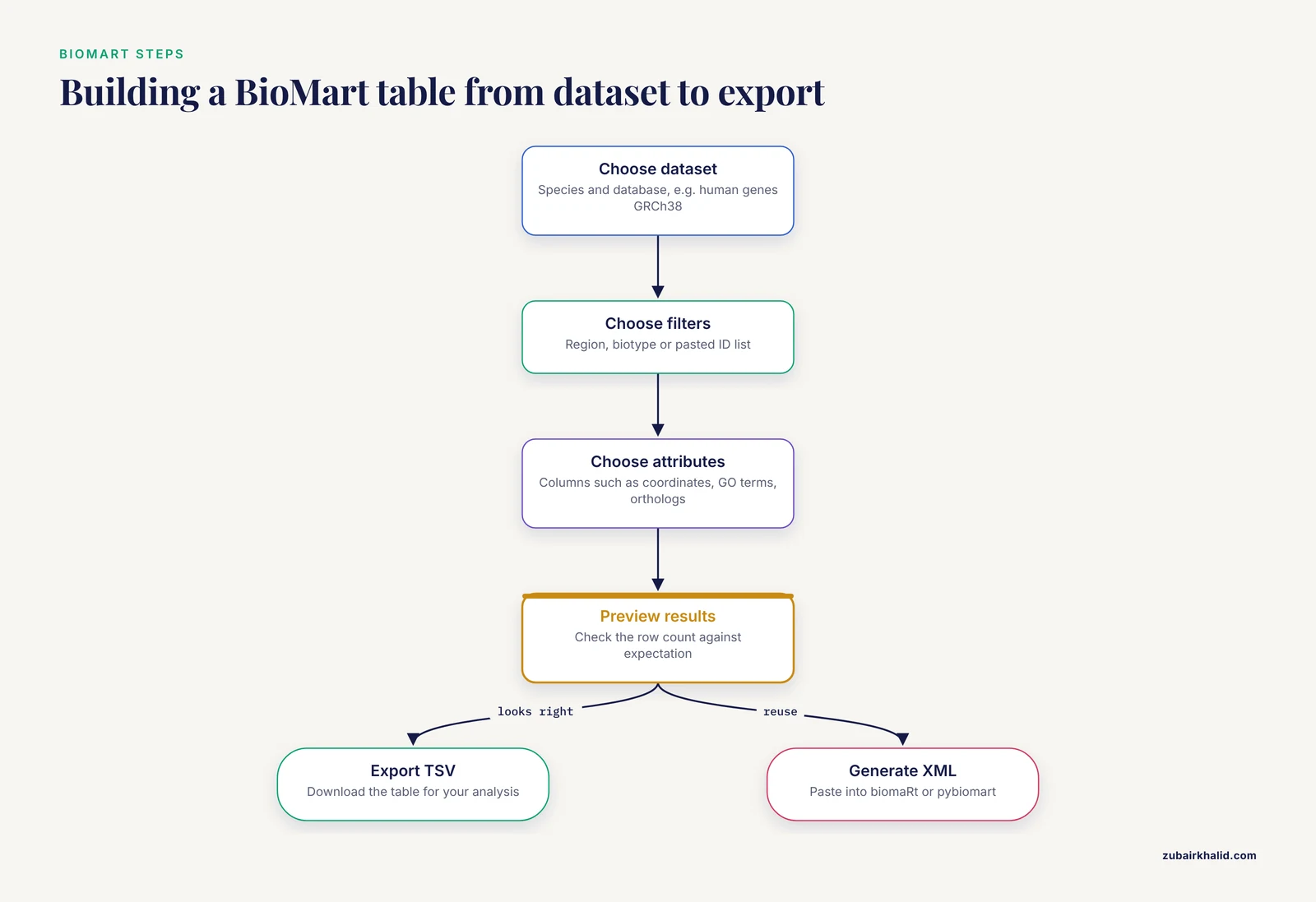
The web version lives on the Ensembl site and is the fastest zero-code path to a bulk table. The workflow is the same every time:
- Choose a dataset. Pick the species and database, for example Homo sapiens genes (GRCh38). This choice is the single most important one, because every later step is scoped to it.
- Choose filters. Restrict rows. Common examples: a region such as 7:117,100,000-117,500,000, a biotype such as protein_coding, or a pasted list of gene IDs.
- Choose attributes. Pick columns. The default gives Ensembl gene ID and associated external references. Expand categories to add chromosome coordinates, GO terms, orthologs, or protein domains.
- View results and export. Preview the table, then download as TSV, or generate the underlying XML query for reuse.
That fourth step deserves emphasis. When you click through the web interface and then open the "generate XML" view, BioMart hands you the formal query definition. You can paste that XML into the programmatic clients, which converts an interactive session into a reproducible script. Analysts who learn this trick early stop re-clicking through the interface for every rerun.
Programmatic BioMart with biomaRt and pybiomart
For R users, the Bioconductor package biomaRt is the standard client. The same filter-and-attribute logic appears as function arguments:
library(biomaRt)

ensembl <- useMart("ensembl", dataset = "mmusculus_gene_ensembl")

results <- getBM(
  attributes = c("ensembl_gene_id", "external_gene_name",
                 "chromosome_name", "start_position",
                 "mmusculus_homolog_assoc_gene_name"),
  filters    = "biotype",
  values     = "protein_coding",
  mart       = ensembl
)
Three lines of intent, one local data frame, no rate-limit bookkeeping. The same package can point at other BioMart-enabled servers by changing the host and mart arguments, which is the federation property showing up in practice.
For Python users, pybiomart wraps the same query model:
from pybiomart import Dataset

dataset = Dataset(name="mmusculus_gene_ensembl", host="http://www.ensembl.org")
df = dataset.query(
    attributes=["ensembl_gene_id", "external_gene_name", "start_position"],
    filters={"biotype": "protein_coding"},
)
The result is a pandas DataFrame, ready for the rest of a Python analysis. Between the R and Python clients, most working bioinformaticians can reach BioMart without leaving their analysis environment, which is a major practical advantage over copying downloaded files around.
How to Use Ensembl: Where the Genome Browser Fits
Many people arrive at this decision after first using the Ensembl genome browser interactively, so it helps to place the browser in the picture. A short orientation:
- Search. Type a gene symbol, variant ID, or coordinate into the search box at ensembl.org. The browser takes you to a location view for the current assembly.
- Navigate and configure. The location page shows tracks for genes, transcripts, variants, regulation, and comparative data. The "Configure this page" menu turns tracks on and off and adjusts detail level.
- Read the left-hand menu. Each entity page (gene, transcript, variant) carries tabs for sequence, external references, ontology, and orthologs. The variant page in particular displays predicted consequences that mirror what the VEP REST endpoints return.
- Export. The "Export data" button on a location view downloads sequence, EMBL format, or GTF for the region on screen. This handles one-region exports well.
The browser is the right tool for orienting yourself, sanity-checking a coordinate, and understanding an annotation in context. It is the wrong tool for any list longer than a handful of items. Once you find yourself copying identifiers out of the browser one page at a time, stop, identify whether your task is per-item or set-based, and switch to the REST API or BioMart accordingly. The browser, the REST API, and BioMart all serve the same current release of the database, so an identifier you find in the browser will resolve identically in either programmatic tool.
When to Use Ensembl REST API
The REST API earns its place in these situations:
Per-item questions inside a script. You have 150 variant IDs from a clinical report and need consequence annotations for each. Loop over the IDs, call a VEP endpoint per variant, collect JSON. The API returns exactly the fields you need and nothing more.
Live integration. A web application or internal service needs to resolve an identifier when a user submits it. You cannot pre-export a BioMart table for inputs you do not know yet. The REST API is designed to be called at runtime, on demand, one query at a time.
Coordinate-driven tasks. "Return every transcript overlapping chr11:5,200,000-5,300,000" is a native overlap query. Expressing the same thing in BioMart requires a region filter, which works, but the overlap endpoint maps more directly onto the question.
Fresh data on a fast-moving analysis. When you want the current release's answer for a small number of entities right now, one REST call is faster than configuring a mart.
JSON-native pipelines. If your downstream code consumes JSON (a common pattern in modern pipelines), the REST API's response format plugs in directly with no table-munging step.
In short, when to use the Ensembl REST API comes down to question shape and call volume. Small numbers of items, dynamic inputs, structured responses: REST.
When to Use BioMart
BioMart earns its place in these situations:
Bulk extraction. All protein-coding mouse genes with coordinates, symbols, and human orthologs is a three-attribute, one-filter BioMart query that returns in one request. Doing the same through the REST API would mean thousands of calls against a rate limit.
Attribute-heavy tables. BioMart composes many columns in one query. Pulling gene ID, symbol, biotype, coordinates, GO terms, InterPro domains, and orthologs for a genome-wide gene list is a single mart query in biomaRt producing a wide data frame.
Set-based filtering. Selecting rows by shared properties (biotype, chromosome, membership in an ID list) is BioMart's native operation. REST endpoints select by identity, not by property, so set-selection forces you to fetch and filter client-side.
Cross-database work. Because BioMart is a federation technology intended to let repositories interoperate, queries can draw across the databases exposed through the mart system rather than being confined to a single endpoint's scope [1]. If your analysis joins Ensembl annotations to data housed in another BioMart-enabled resource, this is the deciding feature.
Non-programmer colleagues. The web interface lets a collaborator build and download a table with no code. For lab meetings and one-off requests, that accessibility matters.
A reasonable rule for R-centered workflows: if your analysis script starts with library(biomaRt) and a getBM() call, and the result is a data frame you join to your own results table, you are using the tool the way it was designed.
Worked Scenarios
These four scenarios cover the decisions analysts actually face.
Scenario 1: Annotating 200 variants for a manuscript
You have 200 human variant IDs from a sequencing paper and need consequence terms, affected genes, and clinical significance context for a supplementary table.
Choice: REST API. Loop over the IDs against the variant endpoints, write the JSON responses into a list, flatten to a table locally. Total call count is well within polite-use territory, the per-variant output is small, and JSON handles the nested consequence structure cleanly. BioMart can return variant-associated attributes, but composing per-variant consequence detail is not its strength, and the filter-based model fights a task that is fundamentally "look up these specific records."
Scenario 2: One-time export of every mouse gene with GO terms and orthologs
You need a genome-wide table for all mouse genes: ID, symbol, coordinates, GO terms, human ortholog. Expect tens of thousands of rows before the GO expansion multiplies them.
Choice: BioMart. Build the query once in the web interface or in biomaRt, export to TSV, archive the file and the query definition. One request, no rate-limit management, and the XML record gives you reproducibility. Attempting this through the REST API would burn tens of thousands of rate-limited calls to reconstruct a table BioMart returns directly.
Scenario 3: A variant annotation service inside a pipeline
Your lab runs a small web service where users paste one variant at a time and get annotations back. Traffic arrives unpredictably, a few queries per hour.
Choice: REST API. Runtime per-item service is exactly the access pattern the API supports, and the JSON responses feed the front end directly. Pre-exporting BioMart tables cannot serve inputs that arrive after the export.
Scenario 4: Joining Ensembl annotations with a partner database
Your project needs Ensembl gene attributes combined with annotations held in another BioMart-enabled resource.
Choice: BioMart. This is the federation use case the technology was built for. The comparative review of access mechanisms found BioMart well suited to this class of interoperation, with each access technology carrying design tradeoffs that suit particular uses [1]. The REST API has no equivalent cross-source query capability.
A quick decision procedure
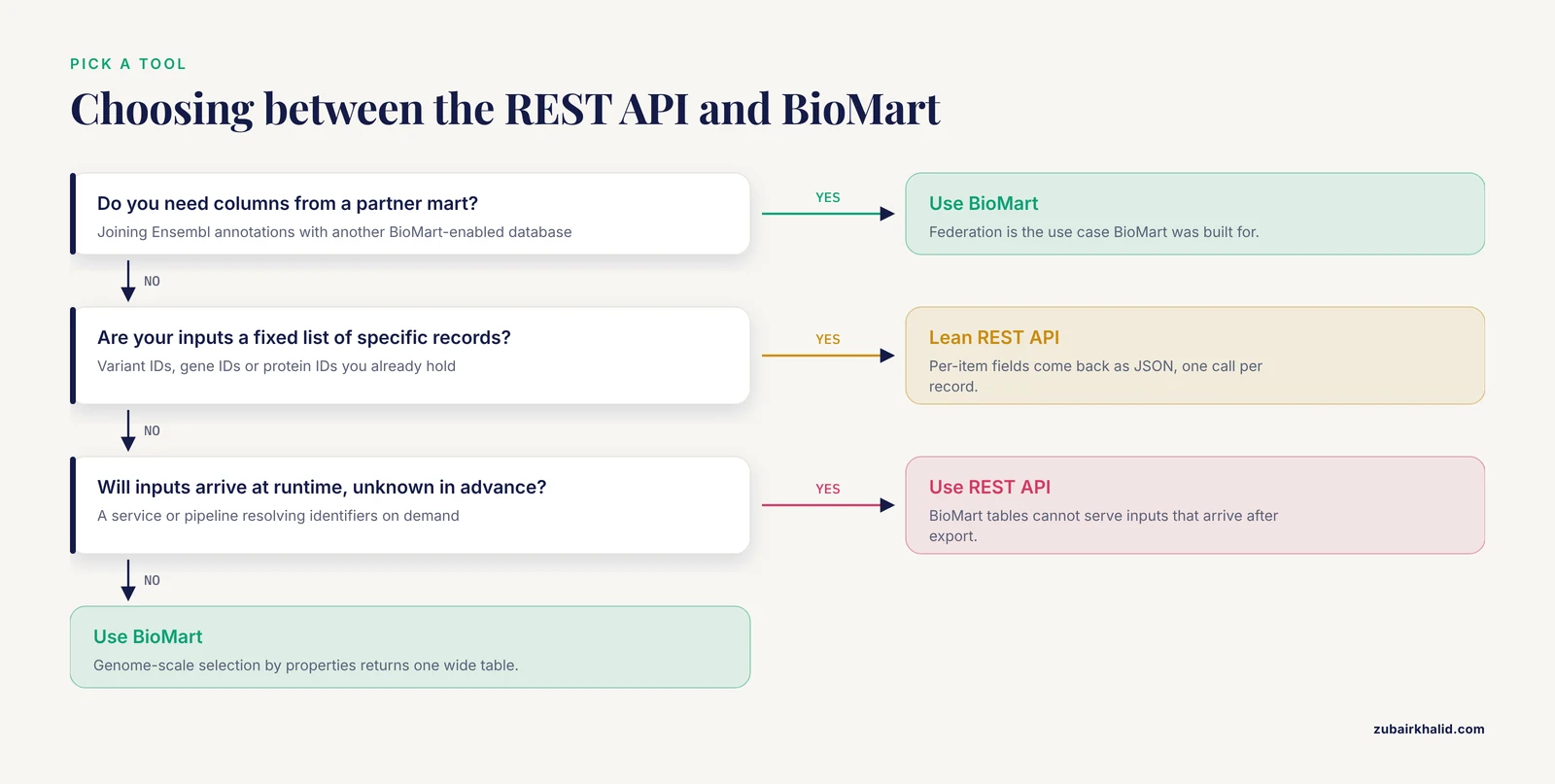
- Count your inputs. A handful to a few thousand specific records: REST. A genome-scale selection by properties: BioMart.
- Ask whether the inputs exist yet. Fixed list in hand: either works, lean REST for per-item fields. Unknown future inputs: REST.
- Ask whether you need columns from a partner mart. Yes: BioMart.
- Ask who runs the query. A coder: either. A non-coder: BioMart's web interface.
Common Mistakes and Limitations
These are the errors that show up repeatedly in real projects.
Assuming both tools report the same assembly by default. Human data exist on GRCh38 and, in archives, GRCh37. A BioMart dataset and a REST endpoint both serve the current release unless you deliberately point at an archive. Mixing coordinates across assemblies is a silent corruption of your results. Record the assembly with every dataset and every API call, and check it once per project.
Confusing filters and attributes in BioMart. Putting a gene symbol into the attribute list instead of the filter box produces a full-database table with an extra column, which looks plausible and is wrong. Filters restrict rows. Attributes name columns. Check the row count of every export against expectation before you trust it.
Looping REST calls at BioMart scale. The most common structural mistake in the ensembl rest api vs biomart decision is using the API for genome-wide extraction. Beyond a few thousand per-item calls you will hit rate limiting, your runtime will grow linearly, and the shared public server will suffer for it. When the input list grows past that scale, stop and reframe the task as a table extraction.
Pasting oversized ID lists into GET requests. URLs have practical length limits. Endpoints that accept batches expect a POST request with the ID list in the body. A GET with a thousand comma-separated IDs fails in confusing ways.
Ignoring HTTP 429 responses. A script that retries immediately in a tight loop makes rate limiting worse. Back off, sleep, and retry. Better still, stay under the cap from the start.
Treating REST response schemas as frozen. API responses can gain fields between releases. Code that indexes by position or assumes an exact key set can break quietly. Parse defensively and log unexpected structures.
Forgetting the dataset in biomaRt. Calling getBM() against the wrong species dataset returns valid-looking rows for the wrong organism. Species-specific gene IDs and symbols will not overlap across species, so the mismatch usually surfaces as an empty result, but ortholog attribute columns can mask it. Print the mart and dataset object before every long run.
Assuming either tool archives history by default. Both web interfaces serve the current release. If a revision to your paper depends on the annotation as it existed at an earlier release, use the Ensembl archive sites rather than re-running a query against the live service.
Not recording the release. Ensembl updates on a regular release cycle, and gene models, IDs, and variant annotations change between releases. A result is reproducible only if you record the release number alongside the tool, query, and date. This applies equally to both tools, and its absence is the most common reason an old BioMart export no longer matches a fresh REST response.
One further limitation applies to the tools themselves. The tradeoff analysis of data access technologies for research repositories found that each mechanism suits certain uses and carries design compromises, meaning neither tool is universally superior and neither replaces the other [1]. Plan on knowing both.
Frequently Asked Questions
Can I use the Ensembl REST API and BioMart together?
Yes, and most experienced analysts do. A common pattern is a BioMart export for the genome-scale backbone table, followed by targeted REST calls for per-entity details the mart does not expose cleanly, such as per-variant consequences. Keep one tool authoritative for each field in your final table so releases and assemblies stay consistent.
Does BioMart still work now that Ensembl has a REST API?
Yes. BioMart remains a maintained access route to Ensembl data, and the biomaRt and pybiomart clients remain in active use across the community. The REST API did not replace BioMart because the two solve different question shapes, bulk table extraction versus per-item lookup.
Which tool is faster for large queries?
BioMart, for large tabular extractions, by a wide margin. One mart query returns the full table, whereas the REST API requires one request per item subject to per-second caps. For a single small lookup, the REST API is faster because there is nothing to configure.
Do the two tools return the same identifiers?
They draw on the same Ensembl database and use the same stable identifier scheme, so an Ensembl gene ID means the same thing in both tools. Differences appear in what surrounds the ID: attribute coverage, response format, and version details differ by tool. Always record the Ensembl release number with either tool's output.
How do I record which release of Ensembl I used?
Note the release number stated on the Ensembl site at query time, plus the assembly (GRCh38 for current human data), the exact endpoint URL or the BioMart dataset, filters, and attributes, and the date of the query. For BioMart, saving the generated XML query alongside the exported table captures nearly everything needed to reproduce the result.
Is the Ensembl REST API free to use?
Yes. The public REST server is free, with per-second rate limits that govern how fast you may query it. Very high-volume projects are directed toward running a local mirror rather than loading the shared service.