Ensembl REST API Rate Limits and Best Practices
By Dr. Zubair Khalid, DVM, MS, PhD ·

The Ensembl REST API rate limit caps the public server at 33 requests per second per client, while every alternative access route (batched POST requests, a self-hosted server, bulk downloads, or a local tool such as VEP) removes that ceiling in exchange for setup work. The rule of thumb is simple. If your job involves thousands to tens of thousands of requests and can finish politely in minutes to hours, use the public REST API and pace your client. If your job involves millions of records, runs nightly, or feeds a production pipeline, switch to bulk data or host the resources yourself, because no amount of retry logic will turn a throttled public API into a data warehouse.
This article covers exactly how the documented rate limit works, what the server tells you in response headers, every realistic option for working within or around the limit with their pros and cons, worked scenarios with runnable code, and the mistakes that most often break Ensembl API scripts.
How the Ensembl REST API Rate Limit Works
Ensembl is a joint project of EMBL-EBI and the Wellcome Sanger Institute, and the REST API at rest.ensembl.org is a shared, free public service. It serves the entire world's bioinformatics community on infrastructure that is not resourced for unbounded bulk queries. The rate limit exists so that one aggressive script does not degrade service for everyone else. According to Ensembl's own API documentation, the published conditions for the public server are a limit of 33 requests per second, with a burst allowance of up to 200 requests before throttling begins. The limit is enforced per client IP address, so it applies to the sum of all requests your machine, container, or shared cluster node sends, not per script or per process.
The headers the server sends back
Every response from the Ensembl REST server carries rate limit information in HTTP headers. Three matter in practice.
| Header | Meaning | Typical value |
|---|---|---|
| X-RateLimit-Limit | Requests allowed per period | 33 |
| X-RateLimit-Period | Length of the period in seconds | 1 |
| X-RateLimit-Reset | Time until the current window resets | Seconds remaining |
Reading these headers turns rate limiting from guesswork into measurement. A well-written client logs X-RateLimit-Limit and X-RateLimit-Period on the first response of a run to confirm the server's current terms, then uses the values to self-pace instead of hard-coding an assumption that could change.
What happens when you exceed the limit
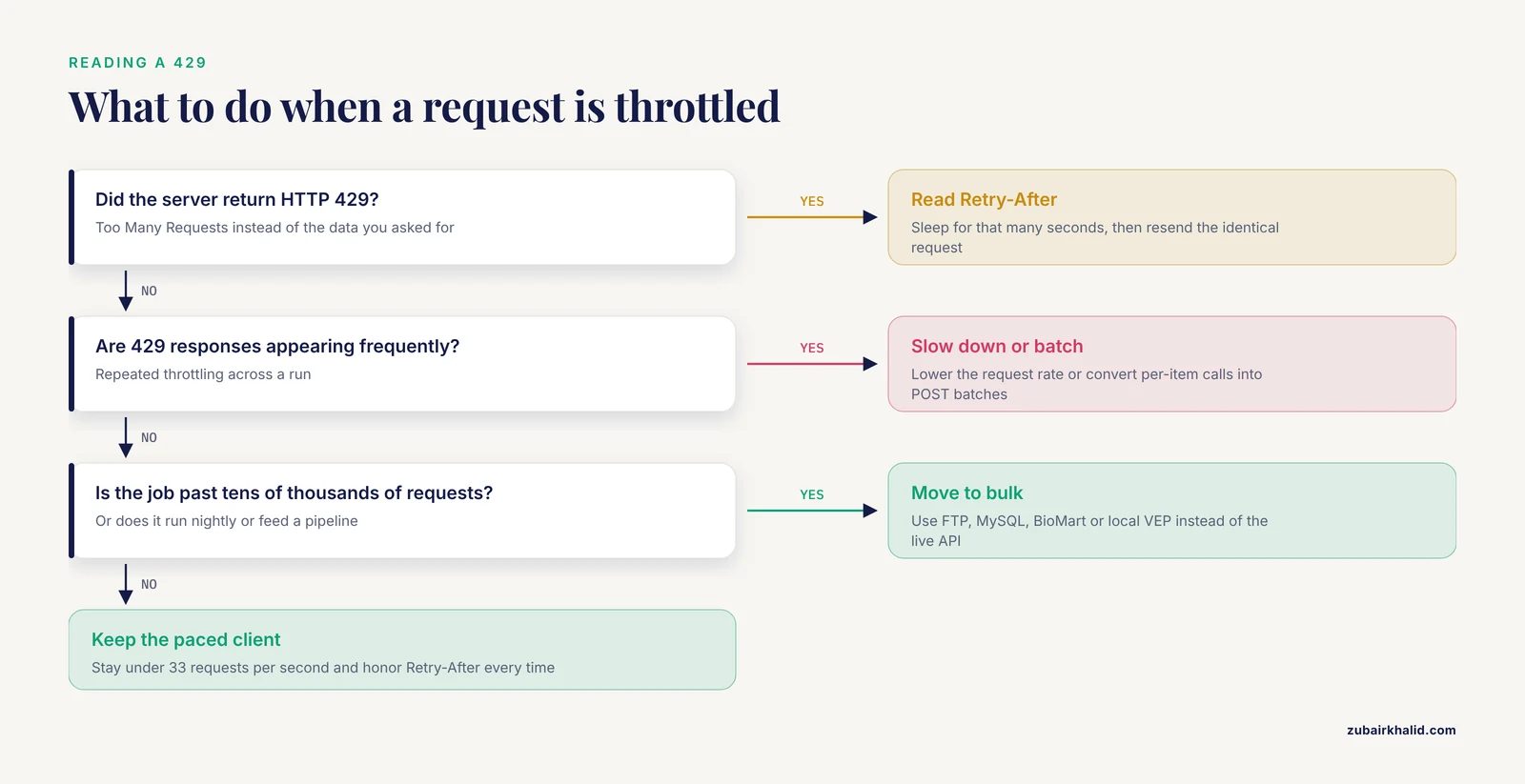
When a client exceeds the allowance, the server responds with HTTP status 429 (Too Many Requests) instead of the data you asked for. The 429 response includes a Retry-After header telling you how many seconds to wait. Scripts that treat 429 as a fatal error fail unnecessarily on perfectly recoverable conditions. Scripts that ignore 429 and immediately retry make the throttling worse, because every rejected request still costs the server handling effort. The correct behavior is to catch 429, sleep for the duration in Retry-After (or a sensible default if the header is absent), and resend the identical request.
Two related failure modes are worth knowing. Sending requests far faster than 33 per second for sustained periods can move a client from soft throttling into harsher treatment, so a client that retries without backing off can dig itself a deeper hole. And heavy sustained abuse of the public service risks the project contacting your network administrator or blocking your address, which Ensembl's documentation makes clear is an outcome for users who run unattended bulk jobs against the live API.
One limit per IP, mirrors, and where the server lives
Because the cap is per IP address, running 40 worker processes from one compute node still counts as one client sending 40 concurrent requests. This surprises people who scale out with multiprocessing and then wonder why they see 429 responses. Ensembl operates servers in Europe and a mirror on the US East Coast reachable through the useast.ensembl.org hostname. Choosing the geographically closer server reduces latency, which indirectly reduces the time your requests occupy the rate limit window. The mirror enforces the same published limits, so switching servers is a performance choice, not a way around the cap.
Your Options for Handling the Ensembl REST API Rate Limit
Five practical routes exist, and most projects end up combining two of them. The table below is the core comparison for this article. The sections after it explain each option on its own terms.
| Option | Typical scale | Setup effort | Best for | Main drawback |
|---|---|---|---|---|
| Public REST API, paced client | Up to tens of thousands of requests | Minutes | Interactive work, small scripts, prototyping | 33 requests per second ceiling, shared infrastructure |
| Batched POST requests | Up to hundreds of thousands of IDs | Minutes | ID lookups, sequence retrieval for gene or transcript lists | Only some endpoints accept batches, batches can time out |
| Self-hosted REST server | Millions of requests | Hours to days | Production pipelines, recurring internal services | You maintain Perl dependencies, databases, and releases |
| Bulk downloads (FTP, MySQL, BioMart) | Millions of rows | Minutes to hours | Whole-genome tables, repeated analyses, archival snapshots | Large downloads, data is per-release rather than live |
| Local annotation tools (VEP) | Millions of variants | Hours | Variant annotation at any scale | Narrow purpose, cache diskspace and install effort |
Option 1: Stay Within the Public Limits With a Well-Behaved Client
For most people asking about the Ensembl REST API rate limit, the honest answer is that the limit is comfortable if the client is written correctly. A paced client that sends fewer than 33 requests per second, reads the rate limit headers, and backs off on 429 responses will run for hours without a single rejection. Ensembl's documentation asks exactly this of API users: identify your client honestly with a User-Agent header, avoid parallel hammering, and move to bulk methods for large jobs.
Three habits define a well-behaved client.
- Self-pace below the documented ceiling rather than relying on the server to correct you. A minimum interval of roughly one-thirtieth of a second between requests sits safely inside the limit.
- Honor Retry-After on every 429 response instead of retrying on a fixed guess.
- Set an explicit timeout on every request so a slow response cannot hang an unattended run, and set a descriptive User-Agent so the Ensembl team can contact you if your traffic ever looks problematic.
A minimal rate-limited client
The following Python function enforces spacing between requests, handles 429 with the server's own Retry-After value, and retries transient failures a bounded number of times.
import time
import requests

BASE = "https://rest.ensembl.org"
HEADERS = {
    "Content-Type": "application/json",
    "Accept": "application/json",
    "User-Agent": "my-lab-pipeline/1.0 (contact: [email protected])"
}

MIN_INTERVAL = 0.05  # about 20 requests per second, safely under 33
_last = 0.0

def get(path, params=None, max_tries=5):
    global _last
    wait = MIN_INTERVAL - (time.time() - _last)
    if wait > 0:
        time.sleep(wait)
    _last = time.time()

    for attempt in range(max_tries):
        response = requests.get(
            BASE + path, params=params, headers=HEADERS, timeout=30
        )
        if response.status_code == 429:
            retry_after = float(response.headers.get("Retry-After", 2))
            time.sleep(retry_after)
            continue
        response.raise_for_status()
        return response.json()
    raise RuntimeError(f"Giving up after {max_tries} tries on {path}")
Using it is one line per resource. Fetching the canonical transcript of a human gene looks like get("/lookup/id/ENSG00000139618", params={"canonical": 1, "expand": 1}). The same pattern works in R with httr and in command-line scripts with curl, and the three habits transfer unchanged.
Retries that do not make things worse
Retries deserve one explicit rule. Retry only failures that are safe to repeat. GET requests are idempotent, meaning the server does the same work and returns the same data each time, so retrying them is safe. A script that resends a POST batch after a partial failure must deduplicate results on its side, because a batch that succeeded once and a duplicate batch will both return data. In practice, most analysts handle this by keying results on the input identifier in a dictionary, which makes duplicate responses harmless.
Option 2: Batch Requests With POST
Batching is usually the single biggest win available within the public rate limit. Many of the most-used endpoints accept a list of identifiers in a single POST request and return results for the whole list at once. Ensembl's endpoint documentation specifies a maximum of 1,000 identifiers per batch. One POST carrying 1,000 IDs consumes one request against your rate allowance and returns the same information that 1,000 separate GET requests would have needed.
Endpoints that accept batches
The commonly used batch-friendly endpoints include the following.
- POST /lookup/id, which resolves identifiers to stable genomic locations with optional expansion to transcripts, translations, and exons.
- POST /sequence/id, which returns sequence strings for up to 1,000 identifiers in a single call.
- POST /xrefs/id, which retrieves cross-references between Ensembl IDs and external databases.
- POST /variation/human/id (and the equivalent for other species), which resolves variant identifiers to their genomic records.
Endpoints that compute per-region or per-variant results in other ways, such as the overlap and VEP endpoints, have their own documented input formats and limits, so check the specific endpoint page on the Ensembl REST documentation site rather than assuming batching applies everywhere.
A batched lookup example
import requests

ids = ["ENSG00000139618", "ENSG00000141510", "ENSG00000157764"]

response = requests.post(
    "https://rest.ensembl.org/lookup/id",
    headers={
        "Content-Type": "application/json",
        "Accept": "application/json"
    },
    json={"ids": ids, "expand": 0},
    timeout=60
)
response.raise_for_status()
results = response.json()
Two details trip people up here. The Content-Type header must be application/json on POST requests, because the server rejects otherwise well-formed bodies with a confusing error. And the response is keyed by identifier, so missing or retired IDs return a null value for that key rather than failing the whole batch, which means your code should check for null entries instead of assuming every requested ID resolved.
For a list of 50,000 transcripts, batching turns a job that would need 50,000 individual requests (about 25 minutes at a safe 33 per second) into 50 batched requests that complete in well under a minute. This is why experienced users reach for batching before they reach for threads.
Option 3: Run Your Own Ensembl REST Server
The ensembl-rest codebase is open source and can be installed on your own hardware, pointed at either Ensembl's public MySQL servers or databases you load locally, and then used without the public rate limit because you are now the operator. Ensembl publishes installation instructions covering the Perl dependencies and database configuration. Running your own instance means you decide your own throughput policy, which removes the 33 requests per second ceiling and the risk of a shared-service operator throttling your production job.
The costs are real and worth naming before you commit.
- You maintain a working stack of the Ensembl Perl APIs, a web framework, and a database backend, and you upgrade it every Ensembl release if you want current data.
- Local MySQL databases for all your species of interest take meaningful disk space and load time per release.
- Your team becomes the on-call engineer for the service. There is no Ensembl support contract for your private instance.
Self-hosting makes sense for institutions that run the same annotation queries continuously, need an internal service other teams can call, or process data at volumes that would be impolite against the public server. For a one-off analysis or a weekly job, it is overkill.
Option 4: Skip the API With Bulk Data
A large fraction of what people hammer the REST API for does not require an API at all. Ensembl publishes complete data releases for download, and pulling a file once is almost always faster, cheaper, and more reproducible than requesting its rows one call at a time.
FTP downloads
The Ensembl FTP site at ftp.ensembl.org hosts GTF and GFF3 gene annotation, DNA FASTA files, variation files in VCF format, and regulatory data for every supported species and assembly. If your script calls the API once per gene to collect coordinates, downloading the species GTF once and joining locally gives you all coordinates in seconds with zero rate limit exposure. This is the single most effective fix for the most common rate limit complaint.
Public MySQL servers
Ensembl runs public read-only MySQL servers at ensembldb.ensembl.org that accept anonymous connections to every current and archived release database. With a MySQL client or any language's database driver, you can run SQL directly against core schema tables. A query that would take 10,000 REST calls is frequently one SELECT with a join. This route still uses shared Ensembl infrastructure, so common-sense politeness applies, but it has no 33 requests per second REST policy and moving set-based work from the API to SQL is exactly what the servers are provided for.
BioMart
BioMart is Ensembl's web and programmatic query interface for tabular extracts. The web interface at the Ensembl site lets you select attributes and filters interactively and download results, and the biomaRt package in R and its Python equivalents run the same queries programmatically. BioMart suits questions like "give me all protein-coding genes on chromosome 7 with their HGNC symbols and RefSeq matches," which are awkward to assemble endpoint by endpoint through the REST API and trivial as one BioMart query.
Option 5: Use Local Tools Such as VEP
Variant annotation is the workload where the public REST API is most often misused. The VEP (Variant Effect Predictor) endpoint on the REST server is convenient for tens or hundreds of variants, but annotating a whole-exome VCF through the API means serial network round trips for every variant, which runs afoul of both the rate limit and plain arithmetic. Ensembl's own guidance for large variant sets is to run the VEP command-line tool locally with a downloaded cache.
The local VEP reads your VCF in one pass, consults a local cache of transcripts and variation data, and annotates millions of variants per hour on ordinary hardware, offline and with no network requests at all. Installing VEP and downloading the cache for your species and assembly is an hour of setup that permanently removes variant annotation from the rate limit conversation. Keep the REST VEP endpoint for interactive checks of a handful of variants, and use local VEP for anything VCF-shaped and large.
Comparing the Options: Pros and Cons
The table above gives the overview. The criteria below are the ones that actually decide which route a project takes.
Throughput. The public REST API tops out at the documented 33 requests per second, multiplied by batching efficiency where POST endpoints apply. Bulk downloads and local tools have no comparable ceiling because they move the compute to you. Self-hosting scales to whatever your own hardware tolerates.
Data freshness. The REST API always serves the current release, which matters if you need the newest gene models or the latest variation data. FTP files and MySQL dumps are snapshots of a specific release, and local caches age until you redownload them. If your analysis must track the latest release automatically, the API or scheduled downloads on release day are the honest choices.
Reproducibility. Counterintuitively, the live API is the least reproducible route, because responses change when releases change and there is no archived endpoint for most queries. Downloading a specific release's files and recording the release number gives you a frozen, citable dataset. Local VEP caches carry the same benefit. For any analysis that will be reviewed, published, or rerun later, pinning a release beats querying live endpoints.
Setup and maintenance cost. The paced REST client costs minutes to write and nothing to maintain. Batched requests cost minutes more. FTP and BioMart need no infrastructure. VEP and self-hosted REST servers each demand real installation and per-release maintenance.
Failure modes. The public API can throttle you, time out, or change under your feet at a release boundary. Bulk files cannot throttle you but can be gigabytes to download. Self-hosted servers fail when your own database or dependencies fail. Choosing an option is largely choosing which failure mode you can live with.
Politeness and goodwill. The public REST API is a free shared resource funded by EMBL-EBI and the Wellcome Sanger Institute. Everything Ensembl publishes about API etiquette reduces to one principle: take bulk-scale demands to bulk-scale channels. A script that respects that principle never has a rate limit problem in the first place.
Worked Scenarios
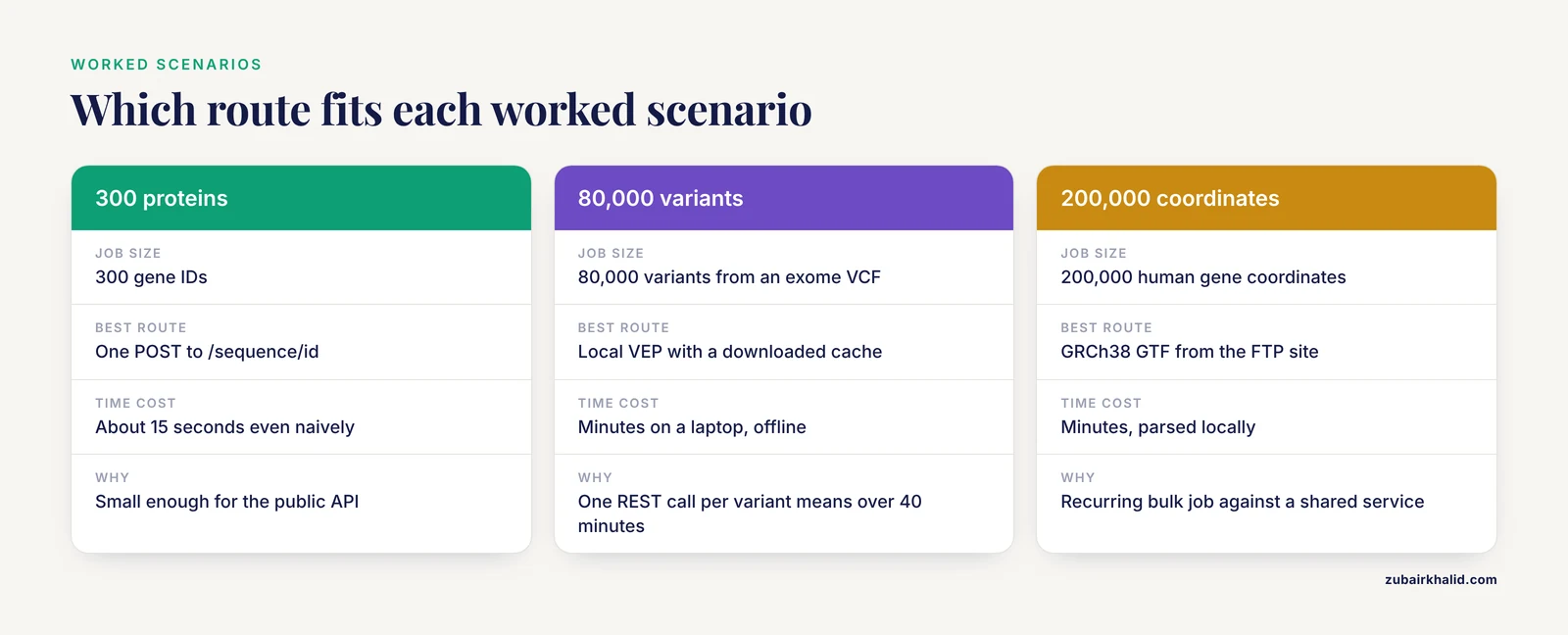
Scenario 1: Fetch protein sequences for 300 genes
A researcher has 300 Ensembl gene IDs and wants the protein sequence of each canonical transcript. The naive loop makes 300 GET requests to /sequence/id, which at a polite pace takes about 15 seconds and works fine. The batched approach splits the IDs into chunks of 1,000 (one chunk in this case) and makes a single POST to /sequence/id. Batching wins here, but even the naive loop is acceptable at this scale. This is exactly the workload the public API is designed for.
Scenario 2: Annotate 80,000 variants from an exome VCF
At 33 requests per second, one REST call per variant means over 40 minutes of pure request time before counting response parsing, and any hiccup multiplies it. Batched VEP endpoints improve the math, but local VEP with a downloaded cache annotates the same file in minutes on a laptop with no network dependency. The right choice is unambiguous. Run the REST VEP endpoint during interactive exploration of a few variants, and run local VEP for the full VCF.
Scenario 3: Refresh a gene coordinate table every release
A database team maintains an internal table of 200,000 human gene coordinates, updated each Ensembl release. Calling the API for 200,000 IDs is feasible with batching (200 POST requests) and takes minutes, but it is a nightly, recurring, bulk-shaped workload against a shared service. The better design downloads the current GRCh38 GTF from the FTP site on release day, parses it locally, and records the release version alongside the data. The API remains useful in this scenario for one-off spot checks and for fields the GTF does not carry, fetched for the handful of genes that need them.
Rate Limit Best Practices Checklist
The following list compresses the practices above into an actionable sequence for any REST API project.
- Read the endpoint documentation first and check whether a POST batch form exists before writing any per-item loop.
- Self-pace below 33 requests per second using the documented values, and read X-RateLimit-Limit and X-RateLimit-Period from the first response to confirm them.
- Handle HTTP 429 by sleeping for Retry-After and resending, never by treating it as fatal and never by immediate retry.
- Set timeouts and a descriptive User-Agent on every request.
- Cache responses on disk keyed by request parameters so repeated runs do not repeat requests.
- Prefer the geographically closer server (Europe or the US East mirror) to reduce latency.
- Record the Ensembl release number with your results, because identifiers and gene models shift between releases.
- Move any workload past tens of thousands of requests to bulk files, SQL, BioMart, or local VEP.
Using the Ensembl Genome Browser Alongside the API
Many people meet Ensembl through the genome browser and wonder how it relates to the REST API. The two are views of the same underlying databases, and they work best together. A short practical tour of how to use Ensembl effectively starts with the browser. You search for a gene by symbol, land on its region view, and can then configure tracks for transcripts, variants, regulation, and comparative genomics. Every view has an export function that hands you the displayed data as FASTA, GTF, or tabular text, which is frequently the fastest path to a small custom dataset and a good way to sanity-check what an API script returns.
The connection point to this article's topic is that the browser export and the API surface the same data, so a browser session is the right place to verify that your identifiers, species, and assembly match what your script will request. The single most common silent failure in Ensembl API work is requesting data with the wrong assembly parameter, for example omitting species and assembly context on a variant endpoint and getting a result for the wrong build. Ten minutes in the browser confirming the gene model you expect prevents an hour of debugging API output that is technically correct but not what you meant to ask for. Ensembl also hosts self-guided browser tutorials on its training pages for readers who want a structured walk-through of views, tracks, and exports.
Common Mistakes and Limitations
Looping where batching exists. The most frequent cause of self-inflicted rate limit pain is a for-loop over /lookup/id when POST /lookup/id accepts up to 1,000 identifiers per call. Check every endpoint's documentation for a batch form before writing the loop.
Treating 429 as an error instead of an instruction. The server is telling you exactly how long to wait. Scripts that crash on 429 abandon recoverable jobs, and scripts that ignore Retry-After convert soft throttling into a bad afternoon.
Parallelizing from one IP address. Forty threads on one machine still share one rate limit. Concurrency adds speed only until the cap, then adds 429 responses. Within the public API, batching buys more than parallelism does.
Ignoring the assembly and species context. Results returned for GRCh37 and GRCh38 differ, and endpoints differ in how assembly is specified. Verify the assembly every time you write a new script and every time a release changes under you.
Hard-coding the limit instead of reading it. The numbers in this article reflect the published terms at the time of writing. A client that reads the rate limit headers adapts automatically if Ensembl adjusts its policy, while a client with a hard-coded sleep silently breaks.
Using the live API for reproducible bulk data. An analysis that queries live endpoints cannot be rerun identically after the next release. For anything that will be reported or reviewed, download the specific release you need and document it.
Forgetting that the public server is shared. Sustained heavy load risks throttling, contact with your institution's network administrators, or blocking. The published guidance exists to prevent one user from degrading a service the whole community depends on, and the alternatives listed in this article exist precisely so that no one has to make that trade.
One general limitation applies to everything above. Public web service policies, endpoint availability, and release schedules change over time, so confirm current terms on Ensembl's official documentation before committing a long-running workflow to them.
Frequently Asked Questions
How many requests can I send to the Ensembl REST API per second?
The documented public limit is 33 requests per second, with a burst allowance of up to 200 requests before throttling. The limit applies per client IP address, and the server reports the current values in its X-RateLimit response headers.
Does the Ensembl REST API rate limit depend on an API key?
No. The public Ensembl REST API requires no registration or API key, and the rate limit applies equally to anonymous users based on IP address. There is no key tier that raises the limit, so projects needing more throughput should use batching, bulk data, or a self-hosted server instead.
Why am I getting HTTP 429 responses?
HTTP 429 means your client exceeded the rate limit. Read the Retry-After header on the response, sleep for that many seconds, and resend the same request. If 429 responses appear frequently, reduce your request rate or convert per-item calls into batched POST requests.
Can I bypass the Ensembl REST API rate limit by using multiple IP addresses?
No. Circumventing the cap by distributing load across addresses violates the terms the Ensembl project publishes for the service and risks blocking for you or your institution. The legitimate paths to higher throughput are batched requests, the US East mirror for lower latency, self-hosting, and bulk data downloads.
Should I use the REST API or download Ensembl data in bulk?
Use the REST API for interactive queries, small scripts, and anything under roughly tens of thousands of requests. Download bulk files from the Ensembl FTP site or query the public MySQL servers when a job involves whole-genome tables, runs on a schedule, or must be reproducible against a specific release. Local VEP is the right tool for annotating large variant files.
Does the rate limit apply to the US East mirror?
Yes. The useast.ensembl.org mirror enforces the same published limits as the main server. Choosing the mirror improves response latency for users near it but does not increase the number of requests you may send.