How to Retrieve Gene Sequences from Ensembl REST API
By Dr. Zubair Khalid, DVM, MS, PhD ·

By the end of this walkthrough you will be able to get gene sequences from the Ensembl REST API on demand. You will fetch the full genomic span of a gene, its spliced cDNA, its CDS, and its protein, pull any coordinate range on either strand, batch thousands of IDs without tripping rate limits, and verify every sequence against the annotation before you trust it in a pipeline.
You need one of two things on hand: Python 3 with the requests library (install with pip install requests) or the curl command line tool. Everything runs against the public server at https://rest.ensembl.org, so there is no account to create, no key to obtain, and nothing to install beyond a language runtime.
The Ensembl REST API was designed for exactly this job. It serves Ensembl data as standard JSON and FASTA to any programming language while minimizing client work [1]. If you have only used the Ensembl website and want to learn how to use Ensembl programmatically, the steps below follow the same path as the Ensembl tutorial on getting gene and genome data programmatically [2]. Each step shows the exact command, the shape of the response, and how to check the result.
What the Ensembl REST API Does
REST stands for Representational State Transfer. An API (application programming interface) is a machine-readable interface to a service, and in a REST API every piece of data lives at a stable URL called an endpoint. You request an endpoint, the server answers with data, and you parse the answer in whatever language you prefer.
Ensembl sits on top of its core database infrastructure, which stores genome assemblies and their functional annotation for hundreds of species and links them to popular external identifiers such as UniProt and RefSeq [3]. The REST server exposes that store over plain HTTP. Four properties matter for daily work:
- No authentication. You send requests anonymously. Ensembl asks that you set a User-Agent header identifying your script and including a contact email.
- Rate limits. The service is shared. Ensembl documents a limit of 55 requests per second per IP address at the time of writing. Exceed it and the server answers with HTTP 429 (Too Many Requests).
- Two response formats. JSON (JavaScript Object Notation, a structured plain-text format) is the default. FASTA (the plain-text sequence format with a
>header line) is available on every sequence endpoint. - Open implementation. The server code is released under the Apache 2.0 license on GitHub [1].
Coverage is broad. Since Ensembl release 96, the Ensembl and Ensembl Genomes codebases are unified, so the same endpoints retrieve human, mouse, plant, fungal, and bacterial sequences [3]. For a second worked perspective on the same workflow, the Ensembl tutorial on getting gene and genome data programmatically pairs well with this guide [2].
Before You Start: Stable IDs, Assemblies, and Coordinates
Three conventions cause most beginner errors, so settle them before the first request.
Stable identifiers. Ensembl assigns a stable ID to every gene, transcript, and protein. The prefix encodes the species and object type:
ENSG, gene (human), for example ENSG00000139618 for BRCA2ENST, transcriptENSP, proteinENSR, regulatory feature- Other species extend the prefix, for example
ENSMUSGfor mouse genes
A dot and a number after the ID (for example, a gene may appear as ENSG00000139618.16 in another database) is a version stamp. The API wants the bare ID, so strip the suffix. Gene symbols such as BRCA2 are human-friendly labels, not stable IDs. They change, they collide across species, and they can be ambiguous. Always resolve a symbol to a stable ID first (Step 1).
Assemblies. A genome assembly is a specific coordinate system for a species genome. Human data currently lives on GRCh38. Many older datasets use GRCh37, which Ensembl still serves from a dedicated server (see the older releases section below). A coordinate from one assembly points to a different sequence in the other, so decide which assembly your project uses before you fetch anything.
Coordinates. Ensembl coordinates are 1-based and fully closed. The first base of chromosome 13 is position 1. A gene from 32,315,478 to 32,400,405 includes both of those bases. If your input comes from a BED file or a VCF, which use 0-based starts, add 1 to the start. A BED interval 13 32315477 323400405 becomes Ensembl 13:32315478-323400405. Strand is written 1 for forward and -1 for reverse.
Format negotiation. Ensembl selects the response format from the Content-Type header of your request, which is unusual (most APIs use the Accept header for this), or from a content-type query parameter [1]. Send Content-Type: application/json for structured data or Content-Type: text/x-fasta for sequences. Omit both and you get JSON.
Step-by-Step: Get a Gene Sequence from the Ensembl REST API
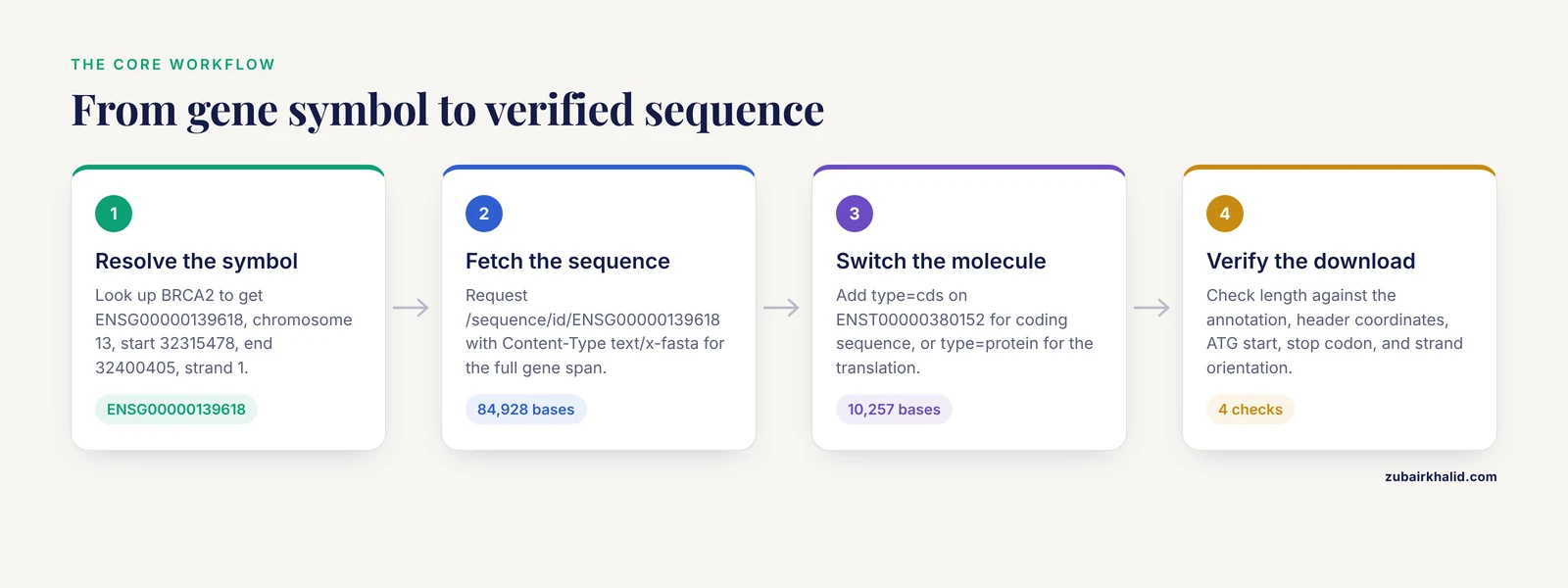
The six steps below use BRCA2, a well-annotated human gene, as the worked example. Substitute your own symbol or ID as you go.
Step 1. Check the Service and Resolve the Gene Symbol
Confirm the service is up:
curl -s -H 'Content-Type: application/json' 'https://rest.ensembl.org/info/ping'Expected output:
{"ping":1}A response of {"ping":1} means the service is healthy. Anything else, or a long silence, means try again later.
Now resolve the symbol to a stable ID and coordinates:
curl -s -H 'Content-Type: application/json' 'https://rest.ensembl.org/lookup/symbol/homo_sapiens/BRCA2'Expected output (trimmed):
{
  "assembly_name": "GRCh38",
  "biotype": "protein_coding",
  "end": 32400405,
  "id": "ENSG00000139618",
  "object_type": "Gene",
  "seq_region_name": "13",
  "species": "homo_sapiens",
  "start": 32315478,
  "strand": 1
}
The full response also carries the canonical transcript ID, the gene version, and other fields. Five values drive everything else: id (ENSG00000139618), seq_region_name (13), start (32315478), end (32400405), and strand (1). The gene span length is end minus start plus 1, here 32400405 - 32315478 + 1 = 84,928 bases. Write that number down, because Step 6 uses it to verify the download.
Add ?expand=1 to the same call to receive every transcript of the gene, each with its own stable ID, coordinates, and translation ID. That list is what you will use for transcript-level requests in Step 3.
Step 2. Get the Genomic Sequence of the Gene
With the stable ID in hand, one call returns the genomic sequence of the entire gene span, introns included:
curl -s -H 'Content-Type: text/x-fasta' 'https://rest.ensembl.org/sequence/id/ENSG00000139618'Expected output (sequence truncated for display):
>ENSG00000139618 dna:chromosome chromosome:GRCh38:13:32315478:323400405:1
<84,928 bases follow, 60 characters per line>
Read the header line carefully, because it is your provenance record. It encodes the molecule type (dna), the assembly (GRCh38), the chromosome (13), the start (32315478), the end (323400405), and the strand (1). If you ever need to defend where a sequence came from, this line is the evidence.
The same endpoint returns JSON by default:
curl -s -H 'Content-Type: application/json' 'https://rest.ensembl.org/sequence/id/ENSG00000139618'{
"desc": "dna:chromosome:chromosome:GRCh38:13:32315478:323400405:1",
"id": "ENSG00000139618",
"molecule": "dna",
"query": "ENSG00000139618",
"seq": "<the full 84,928-base sequence>"
}The desc string packs the same information as the FASTA header. Two things to know about the default genomic sequence. First, type=genomic is the default for gene and transcript IDs, and it includes introns. Second, repeat regions are hard-masked by default, meaning repetitive bases are replaced with N. Add ?type=genomic_unmasked for the raw sequence or ?type=genomic_softmasked for repeats in lowercase.
Step 3. Get cDNA, CDS, or Protein Sequence
The type parameter switches the molecule you get back. Define the terms first:
- cdna, the spliced transcript, exons joined, untranslated regions (UTRs, the non-coding ends of the transcript) included
- cds, the coding sequence from the start codon through the stop codon, UTRs excluded
- protein, the translated CDS without the stop codon
For a transcript-level request, use a transcript ID:
curl -s -H 'Content-Type: text/x-fasta' 'https://rest.ensembl.org/sequence/id/ENST00000380152?type=cds'Expected output shape (header abbreviated, sequence truncated):
>ENST00000380152
<10,257 bases of coding sequence, 60 characters per line>
The full header also encodes the assembly, coordinates, and strand, exactly like the genomic example in Step 2. ENST00000380152 is the canonical BRCA2 transcript at the time of writing. Never hard-code transcript IDs in a pipeline. Take the current canonical_transcript value from the lookup call in Step 1, because IDs and canonical status change between releases.
Why 10,257 bases? The BRCA2 protein is 3,418 amino acids. A complete CDS is 3,418 sense codons plus the stop codon, so 3,419 x 3 = 10,257 bases. Step 6 turns that into an automated check.
A gene has many transcripts, and the endpoint refuses to guess which one you mean. To pull a transcript-level molecule for every transcript of a gene in one call, set multiple_transcripts=1:
curl -s -H 'Content-Type: application/json' 'https://rest.ensembl.org/sequence/id/ENSG00000139618?type=cdna&multiple_transcripts=1'You get a JSON array with one object per transcript:
[
  {
    "id": "ENST00000380152",
    "molecule": "dna",
    "query": "ENSG00000139618",
    "seq": "<full cDNA sequence>"
  }
]
With Content-Type: text/x-fasta, the same call returns one FASTA record per transcript. The protein route is the same with type=protein, which returns one entry per translated transcript, identified by its ENSP ID.
Step 4. Get an Arbitrary Region on Either Strand
Sequence endpoints also accept raw coordinates, which is what you want for promoters, flanking regions, or any interval from a BED file:
curl -s -H 'Content-Type: text/x-fasta' 'https://rest.ensembl.org/sequence/region/homo_sapiens/13:32315478:32315978:1'Expected output:
>13:32315478:32315978:1
<501 bases, 60 characters per line>
The region format is chromosome:start:end:strand. Omit the strand and you get the forward strand. Use -1 for the reverse complement. The species field accepts homo_sapiens or the alias human.
Minus-strand features need care. BRCA1 (ENSG00000012048) sits on chromosome 17 at 43,044,295 to 43,125,482 on the reverse strand, so its 5' end lies at the high coordinate. To grab 500 bases upstream of that 5' end:
curl -s -H 'Content-Type: text/x-fasta' 'https://rest.ensembl.org/sequence/region/homo_sapiens/17:43125483:43125982:-1'The strand value -1 returns the reverse complement of the interval, so the first base of the output corresponds to coordinate 43,125,982. That is the orientation you want for a minus-strand promoter.
ID-based requests can also be padded with flanks. The expand_5prime and expand_3prime parameters take a number of bases. For example, ?expand_5prime=2000 on a gene ID returns the gene span plus 2,000 bases beyond the 5' end, oriented relative to the feature strand. For species whose assemblies include unplaced scaffolds, the coord_system parameter selects the coordinate system, for example contig-level access.
Step 5. Batch Many Genes Safely with POST
For lists of IDs, use the POST version of the sequence endpoint. The request body carries the IDs, and because the Content-Type header now describes the request body, the response format moves into the URL:
curl -s -d '{"ids":["ENSG00000139618","ENSG00000012048"]}' -H 'Content-Type: application/json' 'https://rest.ensembl.org/sequence/id?content-type=text/x-fasta'Expected output: two FASTA records, one per gene.
For production use, wrap the calls in a loop that chunks IDs, throttles, and backs off when the server pushes back. The script below sends 50 IDs per request, sleeps between chunks, and retries with exponential backoff (doubling wait times) on HTTP 429 and server errors:
import time
import requests

BASE = "https://rest.ensembl.org"
HEADERS = {
    "Content-Type": "application/json",
    "User-Agent": "gene-fetcher/1.0 ([email protected])",
}

def fetch_fasta(ids, chunk_size=50):
    out = []
    for i in range(0, len(ids), chunk_size):
        chunk = ids[i:i + chunk_size]
        wait = 1
        done = False
        for attempt in range(6):
            r = requests.post(
                f"{BASE}/sequence/id",
                headers=HEADERS,
                params={"content-type": "text/x-fasta"},
                json={"ids": chunk},
                timeout=60,
            )
            if r.status_code == 429 or r.status_code >= 500:
                time.sleep(wait)
                wait *= 2
                continue
            r.raise_for_status()
            out.append(r.text)
            done = True
            break
        if not done:
            raise RuntimeError(f"chunk starting at index {i} failed after retries")
        time.sleep(0.2)
    return "".join(out)

fasta = fetch_fasta(["ENSG00000139618", "ENSG00000012048"])
with open("sequences.fa", "w") as handle:
    handle.write(fasta)
print(fasta[:80])
The User-Agent header is not decoration. Ensembl asks for an identifying agent with a contact address so heavy users can be reached before they are blocked. Put a real mailbox in it.
Step 6. Verify What You Downloaded
Trust, then verify. Four checks catch almost every silent failure.
Length against the annotation. The genomic FASTA of BRCA2 must contain 84,928 bases, the number you computed in Step 1.
Header coordinates against the lookup. The FASTA header must repeat the assembly, chromosome, start, end, and strand from Step 1.
Coding sanity. A complete CDS from a protein_coding transcript divides evenly by 3, starts with ATG, and ends with a stop codon (TAA, TAG, or TGA).
Strand sanity. The reverse complement of a forward-strand region must equal the same interval requested with strand -1.
def read_fasta(path):
    records, name, chunks = {}, None, []
    for line in open(path):
        line = line.strip()
        if line.startswith(">"):
            if name:
                records[name] = "".join(chunks)
            name, chunks = line[1:].split(), []
        else:
            chunks.append(line)
    if name:
        records[name] = "".join(chunks)
    return records

seqs = read_fasta("sequences.fa")
brca2 = seqs["ENSG00000139618"]
assert len(brca2) == 84928, "genomic length mismatch"

cds = read_fasta("brca2_cds.fa")["ENST00000380152"]
assert len(cds) % 3 == 0
assert cds.startswith("ATG")
assert cds[-3:] in ("TAA", "TAG", "TGA")

comp = str.maketrans("ACGTNacgtn", "TGCANtgcan")
plus = read_fasta("region_plus.fa")
minus = read_fasta("region_minus.fa")
p = list(plus.values())
m = list(minus.values())
assert p.translate(comp)[::-1] == m, "strand mismatch"
print("all checks passed")
If an assertion fires, revisit the assembly and coordinates before debugging anything else. Most sequence surprises are coordinate surprises.
Sequence Endpoints and Parameters at a Glance
The table condenses the calls this guide used. Every endpoint accepts the content-type query parameter as an alternative to the header.
| Call | Returns | Key parameters | Notes |
|---|---|---|---|
| , - | , - | , - | , - |
| GET /info/ping | {"ping":1} when healthy | none | cheap health check |
| GET /lookup/symbol/{species}/{symbol} | stable ID, coordinates, biotype | expand=1 adds transcripts | resolve symbols here, then fetch by stable ID |
| GET /lookup/id/{id} | same record, starting from a stable ID | expand=1 | use when you already hold an ID |
| GET /sequence/id/{id} | sequence for one gene, transcript, or protein | type, expand_5prime, expand_3prime, multiple_transcripts | default type is genomic, repeats masked as N |
| POST /sequence/id | sequences for a list of IDs | body {"ids": [...]} | chunk long lists, expect an array or multi-record FASTA |
| GET /sequence/region/{species}/{region} | sequence for chr:start:end:strand | coord_system | strand defaults to 1, -1 returns the reverse complement |
| GET /archive/id/{id} | current replacement for a retired ID | none | use when an old ID returns 404 |
Values the type parameter accepts on sequence calls: genomic (default, introns included, repeats hard-masked), genomic_unmasked, genomic_softmasked (repeats in lowercase), cdna (spliced, UTRs included), cds (start codon through stop codon), protein (translated CDS, no stop), and gene_exon or transcript_exon (concatenated exons).
Troubleshooting: Common Errors and Their Fixes
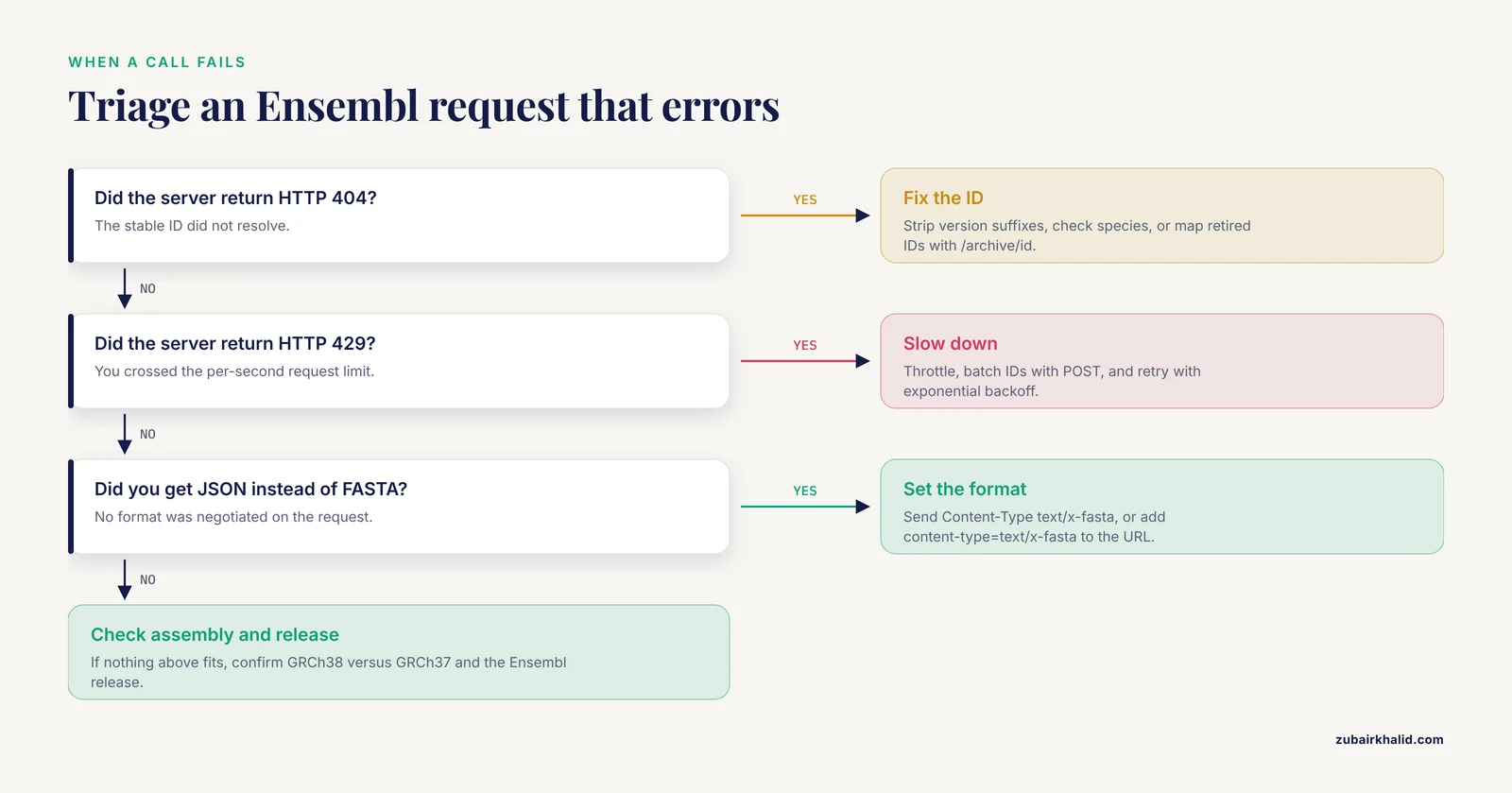
Ensembl signals problems through standard HTTP status codes (200 success, 400 bad request, 404 not found, 429 too many requests, 503 unavailable) plus a short JSON body.
404 with {"error":"ID not found"}. The stable ID does not resolve. In order of likelihood: the ID carries a version suffix (strip ENSG00000139618.16 down to ENSG00000139618), the ID was retired in a release transition (pass it to GET /archive/id/{id} for the current replacement), the ID belongs to a different species than you assumed, or it is mistyped.
400 Bad Request. The URL or a parameter value is malformed. The classic case is a region string with the wrong shape, for example a missing chromosome or a start greater than the end. The response body names the problem, so read it before changing code.
429 Too Many Requests. You crossed the per-second limit. Back off, add throttling, and prefer the POST batch endpoint over one-request-per-gene loops. A few hundred milliseconds of sleep between chunks keeps a single process comfortably inside the limit.
503 Service Unavailable. The service is down for maintenance or under load. Ensembl announces maintenance windows on its website. Retry with backoff, and schedule large jobs outside peak windows.
JSON where you expected FASTA. You omitted the Content-Type header and the content-type parameter, so the server defaulted to JSON. Set Content-Type: text/x-fasta, or append ?content-type=text/x-fasta when the header is spoken for, as in the POST case.
An error when you request type=cdna on a gene ID. A gene has many transcripts and the endpoint will not pick one for you. Add multiple_transcripts=1 for all transcripts at once, or target a specific transcript ID.
Working with Older Releases, GRCh37, and Retired IDs
Annotations change between releases, and a sequence you fetched last year may not match this year's. Three tools keep old work reproducible.
The GRCh37 server. Point the same paths at https://grch37.rest.ensembl.org and every call runs against GRCh37 coordinates, the assembly behind hg19 and a large fraction of published variant data. A lookup of BRCA2 on that server returns GRCh37 coordinates, not GRCh38 ones.
The archive endpoint. Stable IDs occasionally retire when features merge or split. GET /archive/id/{id} maps an old ID to its current replacement and reports the change.
Release pinning. Record the Ensembl release number alongside every downloaded sequence, in the filename or a README. Public archive sites such as dec2023.archive.ensembl.org serve past releases of the browser for exactly this purpose. Version-aware programmatic access matters enough that dedicated tooling exists for it, such as the JEnsembl Java API, which can connect to current and archived Ensembl database instances simultaneously to support repeatable analyses [4]. The REST server itself serves the current release, so the release number you record is what makes a download reproducible.
Cross-Checking Results in the Ensembl Genome Browser
The browser is the fastest independent check on an API result, and this short Ensembl genome browser tutorial doubles as a verification protocol.
- Open https://www.ensembl.org, type the gene symbol or stable ID into the search box, and choose the species.
- The gene page opens on tabs such as Location, Transcripts, and Sequence. Location shows the gene model on the chromosome with its coordinates in the page header and URL.
- Compare the on-screen coordinates with the start, end, and strand from your lookup call. They must match exactly, including the assembly, which appears as GRCh38 throughout the page.
- Open the Sequence tab to see the sequence with exons highlighted, or use the Export data menu to download the same sequences the API returns, as FASTA.
- For base-level work, zoom the Location view until individual bases appear, then compare a short window against the first bases of your downloaded FASTA.
If the browser and the API disagree, check the assembly first, then the release. The browser defaults to the current release on GRCh38, exactly like the main REST server, so a mismatch almost always means a GRCh37 coordinate or an old ID crept into one of the two.
Going Further: Cross-References, Homology, Variants, and Bulk Data
Once sequences flow, three extensions cover most downstream needs.
Cross-references. GET /xrefs/id/ENSG00000139618 returns the external identifiers linked to the gene, including UniProt and RefSeq entries [3]. Those IDs are the tickets into partner resources. UniProt maintains its own open REST API for protein knowledge, which handles on the order of 300 million requests per month and requires no login [5]. A common pattern is Ensembl for nucleotide sequence and coordinates, UniProt for protein annotation.
Homologs. GET /homology/id/{id} returns homologous genes across species from Ensembl Compara, with similarity measures where calculated. An ortholog is a gene in another species that descends from the same ancestral gene. For large-scale orthology questions, dedicated resources such as the OMA database also expose a REST API with R and Python clients [6].
Variants. The same server carries the Variant Effect Predictor (VEP), which annotates variants with their predicted consequences, and its REST bindings support large-scale programmatic variant analysis independent of any programming language [1].
Bulk data. The REST API is built for targeted retrieval. For whole genomes, all transcripts, or genome-wide annotation, download FASTA and GFF3 files from the Ensembl FTP site, query BioMart, or connect to the public MySQL server. The underlying core databases and APIs are documented and openly licensed [3]. A practical threshold: if a job needs more than a few thousand requests, switch to bulk files.
Common Mistakes and Limitations
- Fetching by symbol directly. Symbols are not stable IDs. They change, collide, and vary by species. Resolve with /lookup/symbol first, then use the stable ID everywhere.
- Passing versioned IDs. A versioned ID such as ENSG00000139618.16 returns 404. Strip the dot suffix, and record the version in your metadata instead.
- Mixing assemblies. GRCh37 coordinates are not GRCh38 coordinates. The same interval fetched from the GRCh37 server and the main server returns different sequence. Decide the assembly once per project and put it in filenames.
- Off-by-one from 0-based inputs. BED and VCF positions start at 0, Ensembl starts at 1. Add 1 to starts converted from those formats, and check a known gene length as a smoke test.
- Requesting transcript molecules from a gene ID without multiple_transcripts. The endpoint will not choose a transcript for you. Either set
multiple_transcripts=1for all transcripts or use a specific transcript ID.
- Ignoring strand on ID-based results. Region calls state their strand explicitly because you supply it. ID-based calls inherit the feature strand, which is recorded at the end of the
descstring or FASTA header. Verify orientation before feeding sequences into tools that assume forward orientation.
- Hammering the service. Unthrottled parallel loops hit 429 within seconds. Throttle, batch with POST, back off on errors, and identify your script with a User-Agent.
- Using REST as a bulk download system. Genome-scale work belongs on the FTP site or in BioMart, not in millions of small requests.
- Not recording release and version. A sequence without a release number cannot be reproduced after the next release. Record release, assembly, stable ID, and ID version for every download.
- Assuming annotation is frozen. Transcripts gain and lose exons between releases, canonical transcripts change, and CDS lengths shift with them. Re-verify lengths after any release bump, and use the archive endpoint when old IDs disappear. Version-aware access to current and archived Ensembl databases is a recognized requirement for repeatable analysis [4].
Limitations of the approach itself: the public service is shared and rate-limited, the main server serves the current release while past releases live in the archive sites, maintenance windows take it offline occasionally, and genomic sequences carry repeat masking by default. None of these block gene-scale work, and each has a workaround described above.
Frequently Asked Questions
Do I need an API key or account to get gene sequences from the Ensembl REST API?
No. The service is open and anonymous. Identify your script with a User-Agent header that includes a contact email, and stay within the documented per-second request limit.
What is the difference between genomic, cDNA, CDS, and protein sequence types?
Genomic sequence is the full gene span including introns, with repeats masked as N by default. cDNA is the spliced transcript including UTRs. CDS runs from the start codon through the stop codon. Protein is the translated CDS without the stop codon.
How do I get the sequences of all transcripts of a gene in one request?
Set multiple_transcripts=1 on the gene ID together with type=cdna, type=cds, or type=protein. The response is a JSON array with one entry per transcript, or one FASTA record per transcript.
Why does my request return 404 when the gene clearly exists in Ensembl?
The usual causes are a version suffix on the ID, a retired ID, a species mismatch, or a typo. Strip version suffixes, resolve symbols through the lookup endpoint, and map retired IDs with the archive endpoint.
Can I download whole chromosomes or an entire genome through the REST API?
A chromosome-sized region request is technically possible but the wrong tool. For whole chromosomes and whole genomes, download the ready-made FASTA files from the Ensembl FTP site.
How do I retrieve sequences on GRCh37 coordinates instead of GRCh38?
Send the same calls to https://grch37.rest.ensembl.org. That server serves the GRCh37 assembly, and your coordinates must come from GRCh37 sources to match.
What happens if I exceed the Ensembl REST API rate limit?
The server answers with HTTP 429. Slow down, add spacing between requests, batch IDs with POST, and retry with exponential backoff.
Does the Ensembl REST API cover plants, fungi, and bacteria?
Yes. The same endpoints serve Ensembl Genomes species since the Ensembl and Ensembl Genomes codebases were unified, so one client covers vertebrate and non-vertebrate species alike.
Sources
- The Ensembl REST API: Ensembl Data for Any Language
- Getting gene and genome data programmatically: Ensembl REST API
- Ensembl core software resources: storage and programmatic access for DNA sequence and genome annotation
- JEnsembl: a version-aware Java API to Ensembl data systems
- The UniProt website API: facilitating programmatic access to protein knowledge
- Expanding the Orthologous Matrix (OMA) programmatic interfaces: REST API and the OmaDB packages for R and Python