Ensembl REST API Error 400, 404, 429: How to Fix Common HTTP Errors
By Dr. Zubair Khalid, DVM, MS, PhD ·

The single most common cause of an Ensembl REST API error 400, 404 or 429 is a request that does not match what the endpoint expects. A 400 usually means the request body or parameters are malformed. A 404 usually means the endpoint path or the identifier you asked about does not exist in the release you are querying. A 429 means you exceeded the per-second request limit Ensembl applies to every client. The first thing to check in every case is the response body itself, because the Ensembl REST API returns a machine-readable error message that names the failing parameter or explains the problem. Most 400 responses, for example, arrive as a small JSON object with an error field that says exactly which parameter was rejected. Reading that message before changing anything in your script resolves a large share of failures on the first try.
This guide walks through each error class from most common to rarest, explains the mechanism behind the failure, gives a short diagnostic sequence you can follow, and ends with prevention practices for scripts that query https://rest.ensembl.org at scale. Every fix shown here uses the documented, unauthenticated REST service that Ensembl, a project of EMBL-EBI, publishes for programmatic access to genome annotation.
How the Ensembl REST API Reports Errors
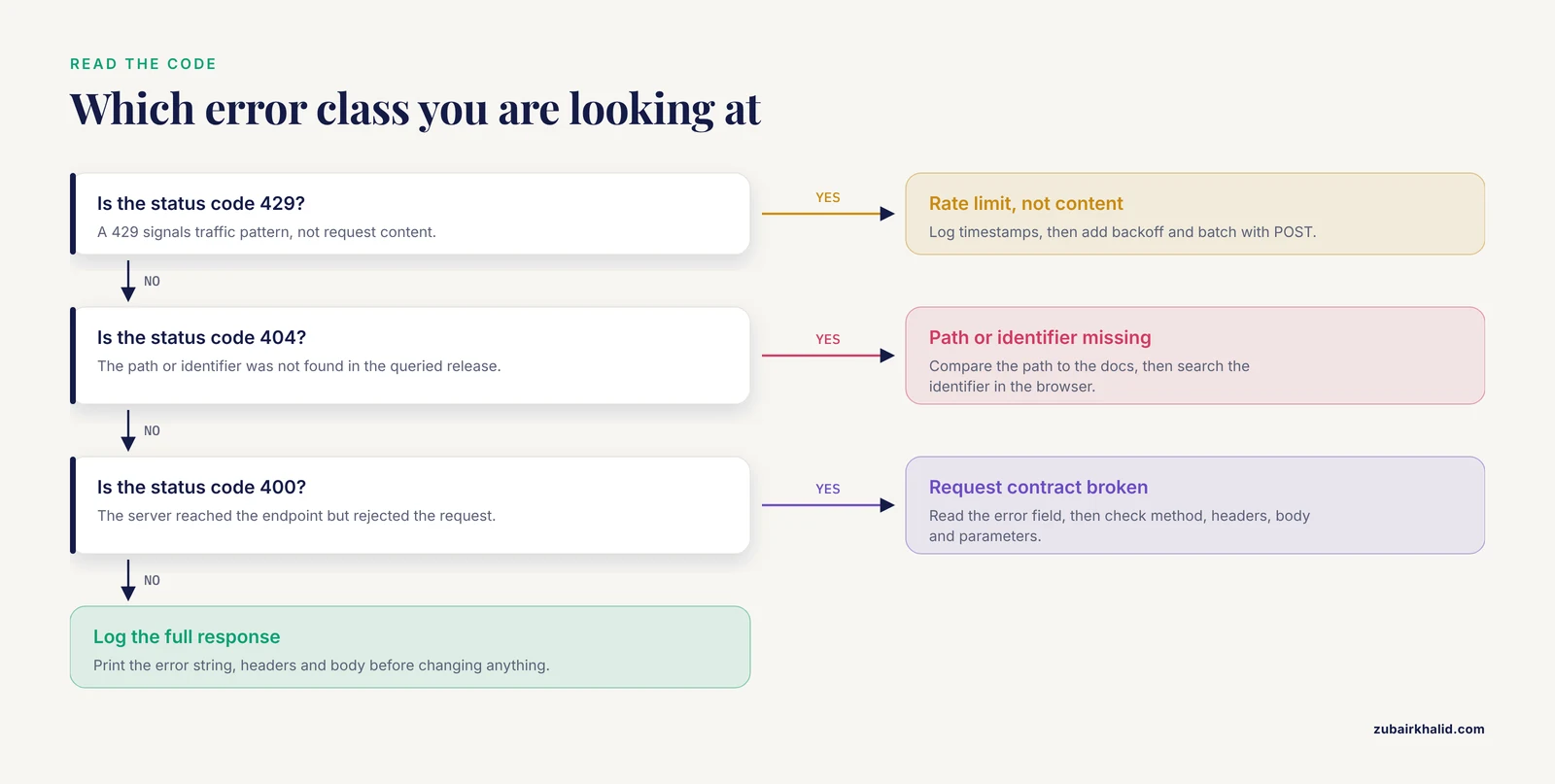
Before troubleshooting specific codes, it helps to know what a well-formed failure looks like. The Ensembl REST service follows standard HTTP semantics. The status code tells you the category of problem and the body tells you the detail.
A failing request typically returns something like this:
{
  "error": "Species 'human' not found. Use the /info/species endpoint to see valid species."
}
Three habits make every later section easier:
- Always print or log the full response, not just the status code. The
errorstring is written for you. - Check the response headers. The
X-RateLimit-Remainingstyle headers returned by the service tell you how close you are to throttling, and some throttling responses include aRetry-Afterhint. - Reproduce the failing request with
curlbefore editing code. A minimal command strips away everything your HTTP library might be adding.
A minimal reproduction looks like this:
curl -s -H "Content-Type: application/json" -H "Accept: application/json" \
  "https://rest.ensembl.org/lookup/id/ENSG00000139618?expand=0" \
  -d '{ "ids": ["ENSG00000139618"] }'
Wait, that example mixes GET and POST conventions. That confusion is itself one of the most common triggers of a 400, which is a good place to start.
Error 400 Bad Request: The Server Could Not Parse or Validate Your Request
A 400 means the request reached the server but violated the contract of the endpoint. Ensembl REST API error 400 responses fall into a handful of recurring causes, listed here from most to least frequent.
Wrong HTTP Method for the Endpoint
Every endpoint in the Ensembl REST documentation specifies either GET or POST. GET endpoints take identifiers in the URL path or query string. POST endpoints take a JSON body. Sending a POST body to a GET endpoint, or a query-string parameter to a POST endpoint, produces a 400 because the server cannot find the input where the endpoint expects it.
The lookup endpoint accepts both styles, which makes it a frequent source of confusion. Correct usage for a single identifier with GET:
curl -s -H "Content-Type: application/json" -H "Accept: application/json" \
  "https://rest.ensembl.org/lookup/id/ENSG00000139618?expand=0"
Correct usage for many identifiers with POST:
curl -s -X POST \
  -H "Content-Type: application/json" -H "Accept: application/json" \
  -d '{ "ids": ["ENSG00000139618", "ENSG00000141510"] }' \
  "https://rest.ensembl.org/lookup/id"
Two details matter in the POST form. The -X POST flag sets the method. The URL has no identifier appended, because the identifiers now live in the body. If your request body is empty, truncated, or wrapped in an extra layer of quoting, the server responds with a 400 and an error message about the body.
Missing or Incorrect Headers
Ensembl expects two headers on essentially every request. Content-Type: application/json declares what you are sending, and Accept: application/json declares the response format you want. Omitting Accept can yield a default serialization rather than the one your parser expects, and omitting Content-Type on a POST is a direct route to a 400.
In Python, the headers belong in the request call:
import requests

url = "https://rest.ensembl.org/lookup/id/ENSG00000139618?expand=0"
r = requests.get(url, headers={"Content-Type": "application/json",
                               "Accept": "application/json"})
print(r.status_code, r.text)
A subtle variant of this error: using Content-Type: text/plain while passing JSON as a string. The server sees a body but not a declared JSON body and rejects the request. If your library sets the content type automatically when you use its json= parameter, let it.
Malformed JSON in the Request Body
A missing comma, a trailing comma, single quotes instead of double quotes, or an unquoted key all produce a 400 with an error message about the body. Confirm the payload parses locally before sending it:
import json

payload = {"ids": ["ENSG00000139618", "ENSG00000141510"]}
# This raises immediately if the structure is malformed, before a network call.
serialized = json.dumps(payload)
print(serialized)
If you build the body by string concatenation instead of json.dumps, switch to a serializer. Hand-built JSON is the classic source of malformed bodies, especially when identifiers or region strings are interpolated into a template.
Invalid Species, Assembly, or Parameter Values
The species parameter must use the lowercase genus and species separated by an underscore, for example homo_sapiens or mus_musculus. The word human fails. Full names with a space, such as Homo sapiens, also fail. When you are unsure of the exact string for an organism, ask the service:
curl -s -H "Accept: application/json" \
  "https://rest.ensembl.org/info/species" | head -c 2000
The response lists every valid species name and its current default assembly, which also solves the assembly half of this problem. Assembly names follow specific strings, such as GRCh38 for human. Passing an assembly name with a typo, a lowercase variant the service does not recognize, or an assembly not available for the species returns a 400.
Other parameter failures follow the same pattern. A feature filter that is not one of the allowed values, a distance parameter given as text instead of a number, or an expand value outside the endpoint's allowed range all return a 400 with the offending parameter named in the error body.
Coordinate Problems
Ensembl REST uses one-based, fully closed coordinates. The first base of a chromosome is position 1, and a region string of 1:1000-2000 includes both endpoints. Many other formats, including BED files, use zero-based half-open coordinates, so a BED interval written as 999 to 2000 in the file corresponds to positions 1000 through 2000 in Ensembl notation. Passing a zero-based start directly into a region string shifts the query by one base and can push a start of zero into the request, which the service rejects.
Chromosome naming is the second trap. Ensembl expects chromosome names without a chr prefix: 7, not chr7, and X, not chrX. In some assemblies, sequences carrying unplaced scaffold names exist under identifiers that the browser displays but the REST region endpoints reject, so a region string copied from another tool can fail even when the coordinates are right. Convert your coordinates to one-based and strip the prefix before building a region string.
An out-of-range request, such as an end coordinate beyond the chromosome length in the queried assembly, also returns an error. This happens most often when coordinates were generated against a different assembly version and the region runs off the edge of the current assembly.
Requests to the Wrong Endpoint Family
Ensembl runs separate REST services for different data domains, and the main REST service at rest.ensembl.org does not serve every annotation type. Bacterial genomes live on a separate Ensembl Genomes service. Sending a bacterial accession to the main service produces a not-found style error rather than data. If your organism is bacterial, phasic, or otherwise from Ensembl Genomes, point the request at the correct host described in the Ensembl REST documentation for that data type.
Error 404 Not Found: The Path or the Identifier Does Not Exist
A 404 means the server understood the request format but found nothing at the address you asked about. Ensembl REST API error 404 responses split into two groups: the endpoint itself does not exist, or the identifier does not exist.
Wrong URL Path or Endpoint
A typo in the path, a missing segment, or an endpoint copied from an older version of the documentation all produce a 404. Compare your URL character by character against the endpoint pattern in the documentation. A frequent mistake is pluralization and casing, for example /lookup/gene where the documented path is /lookup/id.
A related and maddening variant: the path is right but the HTTP method is wrong. Some servers report a GET request to a POST-only endpoint as a 404 rather than a 405. If the path looks correct and the identifier looks correct, check the method column of the endpoint documentation. The sequence endpoint, for example, documents both a GET form for single identifiers and a POST form for identifier lists, and only the POST form accepts a body.
The Identifier Does Not Exist in the Queried Release
Ensembl identifiers change across releases. Genes, transcripts, and proteins gain version suffixes such as ENST00000269305.4, where the digit after the dot is the version. Annotation changes between releases can retire an identifier, merge it into another, or bump its version. Consequences for the REST service:
- An identifier that existed in release 90 may be absent from release 110. The lookup returns a 404 even though the identifier is well formed.
- A versioned identifier with a version number higher than any existing version returns a 404.
ENST00000269305.99does not exist even ifENST00000269305.4does. - Stable identifiers from a different species, or invented strings that merely resemble Ensembl identifiers, return a 404.
The most reliable confirmation step is the Ensembl genome browser itself. Type the identifier into the search box on ensembl.org. If the browser resolves it, note the release and species it maps to and use those in your request. If the browser shows nothing, the identifier is not valid in the current release and your 404 is real, not a request formatting problem. When you have a version number in doubt, try the unversioned form, which resolves to the current version of that identifier where one exists.
Identifier mismatches also occur when the identifier came from a different source. RefSeq accession numbers, UniProt accessions, and HGNC symbols are not Ensembl identifiers. Passing NM_ or NP_ accessions to an Ensembl identifier lookup fails. To connect a RefSeq or UniProt record to an Ensembl identifier, use the cross-reference endpoints, which map external identifiers to Ensembl identifiers and the reverse.
Wrong Assembly or Species for the Identifier
An identifier can be perfectly valid for one assembly context and absent in another query. If your pipeline downloaded identifiers from a GRCh37 project and your REST requests default to the current assembly, some identifiers will not resolve. Verify species and assembly together. The species-specific lookup endpoints accept an assembly parameter, and the /info/species response reports the default assembly for each species so you can confirm what an unqualified request will use.
Region Strings That Reference Missing Sequences
A 404 on a region request usually means the chromosome or scaffold name is not part of the assembly you queried. This is common when a chromosome name carries a prefix the assembly does not use, or when the name comes from a different assembly. The fix is the same as for coordinates: confirm the assembly, confirm the sequence naming convention for that assembly, and rebuild the region string.
Error 429 Too Many Requests: You Hit the Rate Limit
A 429 is the only one of the three codes that signals a problem with your traffic pattern rather than your request content. The mechanism is simple. The Ensembl REST service applies a per-second request limit per IP address for unauthenticated access, and Ensembl's published rate limit guidance sets that limit at about 15 requests per second. When your client exceeds it, the service throttles you and returns a 429 until your rate drops below the ceiling.
This is why a script that runs fine on 50 queries and then falls over at query 500 is behaving exactly as documented. Early requests pass, the average rate climbs above the limit once network latency is short, and the throttle engages.
Confirming a 429 Is a Rate Limit
The diagnosis is straightforward. If the status is 429 and the request succeeds unchanged after a pause, the limit is the cause. Log timestamps and look at the interval between your requests. When your loop issues requests with no sleep and no delay beyond network latency, a 429 on a large run is expected behavior, not a fault in your parameters.
Fix One: Slow Down
Add a delay between requests that keeps your sustained rate below the documented ceiling. A conservative pattern for Python:
import requests
import time

HEADERS = {"Content-Type": "application/json", "Accept": "application/json"}

def get_with_backoff(url, max_retries=6):
    delay = 1.0
    for attempt in range(max_retries):
        r = requests.get(url, headers=HEADERS, timeout=30)
        if r.status_code == 429:
            time.sleep(delay)
            delay *= 2          # exponential backoff: 1, 2, 4, 8, 16 seconds
            continue
        r.raise_for_status()
        return r
    raise RuntimeError(f"Rate limit persisted after {max_retries} retries: {url}")
Exponential backoff with doubling is the standard approach. If a response includes a Retry-After header, honor that value instead of your own schedule for that retry. Cap the retry count so a persistent failure raises an error rather than hanging your pipeline.
Fix Two: Batch With POST
Many endpoints that accept one identifier per GET also accept a JSON array of identifiers per POST. Batching converts hundreds of requests into a handful, keeps you far below the limit, and reduces total runtime. The lookup and sequence endpoints are the classic examples. Check the identifier-count limit documented for each endpoint before sending large arrays, and split your identifier list into chunks under that limit.
A chunked POST loop:
import requests, time

HEADERS = {"Content-Type": "application/json", "Accept": "application/json"}

def lookup_chunked(ids, chunk_size=200):
    results = {}
    for i in range(0, len(ids), chunk_size):
        chunk = ids[i:i + chunk_size]
        r = requests.post("https://rest.ensembl.org/lookup/id",
                          headers=HEADERS,
                          json={"ids": chunk},
                          timeout=60)
        if r.status_code == 429:
            time.sleep(5)
            i -= chunk_size   # retry this chunk on the next loop pass
            continue
        r.raise_for_status()
        results.update(r.json())
        time.sleep(0.2)
    return results
Fix Three: Use Regional Mirrors
Ensembl publishes regional mirror hosts for the REST service so that users in different parts of the world can spread load across infrastructure. If your run sits behind a shared institutional IP, moving to a documented mirror reduces contention with every other script on the same network. A mirror serves the same endpoints at the same paths under a different hostname. Rotate between the primary host and mirrors only if the data you need is available on each mirror for the release you are using, and keep the retry logic from Fix One in place regardless.
Fix Four: Cache Responses
The highest-throughput request is the one you never send. If your pipeline asks for the same transcript sequence in three scripts, write the response to disk the first time and read it locally afterward. Content-addressed caching keyed by the exact request URL is a small amount of code that eliminates a large share of 429s in shared environments.
What Not to Do
Do not retry in a tight loop with no delay. Aggressive hammering after a throttle can extend the throttle period, and in a shared institutional setting it penalizes every colleague behind the same IP address. Do not solve a 429 by catching the exception and moving on silently, because then your results are missing rows without any signal that data was dropped.
Troubleshooting Table: Symptom, Cause, Confirmation, Fix
The table below consolidates the causes above into a single reference you can keep beside your terminal.
| Symptom | Likely cause | How to confirm | Fix |
|---|---|---|---|
| 400 with an error message about the request body | Malformed or empty JSON in a POST body | Print the exact body sent, run it through a JSON validator | Build the body with json.dumps or equivalent, set Content-Type: application/json |
| 400 with an error message naming a parameter | Invalid parameter name or value, wrong species string | Remove parameters one at a time until the request succeeds, then read the endpoint documentation for the failing parameter | Correct the parameter, use homo_sapiens style species names, check /info/species |
| 400 on a region request | Zero-based coordinates from a BED-style source, or a chr prefix | Compare the queried interval to the browser view of the same gene | Convert to one-based inclusive coordinates, strip the chr prefix |
| 400 on every request from one script | Missing or wrong headers | Reproduce with curl using the two documented headers | Add Content-Type: application/json and Accept: application/json |
| 404 on every request | Endpoint path typo, or GET used where POST is required | Paste the URL into a browser or curl and compare against the documented path and method | Correct the path, switch the method to match the documentation |
| 404 for one identifier | Identifier retired, versioned, or from another database | Search the identifier in the Ensembl genome browser, note the species and release it resolves to | Use the unversioned identifier or the current version, or map external accessions through the xref endpoints |
| 404 for a batch of identifiers from one project | Identifiers generated against a different assembly or release | Spot-check a few identifiers in the browser, note the assembly | Query the assembly the identifiers belong to, or remap identifiers to the current release |
| 429 early in a run, then consistently | Sustained request rate above the documented per-second limit | Log timestamps, compute requests per second over a sliding window | Add delays, exponential backoff, and honor any Retry-After header |
| 429 on a large batch loop, not on small tests | Missing batching, one request per identifier | Count requests issued for one identifier list | Convert to POST batch endpoints and chunk the identifier list |
| 429 on a shared institutional network | Cumulative traffic from many users behind one IP | Ask colleagues whether their scripts throttle at the same times, check whether the failures cluster in working hours | Move to a documented regional mirror, add caching, coordinate run schedules |
A Short Diagnostic Sequence You Can Follow
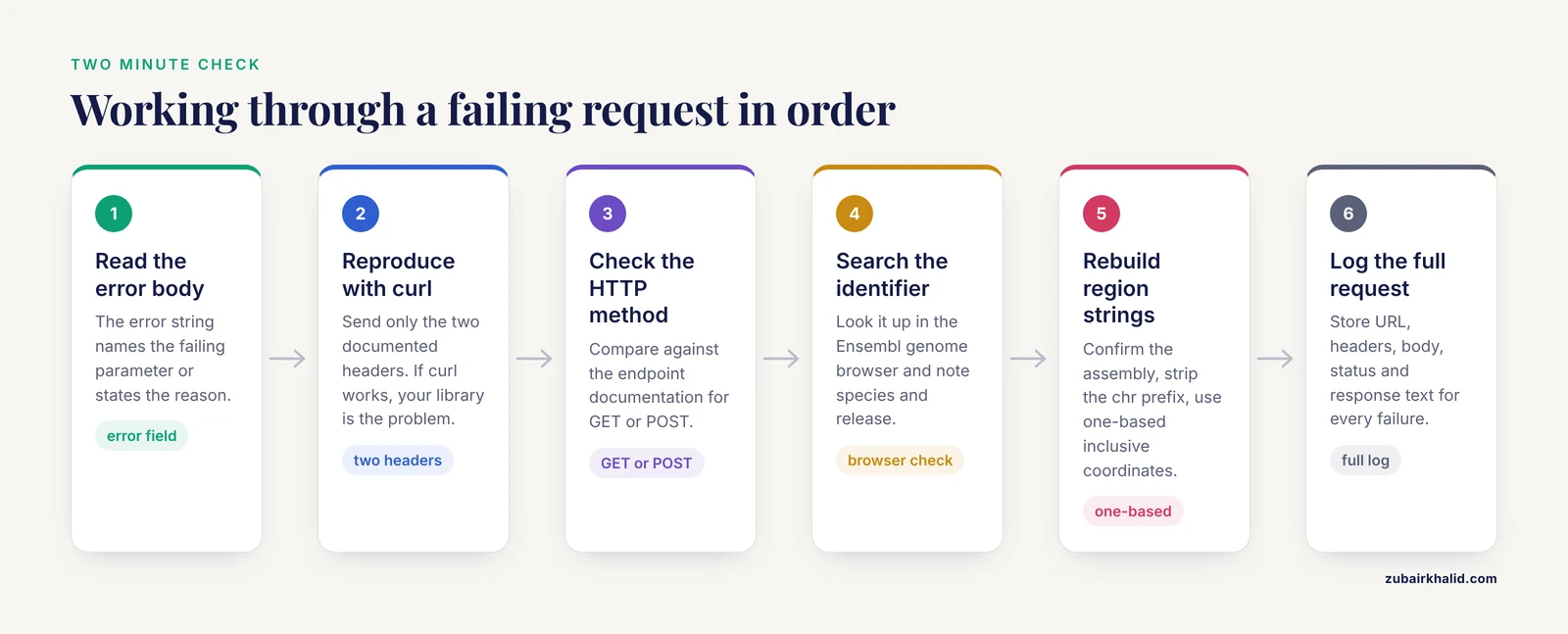
When a request fails and the cause is not obvious, work through this sequence. It takes about two minutes and resolves most cases without touching code.
- Read the response body. The
errorstring names the failing parameter or states the reason. - Reproduce the request with
curl, sending only the two documented headers. Ifcurlsucceeds, the problem is in how your HTTP library builds the request, not in the request itself. - Check the HTTP method against the endpoint documentation. POST bodies to GET endpoints and query strings to POST endpoints are both common.
- For identifier queries, search the identifier in the Ensembl genome browser. If the browser finds it, use the species and release shown there. If not, the 404 is telling the truth.
- For region queries, confirm the assembly, strip any
chrprefix, and convert to one-based inclusive coordinates. - For 429s, add exponential backoff with a retry cap, then batch with POST, then consider a regional mirror.
- Log the exact URL, headers, body, status code, and response body for every failure. A log that captures full requests turns a day of debugging into minutes.
How to Use Ensembl Effectively: Verifying Inputs Before You Script
A large share of 400s and 404s can be prevented before any code is written, and the Ensembl genome browser is the fastest verification tool for that. If you are new to programmatic access, a brief orientation on how to use Ensembl for this purpose pays for itself in saved debugging time.
To verify an identifier, open the Ensembl website, enter the identifier in the search box, and read the result page. It states the species, the assembly, the stable identifier with its version, and the current release number. Those four facts are exactly the four inputs your REST request needs. A gene page also shows the location string, such as the human BRCA1 location on chromosome 17, which you can adapt directly into a region request after converting it to the species/region format the service expects.
To verify a species name, the /info/species endpoint is faster than the browser because it returns the exact machine-readable strings. To verify an assembly, the same endpoint reports the default assembly per species, and assembly-specific endpoints accept an explicit assembly parameter when you need a version other than the default.
One caution drawn from practice rather than documentation: copy region strings from the browser address bar carefully. Browser URLs are built for the browser and may include display formatting, commas in large numbers, or abbreviated ranges. Rebuild the region string from the raw coordinates shown on the page instead of copying the URL.
Prevention Practices for Scripts That Query Ensembl
Once a pipeline works, keep it working with these practices.
Validate inputs before the first network call. Check that species strings match the lowercase underscore pattern, that identifiers match the expected prefix for their type, and that coordinates are one-based and within plausible chromosome ranges. Every bad input you catch locally is one 400 you never generate.
Batch wherever the endpoint allows it. POST endpoints with identifier arrays reduce both your request count and your exposure to the rate limit. Chunk to the documented per-endpoint maximum rather than assuming one size fits all.
Implement retry with exponential backoff on 429 and transient network failures. A fixed schedule of 1, 2, 4, 8, and 16 seconds with a retry cap of about six attempts handles routine throttling without hanging your pipeline. Honor a Retry-After header when one is present.
Cache aggressively. Identifier lookups, sequence fetches, and species information requests are highly repetitive across projects. A local cache keyed by request URL is a few dozen lines of code and removes most repeat traffic.
Log full requests and responses. Store the URL, headers, body, status, and response text for failures. When a colleague reports that the pipeline failed overnight, a complete log answers in minutes what otherwise takes a debugging session.
Pin your expectations to a release. If your project depends on specific identifier versions, record the Ensembl release number alongside your inputs. Identifiers evolve across releases, and a record of the release you validated against explains 404s that appear months later.
Do not build silent failure into your code. A retry loop that swallows a persistent 404 and writes a blank row produces a dataset that looks complete and is not. Raise an error, or write failures to a separate file you review before publication.
Respect the shared resource. The Ensembl REST API is a free public service operated by EMBL-EBI for the community. Staying under the documented rate limit, batching, and caching are the practical expression of that etiquette, and they are also the behavior that keeps your own scripts fast.
Common Mistakes and Limitations
A few specific, recurring mistakes deserve their own list, along with honest limits on what the REST service can do for you.
Mistake one: treating the browser and the REST service as the same system. The genome browser and the REST service serve the same underlying database but expose different interfaces. A URL that works in the browser is not a REST endpoint. Rebuild requests from the documented endpoint patterns.
Mistake two: assuming coordinates from any file are Ensembl coordinates. BED-style zero-based half-open intervals and one-based inclusive intervals differ by one on the start position. Mixing them silently shifts every query. Convert once, at the point your data enters the pipeline, and document the conversion.
Mistake three: hard-coding an assembly. Scripts written against one assembly year break when identifiers or coordinates shift. Read the assembly from the response metadata rather than assuming the default never changes, and record which assembly your results refer to.
Mistake four: retrying 400s and 404s. Retrying a malformed request changes nothing. Only 429 and transient network errors merit retries. Retry logic applied to every status code wastes the rate budget you need for valid requests and hides real data problems.
Mistake five: treating all identifiers as interchangeable. Ensembl gene, transcript, protein, and exon identifiers each work only in endpoints designed for that type. A transcript identifier sent to a gene lookup fails, and the error message is the only clue.
Limitations to keep in mind. The exact error strings, per-endpoint batch limits, and header details can change between service updates, so treat the live documentation at the Ensembl REST documentation site as the authority for the endpoint you are using at the time you are using it. Rate limits are enforced per IP address, which means your script can throttle because of traffic it did not generate when running on a shared network. Finally, identifiers are not stable across all releases by design, because annotation changes, so any long-running comparison across releases needs an explicit identifier-mapping step rather than an assumption of stability.
Frequently Asked Questions
Why does my request work in the Ensembl genome browser but fail in my script?
The browser and the REST service are separate interfaces. A browser URL is not a REST endpoint, and browser URLs often contain display formatting such as commas in coordinates. Build the request from the documented endpoint pattern, use the species, assembly, and identifier confirmed on the browser page, and the request will usually succeed.
How many requests per second can I make to the Ensembl REST API?
Ensembl's published rate limit guidance for the unauthenticated REST service is about 15 requests per second per IP address. Exceeding that rate returns a 429. Batching identifiers with POST endpoints and adding exponential backoff are the standard ways to stay under the limit on large jobs.
Does the Ensembl REST API require an API key or registration?
No. The service at rest.ensembl.org is unauthenticated and free, and no key is needed for standard use. Because there is no per-user identity, the rate limit is enforced per IP address, which is why scripts on shared institutional networks can throttle even at moderate individual request rates.
Why does my Ensembl identifier return 404 even though it looks valid?
The identifier is probably retired, versioned incorrectly, or from a different release or species than the one you queried. Search it in the Ensembl genome browser to see whether it resolves and to what. Try the unversioned form if you included a version, and confirm the species and assembly match the source of your identifier list.
Should I use GET or POST for my Ensembl REST request?
Use whichever method the endpoint documentation specifies. As a rule, single-identifier queries use GET with the identifier in the URL, and multi-identifier queries use POST with a JSON body. Sending a body to a GET endpoint or parameters to a POST endpoint is a common cause of a 400.
Which headers does the Ensembl REST API require?
Send Content-Type: application/json on requests with a JSON body, and Accept: application/json to request JSON responses. Both headers are shown in the examples on every endpoint's documentation page. Omitting them is one of the most common causes of parsing errors and malformed responses.
How do I check which species and assembly names are valid before making my request?
Query the /info/species endpoint on rest.ensembl.org. It returns every valid species string in the lowercase underscore format the API expects, along with the default assembly for each species. Use those exact strings in subsequent requests rather than common names such as human.
I keep getting a 429 on a long run. What is the fastest fix that does not just slow everything down?
Convert your loop to the POST batch form of the endpoint, chunking identifiers to the documented per-endpoint limit. Batching typically cuts the request count by one to two orders of magnitude, which keeps you under the rate limit while making the run faster. Add exponential backoff for remaining throttling and cache responses you have already fetched.