Ensembl REST API Endpoints Cheat Sheet: The 10 Most Useful Calls
By Dr. Zubair Khalid, DVM, MS, PhD ·

Ensembl REST API endpoints are individual web addresses, each of which returns a specific type of Ensembl data, such as gene annotation, DNA sequence, variant consequences, or cross-references, as structured JSON or text over standard HTTP requests. Because every endpoint follows the pattern of a plain URL, you can query Ensembl from a browser, a command line, or a script without installing a database or downloading gigabytes of flat files.
This matters because most genome analysis eventually needs one of two things: an annotation you do not already have, or a coordinate translation you do not want to build yourself. The Ensembl REST server, run by EMBL-EBI as part of the Ensembl project, answers both. You can pull the canonical transcript for a gene, translate a variant into its protein-level consequence, fetch orthologues across species, and convert CDS coordinates to genomic coordinates, all with single-line calls. The same data sits behind the Ensembl genome browser, so everything you can inspect visually in a browser session can be retrieved programmatically and reproduced in a pipeline. This article is the practical cheat sheet: what the endpoints are, how a call is built, the ten endpoints that cover most day-to-day work, and the mistakes that waste the most time.
What the Ensembl REST API Endpoints Are
REST stands for Representational State Transfer. In practice it means the server exposes a set of URLs, and the shape of the URL tells the server exactly what you want. Ensembl organizes its endpoints into families that mirror the data model: lookup endpoints resolve identifiers, sequence endpoints return nucleotide or protein sequence, overlap endpoints return all features in a genomic region, variation endpoints return variant records and frequencies, comparative endpoints return homology relationships, and info endpoints describe the assemblies and species the server supports.
Three properties define every call you will make:
- A base URL. The current production server is
https://rest.ensembl.org. For the archived GRCh37 human assembly, the base becomeshttps://grch37.rest.ensembl.org, with the same endpoints appended. - A path that encodes the question. For example,
/lookup/symbol/homo_sapiens/BRCA1asks for the gene record behind the human BRCA1 symbol, and/sequence/id/ENSG00000139618asks for the sequence of that stable identifier. - Headers and parameters that control the format and content. An
Accept: application/jsonheader (or acontent-type=application/jsonparameter) requests JSON, andAccept: text/x-fastarequests FASTA text. Extra query parameters such asexpand=1orhgvs=1switch on additional response content.
The default response format is JSON, which parses directly into dictionaries in Python, lists and hashes in R or Perl, or objects in JavaScript. Sequence endpoints can return FASTA when you ask for it, which keeps downstream tools such as BLAST or alignment pipelines happy without any conversion step.
The Ten Endpoints at a Glance
| # | Endpoint family | Example call (trimmed) | What it returns |
|---|---|---|---|
| 1 | lookup | /lookup/symbol/homo_sapiens/BRCA1 | Gene or transcript record, coordinates, biotype |
| 2 | lookup with expansion | /lookup/id/ENSG00000139618?expand=1 | Gene record plus transcripts and exons |
| 3 | sequence by identifier | /sequence/id/ENST00000357654?type=cdna | Nucleotide or protein sequence as JSON or FASTA |
| 4 | sequence by region | /sequence/region/homo_sapiens/7:140726322-140726500 | Genomic sequence for any assembly region |
| 5 | overlap | /overlap/region/homo_sapiens/7:140726322-140728000?feature=gene | All features of a chosen type in a region |
| 6 | VEP consequences | /vep/homo_sapiens/region/13:32316467-32316467:1/G | Variant consequence predictions, HGVS, protein effects |
| 7 | variation record | /variation/homo_sapiens/rs699 | Variant metadata, alleles, population frequencies |
| 8 | cross-references | /xrefs/id/ENSG00000139618 | Links to RefSeq, UniProt, HGNC, and other databases |
| 9 | homology | /homology/id/homo_sapiens/ENSG00000139618?type=orthologues | Orthologues and paralogues across species |
| 10 | information | /info/assembly/homo_sapiens | Assembly names, chromosome sizes, coordinate systems |
How a Call Is Structured, Step by Step
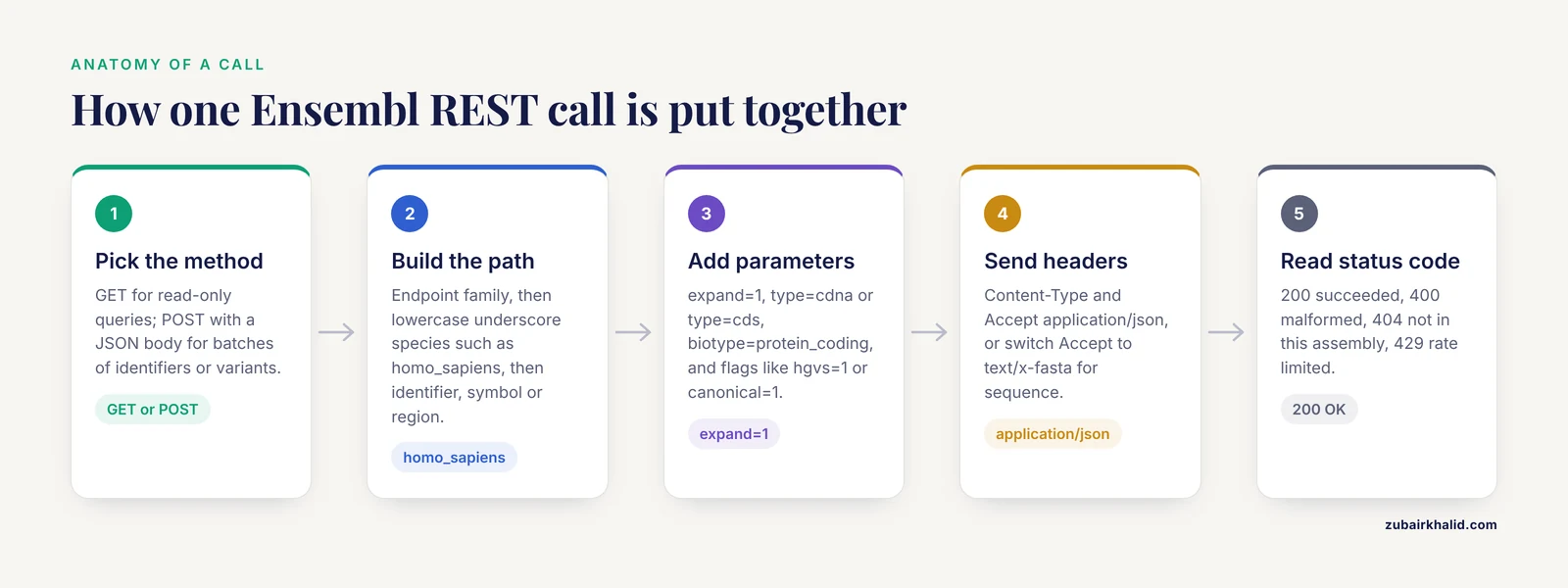
Every Ensembl REST call, no matter which endpoint, is assembled the same way. Learn this once and the cheat sheet becomes a menu rather than ten separate tools.
Step 1. Choose the method. Read-only queries use GET. Batch operations, such as looking up hundreds of identifiers at once or submitting many variants to VEP, use POST with a JSON body passed as the content-type: application/json header. The GET form is enough for interactive work, and POST exists so you are not issuing thousands of individual requests.
Step 2. Build the path. The path always starts with the endpoint family, then usually the species in Ensembl's lowercase underscore format (homo_sapiens, mus_musculus, danio_rerio), then the identifier, region, or symbol. Species names must be spelled exactly as Ensembl writes them. Homo sapiens with a space fails. A region is written as chromosome:start-end, optionally with a strand suffix, for example 7:140726322-140726500:1.
Step 3. Add query parameters. Parameters tune the response. Common ones include expand=1 (include child objects such as transcripts and exons), format=fasta or FASTA accept headers, type=cdna or type=cds for specific sequence flavors, biotype=protein_coding as a filter on overlap results, and endpoint-specific flags such as hgvs=1, canonical=1, and protein=1 on the VEP endpoint.
Step 4. Send headers. At minimum, send Content-Type: application/json and Accept: application/json. Ensembl's documentation strongly recommends these headers, and omitting the content type on POST calls is a frequent cause of confusing errors. When you want FASTA, switch the accept header to text/x-fasta.
Step 5. Read the response and the status code. A 200 status means the request succeeded. A 400 usually means a malformed identifier or region string. A 404 means the identifier is not in the current assembly or release. A 429 means you hit the rate limit and should slow down. The JSON body of an error message is descriptive, so read it before debugging anything else.
A minimal call from a terminal looks like this:
curl -H "Content-Type: application/json" -H "Accept: application/json" \
  https://rest.ensembl.org/lookup/symbol/homo_sapiens/BRCA1?expand=0
And the same call in Python using the requests library:
import requests

url = "https://rest.ensembl.org/lookup/symbol/homo_sapiens/BRCA1"
headers = {"Content-Type": "application/json", "Accept": "application/json"}
r = requests.get(url, headers=headers)
data = r.json()
print(data["id"], data["start"], data["end"], data["biotype"])
That single pattern, a URL plus two headers, is the entire barrier between a spreadsheet of gene names and live Ensembl data.
The 10 Most Useful Calls
1. /lookup/symbol and /lookup/id: Resolve a Name to Coordinates
This is the endpoint you will use most. It converts a gene symbol, a stable identifier such as ENSG00000139618, or a transcript identifier into a structured record containing the Ensembl gene ID, chromosome, start and end positions, strand, biotype, and version. The symbol form takes the species in the path, while the identifier form does not need one because stable identifiers encode the species.
curl -H "Content-Type: application/json" -H "Accept: application/json" \
  https://rest.ensembl.org/lookup/symbol/homo_sapiens/TP53?expand=0
Add expand=1 and the response includes every transcript of the gene, each with its own coordinates and exon structure. This is the fastest way to answer the everyday question of where a gene sits in the genome and which transcripts Ensembl currently annotates for it. When a paper gives you a gene symbol and you need a genomic window to design primers or pull regulatory regions, this is the endpoint that produces the numbers.
2. /sequence/id: Fetch Sequence for a Known Identifier
Given an Ensembl identifier, this endpoint returns the sequence in JSON by default or in FASTA when you request it. The type parameter selects the flavor of sequence: unmasked genomic sequence, cDNA for a transcript, CDS, peptide for protein-coding transcripts, or specific subsequences.
curl -H "Accept: text/x-fasta" \
  "https://rest.ensembl.org/sequence/id/ENST00000357654?type=cds"
This call returns the coding sequence of the requested transcript, ready for BLAST or alignment without any parsing. A practical detail is that the endpoint accepts POST with a list of up to several hundred identifiers, so a batch of transcript IDs from an RNA-seq result can be converted to sequences in one request rather than one per gene. Two optional parameters, expand_5_UTR and expand_3_UTR, pad the sequence by a requested number of bases on either side, which is convenient when you want context around a coding region.
3. /sequence/region: Fetch Sequence by Genomic Coordinate
When you care about a location rather than an identifier, the region endpoint returns the reference sequence between two coordinates on a chromosome. The format is chromosome:start-end, with an optional strand suffix where 1 is forward and -1 is reverse.
curl -H "Accept: text/x-fasta" \
  "https://rest.ensembl.org/sequence/region/homo_sapiens/7:140726322-140726500:1"
This is the endpoint behind most primer design sanity checks, SNP context lookups, and quick verification that a coordinate you copied from a paper actually lands on the sequence you expect. A single base is written with identical start and end, for example 7:140726322-140726322. Keep the assembly in mind, because the same coordinates describe different sequence in GRCh37 and GRCh38, a point covered in more detail under common mistakes.
4. /overlap/region: List Every Feature in a Genomic Window
The overlap endpoint returns all features of specified types within a region. Supported feature values include gene, transcript, exon, cds, variant, repeat, and regulatory regions. You combine feature types in a comma-separated list.
curl -H "Content-Type: application/json" -H "Accept: application/json" \
  "https://rest.ensembl.org/overlap/region/homo_sapiens/7:140726322-140728000?feature=gene,variant"
The result is a list of feature records, each with its own coordinates and identifier, so a single call tells you which genes and known variants sit in a candidate interval. This endpoint is the programmatic equivalent of opening a region in the Ensembl genome browser and reading the tracks, and it is the natural next step after endpoint 1 gives you coordinates. Filter parameters such as biotype=protein_coding or transcript_filtering=three_prime_utr narrow the result, and the downstream and upstream parameters extend the window in either direction.
5. /vep/:species/region: Variant Consequence Prediction
The Ensembl Variant Effect Predictor (VEP) REST endpoint takes a variant, either as a genomic region plus allele or as an HGVS notation, and returns the predicted consequences on every transcript it overlaps, including amino acid changes, HGVS strings, codon and protein positions, and functional classifications such as missense_variant or stop_gained.
curl -H "Content-Type: application/json" -H "Accept: application/json" \
  "https://rest.ensembl.org/vep/homo_sapiens/region/13:32316467-32316467:1/G?hgvs=1&canonical=1&protein=1"
The example asks for the effect of a G allele at position 32316467 on chromosome 13, which falls in the BRCA2 coding region. The canonical=1 parameter flags which transcript Ensembl marks as canonical, which is the one most curators quote first. Additional parameters such as domains=1 add protein domain annotations. This endpoint is the correct tool whenever you need to move from a genomic change to a transcript-level and protein-level interpretation, and it runs the same VEP software that ships as a standalone annotation tool.
6. /variation/:species/:id: Full Record for a Known Variant
Where the VEP endpoint predicts consequences, the variation endpoint retrieves the stored record for a variant identified by its rs number or Ensembl variant identifier. The record includes the reference and alternate alleles, the variant class (for example SNV, deletion, or insertion), most severe consequence, source, and, when you request them, allele frequencies from population collections such as the 1000 Genomes Project and gnomAD.
curl -H "Content-Type: application/json" -H "Accept: application/json" \
  "https://rest.ensembl.org/variation/homo_sapiens/rs699?populations=1"
The example variant, rs699 in the AGT gene, is a classic hypertension-associated SNP often used in teaching datasets. This endpoint answers questions such as which populations have been genotyped for a variant, what the alternate allele frequency is in each, and whether the variant has been merged with other records. When reviewing a candidate variant list, this is the endpoint for annotating each rs number with stored population context.
7. /xrefs/id: Cross-References to Other Databases
Research never stays inside one database. The xrefs endpoint maps an Ensembl identifier to its equivalents elsewhere: NCBI RefSeq transcripts, UniProt proteins, HGNC gene records, OMIM entries, and several others. The reverse direction works too, with /xrefs/symbol resolving an external symbol into Ensembl identifiers.
curl -H "Content-Type: application/json" -H "Accept: application/json" \
  "https://rest.ensembl.org/xrefs/id/ENSG00000139618"
Each returned entry carries the external database name, the external accession, and often a display identifier and description. The external_db parameter filters by database when you only want, say, RefSeq mappings. This endpoint solves the constant identifier-mapping chore in meta-analysis, where a table of Ensembl gene IDs must be joined against a resource that speaks RefSeq or UniProt.
8. /homology/id: Orthologues and Paralogues
The homology endpoint, sometimes described as the Ensembl Compara service, returns the homologous genes of a query gene across species. With type=orthologues you get one-to-one, one-to-many, and many-to-many orthologue relationships with the source and target species, the homology type, and the percentage identity between the aligned proteins. With type=paralogues you get within-species duplicates.
curl -H "Content-Type: application/json" -H "Accept: application/json" \
  "https://rest.ensembl.org/homology/id/homo_sapiens/ENSG00000139618?type=orthologues"
Typical uses include finding the mouse orthologue of a human gene before designing a knockout experiment, checking whether a gene family expanded in a lineage you study, and pulling candidate genes in a non-model species by their relationship to well-annotated human genes. The target_species parameter restricts the comparison to one species, which keeps the response small when you only care about one cross-species match.
9. /map/cds/:id/:region: Convert Between Coordinate Systems
Coordinate conversion is a recurring headache. The map endpoints translate between genomic, cDNA, CDS, and protein coordinate systems for a given transcript. The CDS form takes a transcript identifier and a CDS-coordinate range and returns the corresponding genomic coordinates.
curl -H "Content-Type: application/json" -H "Accept: application/json" \
  "https://rest.ensembl.org/map/cds/ENST00000357654/1-30"
The response reports, for each input coordinate, where it lands in the genome, the exon it belongs to, and the strand. Sibling forms handle genomic-to-cDNA (/map/cdna) and cDNA-to-protein (/map/translation) conversions. This is the endpoint for questions such as where codon 537 of a transcript sits in the genome, or which amino acid a genomic variant touches, without hand-building an exon table from a GFF file.
10. /info/assembly and /info/species: Server Metadata and Assemblies
The info endpoints are less glamorous and nearly always useful. /info/assembly/homo_sapiens returns the default assembly (currently GRCh38 for human), the list of available assemblies, top-level region names, and, with bands=1, cytogenetic band positions. /info/species lists every species the server serves, with the exact names you must use in paths and their assembly defaults.
curl -H "Content-Type: application/json" -H "Accept: application/json" \
  "https://rest.ensembl.org/info/assembly/homo_sapiens?bands=1"
Check this endpoint first when a call keeps returning errors, because the most common cause is a species or assembly assumption that does not match the server. It is also the source for chromosome length lists when you need to generate genome-wide windows or filter out unplaced scaffolds.
Testing Calls in Practice
Three tools cover essentially all interactive testing, and using them deliberately saves hours.
A plain web browser. Paste the full URL, including query parameters, into the address bar. The browser sends its own headers, so results appear as raw JSON text in the page. This is the fastest way to read a response, and it is how most people first explore how to use Ensembl programmatically after learning the genome browser visually. Keep in mind that some browser add-ons pretty-print JSON, which is fine for reading but not what your scripts will see.
curl. The command-line examples throughout this article run directly in any terminal on macOS, Linux, or Windows with curl installed. Add -i to see the HTTP status code and headers, which makes error diagnosis immediate. Chain calls with jq to extract fields, for example piping a lookup response through jq '.start, .end'.
Python or R. For anything beyond one-off checks, wrap the calls in a script with a small retry function that backs off on 429 responses. The requests library in Python and the httr package in R both handle the headers shown here. A pattern that works well is a helper function taking the endpoint path and a parameter dictionary, returning parsed JSON, so each of the ten endpoints becomes a one-line call in your analysis code.
Ensembl's documentation asks users of the public REST server to keep request rates modest and to register an email address with the service for heavy scripted use, so that automated traffic can be identified and supported. For very large jobs, downloading Ensembl data files directly is more appropriate than hammering an API built for interactive queries.
How This Compares to the Genome Browser, BioMart, and FTP Downloads
If you have followed an Ensembl genome browser tutorial, you already know the data visually: clicking a region shows gene models, variants, regulation, and conservation as tracks. The REST API serves the same underlying Ensembl databases, but as machine-readable responses. The browser is the better tool when you want to see context and judge an annotation by eye. The API is the better tool when you want the same answer for two hundred genes, reproducibly, inside a script.
BioMart, accessed through the Ensembl website, is a batch query interface with a form-based builder. It exports large tables, such as all mouse genes with their orthologues, without writing any code. Its strengths are bulk tabular exports and a zero-programming interface. Its limits are fixed output shapes and no support for the more complex operations VEP performs. REST covers those gaps, and a VEP REST call has no BioMart equivalent.
FTP downloads provide entire data files, such as GTF annotation, genome FASTA, and VCF variant sets, for a species and release. Downloading the full human GTF is the right choice for annotation in a local pipeline. It is the wrong choice when you need one gene's coordinates right now. REST, BioMart, and FTP are complementary layers over the same Ensembl releases, and choosing among them is a matter of scale and latency, not correctness.
Common Mistakes and Limitations
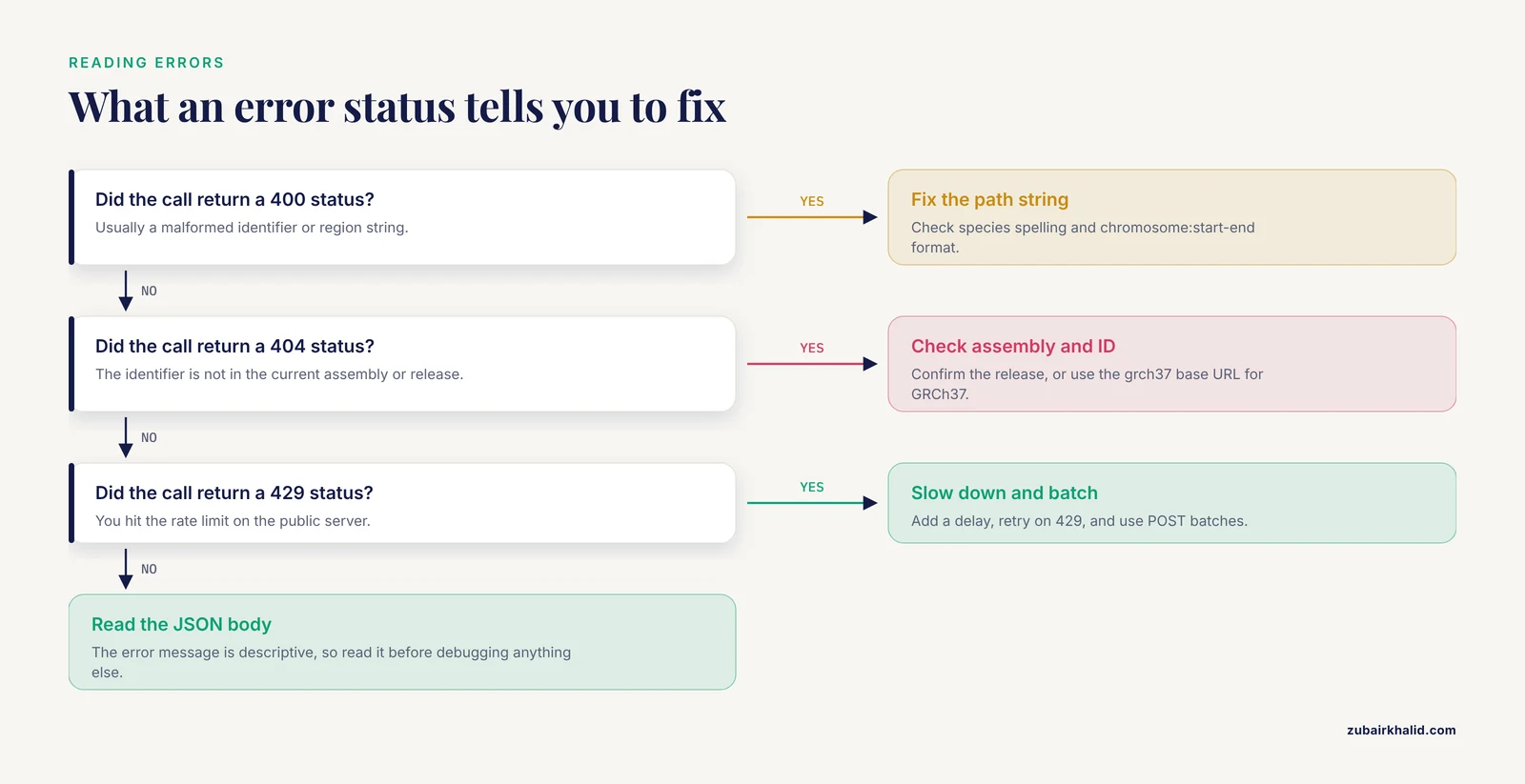
Mixing assemblies. Coordinates are not portable between GRCh37 and GRCh38. A BRCA1 coordinate quoted from an older paper refers to the older assembly. Use the grch37 prefix on the REST base URL when you need the archived assembly, and state the assembly in any output you publish. This single habit prevents the most consequential silent errors in variant interpretation.
Forgetting the strand. Genes on the minus strand are annotated with their genomic start less than their genomic end regardless of transcription direction, and sequence endpoints return the forward strand unless you append the strand to the region string. When a reverse-complement sequence appears where you expected coding sequence, a missing :-1 is usually the reason.
Assuming 0-based coordinates. Ensembl REST uses 1-based, fully closed coordinates, so the first base of a chromosome is position 1, and a one-base feature is written start=end. Tools in the UCSC and BED format tradition use 0-based half-open intervals. Converting between the two conventions incorrectly shifts every position by one, which is invisible in casual testing and fatal in variant annotation.
Confusing identifiers with versions. A transcript stable ID such as ENST00000357654 may carry a version suffix (.4 in some exports). The REST endpoints accept the unversioned identifier and return the current version in the response, so do not append version numbers from old tables to REST calls and be surprised by mismatches. When reproducibility against a specific release matters, record the version returned in your outputs.
Ignoring rate limits and batching. Looping over ten thousand identifiers with individual GET requests will trigger throttling and wasted time. Where an endpoint supports POST batches, use them, and add a small delay plus retry-on-429 logic to any script. For genuinely bulk needs, switch to BioMart or FTP.
Treating predicted consequences as diagnoses. VEP consequences are computational annotations based on transcript models. They are the standard first-pass annotation used across the field, but they do not replace clinical interpretation of a variant, which requires curation against current evidence, population data, and disease-specific criteria. Individual interpretation of a patient variant belongs with a qualified clinical genetics professional.
Expecting the API to be the browser. Some regulatory and comparative data are presented more richly in the browser than in individual REST responses, and some track-specific displays have no single-endpoint equivalent. When a visual property of a track matters, look at the region in the browser, then use the endpoint that returns the underlying data.
Quick Review
- The base URL is
https://rest.ensembl.orgfor the current assemblies andhttps://grch37.rest.ensembl.orgfor the archived GRCh37 human assembly. - Every call combines an endpoint path, optional query parameters, and
Content-Type: application/jsonplusAccept: application/jsonheaders. /lookup/symboland/lookup/idresolve names and identifiers to coordinates and are the usual first call in any workflow./sequence/idand/sequence/regionreturn sequence, withtype=cdsortype=cdnaand FASTA accept headers for downstream tools./vep/:species/regionconverts a variant into transcript-level and protein-level consequences, andcanonical=1marks the primary transcript./xrefs/idmaps Ensembl identifiers to RefSeq, UniProt, HGNC, and other databases, and/homology/idreturns orthologues and paralogues.- Coordinates are 1-based inclusive, species names use the lowercase underscore format, and assemblies must match the coordinate source of your data.
Frequently Asked Questions
What are Ensembl REST API endpoints in simple terms?
They are web addresses that each return one specific piece of Ensembl data, such as a gene's coordinates, a stretch of DNA sequence, or a variant's predicted effect. You request the URL and receive structured JSON or FASTA text, with no software installation required.
Do I need to install anything or get credentials to start?
No. The public REST server works from any browser or any tool that can issue an HTTP request, and no account is needed for light use. Ensembl does ask heavy scripted users to register an email address so automated traffic can be identified.
Which of the ten endpoints should a beginner learn first?
Start with /lookup/symbol, then /sequence/region, then /overlap/region. Those three let you go from a gene name to its coordinates, the underlying sequence, and everything annotated nearby, which covers a large share of everyday questions.
How do I query the older GRCh37 human assembly through the REST API?
Use https://grch37.rest.ensembl.org as the base URL instead of https://rest.ensembl.org, keeping the endpoint paths the same. This matters whenever your input coordinates come from GRCh37-based publications or older datasets.
How is the REST API different from the Ensembl genome browser interface?
The browser shows annotated data visually as tracks and is ideal for exploring a region by eye, while the API returns the same underlying data as structured text for scripts and pipelines. They access the same Ensembl releases, so they complement rather than replace each other.
Can I request many genes or variants in a single call?
Yes. Several endpoints, including lookup, sequence, and VEP, accept POST requests with a JSON list of identifiers or variants, subject to documented batch size limits. For very large bulk jobs, downloading data files through BioMart or the Ensembl FTP site is the better route.