Ensembl Gene Not Found: Common Problems and Fixes
By Dr. Zubair Khalid, DVM, MS, PhD ·

You paste a gene identifier into Ensembl and the browser answers that it cannot find it. The most common cause is a mismatch between the identifier you have and the resource you are searching: a human gene ID entered into a mouse search, a gene symbol pasted into a field that expects a stable Ensembl ID, or a version-14 ID queried against the current release. The first thing to check takes ten seconds. Look at the identifier itself. If it starts with ENS followed by a three-letter species tag and a letter code such as ENSG, ENST, or ENSP, Ensembl expects a stable ID, not a symbol like BRCA1 or SVIL. If it starts with ENSG and still fails, check the species and assembly selectors next to the search box before you assume the gene is missing.
This article walks through every common reason an Ensembl search returns nothing, explains the mechanism behind each failure, and gives you a diagnostic sequence you can follow in order. It also covers programmatic lookups through the REST API, BioMart, and R, because a gene that resolves in the browser but fails in a script has its own distinct set of causes.
How Ensembl Identifiers and Assemblies Work
A short tutorial on the structure of Ensembl data makes every later fix easier to understand. Ensembl, produced by EMBL-EBI jointly with the Wellcome Sanger Institute for the vertebrate releases, annotates genome assemblies and assigns stable identifiers to genes, transcripts, proteins, and exons. Those identifiers follow a predictable pattern. A human gene ID looks like ENSG00000139618. The prefix ENS marks Ensembl, the next three letters mark the species, in this case ENS for human and ENSMUS for mouse, and the letter code marks the feature type. G means gene, T means transcript, P means protein, E means exon.
The letter code matters because these identifiers live in separate namespaces. ENSG00000139618, ENST00000357654, and ENSP00000257839 all relate to the BRCA2 locus, but a search box tuned to genes will not resolve a transcript ID, and a protein lookup will not resolve a gene ID. If you paste an ID of the wrong type into a lookup endpoint, you get an error that reads as "not found" even though the ID itself is perfectly valid.
The second structural concept is the assembly. A genome assembly is a specific reconstruction of a species' genome sequence. Human annotation currently exists on GRCh38, and Ensembl maintains access to the previous major assembly, GRCh37, through a dedicated archive site. Coordinates on GRCh37 do not match coordinates on GRCh38. Gene IDs can also differ between assemblies, because stable IDs are assigned during annotation of a given assembly, and large-scale re-annotation can retire or merge identifiers. When a gene "disappears" between two queries weeks apart, the assembly selector is the first suspect.
The third concept is the release number. Ensembl updates annotation on a regular release cycle. A gene that was annotated in release 75 can be renamed, merged into a neighboring gene model, or removed in a later release. Archived releases remain accessible, which matters when you need to reproduce an analysis exactly as it was run. Published work illustrates how tightly analyses bind to a specific annotation state. A whole-exome sequencing study of COVID-19 severity in a Pakistani cohort annotated variants against the GRCh38 human reference genome using the Ensembl Variant Effect Predictor, so every consequence call in that paper is anchored to a specific release of the GRCh38 annotation [1]. If you tried to re-derive those annotations from a different release, or against GRCh37, you would get different results, and if you queried old transcript identifiers that the newer releases had reorganized, you would see the classic not found error.
The Ten-Second Diagnostic Sequence
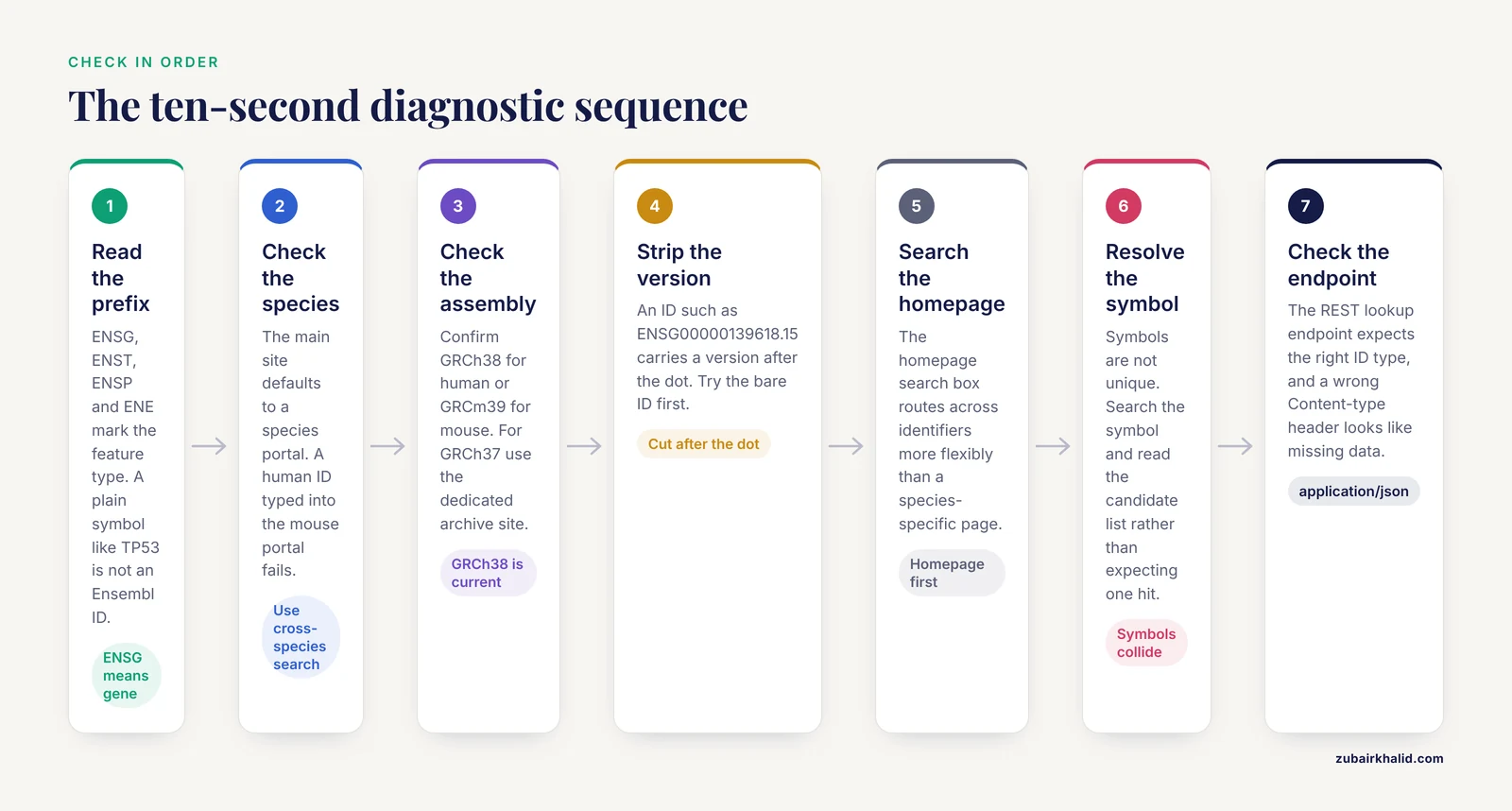
Work through this list in order. Each step takes seconds and eliminates an entire branch of causes.
- Read the identifier. Count the prefix characters. ENSG, ENST, ENSP, and ENE tell you the feature type. A plain symbol like TP53 is not an Ensembl ID.
- Check the species. The search box on the main Ensembl site defaults to a species-specific portal. A human ID typed into the mouse portal fails. Use the species drop-down or the cross-species search.
- Check the assembly. On the vertebrate site, confirm you are on the current assembly, GRCh38 for human, GRCm39 for mouse. If you are intentionally on GRCh37, use the dedicated GRCh37 archive site rather than the main site.
- Remove the version suffix. An ID such as ENSG00000139618.15 carries a version number after the dot. Some Ensembl interfaces accept it, others do not. Try the bare ID first.
- Try the ID in the search box on the Ensembl homepage rather than a species-specific page. The homepage search routes across identifiers more flexibly.
- If the ID is a symbol, search the symbol and inspect the result list. Symbols are not unique, and Ensembl will show you candidate matches rather than a single hit.
- If you are using the REST API, check the endpoint. The lookup endpoint expects the correct ID type, and an incorrect Content-type header returns errors that look like missing data.
- If none of these resolve it, move to the deeper causes in the sections below, which cover retired IDs, annotation gaps, and homology assumptions.
Troubleshooting Table
This table is the core reference for the article. It lists symptoms, likely causes, how to confirm each one, and the fix.
| Symptom | Likely cause | How to confirm | Fix |
|---|---|---|---|
| Gene symbol returns nothing in the search box | The field expects a stable ID, or the symbol is not the primary name Ensembl uses | Check the prefix of your query. A symbol has no ENS prefix | Search the symbol on the homepage, which does fuzzy matching, or look the symbol up in a symbol-to-ID service and paste the ENSG ID |
| ENSG ID fails on one Ensembl site but works on another | Species or assembly mismatch | Compare the species and assembly labels shown on the failing page | Switch the species selector, or use the correct archive site for the older assembly |
| ID worked last month, fails now | Ensembl release update retired, merged, or renamed the ID | Check the release notes, or query the ID with the REST API lookup endpoint, which can sometimes still resolve merged IDs | Recover the current ID by searching the gene name, or use the archive release where the ID was valid |
| ID resolves in the browser but fails in your script | Version suffix, wrong endpoint, wrong content type, or a species-specific database in BioMart | Print the exact ID your script sends. Compare it character by character with the browser query | Strip the version suffix, use the correct endpoint, and set the Content-type header to application/json |
| Gene has a RefSeq record but no Ensembl gene page | The gene is annotated in the NCBI RefSeq set but not in the Ensembl annotation set, or the annotation model differs | Compare the gene's presence in both annotation sets directly | Work from the RefSeq accession, or check whether Ensembl carries the gene under a merged or alternative model |
| Cross-species mapping returns many partners for one gene | One-to-many orthology from gene family expansion, which is real biology, not an error | Inspect the homology type label on the gene comparison view | Restrict to one-to-one orthologs if your analysis requires unique mappings, accepting that you will lose some pairs |
| Old analysis will not reproduce, IDs no longer resolve | The analysis depended on a specific annotation release that has been superseded | Compare your file's IDs against the current release | Re-run against the archived release that matches the original publication |
| Coordinate-based lookup returns the wrong gene or nothing | Coordinates belong to a different assembly | Convert the coordinates with the assembly converter and check species | Run the assembly conversion tool before coordinate lookup, then search the converted region |
Cause 1, The Most Common: Species and Assembly Mismatch
This cause accounts for the majority of not found errors, especially in collaborative projects where one person works with mouse data and another with human data. Ensembl maintains separate annotation sets per species, and the stable ID space is species-specific. ENSG00000141510 is human TP53. The mouse ortholog carries an ENSMUSG prefix. If you paste the human ID into the mouse portal, the lookup fails because the ID literally does not exist in the mouse database.
Assemblies create a subtler version of the same failure. Two researchers can both say they are working on the human genome and still be on different assemblies. GRCh37 was the standard for years, and a large body of published data, including older VCF files, BED intervals, and array probe designs, is anchored to GRCh37 coordinates. The current Ensembl release annotates GRCh38. A gene ID is generally portable across these assemblies because Ensembl tries to keep stable IDs consistent through assembly updates, but coordinate-based lookups are not portable at all. If you search a GRCh37 coordinate range on a GRCh38 browser, you can land on the wrong locus or empty sequence.
Ensembl solves this with dedicated access points. The main vertebrate site serves the current release on the current assemblies. The GRCh37 archive site serves the last GRCh37-based release, frozen, so that older analyses remain reproducible. The trick is knowing which world your data belongs to. Check the header lines of your GTF, GFF, or VCF files. A header stating GRCh37 means your coordinates and often your IDs belong on the archive site.
The same logic applies to non-vertebrate species. Ensembl runs separate portals for bacteria, fungi, metazoa, plants, and protists, because those genomes are annotated by partner institutions. A worm gene will never resolve on the vertebrate site. If your species is not a vertebrate, pick the correct portal before you debug anything else.
Cause 2, Identifier Type and Version Confusion
The second most common cause is feeding one namespace of identifiers into a lookup built for another. The gene, transcript, protein, and exon ID spaces are separate. A transcript ID is valid data, but the gene lookup endpoint will reject it. The error message in both the browser and the REST API tends to say the ID was not found, which is misleading, because the ID exists, just not in the collection being searched.
Version suffixes cause a closely related failure. Ensembl attaches a version number to transcripts and proteins, incrementing it when the annotation model changes. Gene IDs do not carry versions in the same way. Many external resources, and many published supplement tables, export IDs with the version suffix attached. Whether a given Ensembl interface accepts the suffixed form varies. The safe habit is to strip everything after the first dot before any lookup, then re-attach versioning only if your downstream tool needs it for reproducibility.
A different flavor of the same problem arises with symbols. Gene symbols such as SVIL are aliases maintained by nomenclature committees, and a symbol can map to more than one Ensembl gene, or to none if Ensembl records the gene under a different primary name. Real analysis pipelines hit this constantly. The study that identified a missense variant in the cytoskeletal gene SVIL and implicated actin remodeling in COVID-19 severity reported the finding as a gene symbol with an rs-numbered variant [1]. To move that result into Ensembl, into a genome browser track, or into an annotation database, you must first resolve the symbol to a stable Ensembl gene ID, and the resolution step is exactly where symbol-based lookups silently fail. The fix is to always carry stable IDs through your pipeline and treat symbols as display labels only.
Cause 3, IDs Retired or Reorganized Between Releases
Ensembl re-annotates genomes on a release cycle. When the annotation model for a locus changes, for example when two partially overlapping gene models are merged into one, the stable ID system tries to preserve continuity, but some IDs are genuinely retired. An ENSG ID that resolved in release 90 may fail in release 110. This is not data loss. The gene usually still exists under a different ID, and the old ID may still resolve in the archive of the release where it was valid.
Three practical fixes exist. First, search by gene name or by coordinate instead of the old ID, then note the new stable ID going forward. Second, query the REST API lookup endpoint with the old ID. In many cases the service resolves IDs across releases and returns the current object, or reports the ID as merged. Third, use the archive sites. Ensembl keeps previous releases accessible, which lets you confirm that the gene existed under the old ID and read off the updated identifiers shown on the archived page.
This failure mode is most common when reproducing published work. A paper from several years ago lists gene IDs in its supplement. Those IDs were valid against the release the authors used. When the paper's method requires annotation against GRCh38 with a defined tool version, as in the exome study cited above [1], the release is part of the method, and reproducing the result requires matching the annotation state, not just the reference sequence. If the IDs in a supplement do not resolve, do not conclude the genes were wrong. Check the release first.
Cause 4, The Gene Is Genuinely Absent From the Ensembl Annotation Set
Sometimes the answer is that Ensembl does not annotate the feature you are looking for, at least not as a protein-coding gene under the name you expect. Ensembl and the NCBI RefSeq database are separate annotation projects. They use different pipelines, different evidence weighting, and different merge rules. A gene can exist in RefSeq with a well-maintained record and be absent from Ensembl, present under a different model, or present as a non-coding annotation.
Small RNA genes illustrate the point clearly. Small nucleolar RNAs, or snoRNAs, guide chemical modifications of ribosomal and spliceosomal RNAs, and most vertebrate snoRNAs sit inside introns of host genes. Research that characterizes snoRNA evolution combines specialized resources such as snoDB with Ensembl gene annotations and vertebrate orthology data to place each snoRNA in its genomic context [2]. A researcher who looked up a snoRNA expecting a standard protein-coding gene page would find a different feature type, fewer associated transcripts, and in some cases no Ensembl gene model at all, because the snoRNA is annotated as a feature inside the host gene's intron rather than as an independent gene. When a lookup fails, check whether the feature type you expect matches the type Ensembl assigns. The gene may be present as a transcript, a regulatory feature, or a nested feature within another gene.
Pseudogenes, very recent genes, genes predicted only by automated pipelines, and genes from poorly assembled regions of the reference also fall into this category. If a gene is absent from the assembly itself, for example in a gap or a collapsed repeat, no annotation project can place it there. The fix is to confirm the gene's presence in an independent annotation source, then decide whether your analysis can proceed on the alternative model or whether the locus is genuinely missing from your reference.
Cause 5, Programmatic Access Fails While the Browser Works
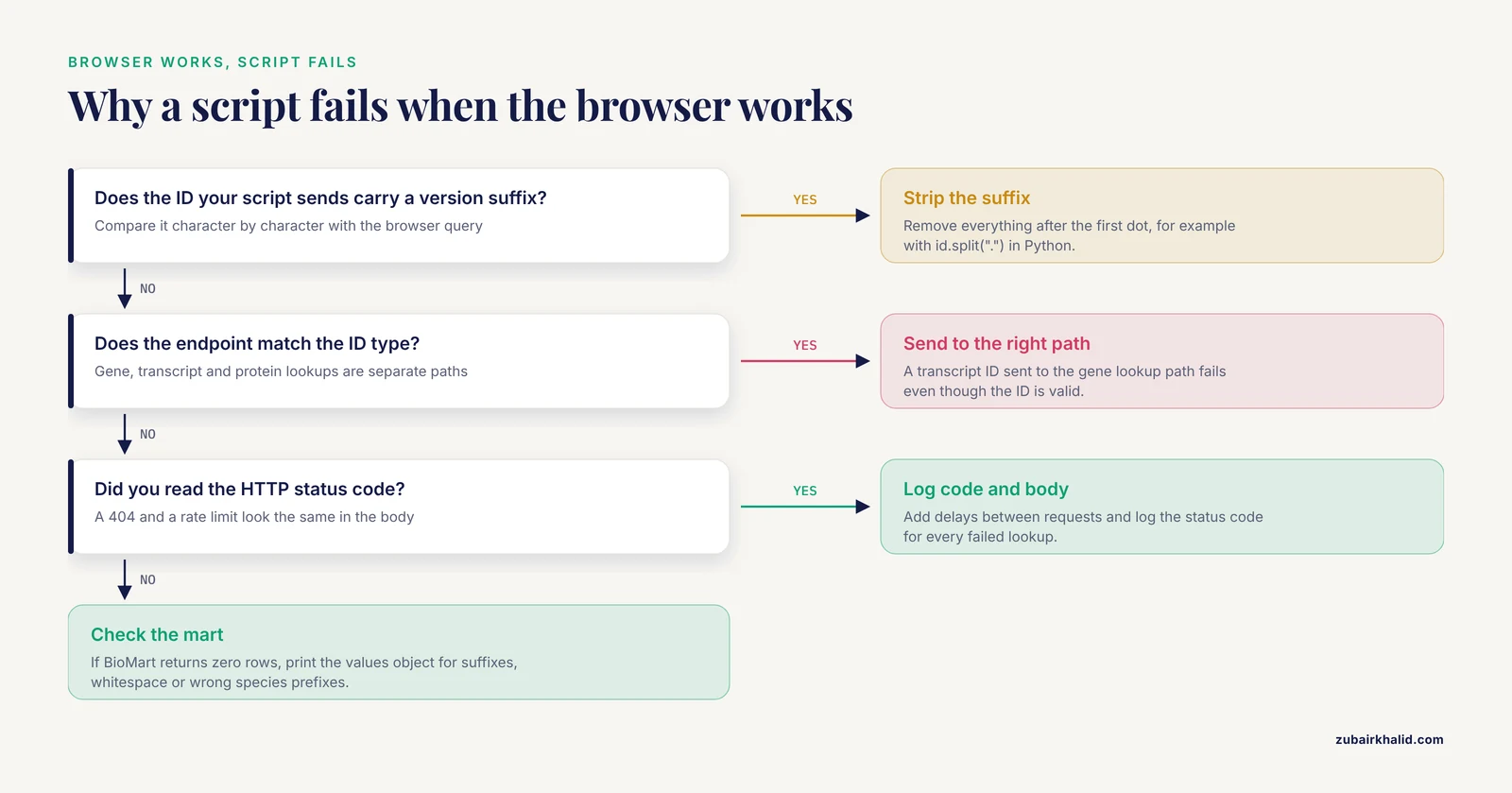
A gene that opens fine in the browser but fails in a script has a bounded set of causes, and all of them are fixable in minutes. The Ensembl REST API is the standard programmatic interface. It exposes lookup, sequence, homology, and mapping endpoints. The most common script-side failures follow.
First, the version suffix. The endpoint at rest.ensembl.org accepts an ID such as ENSG00000139618. Some endpoints tolerate the versioned form, others return an error. Strip the suffix in your code before the request. In Python this is one line, id.split(".").
Second, the endpoint and ID type. The lookup endpoint has variants for each feature type. Sending a transcript ID to the gene lookup path fails. Check your IDs before your code.
Third, headers. The REST API requires a Content-type of application/json for JSON responses. Omitting it can return HTML error pages that your JSON parser then reports as a missing resource. A request without error handling also hides the difference between a 404, meaning the ID is not found, and a rate limit response, meaning you are querying too fast. The API enforces rate limits, and scripts that hammer the service get throttled in ways that look like missing data. Add delays between requests, and read the response code, not just the body.
A worked example. To look up the human gene ENSG00000139618 with its transcripts, request the URL https://rest.ensembl.org/lookup/id/ENSG00000139618?expand=1 with the header Content-type set to application/json. The response includes the gene's stable ID, its current assembly coordinates, its biotype, and a nested list of transcript objects. If that same request is run with a mouse ID, the response includes mouse assembly coordinates, which is a quick way to confirm species in a pipeline that handles mixed data.
Fourth, BioMart and R. The biomaRt package in R connects to Ensembl BioMart, a query service for bulk retrieval. A common failure is a stale mart, meaning the script pins to an Ensembl release that the service has retired. The fix is to call listMarts() and listDatasets() fresh in every session, use useEnsembl with the dataset name such as hsapiens_gene_ensembl, and let the package pick the current release unless you deliberately pin a version for reproducibility. A second common failure is filtering on a symbol column with values that contain mixed case or whitespace. Symbols are matched literally. Normalize your input before the query.
A short biomaRt example that works as written.
library(biomaRt)
ensembl <- useEnsembl(biomart = "genes", dataset = "hsapiens_gene_ensembl")
results <- getBM(
  attributes = c("ensembl_gene_id", "external_gene_name", "chromosome_name"),
  filters = "ensembl_gene_id",
  values = c("ENSG00000139618", "ENSG00000141510"),
  mart = ensembl
)
If getBM returns zero rows for IDs you know are valid, print the values object and check for version suffixes, trailing whitespace, or species-prefixed IDs such as ENSMUSG in a human query. Every one of those produces an empty result rather than an error message, which is why the empty result is so confusing.
Cause 6, Cross-Species and Homology Lookups
A distinct family of not found problems arises when you ask Ensembl for the equivalent of a gene in another species. The homology data in Ensembl classifies relationships as one-to-one, one-to-many, and many-to-many. One-to-one means a single gene in each species descends from a single ancestral gene. One-to-many means the gene duplicated in one lineage after the species split. Many-to-many means duplications occurred in both lineages, which happens frequently in gene families that expanded along one branch of the tree.
These classifications matter for practice because a naive "give me the ortholog" request can return multiple partners, and an analysis that assumes uniqueness breaks. Recent work on cross-species single-cell transcriptome integration examined this problem directly. The authors noted that current approaches predominantly rely on Ensembl homology tables, and that default many-to-many mappings can overweight expanded gene-family signals during integration, generating mapping-associated microclusters that lack clear cell-type identity. Restricting mappings to one-to-one suppressed those artifacts but reduced the number of homologous gene pairs by roughly 8 percent, about 900 pairs in their benchmark. Their solution fused protein language model representations with sequence similarity under a one-to-one constraint across 11 species and more than 3.2 million cells [3]. The lesson for anyone debugging a homology lookup is that a many-to-many result is not an error. It is the correct evolutionary answer, and your analysis design determines whether you need one-to-one orthologs or can tolerate the full mapping set.
Orthology lookups also fail silently when species names are wrong. The REST homology endpoint takes a species name in a specific format, homo_sapiens rather than Homo sapiens. The wrong format returns an empty result that looks like missing data.
A related caution applies when combining annotations from multiple resources. Work on snoRNA host-gene relationships combined Ensembl gene annotations with a specialist database and orthology data across vertebrates, and found that sequence conservation can persist even when the exact host-gene association changes across species [2]. The practical implication is that an ortholog lookup tells you about the genes themselves, not about every annotation relationship attached to them. If your analysis depends on a structural relationship, such as a snoRNA nested in a host gene, verify that relationship in each species rather than assuming it transfers with the orthology mapping.
Cause 7, Coordinate and Assembly Conversion Failures
When you search by coordinates rather than IDs, the assembly becomes the whole game. A coordinate such as chromosome 13, position 32 million, means different sequence on GRCh37 and GRCh38. Ensembl provides an assembly converter tool that maps coordinates between assemblies, and the REST API exposes the map endpoint for programmatic conversion. If a coordinate-based search finds nothing, run the coordinates through the converter first and search again on the target assembly.
Patches and fixes add one more layer. Reference assemblies are refined through patch releases, and sequences can shift at patch boundaries. A lookup that fails at a specific coordinate may be falling in a region that changed between patch versions of the same assembly. This is rare, but it appears in genotyping pipelines and primer design workflows where coordinates come from older publications.
The diagnostic habit is simple. Never trust raw coordinates without confirming the assembly label attached to them. Every GTF, VCF, and BED file should declare its assembly in the header. If the label is missing, treat the coordinates as suspect until you have validated them against a known landmark, such as a well-annotated housekeeping gene.
Cause 8, Rarer Causes Worth Knowing
Several uncommon failure modes are worth listing so you recognize them when the standard fixes have all been exhausted.
Synonyms and historical names. A gene may have been renamed, and the name you remember is a historical alias. Ensembl records many aliases, but not all. Searching the current symbol, or resolving through a nomenclature database, resolves this.
Species strain differences. Ensembl annotates a reference strain for each model organism. If your work involves a non-reference strain with its own assembly, the gene may be annotated in a separate EnsemblGenomes-style resource or in a strain-specific database rather than the main species annotation.
Contamination or mixed identifiers in bulk files. Large ID lists assembled by hand often mix species prefixes. A list of 500 IDs where three begin with ENSRNOG, the rat prefix, will produce three not found errors in a human query. Filter your list by prefix before debugging.
Local mirrors and cached data. Some institutions run Ensembl mirrors. A mirror can lag behind the main site by one or more releases, so an ID that resolves on the main site can genuinely be absent from a lagging mirror. Compare release numbers shown in the page footer before concluding the gene is missing.
A safety note applies here for teams working with human data. Gene lookups themselves are safe, but if your troubleshooting involves uploading variant files, phenotype tables, or sample metadata to third-party web forms, strip direct identifiers first, and confirm your institution's data sharing policy covers the transfer. Human genomic data can re-identify individuals, and web tools are not designed as secure storage.
How to Use Ensembl, a Practical Browser Tutorial
For readers who want a grounding in the interface itself rather than a repair guide, this section walks through a standard gene lookup and the views that matter most.
Start at the Ensembl homepage. The central search box is the fastest route. Type a symbol, such as BRCA2, select the species from the suggestion list, and submit. The result page lists matching genes with their stable IDs, biotypes, and locations. If multiple results appear, read the biotype column, because protein-coding, lincRNA, and pseudogene entries can share a similar name.
Click through to the gene page. The tabs across the top organize the information. The Genes and transcripts tab shows the gene model with its transcripts, including the canonical transcript flag. The location tab opens the genome browser view, where you can add tracks for variants, regulatory features, and comparative genomics. The homologs tab shows orthologs and paralogs with their homology type labels, one-to-one or one-to-many, which is where the cross-species distinctions described above become visible.
For bulk work, use the BioMart link on the homepage. BioMart builds filtered, column-selectable tables without code. Choose the dataset, apply filters such as a chromosome or an ID list, and select attributes such as gene IDs, symbols, coordinates, and biotypes. Export as a table. BioMart is the right tool when you need annotations for hundreds of genes and do not want to write a script.
For reproducible programmatic work, prefer the REST API or biomaRt over screen scraping, and record the release number your results depend on. The release number appears in the page footer and in API responses. Recording it costs nothing and saves hours when a colleague asks why their rerun produced different annotation.
Common Mistakes and Limitations
Several recurring mistakes turn a two-minute fix into an afternoon of confusion.
Carrying symbols through pipelines. Symbols change, collide across genes, and differ between nomenclature authorities. Stable IDs are the only identifiers designed for persistence. Convert symbols to stable IDs at the first step of any analysis and use the IDs internally.
Assuming the newest release is always the right one. If you are reproducing a published analysis, match the release the authors used. If you are starting fresh, use the current release. Mixing releases within one analysis produces errors that look like missing genes.
Trusting a single source when a gene seems absent. Before concluding a gene does not exist, check an independent annotation resource. Absence from Ensembl means absence from that annotation set, not absence from biology.
Forgetting that annotation is a model, not a fact. Gene models are evidence-based reconstructions. Two authoritative projects can disagree about whether a locus contains one gene or two, and both can be defensible. When an ID resolves in one system and not another, the disagreement may be real.
Ignoring response codes in scripts. A script that treats every failed lookup as "gene not found" conflates rate limiting, network errors, malformed requests, and genuine absence. Log the HTTP status code and the response body.
One limitation deserves a plain statement. This guide covers lookup and annotation issues, not biological interpretation. An individual clinical or veterinary question, including any question about a variant found in a patient or animal, needs assessment by a qualified professional who can weigh the full case context.
Prevention Practices
A small set of habits prevents most not found errors before they happen.
Record the release and assembly in every analysis. Put the Ensembl release number, the assembly name, and the date in your script header and in any exported file. This single line of documentation resolves most reproduction failures.
Convert symbols to stable IDs once, at the start. Keep a mapping table with the source and date of the conversion. Re-verify the table only when you change releases.
Validate ID lists on ingest. Check prefixes against the expected species, strip version suffixes, remove duplicates and whitespace, and count failures before analysis rather than during it.
Pin versions for reproducibility. When a result must be reproduced exactly, archive the release number, the tool versions, and the parameter settings alongside the results. Ensembl archive sites exist precisely so that this is possible.
Handle cross-species mappings explicitly. Decide in advance whether your analysis needs one-to-one orthologs or can use the full homology set, and record that decision. The cross-species single-cell work cited above shows that the choice changes both the number of mapped pairs and the biological signals the integration recovers [3].
Add error handling that distinguishes failure modes. In scripts, log the status code, the request URL, and the response body for every failed lookup. A rate limit error and a genuine missing gene require opposite responses.
Frequently Asked Questions
What does an "Ensembl gene not found" error actually mean?
It means the identifier or coordinates you submitted do not resolve in the specific database you are querying, which usually reflects a species, assembly, identifier-type, or release mismatch rather than a truly missing gene. Start by checking the ID prefix and the species and assembly selectors.
Why does my Ensembl gene ID work on one site but fail on another?
The two sites are likely serving different species or different assemblies. The main vertebrate site serves current assemblies such as GRCh38, while the GRCh37 archive site serves the frozen previous assembly. Match your ID and coordinates to the correct site.
How do I convert an old Ensembl gene ID to the current one?
Search by gene name or coordinate to find the current gene page, or query the REST API lookup endpoint, which often resolves older IDs. If those fail, open the archived release where the ID was valid and read the updated identifiers from that page.
Why does my gene symbol fail in Ensembl but work in NCBI?
The two projects maintain separate annotation sets with different naming and merge rules, so a gene can be present in one and absent or modeled differently in the other. Resolve your symbol to a stable Ensembl ID first, and check whether the feature type matches what you expect.
How do I find the equivalent of my gene in another species?
Open the gene page and use the homologs tab, or query the homology endpoints of the REST API. Note the homology type. One-to-many and many-to-many relationships are real biology, not errors, and analyses that need unique mappings should filter to one-to-one orthologs.
What is the difference between ENSG, ENST, and ENSP IDs?
The letter code marks the feature type. ENSG is a gene, ENST is a transcript, and ENSP is a protein, and each lives in a separate identifier namespace. A gene lookup will not resolve a transcript ID, so match the ID type to the lookup you are performing.
Which assembly should I use, GRCh37 or GRCh38?
Use GRCh38, the current assembly, for new work. Use GRCh37 only when your existing data or a publication you are reproducing is anchored to it, and access it through the dedicated GRCh37 archive site. Never mix coordinates between the two assemblies.
Can I use Ensembl homology data for cross-species single-cell analysis?
Yes, and it is the standard starting point, but be deliberate about the mapping scheme. Default many-to-many homology mappings can distort integrated results, while one-to-one mappings are cleaner but discard roughly 8 percent of homologous gene pairs, so choose the scheme that fits your biological question.
Sources
- Whole-exome sequencing identifies a missense variant in the cytoskeletal gene SVIL implicating actin remodeling in COVID-19 severity in a Pakistani cohort.
- SnoRNA Evolution, Genomic Context, and Mobility: The Role of Function and Host Gene Association.
- Protein large language model-assisted one-to-one gene homology mapping in cross-species single-cell transcriptome integration.