Ensembl FASTA Export: Step-by-Step Guide
By Dr. Zubair Khalid, DVM, MS, PhD ·

By the end of this guide you will be able to export FASTA sequence data from Ensembl at four scales: one gene or genomic region from the genome browser, a filtered batch of hundreds to thousands of records with BioMart, scripted requests through the REST API, and complete genome, transcriptome, or proteome files from the FTP site. You will also be able to verify that every file carries the assembly, release, coordinates, and sequence you intended, which is the step most exports skip.
Ensembl publishes the same underlying annotation through a graphical genome browser, a programmatic API, and the BioMart batch tool [1]. FASTA is the plain-text sequence format used by BLAST, aligners, and most downstream software. Each record begins with a header line that starts with the greater-than symbol, followed by the sequence on subsequent lines.
You need a web browser for the first two methods and a Unix-style shell (macOS Terminal, Linux, or Windows Subsystem for Linux) with curl and wget installed for the rest. The verification steps use samtools and bgzip from the HTSlib package, and an optional section at the end covers R with Bioconductor.
How Ensembl Organizes Sequence Data
An assembly is the coordinate system of a reference genome. Human sequence lives on GRCh38, and the previous major assembly, GRCh37, remains available as an archived site for legacy comparisons [1]. A release is a numbered snapshot of Ensembl annotation and databases layered on top of an assembly. Releases increment as annotation improves while the assembly stays fixed, so a precise reference names both. The notation GRCh38.86, used in published variant-annotation pipelines, means Ensembl release 86 annotation on the GRCh38 assembly [2].
Identifiers encode the object type. ENSG marks a gene, ENST a transcript, ENSP a protein, and ENSE an exon. Human identifiers carry no species prefix, while other species add one, such as ENSMUSG for mouse, ENSBTG for cow, and ENSDARG for zebrafish. File headers often append a version number, for example ENST00000456328.2. Downstream work frequently correlates Ensembl gene and transcript identifiers with UniProtKB protein accessions [2], and the two resources are complementary, with Ensembl serving gene-centric annotation and UniProt serving curated protein information [3].
Sequence types matter more than any other setting in an Ensembl FASTA export, because picking the wrong one silently produces a file your analysis cannot use. cDNA is the spliced, mature transcript including UTRs (untranslated regions flanking the coding portion). CDS is the coding bases only. Peptide is the translated protein. Soft-masked genomic files keep every base but print repetitive sequence in lowercase, while repeat-masked files replace repeat bases with N.
| File or record type | Contents | Typical use |
|---|---|---|
| dna (unmasked) | Full chromosome sequence, all uppercase | Alignments, primer design, coordinate extraction |
| dna_sm (soft-masked) | Same bases with repeats in lowercase | Repeat-aware BLAST with -lcase_masking |
| dna_rm (repeat-masked) | Repeat bases replaced with N | Hard-masked searches |
| cdna | Spliced transcripts including UTRs | RNA-seq references, probe design |
| cds | Coding bases only, no UTRs | Open reading frame checks, translation |
| pep | Translated protein sequences | Domain and homology searches |
| ncrna | Non-coding transcripts | Non-coding RNA annotation |
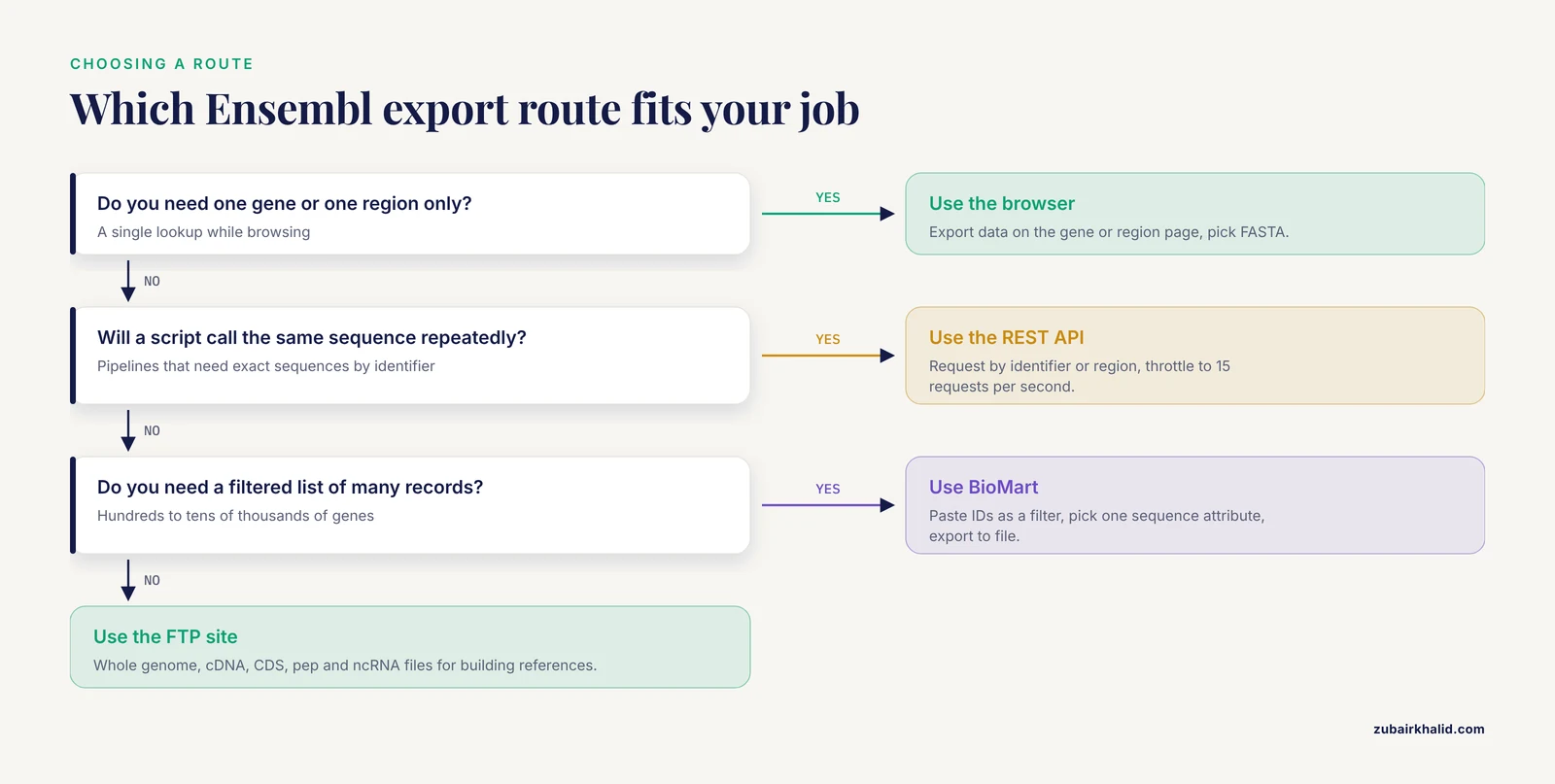
Ensembl FASTA Export Routes at a Glance
| Route | Practical scale | What you get | Best for |
|---|---|---|---|
| Genome browser Export data | One gene or region | FASTA of the viewed region, or cDNA, CDS, or peptide for a gene | Quick single lookups |
| BioMart | Tens to tens of thousands of records | FASTA with custom headers built from filters and attributes | Batch exports for gene lists |
| REST API | One to a few hundred requests | Exact sequences by identifier or coordinates | Scripts and pipelines |
| FTP site | Whole species | Genome, cDNA, CDS, pep, and ncRNA files | Building references and indexes |
| ensembldb in R | Release-locked annotation | Local database plus sequence extraction | Reproducible R workflows |
Scale is the deciding factor. The browser answers one question at a time. BioMart handles batch work, and published Ensembl protocols use it precisely for quick sequence export [4]. The REST API suits automation but is not designed for genome-scale pulls. Bulk files from the FTP site are the substrate for large infrastructure, and precomputed similarity databases such as SIMAP have folded Ensembl sequence space, 48 million proteins as of September 2009, into a single searchable matrix [5].
Export FASTA from the Ensembl Genome Browser, Step by Step
If you are learning how to use Ensembl for the first time, start here. The walkthrough doubles as a short Ensembl genome browser tutorial for sequence retrieval, and it needs nothing but a browser.
- Open www.ensembl.org and type a gene symbol such as TP53 into the search box. The search lands on the gene page, which summarizes transcripts, protein products, and external references. Ensembl integrates data from projects such as OMIM, dbSNP, and the GWAS catalog in the same view, so the gene page also works as an annotation hub for disease loci [4].
- To export the sequence of a region, open that region in the location view, then select Export data in the left-hand menu. Choose FASTA as the output format, set any flanking sequence you want, and download the file.
- To export gene-centered sequence, stay on the gene page, select Export data, and pick the sequence type: genomic, cDNA, CDS, or peptide. Toggle UTR inclusion and add flanking bases, for example 100 bases upstream, when the design calls for it. Download the file or display it in the browser and copy the text.
- Open the file and read the header. A region export produces a header naming the chromosome and coordinates, in this form:
>17:7668421-7687550Gene exports name the transcript or gene instead. The exact header depends on what you exported, and the verification section below shows how to decode the full form.
A note on context: genome browsers organize annotations as tracks around reference assemblies and support downloading data for a chosen locus [6]. The UCSC Genome Browser is a complementary portal built on the same assemblies with a different track set. Coordinates agree between the two for the same assembly version, but gene sets and track processing differ, so pull Ensembl annotation from Ensembl.
Batch Export with BioMart, Step by Step
BioMart is Ensembl's batch query interface, and Ensembl's own protocols recommend it for quick sequence export [4][1]. It converts a filter (which records) plus an attribute list (which fields and sequences) into a single FASTA file.
- From the Ensembl home page, open BioMart at www.ensembl.org/biomart.
- Under CHOOSE DATABASE, pick Ensembl Genes for the current release.
- Under CHOOSE DATASET, pick your species, for example Homo sapiens genes (GRCh38).
- Open the FILTERS panel. Use the GENE input box to paste a list of Ensembl stable IDs or gene symbols, one per line. You can instead filter by chromosome, band, or gene type such as protein_coding.
- Open the ATTRIBUTES panel, expand SEQUENCES, and pick exactly one sequence type: cDNA sequence, CDS sequence, peptide sequence, gene exonic sequence, transcript exonic sequence, 5' UTR, 3' UTR, or flanking sequence. Under the header checkboxes, add Gene stable ID or Gene name so each record stays identifiable.
- Click RESULTS in the top right. Set the output format to FASTA, choose export all results to File as TXT rather than the HTML preview, and click Go. The HTML preview truncates large result sets, so file export is the reliable route.
- Open the file and check the headers.
With transcript stable ID and gene name selected as header attributes, a CDS export looks like this:
>ENST00000269305|TP53
ATGGAGGAGCCGCAGTCAGAT...
The header joins the attributes you ticked, separated by a vertical bar. Records appear one per transcript by default, so a gene with several isoforms produces several records. The same interface is available on the Ensembl Genomes division sites for plants, fungi, protists, and invertebrates.
Scripted Export with the Ensembl REST API
The REST API is an HTTP interface where URLs return data, and Ensembl documents it alongside the browser and BioMart as a primary access route [1]. It is the right tool when a script needs one exact sequence at a time.
Example 1, genomic sequence for a gene. A gene identifier with no type parameter returns the gene's genomic sequence, introns included:
curl -s 'https://rest.ensembl.org/sequence/id/ENSG00000141510?content-type=text/x-fasta'The header names the requested identifier, and the sequence follows, wrapped at 60 characters per line. Depending on the endpoint, headers can also carry a version suffix and a chromosome mapping.
Example 2, coding sequence for a transcript. The type parameter accepts genomic (the default), cdna, cds, or peptide. The cds and peptide types apply to transcript identifiers that carry a coding sequence:
curl -s 'https://rest.ensembl.org/sequence/id/ENST00000269305?type=cds&content-type=text/x-fasta'Expected output for the TP53 coding sequence:
>ENST00000269305
ATGGAGGAGCCGCAGTCAGAT...
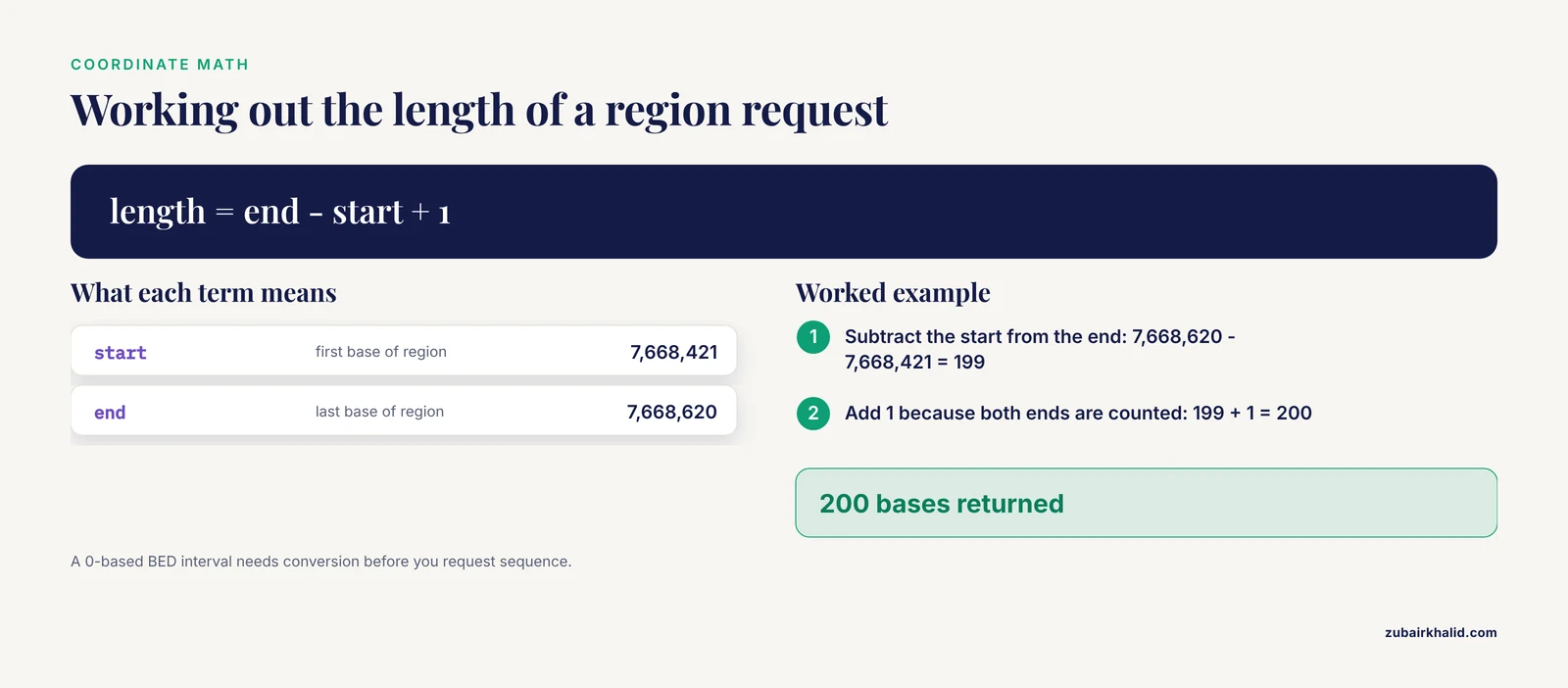
Example 3, an arbitrary genomic interval. Region requests take species, chromosome, start, end, and strand. Coordinates are 1-based and inclusive, and the strand flag is 1 for forward or -1 for reverse:
curl -s 'https://rest.ensembl.org/sequence/region/human/17:7668421-7668620:1?content-type=text/x-fasta'Expected output:
>17:7668421-7668620:1The next lines carry the sequence. The length math follows directly from the inclusive convention: 7,668,620 minus 7,668,421 plus 1 equals 200 bases.
Parameters that matter:
type: genomic, cdna, cds, or peptide. cds and peptide fail on non-coding transcripts.expand_5primeandexpand_3prime: integers in bases that extend the returned sequence beyond the object boundaries, useful for pulling promoter-adjacent sequence with a transcript.content-type: set totext/x-fastafor FASTA. Without it you get JSON. AnAccept: text/x-fastaheader works as an alternative.multiple_sequences: with a POST request, returns one FASTA record per identifier instead of a single merged record.
Batch pulls. A loop with a short pause keeps you inside the rate limit and appends one record per gene, here TP53, BRCA1, and BRCA2:
for id in ENSG00000141510 ENSG00000012048 ENSG00000139618
do
  curl -s "https://rest.ensembl.org/sequence/id/${id}?content-type=text/x-fasta" >> genes.fa
  sleep 0.1
done
For longer lists, POST the identifiers in one call:
curl -s -X POST -H 'Content-Type: text/plain' \
  -d 'ENSG00000141510,ENSG00000012048,ENSG00000139618' \
  'https://rest.ensembl.org/sequence/id?content-type=text/x-fasta&multiple_sequences=1'
Errors you will actually see. Omit the content type and the response is a JSON object with the sequence in a seq field rather than a FASTA record. Request an unknown identifier and the server answers with HTTP 404 and a JSON error naming the identifier. Malform a region string and you get HTTP 400. Exceed the documented ceiling of 15 requests per second and the server answers with HTTP 429, so throttle with sleep, batch with POST, or move bulk work to BioMart or the FTP site.
Whole-Genome Downloads from the Ensembl FTP Site
For reference building, indexing, and whole-proteome work, download the bulk files. Under https://ftp.ensembl.org/pub/release-113/fasta/homo_sapiens/ you will find five subdirectories: dna, cdna, cds, ncrna, and pep. Check the current release number on the Ensembl home page and substitute it, because the examples here use release 113.
- Download the files you need:
wget https://ftp.ensembl.org/pub/release-113/fasta/homo_sapiens/dna/Homo_sapiens.GRCh38.dna_sm.primary_assembly.fa.gz
wget https://ftp.ensembl.org/pub/release-113/fasta/homo_sapiens/pep/Homo_sapiens.GRCh38.pep.all.fa.gz- Verify the download against the checksum file in the same directory:
wget https://ftp.ensembl.org/pub/release-113/fasta/homo_sapiens/dna/CHECKSUMS
md5sum Homo_sapiens.GRCh38.dna_sm.primary_assembly.fa.gz
grep dna_sm.primary_assembly CHECKSUMS
The hash from md5sum must match the hash listed in CHECKSUMS. If it does not, re-download before doing anything else.
- Decompress and index the genome so coordinate lookups take milliseconds instead of minutes:
gunzip Homo_sapiens.GRCh38.dna_sm.primary_assembly.fa.gz
samtools faidx Homo_sapiens.GRCh38.dna_sm.primary_assembly.fa
To keep the file compressed, convert it to BGZF, a blocked gzip format that supports random access, and index that:
zcat Homo_sapiens.GRCh38.dna_sm.primary_assembly.fa.gz | bgzip -c > hsapiens_GRCh38_dna_sm.fa.bgz
samtools faidx hsapiens_GRCh38_dna_sm.fa.bgz- Extract any interval by coordinates:
samtools faidx Homo_sapiens.GRCh38.dna_sm.primary_assembly.fa 17:7668421-7668620Expected output:
>17 dna:chromosome chromosome:GRCh38:17:1:83257441:1 REFfollowed by the 200 bases on wrapped lines. The header preserves the original chromosome record, including the assembly and the full chromosome length.
File naming, decoded. The dna directory offers primary_assembly and toplevel variants. primary_assembly keeps the reference chromosomes and unplaced scaffolds but drops alternate haplotypes and patch sequences, which is what most analyses want. toplevel keeps everything, so a locus with an alternate haplotype exists twice in the file. The sm and rm infixes mark soft-masked and repeat-masked versions. The cdna, cds, and pep directories use the suffix all.fa.gz, for example Homo_sapiens.GRCh38.cdna.all.fa.gz. Many dna directories also carry per-chromosome files such as Homo_sapiens.GRCh38.dna.chromosome.13.fa.gz when you need only one chromosome. The human primary assembly holds roughly 3.1 billion bases and compresses to close to a gigabyte, so plan disk and memory accordingly.
Non-vertebrate species. The Ensembl Genomes divisions serve plants, fungi, protists, metazoa, and bacteria from their own archive at ftp.ensemblgenomes.org. Ensembl Plants at plants.ensembl.org organizes reference genome sequence, gene models, variant loci, and comparative data for crops and model plants, including large polyploid genomes such as bread wheat [7]. The FASTA directory structure and file naming mirror the main site, so the same wget, checksum, and indexing commands apply.
Transcript and Protein Sequences in R with ensembldb
ensembldb is a Bioconductor package that stores Ensembl annotation in a local database tied to a specific Ensembl release, with data kept separately from the package software so analyses stay reproducible [8]. Premade databases exist for common genomes and releases, and you can build your own from the Ensembl GTF, a tabular gene annotation format, optionally together with the peptide FASTA so protein sequences ship with the annotation [8].
Install a premade database and pull transcripts and proteins for one gene:
library(ensembldb)
library(EnsDb.Hsapiens.v86)
edb <- EnsDb.Hsapiens.v86

tx <- transcripts(edb, filter = GeneIdFilter("ENSG00000141510"))
pr <- proteins(edb, filter = GeneIdFilter("ENSG00000141510"))
The transcripts call returns GRanges objects, which bundle genomic coordinates with metadata, for every TP53 transcript in release 86. The proteins call returns peptide sequences when the database was built with protein data. With a matching genome FASTA you can also splice transcript sequences straight from the genome:
library(Rsamtools)
library(GenomicFeatures)
fa <- FaFile("Homo_sapiens.GRCh38.dna.primary_assembly.fa")
txseq <- extractTranscriptSeqs(fa, edb, use.names = TRUE)
Because the database is pinned to release 86, re-running the code months later returns the same annotation, which is the main argument for this route in production pipelines [8].
How to Verify Your FASTA Export
Read the header first. Ensembl headers pack the facts you need into one line:
>ENST00000456328.2 chromosome:GRCh38:1:16857:29570:1That decodes as transcript ENST00000456328, version 2, on GRCh38, chromosome 1, bases 16,857 through 29,570, forward strand. If the assembly or coordinates in the header disagree with your project, stop and re-export.
Count records and lengths. Two one-liners answer the questions reviewers ask:
grep -c '^>' file.fa
awk '
/^>/ { if (n) print id, n
       id = $0
       n = 0
       next }
     { n += length($0) }
END   { print id, n }' file.fa
The first prints the number of FASTA records. The second prints each header with its sequence length in bases, or residues for pep files. Compare a few lengths against the coordinate spans in the headers.
Sanity-check CDS records. A protein-coding CDS should start with ATG, end with a stop codon (TAA, TAG, or TGA), and have a length divisible by 3. A record that fails one of these checks usually means you exported the wrong sequence type or the wrong transcript.
Round-trip against the API. Extract 20 bases from your genome file with samtools faidx, request the same coordinates from the REST region endpoint, and compare. Identical output confirms that your local file and your scripts agree on assembly and coordinates.
Spot-check by similarity. Paste 100 or more bases into the BLAST tool built into Ensembl and confirm the top hit is the expected gene on the expected assembly. Also glance at the case of the letters, because lowercase characters reveal that you are holding a soft-masked file.
Common Mistakes and Limitations
- Comparing GRCh37 coordinates to GRCh38 sequence. The symptom is variants or primers landing in the wrong place or in intergenic sequence. GRCh37 remains archived for legacy work [1], so confirm the assembly in every FASTA header and never mix coordinate systems in one analysis.
- Conflating release with assembly. Release numbers change with annotation updates while GRCh38 stays fixed. Report both, in the form GRCh38.86, as published pipelines do, and pin the release in your methods section.
- Downloading toplevel when you wanted primary_assembly. toplevel includes alternate haplotypes and patch sequences, so reads or probes can hit multiple copies of the same locus. Use primary_assembly unless you specifically study haplotype variation.
- Ignoring soft-masking. In dna_sm files, repeats are lowercase. BLAST ignores case unless you pass -lcase_masking, so a soft-masked file behaves like an unmasked one by default. Decide deliberately whether to mask.
- Forgetting the content type in REST calls. Without content-type=text/x-fasta the API returns JSON. Add the parameter or an Accept header.
- Exceeding the REST rate limit. Ensembl documents a ceiling of 15 requests per second, and excess traffic draws HTTP 429 responses. Throttle, batch with POST, or switch to BioMart and FTP for bulk work.
- Indexing a plain gzip file with samtools. samtools faidx needs random access, which plain gzip does not provide, and the index step stops with the message "Cannot index files compressed with gzip, please use bgzip". Gunzip first or recompress with bgzip.
- Pushing huge jobs through the BioMart web form. The HTML preview truncates and long jobs can stall. Export to file, split filter lists into batches, or download the equivalent bulk file from the FTP site.
- Exporting the wrong sequence type. cDNA carries UTRs, CDS does not, and genomic sequence includes introns. A primer designed on CDS sequence will fail across an intron. Match the type to the application using the table near the top of this guide.
- Assuming identifier mappings are one-to-one. One Ensembl gene can host several transcripts and proteins, and mapping to UniProt accessions can fan out in both directions [3]. Decide whether you work at gene, transcript, or protein level and keep the matching identifier type throughout.
- Forgetting 1-based inclusive coordinates and strand. Ensembl region requests and samtools faidx both use 1-based inclusive coordinates. A 0-based BED interval needs conversion before you request sequence, and the REST strand flag is 1 or -1.
- Treating browser exports as a bulk route. The browser is for one-off lookups. Genome-scale work belongs on the FTP site, and annotation-heavy workflows belong in a release-locked database such as ensembldb [8].
A final limitation worth planning around: Ensembl updates annotation every release, so sequences pulled today can differ from the same identifiers after the next release. Archive the exact files you used, record the release number, and re-derive results when you upgrade. Genome browsers, including the UCSC Genome Browser, are built for visualization and locus-scale retrieval rather than bulk distribution [6].
Next Steps with Your FASTA Files
- Index genome files with samtools faidx so coordinate extraction is instant.
- Build a BLAST database from your downloaded FASTA for local similarity searches.
- Map Ensembl protein identifiers to UniProt accessions when you need curated functional annotation [3].
- Move recurring annotation needs into ensembldb or another release-pinned resource so results stay reproducible [8].
Frequently Asked Questions
How do I export a FASTA file from Ensembl?
Open the gene or region page in the Ensembl genome browser, click Export data in the left menu, and choose FASTA as the output format. For batch jobs, use BioMart, the REST API, or the FTP site as described above.
What is the difference between cDNA, CDS, and peptide FASTA?
cDNA is the spliced transcript including untranslated regions, CDS is the protein-coding bases only, and peptide is the translated protein sequence. Pick cDNA for transcript references, CDS for coding-sequence checks, and peptide for protein analysis.
Should I use GRCh37 or GRCh38?
Use GRCh38 for current work. Use GRCh37 only when you must match legacy data collected on the older coordinate system, and never mix coordinates between the two assemblies in one analysis.
Why does my Ensembl FASTA sequence contain lowercase letters?
Lowercase letters mark soft-masked repetitive sequence in dna_sm files. The bases are identical to their uppercase forms, so convert case if your tool requires it, or run BLAST with -lcase_masking to honor the masking.
How do I export FASTA sequences for a list of gene IDs?
Paste the list into BioMart as a filter and select a sequence attribute, or POST the list to the Ensembl REST sequence/id endpoint with multiple_sequences=1.
Why does BioMart time out on large exports?
The web interface struggles with very large jobs. Export results to a file instead of the HTML preview, split your filter list into smaller batches, or download the equivalent bulk file from the FTP site.
How do I get protein sequences from Ensembl?
Download the pep.all file for your species from the FTP site, select the peptide attribute in BioMart, or call the REST sequence endpoint with type=peptide. Map Ensembl protein identifiers to UniProt accessions when you need curated protein annotation.
Can I download FASTA files for plants, fungi, or bacteria?
Yes. The Ensembl Genomes divisions, including Ensembl Plants at plants.ensembl.org, provide the same FASTA directory structure on their own FTP archive, so the same download and indexing commands apply.
Sources
- Ensembl's 10th year.
- Systems biology-driven analysis of obesity-associated genes with transcript mapping and post-translational modification annotations.
- Retrieving GPCR data from public databases.
- Disease and phenotype data at Ensembl.
- SIMAP--a comprehensive database of pre-calculated protein sequence similarities, domains, annotations and clusters.
- Visualizing Genomic Annotations with the UCSC Genome Browser.
- Triticeae resources in Ensembl Plants.
- ensembldb: an R package to create and use Ensembl-based annotation resources.