Ensembl Compara for Non-Model Organisms: How to Find Orthologs
By Dr. Zubair Khalid, DVM, MS, PhD ·

For model organisms, orthologs are one click away, while non-model organisms force you to choose an access route, a reference species, and a validation step. The rule of thumb is simple. If your species has an annotated genome inside Ensembl, pull orthologs in bulk from the FTP files or BioMart and spot-check them in the browser. If it does not, anchor your genes to the closest relative that Ensembl does cover, map your sequences onto that relative, and then use Compara to complete the jump to well-annotated species such as human or mouse.
This article covers the four query routes into Ensembl Compara that work for non-model organisms, plus the fifth option of running the Compara pipeline on your own genome. Each route is explained on its own terms, then compared on the criteria that actually decide the choice: species coverage, throughput, reproducibility, and how much detail you get back. Worked examples use real commands and real attribute names.
What Ensembl Compara Is, and Why Non-Model Organisms Are a Special Case
Orthologs are genes in different species that diverged through a speciation event. Paralogs are genes that diverged through a duplication event. The distinction matters because orthologs are the safest currency for cross-species functional inference. If a gene in pig has a clear one-to-one ortholog in human, pig-to-human transfer of gene function is on reasonably solid ground.
Ensembl Compara is the comparative genomics service attached to Ensembl. It compares every genome in the Ensembl collection, builds multiple alignments and gene trees for the protein-coding genes, and reconciles those gene trees against the species tree to label each cross-species gene pair as an orthologue, a parologue, or a between-species paralog (co-ortholog). The output is not a single flat table. It is a network of gene relationships, and every relationship carries a homology type, an optional high-confidence flag, and often percent identity and dN/dS values.
For well-studied species this machinery runs quietly in the background. For non-model organisms, three realities shape everything you do:
- Coverage is uneven. Ensembl includes hundreds of vertebrate genomes, from dense biomedical models to species with low-contiguity assemblies. Ensembl Rapid Release adds newly sequenced genomes faster than the main release, and Ensembl Genomes extends Compara-style resources to plants, fungi, protists, bacteria, and non-vertebrate metazoa. Whether your organism appears in any of these, and with what assembly quality, is the first question to answer before you write a single line of code.
- Assembly and gene model quality drive orthology calls. A fragmented assembly with fragmentary gene models produces fragmented gene trees. A missing gene in your species can appear as a one-to-many relationship or as an apparent loss in the gene tree, even when the gene simply was not assembled. You must read Compara results in that light.
- Orthology is not a guarantee of identical function. A benchmark study that compared seven major phylogenomic databases, including Ensembl Compara, eggNOG, HOGENOM, InParanoid, OMA, OrthoDB, and Panther, against reference gene trees found generally high specificity of orthology assignments but also showed that no database provides a fully correct and comprehensive protein classification, and that most differences between databases reflect underlying database concepts rather than the prediction methods themselves [1]. Treat Compara output as a strong starting hypothesis, not ground truth.
A fourth reality applies specifically to researchers working on less-annotated mammals. Incomplete annotation leads to a substantial loss of information in downstream analyses such as gene set enrichment, which is exactly the problem that motivated tools built on top of Compara rather than inside it [2]. That distinction, querying Compara versus building a mapping pipeline around Compara, runs through every option below.
The Options at a Glance
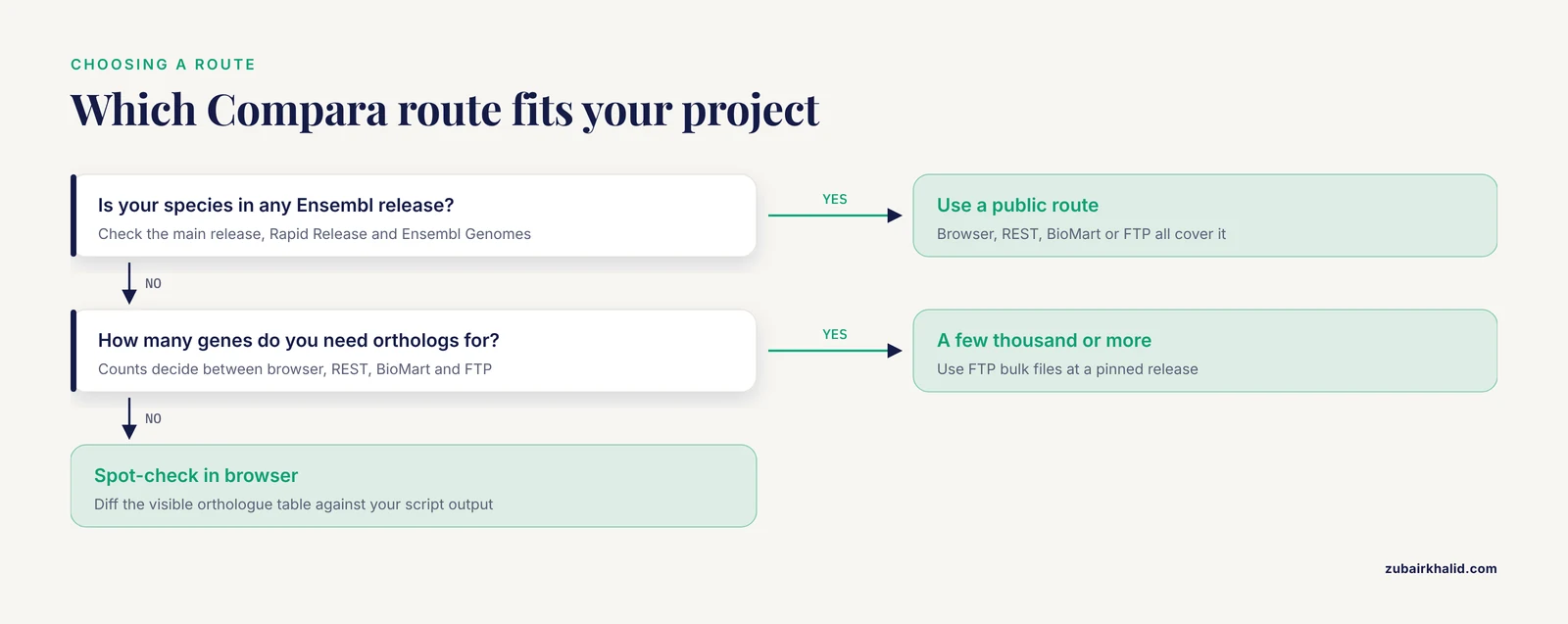
There are five practical ways to get orthology information out of Ensembl Compara for a non-model organism. The table below is the core of this article. The sections that follow explain each route, and a later section compares them on the criteria that decide real project choices.
| Route | What you get | Best for | Main limitation |
|---|---|---|---|
| Genome browser homology views | Interactive gene trees, orthologue tables, species-tree context for one gene at a time | Spot checks, teaching, deciding which gene model is right | Manual, one gene at a time, not reproducible at scale |
| REST API | JSON of homology records per gene, including type, confidence, and percent identity | Scripts that need a few hundred to a few thousand genes quickly | Rate limits make it wrong for genome-wide jobs |
| BioMart and biomaRt | Tabular bulk export of orthology attributes for one species pair at a time | Gene-list-sized projects in R, differential-expression follow-up | Attribute naming is awkward, one query pattern per species pair, many-to-many rows need care |
| FTP bulk files (homology TSVs) | Every homology relationship for every species in the release | Genome-wide pipelines, reproducible builds, multiple species at once | Large denormalized files, split across two hosts in recent releases, requires parsing |
| Running Compara yourself | Orthology predictions for your own genome assembly against the Ensembl set | Species with no Ensembl entry whose genome you have sequenced and annotated | Heavy compute, Perl and eHive pipeline machinery, steep learning curve |
Option 1: The Ensembl Genome Browser
The browser is the slowest route and the best first route. Before you script anything against a non-model species, you should look at one gene end to end, because the browser shows you the species-tree context and the gene-tree structure that raw API output flattens away. This doubles as a short Ensembl genome browser tutorial for the homology views specifically.
Start from the Ensembl homepage and search for your gene symbol or stable ID. On the gene page, the left-hand menu carries the comparative genomics views. The ones that matter for non-model work are these:
- Orthologues. A table of predicted orthologs, grouped or listed by species, with the homology type, confidence, and identity figures where available. Each row links to the counterpart gene page. You can filter to the species you care about and export the visible table.
- Paralogues. The same view for within-species and cross-species paralogs, useful when you suspect a duplication in your lineage.
- Gene tree. The full phylogenetic tree containing your gene, rendered with the species tree backbone. On a non-model species this view is where you see whether an apparent one-to-many orthology comes from real duplications or from a fragmented gene model.
- Genomic alignments and pairwise alignment views. These sit deeper in the comparative genomics menu and matter more when you are checking a region than when you are checking a gene list.
A practical habit: when you open a gene tree for a non-model species, look first at where your species sits relative to the reference species you intend to map to. The tree labels internal nodes with the last common ancestor, such as a mammalian or vertebrate ancestor. If your gene in the non-model species sits on a branch by itself with weak support and no nearby ortholog, the Compara call for that gene is telling you something about the assembly or the gene model, not about biology. Note it, and move on to the next gene.
The browser route is also how you sanity-check a small sample of results before trusting a bulk export. Exporting the visible orthologue table for five or ten genes and diffing those rows against what your script produces is cheap insurance.
Option 2: The Ensembl REST API
The REST API serves individual homology records as JSON. It is the right tool when you have a gene list in the hundreds and want typed, structured output directly in a script. The endpoints that matter for non-model organisms are the homology endpoints, queried by Ensembl gene ID, Ensembl peptide ID, or NCBI gene ID.
A minimal query for the orthologs of a single pig gene uses the homology endpoint with the vertebrates compara:
curl -H "Content-Type:application/json" \
  -H "Accept:application/json" \
  "https://rest.ensembl.org/homology/id/ENSSSCG00000014735?compara=vertebrates"
The response contains, for each homology: a homology_type (values such as ortholog_one2one, ortholog_one2many, ortholog_many2many, and between_species_paralog), an is_high_confidence boolean, a perc_identity value between the aligned proteins, and the source and target gene identifiers with their species. You can restrict the response with parameters such as type=orthologues and pass target_species when you only want one counterpart species.
The same query by NCBI gene ID works through homology/id/ with the appropriate id_type parameter, which is convenient when your input list comes from an NCBI annotation of a non-model species.
Three practical rules keep REST work for non-model organisms clean:
- Batch politely. The API is built for interactive use, and Ensembl directs users with bulk needs toward the downloadable files. Keep request rates low, add small sleeps between calls, and cache every response to disk so a crashed run does not refetch what it already has.
- Record the release number. Every response is tied to an Ensembl release. Store that number alongside your results, because homology calls change between releases as assemblies and gene sets improve.
- Log the homology type, not just the ID pair. The single most common scripting error is storing the matched gene ID and discarding
homology_type. For non-model species, a large share of matches are one-to-many or many-to-many, and a downstream analysis that collapses them silently will produce wrong gene counts.
REST is also the natural place to attach your own validation. A common pattern for a species outside Ensembl is to BLAST your proteins against the Ensembl proteome of the closest relative, take the best hits, then query the homology endpoint for those Ensembl IDs. You inherit the full Compara network from the anchor species while keeping your own evidence layer underneath.
Option 3: BioMart and biomaRt
BioMart is Ensembl's query builder for tabular bulk export, and biomaRt is its R interface. For non-model organisms with an Ensembl entry, this is usually the fastest way from a differential-expression gene list to ortholog IDs in a well-annotated species.
The workflow in R looks like this for pig, using human as the target species:
library(biomaRt)

ensembl <- useEnsembl(biomart = "genes",
                      dataset = "sscro_gene_ensembl")

result <- getBM(attributes = c(
                  "ensembl_gene_id",
                  "external_gene_name",
                  "hsapiens_homolog_ensembl_gene",
                  "hsapiens_homolog_associated_gene_name",
                  "hsapiens_homolog_orthology_type",
                  "hsapiens_homolog_perc_id",
                  "hsapiens_homolog_perc_id_r1",
                  "hsapiens_homolog_orthology_confidence"),
                filters    = "ensembl_gene_id",
                values     = gene_list,
                mart       = ensembl)
The pattern is the same for any species pair. The dataset name comes from the species, and the homology attributes are prefixed with the target species abbreviation. One query returns the orthology type, percent identity from both directions, and the confidence class for each gene pair.
BiomaRt for non-model organisms has three quirks that cause real trouble:
- One attribute set per target species. To get orthologs to mouse and human and chicken from the same pig gene list, you either run three queries or list three attribute sets. Plan for that when building the query.
- Many-to-many relationships generate multiple rows. A single input gene can return several target genes, one per homology relationship. Summarize deliberately. Keep the orthology type column so you can distinguish a clean one2one from a many2many tangle, and decide your collapsing rule once, in writing, before the analysis.
- Dataset availability tracks the release. Species freshly added through the rapid release path may not be present in the main BioMart endpoints. Check the dataset list for your species before building a pipeline on biomaRt.
The value of this route shows up in the downstream statistics. The Mammalian Annotation Database tool, which addresses poor annotation in non-model mammalian RNA-seq, assigns homologs in three ordered steps: first by matching official gene symbols, then by using orthology information contained in Ensembl Compara, and finally by pairwise BLAST comparisons of all transcripts. The authors tested the approach on a published pig RNA-seq dataset and showed clearly improved overrepresentation analysis results based on human homologous gene identifiers compared with the original annotation [2]. That is exactly the biomaRt-shaped job: take a non-model gene list, translate it through Compara orthology, and run enrichment in the well-annotated species. The three-step ordering is also a design lesson, because symbol matching handles the easy cases cheaply, Compara handles the principled middle, and BLAST rescues the remainder.
Option 4: FTP Bulk Files
For genome-wide or multi-species projects, the downloadable files are the best Ensembl Compara non-model organisms option in most pipelines. Every release ships the complete set of homology relationships as tab-separated files, organized by species, along with the underlying gene member data. You download once, parse locally, and your analysis becomes reproducible against a frozen release.
The vertebrate homology files live under the TSV section of the Ensembl FTP site, in per-species directories, with each file listing that species' genes alongside their homologs in all other species. Recent Ensembl releases have also split comparative data between the main FTP host and the rapid-release host, so if a species is missing from the main tree of files, check whether its data lives on the rapid-release side before concluding it has no homology data.
The files are denormalized. Each row ties one gene in the focal species to one homolog elsewhere, with columns for the homology type, the confidence class, percent identity in both directions, the gene tree node identifier, and the last common ancestor name for the relationship. A parsing pass with pandas or awk typically does three things:
- Filter to the homology types you want to keep, for example
ortholog_one2oneandortholog_one2many. - Resolve stable IDs across releases, because stable IDs can be retired and remapped between versions of a non-model annotation.
- Reshape the long table into the gene-by-species structure your analysis expects.
Bulk files reward you at scale. If your project needs orthologs between one non-model species and twenty others, the file for your focal species already contains every relationship, and no API strategy can match that. The costs are file size, the need to handle duplicate rows for one-to-many and many-to-many relationships, and the discipline of pinning a release URL so your results do not drift when the next release lands.
Option 5: Running the Compara Pipeline on Your Own Genome
If your species has no Ensembl entry, and anchoring through a relative is not good enough, the pipeline itself is open source. Ensembl publishes the Compara code base, including the pipeline system used to produce the public gene trees and homology calls, and documents how to load your own genome assembly and gene set and run the comparative analyses against the Ensembl data.
The honest assessment of this route is that it is powerful and expensive. You need your assembly and a protein-coding gene annotation you trust. You need the Ensembl Core and Compara Perl APIs and the eHive pipeline system, a PostgreSQL-backed pipeline database, and compute for the all-against-all protein comparisons and tree building. The reward is that your species becomes a first-class member of the analysis, with its own member entries, its own position in the species tree, and gene-tree based orthology calls made under the same algorithm that produced the public data.
For most labs working on a single non-model species, the anchor-through-a-relative strategy in options 2 and 3 delivers what they need at a fraction of the effort. Running Compara yourself is the right call when the species is the ongoing subject of the lab's work, when many genes lack any reliable anchor relative, or when you need orthology calls that respect your own gene models rather than a distant relative's.
How Compara Labels Orthologs, and What Non-Model Species Change
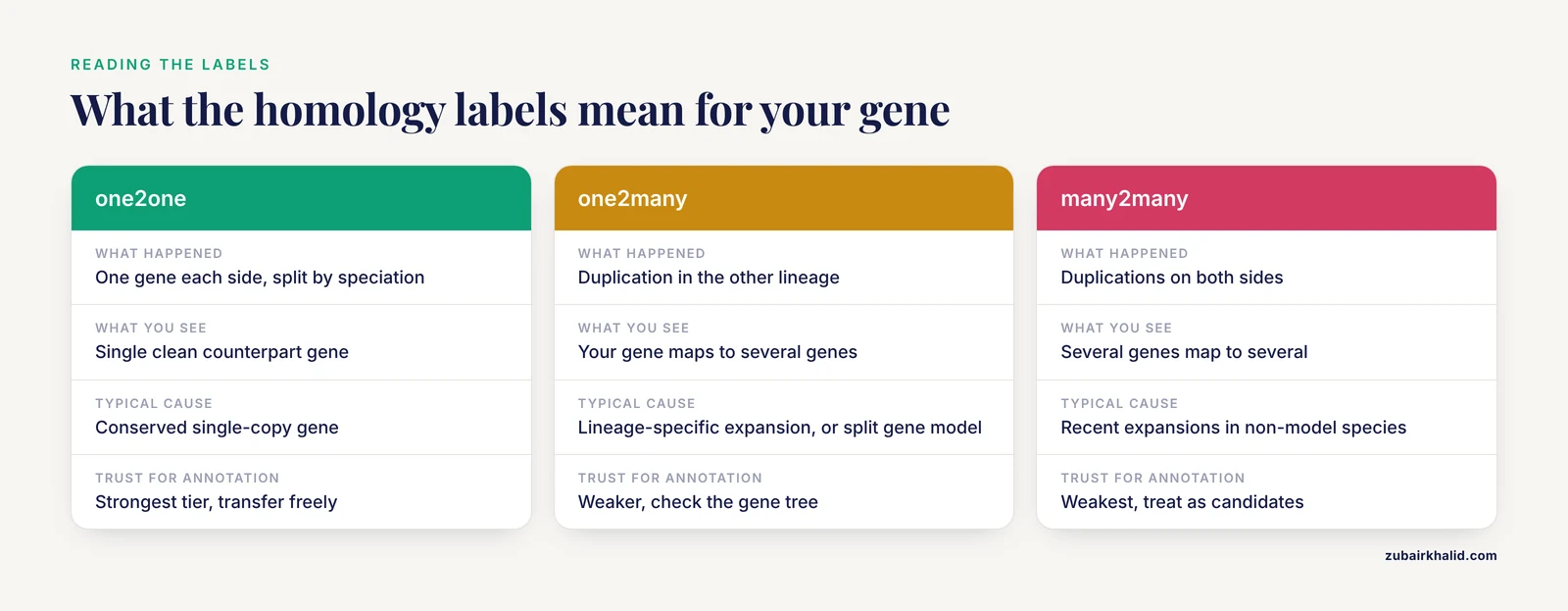
Every homology relationship in Compara carries a label from a fixed vocabulary. Reading these correctly matters more for non-model organisms, because duplications and assembly gaps shift the distribution of labels away from the clean one-to-one calls that dominate model organism comparisons.
- ortholog_one2one. One gene in your species, one gene in the other, split by speciation. This is the highest-value call for functional transfer.
- ortholog_one2many. Your gene maps to multiple genes in the other species, typically because duplications occurred in one lineage after speciation. The other species' genes are between-species paralogs of each other, co-orthologs of your gene.
- ortholog_many2many. Duplications on both sides. Common in non-model species with recent lineage-specific expansions.
- between_species_paralog. The two genes are related by duplication rather than speciation. These rows appear in orthologue tables and pipelines must exclude them explicitly, not implicitly.
- Duplicated in one lineage. The gene tree records a duplication in one species' ancestry, which often explains a one-to-many call.
The high-confidence flag is assigned within the Compara pipeline based on the topology of the gene tree around the relationship, and it is the field most worth filtering on for non-model species. Alongside it, each relationship carries the last common ancestor name, such as the mammalian or vertebrate ancestor, which tells you how deep in the tree the orthology was called.
Non-model genomes shift these labels in predictable directions. Fragmented assemblies split genes across scaffolds, and a split gene can appear as one-to-many relationships against intact genes in the reference species. Lineage-specific duplications, which are common in domesticated and wild non-model species, generate genuine many-to-many calls that reflect biology rather than error. And species that entered Ensembl through the rapid release track may carry gene sets built with less manual curation than the flagship species, which propagates into tree quality. The benchmark study across seven orthology databases found high specificity in well-conserved protein families, which supports trusting Compara calls for conserved genes, while the same study's finding that differences between databases stem from database concepts reinforces the practice of checking important gene families across more than one resource [1].
Comparing the Options: Pros and Cons
Choosing the best Ensembl Compara route for a non-model species comes down to five criteria. Here is how the options score on each.
Species coverage. The browser, REST, BioMart, and FTP all cover exactly the species in the relevant Ensembl release, so coverage is a property of the species, not the route. The rapid-release host extends coverage to freshly sequenced genomes, and Ensembl Genomes extends it to non-vertebrate divisions. Running Compara yourself is the only route that adds a species.
Throughput. FTP wins outright for genome-scale work. BioMart and biomaRt handle gene-list-sized jobs of thousands of identifiers well. REST handles hundreds comfortably and breaks down as a strategy beyond that. The browser handles one gene at a time.
Reproducibility. FTP files pinned to a release URL give byte-stable inputs. REST and BioMart results depend on live server state, which is acceptable if you record the release number and cache responses, and unacceptable if you do not. Browser exports are the least reproducible because they are manual.
Detail returned. REST and the browser give the richest per-relationship detail, including the gene-tree context that helps interpret odd calls in non-model species. BioMart gives the fields you ask for and nothing more. FTP gives everything but in a shape you must reshape.
Setup effort. The browser needs none. REST needs a small script. biomaRt needs a small R session. FTP needs a parser. Running Compara yourself needs a pipeline environment and real compute, and it is the only option with a measured learning curve to match its power.
Put together, the pros and cons point to a default strategy for most non-model projects. Explore in the browser, prototype in biomaRt, and run the production job from FTP files, with REST reserved for resolving individual questions the bulk files raise.
Worked Scenarios
Scenario 1: RNA-seq in a non-model mammal, enrichment in human
You have differential-expression results from an RNA-seq experiment in pig and your overrepresentation analysis against pig annotation comes back thin. This is the exact problem the Mammalian Annotation Database work was built around, and its solution maps cleanly onto Compara.
The pipeline runs in three ordered steps: match official gene symbols where they align across species, then take the remaining genes through Ensembl Compara orthology, then use pairwise BLAST of transcripts for whatever still lacks an assignment [2]. In practice, step one is a small script over annotation tables, step two is a biomaRt query against the pig dataset with the human homolog attributes, and step three is a BLAST run against the human proteome with careful thresholds. After mapping, you run the enrichment analysis on human gene identifiers. The published test on pig RNA-seq showed clearly improved overrepresentation results using the assigned human homologous identifiers [2], which is the expected outcome when you trade a thin annotation for a dense one.
The step order matters. Symbol matching is free but fragile, since gene symbols collide and drift across species. Compara orthology is principled and typed, and it carries confidence values. BLAST is the broadest net and the easiest to get wrong, so it belongs last, on the small residual set, where a human curator or a second database can check its output.
Scenario 2: A species with no Ensembl entry
Your organism is a reptile or an amphibian with a draft genome that Ensembl does not carry. The anchor strategy is:
- Identify the closest relative in Ensembl. The species-tree views in the browser make this easy, and the rapid-release and Ensembl Genomes trees may already include a close relative.
- BLAST your proteins, or your transcriptome-derived sequences, against that relative's Ensembl proteome. Keep best hits with an explicit identity and coverage threshold you can defend, and log the second-best hits too.
- For each anchored Ensembl gene, pull orthologs to human and mouse through the homology REST endpoint or the bulk TSV for your anchor species.
- Carry three identifiers through the pipeline: your gene, the anchor gene, and the human ortholog. Mark the evidence type for each link, and expect the chain to break for lineage-specific genes, which is a real result and not a failure.
This is the same architecture as the MAdb design, generalized to any species outside Ensembl: your species, an intermediate with good Ensembl presence, and the well-annotated target [2]. The intermediate adds noise, so record homology types at every hop and treat chained one-to-many links as the weakest evidence class in your output.
Scenario 3: Genome-wide orthology across many species
You need every ortholog between your non-model species and a panel of reference species, for a synteny or gene-family expansion analysis. This is FTP territory. Download the homology TSV for your focal species at a pinned release, filter homology types, join against the gene member tables to get symbols and synonyms, and build one table with one row per focal gene and one column per target species. Decide before you start how many-to-many rows will be represented, because that single decision shapes every downstream count.
Common Mistakes and Limitations
Treating every ortholog as one-to-one. Non-model species produce large fractions of one-to-many and many-to-many calls. Scripts that keep one arbitrary row per input gene silently discard the others and bias gene counts toward whichever row parsed first. Keep the homology type column and document your collapsing rule.
Using percent identity as the definition of orthology. Percent identity describes sequence similarity, and the fastest-evolving true orthologs can be less similar to each other than recent paralogs are. Orthology comes from the gene-tree reconciliation, not from a similarity cutoff. Identity is a useful sanity check, not the criterion.
Ignoring the between_species_paralog rows. These appear alongside true orthologs in tabular exports and will contaminate a gene set if not filtered explicitly by homology type.
Mixing releases. Homology calls change between Ensembl releases as assemblies and gene models improve. Results generated against different releases, or against the rapid-release track and the main release, are not comparable without recording versions. Pin the release in every script and report it in every methods section.
Assuming orthology implies identical function. Orthologs share ancestry through speciation, and function can diverge after that, especially in lineage-specific physiology. For functional annotation transfer, high-confidence one-to-one calls are the strongest tier and everything else is weaker in a graded way. The cross-database benchmark found generally high specificity but no fully comprehensive classification, which is the quantitative backing for a graded-trust approach rather than binary trust [1].
Ignoring identifier namespace problems. NCBI and Ensembl gene identifiers are different identifier spaces, and pipelines that mix them produce silent mismatches. The AnnOverlappeR tool was developed specifically for reliable assignment between NCBI and Ensembl gene IDs, and the MAdb workflow treats namespace reconciliation as its own step rather than an afterthought [2]. Budget a real step for this in any pipeline that touches both worlds.
Forgetting assembly quality when a gene is missing. An absent ortholog in a non-model species usually means the gene model is absent from the annotation, not that the gene is absent from the genome. Check the region by BLAST against the assembly before concluding a gene loss, and remember that fragmented gene models produce misleading one-to-many patterns.
Comparing against the wrong reference species. The closest relative is not always the best anchor. A moderately close relative with a chromosome-scale assembly and curated gene models often outperforms a marginally closer relative with a scaffold-level assembly. Anchor quality beats tree distance.
Overlooking the database-concept dimension. When Compara and another resource disagree about a gene, the explanation is often structural. Different databases draw the orthology-paralogy boundary differently, handle in-paralogs differently, and weight gene trees differently, and the benchmarking study showed these concept-level differences drive most disagreement between databases rather than methodological error [1]. For a small set of critical genes, checking two databases and reading the disagreement is time well spent.
One further limitation applies to the interpretation of any of these results. Individual biological conclusions drawn from cross-species mapping need domain expertise for the organism in question, and the mapping is a hypothesis-generating layer rather than a substitute for experimental validation in your species.
Frequently Asked Questions
Does Ensembl Compara include my non-model species?
Check three places in order. The main Ensembl release covers hundreds of vertebrate genomes including many non-model mammals, birds, reptiles, and fishes. Ensembl Rapid Release adds newly sequenced genomes on a faster schedule with the same comparative analyses. Ensembl Genomes carries plants, fungi, protists, bacteria, and non-vertebrate metazoa. Search the species list on each site, and if the species is absent everywhere, use the anchor-through-a-relative strategy described in this article or run the Compara pipeline on your own assembly.
What is the best way to get all orthologs for a non-model species in one file?
Download the homology TSV files for your species from the Ensembl FTP site at a pinned release. They contain every homology relationship for that species against all others, with homology type, confidence, and identity columns. This is the route that scales to genome-wide projects and stays reproducible, and it beats scripted API calls whenever the gene count exceeds a few thousand.
Why does Compara call my gene an ortholog while another database calls it a paralog?
Different databases define and compute orthology differently, including how they handle duplications and in-paralogs, and a benchmark against reference gene trees showed that most disagreement between seven major orthology databases comes from these underlying database concepts rather than from method errors [1]. Check the gene tree, look at the homology type each resource reports, and treat the disagreement as information about the gene's duplication history rather than as an error in one of the tools.
Can I add my own genome assembly to Ensembl Compara?
You cannot add it to the public Ensembl releases, but the Compara pipeline itself is open source and can be run on your own assembly against the Ensembl data. The costs are a trustworthy gene annotation for your species, the Perl API and eHive pipeline infrastructure, and substantial compute for the all-against-all comparisons and tree building. For most single-species projects, anchoring through the closest Ensembl relative is faster and sufficient.
What do one2one, one2many, and many2many mean in practice?
One-to-one means a single gene in each species split by the speciation event, and it is the strongest basis for functional transfer. One-to-many means your gene corresponds to several genes in the other species, usually from a duplication in that lineage. Many-to-many means duplications occurred on both sides of the split. All three are genuine orthology calls, but only one-to-one relationships support unambiguous gene-count matching between species.
Should I use high-confidence orthologs for functional annotation in my non-model species?
Yes, and grade the rest. Filter bulk exports or API results on the high-confidence flag and the homology type together, use one-to-one high-confidence calls as the tier where you transfer annotation freely, and treat lower tiers as candidates requiring sequence-level checking. For enrichment analysis specifically, mapping your gene list to a well-annotated species such as human through Compara orthology demonstrably improves overrepresentation results for non-model mammals, as shown for pig RNA-seq data [2].