Ensembl Compara Troubleshooting: Why Your Gene Tree Shows No Orthologs
By Dr. Zubair Khalid, DVM, MS, PhD ·

The most common cause of an "ensembl compara no orthologs" result is not a missing gene. It is a query problem. You are asking the wrong database, the wrong release, or the wrong endpoint with an identifier the system cannot resolve. The first thing to check takes about two minutes: paste your stable ID into the Ensembl search box and confirm the gene exists in the current release. If the gene resolves on the website but your script returns nothing, the bug is almost always in your query, not in the data.
This guide covers the full set of Ensembl Compara troubleshooting steps for empty ortholog results. It explains how Compara builds gene trees and calls orthologs, walks through the causes from most common to rarest, gives you a diagnostic sequence you can follow in order, and shows copy-paste commands for the REST API, the Perl API, direct MySQL access, and BioMart. It ends with the cross-checks that separate a query bug from a genuine biological absence, and the prevention habits that keep this problem from coming back.
How Ensembl Compara Builds Gene Trees and Calls Orthologs
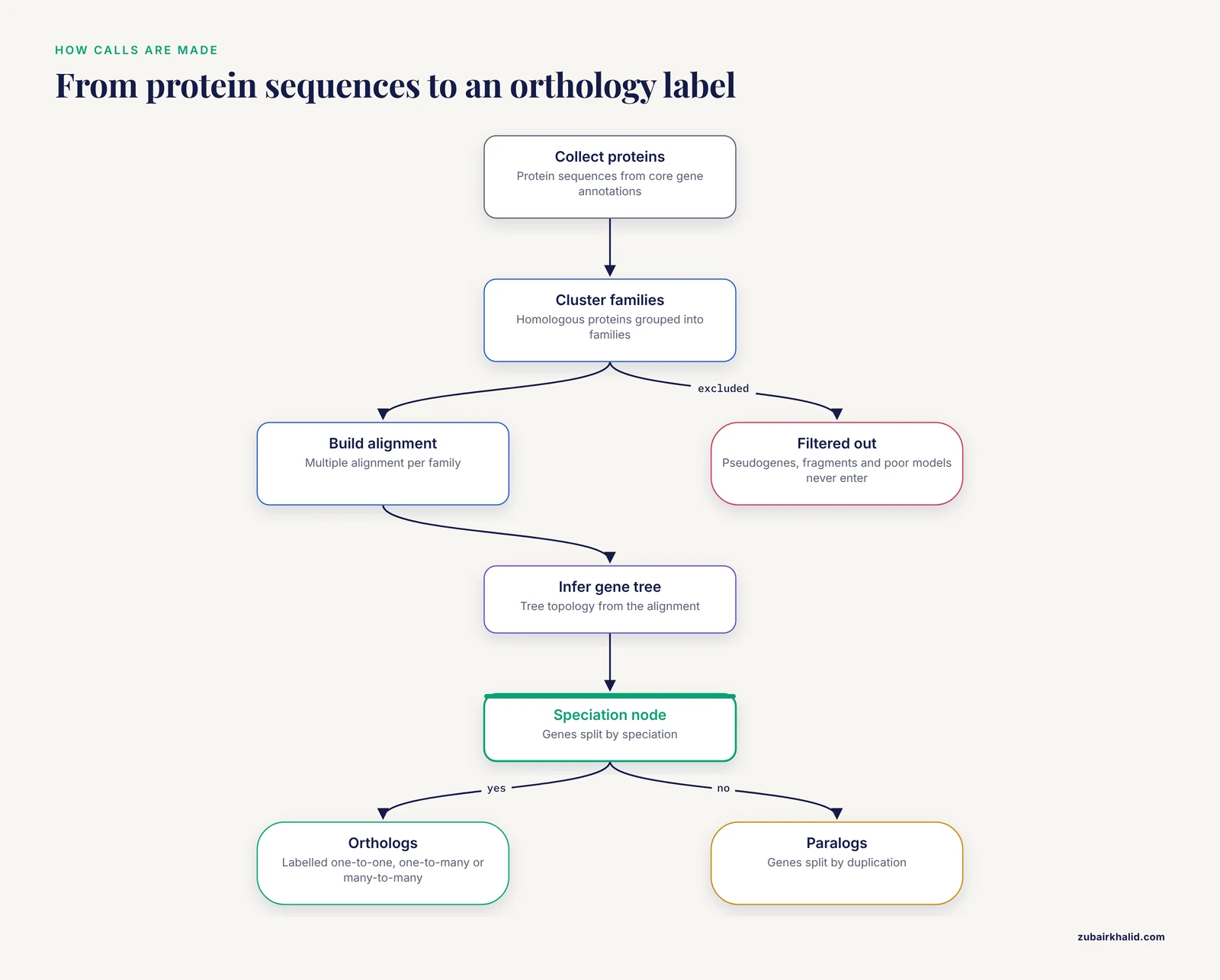
Compara is not a lookup table of pairwise matches. It is a tree-based inference system. In every Ensembl release, the pipeline takes protein sequences from the core gene annotations of all included species, clusters homologous proteins into families, builds a multiple alignment for each family, and infers a gene tree. Orthology calls are then read off the tree topology. Two genes related by a speciation node on the tree are orthologs, genes separated by a duplication node are paralogs, and Compara labels every relationship with a type, such as one-to-one, one-to-many, or many-to-many.
Two properties of this system matter when results come back empty.
First, the label depends on the tree, and the tree depends on the species set and the gene models of that release. Change either one and the labels change. A benchmark of seven phylogenomic databases, including Ensembl Compara, found that differences in completeness between databases were mostly driven by underlying database concepts rather than the prediction methods themselves, and that none of the databases provided a fully correct and comprehensive protein classification [1]. An independent comparison of nine orthology projects found clear tradeoffs between specificity and coverage, with Ensembl Compara sitting between the very high specificity options and the broader coverage options [2]. In practical terms, Compara favors precision, and precision costs recall. Some true homologs will not receive an orthology call.
Second, Compara distinguishes relationship type and confidence. A one-to-many call between your gene and a set of genes in another species is still an orthology call, even though the output looks different from the one-to-one case. Low-confidence calls are also real calls, computed from weaker tree support, and the web interface can hide them behind display filters. A large share of "no orthologs" reports collapse once the reader understands these two properties.
The Five-Minute Diagnostic Sequence
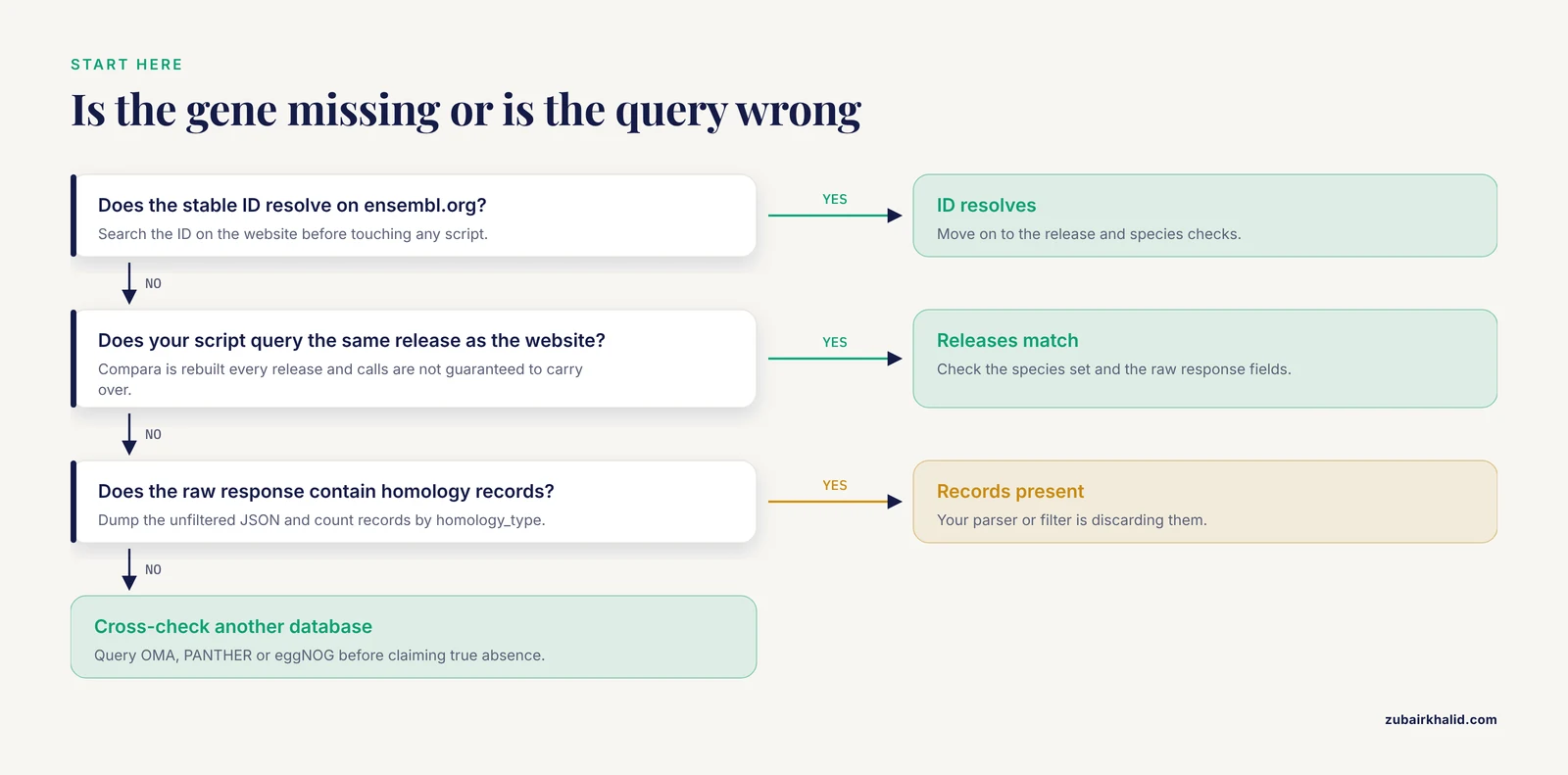
Run these checks in order. Stop as soon as one fails, because each step rules out a layer of the problem.
- Resolve the stable ID on the website. Search the ID on ensembl.org. If it does not resolve, go to the identifier section below.
- Check the release. Note which release the website used to show the gene, and which release your script queried. Compara data is rebuilt every release, and orthology calls are not guaranteed to carry over.
- Confirm the species is in the tree. Open the gene page, go to the gene tree view, and expand the collapsed branches. If your target species is not in the tree at all, no orthology call against that species is possible.
- Hit the REST endpoint directly with curl. This removes your script, your library versions, and your parsing code from the equation.
- Check the raw fields. Look at the
homology_typeandis_high_confidencevalues in the response before filtering. Many scripts filter out one-to-many and many-to-many calls silently and then report zero results. - Cross-check one other database. Query OMA, PANTHER, or eggNOG for the same gene. If another database returns orthologs that Compara does not, you have a coverage difference, not a bug.
Troubleshooting Table
This table is the core of the workflow. Work down it, because the rows are ordered from most common to least common.
| Symptom | Likely cause | How to confirm | Fix |
|---|---|---|---|
| Script returns an empty list, website shows orthologs | Querying a different release than the website, or a stale cached response | Compare the release number in your connection string or URL against the current release on the website | Point your script at the current release explicitly and clear any cached results |
| Stable ID does not resolve anywhere | ID was retired during reannotation, or you are using a protein ID where a gene ID is expected | Run the ID through the Ensembl ID History Converter on the website | Fetch the current stable ID, and use gene IDs for gene-level queries, protein IDs for protein-level queries |
| REST endpoint returns an error or empty payload | Wrong endpoint, missing compara parameter, or malformed request headers | Print the HTTP status code and the raw response body before parsing | Set the compara and type parameters explicitly and send the correct Accept: application/json header |
| Website gene page shows an orthologue section but your filtered list is empty | Your script filters by homology type or confidence and discards one-to-many, many-to-many, or low-confidence calls | Dump the unfiltered response and count records by homology_type | Loosen the filter, or handle each homology type explicitly in your parser |
| Gene tree page loads but looks empty or collapsed | Collapsed tree nodes hide the orthologous clade by default in the browser | Click "Expand" on the tree nodes, and check the species visibility panel | Expand the tree, turn on the species you need, and re-read the orthologue list |
| Gene tree exists but your target species is missing from it | Species not included in that Compara species set, or the gene model was filtered out of the tree | Check the species set for your Compara division (vertebrates, plants, fungi, metazoa, bacteria) | Query the correct division, or accept that the species is outside the current species set |
| No gene tree at all for your gene | Gene was excluded from tree building, for example a pseudogene, a fragment, or a low-quality protein model | Check the gene biotype on the gene page and look for a gene tree link | Use an alternative orthology resource for that gene, or fix the gene model upstream |
| Another database finds orthologs Compara does not | Coverage difference between prediction systems, not an error in your query | Query OMA, PANTHER, eggNOG, or InParanoid for the same gene | Combine sources, and record which database each call came from in your results |
| Results differ between two runs weeks apart | You queried two different releases without noticing | Log the release number with every result | Pin the release in scripts and archive URLs for reproducibility |
Causes and Fixes, From Most Common to Rarest
1. The identifier is wrong, stale, or the wrong type
Ensembl uses a layered identifier scheme. Gene IDs start with ENSG, transcripts with ENST, proteins with ENSP, each prefixed by the species code, such as ENSG00000139618 for a human gene. These IDs carry version suffixes, for example ENSP00000389047.3, where the number after the dot is the version. When the annotation is updated, a stable ID can be retired entirely or replaced by a new one, and a versioned ID that is no longer the current version may fail against endpoints that expect current identifiers.
Three failure modes dominate:
- Wrong identifier level. Compara homology queries are built around genes and their representative proteins. Passing a transcript ID to an endpoint that expects a gene ID returns nothing useful. Decide at the start of the workflow whether you are working at gene level or protein level and stay consistent.
- Retired IDs. Gene models are reannotated as assemblies improve, and old IDs do not always map to a single successor. The Ensembl website provides an ID History Converter that takes an old stable ID and returns the IDs it maps to in current and past releases. If your gene was renamed or merged, this is where the trail resumes.
- Version suffixes. Some endpoints accept versioned IDs and some do not. When a script works for one gene and fails for another, compare the exact ID strings character by character. A trailing version number is the most frequent silent difference.
The fix is procedural, not clever. At the start of every analysis, resolve each input identifier against the current release, store both the input ID and the resolved ID in your results, and query Compara with the resolved ID.
2. You are querying the wrong Compara database or release
Compara is not one database. Vertebrate orthology lives in one database, and the Ensembl Genomes divisions (plants, fungi, metazoa, bacteria) maintain their own Compara databases with their own species sets and release numbering. Querying the vertebrate Compara for a plant gene is a guaranteed empty result, and the error message will not tell you why.
Release mismatch is the second version of this failure. Compara is rebuilt every Ensembl release. Gene models change, assemblies change, and tree topology changes, so orthology calls are recomputed from scratch each cycle. If your pipeline was written against release N and the public server now serves release N plus one, a call that worked may silently return an empty set, especially if the underlying gene ID was retired in the interval.
Two practices fix both problems:
- Name the release explicitly in every connection. In the REST API, most endpoints serve the current release by default, so if reproducibility matters, record the release number in your output. For direct MySQL access, the database name carries the release, for example
ensembl_compara_<release>, where you substitute the current release number. - Confirm the division before the first query. If your organism is not a vertebrate, you are almost certainly in the wrong database, and the Ensembl Genomes site is where your species lives.
A related trap is identifier translation. Even when Compara returns orthologs, the hits are Ensembl gene IDs that may need conversion before downstream tools accept them. The DAVID Ortholog system was built around exactly this problem, integrating orthology data from OMA and Ensembl Compara into its knowledgebase so that user gene lists can be converted between species and carried seamlessly into functional analysis [3]. If your downstream tool does not accept Ensembl IDs, budget time for the mapping step rather than assuming Compara output will plug in directly.
3. Your API call or REST parameters are wrong
The Compara data lives in a separate layer from the species core databases. A frequent mistake among people learning how to use Ensembl programmatically is to fetch the gene through the species core API and then look for orthologs there. Orthology data is only reachable through the Compara adaptors or the dedicated REST endpoints, and no amount of poking the core gene object will produce it.
On the REST side, the homology endpoints are the right tool. A minimal, complete call looks like this:
curl -H "Accept: application/json" \
  "https://rest.ensembl.org/homology/id/ENSG00000139618?compara=vertebrates;type=orthologues;format=condensed"
Common mistakes with this call:
- Omitting the
comparaparameter. Set it explicitly. The vertebrate and non-vertebrate datasets are separate, and an implicit default is invisible when you reread the script six months later. - Setting
type=paraloguesby accident and then wondering why no cross-species hits appear. Thetypeparameter filters which relationship types are returned. - Forgetting the
Accept: application/jsonheader and receiving a response your parser cannot read. - Parsing before checking the status code. An HTTP 404 or 400 with an empty payload looks identical to "no orthologs" if your code only checks whether the parsed list is empty. Print the status and the raw body every time during debugging.
On the Perl side, the Compara API is powerful but its adaptor and method names have shifted across releases. A minimal pattern is:
use strict;
use warnings;
use Bio::EnsEMBL::Registry;

my $registry = 'Bio::EnsEMBL::Registry';
$registry->load_registry_from_db(
  -host => 'ensembldb.ensembl.org',
  -user => 'anonymous',
);

my $homology_adaptor = $registry->get_adaptor('Multi', 'compara', 'Homology');
my $gene_member_adaptor = $registry->get_adaptor('Multi', 'compara', 'GeneMember');

my $member = $gene_member_adaptor->fetch_by_stable_id(
  'ENSG00000139618', 'ENSEMBLGENE'
);
my $homologies = $homology_adaptor->fetch_all_by_Member($member);
Treat this as a pattern rather than a guaranteed drop-in script. Adaptor names such as GeneMember versus the older Member, and the exact method signatures, have changed between releases, so check the Compara API documentation shipped with the version you have installed before debugging further. An empty return from a deprecated method call is indistinguishable from a gene with no orthologs unless you verify the method exists in your installed version.
4. Browser and interface filters are hiding the results
A frequent report goes the other way, where the script finds orthologs and the website appears to show none. The Ensembl gene page groups orthologues by species under a dedicated section, and long lists are collapsed. The gene tree view, reached from the gene page, collapses tree branches by default, and a one-to-many ortholog can sit inside a collapsed clade that looks like an empty tree at first glance.
Three browser controls cause most false "no orthologs" readings on the website:
- Collapsed tree nodes. Click "Expand" on nodes with descendant counts. The orthologous clade is frequently inside one of them.
- Species visibility. The tree view and homology tables let you show or hide species. A species you switched off during an earlier session stays hidden.
- Confidence filters. The homology views distinguish high and low confidence calls. If your display is set to show only high confidence relationships, real orthologs vanish from the list while still being present in the data.
If the website shows nothing after all three controls are checked, capture the URL and the release number, then move to the REST call above. If the REST call returns hits the browser does not show, you have found a display issue, and the underlying data is intact.
5. The gene was dropped from the gene trees
Compara gene trees are built from protein-coding genes. Several classes of gene model are excluded or filtered before tree building, and a gene that never enters a tree cannot receive a tree-based orthology call.
- Pseudogenes. These carry no intact protein product and are not members of protein gene trees. The cytochrome P450 superfamily is a textbook case, where human CYP genes have expanded through duplication and some copies have degenerated into pseudogenes, so a CYP gene and a CYP pseudogene may look like a missing orthology pair when one member is simply not a protein-coding member [4].
- Fragments and poor models. Very short or low-quality protein predictions are filtered during family clustering because they corrupt alignments. Genes on unplaced scaffolds in poorly assembled genomes are also less likely to make it into stable trees.
- Incomplete annotations. If a gene has not been annotated in a species, it does not exist for Compara. This is a species annotation issue, not an orthology inference issue.
To confirm this cause, check the gene biotype on the gene page. If the biotype is pseudogene or anything other than protein coding, absence from the protein gene trees is expected. Look for a gene tree link on the gene page. If there is none, the gene is not in a tree, and no tree-based orthology call is possible for it in that release.
6. The biology says there are none
The rarest, and most defensible, outcome is that the gene genuinely has no orthologs among the species Compara compared. Lineage-specific genes, rapidly evolving proteins whose similarity has decayed below detection thresholds, and taxon sampling gaps all produce this result.
Keep two qualifications in mind before accepting it. First, absence of a Compara call is not proof of absence of homology. The method is tuned for specificity, so some real orthologs are missed. This was demonstrated concretely in a study that used reciprocal best hits based on short-range sequence context and recovered the large majority of one-to-one orthologs annotated by Ensembl Compara with high selectivity and high sensitivity, while additionally surfacing putatively novel orthologs not present in Ensembl, including over two thousand for the human and chimpanzee comparison [5]. Second, databases disagree with each other by design. A benchmark of seven orthology databases found generally high specificity for well-conserved families but meaningful differences in completeness across all of them, driven by database concepts rather than algorithms [1], and the nine-project comparison found that at broader coverage levels other systems such as OrthoMCL outperformed Ensembl Compara, at a cost in specificity [2]. Coverage differences are the normal state of the field, not an anomaly.
7. You are misreading the output
A few users do get orthologs back and call the result empty because they are looking for the wrong shape of data.
homology_typevalues.orthologue_one2oneis one gene to one gene.orthologue_one2manymeans one gene in the reference species against several in the target species.orthologue_many2manymeans duplication on both sides. If your parser only accepts the one2one string, every non-trivial relationship disappears.- The
is_high_confidencefield. Low confidence calls are still calls. Filter them deliberately, not accidentally. - Related pairs and homoeologues. In polyploid plants, homoeologous relationships arising from lineage-specific whole-genome duplications are reported separately from orthologs, and a script looking only for the ortholog string will report an empty set while the response contains substantial data.
Dump the raw JSON or the raw table for one gene and read it by eye before you trust any parser.
Worked Examples You Can Copy
Query the REST API with curl
This returns condensed orthology data for a human gene against the vertebrate species set:
curl -H "Accept: application/json" \
  "https://rest.ensembl.org/homology/id/ENSG00000139618?compara=vertebrates;type=orthologues;format=condensed"
Useful parameter combinations:
type=orthologuesfor orthology only,type=paraloguesfor within-species paralogs,type=allfor everything.format=condensedgives a compact list of target species and IDs. The default full format includes per-pair annotations such as confidence and percentage identity.target_species=horserestricts results to one species, which is a fast way to answer "does this gene have an ortholog in this organism".
If the call returns a 200 with an empty data array and all parameters are correct, and the same gene shows a gene tree on the website, compare the release you queried against the website release before anything else.
Query through the Perl API
The Perl pattern shown in section 3 above is the standard route for bulk work. Two additions for troubleshooting:
- Wrap the
fetch_all_by_Membercall so that a failed lookup on one gene logs the stable ID and continues, rather than aborting the whole batch. - After the registry loads, list the available Compara adaptors for your installed version. If the adaptor you called does not appear in the list, you have found the real cause of the empty result, and it predates any query.
Query the database directly with MySQL
Public MySQL access runs against ensembldb.ensembl.org on port 3306 with the username anonymous and no password. The Compara database name includes the release number:
mysql -u anonymous -h ensembldb.ensembl.org -P 3306 ensembl_compara_<release>A direct query for all homology records touching one gene:
SELECT m.stable_id, h.homology_type, h.is_high_confidence,
       hm.homology_id
FROM member m
JOIN homology_member hm ON hm.member_id = m.member_id
JOIN homology h ON h.homology_id = hm.homology_id
WHERE m.stable_id = 'ENSG00000139618';
From a homology_id, join back through homology_member to member to pull the paired genes in the other species. Two cautions. The schema changes between releases, with table and column names such as member having carried different names in older releases, so run SHOW TABLES first and inspect the actual schema of the release you are connected to. Second, the public server is a shared resource, so keep queries selective with WHERE clauses on indexed columns and download the full dumps from the FTP site instead of scanning whole tables interactively when you need genome-wide data.
Export through BioMart
BioMart is the right tool when you need a bulk table, such as every human gene with its mouse ortholog and the confidence flag. The sequence of choices is:
- Open BioMart from the Ensembl home page.
- Choose the Ensembl Genes database for the current release.
- Choose the Comparative Genomics dataset.
- Set your species as the input filter, for example Homo sapiens genes.
- Under attributes, select gene ID plus orthologue type and orthologue confidence for the target species you need.
- Run the query and export as TSV.
If the exported orthologue columns are empty for the whole species pair, return to the diagnostic sequence above, because a whole-species empty result in BioMart almost always means the wrong dataset or the wrong species selection, not missing data.
A short Ensembl genome browser tutorial for ortholog checks
For readers who have mainly used the REST API, the browser is the fastest debugging instrument. Here is the walk-through:
- Search your stable ID on ensembl.org. The gene tab opens with the gene's location, biotype, and transcripts.
- Find the orthologue information. The gene page includes an orthologues listing grouped by species, alongside paralogues. If this section lists hits your script missed, your query is the problem.
- Open the gene tree. Follow the gene tree link from the gene page. The tree shows your gene highlighted within its family across species.
- Expand the tree. Collapsed nodes are the default. Expand until you see your gene and the clade containing its closest relatives in other species.
- Check the confidence coloring. Tree branches and the homology listings distinguish high and low confidence calls, and the display options let you control what is shown.
- Note the release. The release number appears on the site, and it should match every number you record in your own output.
Ten minutes in the browser answers questions that can take an hour to debug in code, which is why this check sits early in the diagnostic sequence.
Cross-Checking Orthology Predictions Elsewhere
Because no single orthology database is complete, a Compara-empty result should end with a cross-check, not a conclusion. Several mature resources cover the same space with different algorithms and species sets: OMA, PANTHER, eggNOG, InParanoid, and TreeFam among them. The CYP450 study mentioned above illustrates the standard practice, identifying orthologs and paralogs for human cytochrome P450 genes by consulting multiple resources in parallel, including Ensembl Compara, OMA, PANTHER, TreeFam, and eggNOG, rather than trusting any single source [4].
The cross-check also serves a downstream purpose. Cross-species workflows in comparative genomics, from functional annotation transfer to expression pattern comparison between animal species, stand or fall on the quality of the orthology mapping underneath them, which is why resources built for those comparisons treat orthology assignment as their foundation [6]. And if your endpoint is a functional enrichment workflow, dedicated systems already integrate Compara and OMA orthology behind the scenes, so the mapping may exist in your toolchain even when your own script returns empty [3].
A practical rule: when Compara and one alternative resource agree, record the call with high trust. When they disagree, record both and carry the source tag through your analysis. When Compara is empty and another resource is not, prefer the non-empty result and note the discrepancy, because the benchmark literature shows coverage gaps are distributed across all systems, including Compara [1][2].
Common Mistakes and Limitations
- Treating one-to-many calls as second-class. A one-to-many orthology call is legitimate orthology with a duplication somewhere in one lineage. Discarding it silently biases your downstream analysis toward trivially clean pairs.
- Reading "low confidence" as "wrong". The confidence flag reflects tree support, and low-confidence calls are worth keeping with an annotation, particularly for poorly sampled taxa.
- Assuming the release does not matter. Orthology calls are recomputed every release. A result set generated against one release is not valid evidence about another, and scripts that do not pin and log the release produce unreproducible outputs.
- Mixing identifier types. Gene, transcript, and protein IDs answer different questions, and versioned IDs add a second axis. Normalize identifiers at the pipeline entrance, not at each step.
- Assuming Compara covers all species. Species sets differ between the vertebrate and Ensembl Genomes divisions, and a species absent from the current set returns empty results for reasons that have nothing to do with the gene.
- Treating an empty result as a biological conclusion. An empty result is a combination of data state, method coverage, and query correctness. Only a cross-check against at least one other resource supports a claim of true absence.
- Over-trusting any single database. Benchmarking across seven databases found none fully correct and comprehensive [1], and method-level comparisons show systematic specificity and coverage tradeoffs [2]. Ensemble evidence, in the statistical sense, is the only defensible standard for orthology claims.
- Skipping the raw output. Filters, parsers, and wrappers sit between you and the data. One raw JSON dump per debugging session prevents an hour of guessing.
Prevention Practices
- Pin the release in every script and store it in every output row. A result without a release number cannot be reproduced or defended.
- Resolve IDs at pipeline entrance. Map every input identifier to the current-release stable ID once, store the mapping, and fail loudly when a resolution fails rather than returning an empty list downstream.
- Log the query, not just the result. Keep the full URL, the parameters, and the HTTP status with the parsed result. Every "no orthologs" investigation in this article becomes a five-minute lookup if the query itself was recorded.
- Count records by homology type and confidence before filtering. A one-line summary of counts by
homology_typecatches silently discarded results immediately. - Validate against a known gene. Run your pipeline on a gene with well-characterized orthology, such as a core housekeeping gene, on every run. If the positive control returns empty, the pipeline is broken before you look at your real data.
- Use archive releases for reproducibility. When a manuscript or report depends on a specific orthology call, use the Ensembl archive for that release so the analysis can be re-executed later against identical data.
- Cross-check at the end of the workflow, not the beginning. Decide in advance which alternative database you will query for any empty Compara result, so the decision is not made under deadline pressure.
- Keep bulk downloads on the FTP site. Interactive public database access is for targeted queries. Genome-wide pulls belong on the bulk downloads, both for speed and to avoid rate limits on the shared servers.
Frequently Asked Questions
Why does the Ensembl website show orthologs but my script returns none?
Your script is almost certainly querying a different release, filtering out certain homology types or confidence levels, or calling an API method that no longer exists in your installed version. Dump the raw response from a direct REST call and compare it to what your parser produces.
Does a "no orthologs" result mean the gene has no evolutionary relatives?
No. It means no orthology call was returned by the query you made. The cause may be an identifier problem, a filtered gene, an absent species, or a coverage gap in the method, and only a cross-check against another database supports a claim of true biological absence.
What is the difference between one-to-one and one-to-many orthologs in Compara?
One-to-one means a single gene in each species descends from the same ancestral gene at the speciation event. One-to-many means a duplication occurred in one lineage after the speciation, so your gene maps to several orthologs in the other species. Both are orthology calls and both appear in the same output fields.
How do I check whether my Ensembl stable ID is still valid?
Search the ID on the Ensembl website first. If it does not resolve, use the ID History Converter on the website, which maps retired stable IDs to their successors across releases. Also confirm you are using the right identifier level, gene versus transcript versus protein.
Which Compara database should I query for plants, fungi, or bacteria?
Use the Ensembl Genomes Compara databases for non-vertebrate divisions, which are maintained separately from the vertebrate Compara database and have their own species sets. In the REST API, set the compara parameter explicitly rather than relying on a default.
Why do OMA or PANTHER find orthologs that Compara does not?
Different orthology systems make different coverage and specificity tradeoffs, and benchmarks have documented meaningful completeness differences across all of them. A call present in one database and absent in another is a normal outcome, so record the source of every call in your results.
How do I download all orthologs for a species in bulk?
Use BioMart with the Comparative Genomics dataset and export as TSV, or download the Compara homology dumps from the Ensembl FTP site and load them into a local database. Avoid interactive MySQL sessions for genome-wide pulls, because the public server is shared and selective queries are expected.
Why do my orthology results change between Ensembl releases?
Compara rebuilds gene trees from the current assemblies and annotations every release, and both can change. Gene IDs can be retired, gene models can be replaced, and tree topology can shift, so orthology calls are expected to change. Pin the release for reproducible results and use the archive sites when a specific call must be re-verified later.
Sources
- Conceptual framework and pilot study to benchmark phylogenomic databases based on reference gene trees
- Phylogenetic and Functional Assessment of Orthologs Inference Projects and Methods
- DAVID Ortholog: an integrative tool to enhance functional analysis through orthologs
- Computational Identification of the Paralogs and Orthologs of Human Cytochrome P450 Superfamily and the Implication in Drug Discovery
- Orthologs from maxmer sequence context
- Comparing and Analysing Gene Expression Patterns Across Animal Species Using 4DXpress