Ensembl BioMart vs. FASTA Export: Which Tool Should You Use
By Dr. Zubair Khalid, DVM, MS, PhD ·

BioMart is a batch query engine that returns tables or FASTA files for hundreds to millions of Ensembl entries at once, while the FASTA export on the genome browser returns sequence for the specific region you are currently viewing. The rule of thumb is simple: if you already know the region and want its sequence, use the browser export. If you have a list of identifiers or a set of filters and want structured results for many entries, use BioMart.
This article explains what each tool actually does, compares them on the criteria that decide real projects, walks through five worked scenarios, and lists the mistakes that waste the most time. The distinction between BioMart and FASTA export is one of the first things to get right when you are learning how to use Ensembl, because choosing the wrong one either buries you in clicks or buries you in a spreadsheet with the wrong columns.
How Ensembl Structures Data Access
Ensembl integrates genomic information for a comprehensive set of species, with particular depth for human, mouse, rat, and zebrafish, and it exposes its data through several deliberately different interfaces: the graphical genome browser, the BioMart batch query tool, and a programmatic API [1]. The REST API and Perl API sit outside the scope of this comparison, but the browser and BioMart are the two interfaces most bench scientists and analysts touch daily, and the choice between them drives almost every sequence or annotation retrieval question.
The Ensembl Genome Browser in Brief
The genome browser is a web-based graphical interface that presents annotations as tracks laid over the reference sequence at a location you specify [2]. You arrive at a location by searching for a gene symbol, an Ensembl identifier, a variant ID, or raw coordinates. From there you can look at transcripts, regulatory features, variation, conservation, and comparative genomics data, all anchored to the same coordinate system. Ensembl also aggregates external resources such as OMIM, dbSNP, and the GWAS catalog into that single view, which is why it functions as a common entry point for human disease genetics work [3].
The browser excels at answering "what is here" questions for one locus at a time. Its weakness is scale. Clicking through hundreds of genes is not a workflow, it is a typing injury. That scale problem is what BioMart exists to solve.
FASTA Export From the Browser View
FASTA is the standard flat-file format for biological sequences. Each record begins with a header line starting with the greater-than character, followed by the raw sequence in single-letter code. When you are viewing a region in the Ensembl browser, the left-hand menu offers an "Export data" option, and the dedicated sequence view offers sequence download controls. These controls let you pull the genomic sequence of the displayed region, and, when a transcript is selected, the cDNA, the coding sequence (CDS), the peptide, or the genomic sequence with a chosen number of flanking bases on each side. The output arrives as plain text or a file you can save directly.
This export is region-centric. It takes what you see and hands it to you in a portable format. It knows nothing about your gene list from yesterday, and it will not add columns of annotation. Its virtues are speed and context: you are looking at the exact transcript model you just inspected, so the sequence you export is the sequence you just confirmed visually.
BioMart in Brief
BioMart is a query interface built on a different model. Instead of "show me this locus," it asks "show me every entry matching these filters, with these attributes." A dataset corresponds to an Ensembl division and species, for example the human genes dataset. Filters restrict the result set, for example a chromosome, a gene biotype, or a pasted list of identifiers. Attributes define the output columns, for example Ensembl gene ID, gene symbol, chromosome, start, end, strand, and UniProt accession. Results return as an HTML table, a tab-separated file, an XLS file, or, when you select sequence attributes, as FASTA text with a configurable header.
Ensembl's own protocol literature treats BioMart as the standard route for quick sequence and annotation export when you move beyond a single locus [3]. The tool dates back well over a decade in Ensembl's interface stack [1], and its design philosophy, filtering large tables into custom result sets, is the same one that underlies the biomaRt package in R [4]. Understanding that BioMart is fundamentally a filtered table join, not a sequence viewer, resolves most of the confusion around the ensembl biomart vs. fasta export question.
Side-by-Side Comparison: Ensembl BioMart vs. FASTA Export
The table below is the core of this article. Every row is a decision criterion that comes up in real projects.
| Criterion | FASTA Export (browser view) | BioMart |
|---|---|---|
| Primary input | The region or gene currently displayed in the browser | A dataset plus filters, including pasted lists of hundreds of IDs |
| Mental model | "Give me what I am looking at" | "Query the database with my criteria" |
| Output formats | Plain text or FASTA for the displayed region | HTML, TSV, XLS, or FASTA with custom headers |
| Annotation columns | None, sequence only | Any combination of dozens of attributes (IDs, symbols, coordinates, biotypes, orthologs, GO terms, external references) |
| Scale | One region per operation | Thousands to millions of rows per query |
| Sequence retrieval | Genomic, cDNA, CDS, peptide, with flanks, for one locus at a time | Batch, for every entry passing the filters |
| Coordinate control | Implicit, tied to the displayed location and selected assembly | Explicit, you choose assembly release at query setup |
| Reproducibility | Manual clicks, hard to document precisely | Filter and attribute choices are documented in the URL and exportable as an XML query |
| Programmatic equivalent | Region endpoints of the REST API | biomaRt in R, or BioMart's own XML query format [4] |
| Best for | Single transcripts, primer design, quick checks | Gene lists, bulk annotation, identifier mapping, batch sequences |
| Learning curve | Minutes | Under an hour, mostly spent choosing attributes |
If you read only one row, read "primary input." That row predicts the correct choice in nearly every situation, and it is the practical answer to the difference between Ensembl BioMart and FASTA export.
When to Use Ensembl BioMart
Bulk Annotation for a Gene List
The classic BioMart job is turning a list of identifiers into a table of annotations. You have 500 differentially expressed genes from an RNA-seq experiment and you need coordinates, gene symbols, biotypes, and RefSeq matches. In BioMart you paste the Ensembl gene IDs into the ID filter, tick the attributes you want, and export a TSV. The same operation through the browser would require 500 searches and 500 exports.
This is also the right tool when your starting point is not Ensembl IDs at all. BioMart accepts many external identifier types as filters, which is the same capability that made the original biomaRt package useful for annotating Affymetrix probe sets and Entrez Gene IDs with symbols, chromosomal coordinates, Gene Ontology terms, and OMIM links [4]. For human disease work specifically, protocol literature has long treated BioMart export as the standard follow-up step after browsing a candidate locus [3].
Identifier Mapping Across Databases
Identifier conversion is a daily task in integrative projects. A published workflow on obesity-associated variants illustrates the pattern well: the authors retrieved candidate genes and nonsense SNPs from dbSNP, mapped functional consequences against the Ensembl annotation, then correlated Ensembl gene and transcript IDs with UniProtKB protein accessions to build gene-variant-protein relationships [5]. BioMart is the natural Ensembl-side tool for that correlation step, because UniProt accessions are exposed as exportable attributes alongside Ensembl IDs.
The same cross-database pattern appears across research domains. Reviews of GPCR pharmacology describe UniProt for protein records and Ensembl for gene records as complementary layers of the same annotation stack, and practical data retrieval typically means joining identifiers between them [6]. BioMart performs that join for Ensembl-side attributes. It will not fetch ChEMBL bioactivity data, but it will give you the stable IDs you need to query those resources yourself [6].
Batch Sequence Retrieval
A point that surprises many newcomers: BioMart exports FASTA too. Under the sequence attributes you can request cDNA, CDS, peptide, or untranslated region sequences for every entry matching your filters, and you can compose the FASTA header from the attributes you choose, for example gene symbol plus transcript ID. If you need the protein sequences of 300 receptors for a phylogenetic analysis, BioMart produces one file in one query. The browser export would need 300 manual operations. Note that BioMart's sequence output does not give you the interactive flank controls the browser does, so for a single transcript with 5,000 bases of upstream flanking sequence, the browser export remains the more direct route.
Reproducible, Versioned Queries
BioMart queries are parameterized. The URL of a BioMart session encodes the dataset, filters, and attributes, and you can export the query as XML and rerun it later. This matters because Ensembl data changes every release. Genes are added, merged, and retired, and coordinates shift with assembly patches. Bioinformatics practice has converged on tying annotation resources to specific Ensembl releases precisely so that results can be reproduced, which is the design principle behind the ensembldb Bioconductor package, where data are stored separately from software and labeled with the release they came from [7]. Treat your BioMart filter and attribute settings as part of your methods section. Record the release number, the dataset, the filters, and the attributes, and anyone can regenerate your table.
Programmatic Access With biomaRt
When a retrieval step needs to run inside an analysis script, BioMart has a programmatic twin. The biomaRt package connects R directly to BioMart databases and executes the same class of filtered queries, then returns results as data frames ready for downstream analysis [4]. A minimal, complete example:
library(biomaRt)

ensembl <- useEnsembl(biomart = "genes",
                      dataset = "hsapiens_gene_ensembl")

results <- getBM(attributes = c("ensembl_gene_id",
                                "external_gene_name",
                                "chromosome_name",
                                "start_position",
                                "end_position",
                                "uniprotswissprot"),
                 filters    = "external_gene_name",
                 values     = c("BRCA1", "TP53", "EGFR"),
                 mart       = ensembl)
The attribute and filter names match what you see in the web interface, which makes the web version the natural discovery tool and biomaRt the natural automation layer. One caution appears in the limitations section below about pinning release versions programmatically.
When to Use FASTA Export
Single Locus, Single Sequence
If you are looking at one transcript and need its sequence, the browser export wins on every axis. You are already there. The sequence view gives you explicit control over what "the sequence" means: unspliced genomic, spliced cDNA, CDS only, peptide, or any of those plus configurable flanks. This is the fastest path from "I am reading this gene model" to "I have its sequence in a file," and it is the route the Ensembl quick-export protocols describe for simple sequence needs [3].
Visual Confirmation Before Extraction
A sequence is only useful if it is the sequence you intended. The browser shows the transcript structure, the coding exons, the variant positions, and the regulatory context before you export anything. For a newly described cis-regulatory element, the standard first questions, which include which nearby gene it belongs to and what the local chromatin and sequence context look like, are answered visually at the locus before any data export happens [2]. Exporting from the view you have just verified eliminates a whole class of wrong-sequence errors.
Primer Design and Targeted Constructs
Primer design over a specific exon-exon junction, or cloning a specific isoform, requires a precise span with defined flanks. The browser sequence view lets you request exactly N bases upstream and downstream of the displayed region, which maps directly onto the constraints of those tasks. BioMart can retrieve sequences in bulk but does not offer the same interactive flank control per record.
Worked Scenarios
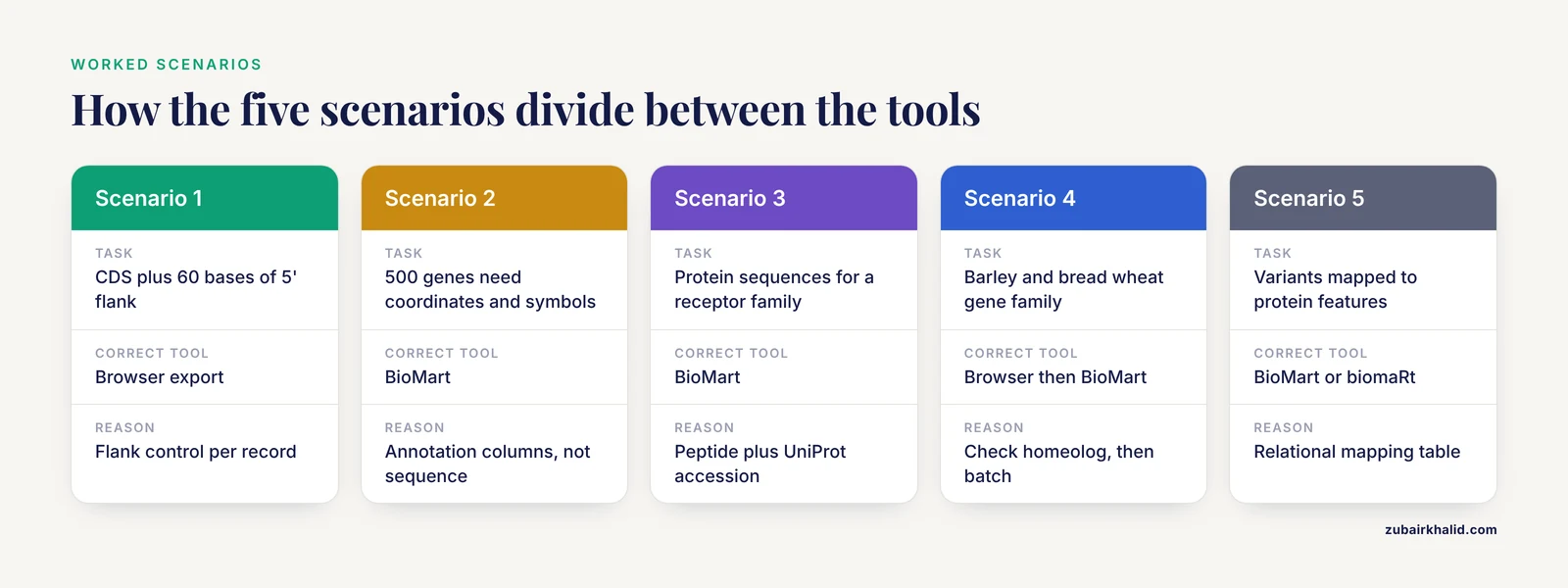
These five scenarios cover the decisions where the ensembl biomart or fasta export choice actually changes your afternoon.
Scenario 1: One Transcript for a Cloning Experiment
You need the CDS of a specific human transcript, plus 60 bases of 5' flank for a restriction site. You search the gene in the browser, click through to the transcript, open the sequence view, confirm the exon structure and that you have the right isoform, then use the download controls to export the CDS with 60 bases of upstream sequence. Total time, under five minutes. BioMart would work for the sequence itself but gives you less control over per-record flanking, and you would still want the browser open to confirm the isoform. FASTA export is correct here.
Scenario 2: 500 Human Genes Need Coordinates and Symbols
Your differential expression table uses Ensembl gene IDs. Your collaborator wants symbols, chromosomal coordinates, and gene biotypes. You open BioMart, select the human genes dataset, paste the IDs into the Ensembl gene ID filter, select the annotation attributes, and export a TSV. Total time, under ten minutes including attribute hunting. FASTA export cannot do this at all, since it returns sequence rather than annotation columns. BioMart is correct here, and if the step must live inside an R pipeline, the identical query goes through biomaRt with getBM() [4].
Scenario 3: Protein Sequences for a Receptor Family
A pharmacology project needs the protein sequences of all human GPCR genes to build a multiple sequence alignment. GPCR data is scattered across resources, with UniProt holding protein records and Ensembl holding gene-level annotation, so a realistic workflow pulls gene identifiers from Ensembl and resolves them to UniProt entries [6]. In BioMart you filter the human genes dataset on the appropriate gene symbol prefix or a curated ID list, select the UniProt SWISS-PROT accession as an attribute along with the peptide sequence attribute, and export. You get both a FASTA file for the alignment and an ID mapping table for the follow-up database queries, in one operation.
Scenario 4: Cross-Species and Crop Genomes in Ensembl Plants
Suppose you work on barley or bread wheat. Ensembl Plants organizes reference genome sequence, variant loci, gene models, and functional annotation for crop and model plants, and it performs comparative DNA and protein analyses whose results, including genome alignments and gene trees, are available for both visualization and export [8]. Large polyploid genomes such as bread wheat required specific interface extensions, which means the browser view for a wheat gene may show a homeologous context you need to inspect before trusting any single sequence [8]. A sensible split: use the browser to examine the homeolog and confirm which subgenome copy you care about, then use BioMart to pull the sequences or ortholog annotations for the full gene family across the Triticeae species.
Scenario 5: Variants Mapped Through to Protein Features
You have a set of coding variants and want to connect them to post-translational modification sites. A published obesity analysis did exactly this chain: variants from dbSNP, functional consequence prediction against the Ensembl GRCh38.86 annotation, then Ensembl transcript IDs correlated with UniProtKB accessions, then PTM data from resources including PhosphoSitePlus and UniProt, and finally network construction in Cytoscape [5]. The Ensembl-side extraction, gene and transcript IDs with their protein mappings, is a BioMart query or a biomaRt call. No browser-based sequence export could produce that mapping table, because the required output is relational data, not sequence text.
Programmatic Alternatives and When They Beat Both
Neither the browser export nor the web BioMart is the ceiling. Two programmatic routes matter, and knowing when to jump to them is part of learning how to use Ensembl well.
The first is biomaRt, covered above, which brings BioMart queries into R notebooks and pipelines so that data retrieval becomes a reproducible step in a script rather than a manual detour [4]. The second is ensembldb, an R package that downloads Ensembl annotation into a local SQLite database and serves gene models, transcripts, exons, proteins, and coordinate mappings from your own disk [7]. ensembldb ties each database to a specific Ensembl release, which solves a real problem: web BioMart always queries the current release unless you deliberately select an archive, so a query run today and the same query run after the next release can return different results. For downstream pipelines, especially transcript-level work with GenomicFeatures-style interfaces, ensembldb removes both the network dependency and the release drift [7].
A third pattern applies when the task is whole-scale sequence comparison rather than targeted retrieval. Precomputed similarity databases exist precisely because recomputing all-against-all protein similarities at genomic scale is quadratic in cost. SIMAP, for example, integrated Ensembl sequences into a precomputed similarity matrix covering tens of millions of proteins, so that biologists can query systematic relationships rather than export raw sequence and rerun the comparisons themselves [9]. If your question is "which proteins are similar to mine across all of Ensembl," a precomputed resource is often a better starting point than exporting every candidate sequence and running the searches locally [9].
The decision ladder, in order of increasing setup cost: browser export for one region, BioMart for one interactive query over many entries, biomaRt for the same query inside R, ensembldb for a local, release-pinned annotation copy, and precomputed comparative resources for genome-wide similarity questions.
Common Mistakes and Limitations
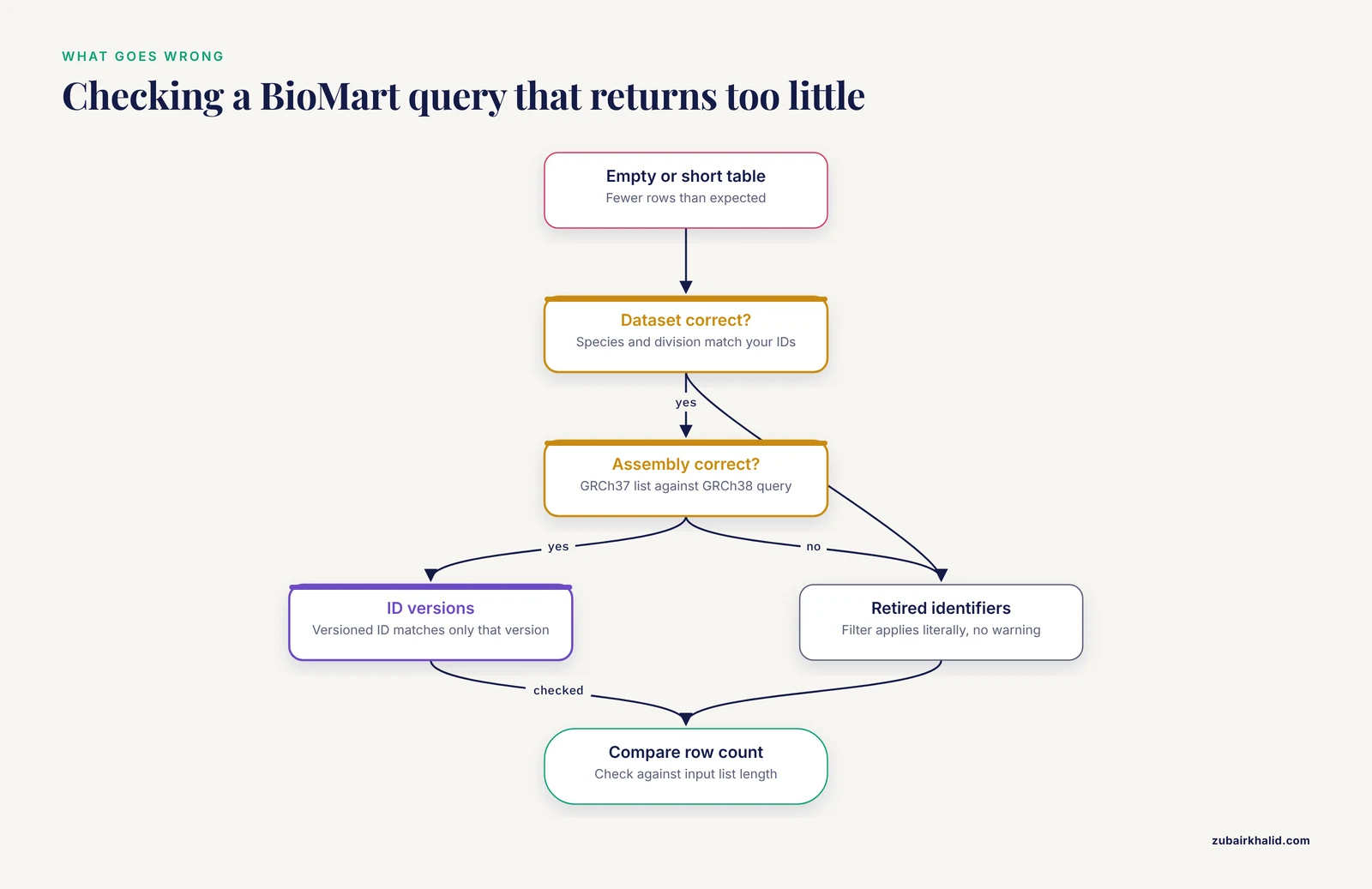
These are the errors that cost real time, ordered roughly by how often they occur.
Assembly mismatch. Human annotation exists on GRCh37 and GRCh38, and coordinates differ between them. Mixing a GRCh37 coordinate list with a GRCh38 query silently mislocates genes. Ensembl maintains GRCh37 archives specifically because long-running projects anchor to the older assembly. Before any query, in either tool, confirm the assembly and record it.
Sequence type confusion. Genomic sequence, cDNA, CDS, and peptide are different strings for the same gene, and exporting the wrong one produces an off-by-everything downstream analysis. In the browser this error is less likely because you see what you select. In BioMart it is a common slip because sequence attributes sit in a long list next to each other. Check the first FASTA record against the transcript model before processing the whole file.
Ensembl ID versions. Ensembl transcript and protein identifiers carry version suffixes that increment when the model changes. A filter on the unversioned ID matches all versions, while a versioned ID matches only that version. Neither behavior is wrong, but using them interchangeably causes both missing results and duplicate rows.
Filters that silently return nothing. BioMart applies filters literally. An ID list containing retired identifiers, or a gene symbol filter with case and species-mismatch errors, can return an empty or truncated table with no warning. Always check the returned row count against your input list length, and run a two-gene test query before pasting 5,000 identifiers.
Counting on stable release state. Ensembl updates its releases on a regular schedule, and gene models, ID mappings, and coordinates can change between releases. This is not a defect, it is the database reflecting new evidence. The practical response is pinning: archive BioMart sessions to a chosen release, cite the release number in your methods, and for scripted pipelines use versioned resources such as ensembldb that bind data to a named release [7].
Expecting BioMart to be a browser. BioMart returns rows. It does not show you the transcript model, the variant density, or the regulatory context. Analysts who build a candidate list purely from a BioMart table sometimes discover, when they finally open the browser, that the region has a paralogous duplicate or a patch-alternate scaffold they did not anticipate. Treat BioMart output as a retrieval layer and open the browser for any locus that will drive an experiment.
Expecting the browser to be a database. The reverse error is clicking through 200 genes because BioMart felt intimidating. The click-through approach also has a hidden reproducibility cost, since manual exports are hard to document precisely. If a task is repeated more than twice, move it to BioMart or biomaRt.
Species and dataset confusion. BioMart datasets are per species and per division. Running a human query against a mouse dataset with human symbols as filters produces a plausible-looking but nearly empty table. Confirm the dataset name in the left panel before pasting identifiers.
Forgetting that individual downstream judgments need domain oversight. A retrieval table is data, not interpretation. Variant consequence calls, candidate gene prioritization, and clinical interpretation each require their own validation steps and, where human subjects are involved, appropriate professional review.
Frequently Asked Questions
Is BioMart only for tables, or can it export sequences too?
BioMart exports sequences as well as tables. When you select sequence attributes such as cDNA, CDS, or peptide, the Results page delivers FASTA text with headers built from the attributes you choose. The browser export still wins for single regions with custom flanks.
What is the fastest way to get one transcript sequence from Ensembl?
Open the gene in the genome browser, go to the transcript sequence view, and use the download controls to export the cDNA, CDS, peptide, or genomic sequence with any flanks you need. This region-centric export is the intended tool for single-locus retrieval and takes under five minutes [3].
How do I get coordinates and annotations instead of sequences?
Use BioMart. Select your species dataset, apply filters (for example a pasted ID list or a chromosome), choose attributes such as Ensembl gene ID, symbol, chromosome, start, end, and strand, and export as TSV or XLS. Attribute selection, not sequence view, is the core skill in BioMart [3].
Which genome assembly should I choose?
The one your other data use. Check the assembly label on your existing annotations or variant calls before querying, because human data exists on both GRCh37 and GRCh38 and coordinates are not interchangeable between them. Record the assembly in your methods alongside the Ensembl release number.
What is the difference between BioMart and biomaRt?
BioMart is the web query interface on the Ensembl site. biomaRt is the R package that sends the same filtered queries to BioMart databases from a script and returns the results as data frames [4]. Use the web interface to explore and design queries, and biomaRt to automate them reproducibly.
Can I use these tools for species other than human?
Yes. Ensembl supports dozens of species across vertebrates, plants, and other divisions, including large crop genomes such as barley and bread wheat through Ensembl Plants [8]. Select the species dataset at the top of BioMart, or use the species selector in the browser. For polyploid genomes, inspect the homeologous context in the browser before exporting any single sequence [8].
Sources
- Ensembl's 10th year.
- Visualizing Genomic Annotations with the UCSC Genome Browser.
- Disease and phenotype data at Ensembl.
- BioMart and Bioconductor: a powerful link between biological databases and microarray data analysis.
- Systems biology-driven analysis of obesity-associated genes with transcript mapping and post-translational modification annotations.
- Retrieving GPCR data from public databases.
- ensembldb: an R package to create and use Ensembl-based annotation resources.
- Triticeae resources in Ensembl Plants.
- SIMAP--a comprehensive database of pre-calculated protein sequence similarities, domains, annotations and clusters.