How to Export Variant Data from Ensembl BioMart: A Practical Guide
By Dr. Zubair Khalid, DVM, MS, PhD ·

By the end of this guide you will be able to export variant data from Ensembl BioMart three different ways: through the web interface, through the biomaRt package in R, and through the BioMart webservice with a scripted HTTP query. You will know which filters and attributes control what you get, how to estimate result sizes before you export, and how to verify that the file you download actually contains what you think it contains.
To follow along you need a web browser for the interface walkthrough, R (version 4.0 or later is a sensible baseline) with the Bioconductor package biomaRt if you want the scripted route, and curl on the command line if you want the webservice route. No credentials or API keys are required. Everything in this guide uses publicly accessible Ensembl servers.
If you are new to Ensembl in general, BioMart is one of several ways the resource exposes its data, alongside the genome browser and the REST API. A comparative review of public data access systems describes BioMart as one of the standard web-based access mechanisms used by large biological databases, each with tradeoffs in how queries are built and delivered [1]. That framing matters here because variant data is large and relational, and BioMart handles it well for moderate, tabular extracts but poorly for bulk whole-genome dumps.
What BioMart Is and Where Variant Data Fits
BioMart is a query system that lets you pick a dataset, apply filters, choose output columns called attributes, and download the resulting table. Ensembl runs BioMart alongside its main browser so researchers can pull structured tables of genes, variants, regulatory features, and annotations without clicking through web pages. BioMart was designed to give the community simple and effective access to large public datasets, and multiple access points for the same underlying data are deliberate, since different users need different mechanisms [1].
Variant data in Ensembl lives in the Ensembl Variation database, which aggregates single nucleotide polymorphisms (SNPs), insertions and deletions, copy number variants, phenotype associations, and allele frequencies from sources such as dbSNP, the 1000 Genomes Project, and gnomAD. In BioMart these appear as a separate mart from the gene mart, usually labeled Ensembl Variation, with one dataset per species. For human, the dataset is typically named something like Human variants (hsapiens_variants), although exact names shift between releases, which is a recurring source of errors covered later.
Because Ensembl also federates BioMart queries, you can in principle join Ensembl variant output with data from other participating resources in a single query, a pattern demonstrated for proteomics data integrated with Ensembl, Reactome, and UniProt through federated BioMart queries [2]. For most variant workflows the single-mart route is what you will actually use, but the federated capability explains why BioMart queries are structured as they are.
Choosing the Right Access Route
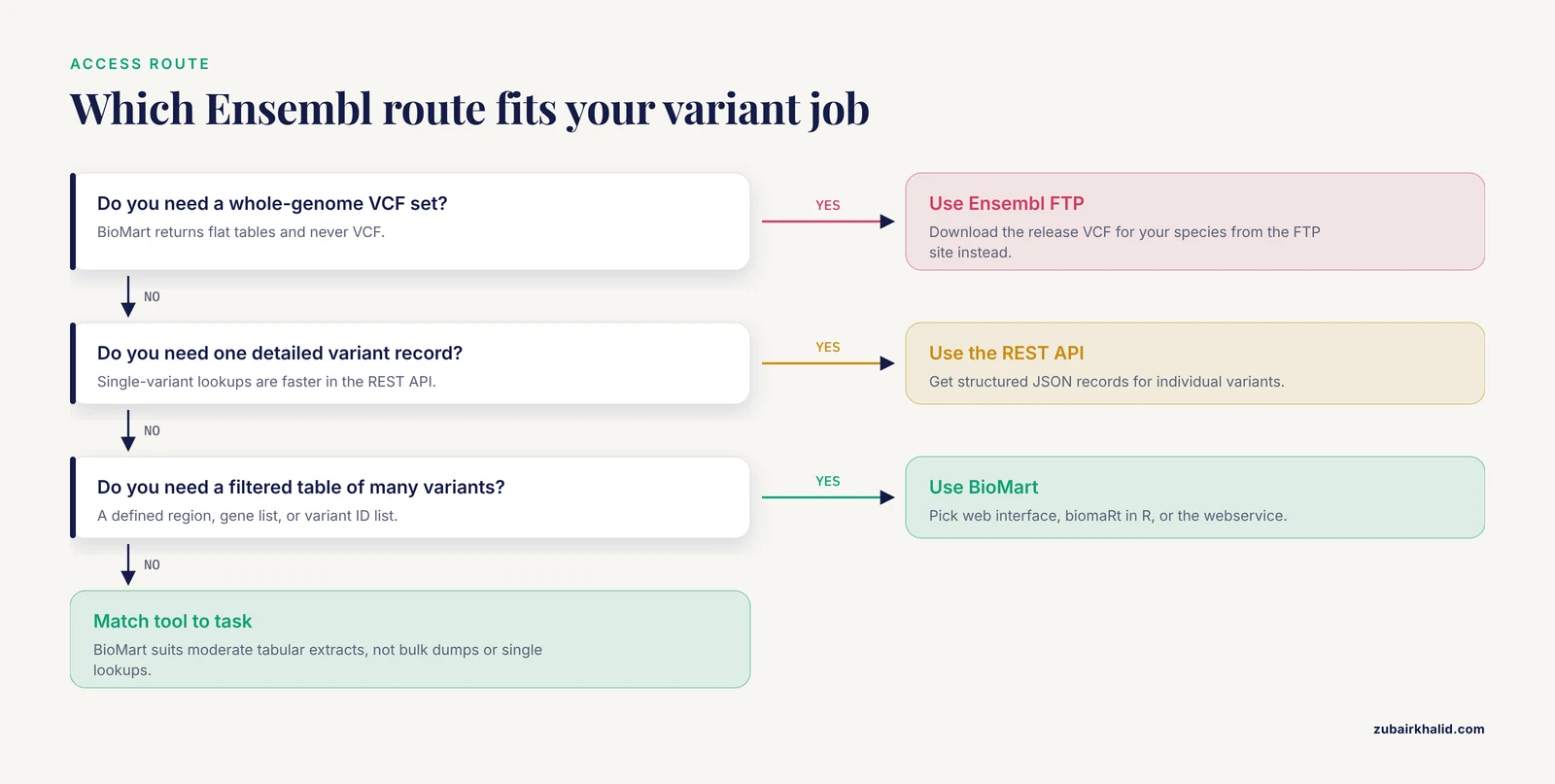
Before you export anything, decide whether BioMart is the right tool at all. BioMart returns flat tabular data. It will not hand you a VCF file. If you need a whole-genome variant set in VCF format, download from the Ensembl FTP site instead. BioMart is the right choice when you need a filtered, annotated table for a defined region, a gene list, or a variant ID list, typically ranging from a handful of rows to the low hundreds of thousands.
| Route | Best for | Typical output | Practical scale |
|---|---|---|---|
| BioMart web interface | One-off queries, exploratory work, learning the schema | TSV, CSV, HTML table | Up to roughly tens of thousands of rows comfortably |
| BioMart webservice (HTTP) | Repeatable scripted queries from any language | TSV, XML | Same limits as web, suitable for cron-driven jobs |
| biomaRt (R) | Variant tables feeding directly into R analysis | data.frame | Same limits, integrates with your downstream code |
| Ensembl FTP or REST API | Whole-genome variant sets, VCF, programmatic single-variant lookups | VCF, JSON | Effectively unlimited for FTP, per-request limits for REST |
The rest of this guide covers the first three routes in detail, in the order most people encounter them: web first, then R, then raw webservice.
Step-by-Step: Exporting Variant Data from the BioMart Web Interface
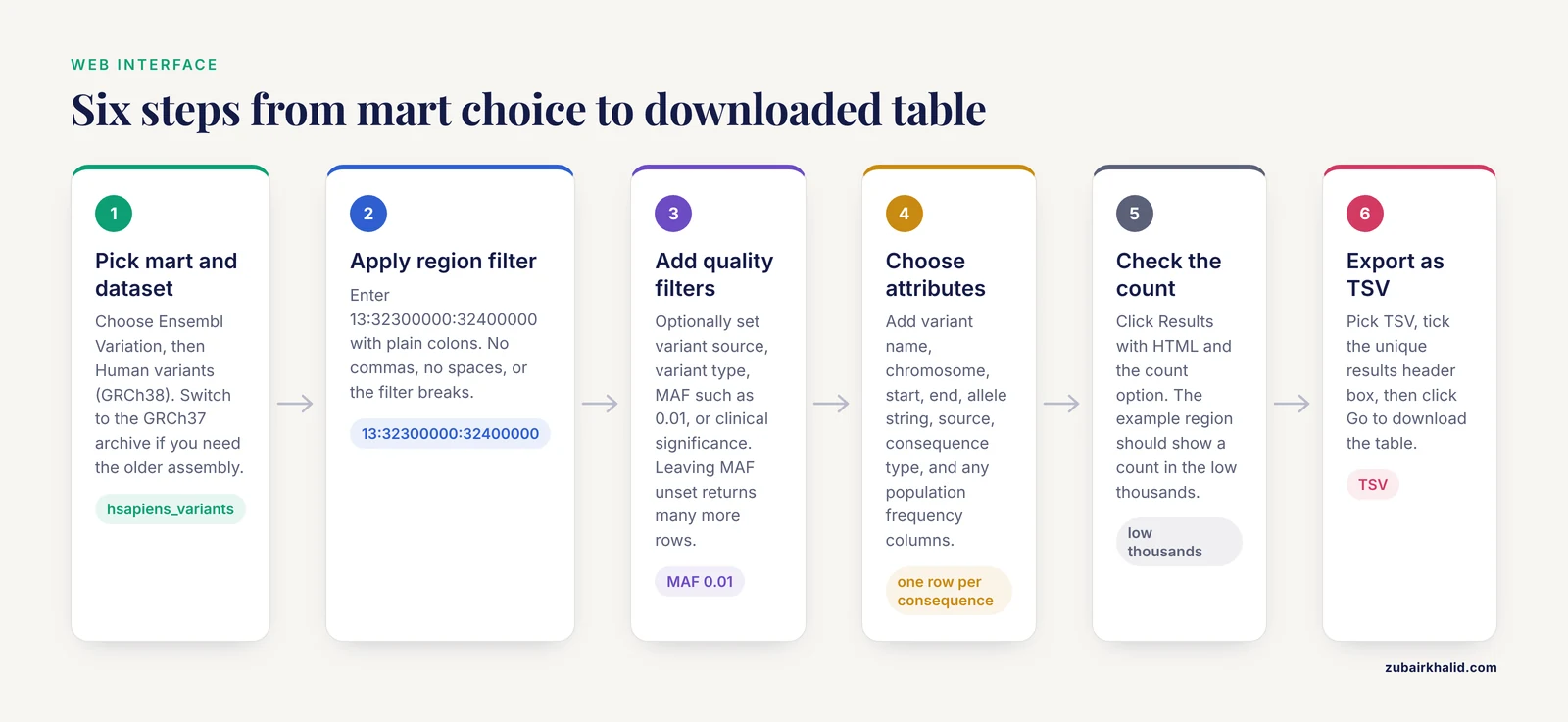
This walkthrough exports all variants in a 100 kilobase window around the BRCA2 gene on chromosome 13 (GRCh38 coordinates 13:32,300,000-32,400,000), including variant IDs, positions, alleles, and consequence annotations.
Step 1: Open BioMart and Pick the Right Mart and Dataset
Go to https://www.ensembl.org/biomart. You land on a page with two dropdown selectors. The first asks CHOOSE DATABASE. The second asks CHOOSE DATASET.
Select Ensembl Variation as the database. Then select Human variants (GRCh38) as the dataset. If GRCh38 is not the assembly you want, stop here. You must switch to the GRCh37 archive site at https://grch37.ensembl.org/biomart instead of trying to convert coordinates after the fact. Mixing assemblies is the single most damaging mistake in variant work because the positions look plausible while being wrong.
Expected state: the page now shows a panel with FILTERS on the left and a preview line confirming Human variants.
Step 2: Apply a Region Filter
Under FILTERS, expand the section for genomic region. Enter the region in the format the interface expects:
13:32300000:32400000The format is chromosome, colon, start, colon, end, all in the assembly you selected. Commas in numbers will break the filter. If your filter field rejects the value, check for stray spaces and use plain colons.
BioMart accepts multiple values in most filters, one per line, so you can paste a list of regions or a list of variant IDs (rs numbers) or gene stable IDs (ENSG identifiers). Each line is treated as a separate filter value and results are the union.
Step 3: Add Optional Quality and Source Filters
Under FILTERS you will also find sections for:
- Variant source (for example, source database such as dbSNP or array content)
- Variant type (insertion, deletion, substitution, and so on)
- Minor allele frequency (MAF) thresholds, often per population
- Clinical significance or phenotype-associated status, depending on release
A concrete example that matters in practice: if you only want variants seen in population samples, set the MAF filter to a threshold such as 0.01 (1 percent). If you want everything including singletons and unverified submissions, leave MAF filters unset. Leaving frequency filters unset is the default and returns many more rows.
Step 4: Choose Attributes
Click ATTRIBUTES in the left panel. Attributes are the columns of your output table. The default selection is minimal, usually just the variant identifier. Add:
- Variant name (the rs identifier)
- Chromosome, start, end
- Reference and alternate alleles (the allele string)
- Variant source
- Consequence type(s) from the consequence attributes page
- Any population frequency columns you need, grouped by source such as 1000 Genomes populations
Attribute pages group related columns. Selecting a frequency column usually requires picking the specific population, so open the group and check the exact boxes rather than assuming a single column covers all populations.
Step 5: Check the Count Before Exporting
Click the Results button once, with the output format left at HTML and the count option selected. BioMart shows the number of matching rows. For the example region you should see a count in the low thousands, since a dense 100 kb window in the human genome contains thousands of known variants.
If the count is in the millions, you forgot a filter. If it is zero, you probably formatted the region filter wrong or queried the wrong assembly.
Step 6: Export
On the Results page, choose the export format. TSV (tab-separated values) is the most reliable for downstream parsing because variant alleles and consequence fields can contain commas. Tick the box for a unique results header if you want column names. Click Go to download.
Expected output, first rows of the TSV:
Variant name	Chromosome/scaffold position start (bp)	Chromosome/scaffold position end (bp)	Allele	Ancestral allele	Consequence type
rs80357906	13	32398283	32398283	T/C	frameshift_variant
rs28897742	13	32340089	32340089	A/G	missense_variant
rs80357068	13	32399394	32399394	C/T	missense_variant
Column names vary slightly by release. What stays constant is the structure: one row per variant per consequence, which means a variant spanning two transcript consequences appears on two rows.
Filtering Options That Matter
Filters determine which rows survive. Attributes determine which columns appear. Getting this distinction right is most of the skill in using BioMart.
- Chromosomal region filter. Format is chromosome:start:end. Multiple regions go on separate lines. Start and end are 1-based, inclusive, matching Ensembl browser conventions.
- Variant ID filter. Paste rs numbers one per line. Useful when you have a candidate list from a paper or a GWAS hit table and want annotation columns added.
- Gene filter. Restricts to variants linked to specific Ensembl gene IDs. Handy when your gene list is already stable and you do not want to hand-compute coordinates.
- MAF filters. Threshold values are per population, so a variant with MAF 0.02 in the global column but 0.005 in a specific population will pass or fail depending on which filter you set. Check which population column the filter binds to.
- Consequence filters. Apply only if you want the export pre-trimmed, for example only missense and stop_gained variants. Note that if you filter on consequence and also export consequence attributes, variants filtered out are gone entirely, which may not be what you want for a denominator in downstream statistics.
A compact reference table for the most-used filter and attribute choices:
| Goal | Where to set it | Example value | Watch out for |
|---|---|---|---|
| Variants in a region | Filters, genomic region | 13:32300000:32400000 | Wrong assembly, comma thousand separators |
| Specific known variants | Filters, variant ID | rs80357906 (one per line) | Leading whitespace from pasted lists |
| Genes of interest | Filters, associated gene | ENSG00000139618 | Gene IDs are release-versioned in the gene mart, not here |
| Common variants only | Filters, MAF | 0.01 | Population-specific thresholds differ from global |
| Position and alleles in output | Attributes | Variant name, start, end, allele string | Default attributes omit these, add them yourself |
| Functional effect in output | Attributes, consequence page | missense_variant, synonymous_variant | One output row per variant-consequence pair |
Exporting with biomaRt in R
biomaRt is the R interface to BioMart and the cleanest way to make variant exports reproducible. Install it from Bioconductor:
install.packages("BiocManager")
BiocManager::install("biomaRt")
Then connect to the Variation mart and confirm the dataset and attribute names for your release:
library(biomaRt)

marts <- listMarts()
head(marts)

mart <- useEnsembl(
  biomart  = "variation",
  dataset  = "hsapiens_variants"
)

filters    <- listFilters(mart)
attributes <- listAttributes(mart)

head(filters)
head(attributes)
Two habits here pay for themselves every time. First, always call listMarts and listDatasets before hardcoding names, because dataset names change between Ensembl releases. Second, always inspect listFilters and listAttributes, because the exact attribute identifiers for variant name, position, and frequencies shift between releases and copying old blog code is the fastest route to an empty data frame.
Run the same BRCA2-region query you ran in the web interface:
results <- getBM(
  attributes = c("variation_name", "chr_name", "chrom_start",
                 "chrom_end", "allele_string"),
  filters    = "chromosomal_region",
  values     = "13:32300000:32400000",
  mart       = mart
)

nrow(results)
head(results)
Expected output for the head call, with column names as biomaRt returns them:
  variation_name chr_name chrom_start chrom_end allele_string
1     rs80357906       13    32398283  32398283           T/C
2    rs116753799       13    32302155  32302155           C/T
3     rs28897742       13    32340089  32340089           A/G
For consequence annotation, add the relevant consequence attributes to the attributes vector. Because one variant can have several consequences, the returned data frame will be longer than the variant count. If you need one row per variant, aggregate consequences in R, for example with aggregate or dplyr::summarise, after the export rather than trying to force BioMart to do it.
For large region lists, batch the getBM calls. A filter with thousands of region values is slower and more fragile than 20 calls of 500 values each, and batching lets you resume after a network failure.
Exporting Through the BioMart Webservice
The webservice route is the same query engine behind an HTTP endpoint. It is what the web interface and biomaRt both call, and writing the query yourself gives you full control and easy integration into shell pipelines.
Save a query definition as XML. This one mirrors the walkthrough query:
<?xml version="1.0" encoding="UTF-8"?>
<!DOCTYPE Query>
<Query  virtualSchemaName = "default"
        formatter = "TSV"
        header = "1"
        uniqueRows = "1"
        count = ""
        datasetConfigVersion = "0.6" >
    <Dataset name = "hsapiens_variants" interface = "default" >
        <Filter name = "chromosomal_region" value = "13:32300000:32400000"/>
        <Attribute name = "variation_name"/>
        <Attribute name = "chr_name"/>
        <Attribute name = "chrom_start"/>
        <Attribute name = "chrom_end"/>
        <Attribute name = "allele_string"/>
    </Dataset>
</Query>
Send it to the martservice endpoint with curl:
curl -s --data-urlencode "[email protected]" \
     "https://www.ensembl.org/biomart/martservice"
Expected output is a TSV stream on standard output, identical in structure to the web export:
Variant name	Chromosome/scaffold position start (bp)	Allele
rs80357906	32398283	T/C
rs28897742	32340089	A/G
To get only the row count instead of the data, set the count attribute in the Query element to "1" and drop the attribute list. This is the scripted equivalent of the Count button and belongs in any pipeline that wants to sanity-check result sizes before committing to a full download. Redirect the output to a file with a trailing > results.tsv and inspect the first lines with head before trusting it.
How to Check Your Export Is Correct
Validation takes minutes and prevents hours of confusion downstream.
- Confirm the assembly. The web interface shows GRCh38 or GRCh37 in the dataset selector. For biomaRt and the webservice, the archive host you connected to determines the assembly. If you did not explicitly connect to the GRCh37 archive, you are on GRCh38.
- Cross-check one variant against the browser. Take one rs ID from your export, search it on the main Ensembl site, and confirm the position, alleles, and consequence match. This one-to-one check catches assembly mismatches, strand confusion, and stale release artifacts.
- Reconcile the count. Compare the row count from the Results page or a count query against the line count of your file (wc -l on Linux). If a variant appears on multiple consequence rows, expect the file to have more rows than unique variant IDs, and confirm that with sort -u on the ID column.
- Check allele strings. An allele string like T/C means T is the reference and C the alternate on the forward strand. An insertion or deletion appears as a longer dash-containing string. If your downstream tooling expects a REF/ALT split, split on the slash yourself.
- Confirm frequencies against the source. If you exported MAF columns, verify one variant's frequency against the variant page on Ensembl, which cites the source population data directly.
Common Mistakes and Limitations
These are the failure modes that come up repeatedly in practice, with fixes.
- Querying the wrong assembly. The GRCh37 archive is a separate site with its own BioMart. Data exported from the main site is GRCh38. Converting between assemblies after export requires a liftover step and introduces errors at every variant. Pick the assembly first, at the dataset selector or the archive host, never after.
- Assuming the gene mart contains variant data. New users select the Ensembl Genes mart and search the attribute pages for variant columns. Variant data sits in the Ensembl Variation mart. If you cannot find variant attributes, you are almost certainly in the wrong mart.
- Hardcoding dataset or attribute names from old tutorials. Names evolve across releases. Always call listMarts, listDatasets, listFilters, and listAttributes at the start of a session, or your code breaks the week a release lands.
- Region filter formatting errors. BioMart expects chromosome:start:end with no commas and no spaces. A value like 13:32,300,000-32,400,000 produces either an error or, worse, an empty result that looks like a successful query with no matches.
- Exporting without headers. TSV output without the header option gives you unlabeled columns, and variant frequency columns are easy to misassign without names. Turn the header option on, or the first row of your analysis becomes a silent data error.
- Expecting VCF. BioMart outputs flat tables. It does not produce VCF, and it does not preserve the full genotype matrix for a cohort. For VCF, use the Ensembl FTP download for your release and species.
- Timeouts on large queries. Queries returning very large row counts can fail with a message along the lines of the query exceeding processing time. Fix it by narrowing filters, splitting a region into windows, or batching a variant ID list into chunks. The same applies in biomaRt, where an oversized getBM call can fail with an error noting that the webservice returned an invalid result.
- Forgetting the one-row-per-consequence structure. Counting rows and reporting that as the number of variants is wrong whenever consequence attributes are included. Aggregate after export.
- Population frequency confusion. Frequency columns are per population and per source. Exporting a single MAF column without checking which population it represents produces results that look valid and mean something different from what you assumed.
- Treating BioMart as a snapshot. BioMart queries the current release unless you deliberately use the archive site for an older release. Results are not frozen. If your paper must be reproducible, record the Ensembl release number, the dataset name, and the date of the query, and prefer the archive site for pinned analyses.
A broader limitation deserves one honest paragraph. BioMart is one access mechanism among several, and the comparative literature on data access systems notes that each mechanism suits particular uses, with tradeoffs in flexibility and learning curve [1]. BioMart excels at moderate, filterable, tabular extracts. It is not the tool for bulk downloads, for complex joins across many entity types, or for single-variant lookups where the REST API is faster and simpler. Choosing it for those jobs is a workflow mistake, not a data error, and the fix is routing the task to the appropriate interface.
Frequently Asked Questions
Can BioMart export variants as a VCF file?
No. BioMart exports flat tables in formats such as TSV and CSV, not VCF. For a full VCF set of variants for your species and release, download directly from the Ensembl FTP site, or use the REST API for individual variant records in JSON.
How do I know which genome assembly my export used?
The assembly is fixed by the dataset you selected in the web interface, or by the host you connected to in biomaRt and the webservice. The main site serves GRCh38 for human, and the GRCh37 archive site serves its own BioMart instance for the older assembly. Record the assembly in your methods the moment you export.
Why did my Ensembl BioMart variant export return zero rows?
The usual causes are a malformed region filter (commas, spaces, or dashes instead of colons), querying the wrong assembly, filtering on a combination so restrictive nothing matches, or using attribute or filter names that do not exist in the current release. Re-run the query with only the region filter and default attributes, then add complexity back one piece at a time.
How do I get allele frequencies for one specific population?
Expand the frequency attributes in the Attributes panel and check the box for that exact population under the relevant source, such as a specific 1000 Genomes superpopulation. The same logic applies to MAF filters, which are population-specific, so confirm which column your filter threshold is applied to.
Can I export variant consequences and transcript effects through BioMart?
Yes. Consequence attributes are available in the Variation dataset and typically output one row per variant-transcript consequence pair. If you need a single row per variant, aggregate the consequence column after export rather than trying to collapse it within BioMart.
Is there a row limit when exporting from BioMart?
BioMart does not advertise a fixed row cap, but very large queries can hit processing time limits and fail. Practical guidance is to keep exports in the range where the Count preview finishes quickly, batch large ID lists or wide regions into chunks, and use FTP downloads for anything approaching whole-genome scale.
Can BioMart combine Ensembl variant data with other databases?
Yes, BioMart supports federated queries across participating resources, which has been used to integrate Ensembl data with resources such as Reactome and UniProt in a single query [2]. In practice, most variant work uses a single Variation mart query, with joins done downstream in R or a scripting language.
Should I use BioMart or the Ensembl REST API for variant data?
Use BioMart when you want a filtered, tabular batch of many variants with annotation columns. Use the REST API when you need detailed structured records for individual variants, and use the FTP site when you need everything for a release in VCF. BioMart as one of several parallel access mechanisms exists precisely because these use cases differ [1].