Ensembl BioMart Tutorial: How to Export Custom Gene Lists
By Dr. Zubair Khalid, DVM, MS, PhD ·

By the end of this Ensembl BioMart tutorial you will be able to build a filtered gene query on the Ensembl database, select exactly the columns you need, export the result as a TSV or CSV file, and reproduce the same export from R with biomaRt or from the command line with an XML query. You will also know how to verify the export, how to fix the errors that stop most first-time users, and how to avoid the mistakes that quietly corrupt downstream analyses.
To follow along you need a web browser and an internet connection for the web interface route, and R (version 4.x) with the Bioconductor package biomaRt installed, or a Unix shell with curl, for the programmatic routes. No local copy of any genome annotation is required.
What BioMart Is and Why It Exists
BioMart is a data mining system that lets you query large biological databases through filters and attributes rather than by browsing records one at a time. A filter restricts which rows you get back, for example only protein-coding genes on chromosome 22. Attributes are the columns you want returned, for example Ensembl gene ID, HGNC symbol, start coordinate, and end coordinate. The Ensembl project uses BioMart as its bulk-query interface, separate from the point-and-click genome browser.
BioMart exists because research data needs more than one access mechanism. A review of data access systems that implemented BioMart, caBIG, and Google Data Sources over the PeptideAtlas repository concluded that each technology suits different uses, and that offering multiple access points ensures the community can reach the data in the simplest and most effective manner for their particular needs [1]. For bulk gene list extraction, BioMart is that effective access point. The same review notes that web-protocol-based access systems had been in use for over a decade and were widely adopted across the industry, which is why BioMart queries are simple HTTP requests under the hood and can be scripted [1].
The pattern extends beyond Ensembl. PRIDE, a proteomics database, used federated BioMart queries to integrate its data with other resources such as Ensembl, Reactome, and UniProt, demonstrating that a BioMart query can join data across repositories in a single request [2]. Once you understand filters and attributes on Ensembl, you can apply the same mental model to other BioMart-enabled resources.
Ensembl BioMart Tutorial: Step-by-Step Walkthrough
This section walks through the web interface at https://www.ensembl.org/biomart. Ensembl redesigns the interface from time to time, so button labels may differ slightly between releases, but the underlying concepts of dataset, filters, attributes, and results are stable.
Step 1: Choose the Database
Open https://www.ensembl.org/biomart. The first panel, labeled CHOOSE DATABASE, presents options such as Ensembl Genes, Ensembl Variation, Ensembl Regulation, and Ensembl Comparative Genomics. For gene lists you almost always want Ensembl Genes. Choosing the wrong database here is the most common reason a filter or attribute you expect is simply not in the lists later. If you need gene coordinates, Ensembl Genes is correct. If you need variants, you would choose Ensembl Variation instead.
Step 2: Pick the Dataset (Species and Assembly)
The second panel, CHOOSE DATASET, lists species-specific gene sets such as Homo sapiens genes (GRCh38) or Mus musculus genes (GRCm39). The assembly version in parentheses matters. Coordinates exported from GRCh38 will not match a liftOver-converted GRCh37 file, and mixing assemblies is a classic silent failure. If you must query a release other than the current one, Ensembl keeps previous releases on dedicated archive sites for each version, which you can reach from the Ensembl website archive links. Write the release number and assembly into your analysis notebook the moment you export.
Step 3: Apply Filters
Click Filters. Filters determine which rows are returned. The panel is organized into sections such as REGION, GENE, and ID list. The filters you will use most:
- Chromosome/scaffold coordinates: restrict to a chromosome, or a region such as chromosome 22.
- Gene type: restrict to protein_coding, lncRNA, miRNA, or another biotype.
- ID list filters: paste up to thousands of identifiers, for example Ensembl gene IDs, HGNC symbols, or RefSeq mRNA identifiers. Ensembl then returns rows only for those genes.
When you paste a list, check the format note under the input box. If you paste HGNC symbols into a box that expects Ensembl gene IDs, BioMart will not error out in an obvious way, it will just return fewer rows than you expect. Always match the identifier type to the filter name.
Step 4: Choose Attributes
Click Attributes. This panel is where you build the columns of your output table. The GENE section gives you Ensembl Gene ID, HGNC symbol, gene name, chromosome, start position, end position, strand, and gene biotype. The EXTERNAL section lets you add cross-references such as RefSeq mRNA identifiers or UniProt accessions. The SEQUENCES section switches the output into sequence mode, returning cDNA, coding sequence, or peptide sequences instead of a table.
A sensible baseline attribute set for a gene coordinate export is:
- Ensembl Gene ID
- HGNC symbol (species dependent, labeled external gene name in some releases)
- Chromosome
- Gene start (bp)
- Gene end (bp)
- Strand
- Gene biotype
Step 5: Preview, Count, and Set Output Options
Click Results in the toolbar. You will see a preview of the first rows and, near the results button, a count of the total rows your query returns. This count is your primary sanity check. If you filtered to chromosome 22 protein-coding genes and the count reads several thousand, that is plausible. If it reads 3, your filter or attribute choice went wrong.
In the results panel set the output options:
- Format: TSV (tab separated values) is the safest default for scripts, CSV for quick Excel work, HTML for a readable table in the browser, XLS for spreadsheets.
- Unique rows only: leave enabled when your attributes could produce duplicate rows, for example when a gene has multiple cross-references in an external attribute. Disable it when you want one row per transcript deliberately.
- Header: keep the header line on so column names travel with the file.
Step 6: Export the Gene List
Click Go to download the file, or use the export links on the results page. The browser downloads a plain text file. Open it and confirm the first line contains your attribute names and the second line contains real data, for example a gene identifier starting with ENSG for human genes.
Worked Example: Protein-Coding Genes on Chromosome 22
Here is the full walkthrough applied to a concrete question. Goal: export every protein-coding gene on human chromosome 22 with genomic coordinates.
- Database: Ensembl Genes.
- Dataset: Homo sapiens genes (GRCh38), current release.
- Filters: REGION section, Chromosome/Scaffold coordinates, chromosome 22. GENE section, Gene type, select protein_coding.
- Attributes: Ensembl Gene ID, HGNC symbol, Chromosome, Gene start, Gene end, Strand, Gene biotype.
- Results: verify the row count is in the low hundreds, the expected scale for protein-coding genes on one chromosome, and that every chromosome column reads 22.
- Export as TSV with the header on.
Expected first lines of the output, with representative values:
Ensembl Gene ID    HGNC symbol    Chromosome    Gene start (bp)    Gene end (bp)    Strand    Gene biotype
ENSG00000083067    FBXW7          22            30762656           30858001         1         protein_coding
ENSG00000100346    DDT            22            36808347           36823614         -1        protein_coding
The exact numbers will differ between Ensembl releases because annotation is revised continuously. What should be stable across your own exports is the column structure and the identifier prefix.
Verifying the Export Before You Trust It
Three quick checks catch most problems.
First, count check. The row count BioMart reports should match the line count of your file minus one header line. In a Unix shell:
wc -l chromosome22_protein_coding.tsvSecond, spot check. Look up one gene you know well, for example a tumor suppressor or a housekeeping gene, and confirm its chromosome and biotype in the file match what the Ensembl gene page shows in the browser. If BRCA1 is in your list, confirm it sits on chromosome 17.
Third, column integrity check. Sort on the start column and confirm no values are missing or empty. In R:
genes <- read.delim("chromosome22_protein_coding.tsv")
nrow(genes)
table(genes$Chromosome)
summary(genes$Gene.start..bp.)
If the chromosome table contains anything other than "22", your filter did not apply the way you thought.
Programmatic Access: biomaRt in R and the MartService API
The web interface is ideal for exploration, but reproducible analyses need scripted exports. BioMart supports this because, as noted above, the underlying access is web protocol based [1]. Two programmatic routes matter.
Route A: biomaRt in R
biomaRt is the Bioconductor package that wraps BioMart queries in R functions. Install and run a query that reproduces the chromosome 22 example:
if (!require("BiocManager", quietly = TRUE))
    install.packages("BiocManager")
BiocManager::install("biomaRt")

library(biomaRt)

# Connect to Ensembl genes and the human dataset
mart <- useEnsembl(biomart = "genes",
                   dataset = "hsapiens_gene_ensembl")

# Search for the correct filter names first
searchFilters(mart, pattern = "chromosome")
searchFilters(mart, pattern = "biotype")

# Search for the correct attribute names
searchAttributes(mart, pattern = "gene")

# Build and run the query
genes <- getBM(
    attributes = c("ensembl_gene_id", "external_gene_name",
                   "chromosome_name", "start_position",
                   "end_position", "strand", "gene_biotype"),
    filters    = "chromosome_name",
    values     = "22",
    mart       = mart
)

head(genes)
nrow(genes)
Expected output from head(genes) is a data frame whose column names match your attribute list and whose first rows contain ENSG identifiers. nrow(genes) should land in the same range as the web interface count for the same query, since both hit the same service.
Attribute names in biomaRt change between Ensembl releases, for example identifiers gaining a _version suffix in newer releases. The searchFilters() and searchAttributes() calls exist precisely so you never hardcode a name you have not confirmed for the release you are querying.
A keyed query that pulls only a short list of genes works the same way:
tp53 <- getBM(
    attributes = c("ensembl_gene_id", "external_gene_name",
                   "chromosome_name", "start_position", "end_position"),
    filters    = "external_gene_name",
    values     = c("TP53", "BRCA1"),
    mart       = mart
)
Route B: The MartService HTTP API with curl
Every BioMart query is an XML document posted to the mart service endpoint. The web interface generates this XML for you, and you can capture and reuse it, which makes exports exactly reproducible. The endpoint for Ensembl is the martservice URL documented on the Ensembl website. A query equivalent to the worked example looks like this:
<?xml version="1.0" encoding="UTF-8"?>
<!DOCTYPE Query>
<Query  virtualSchemaName = "default"
        formatter = "TSV"
        header = "1"
        uniqueRows = "1"
        count = ""
        datasetConfigVersion = "0.6">
    <Dataset name = "hsapiens_gene_ensembl" interface = "default" >
        <Filter name = "chromosome_name" value = "22"/>
        <Filter name = "biotype" value = "protein_coding"/>
        <Attribute name = "ensembl_gene_id" />
        <Attribute name = "external_gene_name" />
        <Attribute name = "chromosome_name" />
        <Attribute name = "start_position" />
        <Attribute name = "end_position" />
        <Attribute name = "strand" />
        <Attribute name = "gene_biotype" />
    </Dataset>
</Query>
Save that as query.xml, then run:
curl -s -X POST \
    -d "query=$(cat query.xml)" \
    http://www.ensembl.org/biomart/martservice \
    > chromosome22_protein_coding.tsv

head -n 3 chromosome22_protein_coding.tsv
The header = "1" attribute adds the column header line, formatter = "TSV" sets the delimiter, and uniqueRows = "1" mirrors the unique rows checkbox in the interface. The XML in the interface is visible in the results panel under the banner or code view in most Ensembl releases. Copying it into your repository alongside your script is the single highest-value habit in this entire tutorial, because the XML is a complete, self-contained record of what you exported, from which dataset, on which release.
Route C: Federated Queries Across Resources
BioMart can also join data across multiple marts in one query. When PRIDE built Database on Demand and federated BioMart queries, the team integrated proteomics data with Ensembl, Reactome, and UniProt resources through this mechanism, showing that a single BioMart session can span repositories when each exposes a BioMart interface [2]. In the Ensembl web interface, the effect is that you can add attribute panels from other compatible marts rather than running separate queries and merging tables by hand. For most gene list work the single-mart route is sufficient, but federated queries are worth knowing about when your pipeline needs protein-level or pathway-level columns joined directly to gene rows [2].
Export Format Comparison
| Format | Best for | Header | Watch out for |
|---|---|---|---|
| TSV | Scripts, R, Python, pipeline input | Toggle on | None, safest default |
| CSV | Quick spreadsheets | Toggle on | Commas inside gene descriptions can shift naive parsers |
| XLS | Manual review in Excel | Built in | Excel mangles gene symbols such as MARCH1 into dates |
| HTML | Reading in the browser | Built in | Not a data exchange format, do not parse it |
| Sequence (FASTA) | cDNA, CDS, peptide exports | FASTA headers | Not a table, row count checks do not apply |
How to Use Ensembl Beyond BioMart
BioMart answers bulk questions. The rest of Ensembl, the genome browser, answers record-level questions. In the browser you search for a gene symbol, land on the Location tab, and see the gene model, transcripts, regulatory tracks, and cross-references in context. The browser also has its own export menu on the Location view, which is convenient for exporting a single region or a single gene graphic. A practical division of labor: use the browser to understand one gene and BioMart to extract thousands. When you need the browser export for many genes, that is your cue to switch to BioMart and paste the gene list into an ID filter instead.
Practical Ensembl BioMart Tutorial Tips
These tips save the most time in real pipelines.
- Capture the XML every time. In the web results panel, copy the generated query XML and store it next to your analysis. Any colleague can rerun the exact export months later with curl or biomaRt.
- Run the count before the export. If the count is zero or implausibly large, fix the query before downloading anything.
- Use unique rows deliberately. With external cross-reference attributes such as RefSeq or UniProt identifiers, one gene can legitimately map to several accessions. Unique rows collapses duplicates, but it can also collapse rows you needed. Decide per query.
- Pin the release. Note the Ensembl release number and assembly in your methods. Archive sites let you rerun an old query against the same release later.
- Search filter and attribute names, never guess them.
searchFilters()andsearchAttributes()in biomaRt, or the search boxes in the web panels, prevent the majority of failed queries. - Keep TSV as your pipeline format. Convert to whatever your tool needs downstream, and never re-edit exported files by hand in Excel.
- Cache your biomaRt connection in interactive sessions. Building the mart object once per session avoids repeated network setup, and biomaRt can cache query results locally so repeated identical calls are faster and reproducible offline.
Common Mistakes and Limitations
Mixing genome assemblies. Coordinates from GRCh38 pasted into a GRCh37-based analysis are wrong, and nothing downstream will warn you. Record the assembly with every export and convert explicitly with a liftover tool when you must cross assemblies.
Mismatched identifier types. Pasting RefSeq accessions into a filter that expects Ensembl gene IDs returns zero or near-zero rows without a clear complaint. Match the filter name to the identifier prefix: ENSG for human Ensembl genes, ENSP for peptides, ENSMUSG for mouse genes.
Exporting from the wrong dataset. If you switched species mid-session and forgot to change the dataset back, your symbol list will silently resolve against the wrong organism. Check the dataset label before clicking Results.
Trusting Excel with gene symbols. Opening a CSV in Excel converts symbols such as MARCH1 and SEPT1 into dates and back-converts them on save, permanently corrupting the list. HGNC has long advised careful handling of these symbols, and the practical rule is to never round-trip a gene list through Excel, or to import the file as text with all columns typed as text.
Ignoring duplicate rows. Multi-valued attributes multiply rows. If your enrichment analysis assumes one row per gene, deduplicate on the Ensembl gene ID after export and check how many rows you lost.
Versioned vs unversioned identifiers. Some releases return ENSG00000141510.15 style versioned IDs. Tools that parse identifiers often choke on the version suffix. Decide early whether your pipeline needs the version and pick the attribute name accordingly.
Zero rows with a syntactically valid query. This usually means the filter value format is wrong, the identifiers are from a different assembly or species, or the attribute combination is empty for those genes. Re-run the query with a single well-known identifier to isolate the failure.
Rate limits and server load. Large scripted queries against the public Ensembl service are subject to responsible-use limits. Ensembl asks heavy users to install a local Ensembl mirror or schedule large jobs off peak. If a script fails intermittently with a service error, batch your queries into smaller chunks and add a delay between requests.
Annotation is a moving target. Ensembl revises gene models, merges, and splits identifiers between releases. A list exported two years ago is not equivalent to the same list exported today, even with an identical query.
The Mental Model: Anatomy of a BioMart Query
Every BioMart query, whether clicked, scripted in R, or posted with curl, has exactly four moving parts: a dataset, a set of filters, a set of attributes, and an output format. Once you internalize this, the web interface, biomaRt, and the raw XML stop being three different tools and become three syntaxes for one sentence: "From this dataset, give me the rows passing these filters, and for each row return these columns, formatted this way."
The mapping between the three syntaxes is fixed:
| Concept | Web panel | Query XML | biomaRt |
|---|---|---|---|
| - | - | - | - |
| Database (mart) | CHOOSE DATABASE | determines the service endpoint, not a tag inside the query | useEnsembl(biomart = ...) |
| Dataset | CHOOSE DATASET | <Dataset name = ...> | dataset = ... |
| Filter | Filters panel | <Filter name = ... value = .../> | filters = ..., values = ... |
| Attribute | Attributes panel | <Attribute name = .../> | attributes = ... |
| Unique rows only | Results options | uniqueRows = "1" | uniqueRows = ... |
| Header line | Results options | header = "1" | not needed, output is a data frame |
| Output format | Results options | formatter = "TSV" | not needed, output is a data frame |
Two consequences of this model are worth stating explicitly. First, BioMart filters and projects but does not compute. It will not sort rows in a guaranteed order, aggregate counts, join two of your own tables, or calculate anything. Any statistics, sorting, or reshaping happens downstream, in your script. Second, the granularity of the output is set by the most specific attribute you request. Request only gene-level attributes and you get one row per gene. Add a transcript-level attribute such as a transcript identifier and the grain silently shifts to one row per transcript, multiplying your rows. This single rule explains a large fraction of "why did my gene list get longer?" surprises.
A subtle point about the XML: datasetConfigVersion = "0.6" in the query template refers to the version of the dataset configuration schema, not to the Ensembl release. The release is pinned by which host you query, the live site or a release-specific archive. Because every BioMart query is ultimately a simple web request, this same four-part contract is what biomaRt sends and what curl sends, which is why all three routes should return identical tables for identical queries [1]. When they disagree, the cause is almost always a release or dataset mismatch, not a difference in the engine.
Planning Your Export Before You Open BioMart
The most efficient BioMart users spend five minutes planning and two minutes clicking. The least efficient spend two minutes clicking and five hours discovering that the export cannot answer their actual question. Before you touch the interface, answer these questions in writing.
What is the unit of analysis? A gene list, a transcript list, or a protein list are three different exports with three different attribute sets. If your downstream tool quantifies transcripts, export transcripts. If your differential expression table has one row per gene, export genes. Mixing grains is the root of many duplicate-row problems.
What identifier does the next tool consume? An enrichment server, a quantifier, a genome browser track, and a primer designer each expect a specific identifier type. Decide the target identifier now, and make sure your attribute list includes it, plus the Ensembl ID as a stable primary key.
Which assembly matches your data? If your BAM files were aligned to GRCh38, every coordinate you export must be GRCh38. If you are joining against an old analysis built on GRCh37, you need either an archive site or an explicit liftover step, and you should say so in your methods.
Which release do you want to pin? The current release is convenient but moving. If the analysis will be published or rerun, decide whether you need the live release or a specific archive, and record the number.
What is one row per key? Decide before exporting whether duplicates are acceptable. If your attributes include multi-valued cross-references, duplicates are expected; plan to deduplicate on the Ensembl ID after export, or drop the multi-valued attributes.
What result size would you expect? Estimate a plausible band before you look at the count. If you plan to export protein-coding genes from one chromosome, you should already believe the answer is in the hundreds, not dozens and not millions. Writing the expected band first, before you see the number, is the same habit as pre-registering a hypothesis: it stops you from rationalizing a wrong count after the fact.
Keep the answers next to your query XML. They become the methods paragraph later.
Choosing Identifiers Without Regret
Identifier choice is where gene list exports quietly succeed or fail, so it deserves more depth than a single warning.
Ensembl identifiers have structure. Human gene identifiers begin with ENSG, transcripts with ENST, proteins with ENSP, and exon entries with ENSE. The species is embedded in the prefix, so mouse genes begin with ENSMUSG and mouse transcripts with ENSMUST. This structure is your first sanity check: if your human export contains an ENSMUSG value, the wrong dataset was queried at some point.
Version suffixes. Some attributes return identifiers with a dot and a version number attached. The base identifier is stable across releases in the sense that it names the same gene; the version tracks the specific annotation state. Pipelines that string-match identifiers often break on the suffix. Decide once, per project, whether you keep versions, and strip them consistently with something like sub("\\..*$", "", ids) in R when you need bare IDs.
Symbols are convenient and treacherous. HGNC symbols are readable and universally understood, which is why every export should include them as display labels. But symbols are renamed over time, genes have historical aliases, and a symbol you harvested from an old paper may now point to a different record or to nothing. Never use symbols as your primary key for merging. Use the Ensembl gene ID as the key and carry the symbol along as a label.
Cross-references multiply rows. External attributes such as RefSeq or UniProt accessions are genuinely many-to-many: one Ensembl gene can link to several accessions, and some accessions link back to more than one gene. When you add such a column, your row count can exceed your gene count, and "unique rows only" will only collapse rows that are identical across every column, which is not the same as one row per gene. The robust pattern is to export the cross-reference in its own column, keep the Ensembl ID as the key, and resolve the many-to-one relationship in your own script where the decision is visible and reversible.
Existence filters. BioMart exposes filters of the form "with" a particular cross-reference, which restrict the output to genes that have at least one link of that type. Search the filter list for the "with" prefix to find them. This is cleaner than exporting everything and filtering afterwards.
This is also the natural place to mention that BioMart was designed so that resources can expose their data through the same filter-and-attribute contract, and that federated queries can join across such resources, which is precisely how PRIDE connected proteomics identifications to Ensembl, Reactome, and UniProt content in a single request [2]. For most gene list work, the external cross-reference attributes inside the Ensembl Genes mart already give you the mapping you need; reach for true federated queries only when you need columns that live in another mart.
Worked Example: A Transcript-Level Export for Quantification Workflows
Goal: build a reference table of human protein-coding transcripts with their parent gene identifiers, for a pipeline that quantifies at transcript level and needs a clean mapping file.
Step 1: Confirm the filter names. Connect in R and search rather than guessing:
library(biomaRt)
mart <- useEnsembl(biomart = "genes",
                   dataset = "hsapiens_gene_ensembl")

searchFilters(mart, pattern = "biotype")
searchAttributes(mart, pattern = "transcript")
searchAttributes(mart, pattern = "length")
You are looking for a transcript biotype filter, transcript identifier attributes, and a transcript length attribute. The exact names vary between releases, which is why the search calls come first.
Step 2: Build the query. The critical design decision is that including a transcript identifier attribute switches the output grain to one row per transcript:
tx <- getBM(
    attributes = c("ensembl_transcript_id",
                   "ensembl_gene_id",
                   "external_gene_name",
                   "gene_biotype",
                   "transcript_biotype",
                   "transcript_length"),
    filters    = "transcript_biotype",
    values     = "protein_coding",
    mart       = mart
)
Step 3: Verify the grain and the content. The checks that matter for a transcript table:
nrow(tx)
any(duplicated(tx$ensembl_transcript_id))   # must be FALSE
table(tx$transcript_biotype)                # only protein_coding expected
table(tx$gene_biotype)                      # may legitimately be broader
head(tx)
The illustrative structure of the first rows, with placeholder values, is:
  ensembl_transcript_id ensembl_gene_id external_gene_name transcript_length
1 ENST00000123456       ENSG00000987654      TP53            2820
2 ENST00000654321       ENSG00000987654      TP53            1975
A gene with multiple protein-coding transcripts appears once per transcript, which is exactly what a transcript-level quantifier wants and exactly what would corrupt a gene-level list. If you also need a gene-level companion table, run a second query with only gene attributes rather than trying to collapse this one.
Step 4: Write it out and record it. Export with write.table(tx, "tx_reference.tsv", sep = "\t", quote = FALSE, row.names = FALSE) and store the query in your notebook. Note that BioMart does not guarantee row order, so sort explicitly, for example by gene ID then transcript ID, before diffing two exports against each other.
Worked Example: Annotating a Differential Expression Hit List
Scenario: your differential expression tool produced a table of significant genes, and you need coordinates, biotypes, and symbols joined back on. The principle to respect: BioMart supplies annotation, your pipeline supplies the statistics. Never re-derive significance from an export.
Step 1: Prepare the input list. Assume significant_genes.txt holds one Ensembl gene ID per line, possibly with version suffixes if it came from a counting tool:
ids <- readLines("significant_genes.txt")
ids <- trimws(ids)
ids <- sub("\\..*$", "", ids)          # strip version suffixes if present
ids <- ids[ids != ""]
ids <- unique(ids)
length(ids)                            # your expected row count ceiling
Step 2: Query the annotation. For large lists, batch the request; the batching pattern is shown in the biomaRt section below. For a short list, a direct call works:
annot <- getBM(
    attributes = c("ensembl_gene_id", "external_gene_name",
                   "chromosome_name", "start_position",
                   "end_position", "gene_biotype"),
    filters    = "ensembl_gene_id",
    values     = ids,
    mart       = mart
)
Step 3: Merge and audit the losses. Merge back onto your statistics table and, crucially, quantify what did not map:
merged <- merge(de_results, annot, by = "ensembl_gene_id", all.x = TRUE)
unmapped <- merged[is.na(merged$external_gene_name) |
                   merged$external_gene_name == "", ]
nrow(unmapped)
Report the unmapped fraction in your methods. Genes can be missing from the current annotation because they were retired, merged into another identifier, or because your list came from a different release or assembly. Silent dropping is the failure mode; a visible count is the fix.
Step 4: If your list is symbols instead. The same workflow works with filters = "external_gene_name", but expect imperfection. As an illustrative toy list, symbols such as TP53, CDKN1A, GADD45A, MDM2, and BAX will resolve cleanly, but real hit lists contain deprecated symbols and typos that return nothing. After a symbol-based query, always check how many input symbols produced no row, and consider recovering them by mapping through an archived release or by fixing the symbols against current nomenclature. If your upstream pipeline can emit Ensembl IDs, switch to ID-based filtering permanently; it is the more reliable key.
Worked Example: Sequence Exports in FASTA
BioMart is not limited to tables. The SEQUENCES section of the Attributes panel switches the output from a table to FASTA, which is how you bulk-export cDNA, coding sequence, peptide, untranslated regions, or genomic sequence with flanks.
What you can request. The sequence type options include cDNA, coding sequence, peptide, gene sequence, and untranslated regions. Flanking genomic sequence is available through upstream and downstream flank options where you type the number of bases yourself; the interface does not impose a particular window, so the choice is yours and should be recorded. Separately, you choose which identifiers appear in the FASTA header line, and they are joined with pipe characters in the order you selected them.
Web route. Select the SEQUENCES section, pick the sequence type, set any flanks, tick the header fields you want, then run Results. The output is FASTA rather than a table, so the unique rows and header toggles do not apply in the same way, and the row-count sanity check becomes a sequence-count check.
R route. biomaRt exposes this through getSequence():
seqs <- getSequence(
    id      = c("ENSG00000141510", "ENSG00000012048"),
    type    = "ensembl_gene_id",
    seqType = "cdna",
    mart    = mart
)
nchar(seqs$cdna)          # sequence lengths per record
head(seqs)
Shell verification. For a downloaded FASTA file, three quick commands catch most problems:
grep -c '^>' cds.fa
awk '!/^>/{n += length($0)} END{print n " total bases"}' cds.fa
grep -v '^>' cds.fa | grep -v '^[ACGTN]*$' | head
The first line counts records and should match your expected number of genes or transcripts. The second gives total bases for a rough size sanity check. The third prints any sequence line containing characters outside the expected alphabet, which catches truncated downloads, HTML error pages saved as output, or the wrong sequence type entirely. For a peptide export the alphabet check needs adjusting, since amino acid codes include characters beyond ACGTN.
One caution. Exported sequences reflect the annotation and assembly of the release you queried. A cDNA export is a snapshot of current gene models; bump the release and the sequences can change. Pin the release in your records the same way you would for a coordinate export, and re-export deliberately rather than accidentally.
Reading Exports Back Into R Without Surprises
The export is only half the job; the read-back has its own traps.
Column name mangling. read.delim() sanitizes column names by default, so "Gene start (bp)" arrives as Gene.start..bp.. Either set check.names = FALSE and reference names with backticks, or embrace the mangled names consistently. Pick one convention per project, because scripts that mix the two break confusingly.
Protect identifier columns. Read identifier columns as character with colClasses so that no coercion ever touches them. Ensembl IDs are alphanumeric and survive numeric coercion, but chromosome columns and any purely numeric code columns may not, and a silent coercion is hard to notice later.
Quotes inside descriptions. Gene descriptions can contain quotation marks. The default quoting behavior of read.delim() treats double quotes specially, which can shift field boundaries in rare rows. If you see mangled rows, re-read with quote = "" to disable quote processing entirely.
Trailing tabs and phantom columns. Some exports end lines with a trailing tab, which produces an empty final column. Check ncol() against the attribute count you requested and drop empty columns explicitly rather than by position.
Confirm the shape immediately. The first three calls after any read-back should be dim(), head(), and str(). Thirty seconds here catches the truncated download, the wrong file, and the encoding surprise before they reach your analysis.
biomaRt Beyond the Basics: Archives, Batching, and Defensive Coding
The basic useEnsembl plus getBM pattern covers simple cases. Real projects need four more capabilities.
Discovering what exists. listMarts() shows the available marts on the current host, and listDatasets(mart) lists the species datasets within a mart. Run these once per project and keep the output; it is faster than guessing dataset names, and the exact dataset string is what your script must pin.
Querying archived releases. For reproducibility against a specific Ensembl release, biomaRt supports pointing at release archives through a version argument to useEnsembl(), for example:
mart_rel <- useEnsembl(biomart = "genes",
                       dataset = "hsapiens_gene_ensembl",
                       version = 110)   # replace with your pinned release
Consult the package help with ?useEnsembl to confirm the archive mechanism in your installed version, since the interface has evolved. The principle is what matters: a script that hardcodes the release number reruns against the same annotation years later, while a script that silently takes the live release does not.
Non-vertebrate species. Ensembl Genomes serves plants, fungi, protists, and metazoa beyond the vertebrates through separate marts, and biomaRt reaches them with dedicated functions:
listEnsemblGenomes()
mart_pl <- useEnsemblGenomes(biomart = "plants_mart",
                             dataset = "athaliana_eg_gene")
Filter and attribute names differ between marts, so the search-first workflow applies even more strongly here.
Batching and defensive querying. For long identifier lists, split the request, pause between chunks, and survive individual failures:
ids <- scan("gene_ids.txt", what = "character", quiet = TRUE)
chunks <- split(ids, ceiling(seq_along(ids) / 200))  # a few hundred per request

attrs <- c("ensembl_gene_id", "external_gene_name", "gene_biotype")
results <- lapply(chunks, function(chunk) {
    Sys.sleep(2)
    tryCatch(
        getBM(attributes = attrs, filters = "ensembl_gene_id",
              values = chunk, mart = mart),
        error = function(e) NULL
    )
})
annot <- do.call(rbind, results)
annot <- annot[!duplicated(annot$ensembl_gene_id), ]

# audit: which input identifiers came back with no annotation?
setdiff(ids, annot$ensembl_gene_id)
The setdiff audit is the step most people skip and the one that saves papers: it converts silent loss into an explicit number you can report. If individual chunks fail repeatedly, raise R's download timeout with options(timeout = ...) before the loop, since the default is short and large responses can exceed it.
Cross-mart joins. For orthologue-style questions, biomaRt provides getLDS(), which joins two datasets in one call:
human <- useEnsembl(biomart = "genes", dataset = "hsapiens_gene_ensembl")
mouse <- useEnsembl(biomart = "genes", dataset = "mmusculus_gene_ensembl")

ortho <- getLDS(
    attributes  = c("ensembl_gene_id", "external_gene_name"),
    filters     = "external_gene_name",
    values      = "TP53",
    mart        = human,
    attributesL = c("ensembl_gene_id", "external_gene_name"),
    martL       = mouse
)
Confirm the attribute and filter names for both marts with the search functions first, because homologue-related filters in particular change shape between releases. This is the same federated mechanism that let PRIDE join its proteomics data with Ensembl, Reactome, and UniProt content in one request [2], applied to the two-species case you are most likely to meet.
Troubleshooting: From Symptom to Root Cause
When a query misbehaves, resist the urge to change three things at once. Use the table to form a hypothesis, then test it with a minimal query.
| Symptom | Likely cause | Fix |
|---|---|---|
| - | - | - |
| Zero rows, query looks valid | Filter values do not match the expected identifier type, or the wrong species or assembly | Run the query with one known-good identifier, for example a single ENSG ID you verified in the browser |
| Fewer rows than input identifiers | Some identifiers are retired, versioned, from another release, or duplicated in your input | Deduplicate and strip versions, then audit with setdiff() to list what failed |
| More rows than input identifiers | Multi-valued attributes multiplied rows, or a transcript-level attribute shifted the grain | Remove the multi-valued attribute or deduplicate on the gene ID; check which attributes you requested |
| Duplicate rows you did not want | Cross-references are many-to-many by nature | Decide the key, deduplicate in your script, and record the decision |
| Symbol column empty for some rows | Those genes have no current symbol, or the wrong external attribute name was used | Check the rows by Ensembl ID in the browser; test for both NA and empty string |
| Query times out or file is truncated | Response too large for one request, or a service hiccup | Batch into smaller chunks, add delays, and compare checksums between attempts |
| File begins with HTML instead of a header | An error page was saved as the output | Inspect the first lines, rerun a smaller query, and capture the server response rather than blindly redirecting |
| Coordinates look shifted by one | A BED tool consumed one-based coordinates directly | Convert the start column explicitly; see the coordinate section below |
| Error naming an unknown filter or attribute | Names changed between releases | Rerun searchFilters() and searchAttributes() against the current mart and update the script |
| Count matches but line count does not | Trailing newline handling or an incomplete download | Recount with wc -l, re-download, and compare checksums |
The general diagnostic protocol, when the table does not settle it: reduce the query to one known-good identifier and one attribute, confirm the service returns it, then add filters back one at a time until the failure reappears. Keep the last working XML. Most failures are in the input list, not the query, so also audit the input itself: strip whitespace and carriage returns from files edited on Windows, remove duplicates, and check that symbols are in current nomenclature rather than from a 2009 supplement.
Common Misconceptions About BioMart
These beliefs are common, plausible, and wrong. Each one costs someone a day.
"BioMart is a copy of the database." It is a query interface over the live annotation service. Results change when the release changes, even for an identical query. Treat every export as a snapshot of a named release, not as a timeless truth.
"The row count equals the number of genes." The count is rows. Multi-valued cross-references and transcript-level attributes legitimately push rows above genes. If you need the gene count, count distinct gene identifiers after export.
"'Unique rows only' removes the duplicates I care about." It collapses rows that are identical across every selected column. It cannot know which of three RefSeq accessions you wanted. The decision of which duplicate to keep is yours, made in your script, on your key.
"Output order is meaningful." BioMart does not guarantee a sort. Two exports of the same query can differ in row order. Sort explicitly before comparing files or assuming row alignment with another table.
"The website, biomaRt, and curl are different data sources." They send the same query contract to the same service [1]. When results differ, look for a release mismatch, a dataset mismatch, or an attribute name that changed, not for a difference in the underlying data.
"Archive sites are only for reproducing old papers." They are the forward-looking reproducibility mechanism. Pinning a release today is what makes next year's rerun possible, and rerunning an old query against the live site is what makes subtle annotation drift invisible.
"A zero-row result means the service is broken." Overwhelmingly, zero rows means the input did not match the filter: wrong identifier type, wrong species, wrong assembly, or formatting debris in a pasted list. The service being down is the rare explanation.
BioMart Compared with GTF Files, REST, and Offline Annotation
BioMart is one of several ways to obtain Ensembl annotation, and the Ensembl project has long operated on the principle that different access mechanisms suit different uses, which is why offering multiple access points is deliberate design rather than redundancy [1]. Choosing the right route per task is a senior-level habit.
| Route | Best for | Scope | Reproducibility story | Setup cost |
|---|---|---|---|---|
| - | - | - | - | - |
| BioMart web interface | Interactive exploration, one-off custom lists | Any subset you can filter | Manual, unless you capture the XML | None |
| biomaRt or martservice | Scripted, repeatable exports inside pipelines | Same subsets, scripted | Strong, if release is pinned and XML stored | R or shell |
| Ensembl annotation files (GTF/GFF3 from the FTP site) | Whole-genome annotation for aligners, quantifiers, track building | Everything, in one file | Strong, file plus release number is a complete record | Download and index |
| Ensembl REST API | Single-record lookups inside a live application | One feature per request | Weak for bulk, strong for point queries | HTTP client |
| Offline annotation resources (Bioconductor-style packages built from a pinned source) | Network-restricted environments, frozen analyses | Prebuilt per release and species | Very strong once installed | Install per version |
The practical decision rule: when you need the entire annotation, download the annotation file; when you need a filtered subset with chosen columns, use BioMart; when you need one record inside an application, use REST; when you cannot rely on network access at analysis time, install a frozen offline resource. Teams get into trouble when they use one route for all four jobs, for example parsing a 3 GB GTF with ad hoc scripts to answer questions BioMart would answer in one query, or hand-copying hundreds of genes from the browser when an ID-list filter would do it in one shot.
Coordinates, Strand, and Chromosome Names: Quirks That Break Pipelines
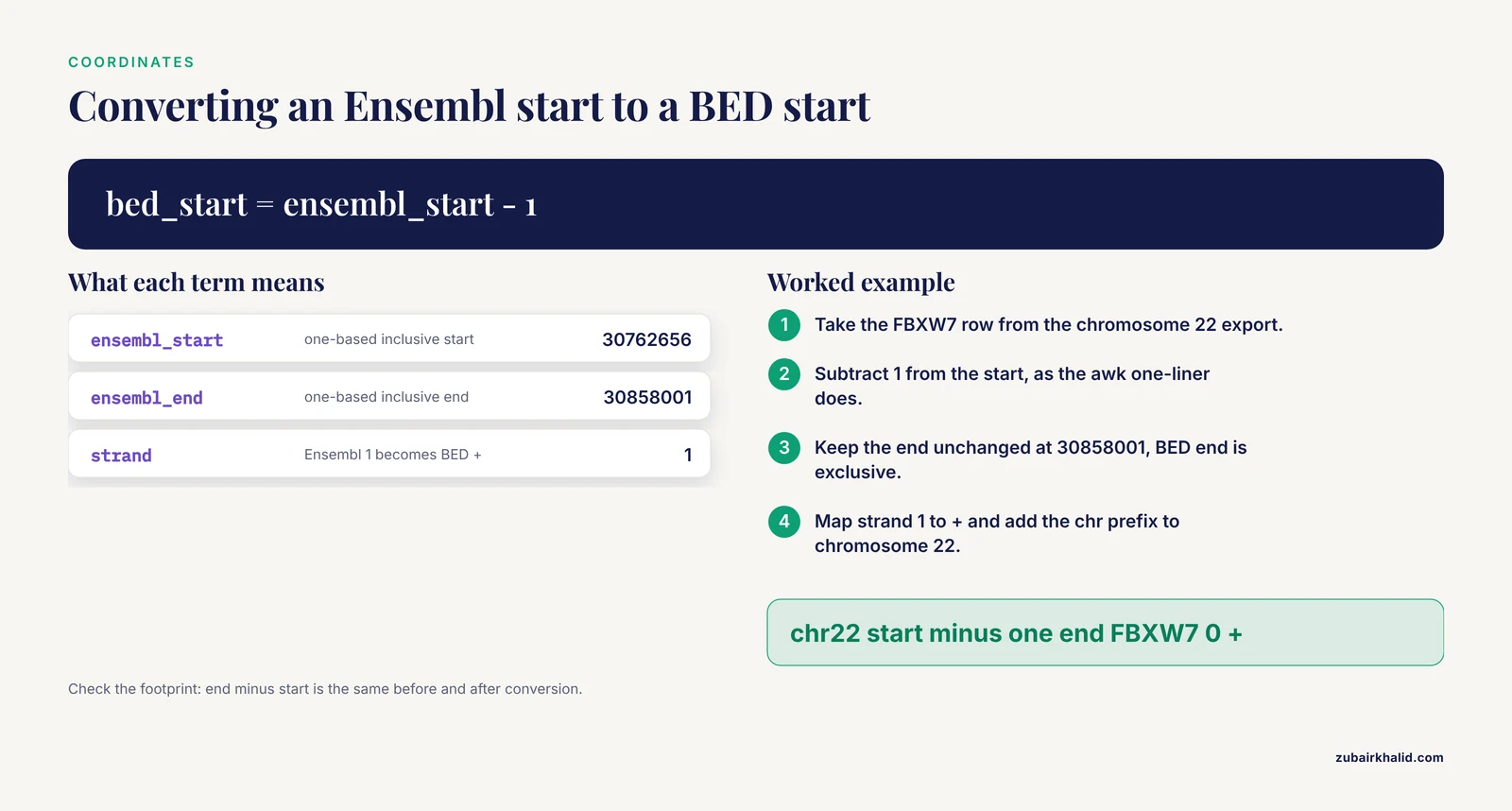
Coordinate conventions are the classic silent failure, because a shifted interval still looks like a plausible interval.
Ensembl is one-based and inclusive. A feature occupying the thousandth base through the thousand-nine-hundred-ninety-ninth base is written with start 1000 and end 1999. BED is zero-based with an exclusive end, so the identical footprint is written start 999, end 1999. GTF shares the Ensembl convention, BED does not. The arithmetic is trivial; the danger is that no tool complains when you skip it. Whenever a BED conversion happens, convert the start explicitly, as the awk one-liner earlier in this guide does, and extend it to map strand at the same time, since Ensembl writes strand as 1 and -1 while BED writes + and -:
awk 'BEGIN{OFS="\t"} NR>1 {print "chr"$3, $4-1, $5, $2, 0, ($6==1?"+":"-")}' genes.tsv > genes.bedChromosome naming. Ensembl writes chromosome names without a "chr" prefix. Some downstream tools require the prefix and others reject it, so know your target tool and add or strip the prefix at one explicit, recorded step rather than letting each script improvise.
Start is always the lower value. For gene start and end attributes, Ensembl reports the ordered boundaries regardless of strand, so start is less than or equal to end even for genes on the minus strand. Do not attempt to infer strand from coordinate order; read the strand column.
Sort your own output. Because BioMart does not guarantee row order, any operation that assumes sorted input, from interval tools to visual diffing, needs an explicit sort step on chromosome and start. One sort -k in the shell, or one arrange() in R, removes an entire class of heisenbugs.
Verify by footprint, not by eye. After any conversion, check that interval lengths are preserved: end minus start in the source should equal end minus start in the target for every row. A one-line check catches off-by-one conversions instantly.
Five Practical Pipelines That Start with a BioMart Export
Enrichment analysis with a defensible background
Enrichment results are only as good as the background universe. Export the genes that were actually detected in your experiment, for example those passing your expression threshold, as a second ID-list query, and use that as the background rather than defaulting to all annotated genes. Keep the identifier namespace identical between the test list and the background, because a mismatch between namespaces is indistinguishable from biology. BioMart cannot compute your detection threshold; you bring the list, it supplies the annotation.
Peak-to-gene assignment for chromatin data
Export gene coordinates as BED, then intersect with your peak file:
bedtools intersect -a peaks.bed -b genes.bed -wa -wb > peak_gene_overlaps.tsvBecause both files are now in the same coordinate convention, overlaps are trustworthy, and the output carries both peak and gene columns for downstream summarization. Remember that promoter-centered questions need the flank options from the sequence export or a defined window around the transcription start site, computed explicitly rather than assumed.
Mitochondrial and QC gene panels
Single-cell and bulk QC pipelines routinely need the mitochondrial gene list. One small query does it: filter on the mitochondrial chromosome, request the gene ID, symbol, and biotype, and store the dozen-odd rows as a static reference file with the release noted. The same pattern builds ribosomal and other QC panels. Small, stable, versioned reference files like this are ideal BioMart products: queried once, committed to the repository, never re-derived by hand.
Cross-species orthologue mapping
When a gene panel or an antibody validation table needs mouse equivalents for human genes, the two-mart getLDS() route shown above returns the mapping directly, and the same federated capability that connects proteomics resources to Ensembl and UniProt underlies it [2]. Export both sides' identifiers and symbols, keep the human Ensembl ID as the primary key, and audit rows where the mapping is one-to-many rather than silently collapsing them.
Sequence retrieval for cloning and probe design
Export the coding sequence for a target gene with the transcript ID in the FASTA header, then verify before design: for a complete CDS, confirm the sequence begins with a start codon and terminates with a stop codon, and confirm the record count matches the number of transcripts you requested. Feeding an unverified sequence into primer design is how silent annotation differences become bench failures. The release-pinned export, plus the three FASTA checks from the sequence section, closes that gap.
Documenting Exports and Final Checklists
The query record
Every export deserves a small, boring record stored beside the data file. A plain text template is enough:
# Query record
Date: 2026-11-11
Ensembl release: <number>
Assembly: GRCh38
Dataset: hsapiens_gene_ensembl
Filters: chromosome_name=22; biotype=protein_coding
Attributes: ensembl_gene_id, external_gene_name, chromosome_name,
            start_position, end_position, strand, gene_biotype
Unique rows: yes
Rows returned: <count from the results panel>
File: chromosome22_protein_coding.tsv
MD5: <checksum>
Query XML: query_chr22_protein_coding.xml
Generate the checksum in one line and store it with the file:
md5sum chromosome22_protein_coding.tsv > chromosome22_protein_coding.tsv.md5In R, capture sessionInfo() output alongside the script so the biomaRt version travels with the analysis. Together, the XML, the release number, and the checksum make the export reproducible by a stranger, which is the actual standard.
Pre-flight checklist
- Correct database chosen (Ensembl Genes for gene lists).
- Correct species dataset and assembly confirmed on screen.
- Release number written down, archive used if the analysis must be pinned.
- Filter and attribute names verified by search, not memory.
- Identifier type in the filter matches the identifier type in your input.
- Expected result band written down before looking at the count.
- Unique rows decision made consciously.
- Output format chosen for the consumer: TSV for pipelines.
Post-export checklist
- Line count equals reported count plus one header line.
- Header line present and column names match the attributes requested.
- One known gene spot-checked against its browser page.
- Key column has no empty values; distinct key count equals expected gene count.
- Chromosome column contains only expected values.
Frequently Asked Questions
What is the difference between Ensembl BioMart and the Ensembl genome browser?
The genome browser shows one region or gene at a time with all its annotation tracks, while BioMart runs filtered bulk queries that return tables of thousands of genes. Use the browser to explore a single gene and BioMart to export a custom gene list.
How do I export a gene list from Ensembl BioMart as a CSV file?
Choose Ensembl Genes and your species dataset, set your filters and attributes, click Results, select CSV in the output format dropdown, and click Go. Keep the header checkbox enabled so column names come with the file.
Why does BioMart return zero rows for my query?
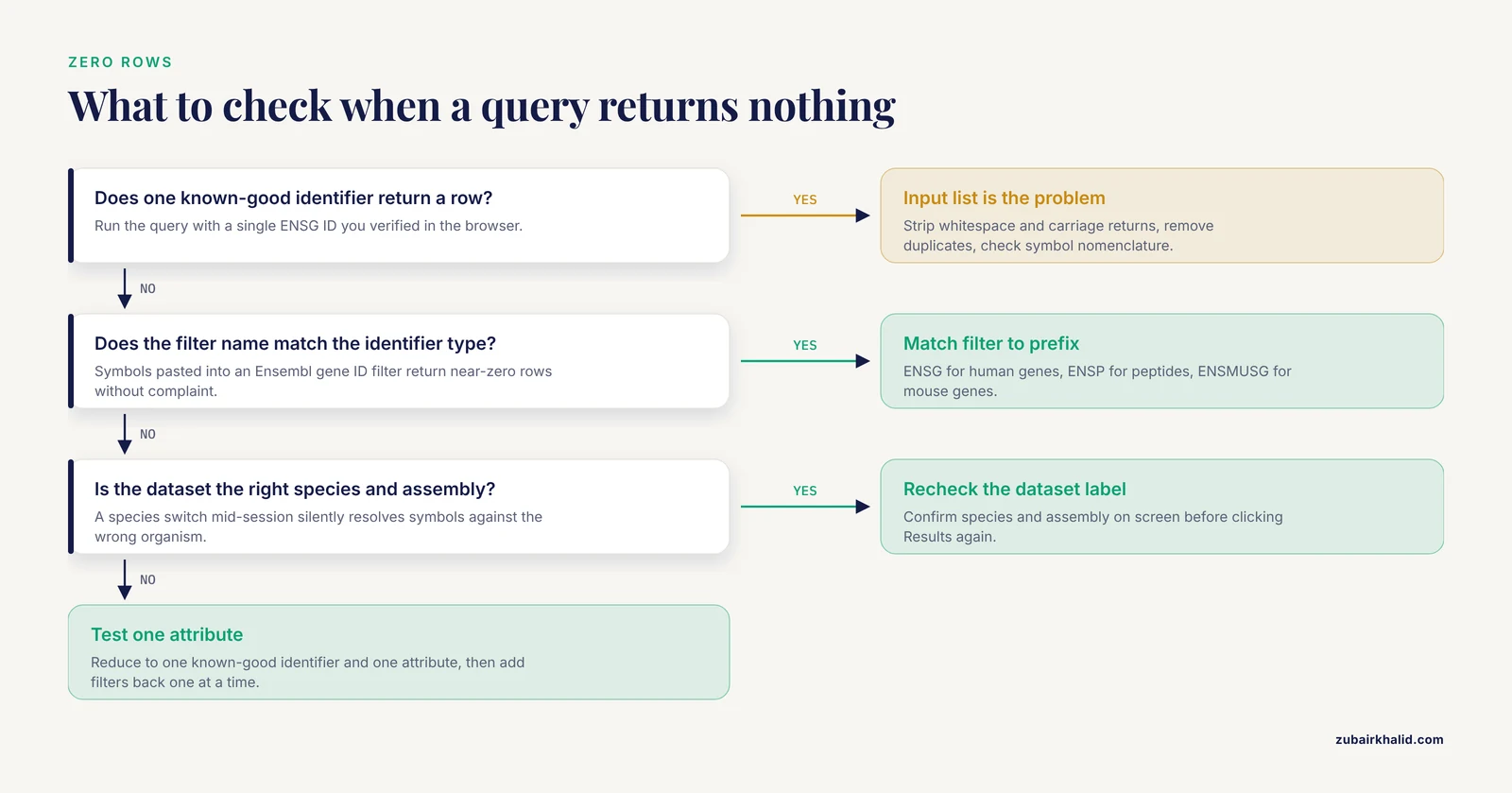
Zero rows almost always means your filter values do not match the identifiers BioMart expects, for example pasting gene symbols into an Ensembl gene ID filter, or querying a different species or assembly than your list came from. Test the filter with one known-good identifier.
Can I export protein or transcript sequences instead of a table?
Yes. In the Attributes panel, expand the Sequences section and select cDNA, coding sequence, or peptide. The output switches to FASTA format, with one header line and one sequence per transcript or gene depending on your filter settings.
How do I export from an older Ensembl release?
Use the archive site for that specific release, which Ensembl maintains so previous versions of the databases and interface remain queryable. Note the release number from your original export so you return to the matching archive.
Is there a limit on how many gene IDs I can paste into a filter?
The interface accepts large lists, but very long queries run slower and scripted queries against the public service are subject to responsible-use limits. For thousands of identifiers, batch the list into chunks of a few hundred or use a scripted route with batching.
Should I use the web interface, biomaRt, or the command line?
Use the web interface to explore filters and attributes interactively, biomaRt when your analysis lives in R, and the martservice API with curl when you need a cron-driven or language-independent export. All three run the same underlying query engine, so results should agree.
How do I turn my exported gene list into a BED file for interval analysis?
Export chromosome, start, end, symbol, and strand columns, then convert with awk, remembering that BED uses zero-based starts while Ensembl reports one-based coordinates. One line does it: awk 'BEGIN{OFS="\t"} NR>1 {print "chr"$3, $4-1, $5, $2, 0, $6}' genes.tsv > genes.bed