Ensembl BioMart Sequence Export: How to Get FASTA Sequences
By Dr. Zubair Khalid, DVM, MS, PhD ·

By the end of this article you will be able to export FASTA-formatted DNA and protein sequences from Ensembl, for a single gene, a list of identifiers, a whole chromosome band, or an entire genome annotation. You will know which sequence type to request (cDNA, coding sequence, peptide, unspliced genomic, or flanked genomic sequence), how to run the same export from the web interface, from R with biomaRt, and from a raw BioMart URL, and how to catch the errors that silently ruin downstream analyses.
What you need on hand before you start:
- A current web browser and an internet connection. BioMart requires no account and no installation.
- A list of identifiers if you plan a batch export. Ensembl gene IDs (for example ENSG00000139618), Ensembl transcript IDs (ENST00000269305), RefSeq accessions, UniProt accessions, HGNC symbols, or gene names all work as filters.
- Optional but recommended for programmatic work: R with the Bioconductor package biomaRt, or curl for raw BioMart service queries.
- Roughly five minutes for a small export and a few minutes more for large ones. An export of tens of thousands of sequences can take longer and should be run as a background job.
Ensembl itself is an integrated source of genome annotation for chordate species and, through Ensembl Genomes, for bacteria, fungi, plants, metazoa, and protists as well [1][2][3]. The Ensembl Core database and API sit underneath every browser page and every BioMart query, storing assemblies, transcripts, translations, and cross-references to identifiers from resources such as UniProt, RefSeq, and PDB [4][5]. BioMart is the web-based query builder layered on top of that Core schema, and the Ensembl documentation protocols have long recommended it as the fastest route to sequence export [6].
What BioMart Actually Exports When You Ask for a Sequence
The Ensembl data model in one paragraph
Ensembl stores a genome assembly (a coordinate system such as GRCh38 for human), gene models on that assembly, transcripts spliced from those genes, and translations (proteins) for transcripts that code for protein. A single gene can have many transcripts, and each transcript can have a different cDNA, a different coding sequence, and a different peptide. Any sequence export that claims to be "per gene" is actually per transcript underneath, and BioMart will hand you one FASTA entry per transcript unless you deliberately restrict to a canonical transcript. This matters more than it first appears, because Ensembl's human annotation alone grew from 58,812 genes in 2014 to 62,710 genes in 2023, and the number of annotated isoforms grows even faster, so the transcript set behind one gene name changes with every release [7].
FASTA in one paragraph
FASTA is a plain-text format in which each sequence starts with a header line beginning with the greater-than character, followed by one or more identifier words, and then the sequence itself split over subsequent lines. A typical BioMart cDNA header looks like this:
>ENST00000269305.4|ENSG00000147883.11|cdna:ENST00000269305.4
ATGGTGCATCTGACTCCTGAGGAGAAGTCTGCCGTTACTGCCCTGTGGGGCAAGGTGAAC
The pipe-separated fields usually contain the transcript ID, the gene ID, and a typed identifier showing what kind of sequence follows. Ensembl writes sequence IDs with version suffixes where versions exist, and the last field (cdna:, cds:, peptide:, gene:) tells you at a glance which sequence type you received. Programs such as BLAST, Clustal Omega, and most scripting libraries read this format directly. Resources built from Ensembl protein sequences, including the transcription factor predictions in AnimalTFDB 4.0, depend on exactly this kind of bulk sequence retrieval from Ensembl as their input layer [8], and curated sequence databases such as GTDB similarly aggregate coding and protein sequences that were originally exported from sources of this kind [9].
The one decision that determines your export
Before touching any interface, decide which of these you want, because everything downstream depends on it:
| Sequence type | BioMart attribute name in biomaRt | What it is | Typical use |
|---|---|---|---|
| cDNA (spliced transcript) | cdna | Mature transcript, exons concatenated, UTRs included, no introns | RNA-seq reference building, probe design |
| Coding sequence (with UTR) | cdna | cDNA restricted to translated regions plus UTRs shown separately when requested | Checking translation start context |
| Coding sequence (CDS only) | coding | Codons from start codon to stop codon | Codon usage, dN/dS-style comparisons |
| 5' UTR | 5utr | Untranslated region upstream of the start codon | Ribosome binding and regulation studies |
| 3' UTR | 3utr | Untranslated region downstream of the stop codon | miRNA target analysis |
| Peptide | peptide | Translated protein sequence | BLASTp, domain searches, cross-referencing to UniProt and PDB through resources such as SIFTS [5] |
| Unspliced transcript | transcript_exon_intron | Transcript with introns left in | Aligning RNA-seq reads across splice junctions |
| Unspliced gene | gene_exon_intron | Full gene span on the genome | Genomic PCR design |
| Gene flanking | gene_flank | Genomic sequence with a set number of bases of upstream or downstream flank (up to 10,000 bases each side) | Promoter and regulatory region analysis |
| Transcript flanking | cdna_flank or coding variants thereof | Flanks added around the transcript or CDS | UTR extension and boundary checking |
Know this table before you start. Most wrong exports are not BioMart failures, they are wrong-attribute selections that return exactly what was asked for.
Ensembl BioMart Sequence Export Step by Step (Web Interface)
This walkthrough uses the human dataset, but every click transfers to other species and to Ensembl Genomes with only dataset names changed [3].
Step 1: Choose your dataset and assembly
Open the BioMart interface from the Ensembl home page (choose BioMart from the tools menu at www.ensembl.org), or go directly to www.ensembl.org/biomart.
- Under CHOOSE DATABASE, select Ensembl Genes. This is the database that contains genes, transcripts, and sequences.
- Under CHOOSE DATASET, select Human genes (GRCh38.p14) or the current release shown. The assembly in parentheses is the coordinate system your export belongs to. Note it and record it with your exported files.
If you work on a non-vertebrate species, use the Ensembl Genomes BioMart instead, which is the companion resource providing genome-scale data for bacteria, plants, fungi, metazoa, and protists through the same interface conventions [3]. If your project pins an old assembly, for example GRCh37 in a clinical setting, use the dedicated archived site (grch37.ensembl.org) rather than the current one, and see the limitations section below for why this distinction is not cosmetic [10].
Step 2: Set filters (the ID list or region)
Filters define which features come back. Common choices:
- To paste identifiers, expand the GENE section, and under ID LIST LIMITS paste your IDs into INPUT EXTERNAL REFERENCES. Set the dropdown to the matching ID type: Ensembl Gene ID(s), Ensembl Transcript ID(s), HGNC symbol(s), RefSeq, or UniProt. Mixing ID types in one paste is the most common silent failure in BioMart, covered in the mistakes section.
- To restrict by location, use REGION. A region filter such as 7:140,500,000-141,000,000 pulls every gene in that genomic interval.
- To restrict by property, use features such as GENE TYPE (protein coding, lincRNA, and so on) or SOURCE. Restricting to protein coding before requesting peptides prevents hundreds of empty entries.
After setting filters, click COUNT in the toolbar. The number that appears tells you how many features match before any sequence is generated. If you pasted 500 IDs and the count says 480, 20 of your IDs did not match. Fix that now, before exporting, because unmatched IDs produce no error later, they just vanish.
Step 3: Choose attributes (the sequence itself)
Click ATTRIBUTES, expand SEQUENCES, and select exactly one primary sequence type:
- cDNA sequences for spliced transcripts.
- Coding sequences for CDS.
- Peptide for protein.
- Unspliced (Gene) or Unspliced (Transcript) for genomic span with introns.
- Genomic sequence 5' upstream, 3' downstream, or flanking, with the flanking length field (default and maximum 10,000 bases).
Optional companion attributes in the same panel include 5'UTR, 3'UTR, Transcript exons, and flags such as TRANSCRIPT WITH CODING ONLY, which drops non-coding transcripts from a cDNA export. Leave that flag off if you want the full transcript set, on if you only want translated products.
Step 4: Run and export
- Click RESULTS. The first ten rows preview on screen.
- Check that the SEQUENCE column is populated and not a dash. A dash means that feature has no sequence of the requested type, for example a peptide requested for a non-coding transcript.
- Set EXPORT ALL RESULTS to ALL (FILE) rather than ALL (HTML). HTML output with tens of thousands of rows will freeze the browser tab.
- Choose FASTA as the output format. Compressed (gzip) is available and recommended for anything over a few thousand entries.
- Click GO. Your browser downloads a .fasta or .txt file, optionally gzipped.
The Ensembl unit protocols on using the browser describe this quick sequence export path through BioMart as the standard shortcut when the goal is sequence retrieval rather than visualization [6][1].
Reading the FASTA header you get back
Every entry is traceable through its header. Break the header on pipes and you can reconstruct which gene, which transcript, and which sequence type each record is, which you will need the moment you join this file back to a table of expression values or variant calls. If the header fields look garbled in one tool, remember that many downstream programs split on whitespace and keep only the first token, so the first token is what must be unique. Ensembl transcript IDs are unique, gene names are not.
Doing the Same Export from R with biomaRt
The BioMart web interface and the biomaRt R package query the same underlying Ensembl Core databases [4]. If your identifier list lives in a data frame or your export needs to rerun when Ensembl releases a new version, script it instead of clicking.
library(biomaRt)

# 1. Connect and pick the dataset
ensembl <- useEnsembl(biomart = "genes",
                      dataset  = "hsapiens_gene_ensembl")

# 2. Inspect available sequence types if unsure
# listAttributes(ensembl) |> subset(grepl("sequence", name))

# 3. Export peptides for a list of Ensembl gene IDs
ids <- c("ENSG00000139618", "ENSG00000141510")
seqs <- getSequence(id      = ids,
                    type    = "ensembl_gene_id",
                    seqType = "peptide",
                    mart    = ensembl)

# 4. Convert the two-column data frame to a FASTA file
write_fasta <- function(df, file, seq_col = 2, id_col = 1) {
  con <- file(file, "w")
  for (i in seq_len(nrow(df))) {
    writeLines(paste0(">", df[i, id_col]), con)
    seq <- df[i, seq_col]
    writeLines(seq, con)   # sequences arrive as single-line strings
  }
  close(con)
}
write_fasta(seqs, "brca_peptides.fasta")
Expected output, truncated:
>ENSG00000139618
MJGATNHTPQEKSLPFTHDAHLELTASSHKGEKSKEHLLEGKLDFSIHNGIHVDSDKSFTAVRDLDNKL...
Key parameters of getSequence:
- seqType: one of cdna, peptide, coding, 3utr, 5utr, gene_exon_intron, transcript_exon_intron, gene_flank, cdna_flank, coding_gene_flank. These mirror the web attributes in the table above.
- type: the identifier class you are passing, for example ensembl_gene_id, ensembl_transcript_id, external_gene_name, refseq_mrna, uniprot_gn. Passing the wrong type is the biomaRt equivalent of picking the wrong dropdown, and it returns zero rows rather than an error.
- mart: the connection object. For an archived assembly, point a useMart call at the archived host, for example useMart(biomart = "ENSEMBL_MART_ENSEMBL", host = "https://grch37.ensembl.org", dataset = "hsapiens_gene_ensembl"), so that your sequences and your coordinates come from the same frozen annotation [10].
- filters: use getFilterValues(ensembl, filter = "chromosome_name") to discover valid values for region-style filters.
For BioMart outside R, the same query can be issued as an HTTP GET against the martservice endpoint. Build an XML query document, URL-encode it, and pass it as the query parameter:
<?xml version="1.0" encoding="UTF-8"?>
<!DOCTYPE Query>
<Query virtualSchemaName="default" formatter="FASTA" header="0"
       uniqueRows="0" datasetConfigVersion="0.6">
  <Dataset name="hsapiens_gene_ensembl" interface="default">
    <Filter name="ensembl_gene_id" value="ENSG00000139618,ENSG00000141510"/>
    <Attribute name="peptide"/>
  </Dataset>
</Query>
Then:
QUERY=$(python3 -c "import urllib.parse; print(urllib.parse.quote(open('query.xml').read()))")
curl -s "https://www.ensembl.org/biomart/martservice?query=${QUERY}" -o brca_peptides.fasta
head -2 brca_peptides.fasta
Expected first line of output:
>ENSG00000139618|ENSG00000141510|peptide:ENSG00000139618Two practical notes on raw martservice queries. First, the value list in a Filter element is comma-separated, and a comma inside a single identifier will silently split it. Second, older standalone BioMart servers and third-party mirrors may serve different annotation releases than www.ensembl.org, and tools written specifically to batch-retrieve sequences from Ensembl, such as the retrieve-ensembl-seq tool described by Sand and colleagues, exist precisely because large-scale retrieval against the service needed its own robust interface [11]. Record the release number that Ensembl reports in the browser footer with every export.
Ensembl BioMart Sequence Export Tips
These are the habits that separate a usable export from one that has to be redone.
Pin the release. Write the Ensembl release number (for example, release 114, whatever the current footer says) into the filename of every export. Ensembl annotation changes measurably between releases, and the gains are real, with recent release-to-release additions producing thousands of newly annotated isoforms that show differential expression across tissues [7]. An expression matrix built against release 112 sequences will not match a release 114 export of the same gene IDs.
Restrict before you request. Add the gene type or source filter before asking for peptides. A whole-genome peptide export of every gene including pseudogenes and partial annotations produces a file full of one-letter entries that BLAST will happily include in a database and that will then waste runtime for every future search.
Use COUNT as a reconciliation step. The count after filtering is the ground truth for how many features matched. Compare it against the number of unique IDs you pasted and against the number of FASTA headers in the output file. Differences among those three numbers each mean something different: unmatched input IDs, features with no sequence of the requested type, and one-to-many gene-to-transcript expansion.
Split very large exports. For a chromosome-at-a-time or genome-wide export, filter on chromosome name and run one export per chromosome, then concatenate. This keeps any single request inside the service timeout window and gives you natural checkpoints.
Keep identifiers versioned in your records. The FASTA header carries version suffixes, for example ENST00000269305.4. Preserve them in any downstream key. Stripping versions merges distinct transcript models into one row and destroys your ability to reproduce the export later.
Match assembly to analysis, not to habit. When mapping exported coordinates or sequences against read alignments, use the assembly the data were aligned to. The mismatch between GRCh37-era and GRCh38-era gene models is not an edge case, hundreds of genes are annotated as protein coding in one assembly and not the other, and downstream resources that rely on stale GRCh37 Ensembl gene annotations silently discard those discrepant genes [10].
Use cross-references to leave Ensembl gracefully. BioMart attributes can carry UniProt IDs, RefSeq IDs, and other external references alongside sequences, which is how the cross-resource mappings that power tools such as SIFTS, the residue-level bridge between PDB structures and UniProt and Ensembl sequences, are maintained [5]. Adding a UniProt ID column to your export costs one checkbox and saves a separate identifier-mapping step.
Common Mistakes and Limitations
Exporting the wrong sequence type
The single most frequent error is requesting cDNA when the analysis needs CDS, or peptide when the analysis needs cDNA. BLASTn against a peptide file or BLASTp against a nucleotide file will run and return plausible-looking nonsense. After every export, run a quick check:
head -4 brca_peptides.fasta
# Peptide sequences contain letters M, L, K, G, etc. and no U characters except selenoproteins
# cDNA and CDS contain only A, C, G, T (U appears if you explicitly requested RNA-style output)
CDS should start with ATG in the vast majority of cases (not all, since alternative start codons exist in some species) and should have a length divisible by three. cDNA should be longer than or equal to the CDS of the same transcript, since it includes UTRs. If your CDS is 1,496 bases long, something is off.
Expecting one sequence per gene
BioMart expands genes into transcripts. A 200-gene paste can return 900 transcript sequences. If you need exactly one sequence per gene, either filter to the canonical transcript (attributes panel offers a CANONICAL TRANSCRIPT AND PROTEIN option in current releases) or select rows afterward using the canonical flag attribute, which biomaRt exposes as is_canonical in transcript attribute lists.
Mixing identifier types in one filter paste
Pasting HGNC symbols and Ensembl IDs together into a single input box fails quietly. Identifiers that do not match the selected type are dropped without an error message. Reconcile your list to one ID class first, or run one BioMart query per ID class and merge afterward.
Assuming annotation stability
Ensembl annotations are revised continuously. The characterization of human Ensembl annotations from 2014 through 2023 documented both steady growth and non-monotonic dips, with some release years actually annotating fewer protein-coding genes than earlier years [7]. Meanwhile, the GRCh37 annotation set was archived and frozen in 2013 and no longer receives updates, which creates a diverging population of gene models between the two assemblies [10]. Consequence for your work: any paper or pipeline that does not record the Ensembl release used for sequence export is not fully reproducible, and re-exporting sequences years later without pinning a release will yield different sequences for the same identifiers.
Confusing assembly coordinate systems
Sequences exported from the current site belong to the current assembly. Sequences exported from grch37.ensembl.org belong to GRCh37. A genomic position from GRCh37 is not the same point in GRCh38, and gene models between the assemblies are discrepant for a non-trivial set of genes [10]. Coordinate-to-protein mapping across assemblies is a genuinely non-trivial problem complicated by alternative splicing and transcript evidence, which is why dedicated tools such as VarMap exist to validate genomic coordinate to protein sequence mappings [12]. BioMart will not warn you that you have mixed assemblies, because each request is internally consistent.
Overlooking what "no sequence" means
A dash in the sequence column for a requested peptide usually means the transcript is not protein coding. It can also mean a partially annotated feature. Check the gene type attribute in the same export rather than assuming a data problem.
Misannotation propagates like any other data
Ensembl annotation is high quality but automatic annotation at scale carries known risks that extend beyond Ensembl itself. The literature documents proteins that were experimentally characterized yet carried wrong functional annotations in public databases, with close sequence similarity masking genuine functional divergence, and the authors of that analysis urged particular caution wherever high sequence similarity meets absent biochemical information [13]. If your analysis treats exported sequences as ground truth for function, validate at least a subset by hand. Ortholog-retrieval pipelines face parallel problems, since mislabeled species and paralog contamination are common enough in harvested sequence data that dedicated pipelines were built to bypass manual database searches [14].
Web timeouts on very large exports
A single request for the peptides of every protein-coding gene in a large genome can exceed the web service time limit. The fixes are chunking by chromosome, using compressed output, or moving to biomaRt or the martservice endpoint run from a script with retries. The martservice is the same machinery the web page calls, and the Ensembl software resources are built so that interactive and programmatic access hit the same stable Core schema [4].
BioMart is not the only front door, and sometimes not the right one
If your goal is a whole-genome file of unspliced sequences, downloading the genome FASTA and the GTF annotation directly and doing the extraction locally with a tool such as gffread or awk is faster, versionable, and repeatable. NCBI Datasets offers a parallel FAIR-compliant route to sequences and metadata across taxa through its own web interface, command-line tools, and API, which is worth knowing when a species is better served there [15]. Conversely, if your group hosts its own genomes, containerized frameworks such as GenomeHubs set up a custom Ensembl database and web server for any species, and support export to flat files including EMBL format for submission [16]. BioMart shines for filtered, identifier-driven, many-to-many queries with cross-references. It is not the best tool for raw whole-assembly downloads, and it does not currently serve variation-specific sequence contexts as flexibly as the dedicated Ensembl variation tools, which maintain their own aggregation and export conventions for variant data [17].
Verifying Your Export Is Correct
Run through this checklist on every export, small or large.
- Count the FASTA headers:
grep -c '^>' sequences.fastaCompare with the BioMart COUNT from step 4 and with the number of unique input IDs. A genome-wide human peptide export of canonical proteins should land in the vicinity of the number of protein-coding genes annotated in that release, roughly twenty thousand for current human releases [7]. A number far below that suggests a filter problem, a number far above suggests transcript expansion you did not intend.
- Check sequence alphabet:
# Should print nothing for a pure DNA export
grep -v '^>' sequences.fasta | grep -v '^[ACGTNacgtn]*$' | head

# Should print nothing for a peptide export
grep -v '^>' sequences.fasta | grep -v '^[A-Z*]*$' | head- Check lengths are sensible:
awk '/^>/{if (n) print id, n; id=substr($0,2); n=0; next}{n+=length($0)}END{print id, n}' sequences.fasta | headPeptides of a protein-coding gene are typically hundreds of residues. Peptides of 2 or 3 residues usually indicate partial or pseudogene annotations, which is a legitimate biological result but usually not what you wanted.
- Spot check one entry against the browser. Open the transcript ID in the Ensembl genome browser and compare the length and the first dozen bases shown on the transcript page with your exported record. This five-minute check catches wrong-assembly exports, which are otherwise invisible until they cause mapping failures.
- Record provenance. Save the BioMart XML (the web interface offers this under results, or capture the URL from a martservice call) next to the FASTA file. The XML reproduces the query byte for byte.
Worked Example: Promoter Sequences for a Gene Set
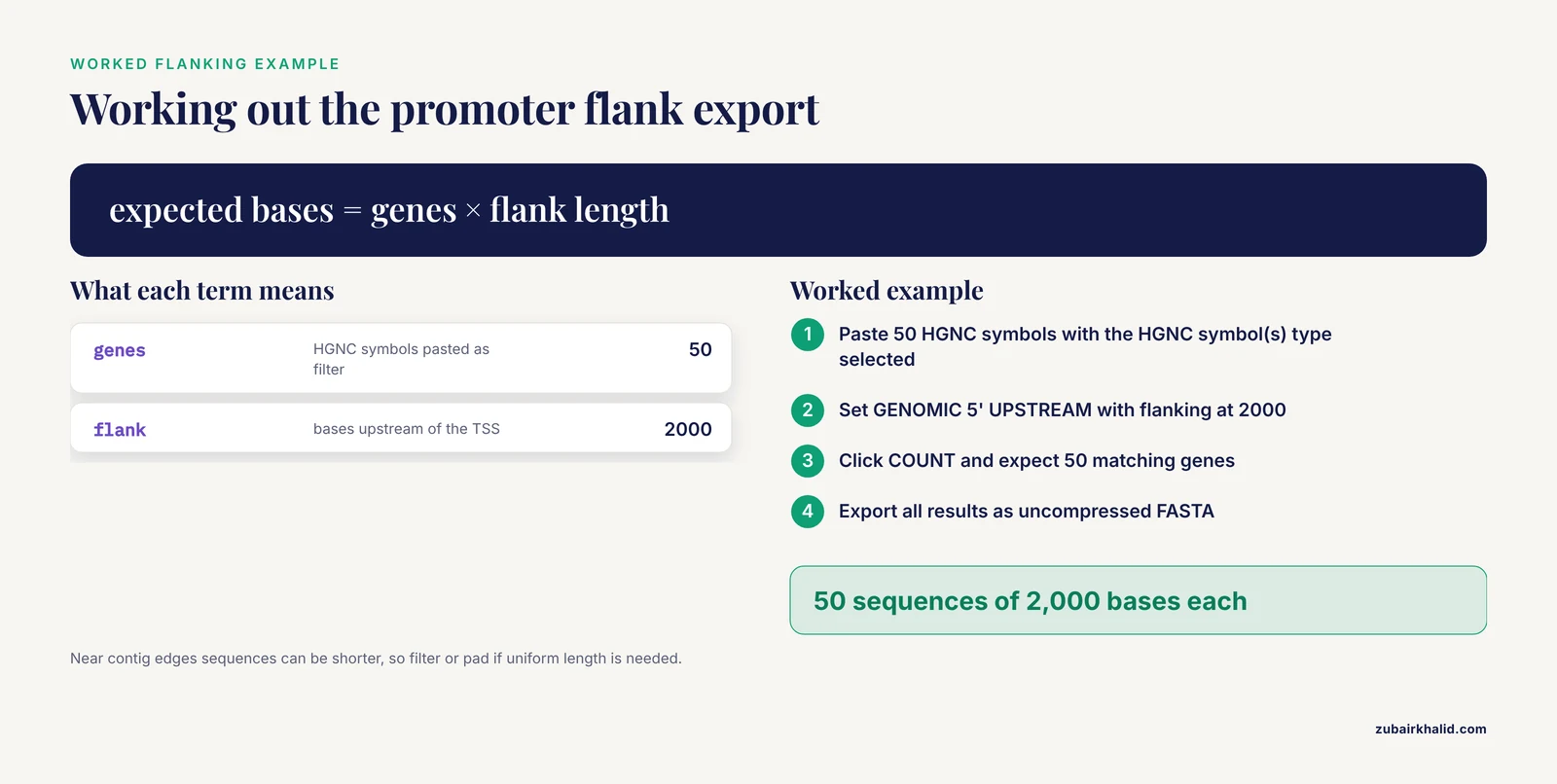
To make the flanking option concrete, suppose you want 2,000 bases upstream of the transcription start site for 50 human genes to scan for transcription factor motifs.
- Paste the 50 HGNC symbols as INPUT EXTERNAL REFERENCES with the HGNC symbol(s) type selected.
- In attributes, choose SEQUENCES, then GENOMIC 5' UPSTREAM with flanking set to 2000, and add the Ensembl Gene ID and external gene name attributes so headers stay interpretable.
- Click COUNT. Expect 50 matching genes, assuming all symbols were current.
- Export all results as uncompressed FASTA.
- Verify: grep -c '^>' should report 50, and each sequence should be exactly 2,000 bases for genes whose upstream region is fully contained in the assembly. Near contig edges, sequences can be shorter. If motif scanning requires a uniform length, filter or pad accordingly.
The same pattern scales. Resources that needed Ensembl protein sequences for genome-wide predictions across 183 animal genomes, such as the AnimalTFDB 4.0 pipeline, and resources that collected hundreds of thousands of glycosyltransferase sequences across thousands of species, such as GTDB, all begin from bulk sequence exports of this kind from genome-scale annotation sources [8][9]. The mechanics are identical, only the filters and the volume change.
Next Steps
With a verified FASTA export, natural next moves include building a BLAST database (makeblastdb -in sequences.fasta -dbtype nucl for nucleotide, -dbtype prot for peptide), running multiple sequence alignment for a gene family, mapping variants onto exported transcripts using the Ensembl variation toolchain, which integrates variant data with genome annotation in a consistent programmatic framework [17], or joining your sequences to structural annotations through UniProt and PDB mappings using SIFTS-derived cross-references [5]. If your analysis depends on reproducibility across years, prioritize pinning the release and archiving the query XML above every other consideration.
Frequently Asked Questions
What is the difference between cDNA, CDS, and peptide in BioMart?
cDNA is the full mature transcript including UTRs and exons concatenated without introns, CDS is only the protein-coding region from start codon to stop codon, and peptide is the translated amino acid sequence of the CDS. Choose cDNA for transcript-level work, CDS for codon-level work, and peptide for protein comparisons.
How do I get FASTA sequences for a list of Ensembl gene IDs?
In BioMart, paste the IDs into the ID LIST LIMITS input with Ensembl Gene ID(s) selected, click COUNT to confirm how many matched, then in attributes choose the sequence type and export as FASTA. In R, use biomaRt with getSequence(id = your_ids, type = "ensembl_gene_id", seqType = "peptide", mart = ensembl).
Why are my exported sequences shorter than expected?
The most likely causes are a filter that excluded exons (for example a UTR-heavy transcript where you requested CDS), a feature near a contig boundary, or a partially annotated transcript. Check the gene type and biotype attributes, and verify one entry in the genome browser against the same release.
Can BioMart export sequences for a genomic region instead of a gene?
Yes. Use the REGION filter with a chromosome-coordinate interval, then select the unspliced gene sequence or a flanked sequence attribute. This returns every feature in the interval, so restrict by gene type if you want only certain classes.
How do I get GRCh37 sequences when the current site defaults to GRCh38?
Use the dedicated archived GRCh37 site at grch37.ensembl.org and its BioMart, or point biomaRt at that host with useMart. The GRCh37 annotation set has been frozen since 2013, so it will not receive updates, and gene models differ between the two assemblies for a substantial number of genes.
Can I use BioMart from R or the command line?
Yes. The biomaRt Bioconductor package exposes the same Ensembl Genes database with getSequence for sequence retrieval, and the raw martservice HTTP endpoint accepts BioMart XML queries and returns FASTA when the formatter is set accordingly. Both hit the same underlying Ensembl Core databases as the web interface.
Why is my FASTA header different from my gene name?
BioMart headers use Ensembl identifiers plus a typed tag, not gene symbols, because symbols are neither unique nor stable. Add external gene name or HGNC symbol to the attributes alongside the sequence if you need the symbol, and it will appear as an additional column in tabular output or as extra header fields depending on format.
Does BioMart work for non-vertebrate species?
Yes. Ensembl Genomes runs the same BioMart interface for bacteria, fungi, plants, metazoa, and protists, so the workflow in this article transfers with the dataset name changed, though attribute availability can differ by species.
Sources
- Using the Ensembl genome server to browse genomic sequence data.
- Ensembl 2007
- Ensembl Genomes 2018: an integrated omics infrastructure for non-vertebrate species
- Ensembl core software resources: storage and programmatic access for DNA sequence and genome annotation
- SIFTS: updated Structure Integration with Function, Taxonomy and Sequences resource allows 40-fold increase in coverage of structure-based annotations for proteins
- Disease and phenotype data at Ensembl.
- Genome annotations matter: characterizing Ensembl hg38 annotations from 2014 to 2023
- AnimalTFDB 4.0: a comprehensive animal transcription factor database updated with variation and expression annotations
- GTDB: an integrated resource for glycosyltransferase sequences and annotations
- Lost in translation: the pitfalls of Ensembl Gene annotations between human genome assemblies and their impact on diagnostics
- Retrieve-ensembl-seq: user-friendly and large-scale retrieval of single or multi-genome sequences from Ensembl
- VarMap: a web tool for mapping genomic coordinates to protein sequence and structure and retrieving protein structural annotations
- Retrieving sequences of enzymes experimentally characterized but erroneously annotated : the case of the putrescine carbamoyltransferase
- phylotaR: An Automated Pipeline for Retrieving Orthologous DNA Sequences from GenBank in R
- Exploring and retrieving sequence and metadata for species across the tree of life with NCBI Datasets
- GenomeHubs: simple containerized setup of a custom Ensembl database and web server for any species
- Ensembl variation resources