Ensembl BioMart Returns No Results: Causes and Fixes
By Dr. Zubair Khalid, DVM, MS, PhD ·

The single most common reason an Ensembl BioMart query returns no results is an identifier mismatch. The IDs in your input list do not exist in the dataset, release, or species you selected, so BioMart matches zero rows and reports an empty table. Before touching any filter or attribute, paste one identifier from your list into the Ensembl genome browser search box and confirm that (a) the species is right, (b) the assembly is right, and (c) the gene still exists under that exact ID in the release you are querying. If that single ID resolves in the browser but fails in BioMart, the problem is almost always in your filter, attribute, or release selection. If the ID fails in the browser too, the problem is in your list.
This article walks through every common cause of an Ensembl BioMart query returning no results, in order from most to least frequent, explains the mechanism behind each failure, gives you a compact diagnostic table, and ends with a prevention checklist you can apply to any future query. The command examples use R with the biomaRt package and the standard BioMart web interface at ensembl.org.
Quick Diagnosis: The 60-Second Check
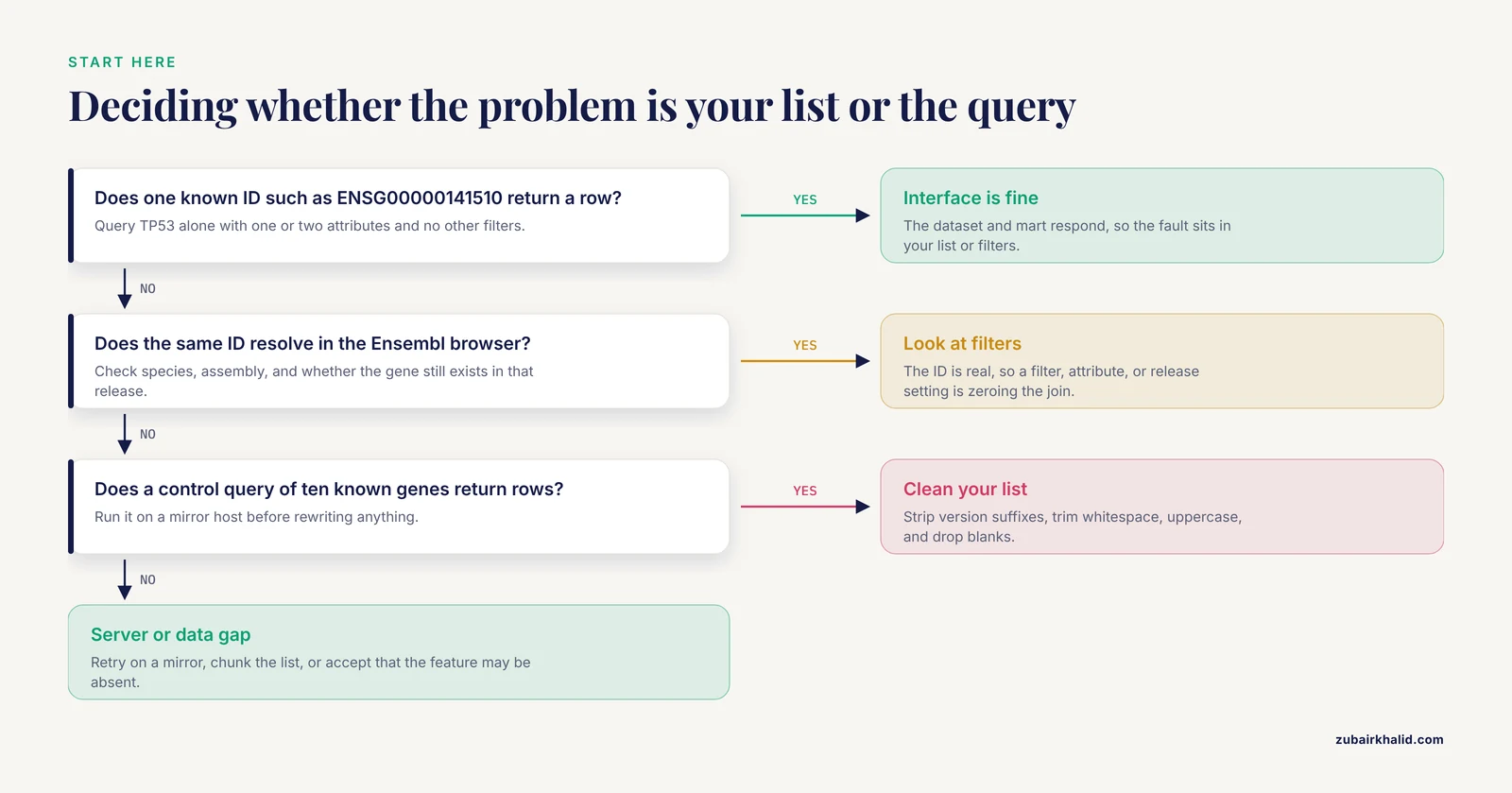
Run this sequence before anything else. It resolves a large share of empty results on the spot.
- Confirm the dataset. Open your BioMart session and read the dataset line literally. "hsapiens_gene_ensembl" is human. "mmusculus_gene_ensembl" is mouse. A rat list queried against a mouse dataset returns nothing, and BioMart will not warn you.
- Confirm the release. The web interface does not always display the release prominently. In biomaRt, run
mart <- useEnsembl(biomart = "ENSEMBL_MART_ENSEMBL", dataset = "hsapiens_gene_ensembl")and thenlistAttributes(mart)[1,]or inspect the mart object. The release number matters because gene IDs change between releases. - Test with one known ID. Use the canonical human tumor suppressor TP53. Its Ensembl gene ID in the current human annotation is ENSG00000141510. Query that single ID, no filters beyond the ID itself, and only one or two attributes. If this returns a row, your interface and dataset are fine and the problem is in your list or your filters.
- Strip version suffixes and whitespace. If your IDs look like ENSG00000141510.11, cut everything after the dot. If you pasted from Excel, strip trailing spaces and carriage returns.
- If all five steps pass and the query is still empty, the cause is further down this page, usually in filter logic or the mart itself.
BioMart exists precisely to make this kind of cross-database querying uniform. The original design goal was a single generic interface that biologists could learn once and apply to many data sources, with query pipelines that could be automated rather than assembled by hand [1]. Understanding what the engine does under the hood makes the failure modes predictable.
What BioMart Is Actually Doing When You Click Results
Every BioMart query is a structured join. You pick a dataset (for example, the human genes dataset), optional filters that restrict rows (an input ID list, a chromosome, a biotype), and attributes that define the output columns (Ensembl gene ID, HGNC symbol, coordinates). BioMart translates your selections into SQL against the mart database for that release, evaluates every filter, and returns only rows satisfying all of them simultaneously [1].
Two consequences follow directly. First, an empty result is almost never a random glitch. It is the logically correct output of the join you specified, given the data in that release. Second, any single broken element in the chain, one wrong filter, one unrecognizable ID format, one stale dataset, zeroes out the entire result. That is why debugging means isolating one element at a time rather than staring at the whole query.
Troubleshooting Table
| Symptom | Likely cause | How to confirm | Fix |
|---|---|---|---|
| Zero rows, list of Ensembl IDs, no error | Version suffixes on IDs (ENSG00000141510.11) | Check your input strings for a dot followed by digits | Strip everything after the dot before querying |
| Zero rows, list of gene symbols | Symbols used against an Ensembl ID filter | Confirm the filter name you selected | Use the hgnc_symbol (human) or equivalent external symbol filter, or map symbols to Ensembl IDs first |
| Some rows returned, many missing | Mixture of valid and retired or reformatted IDs | Query a handful of missing IDs individually | Count how many input IDs fail, and verify the failures in the browser or against ID history |
| Query worked last year, empty now | Ensembl release updated, IDs or dataset changed | Compare your recorded release number against the current release | Pin the release, or use the archive site for the original version |
| Empty results for genes you can see in the browser | Assembly mismatch, GRCh37 coordinates against GRCh38 data or vice versa | Check the coordinate system of your input list against the dataset assembly | Query the correct assembly site (see the archive section) |
| Empty results only when a second filter is on | Filters combine with AND logic, the intersection is empty | Remove filters one at a time | Loosen or restructure the filters |
| Empty results for a chromosome filter | Chromosome naming mismatch ("chr1" vs "1", scaffold names) | Print the values accepted by the filter with listFilters() in biomaRt | Match the naming exactly, or use a region filter |
| Empty results for non-vertebrate species | Querying the vertebrate Ensembl mart with a plant, fungus, or pathogen list | Check whether the species lives on ensembl.org or ensemblgenomes.org | Select the correct Ensembl Genomes mart |
| Empty results from a homology query | No ortholog exists for that gene pair in that comparison | Test a gene with a well-known ortholog, such as TP53 between human and mouse | Confirm the expected orthology exists before troubleshooting the query |
| Timeout, truncated output, or intermittent emptiness | Server load or an oversized query | Retry, or split the list into chunks of a few thousand IDs | Use a mirror site, chunk the query, or switch to the MySQL server or API |
Cause 1: Identifier Mismatch in Your Input List
This cause accounts for most empty results in practice, and it has several distinct subtypes. Each one fails silently because BioMart simply joins nothing.
Ensembl IDs with version suffixes
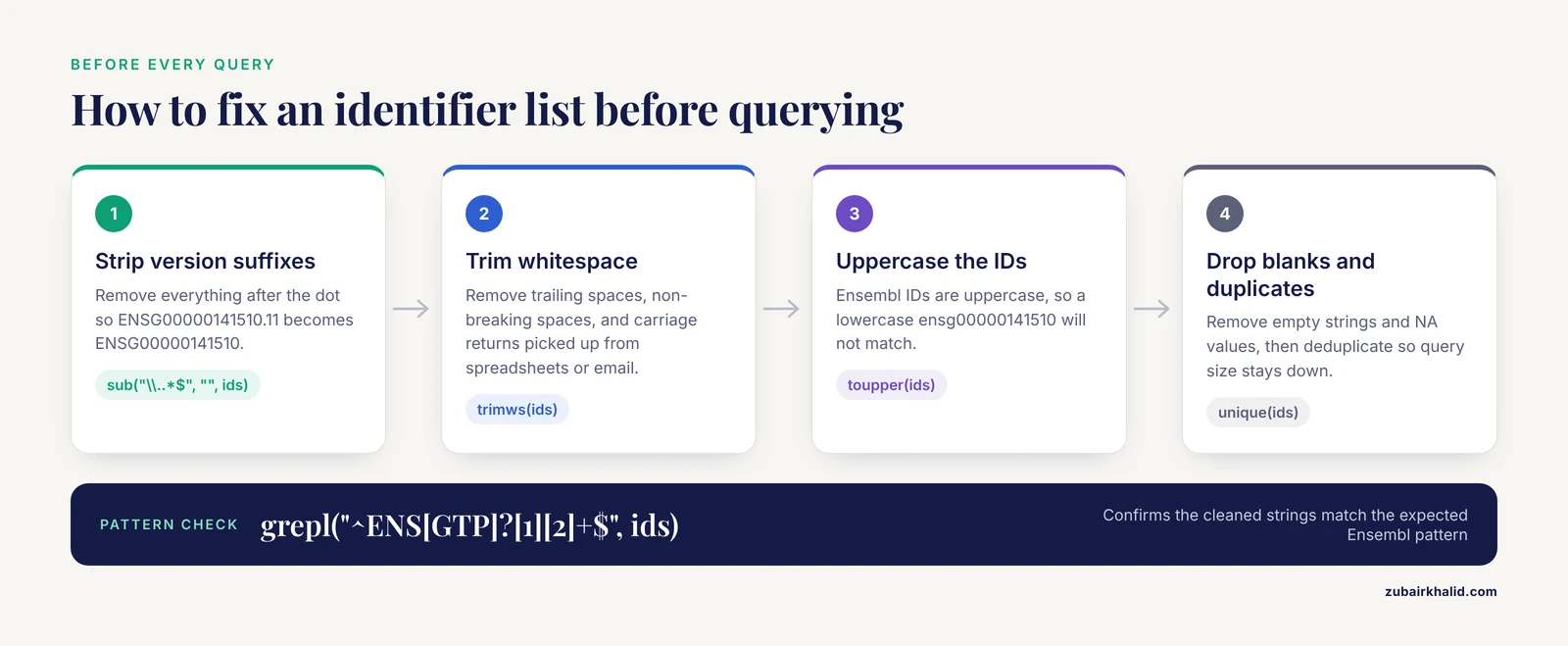
Ensembl gene, transcript, and protein identifiers carry an optional version number after a dot. The gene ID ENSG00000141510 and the versioned form ENSG00000141510.11 refer to the same gene, but many BioMart filter implementations expect the unversioned form and will match zero rows on the versioned string. GSEA outputs, DESeq2 result tables, count matrices, and pipeline logs frequently carry versioned IDs because they were exported from an annotation source that includes versions.
The fix is a one-line regular expression in R:
ids <- sub("\\..*$", "", ids)Do this before every BioMart query, and confirm with grepl("^ENS[GTP]?[1][2]+$", ids) that the cleaned strings match the expected Ensembl pattern. Also check for the string "NA" or empty strings that slipped in during upstream processing, since a few hundred empty strings in a values list can mask real behavior or trigger errors.
Gene symbols used against the wrong filter
If you paste HGNC symbols such as TP53 or BRCA1 into a filter configured for Ensembl gene IDs, the join returns nothing. BioMart filters are typed. An Ensembl ID filter expects Ensembl IDs, period.
You have two options. The cleaner one is to select the external symbol filter directly. In the human dataset the filter is usually named hgnc_symbol, and in biomaRt you can find it by running listFilters(mart) and searching the output for "symbol". The second option is to map symbols to Ensembl IDs in a separate step, which gives you an auditable mapping table you can keep. Symbols change over time, so a symbol-based query can break between releases even when nothing about your list changed.
The same rule applies to every species. Mouse symbols go through mgi_symbol, zebrafish through zfin_id_symbol style filters, and so on. The exact filter name always appears in listFilters(mart), which is the authoritative list for the dataset you are using.
Whitespace, hidden characters, and case
Identifier lists that passed through spreadsheets, PDFs, or email often carry trailing spaces, non-breaking spaces, or carriage returns. BioMart does a strict string match, so "ENSG00000141510 " is not "ENSG00000141510". In R:
ids <- trimws(ids)
ids <- ids[ids != "" & !is.na(ids)]
Ensembl IDs are uppercase. A lowercase "ensg00000141510" will not match. Apply toupper(ids) defensively.
Retired, merged, and changed IDs
Ensembl gene IDs are stable in principle but not always in practice. Genes get merged when annotation pipelines reconcile models, split when one model is reannotated as two, and retired when a gene is dropped entirely. If your list was built years ago, a fraction of the IDs may simply no longer exist in the current release.
Diagnose this by sampling. Take twenty IDs that came back empty, paste each into the Ensembl browser search box, and note what happens. A browser hit under a different ID or a redirect to a merged gene confirms the cause. If many IDs fail this way, query against the archive release that matches the vintage of your list, which is covered next, or accept the ID conversion and reannotate your list.
Cause 2: Release and Archive Mismatch
Ensembl releases data in numbered releases, several per year, and each release carries its own annotation. Between releases, gene models change, IDs are reassigned, and datasets are rebuilt. A query that returns a full table today can return an empty table after the next release if the IDs you use were restructured. The Ensembl project describes its own release cycle this way, with major annotation updates concentrated on the flagship assemblies and a dedicated archive site serving the older human assembly [2].
The mechanism matters for reproducibility. When a paper says "results generated with Ensembl release 104", every ID, coordinate, and cross-reference in the results is defined by that release. If you try to reproduce the analysis on release 112, the identifiers may not line up, and an empty BioMart result is a common symptom of that mismatch rather than an error on your part.
GRCh37 versus GRCh38
The human genome has two widely used assembly generations. GRCh38 is the current primary assembly on ensembl.org. GRCh37, the older generation still used by thousands of published variant and expression datasets, is served from its own dedicated archive site so that coordinates remain stable for comparison [2]. If your coordinates or IDs come from a GRCh37-era study, such as older TCGA pipelines or earlier GWAS catalogs, and you query the GRCh38-based dataset, joins can fail outright or silently misalign.
The fix is to query the matching site:
- Current release and GRCh38: ensembl.org
- Human GRCh37: the dedicated GRCh37 archive site
- Older releases of other species and older human releases: archive.ensembl.org
In biomaRt, point at the archive host explicitly:
mart_grch37 <- useEnsembl(biomart = "ENSEMBL_MART_ENSEMBL",
                          dataset = "hsapiens_gene_ensembl",
                          host = "https://grch37.ensembl.org")
Check the assembly before every human query. If your source data mentions GRCh37, hg19, or February 2009, that is your signal to use the GRCh37 site. GRCh38 corresponds to hg38 in UCSC naming.
Pinning releases with biomaRt
biomaRt allows you to request a specific release version when connecting, which makes the query reproducible:
mart <- useEnsembl(biomart = "ENSEMBL_MART_ENSEMBL",
                   dataset = "hsapiens_gene_ensembl",
                   version = 110)
If the release you request is retired from the live site, you will need the archive host instead. Record the release number, the dataset name, and the date of every query in your analysis notebook. This one habit prevents most repeat occurrences.
Cause 3: Filter Logic Errors
Even with perfect IDs, filters can silently produce an empty intersection. BioMart combines filters with AND logic by default. Every additional filter narrows the result. Three patterns cause most trouble.
The intersection of two filters is genuinely empty
A classic example: you filter for protein-coding genes on chromosome 7 and also supply an input list of IDs, but your list was generated from a different assembly where those IDs map to different chromosomes. Each filter is individually sensible, yet no row satisfies all three at once. Diagnose by removing filters one at a time, from the most restrictive to the least, rerunning the query each time. The filter whose removal restores results is the culprit, and the fix is usually to recheck the assumption behind that filter rather than to delete it blindly.
Chromosome and region naming
Chromosome filters expect the names used in that release. Human chromosomes are "1" through "22", "X", "Y", and "MT", with no "chr" prefix. If your source data uses UCSC style names, "chr1", strip the prefix. For non-model species, scaffold names matter even more. A filter on "scaffold_12" will not match a dataset that stores the same contig as "Scaffold12" or "GL123456.1". When in doubt, list the actual values. In biomaRt, querying a single known ID with the chromosome attribute as an output column shows you the exact chromosome string used internally, which you can then match in your filter.
For coordinate-based restriction, the region filter accepts strings like "7:55086710-55277999" in the web interface. Assembly matters here more than anywhere else, because the same numeric coordinates mean different loci in GRCh37 and GRCh38.
Overly specific attribute combinations
Some attributes exist only in certain combinations or only when a related filter is active. If you request an attribute tied to a specific external database and that database has no entries for your genes, the column comes back empty or the rows drop out depending on the query structure. The general diagnostic is to build the query incrementally. Start with one attribute, the Ensembl gene ID. Confirm results. Add one attribute at a time. The step at which results vanish identifies the problematic attribute, and listAttributes(mart) tells you exactly which attributes the dataset offers.
Cause 4: Cross-Reference and Homology Queries That Return Nothing
Two query families deserve their own treatment because they fail for data reasons rather than syntax reasons.
Cross-references to external databases
If you request RefSeq, UniProt, or EntrezGene mappings for a species or gene set, missing rows usually mean the mapping genuinely does not exist in that release, not that your query is broken. Annotation pipelines update cross-references continuously, and some species have sparse coverage in particular external databases. Confirm by testing a housekeeping gene with known cross-references, such as GAPDH, which should return non-empty mappings in human. If GAPDH maps but your gene does not, your gene is the issue. If GAPDH also comes back empty, the attribute or dataset selection is the issue.
A related trap is using a cross-reference database ID as an input filter. Filtering on a UniProt accession requires that you selected a UniProt-based filter, not an Ensembl ID filter, and the accession format must match exactly.
Homology and orthology queries
The comparative genomics section of BioMart lets you fetch orthologs across species. Empty results here usually mean no ortholog was called for that gene pair in that release, which is a legitimate biological outcome, not an error. Paralogs, lineage-specific expansions, and genes present in one assembly but absent in another all produce genuine empty sets. Before debugging the query, establish that the ortholog you expect exists, for example human and mouse TP53, which is a well-annotated one-to-one ortholog. If a known good pair returns results and your pair does not, accept that the absence may be real, and verify independently in the browser compara views.
Cause 5: Coordinate Mismatch Between Assemblies
Region queries are unforgiving about assembly versions. A region string like "7:55086710-55277999" is only meaningful in the assembly it was written for. The same numeric interval in GRCh37 and GRCh38 points at different sequence, and a region filter built for one assembly against a dataset built on the other either returns nothing or returns the wrong genes without warning.
The diagnostic is direct. Take one gene from your region list, find its coordinates in the Ensembl browser under the assembly you are querying, and compare. If the numbers differ from your list, you have an assembly mismatch, and you need to either switch datasets or lift the coordinates between assemblies with a dedicated tool before querying.
This cause interacts with the assembly quality issue. Genome assemblies, particularly newer ones built from long-read sequencing, can contain residual errors that alter gene predictions. Raw long-read data carries per-read error rates on the order of 5 to 15 percent before correction, and even after polishing, protein-coding predictions in long-read assemblies can be truncated or wrong [3]. When you query a non-reference assembly or a newly annotated species, some genes may genuinely lack the features you are filtering for because the underlying gene models are incomplete. That is a data-content cause of empty results, not a query error, and no amount of filter adjustment will fix it.
Cause 6: Wrong Mart or Dataset Selection
Ensembl is not a single mart. The vertebrate data lives on ensembl.org, while plants, fungi, animals beyond the vertebrate scope, and protists are served through Ensembl Genomes marts with their own datasets and release numbering. Variation, regulation, and compara data each sit in separate marts as well. The Ensembl 2016 release notes describe the regulation mart as a separate component tuned for faster regulatory data delivery, which is a reminder that these marts are distinct services with their own contents [2].
The failure pattern is characteristic. You select the species correctly but the mart incorrectly, for example picking the vertebrate mart for an Arabidopsis gene list. The dataset dropdown then either lacks your species or contains a similarly named species that is not yours. BioMart will happily run the query against the wrong dataset and return nothing.
How to confirm and fix:
- In the web interface, check the species panel. If your organism is missing, you are on the wrong mart. Switch to Ensembl Genomes.
- In biomaRt, run
listMarts(host = "https://www.ensembl.org")to enumerate available marts andlistDatasets(mart)to confirm your dataset name before querying. - For metazoa beyond vertebrates, plants, fungi, and protists, use the Ensembl Genomes host explicitly in
useEnsemblor the equivalentuseMartcall with the correct host argument.
Variation-specific queries, such as fetching variants for a gene list, require the variation mart. Querying the gene mart for variant attributes will either error or return sparse empty columns.
Cause 7: Server-Side and Infrastructure Issues
Once your query is correct, remaining empty results are usually operational.
Timeouts and oversized queries
BioMart imposes limits on query size and runtime. A filter with hundreds of thousands of IDs, or a request for many attributes across the entire dataset, can exceed those limits. Depending on the interface state, an oversized query may return a truncated table, a partial result, or an empty one. The fix is chunking. Split your ID list into blocks of a few thousand, run one query per block, and bind the results. In R:
chunks <- split(ids, ceiling(seq_along(ids) / 3000))
results <- do.call(rbind, lapply(chunks, function(chunk) {
  getBM(attributes = attrs, filters = "ensembl_gene_id",
        values = chunk, mart = mart)
}))
Duplicate IDs in the input are harmless for the join but inflate query size, so deduplicate first with unique().
Mirrors and availability
Ensembl serves its main site through geographically distributed mirrors, including uswest.ensembl.org and asia.ensembl.org. During high load or maintenance, a mart may respond slowly or fail in ways that look like empty results rather than errors. If a query that ran correctly an hour ago now returns nothing without any change on your side, try a mirror before rewriting anything. In biomaRt, the mirror is set through the host argument. Waiting an hour and retrying is also a legitimate diagnostic.
Browser and session state
The web BioMart retains session state. A leftover filter from an earlier step in the left-hand panel can persist invisibly after you change datasets, silently restricting the new query. The reliable habit is to start each new query from the "Reset" or home view and rebuild the panel deliberately. Similarly, count-based previews in the interface will show a zero count before you even run the full query, which is an early warning worth watching.
Worked Example: From Empty Results to a Full Table
Here is a realistic failing query and the fix, using biomaRt.
Failing pattern:
library(biomaRt)
mart <- useEnsembl(biomart = "ENSEMBL_MART_ENSEMBL",
                   dataset = "hsapiens_gene_ensembl")

my_ids <- c("ENSG00000141510.11", "ENSG00000012048.9", "ENSG00000139618.15")

res <- getBM(attributes = c("ensembl_gene_id", "hgnc_symbol", "chromosome_name",
                            "start_position", "end_position"),
             filters = "ensembl_gene_id",
             values = my_ids,
             mart = mart)
nrow(res)   # returns 0
The input IDs carry version suffixes, so the strict join matches nothing. Fixed version:
my_ids <- sub("\\..*$", "", my_ids)          # strip version suffixes
my_ids <- trimws(toupper(my_ids))            # normalize whitespace and case
my_ids <- unique(my_ids)

res <- getBM(attributes = c("ensembl_gene_id", "hgnc_symbol", "chromosome_name",
                            "start_position", "end_position"),
             filters = "ensembl_gene_id",
             values = my_ids,
             mart = mart)
nrow(res)   # returns 3
If this still returns zero rows, the next diagnostic step is to swap the filter from ensembl_gene_id to hgnc_symbol and pass symbols instead, then to check the release, and then to reduce attributes to just ensembl_gene_id to eliminate attribute-related failures. Building back up one element at a time isolates the failure in minutes.
Full Diagnostic Sequence
For a stubborn case, follow this order without skipping steps. Each step either fixes the problem or eliminates a cause.
- Test the reference query. TP53 by Ensembl ID, two attributes, human gene mart. Empty result here means an interface or dataset problem. Non-empty means your query structure is sound.
- Audit the input list. Strip version suffixes, trim whitespace, uppercase, remove blanks, deduplicate. Recount your list before and after. If the count drops, some rows were malformed all along.
- Confirm species and dataset with
listDatasets()or the species panel. - Confirm the release and assembly. Compare against the provenance of your ID list. GRCh37 lists go to the GRCh37 site, older releases go to the archive.
- Reduce the query to a single filter and single attribute. Confirm a nonzero result, then add elements back one at a time.
- For symbol-based inputs, verify the exact filter name with
listFilters(mart)and test one known symbol. - For cross-reference and homology columns, test a known positive control gene first.
- For persistent emptiness, chunk large lists, try a mirror, and check the Ensembl status and help channels for known incidents.
- If all of the above pass, consider that the emptiness may be real data content, particularly in recently assembled or sparsely annotated genomes.
Prevention Practices
Prevention costs minutes and saves hours of re-debugging.
- Record release, dataset, and date for every BioMart query. Put the release number in your methods section and in your analysis notebook. The Ensembl project publishes numbered releases precisely so that results can be tied to a defined annotation state [2].
- Clean identifiers in a dedicated preprocessing step, as its own script, rather than inline. A version-stripping and whitespace-trimming function used consistently becomes invisible infrastructure.
- Pin your release in biomaRt with the version argument so that a rerun months later connects to the same annotation state.
- Keep a positive control. Save a tiny query, ten well-annotated human genes with two attributes, that you know returns results. Run it at the start of every session. If it fails, the problem is environmental, not analytical.
- Prefer ID-based queries with a documented mapping step over symbol-based queries when the analysis will be repeated, because symbols drift between releases while Ensembl IDs are far more stable.
- Match the site to the assembly every time for human data, and check whether non-vertebrate species live on Ensembl Genomes before building a session.
A data-handling caution applies to web-based queries. Do not submit identifiers or datasets that carry confidentiality obligations, such as patient-associated identifiers from controlled-access studies, through public web interfaces. Work with local mirror installations or approved secure environments when the underlying data is restricted.
Common Mistakes and Limitations
- Assuming the interface is broken first. In practice the interface is almost never the problem. The list, the filter, or the release is. Debug your inputs before blaming the server.
- Mixing coordinate systems in one analysis. GRCh37 coordinates pasted into a GRCh38 query either fail or quietly return wrong loci. Treat assembly as a required parameter of every query, not an afterthought.
- Trusting that an empty result means absence. An empty result means the join found nothing in that dataset at that release. It does not prove the gene or feature is absent from biology, only from that annotation.
- Ignoring the count preview. The web interface shows a result count before the full query runs. A count of zero is your cheapest possible diagnostic, so read it before running the full query.
- Not chunking large queries. Very large ID lists can silently truncate or fail. Splitting into blocks is standard practice for robustness.
- Treating all Ensembl IDs as interchangeable. Gene IDs, transcript IDs, and protein IDs are different key types with different prefixes (ENSG, ENST, ENSP). Filtering on gene IDs with a protein ID filter returns nothing by construction.
- Overlooking annotation quality in novel assemblies. Gene predictions in recently assembled genomes can be incomplete or wrong even after correction, which means some features may legitimately be missing from the mart [3].
- Expecting BioMart to be a general-purpose database. BioMart is optimized for structured queries over its supported marts. For arbitrary joins, bulk retrieval, or programmatic pipelines at scale, the Ensembl MySQL servers, REST API, or downloadable annotation files are often the better tool, and BioMart remains what it was designed to be, a uniform query interface for advanced biological questions [1].
Frequently Asked Questions
Why does my Ensembl BioMart query return no results when the IDs look correct?
Because BioMart performs a strict string match, and visually similar strings are not identical. Version suffixes like the ".11" in ENSG00000141510.11, lowercase letters, or invisible trailing whitespace all prevent a match. Strip suffixes, trim whitespace, uppercase the IDs, and retest with a single known gene before debugging anything else.
How do I fix Ensembl Biomart no results caused by version suffixes?
Remove everything after the dot in every Ensembl identifier before querying. In R, the command is ids <- sub("\\..*$", "", ids). This is the most common single fix, and it applies to IDs exported from count matrices, GSEA inputs, and most annotation files that include versioned identifiers.
Can I query old genome assemblies like GRCh37 in BioMart?
Yes. Ensembl maintains a dedicated site for the older human assembly so that GRCh37-era data stays comparable, separate from the current GRCh38 data on the main site. Point your query at the GRCh37 archive host, or use archive.ensembl.org for older releases of other species, and make sure your input coordinates and IDs come from that same assembly generation.
Why does my query work in the web interface but fail in biomaRt?
The two paths often hit different releases or different hosts. The web interface may be using a mirror or a default release that differs from the one your R session resolved to. Pin the release explicitly in useEnsembl(), confirm the dataset name with listDatasets(), and make sure the filter and attribute names match what listFilters() and listAttributes() report for that exact mart.
Why do gene symbols return nothing in Ensembl Biomart?
Most likely you pasted symbols into a filter that expects Ensembl IDs. Filters are typed, and an Ensembl ID filter will not match symbols. Either switch the filter to the external symbol filter for your species, such as hgnc_symbol for human, or map your symbols to Ensembl IDs first and query with the IDs.
What is the difference between Ensembl and Ensembl Genomes marts?
Vertebrate species are served on ensembl.org, while plants, fungi, protists, and many invertebrate metazoa are served through the Ensembl Genomes service with its own marts and datasets. Querying a plant or fungus gene list against the vertebrate mart returns nothing. Check which service hosts your species before building the session.
How do I know if the problem is my query or the server?
Run a known-good control query, ten well-annotated genes with one attribute. If the control returns results, the server and interface are fine and the problem is in your list or filters. If the control is empty, retry on a mirror site, wait and rerun, or check Ensembl service status, since load and maintenance can present as empty or truncated results.
How do I prevent Ensembl Biomart no results in future analyses?
Standardize four habits. Pin the release and record it with your query. Clean identifiers with one reusable preprocessing function. Keep a positive-control query to run at the start of each session. And match the mart, species, and assembly deliberately every time rather than relying on defaults. Together these eliminate nearly all recurrence.