How to Retrieve Gene Ontology Annotations from Ensembl BioMart
By Dr. Zubair Khalid, DVM, MS, PhD ·

By the end of this guide you will be able to retrieve Gene Ontology (GO) annotations for a list of genes from Ensembl BioMart two ways: through the point-and-click web interface on the Ensembl website, and programmatically in R using the biomaRt package from Bioconductor. You will also be able to build a gene-by-GO-term matrix, handle the duplicate rows that GO mapping always produces, pin your query to a specific Ensembl release so results are reproducible, and avoid the errors that trip up most first-time users.
Before you start, have these on hand:
- A list of gene identifiers (Ensembl gene IDs, gene symbols, Entrez IDs, or probe IDs) in a plain text file, one identifier per line.
- For the web route, only a browser. Go to the BioMart interface at the Ensembl website.
- For the R route, R (4.2 or newer is a sensible baseline) and the biomaRt package installed from Bioconductor.
- Roughly 10 to 30 minutes for the web route and 15 minutes to set up the R script, which then runs in seconds to a few minutes depending on list size.
A quick vocabulary check, since every term in this workflow gets used constantly:
- Gene Ontology (GO) is a controlled vocabulary of terms describing gene products across three branches: biological process (BP), molecular function (MF), and cellular component (CC). Each term has a numeric accession such as GO:0006915.
- Annotation is the association between a gene and a GO term, together with an evidence code that records how the association was established.
- BioMart is a data-mining technology that lets you pick a dataset, apply filters, choose output attributes, and download the result as a table. Ensembl exposes its gene, variation, and comparative data through BioMart servers.
- biomaRt is the Bioconductor R package that sends queries to BioMart servers from within R. Because it executes direct queries against the BioMart databases, including Ensembl, it can pull gene symbols, chromosomal coordinates, GO, and other annotation for many identifier types quickly and always against the current data release [1].
What You Are Actually Querying: GO Data in Ensembl
Ensembl does not curate GO annotations itself from scratch. It imports and redistributes GO annotations, largely from projects that do electronic and manual curation, and links them to Ensembl gene and transcript identifiers. This matters for two practical reasons.
First, the annotations you get from BioMart reflect the annotation pipeline of the Ensembl release you query. When Ensembl updates, the GO terms attached to a gene can change.
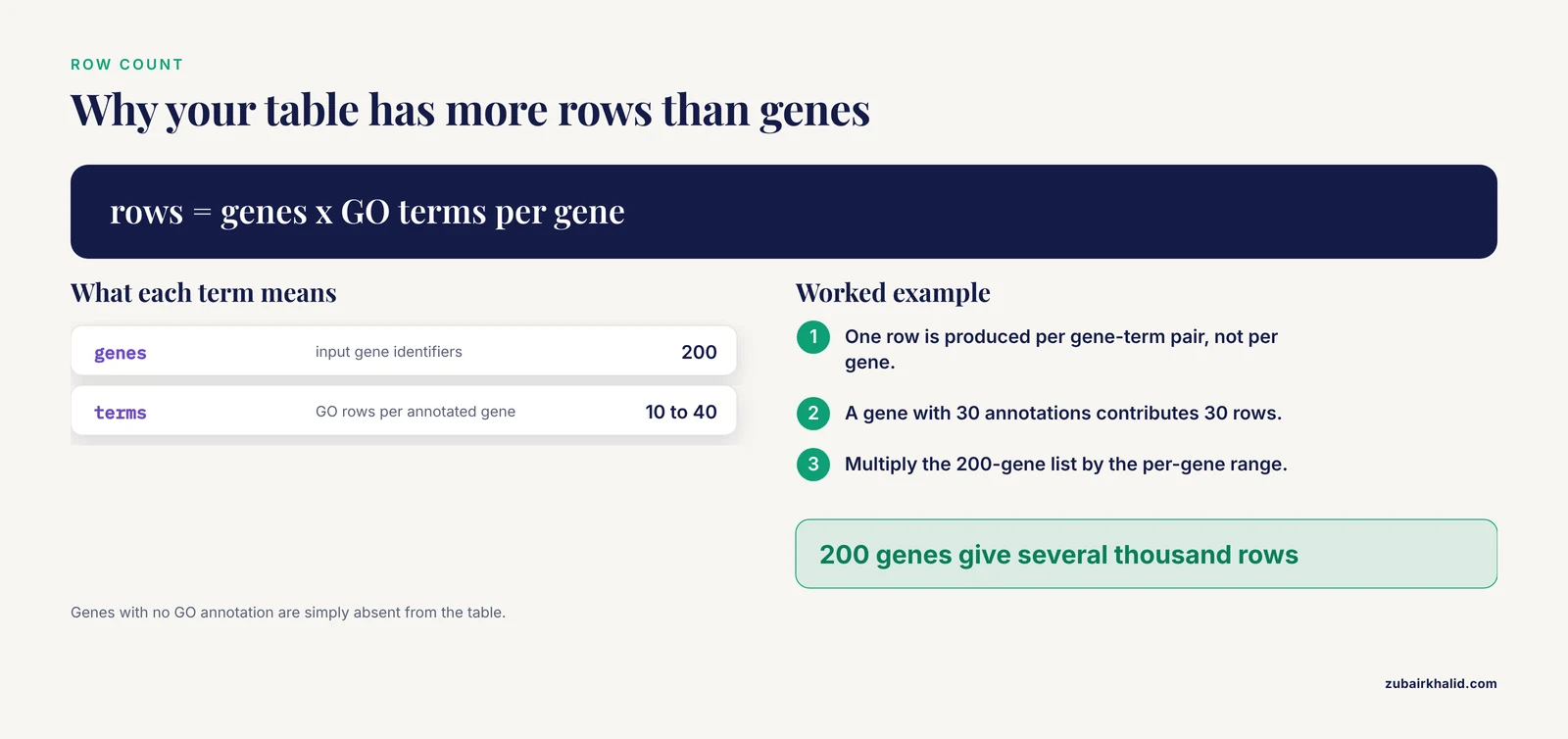
Second, the one-to-many relationship is unavoidable. A single gene typically carries dozens of GO terms, and a single GO term can map back to many genes. Any workflow that retrieves GO annotations produces a long-format table with one row per gene-term pair, which means more rows than genes. Everything in this guide assumes that structure.
BioMart itself is a general access layer rather than an Ensembl-only tool. A review of data-access architectures described three mechanisms, BioMart, caBIG, and Google Data Sources, implemented over the same repository, and concluded that each suits particular uses, with multiple access points letting researchers reach the same data in the manner that works best for them [2]. For GO annotation retrieval, BioMart is the access point Ensembl maintains natively, and the biomaRt package is the access point that integrates directly with R analysis code [1].
Route 1: Retrieving GO Annotations Through the Ensembl Web BioMart
This route requires no code and is the fastest way to sanity-check a small list or grab a one-off annotation table. It is also the best way to learn the structure of BioMart queries, because the web interface shows you the same filter-and-attribute model you will later use in R.
If you are still learning how to use Ensembl, the BioMart page sits alongside the genome browser. The Ensembl genome browser tutorial material covers browsing individual genes on their gene pages, while BioMart handles bulk retrieval. You will use both here, because the browser is the reference you should check your BioMart output against.
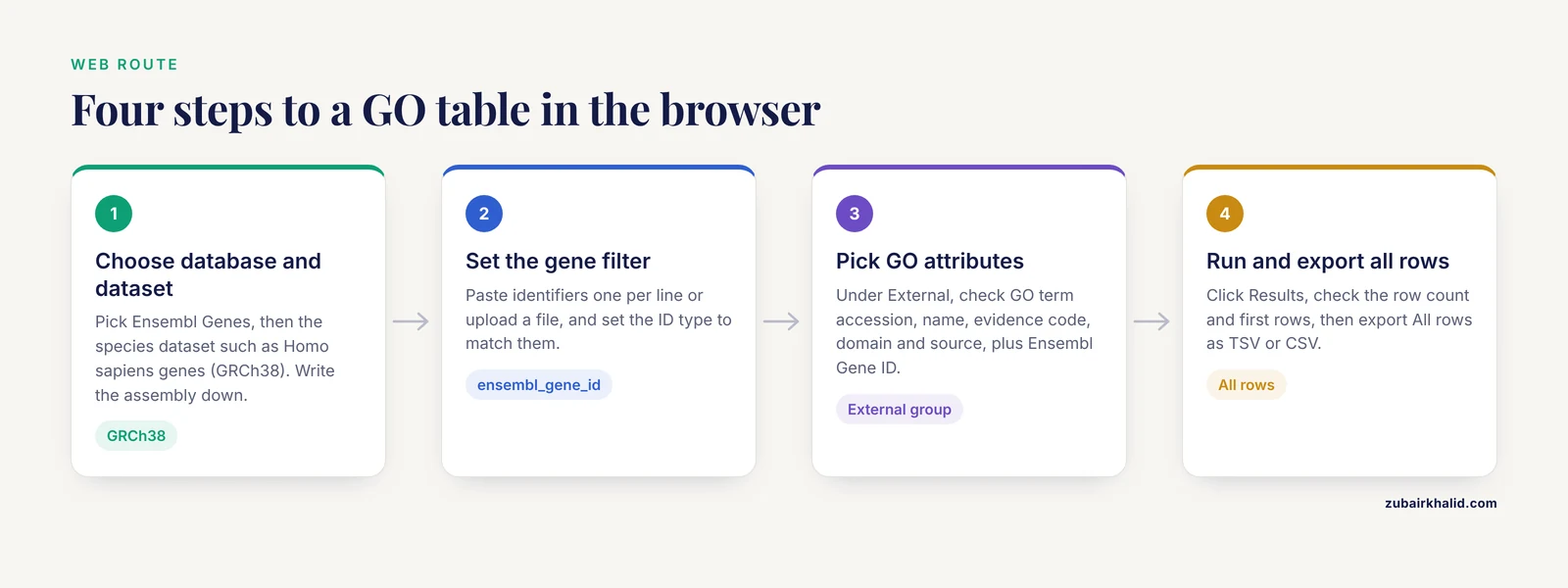
Step 1: Open BioMart and choose the dataset
Navigate to the BioMart section of the Ensembl website. The interface opens with three choice panels: Choose Database, Choose Dataset, and filters and attributes below.
- Under Choose Database, select Ensembl Genes.
- Under Choose Dataset, select the species, for example Homo sapiens genes (GRCh38). The genome assembly in parentheses is the dataset you are committing to. Write it down. Reproducibility depends on it.
Step 2: Set filters
Filters define which rows enter the query. In the Filters panel, expand the GENE section and find the ID list input. Paste your gene list, one identifier per line, or upload a text file. Set the ID type dropdown to match your identifiers.
The most common identifier choices:
- Ensembl gene ID, format ENSG00000141510 for human genes. If your identifiers carry a version suffix such as ENSG00000141510.17, BioMart generally matches the bare ID, but clean the suffix first rather than rely on partial matching.
- Gene symbols such as TP53, matched through the external reference filters. Symbols are ambiguous across species and change over time, so prefer stable Ensembl IDs when you have them.
- Entrez Gene IDs and array probe IDs, which biomaRt and BioMart both support as filters, one of the original design goals of the biomaRt package [1].
Optionally, under the GENE section you can restrict to protein-coding genes with the gene biotype filter. Under the GENE section you can also limit the query to genes that carry GO annotation at all, which keeps unannotated genes out of the output.
Step 3: Choose attributes
Attributes define the columns of your output table. Click the Attributes button on the left, which switches the panel from filters to output columns. In the attributes page, the GO fields live in the External attributes group, labeled for GO and other gene-based annotations:
- GO term accession, the GO:XXXXXXX identifier.
- GO term name, the human-readable label.
- GO term evidence code, such as IEA for inferred from electronic annotation or IDA for inferred from direct assay.
- GO domain, the branch, reported as biological_process, molecular_function, or cellular_component.
- GO term source, the database that provided the annotation.
Also keep Ensembl Gene ID and Gene name checked under the Gene group so every row identifies its gene. Newer BioMart interfaces include a search box on the attributes page, so typing GO finds these fields quickly.
Step 4: Run and export
Click Results. The web interface shows the first rows and reports the total count. Check two things before exporting:
- The count should be a multiple of your gene count only in the trivial case where every gene has exactly one GO term. In practice expect roughly 10 to 40 GO rows per annotated gene, so a list of 200 genes commonly returns several thousand rows.
- Scan the first rows for your genes. If every row is empty or the gene name column is blank, your filter matched nothing and you should revisit the ID type.
Set the export to All rows rather than the default preview limit, choose TSV or CSV, and click Go. The file downloads with your chosen columns.
Route 2: Retrieving GO Annotations with biomaRt in R
The biomaRt package connects R directly to BioMart servers, which means your annotation step becomes a scriptable, repeatable part of an analysis pipeline rather than a manual download [1]. This is the route to use for anything you will redo, anything involving more than a few hundred genes, or anything you need to document in a methods section.
Step 1: Install and load biomaRt
if (!requireNamespace("BiocManager", quietly = TRUE)) {
  install.packages("BiocManager")
}
BiocManager::install("biomaRt")

library(biomaRt)
Installation pulls biomaRt and its dependencies from Bioconductor. On a standard R installation this takes a few minutes the first time and nothing thereafter.
Step 2: Connect to the Ensembl BioMart and select a dataset
ensembl <- useEnsembl(
  biomart  = "ensembl",
  dataset  = "hsapiens_gene_ensembl"
)
ensembl
Expected console output for the connection object looks like this, with the version number reflecting the current Ensembl release at the time you run it:
Object of class 'Mart':
  Using the ENSEMBL_MART_ENSEMBL BioMart database
  Dataset: hsapiens_gene_ensembl
The two arguments do the following:
biomart = "ensembl"selects the Ensembl Genes mart, the one holding gene annotation including GO.dataset = "hsapiens_gene_ensembl"selects the human gene dataset. The pattern is the four-letter species prefix plus_gene_ensembl: mmusculus_gene_ensembl for mouse, drerio_gene_ensembl for zebrafish, and so on.
If you omit dataset, biomaRt connects to the mart without a dataset attached, and you can attach one afterwards with useDataset() or browse options with listDatasets(ensembl). Listing datasets returns a data frame with columns dataset, description, version, so you can grep for your organism:
head(listDatasets(ensembl))Step 3: Inspect available filters and attributes
Filters and attributes have machine names that differ from their web-interface labels, and the machine names change occasionally between Ensembl releases. Always check rather than copy from memory or from an old script.
head(listFilters(ensembl), 10)
head(listAttributes(ensembl), 10)
listFilters() returns columns name and description. You will see entries such as ensembl_gene_id, external_gene_id for external gene identifiers such as symbols, entrezgene_id, and with_go, a logical filter that restricts the query to genes carrying GO annotation. listAttributes() returns columns name, description, and page, and the GO attributes appear in the page group corresponding to external references, matching what the web interface shows in its External group.
To search instead of scrolling, pass a pattern:
grep("go", listAttributes(ensembl)$name, value = TRUE)Typical current names returned include go_id, go_name, go_link_evidence_type, and namespace_1003, where that last unintuitive name is the GO domain, meaning biological process, molecular function, or cellular component. Because these names are release-dependent, treat the grep output, not this article, as authoritative for your connection.
Step 4: Run the query
genes <- readLines("my_genes.txt")   # one Ensembl gene ID per line

go_annot <- getBM(
  attributes = c(
    "ensembl_gene_id",
    "external_gene_name",
    "go_id",
    "go_name",
    "namespace_1003",
    "go_link_evidence_type"
  ),
  filters  = "ensembl_gene_id",
  values   = genes,
  mart     = ensembl
)

head(go_annot)
The four arguments of getBM() map exactly onto the web interface:
attributesare your output columns.filtersis the key your input identifiers match against.valuesis your input list. It can be a character vector or a data frame column such asvalues = df$gene_id.martis the connection object from step 2.
Expected output shape:
  ensembl_gene_id external_gene_name      go_id            go_name        namespace_1003 go_link_evidence_type
1 ENSG00000141510               TP53 GO:0006915 apoptotic process biological_process                   IEA
2 ENSG00000141510               TP53 GO:0005634              nucleus cellular_component                   IEA
3 ENSG00000139618              BRCA2 GO:0006281        DNA repair biological_process                   IDA
Your exact rows will differ, since the terms attached to each gene depend on the Ensembl release and the upstream annotation sources. The structure, one row per gene-term pair, will not change.
Step 5: Handle long lists by chunking
Very long value lists can fail or return incomplete results because of web-service limits. Split the input and bind the results:
chunk_and_query <- function(genes, mart, chunk_size = 400) {
  chunks <- split(genes, ceiling(seq_along(genes) / chunk_size))
  do.call(rbind, lapply(chunks, function(chunk) {
    getBM(
      attributes = c("ensembl_gene_id", "external_gene_name",
                     "go_id", "go_name", "namespace_1003",
                     "go_link_evidence_type"),
      filters = "ensembl_gene_id",
      values  = chunk,
      mart    = mart
    )
  }))
}

go_annot <- chunk_and_query(genes, ensembl)
A chunk size of a few hundred works reliably in practice. The exact ceiling depends on server load and release, so if a chunk fails, halve the size rather than debugging the server.
Step 6: Export
write.csv(go_annot, "go_annotations_ensembl.csv", row.names = FALSE)Record the Ensembl release alongside the file so the table is interpretable later:
sessionInfo()
# and record the mart object, which names the BioMart database and dataset
Key Parameters at a Glance
| Parameter or field | Where it appears | What it does | Practical note |
|---|---|---|---|
biomart = "ensembl" | useEnsembl() | Selects the Ensembl Genes mart | Other marts exist for variation and comparative data |
dataset = "hsapiens_gene_ensembl" | useEnsembl() | Selects species and assembly | Four-letter species code plus _gene_ensembl |
filters = "ensembl_gene_id" | getBM() | Key your identifiers match | Use the exact machine name from listFilters() |
values | getBM() | Your gene list | Chunk lists longer than a few hundred |
go_id | getBM() attributes | GO accession, for example GO:0006915 | Stable join key for downstream analysis |
go_name | getBM() attributes | Human-readable term label | Label only, not a stable key |
namespace_1003 | getBM() attributes | GO domain, BP, MF, or CC | Awkward name, meaningful column |
go_link_evidence_type | getBM() attributes | Evidence code such as IEA or IDA | Filter out IEA if you want only experimentally supported terms |
with_go | listFilters() | Limits query to genes with GO annotation | Useful when annotating whole results tables |
Ensembl BioMart Gene Ontology Tips
These tips cover the steps where the workflow has real slack in it, the difference between a one-off query and a reproducible pipeline.
Pin the Ensembl release for reproducibility. A query run today and the same query run in a year will not return identical tables, because annotations and even attribute machine names change between releases. Recent versions of biomaRt let you request a specific Ensembl version in the connection call, and Ensembl also maintains archived BioMart services for past releases. When you publish, report the Ensembl release number in your methods, the way you would report an antibody clone number.
Prefer stable identifiers as filters. Ensembl gene IDs are the most reliable filter key. Symbols change, and the same symbol can mean different things across species, which is why biomaRt was designed from the start to map a wide range of identifier types, including Entrez Gene and Affymetrix probes, onto current annotation [1]. If your input is probe IDs from a microarray platform, biomaRt can resolve them directly, which was one of its original use cases linking BioMart resources to microarray analysis [1].
Filter by GO domain early. If your downstream analysis needs only biological process terms, add the namespace column and subset, or apply the GO-domain filter in the web interface before export. This keeps the table small and the enrichment inputs clean.
Decide your policy on IEA evidence codes before you export. A large share of GO annotations in any broad resource are electronic, inferred without curator review. Whether you keep them depends on your question. Keep them for coverage, drop them for stringency. The evidence-code column is there so you can make that call on the data rather than by accident.
Cache your query results. Because biomaRt queries live web services, a script that works today can fail during a server outage. Save the returned data frame to disk immediately after retrieval, and have subsequent analysis steps read the saved file. This costs one line and removes the most common source of pipeline fragility.
Build matrices when your tooling needs them. For over-representation analysis, many tools want a genes-by-terms presence-absence table rather than a long list. The Genes2GO web application was built on exactly this pattern, using biomaRt to retrieve custom sets of GO annotations from Ensembl and converting them into a binary matrix marking presence or absence of each annotation per gene [3]. You can reproduce that transformation in a few lines:
go_matrix <- table(go_annot$ensembl_gene_id, go_annot$go_id)
go_matrix[go_matrix > 0] <- 1
The result is a 0/1 matrix suitable for import into enrichment tools, and the Genes2GO design shows why this matters, since many GO tools do not otherwise offer this direct gene-set-to-annotation access [3].
Use federated queries to join annotations with other resources. BioMart supports queries that reach across marts, and this has been used in production workflows, for example combining PRIDE proteomics data with Ensembl, Reactome, or UniProt resources through federated BioMart queries [4]. If your project needs GO terms alongside, say, protein identifiers from another resource, check whether a single federated query can replace two separate downloads and a manual merge.
Checking That Your Result Is Right
Do not trust a download you have not spot-checked. Three checks take under five minutes.
Count check. Summarize rows per gene:
table(table(go_annot$ensembl_gene_id))This shows the distribution of GO terms per gene. Genes with zero GO terms will simply be absent from the table, so also verify which of your input identifiers never appear:
missing <- setdiff(genes, go_annot$ensembl_gene_id)
length(missing)
head(missing)
A small number of missing genes is normal, since not every gene carries GO annotation. A large number means your filter key or identifier type was wrong.
Browser check. Pick two or three genes and open their gene pages in the Ensembl genome browser, scrolling to the GO annotation section. The terms listed there should be a subset of your BioMart rows for the same release. This is the single most convincing check, and it doubles as a way to learn how to use Ensembl for single-gene questions, which is the natural companion skill to bulk BioMart retrieval.
Structure check. Confirm every row has both a gene ID and a go_id. Blank go_id cells mean an attribute was mismatched or a gene matched the filter but the annotation columns returned nothing, which happens when the filter and attributes come from inconsistent parts of the interface.
Common Mistakes and Limitations
These are the errors that recur across every lab that adopts this workflow, with fixes.
Using the wrong machine name for an attribute or filter. If you pass an attribute name that does not exist in the current release, getBM() fails with an error stating the attribute is invalid and directing you to the list of valid names. The fix is never to guess. Run listAttributes() and listFilters() against your live connection, because names that worked two releases ago can be renamed or retired.
Mixing species. Querying human symbols against the mouse dataset returns either nothing or, worse, partial matches on ortholog-looking symbols. The dataset argument in useEnsembl() and the species dropdown in the web interface are the same decision. Make it once, deliberately, and record it.
Leaving version suffixes on Ensembl IDs. Identifiers like ENSG00000141510.17 carry the transcript or gene version after the dot. BioMart matching generally keys on the bare accession, so strip the suffix before querying rather than hoping partial matching behaves:
genes <- sub("\\..*$", "", genes)Assuming one row per gene. The gene-to-GO relationship is many-to-many. Every merge of GO annotation against a gene-level results table will duplicate rows unless you aggregate. Collapse terms per gene with aggregate() or paste() if you need one row per gene, or keep the long format and treat it as the true relational structure.
Querying with an empty or malformed filter and getting the whole dataset. If values is empty or the filter name is wrong in a way the service tolerates, you can receive an unfiltered export, which for a gene dataset is an enormous table. Always check row counts immediately. A GO query against your 200-gene list should never return millions of rows.
Forgetting that results drift with releases. Annotations change. A script rerun next quarter may return different terms for the same gene. This is a feature of living annotation resources, not a bug, but it means saved raw outputs, not re-derivations, are your reproducible artifacts.
Expecting BioMart to do enrichment analysis. BioMart retrieves annotations. Over-representation testing, semantic similarity, and term clustering are downstream analyses performed in other tools. Retrieve your table here, then take it to your enrichment package of choice.
Ignoring evidence codes. Treating every row as equally trustworthy mixes electronically inferred annotations with experimentally validated ones. Split or weight by go_link_evidence_type according to the standards of your analysis.
Network and server errors. biomaRt talks to a live web service, so timeouts and intermittent failures happen, particularly for large queries or during maintenance windows. Retry with smaller chunks, and check the Ensembl website for scheduled downtime before assuming your code is broken.
A limitation to state plainly. The annotation table you retrieve reflects Ensembl's current integration of GO data. Genes change annotation status between releases, and some genes have no GO annotation at any release. Individual downstream interpretations, particularly for any specific gene or experiment, should be checked against the primary literature and the gene's own evidence trail rather than taken from a bulk table alone.
Frequently Asked Questions
Is BioMart the same thing as the Ensembl genome browser?
No. The Ensembl genome browser displays one region or one gene at a time in a graphical view, while BioMart is a bulk query interface that returns tabular data for large sets of genes. They draw on the same underlying Ensembl data, which is why the browser is a good spot-check for BioMart results.
Why does my query return far more rows than the number of genes I submitted?
Because each gene carries many GO terms, the output is one row per gene-term pair. A gene with 30 annotations contributes 30 rows, so a 200-gene list can produce thousands of rows.
Which gene identifier should I use as the filter for my query?
Ensembl gene IDs are the most stable and unambiguous choice. Symbols and Entrez IDs also work as filters, but symbols are ambiguous across species and change over time, so convert to Ensembl IDs early if your input allows it.
How current are the GO annotations I get from Ensembl BioMart?
They reflect the Ensembl release your query hits, which imports annotations from upstream GO resources. Annotations can change between releases, so record the release number with your results.
Can I retrieve GO annotations for non-model organisms?
Yes, for any organism covered by an Ensembl gene dataset. Change the dataset argument in biomaRt or the dataset dropdown in the web interface to your species, and confirm with listAttributes() that GO attributes exist for that dataset.
How do I reproduce results from an older Ensembl release?
Connect to the archived BioMart service for that release, which recent biomaRt versions support through a version option in the connection call. Also save your raw query output, since archived services and annotations can change over long periods.
Why does my long gene list cause getBM to fail or time out?
Large value lists can exceed web-service limits. Split your identifiers into chunks of a few hundred, query each chunk, and bind the results together, as shown in the chunking example above.
Can I get GO annotations without writing any code?
Yes. The Ensembl BioMart web interface lets you paste a gene list as a filter, check the GO attributes, and download a TSV or CSV file in a few clicks, following the web walkthrough earlier in this guide.
Sources
- BioMart and Bioconductor: a powerful link between biological databases and microarray data analysis.
- Interfaces to PeptideAtlas: a case study of standard data access systems.
- Genes2GO: A web application for querying gene sets for specific GO terms.
- PRIDE and "Database on Demand" as valuable tools for computational proteomics.