Ensembl BioMart Filters Explained
By Dr. Zubair Khalid, DVM, MS, PhD ·

By the end of this article you will be able to build a correct Ensembl BioMart query in either the web interface or R, restrict it to exactly the genes, variants, or regions you care about using filters, verify that the filter did what you intended, and export the result in a usable format. You need a web browser for the interface walkthrough. For the scripted workflow you need R (version 4.0 or later is typical) with the Bioconductor package biomaRt installed. Everything runs against the public Ensembl servers, so no local database is required.
This guide covers how Ensembl BioMart filters work, a step-by-step walkthrough in the web interface, the same workflow in biomaRt, a reference table of filter types, tips for large queries, and the mistakes that produce empty files or silently wrong data.
What a BioMart Filter Actually Is
BioMart is a data access system that lets researchers query large biological databases through a web page or a web service API. A comparative case study of data access systems, which implemented BioMart over the PeptideAtlas proteomics repository, describes BioMart as one of the common web-based access mechanisms for research data, alongside REST-style services and other frameworks, and notes that projects such as Ensembl expose their data through it [1]. The same study makes a point that explains most BioMart frustration: every access mechanism involves tradeoffs, so the tool that is convenient for one task can be clumsy for another [1].
A BioMart query has three parts:
- Dataset. The table you are querying, such as Human genes (GRCh38) or Mouse genes (GRCm39). This is the grain of the result, meaning each output row corresponds to one entity in that dataset.
- Filters. The restrictions that decide which rows are returned. A filter narrows the dataset before any columns are extracted. In the web interface they appear in the Filters panel on the left. In biomaRt they are passed as the
filtersargument. - Attributes. The columns you want back, such as Ensembl gene ID, HGNC symbol, chromosome, start and end coordinate.
The single most common conceptual error is confusing the second and third parts. A filter answers "which rows?" and an attribute answers "which columns?". If you want every gene on chromosome 22, chromosome is a filter. If you want a column named chromosome in your output for genes selected by other criteria, chromosome is an attribute. In BioMart the same concept, chromosome, exists in both roles under slightly different names, and picking the wrong one is the number one reason queries return unexpected results.
A second key fact about how Ensembl BioMart filters behave: multiple filters always combine with AND logic, while multiple values supplied to a single filter combine with OR logic. This is covered in detail in a later section because getting it backwards produces queries that silently return far fewer rows than expected.
Ensembl BioMart Filters Step by Step in the Web Interface
This walkthrough is the practical part of any ensembl genome browser tutorial that mentions BioMart. It uses human genes, but the panel layout is the same for other species.
- Open the BioMart interface. Go to www.ensembl.org and select BioMart from the tools area of the site. The direct address, www.ensembl.org/biomart, also works.
- Choose the dataset. The first page asks "Choose database" and then "Choose dataset". Keep the default Ensembl Genes database and select "Human genes (GRCh38.p14)" or whatever release label is shown. The release number changes with every Ensembl release. If you are reproducing an analysis from a paper, note this label now, because results can differ between genome assemblies.
- Open the Filters panel. Click "Filters" in the left sidebar. The panel expands into collapsible sections such as "REGION", "GENE", "GENE ONTOLOGY", "PROTEIN AND DOMAIN", "MULTI SPECIES COMPARISONS", and "EXPRESSION". Each section contains the filters relevant to that theme.
- Set a region filter. Expand "REGION" and the "Chromosome/scaffold coordinates: region" option. Type
22into the chromosome field, or use the full region syntax22:17000000:18000000to restrict to a 10 megabase window. Leave the start and end fields blank if you want the whole chromosome.
- Set a gene type filter. Expand "GENE" and find "Gene type". Tick "protein_coding". In the web interface, ticking a checkbox activates that filter and unticking removes it. Filters that are active are shown in bold, which is the fastest way to see what is restricting your query.
- Check the count. Click the "Count" button at the top of the panel. The interface reports how many rows your current filter combination matches. A human query restricted to chromosome 22 and protein-coding genes returns a number in the low hundreds. If the count is zero, one of your filters is inconsistent with the others, and it is far cheaper to discover that here than after a download.
- Choose attributes. Click "Attributes" in the sidebar. In the "GENE" category, under "Features" columns, select Ensembl Gene ID, HGNC symbol, Chromosome Name, Gene Start (bp), and Gene End (bp). Deselect anything you do not need, because the default attribute set is broad and every extra column slows large queries.
- Preview and export. Click "Results". A preview table appears showing the first rows. Check that the columns match what you expected and that the row count matches the count from step 6. Use the export menu to download as TSV, XLS, or sequences, and set "Unique results only" if you expect duplicated rows from many-to-many joins such as probes mapping to several transcripts.
- Generate the scripted equivalent. On the Results page, click "Generate code". The interface shows the same query as Perl, R (biomaRt style), or a plain URL with the BioMart XML format. Keep this output. It is the most reliable record of exactly which filters a published figure used, and you can paste the URL form into a browser to confirm the server returns the same rows.
The web interface is well suited to exploration and one-off exports. For anything you will repeat, or for queries that join Ensembl to other resources, a script is the better choice, and a case study of BioMart deployed over the PeptideAtlas repository concluded that suitability depends on the usage pattern, with programmatic access favored for repeatable, automated workflows [1].
Ensembl BioMart Filters Step by Step in biomaRt
biomaRt is the R Bioconductor package that talks to Ensembl BioMart servers directly. The steps below mirror the web walkthrough.
Step 1. Install and load the package.
install.packages("BiocManager")
BiocManager::install("biomaRt")
library(biomaRt)
Step 2. Connect to the Ensembl genes mart and see what is available.
listMarts()

ensembl <- useEnsembl(biomart = "genes")
head(listDatasets(ensembl))
listMarts() lists the marts hosted at Ensembl. You will see ENSEMBL_MART_ENSEMBL for genes and annotations, ENSEMBL_MART_SNP for variants, ENSEMBL_MART_FUNCGEN for regulatory features, and a mart dedicated to mouse strains. The output of listDatasets() is a data frame whose dataset column holds the machine names you pass to useDataset(), such as hsapiens_gene_ensembl for human and mmusculus_gene_ensembl for mouse.
You can select the dataset in one step instead of two:
ensembl <- useEnsembl(biomart = "genes", dataset = "hsapiens_gene_ensembl")Step 3. Discover which filters exist.
searchFilters(ensembl, pattern = "chromosome")Expected output is a data frame with name and description columns. You will see entries such as chromosome_name, chromosomal_region, and start and end as separate filters. Always run searchFilters() before using a filter name from memory or from an old tutorial. Filter names are stable for years at a time, but they do change between releases, and a name that worked last year can fail today.
Step 4. Run a region-filtered query.
results <- getBM(
  attributes = c("ensembl_gene_id", "hgnc_symbol",
                 "chromosome_name", "start_position", "end_position"),
  filters    = "chromosome_name",
  values     = "1",
  mart       = ensembl
)

nrow(results)
head(results)
Expected output resembles the following. The exact row order is not guaranteed, so treat the content, not the ordering, as the thing to check.
  ensembl_gene_id hgnc_symbol start_position end_position
1 ENSG00000223972     DDX11L1          11869        14409
2 ENSG00000227232     WASH7P          14453        17937
...
Every protein-coding and non-coding annotation on chromosome 1 appears, several thousand rows in total, because no gene type filter was applied.
Step 5. Filter by a list of identifiers.
genes_of_interest <- c("ENSG00000141510", "ENSG00000139618")

results <- getBM(
  attributes = c("ensembl_gene_id", "hgnc_symbol", "description"),
  filters    = "ensembl_gene_id",
  values     = genes_of_interest,
  mart       = ensembl
)
This returns TP53 and BRCA2 with their full descriptions. Any identifier in the list that does not exist in the dataset simply produces no row. biomaRt does not warn you about unrecognized values, which is why a row count check matters (see the verification section below).
Step 6. Filter by coordinates.
results <- getBM(
  attributes = c("ensembl_gene_id", "hgnc_symbol", "start_position", "end_position"),
  filters    = c("chromosome_name", "start", "end"),
  values     = list("1", 1000000, 5000000),
  mart       = ensembl
)
When you pass more than one filter, values must be a named list in the same order as filters. With this combination, BioMart returns genes whose genomic span overlaps the window from position 1,000,000 to 5,000,000 on chromosome 1. Genes that merely touch the boundary are included, which is what "overlaps the region" means, not "starts inside the region".
Step 7. Use a boolean filter.
Boolean filters are yes-or-no restrictions. In the web interface they are the checkboxes labeled with the prefix "with", such as "with UniProt/Swiss-Prot accession(s)". In biomaRt you pass TRUE as the value:
results <- getBM(
  attributes = c("ensembl_gene_id", "hgnc_symbol", "uniprotswissprot"),
  filters    = "with_uniprotswissprot",
  values     = TRUE,
  mart       = ensembl
)
Boolean filters do not create a column in the output. They only decide whether a row exists. If you want the UniProt accession itself, you must also request the uniprotswissprot attribute, as in the example above.
Step 8. Filter by Gene Ontology term.
results <- getBM(
  attributes = c("ensembl_gene_id", "hgnc_symbol"),
  filters    = "go",
  values     = "GO:0006915",
  mart       = ensembl
)
The go filter accepts Gene Ontology accession numbers, and GO:0006915 is the term for apoptotic process. BioMart resolves the term through Ensembl's annotation of genes to GO terms, including propagation to child terms where Ensembl applies it.
Filter Types and How Each One Behaves
Every filter in every BioMart dataset falls into one of a small number of behavioral types. Knowing the type tells you what kind of value to supply and what the server will do with it. Run listFilters(ensembl) in biomaRt or browse the Filters panel on the web to see the full inventory for your dataset, because the list varies between species, marts, and releases.
| Filter type | Restricts rows by | Example filter name | Example value | Behavior notes |
|---|---|---|---|---|
| ID list | Membership in a supplied list | ensembl_gene_id | c("ENSG00000141510") | One row set per matching ID. Unmatched IDs vanish without warning |
| Boolean | Presence or absence of a related record | with_uniprotswissprot | TRUE | No output column is created. Checkboxes in the web interface |
| Region | Genomic location | chromosome_name with start and end | "1", 1000000, 5000000 | Requires the values list to match the filters vector order |
| Region string | Genomic location in compact form | chromosomal_region | "1:1000000:5000000" | Accepts multiple region strings, useful for spanning intervals |
| Category | Grouping annotation | biotype | c("protein_coding", "lncRNA") | Multiple values act as OR across the categories |
| Cross-reference | Links to external databases | hgnc_symbol, refseq_mrna, uniprotswissprot | "TP53" | Names differ between species marts, verify with searchFilters() |
| Ontology | Membership of a GO term | go, gomf_id | "GO:0006915" | Resolution depends on Ensembl's current GO annotation |
Three points deserve expansion.
ID list filters are the workhorse. Passing a character vector to a single filter is the most common scripted use. The critical detail is matching the identifier type to the filter. Ensembl gene IDs go to ensembl_gene_id, HGNC symbols to hgnc_symbol, UniProt accessions to uniprotswissprot, and RefSeq accessions to filters with refseq in the name. Supplying HGNC symbols to an Ensembl ID filter returns zero rows with no error, which looks like a bug but is a mismatch you created.
Boolean filters only include. A with_ filter states that a link must exist. There is no standard "without" negation for these filters in the Ensembl genes mart. If you need genes lacking a UniProt mapping, the usual approach is to fetch all genes plus the uniprotswissprot attribute and filter the empty strings yourself in R.
Category filters accept vectors as OR. In the biotype example, values = c("protein_coding", "lncRNA") means a gene qualifies if it is either type. This is the OR-within-filter rule, and it contrasts with the AND-across-filters rule in the next section.
Combining Filters and Query Logic
BioMart applies all active filters simultaneously and requires a row to satisfy every one of them. Multiple values within one filter are alternatives. Formally:
- Values inside one filter: OR. A gene matches if it satisfies any listed value.
- Distinct filters: AND. A gene must satisfy every active filter.
A concrete example makes the asymmetry easy to remember. Suppose you want protein-coding genes and long non-coding RNAs located on chromosome 22:
results <- getBM(
  attributes = c("ensembl_gene_id", "hgnc_symbol", "gene_biotype",
                 "chromosome_name", "start_position", "end_position"),
  filters    = c("biotype", "chromosome_name"),
  values     = list(c("protein_coding", "lncRNA"), "22"),
  mart       = ensembl
)
The two biotypes are ORed, the result is then ANDed with the chromosome restriction. You cannot express "protein_coding on chromosome 22 OR lncRNA anywhere" in a single filter set, because every active filter applies to every row. Queries with that shape require either two separate calls or post-filtering in R.
For many disjoint genomic windows, the chromosomal_region filter accepts a vector of strings in chromosome:start:end form:
windows <- c("1:1000000:5000000", "7:55000000:56000000", "17:7500000:7600000")

results <- getBM(
  attributes = c("ensembl_gene_id", "hgnc_symbol", "chromosome_name",
                 "start_position", "end_position"),
  filters    = "chromosomal_region",
  values     = windows,
  mart       = ensembl
)
Each region string is an OR within the filter, so the union of genes overlapping any window is returned in one call. This is usually faster and more readable than looping over windows one at a time.
Queries That Span Multiple Databases
BioMart was designed so that a single query can join datasets hosted in different places, a capability usually described as a federated query. In the web interface you add a second dataset inside the "Attributes" panel under "External" or "Multi-species" sections. A published proteomics workflow demonstrates the pattern in practice, using federated BioMart queries to integrate PRIDE-derived proteomics data with Ensembl, Reactome, and UniProt content, and the "Database on Demand" service built on PRIDE used BioMart to construct custom sequence databases for mass spectrometry search engines [2]. That workflow is a good template for any cross-resource question, for example "give me the Ensembl gene ID and the UniProt accession for every protein identified in this experiment".
Two practical consequences of federation matter for filters:
- Filters belong to a dataset, not to the query. In a federated query, each dataset contributes its own filters and attributes, and the interface shows which panel you are in. A filter applied to the Ensembl genes dataset restricts genes, and the joined rows from the second dataset are then limited to what matches.
- Joins can inflate rows. When the link between datasets is many-to-many, for instance several UniProt entries per Ensembl gene, the result table repeats rows. The "Unique results only" option in the web export and
uniqueRows = TRUEhandling address the display, but think about whether the duplication is biologically real before collapsing it.
Federation is also where the access-tradeoff point from the PeptideAtlas case study shows up concretely. BioMart made cross-resource joins practical, while the same study noted that alternative access mechanisms fit other usage patterns better, such as high-volume programmatic retrieval [1].
Versions, Assemblies, and Archives
Ensembl releases a new version of its gene annotation roughly every few months, and each release can change gene models, stable ID mappings, and the set of available filters. BioMart queries are therefore versioned by default: a query you run today may return slightly different rows next release even with identical filters. Three controls keep this reproducible.
Record the release. The dataset label in the web interface and the version column from listDatasets() both state the genome assembly and release. Record both in your analysis notebook. This single line is what lets a reviewer or your own future self rerun the query against the same data.
Pin a release in biomaRt. useEnsembl() accepts a version argument so the script connects to that specific release's archive rather than the live site:
ensembl_v105 <- useEnsembl(
  biomart  = "genes",
  dataset  = "hsapiens_gene_ensembl",
  version  = 105
)
Query an older assembly through its archive. Coordinates are only comparable within one assembly. Human GRCh37 coordinates do not equal GRCh38 coordinates, and there is no offset or formula between them. When an analysis is based on GRCh37, connect directly to the GRCh37 archive:
ensembl_grch37 <- useEnsembl(
  biomart = "genes",
  dataset = "hsapiens_gene_ensembl",
  host    = "https://grch37.ensembl.org"
)
The same principle applies to any species. Every Ensembl species page in the browser states the current assembly, and that assembly name is the ground truth your BioMart filters are operating against. Mixing coordinate systems is a data corruption bug, not a styling preference, and it is the most serious of the common mistakes because the query still succeeds and returns plausible-looking numbers.
A related choice is the server mirror. useEnsembl() accepts a mirror argument with the values "www", "useast", and "asia", which routes your queries to a geographically closer server without changing the content.
Ensembl BioMart Filters Tips for Speed and Reliability
These are the practices that separate a query that works once from a query you can rerun for a figure or a pipeline.
Trim attributes before scaling up. Every requested column costs transfer time and server work. Build the query with two or three attributes, confirm the filters with the Count button or nrow(), and only then add the full attribute list. On queries returning tens of thousands of rows this routinely cuts runtime by several fold.
Chunk long ID lists. Very long identifier vectors strain the server and can hit timeouts or limits. Splitting the list into blocks and rbind-ing the results is the standard fix:
chunked_getBM <- function(ids, attributes, filter, mart, chunk_size = 500) {
  blocks <- split(ids, ceiling(seq_along(ids) / chunk_size))

  do.call(
    rbind,
    lapply(blocks, function(block) {
      getBM(
        attributes = attributes,
        filters    = filter,
        values     = block,
        mart       = mart
      )
    })
  )
}

results <- chunked_getBM(
  ids        = my_long_id_vector,
  attributes = c("ensembl_gene_id", "hgnc_symbol"),
  filter     = "ensembl_gene_id",
  mart       = ensembl
)
Keep the same attribute set in every chunk, and remember that the concatenated result may need de-duplication if the server ever returns an overlapping block after a retry.
Prefer region strings over loops. As shown above, one call with a chromosomal_region vector beats a loop over windows, because each HTTP round trip has fixed overhead that dwarfs the cost of a slightly longer value string.
Let biomaRt cache work for you. biomaRt caches metadata such as filter and attribute lists on disk so repeated script runs do not re-download them. If you suspect stale cached metadata after an Ensembl release, locate the cache with biomaRt::biomaRtCache() and delete its contents. The package rebuilds it on the next call.
Strip whitespace and quotes from pasted lists. Identifier lists copied from spreadsheets or PDFs routinely carry trailing spaces, carriage returns, or quotation marks. BioMart matches values exactly. Clean the vector in R before the call:
ids <- trimws(unlist(strsplit(pasted_string, ",")))
ids <- ids[ids != ""]
Check your connection early. If useEnsembl() or the first getBM() call hangs or fails, the Ensembl servers may be under maintenance. Ensembl posts scheduled downtime on its site. Retry with a different mirror before assuming the fault is in your query.
How to Check That Your Filters Did What You Expected
Filters fail silently far more often than they fail loudly, so build verification into the workflow rather than trusting the export.
- Compare the count at each stage. In the web interface, use the Count button after setting each filter and confirm the number falls as filters are added. In biomaRt, wrap
getBM()calls so each filter addition is tested incrementally, or simply runnrow()on intermediate results. A count that drops to zero the moment you add one filter points straight at that filter.
- Spot-check known entities. Include one or two identifiers with known answers in every query. If you filter by chromosome 22 and TP53, which sits on chromosome 17, appears in the output, something is wrong with your filter. Conversely, confirm that a gene you know is on chromosome 22 does appear.
- Cross-check against the Ensembl browser. Open the Ensembl genome browser for one or two genes in your result and confirm the coordinates match what BioMart returned. This closes the loop between the BioMart service and the browser view of the same database, and it catches assembly mismatches that pure BioMart checks cannot.
- Reconcile with a reference file. For genome-wide exports, download the corresponding GTF annotation file from the Ensembl FTP site and count features with standard shell tools:
grep -v '^#' Homo_sapiens.GRCh38.gtf | awk '$1=="22" && $3=="gene"' | wc -lCompare that number with your BioMart row count. Small differences are explainable, for instance a BioMart filter set that also includes patched chromosomes, but large differences mean a filter behaved differently than you believed.
Common Mistakes and Limitations
These are the failures seen most often when people use Ensembl BioMart filters, with the specific fix for each.
Using the chr prefix. Ensembl names chromosomes 1, 2, X, MT, not chr1. If your values contain chr, either strip the prefix or, where the dataset supports it, rely on the region string parser. The symptom is a zero-row result on a query that should return thousands.
Mixing assemblies. Filtering GRCh38 coordinates against a GRCh37 dataset, or vice versa, returns shifted or empty results. Confirm the assembly in the dataset name before setting coordinate filters, and pin the archive as shown above when working with older analyses.
Feeding the wrong species IDs. Passing mouse gene IDs to the human dataset, or human HGNC symbols to a zebrafish dataset, returns an empty table with no error. Match the dataset to the identifier source, and use the cross-species comparison features deliberately rather than by accident.
Losing rows to NAs. When your identifier vector contains NA, biomaRt removes those entries from the query without a warning. Genes with missing identifiers in your upstream pipeline therefore disappear from the output, and the final table looks complete. Drop or explicitly flag NA values before the call, and track them in your own log.
Expecting a boolean filter to produce a column. with_uniprotswissprot restricts rows, it does not add a UniProt column. Request the corresponding attribute explicitly.
Trusting a single huge unchunked query. Long lists and enormous attribute sets can time out. The failure mode is sometimes a partial or malformed response rather than a clean error, so chunk long lists as shown above and inspect chunk row counts for anomalies.
Copying filter names from old tutorials. Filter and attribute names change between Ensembl releases and between marts. searchFilters(mart, pattern = "...") takes seconds and eliminates a whole class of invalid-name errors.
Reading multiple values as AND. Multiple values within one filter are OR. If you need the intersection of two conditions, they must be two separate filters. Queries built on the wrong assumption return results that are too broad, and the error is invisible unless you check counts.
Assuming the live site is what the paper used. Published BioMart queries were run against a specific release. Rerunning the identical query against the current release may give different rows because annotation changed, not because anyone made a mistake. Record and pin versions whenever reproducibility matters.
A general limitation of the access method. The comparative case study that implemented BioMart over PeptideAtlas found that BioMart suits certain query and integration patterns and involves tradeoffs relative to other web access mechanisms, which is worth keeping in mind when a task feels awkward in BioMart, such as bulk download of entire annotation files, where direct file downloads from Ensembl are often the better tool [1]. In the same spirit, the PRIDE-based proteomics workflow that used BioMart for cross-resource integration treated it as one component in a pipeline rather than a universal solution [2]. Individual analyses still need judgment about the right access route, and where an analysis involves patient-level biological material, that judgment belongs with the responsible investigator and, where applicable, the relevant clinical professional.
Frequently Asked Questions
What is the difference between a filter and an attribute in Ensembl BioMart?
A filter decides which rows are returned, and an attribute decides which columns are returned. Chromosome 22 as a filter limits results to that chromosome, while chromosome as an attribute adds a chromosome column to rows selected by other filters.
How do I use a boolean filter in biomaRt?
Pass TRUE as the value of a with_ prefixed filter, for example filters = "with_uniprotswissprot", values = TRUE. Boolean filters restrict rows without adding any output column.
Why do my Ensembl gene IDs return no results?
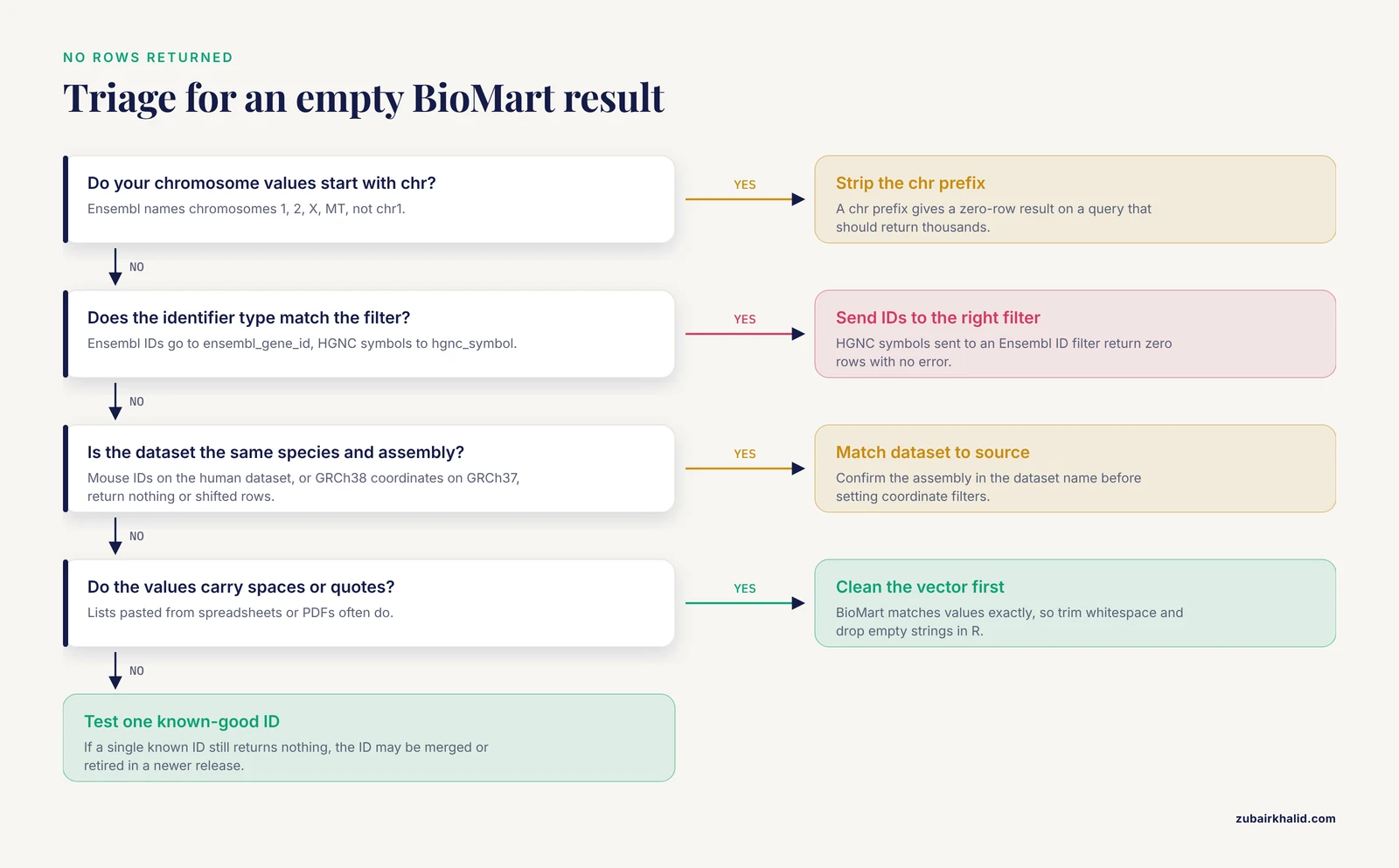
The most likely causes are identifier type mismatch, an assembly or species mismatch, leading whitespace in the values, or IDs that were merged and retired in a newer release. Clean the values, confirm the dataset, and test with one known-good ID.
Can I combine multiple filters in one BioMart query?
Yes. Distinct filters combine with AND logic, meaning every row must satisfy all of them, while multiple values within a single filter combine with OR logic. Expressing a condition such as "category A in region 1 OR category B anywhere" requires two separate queries.
How do I query the GRCh37 archive with biomaRt?
Call useEnsembl() with host = "https://grch37.ensembl.org" along with the biomart and dataset arguments. This connects to the dedicated GRCh37 archive so coordinates match GRCh37-based analyses.
How do I handle long ID lists without timeouts?
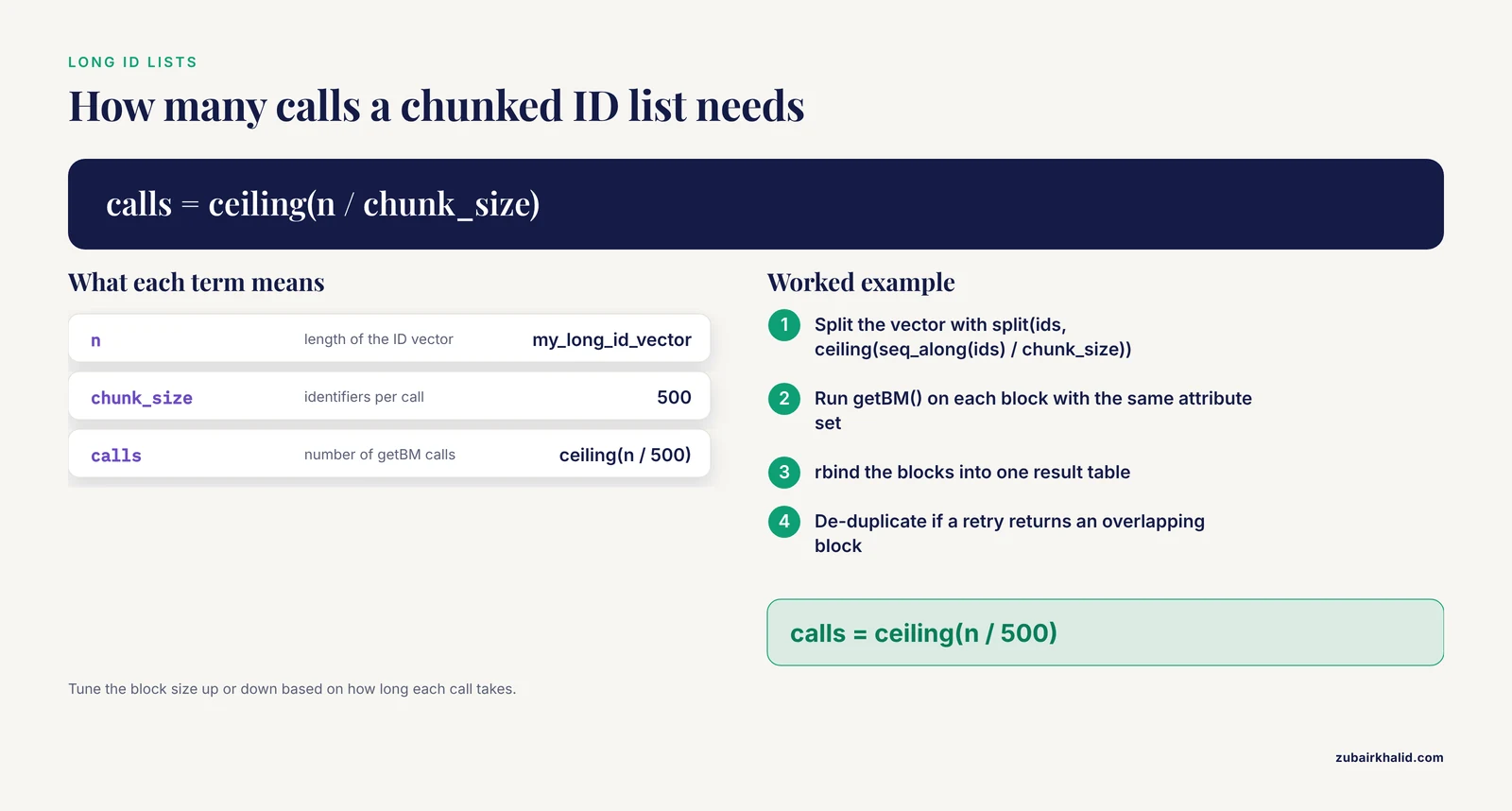
Split the list into blocks, for example 500 identifiers per call, run getBM() on each block, and rbind the results. The block size can be tuned upward or downward based on how long each call takes.
How do I count how many entries my filter matches?
In the web interface, click the Count button after setting the filters. In biomaRt, run the query with a minimal attribute set and take nrow() of the result, or use the Count control reflected in the generated query code.
Can BioMart query other databases besides Ensembl?
Yes. BioMart is a general data access framework, and federated BioMart queries have been used to integrate resources such as PRIDE proteomics data with Ensembl, Reactome, and UniProt, and to build custom sequence databases for proteomics search engines.