How to Choose the Right Dataset in Ensembl BioMart: A Decision Guide
By Dr. Zubair Khalid, DVM, MS, PhD ·

In Ensembl BioMart, the dataset you select decides what one row of your output means, while filters and attributes only trim and shape those rows. That single distinction drives the whole ensembl biomart dataset selection decision. A dataset is one species-specific table, such as human genes, human variants, or human regulatory features, and every exported result is a slice of that table.
The rule of thumb: pick the dataset whose rows are the entity you want to end up with, confirm the species and genome assembly in the dataset label, and only then set filters and attributes. If your final table should list genes, choose a genes dataset. If it should list variants, choose a variation dataset. Getting this backwards is the most common reason BioMart exports need reshaping after download.
BioMart is the batch query tool Ensembl provides alongside its genome browser. Where an Ensembl genome browser tutorial teaches you to inspect one locus at a time, BioMart answers set-based questions about thousands of identifiers at once. Ensembl delivers its data through both web forms and programmatic interfaces, and published evaluations of public data access systems describe BioMart as one of the established web-based mechanisms for this job, with each access mechanism suited to particular uses [1].
This guide covers every dataset selection option, compares them side by side, walks through five decision criteria, and works through concrete scenarios in the web interface and in R.
What a BioMart Dataset Is (and What It Is Not)
BioMart is a data-mining system that presents large biological databases as queryable tables. It runs on standard web protocols and offers two access routes, a point-and-click web form and a programmatic API, so the same question can be asked interactively or from a script [1]. Ensembl operates BioMart servers for its main database and for Ensembl Genomes, and the R package biomaRt talks to the same servers.
Four terms define the query model:
- Mart. The top-level database. Ensembl exposes marts named Ensembl Genes, Ensembl Variation, and Ensembl Regulation, plus the Ensembl Genomes marts for plants, fungi, metazoa, protists, and bacteria.
- Dataset. One table inside a mart, almost always one species on one genome assembly. Homo sapiens genes (GRCh38.p14) is a dataset, and so is Homo sapiens Variation.
- Filter. A condition that removes rows, such as a chromosome region, a pasted list of identifiers, a gene biotype (Ensembl's classification of genes and transcripts, for example protein_coding or lincRNA), or a requirement that a cross-reference exists.
- Attribute. A column you want in the output, such as gene symbol, genomic coordinates, or an ortholog ID (a gene in another species descended from the same ancestral gene).
The dataset fixes the meaning of a row, filters decide which rows survive, and attributes decide which columns appear. This ordering explains why dataset selection comes first. No filter or attribute combination turns a variant table into a gene table.
What BioMart is not matters as much as what it is. BioMart is not the genome browser, which renders one locus at a time, and it is not the FTP file server, which distributes whole-genome files such as GTF (a gene annotation format) and VCF (the variant call format). BioMart sits between those two, answering batch questions and returning tables you can open in a spreadsheet or R.
How to Use Ensembl BioMart: Web and R Interfaces
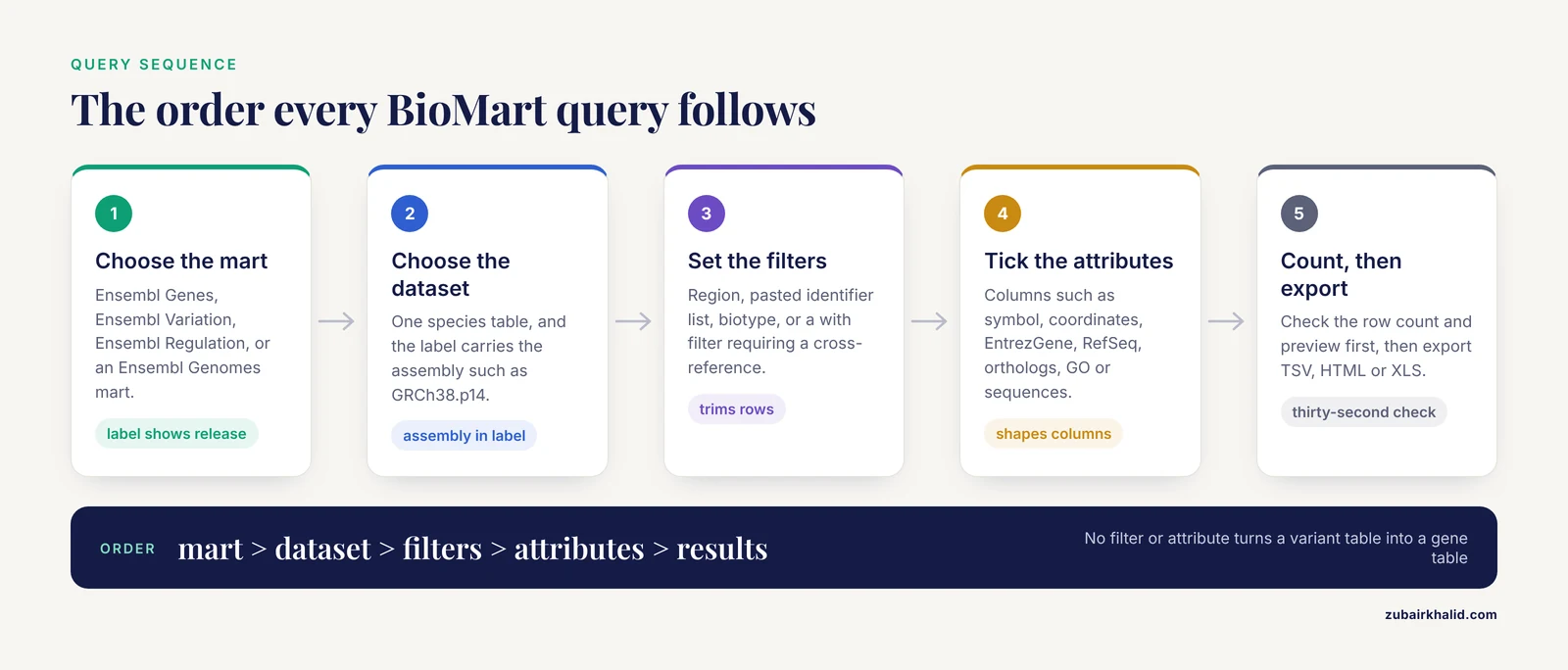
Both interfaces ask the same four questions in the same order: which mart, which dataset, which filters, which attributes. Learn the sequence once and it transfers everywhere.
The web interface, step by step
- Open www.ensembl.org/biomart, or reach BioMart from the tools menu on the Ensembl home page.
- Under CHOOSE DATABASE, pick a mart. The label includes a release number, which changes with each Ensembl release.
- Under CHOOSE DATASET, pick a species table. The label includes the assembly, for example Homo sapiens genes (GRCh38.p14).
- Open the FILTERS panel and set conditions. Typical categories are region (chromosome, start, end), identifier lists you paste in, biotype, and with filters that require a cross-reference to exist.
- Open the ATTRIBUTES panel and tick columns. Attribute pages group related columns, for example External, Homologs, Sequences, GO, and Variations.
- Click Results. The count shows how many rows the filters produced, the preview shows the first rows, and Export delivers TSV, HTML, or XLS.
Run a small test query with a count before a large export. A thirty-second check prevents a twenty-minute surprise.
The R interface with biomaRt
The biomaRt package from Bioconductor sends the same queries from a script, which makes results reproducible and scalable.
library(biomaRt)

# Which marts and versions are available right now
listEnsembl()

# Attach the human genes dataset
mart <- useEnsembl(biomart = "ensembl", dataset = "hsapiens_gene_ensembl")

# Find a dataset when you only know part of the species name
searchDatasets(mart = useEnsembl(biomart = "ensembl"), pattern = "rat")
If the main server responds slowly from your region, pass a mirror to useEnsembl, for example mirror = "useast". Ensembl serves mirrors for the Americas and Asia, and biomaRt exposes the same choice. Everything else in this guide works identically in both interfaces, so the scenarios below show R code with the equivalent web clicks implied.
The Ensembl BioMart Dataset Selection Options
There are four dataset families, plus archived versions of each. Knowing what each family stores prevents most wrong picks before they happen.
Ensembl Genes datasets, one per species
These are the workhorse tables. One row is one gene on the stated assembly for that species. The biomaRt name encodes species and purpose, for example hsapiens_gene_ensembl for human and rnorvegicus_gene_ensembl for rat. Attribute pages cover core gene information, external identifiers such as HGNC symbols, EntrezGene IDs, RefSeq transcripts, and UniProt mappings, homologs across dozens of species, Gene Ontology terms (a controlled vocabulary describing gene function), protein domains, and sequences including cDNA, peptide, and untranslated regions. If a task mentions genes, identifier conversion, orthologs, or annotation, start here.
Ensembl Variation datasets
Switch the database dropdown to Ensembl Variation and the tables flip from genes to variants. One row is one variant, usually a single nucleotide polymorphism (a one-base difference carried by a measurable fraction of the population) or a short insertion or deletion. The human variation dataset is hsapiens_snp in biomaRt. Filters accept rsIDs (variant identifiers from dbSNP that begin with rs), chromosome regions, consequence types, and allele frequency thresholds. Attributes include consequence terms such as missense_variant or splice_donor_variant, predicted protein effects from the SIFT and PolyPhen tools, and minor allele frequencies (the frequency of the less common allele) from imported population studies such as 1000 Genomes and gnomAD.
Ensembl Regulation datasets
The Ensembl Regulation mart stores regulatory features, which are annotations of genome elements such as promoters, enhancers, and transcription factor binding sites, integrated from experimental datasets. One row is one regulatory feature. Filters include feature type and the cell types supporting the annotation, and attributes give coordinates and associated gene information. Coverage follows the underlying regulatory build, so the same feature type can change in extent between releases.
Ensembl Genomes datasets for non-vertebrates
Vertebrates live in the main Ensembl marts. Everything else lives in Ensembl Genomes, divided into plants, fungi, metazoa (invertebrate animals), protists, and bacteria. Rice, wheat, Arabidopsis, Drosophila melanogaster, and Caenorhabditis elegans are all Ensembl Genomes species, so their gene tables never appear in the main Ensembl Genes dropdown. Ensembl Genomes runs its own release cycle with its own version numbers. biomaRt reaches these marts through useEnsemblGenomes, for example useEnsemblGenomes(biomart = "plants", dataset = "athaliana_eg_gene"), and dataset names carry the _eg suffix.
Specialized and archived datasets
Two further options round out the menu. Mouse strain variation datasets hold variants called across a panel of laboratory strains rather than the reference population set. Archived releases let you query any past Ensembl version, through archive websites in the browser or the version argument in biomaRt. Ensembl also maintains a dedicated archive for the older human assembly GRCh37, which many clinical and computational pipelines still use, so GRCh37 data stays reachable even as the main site moves forward.
Side-by-Side Comparison of the Dataset Options
The table below is the core of the decision. Read the second column first, because row semantics decide everything downstream.
| Dataset option | One row is | Choose it when you need | Signature filters | Signature attributes | Main caveat |
|---|---|---|---|---|---|
| Ensembl Genes, species dataset (for example Homo sapiens genes, GRCh38.p14) | One gene | ID conversion, annotation tables, orthologs, sequences, GO terms | Region, input ID list, biotype, with-cross-reference filters | Stable IDs, coordinates, symbols, EntrezGene, RefSeq, UniProt, orthologs, GO, cDNA or peptide sequences | One-to-many attributes duplicate rows, so row counts exceed gene counts |
| Ensembl Variation, species dataset | One variant | Variant lists with consequences, predicted effects, population frequencies | Region, rsID list, consequence type, frequency thresholds | rsID, coordinates, alleles, consequence terms, SIFT and PolyPhen predictions, minor allele frequencies | Gene annotation columns are limited, and wide regions return very large tables |
| Ensembl Regulation, species dataset | One regulatory feature | Promoter, enhancer, and transcription factor binding site lists per cell type | Feature type, cell type, region | Feature type, coordinates, associated gene information | Coverage depends on the regulatory build and varies between releases |
| Ensembl Genomes gene dataset (plants, fungi, metazoa, protists, bacteria) | One gene in a non-vertebrate | Non-vertebrate ID conversion, annotation, orthologs | Same style as Ensembl Genes | Same style, with _eg dataset names | Separate release cycle, and some attribute names differ from the main marts |
| Mouse strain variation | One variant in strain context | Strain-specific variant calls | Strain, region | Strain alleles and frequencies | Specialized use, not a substitute for the main variation dataset |
| Archived version of any of the above | The same table as it existed at that release | Reproducing a published analysis | Same as that release | Same as that release | Frozen data, IDs reflect that release, never updated |
Three of the six rows differ only in version or scope rather than in kind. The real fork is the first three rows, genes versus variants versus regulatory features, plus the Ensembl versus Ensembl Genomes split. Once you can name the row you want, the rest of the query writes itself.
Five Criteria That Decide the Right Dataset
How to choose the right dataset in Ensembl BioMart comes down to five checks, applied in order. The best Ensembl BioMart dataset selection is the one that passes all five, and the checks usually converge on a single answer.
1. What entity should be one row
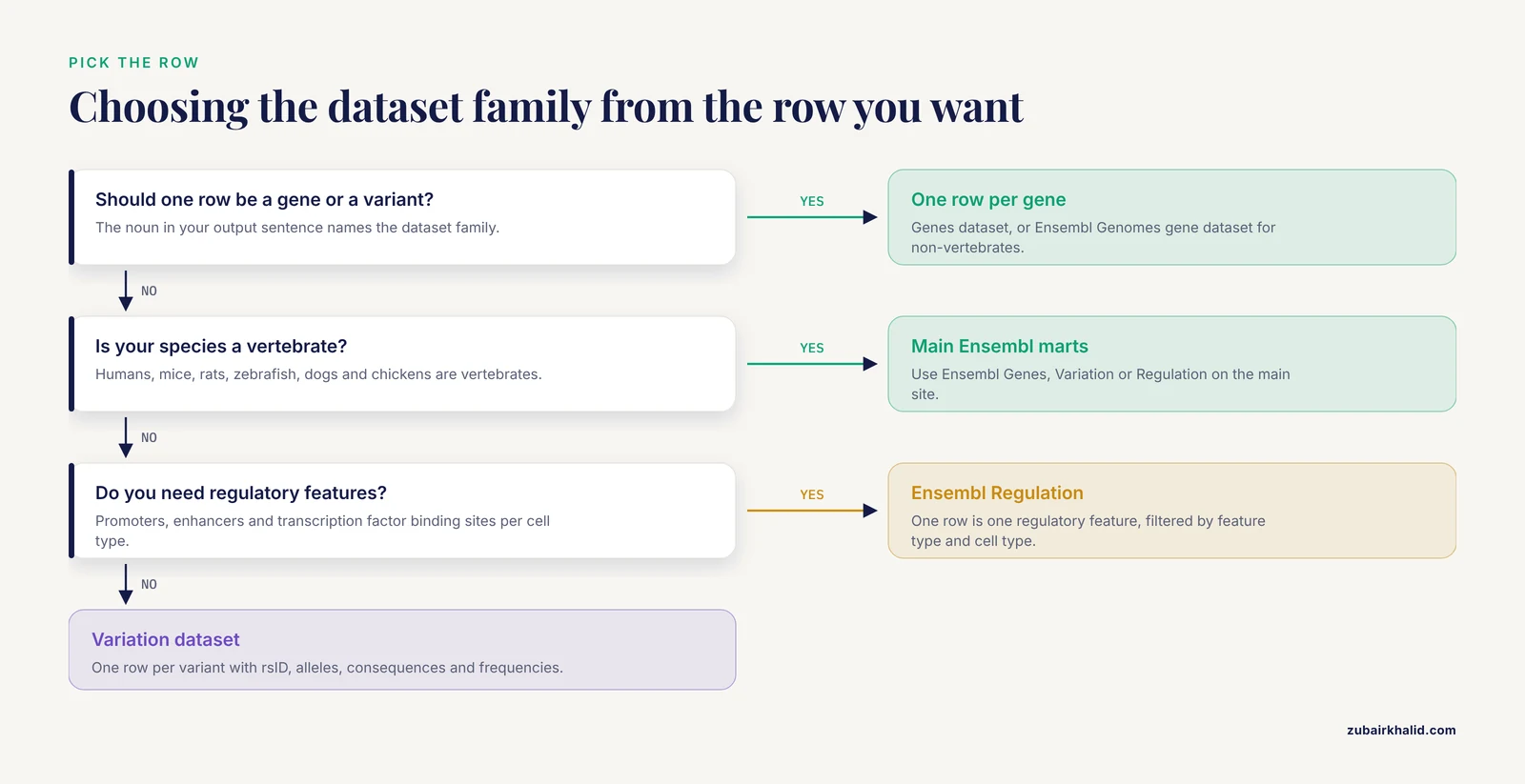
State the desired output as one sentence. A table of genes with Entrez IDs. A table of missense variants in one gene. A table of enhancers active in one cell type. The noun in that sentence names your dataset family.
The subtle case is gene-variant output, which two routes can produce. The genes dataset includes a Variations attribute page that attaches variant information to gene rows. The variation dataset, filtered by gene or region, returns variant rows. If downstream code expects one row per variant, choose the variation dataset. If it expects one row per gene, choose the genes dataset and accept that genes with many variants produce many rows.
2. Species coverage, Ensembl versus Ensembl Genomes
Check the organism before anything else. Humans, mice, rats, zebrafish, dogs, chickens, and other vertebrates sit in the main Ensembl marts. Plants, fungi, invertebrate animals, protists, and bacteria sit in Ensembl Genomes. Drosophila melanogaster and Caenorhabditis elegans are invertebrates, so their gene tables live in Ensembl Genomes Metazoa, a detail that surprises people who know these species from model-organism databases. If a species search in one mart comes up empty, search the other family before concluding the species is absent.
3. Genome assembly and release version
The dataset label carries the assembly, for example GRCh38.p14 for human. Two analyses built on different assemblies cannot share coordinate-based results, so the assembly in the label must match your pipeline. For human, GRCh37 remains in wide use, and Ensembl serves it from a dedicated archive site rather than the current site.
Release numbers matter as much as assemblies. Gene models, identifier mappings, and variant sets change between releases. When reproducing a published analysis, query the release the authors used, through archive sites or the version argument in biomaRt. When starting fresh, use the current release and record its number in your notes or script header.
4. The identifiers you need out
Every dataset exposes a fixed attribute set, and the identifier you need must be among them. Ensembl stable IDs come back unversioned from BioMart, so you receive ENSG00000141510 rather than a versioned form, and versioned IDs are not offered as an attribute. External identifiers such as EntrezGene, RefSeq, and UniProt appear as attributes in the genes datasets. Before committing, confirm the column exists, either through the search box in the web attributes panel or searchAttributes in R. If it does not exist, either pick a different dataset or plan a second query and a local merge.
5. One dataset or a federated query
A federated query joins tables served by different databases in a single BioMart request. BioMart supports joins within a mart, and historically it federated across independent resources entirely. Proteomics work demonstrated this at scale, running complex federated BioMart queries that integrated PRIDE mass spectrometry identifications with Ensembl, Reactome, and UniProt data [2]. Federation is powerful but adds slow queries and dependence on third-party servers whose availability changes over the years.
The practical default for most projects is one query per dataset, merged locally on a shared identifier such as an Ensembl gene ID. You keep the same joins without the fragility, and the merge step becomes part of your recorded script.
A sixty-second checklist
- I can name the entity that should be one row.
- I know whether my species is vertebrate or not.
- The assembly in the dataset label matches my pipeline.
- The release matches my pipeline, or I deliberately chose current.
- The output columns I need exist as attributes, confirmed by search.
- I have decided between a single query and two queries plus a local merge.
Pros and Cons of Each Dataset Choice
Every option carries tradeoffs. Comparative evaluations of data access systems reach the same conclusion for BioMart as for its alternatives, that each mechanism suits particular uses and the match between mechanism and task determines success [1]. Here are the tradeoffs in plain terms.
Ensembl Genes datasets
Pros:
- Broadest attribute coverage, from coordinates to orthologs to sequences
- Accept many identifier types as input filters, so pasted lists of symbols, RefSeq IDs, or UniProt IDs work directly
- Can export sequences directly, including cDNA and peptide
Cons:
- Gene-centric rows, so one-to-many attributes such as multiple RefSeq transcripts duplicate rows
- Variant data appears only through gene-linked attribute pages, not as variant-centric rows
- Attribute names shift between releases, so scripts need occasional maintenance
Ensembl Variation datasets
Pros:
- Variant-centric output with consequence terms and prediction scores in the same table
- rsID lists work as direct input filters
- Population frequency attributes avoid a second lookup
Cons:
- Limited gene annotation columns, so gene context often needs a second query
- Wide regions return very large tables unless filters are tight
- Frequencies reflect the populations Ensembl imported, which may not match your cohort
Ensembl Regulation datasets
Pros:
- The only BioMart source for regulatory features with cell-type context
- Feature type and cell type filters map directly onto common questions
Cons:
- Coverage tracks the regulatory build and varies by cell type and release
- Smaller attribute set, and feature IDs are less widely recognized downstream
- Experimental scope changes between releases, complicating longitudinal comparisons
Ensembl Genomes datasets
Pros:
- The only route to plants, fungi, invertebrates, protists, and bacteria
- Same filter and attribute model as the main marts, so skills transfer directly
Cons:
- Separate release numbering, so version pinning needs both Ensembl and Ensembl Genomes numbers
- Some attribute names differ, and external identifier coverage is thinner than for human
Archived versions
Pros:
- Exact reproduction of published analyses
- Stable snapshots for pipelines that must not drift
Cons:
- Never updated, and old marts occasionally move to archive hosts
- IDs are frozen at that release, so mappings can lag current knowledge
Worked Scenarios
Scenario 1: Convert human gene symbols to Entrez and RefSeq IDs
You have a list of gene symbols from a differential expression analysis and need Entrez and RefSeq IDs for a downstream tool.
- Dataset: Homo sapiens genes (GRCh38.p14), current release
- Filter: HGNC symbol, values TP53, BRCA1, EGFR
- Attributes: Ensembl gene ID, gene name, EntrezGene ID, RefSeq mRNA ID
mart <- useEnsembl(biomart = "ensembl", dataset = "hsapiens_gene_ensembl")

res <- getBM(
  attributes = c("ensembl_gene_id", "external_gene_name",
                 "entrezgene_id", "refseq_mrna"),
  filters    = "hgnc_symbol",
  values     = c("TP53", "BRCA1", "EGFR"),
  mart       = mart
)
In older releases the Entrez attribute was named entrezgene rather than entrezgene_id, which is exactly the kind of drift searchAttributes catches. Check the output shape before saving. A gene with two RefSeq mRNAs appears twice, once per transcript, which is the one-to-many duplication described above. Count unique ensembl_gene_id values when you need the gene count, or drop refseq_mrna from this query and fetch it separately.
Scenario 2: List variants in a gene with their consequences
You want every known variant in the TP53 region with its consequence.
- Dataset: Homo sapiens Variation
- Filter: region, chromosome 17, start 7668421, end 7687489, GRCh38 coordinates covering TP53
- Attributes: variant rsID, chromosome, start, allele string, variant consequence
var <- useEnsembl(biomart = "variation", dataset = "hsapiens_snp")

vars <- getBM(
  attributes = c("refsnp_id", "chr_name", "chrom_start",
                 "allele_string", "consequence_type_tv"),
  filters    = c("chr", "start", "end"),
  values     = list(17, 7668421, 7687489),
  mart       = var
)
Rows are variants here, which is exactly why the query belongs in the variation dataset rather than the genes dataset. To keep only missense variants, add a consequence filter in the FILTERS panel or filter the returned table in R. The variation dataset also carries SIFT and PolyPhen prediction columns, and searchAttributes(var, pattern = "sift") confirms their exact names for your release.
Scenario 3: Get regulatory features for one cell type
You need promoter-associated regulatory features and the cell types that support them.
- Dataset: Homo sapiens Regulation
- Filters: feature type and cell type, chosen from the lists in the FILTERS panel
- Attributes: feature type, chromosome, start, end, and associated gene information
Filter and attribute names in the regulation mart change between releases, so list them before writing the final query.
reg <- useEnsembl(biomart = "regulation", dataset = "hsapiens_feature_set")
listFilters(reg)
searchAttributes(reg, pattern = "feature")
Plug the confirmed names into getBM. This list-first pattern is worth copying for any mart you query less than weekly.
Scenario 4: Map rice genes to Arabidopsis orthologs
You have rice gene IDs and want their Arabidopsis orthologs.
- Mart: Ensembl Genomes Plants
- Dataset: Oryza sativa genes
- Filter: input rice gene IDs
- Attributes: rice stable ID plus the Arabidopsis ortholog columns
plants <- useEnsemblGenomes(biomart = "plants", dataset = "osativa_eg_gene")
searchAttributes(plants, pattern = "homolog")
The search returns the exact ortholog attribute names for Arabidopsis under the _eg naming convention. Add them to getBM alongside the rice stable ID attribute. Because both species live in the same Ensembl Genomes mart, orthologs return as ordinary attributes, and no second query is needed.
Scenario 5: Reproduce a published analysis against the same build
A paper from 2020 mapped its counts to release 101 of the human annotation, and your coordinates must match.
- Dataset: the archived release the paper used
- Route A, browser: open the archive site for that release and run BioMart there
- Route B, R: pass the release to the version argument
mart101 <- useEnsembl(biomart = "ensembl",
                      dataset = "hsapiens_gene_ensembl",
                      version = 101)
For analyses built on GRCh37 rather than a specific release number, use the dedicated GRCh37 access.
mart37 <- useEnsembl(biomart = "ensembl",
                     dataset = "hsapiens_gene_ensembl",
                     GRCh37 = TRUE)
Record four things alongside your results: the Ensembl release number, the assembly, the dataset name, and the biomaRt package version. That record is what makes the query reproducible months later.
Common Mistakes and Limitations
These are the errors that cost real time, collected from the ways BioMart queries actually fail.
- Trusting the species name and ignoring the assembly in the dataset label. Two human gene datasets on different assemblies produce incompatible coordinates, and the mismatch surfaces only when intervals stop overlapping.
- Confusing the Variation dataset with the Variations attribute page inside the genes dataset. The first returns variant rows, the second returns gene rows with variant links attached, and downstream code written for one shape breaks on the other.
- Expecting versioned Ensembl IDs. BioMart returns unversioned stable IDs, so string comparisons against versioned IDs from GTF files fail silently.
- Counting rows as entities after selecting one-to-many attributes. Fetch one-to-many columns in separate queries or deduplicate on the stable ID before counting.
- Adding a with filter by accident. Filters such as with UniProt or with RefSeq silently drop genes lacking that cross-reference, which shrinks results in ways that can look like biology.
- Mixing coordinate systems. BioMart coordinates are 1-based and fully closed, BED files are 0-based and half-open, and off-by-one shifts survive visual inspection.
- Searching the main mart for a non-vertebrate. Plants, fungi, invertebrates, protists, and bacteria live in Ensembl Genomes, and the main dropdown will simply not list them.
- Running huge region queries in the web interface. Broad intervals with loose filters can time out in the browser. Tighten the filters or move to biomaRt.
- Treating third-party federated marts as permanent. External BioMart endpoints have appeared and disappeared over the years, even though federated queries across resources such as PRIDE, Ensembl, Reactome, and UniProt were demonstrated as genuinely useful integrations [2]. Keep a two-query-plus-merge fallback in your toolkit.
- Forgetting to record the release. A query that works today can return different mappings after the next release, and without the recorded release number you cannot diagnose the change.
On limitations, BioMart is built for tabular, set-based extraction, not for everything. Comparative evaluations of access systems conclude that each mechanism suits particular uses, so whole-genome files such as GTF and VCF are better pulled from the FTP server than assembled row by row [1]. Whatever dataset you choose, spot-check a handful of returned mappings against the genome browser before committing a pipeline to them.
Frequently Asked Questions
How do I find which Ensembl BioMart dataset contains my species?
Search the dataset dropdown in the web interface, or run searchDatasets in biomaRt with a fragment of the species name. Vertebrates are in the main Ensembl marts, while plants, fungi, invertebrate metazoa, protists, and bacteria are in Ensembl Genomes, so search both if the first comes up empty.
What is the difference between the Ensembl Genes and Ensembl Variation datasets?
The genes dataset returns one row per gene, and the variation dataset returns one row per variant. Choose genes for ID conversion and annotation, and choose variation when the output should list variants with consequences and frequencies.
Should I use the current Ensembl release or an archived version?
Use the current release for new work and the archived release your reference analysis used for reproduction. The dataset label shows the assembly, and archive sites or the version argument in biomaRt reach old releases.
How do I select a dataset in biomaRt?
Call useEnsembl with the mart name and dataset name, for example useEnsembl(biomart = "ensembl", dataset = "hsapiens_gene_ensembl"). Use searchDatasets to find dataset names, useEnsemblGenomes for Ensembl Genomes divisions, and the version or GRCh37 arguments for archived data.
Can I combine data from two BioMart datasets in one query?
Within a mart, yes, by adding attributes from a related dataset, and BioMart has historically supported federated queries across separate resources. For routine work, two separate queries merged locally on a shared ID are more robust.
Why does my result have more rows than genes?
One-to-many attributes, such as multiple RefSeq transcripts per gene or multiple GO terms per gene, duplicate the gene row once per value. Count unique Ensembl gene IDs, or split one-to-many attributes into their own queries.